
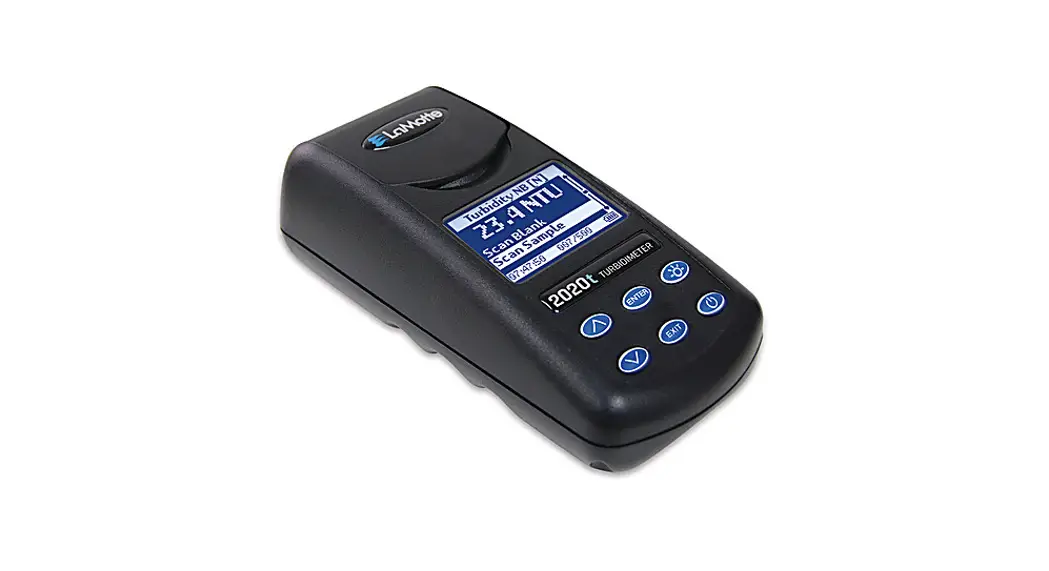

2020t/i QUICK START GUIDE
- Read the manual before using the meter.
- For the most accurate results, follow calibration and blanking procedures before testing.
- To change settings refer to the Options and Set-Up section in the manual.
- Perform a turbidity calibration daily.
- Use clean turbidity tubes (0260).
- Do not pour standards in tubes back into the bottle.
- Reinsert the USB port plug after charging. Failure to insert the USB port plug when the meter is not connected to a computer by USB or actively charging by USB could result in damage to internal components.
| Factory Settings | |
| Turbidity Calibration Curve | Nephelometric (N) |
| Turbidity Units | Default |
| Turbidity Measurement | Turbidity-No Blank (NB) |
| Averaging | Disabled |
| Date Format | MM-DD-YYYY |
| Power Save | 5 minutes |
| Backlight | 10 seconds |
| Language | English |
Calibration
Perform a calibration over the smallest range possible. Use a standard that will bracket the sample range. For the nephelometric mode and ratiometric mode calibrate to the value on the bottle. For the attenuation, mode use Formazin standards. Calibrate meter daily.
| 1 | Press  to turn the meter on. to turn the meter on. |
| 2 | Select Measure. |
| 3 | Select Turbidity – With Blank. |
| 4 | Rinse tube (0260). Fill with BLANK. Dry tube. |
| 5 | Scan Blank. |
| 6 | Rinse tube. Fill with STANDARD. Dry tube. |
| 7 | Scan Sample. |
| 8 | Press ∨and select Calibrate. |
| 9 | Press ∨∧to adjust the display to match the standard value on the bottle. |
| 10 | Press ENTER to accept the calibration. |
| 11 | Press ENTER to set the calibration. |
| 12 | Proceed to Analysis. |
High Range Analysis – Over 10 NTU – Without Blank
| 1 | Press to turn the meter on. |
| 2 | Select Measure. |
| 3 | Select Turbidity – No Blank. |
| 4 | Rinse tube (0260). Fill with SAMPLE. Dry tube. |
| 5 | Scan Sample. |
| 6 | Press to turn the meter off. |
Analysis – With Blank
| 1 | Press to turn the meter on. |
| 2 | Select Measure. |
| 3 | Select Turbidity – With Blank. |
| 4 | Rinse tube (0260). Fill with BLANK. Dry tube. |
| 5 | Scan Blank. |
| 6 | Rinse tube. Fill with SAMPLE. Dry tube. |
| 7 | Scan Sample. |
| 8 | Press to turn the meter off. |
NOTE: Use the AC wall adapter to rapidly charge the meter.
802 Washington Ave | Chestertown | Maryland | 21620 • USA
800-344-3100 | 410-778-3100 (Outside U.S.A.) | Fax: 410-778-6394 | www.lamotte.com
©2020 LaMotte Company | 1974-QG | 02.21


![Morningstar Tristar Digital Meters [ts-m-2, Ts-rm-2] User Manual](https://static-data1.manualsee.com/1/img/485/16483/2020/12/Morningstar-TriStar-Digital-Meters-TS-M-2-TS-RM-2.jpg "Morningstar Tristar Digital Meters [ts-m-2, Ts-rm-2] User Manual")
