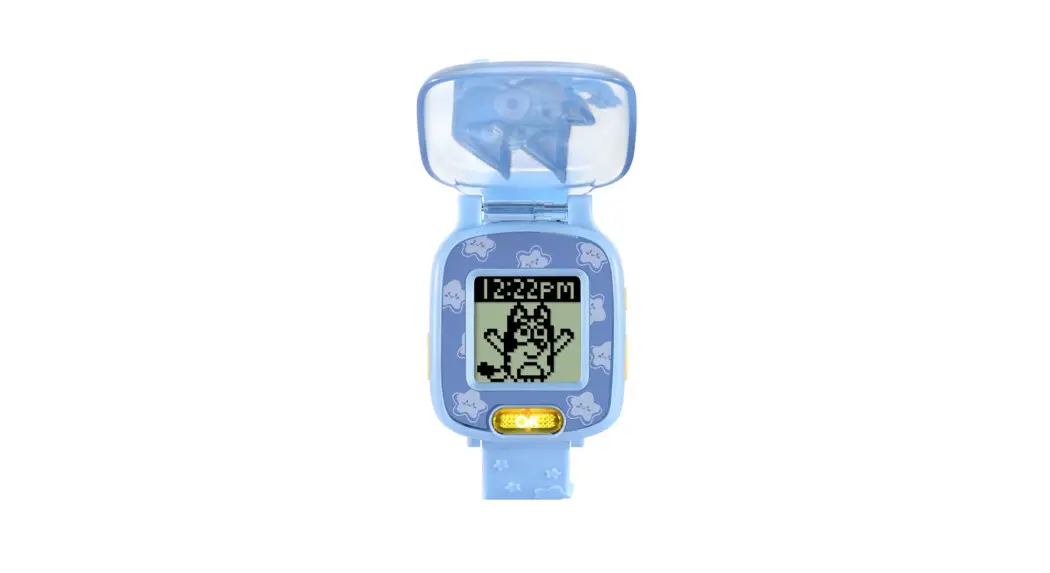
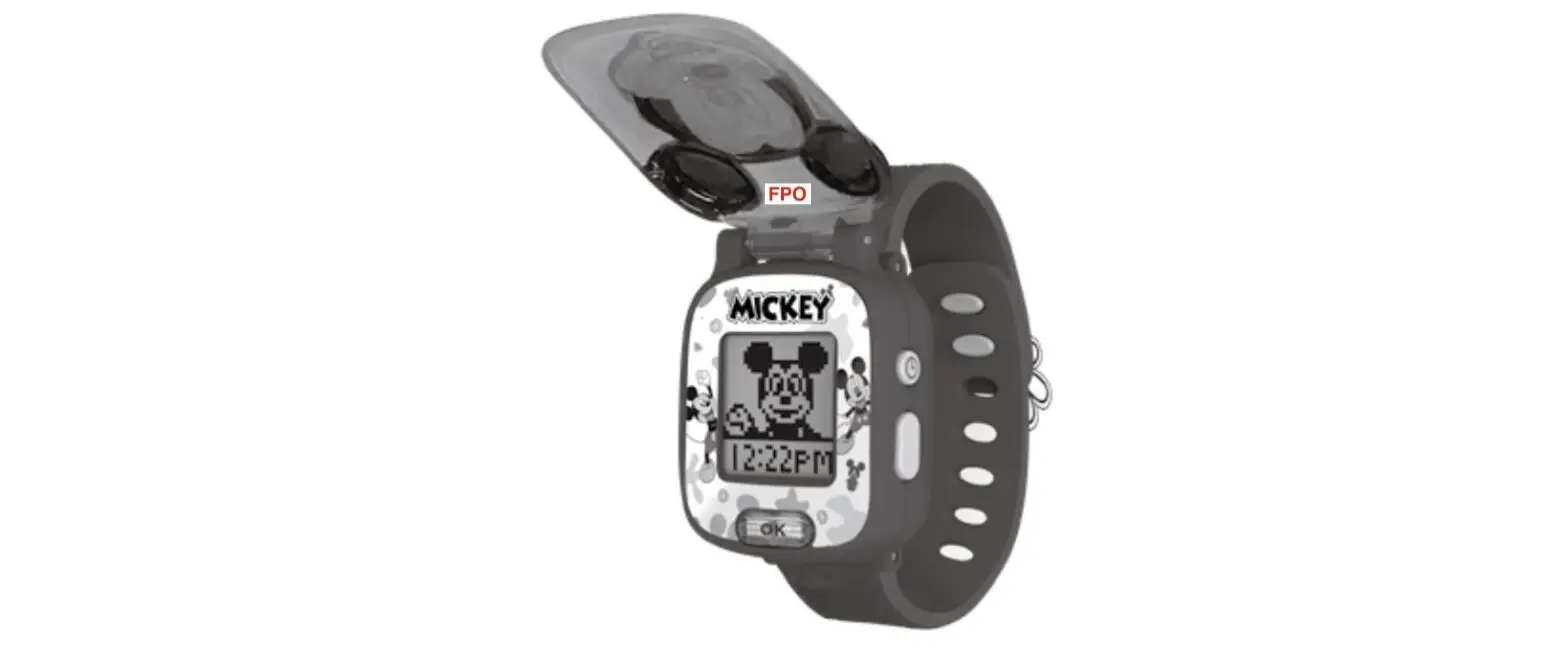
554563 Wackadoo Watch
Product Information
The Wackadoo Watch is a full-function watch with four fun,
Bluey-themed games that help encourage age-appropriate skills. It
includes a variety of clock faces featuring favorite Bluey
characters and has handy alarm, timer, and stopwatch functions. The
watch operates using one CR2450 battery, and the optimum operating
temperature is not specified.
People with very sensitive skin may notice some irritation after
wearing the Wackadoo Watch for extended periods of time. The skin
may become irritated when moisture, sweat, soap, or other irritants
get trapped under the wristband and are left in contact with the
skin. The product contains one coin or button cell battery. If
swallowed, it can cause internal chemical burns in as little as two
hours and can lead to death.
Product Usage Instructions
Power Source
The Wackadoo Watch operates using one CR2450 battery. The CR2450
battery included with the product is for demo purposes only.
Battery Removal and Installation
- Make sure the cover is closed.
- Locate the battery cover on the back of the unit. Use a
screwdriver to loosen the screw. - If a used battery is present, remove this battery from the
unit. - Install one new CR2450 battery as illustrated.
- Replace the battery cover and tighten the screw to secure.
WARNING: Adult assembly required for the battery installation.
Keep batteries out of reach of children.
Disposal of Batteries and Product
Dispose of used batteries immediately. Keep new and used
batteries away from children. If you think batteries might have
been swallowed or placed inside any part of the body, seek
immediate medical attention, and go straight to the nearest
hospital emergency department.
Wristband Usage
To prevent skin irritation, children should remove the watch
before going to bed for the night, take the watch off if it’s
feeling uncomfortable, and keep their wrist and the band clean and
dry. Make sure the fit is good – tight enough so the watch stays in
place but not so tight that it’s uncomfortable. If you notice any
redness, swelling, or other irritation, you may want to consult a
doctor before wearing the watch again.
Instruction Manual Wackadoo Watch
BLUEY TM and BLUEY character logos TM & © Ludo Studio Pty Ltd 2018. Licensed by BBC Studios. BBC logo TM & © BBC 1996
INTRODUCTION
Thank you for purchasing the Wackadoo Watch.
This full-function watch includes four fun, Bluey-themed games that help encourage age-appropriate skills. Choose from a variety of clock faces featuring favourite Bluey characters and use the handy alarm, timer and stopwatch functions.
Cover Left Button
Wristband
Clock/Home Button Right Button
OK Button
222
INCLUDED IN THE PACKAGE
· One Wackadoo Watch · One CR2450 battery · Quick Start Guide
WARNING All packing materials such as tape, plastic sheets, packaging locks, removable tags, cable ties, cords and packaging screws are not part of this toy, and should be discarded for your child’s safety. NOTE Please save this Instruction Manual as it contains important information.
PRODUCT SPECIFICATION
Battery Time Format Display Optimum Operating Temperature
One CR2450 battery 12H or 24H Digital
32°F – 104°F (0°C – 40°C)
Important Note
· Do not place the watch under running water. · Do not submerge. Not suitable for showering, bathing or swimming. · Keep the cover closed when the watch is not in use.
333
WARNING
People with very sensitive skin may notice some irritation after wearing the Wackadoo Watch for extended periods of time. The skin may become irritated when moisture, sweat, soap, or other irritants get trapped under the wristband and are left in contact with the skin. To prevent this, we suggest children remove the watch before going to bed for the night, take the watch off if it’s feeling uncomfortable, and keep their wrist and the band clean and dry.
In addition, wearing the watch too tightly may also cause irritation. Make sure the fit is good – tight enough so the watch stays in place but not so tight that it’s uncomfortable. If you notice any redness, swelling, or other irritation, you may want to consult a doctor before wearing the watch again.
INSTRUCTIONS
Power Source
The Wackadoo Watch operates using one CR2450 battery. The CR2450 battery included with the product is for demo purposes only.
BATTERY REMOVAL AND INSTALLATION
1. Make sure the cover is closed. 2. Locate the battery cover on the back of the
unit. Use a screwdriver to loosen the screw. 3. If a used battery is present, remove this
battery from the unit. 4. Install one new CR2450 battery as illustrated. 5. Replace the battery cover and tighten the
screw to secure.
WARNING: Adult assembly required for the battery installation. Keep batteries out of reach of children.
444
IMPORTANT: BATTERY INFORMATION
· Insert the battery with the correct polarity (+ and -). · Do not short-circuit the supply terminals. · Remove the battery during long periods of non-use. · Remove the exhausted battery from the toy. · Dispose of batteries safely. Do not dispose of batteries in fire. RECHARGEABLE BATTERIES · Remove rechargeable batteries from the toy before charging. · Rechargeable batteries are only to be charged under adult
supervision. · Do not charge non-rechargeable batteries.
Symbol Meaning
Warning: Contains coin battery
Li
Read operator manual
WARNING
This product contains one coin or button cell battery. If swallowed, a button cell or coin battery can cause internal chemical burns in as little as two hours and can lead to death. Dispose of used batteries immediately. Keep new and used batteries away from children. If you think batteries might have been swallowed or placed inside any part of the body, seek immediate medical attention, and go straight to the nearest hospital emergency department.
555
Australia/New Zealand
If you think batteries might have been swallowed or placed inside any part of the body, immediately call the 24-hour Poisons Information Centre on 13 11 26 (in Australia) or 24-hour National Poisons Centre on 0800 764 766 (in New Zealand) for fast, expert advice and go straight to the nearest hospital emergency room.
Disposal of batteries and product
The crossed-out wheelie bin symbols on products and batteries, or on their respective packaging, indicates they must not be disposed of in domestic waste as they contain substances that can be damaging to the environment and human health.
The chemical symbols Hg, Cd or Pb, where marked, indicate that the battery contains more than the specified value of mercury (Hg), cadmium (Cd) or lead (Pb) set out in the Batteries and Accumulators Regulation.
The solid bar indicates that the product was placed on the market after 13th August, 2005.
Help protect the environment by disposing of your product or batteries responsibly.
VTech® cares for the planet.
Care for the environment and give your toy a second life by disposing of it at a small electricals collection point so all its materials can be recycled.
In the UK: Visit www.recyclenow.com to see a list of collection points near you.
In Australia & New Zealand: Check with your local council for kerbside collections.
666
Activate Normal Play
When you use the watch for the first time, you must unlock from Try-Me mode to play. To unlock from Try-Me mode, open the Cover, and press the Left + Right + OK Buttons together for approximately five seconds. You will then hear three squawk sounds to indicate it has been unlocked. Press any button to activate the watch and set the time. Press the Left or Right Button to select, then press the OK Button to confirm and move to the next option. A tick will be displayed when the setting is complete.
Squawk, squawk, squawk!
Note:
· When the battery level is low, most functions on the watch may not be activated, except for the clock display. It is recommended to install a new battery as soon as possible before further use.
· If the battery level is too low and cannot keep the clock running, you will need to enter the time again after the battery has been replaced.
777
PRODUCT FEATURES
1. Cover
Open the Cover to view the time. When the Cover is closed, tap the bottom of the Cover to activate character voices and sounds with a light effect.
2. Left/Right Buttons
Use the Left or Right Button to select an activity or option.
3. OK Button OK
Press the OK Button to confirm a selection and move to the next option in different activities.
4. Clock/Home Button
Press the Clock/Home Button to return to the clock from any other function or activity.
5. Clock Display
When the Clock/Home Button is pressed, the time will be displayed. Press the Left or Right Button to display the Home Menu where other activities can be selected.
6. Home Menu
Press the Left or Right Button to display the Home Menu. There are five activities to choose from:
1. Alarm Clock
2. Stopwatch
3. Timer
4. Games
5. Settings
· Press the Left or Right Button to scroll through the menu options. · Press the OK Button to enter the chosen activity.
888
7. Alarm Clock
· Press the Left or Right Button to select the time and choose between three alarm tones.
· Press the OK Button to confirm and move to the next setting.
· Press the Clock/Home Button to automatically save the current setting.
8. Stopwatch
· Press the OK Button to start the Stopwatch, press again to stop.
· When the Stopwatch is stopped, you can press the Left or Right Button to reset.
9. Timer
· Press the Left or Right Button to change the time.
· Press the OK Button to confirm. · Press the Clock/Home Button to
automatically save the current setting. · Press the OK Button to confirm the Timer
duration and the countdown will start immediately. · While the Timer is running, press the OK Button to pause/resume or press the Left or Right Buttons to reset.
999
10. Settings
In the Settings menu, press the Left or Right Button to scroll through the various options:
10.1. Clock Face · Press the Left or Right Button to select from 8 different clock faces. · Press the OK Button or Clock/Home Button to confirm and save the setting.
10.2. Cuckoo Clock · Press the Left or Right Button to turn the Cuckoo Clock on or off. · Press the OK Button or Clock/Home Button to confirm and save the setting. · Please note that when the Cuckoo Clock is activated, the watch will chime at the top of each hour between 7am and 7pm, unless a game is currently in progress.
10.3. Setting the Time · Press the Left or Right Buttons to change the options. (The AM/PM setting is only applicable in 12-hour time format) · Press the OK Button to confirm. · Press the Clock/Home Button to automatically save the current setting.
111000
11. Automatic Shut-Off
To preserve battery life, the Wackadoo Watch will automatically shut off after approximately 30 seconds without input. The unit can be turned on again by pressing any button or opening the cover. Note: The Wackadoo Watch will not automatically power off when the Stopwatch is running. The unit will also automatically turn Off when the battery power is very low. If you see the Low Battery icon appear on screen, please replace the battery.
ACTIVITIES
1. Games
In the Games menu, press the Left or Right Button to scroll through the different game options:
1.1 Wind up Bingo Bandit winds up Bingo as she enters the classroom. Press the Left or Right Button to help Bingo avoid the obstacles so that she can get into the classroom smoothly.
1.2 Match it At Hammerbarn, Bluey wants to have the same things that Bingo has. Watch the screen carefully. Press the Left or Right Button to choose the matching object then press the OK Button to confirm.
111111
1.3 Keepy Uppy Bluey is trying to keep the balloons flying in the air. Press the Left or Right Button to help Bluey keep the balloons off the ground.
1.4. Find Floppy Bingo puts Floppy into one of the chickenrat eggs. Watch carefully as they are moved around. Press the Left or Right Button to select the chickenrat egg that Floppy is inside, then press the OK Button to confirm.
CARE & MAINTENANCE
1. Keep the unit clean by wiping it with a slightly damp cloth. 2. Keep the unit out of direct sunlight and away from any direct heat
sources. 3. Remove the battery if the unit will not be in use for an extended
period of time. 4. Do not drop the unit on hard surfaces and do not expose the unit
to moisture or water. 5. Try to change the battery for a new one if the toy is not
working properly.
TROUBLESHOOTING
If for some reason the program/activity stops working or malfunctions, please follow these steps:
1. Turn the unit Off.
2. Interrupt the power supply by removing the batteries.
3. Let the unit stand for a few minutes, then replace the batteries.
4. Turn the unit back On. The unit should now be ready to use again.
5. If the unit still does not work, install a new set of batteries.
111222
CONSUMER SERVICES
Creating and developing VTech® products is accompanied by a responsibility that we at VTech® take very seriously. We make every effort to ensure the accuracy of the information, which forms the value of our products. However, errors sometimes can occur. It is important for you to know that we stand behind our products and encourage you to call our Consumer Services Department with any problems and/ or suggestions that you might have. A service representative will be happy to help you.
UK Customers:
Phone: 0330 678 0149 (from UK) or +44 330 678 0149 (outside UK) Website: www.vtech.co.uk/support
Australian Customers:
Phone: 1800 862 155 Website: support.vtech.com.au
NZ Customers:
Phone: 0800 400 785 Website: support.vtech.com.au
PRODUCT WARRANTY/
CONSUMER GUARANTEES
UK Customers:
Read our complete warranty policy online at vtech.co.uk/warranty.
Australian Customers:
VTECH ELECTRONICS (AUSTRALIA) PTY LIMITED CONSUMER GUARANTEES Under the Australian Consumer Law, a number of consumer guarantees apply to goods and services supplied by VTech Electronics (Australia) Pty Limited. Please refer to vtech.com.au/consumerguarantees for further information.
111333
Visit our website for more information about our products, downloads, resources and more.
www.vtech.co.uk www.vtech.com.au
TM & © 2022 VTech Holdings Limited. All rights reserved. Printed in China. IM-554500-000 Version:0