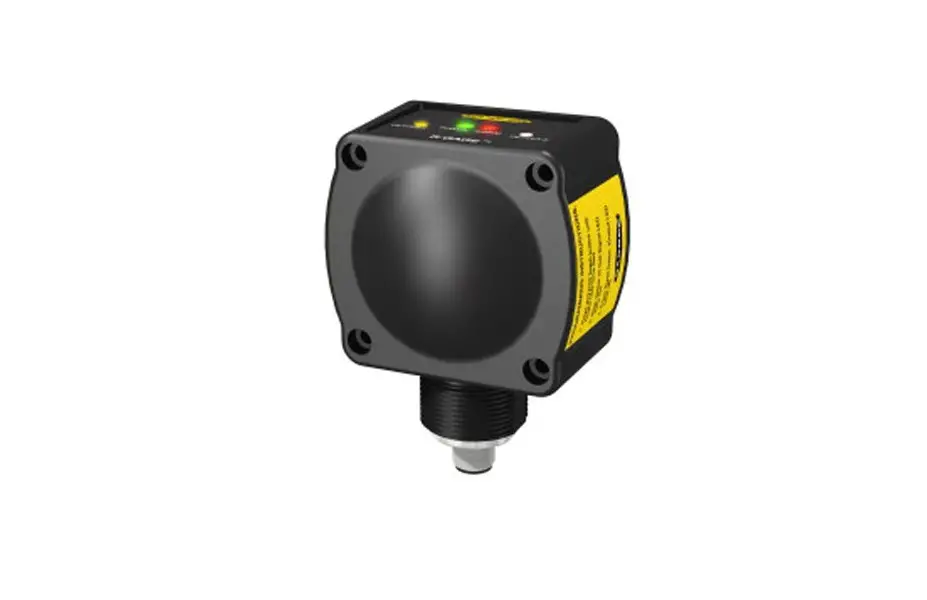
T30RW-1515 R-GAGE Sensor
Product Information
The R-GAGE T30RW sensor is an IP69K rated radar sensor designed
for use in car washes and other harsh environments. It has reliable
detection and measurement of stationary and moving objects, making
it a great tool for various applications.
Features and Indicators
The T30RW sensor has two outputs and two LEDs. LED 1 indicates
power and flashes in proportion to the signal strength. LED 2
indicates signal strength. Output 1 is the taught analog span or
discrete output status, while output 2 is the discrete output
status. The color green indicates that the target is within the
taught analog span or discrete output status, while amber indicates
otherwise.
Installation Instructions
Install the Software
To install the Banner Radar Configuration software, follow these
steps:
- Download the latest version of the software from
www.bannerengineering.com/us/en/products/sensors/software/radarconfiguration.html. - Navigate to and open the downloaded file.
- Click Install to begin the installation process.
- Depending on your system settings, a popup window may appear
prompting to allow Banner Radar Configuration to make changes to
your computer. Click Yes. - Click Close to exit the installer.
Note that administrative rights are required to install the
software.
Mount the Device Using the Threaded Barrel
To mount the device using the threaded barrel, follow these
steps:
- If your device came with a lock washer, place the lock washer
on the barrel of the device. - Insert the barrel of the device through a hole or a
bracket. - Hand-tighten the nut, but do not tighten it all the way.
- Do not tighten the mounting screws at this time.
- Check the device alignment, aiming it near parallel to, or down
towards, the ground. If aiming at a target, alignment and signal
strength can be checked via the red Signal Strength LED or the
Banner Radar Configuration Software. - Tighten the nut.
- If using a bracket, tighten the mounting screws to secure the
device and the bracket in the aligned position.
Connect to the Sensor
To connect to the sensor, use the following:
- A Pro Converter Cable (MQDC-506-USB)
- A Splitter (CSB-M1251FM1251M)
- A PC running Banner Radar Configuration software
- A T30RW sensor
- A Power Supply (PSW-24-1 or PSD-24-4)
- An optional 5-Pin to 5-Pin Double-Ended Cordset (ex.
MQDEC3-515SS)
Refer to the wiring diagrams for push-pull output and analog
current output or push-pull output and analog voltage output.
Product Usage Instructions
To use the R-GAGE T30RW sensor, follow these steps:
- Install the Banner Radar Configuration software on your
PC. - Mount the device using the threaded barrel and connect it to
the sensor using the Pro Converter Cable, Splitter, Power Supply,
and optional Cordset. - Check the device alignment and signal strength using the Signal
Strength LED or the Banner Radar Configuration Software. - Use the taught analog span or discrete output status to
determine if the target is within range or not.
Refer to the Instruction Manual at www.bannerengineering.com for
complete information on programming, performance, troubleshooting,
dimensions, and accessories.
R-GAGE® T30RW Sensor
Quick Start Guide
IP69K rated radar sensors designed for use in car washes and other harsh environments
This guide is designed to help you set up and install the R-GAGE T30RW sensor. For complete information on programming, performance, troubleshooting, dimensions, and accessories, please refer to the Instruction Manual at www.bannerengineering.com. Search for p/n 232729 to view the Instruction Manual. Use of this document assumes familiarity with pertinent industry standards and practices.
WARNING: · Do not use this device for personnel protection · Using this device for personnel protection could result in serious injury or death. · This device does not include the self-checking redundant circuitry necessary to allow its use in personnel safety applications. A device failure or malfunction can cause either an energized (on) or deenergized (off) output condition.
Overview
Measurement Reference Point
Detection possible, but not reliably
Figure 1. Sensing Range
Sensing Range
Reliable detection possible
Reliable detection and measurement of stationary and moving objects
Model T30RW-1515 Models
D0
D0 (m) 0
D1
D2
D1 (m) 0.15
Features and Indicators
Figure 2. T30RW Features
1
2
LED 1 Power 2 Signal Strength 3 Output 1
3
4
4 Output 2
Color Green Red Amber
Amber
D2 (m) 0.20
D3
D3 (m) 15
Description
Power ON Flashes in proportion to the signal strength Target is within the taught analog span or discrete output status Discrete output status
Installation Instructions
Install the Software
Operating System Microsoft® Windows® operating system version 10 1
Hard Drive Space 500 MB
Third-Party Software .NET
USB Port Available USB port
1 Microsoft and Windows are registered trademarks of Microsoft Corporation in the United States and/or other countries.
Original Document 232728 Rev. A
11 January 2023
232728
R-GAGE® T30RW Sensor
Important: Administrative rights are required to install the Banner Radar Configuration software.
1. Download the latest version of the software from www.bannerengineering.com/us/en/products/sensors/software/radarconfiguration.html.
2. Navigate to and open the downloaded file.
3. Click Install to begin the installation process. 4. Depending on your system settings, a popup window may appear prompting to allow Banner Radar Configuration to make
changes to your computer. Click Yes. 5. Click Close to exit the installer.
Mount the Device Using the Threaded Barrel
1. If your device came with a lock washer, place the lock washer on the barrel of the device. 2. Insert the barrel of the device though a hole or a bracket.
· If desired and available, insert the device through an appropriately sized hole in the machine or equipment at the desired location.
· If a bracket is needed, insert the device into the bracket. 3. Thread the mounting nut onto the barrel of the device, finger tight. 4. If using a bracket, mount the device and the bracket to the machine or equipment at the desired location. Do not tighten the
mounting screws at this time. 5. Check the device alignment, aiming it near parallel to, or down towards, the ground.
If aiming at a target, alignment and signal strength can be checked via the red Signal Strength LED or the Banner Radar Configuration Software. 6. Tighten the nut. 7. If using a bracket, tighten the mounting screws to secure the device and the bracket in the aligned position.
Connect to the Sensor
E
A = Pro Converter Cable (MQDC-506-USB) B = Splitter (CSB-M1251FM1251M) C = PC running Banner Radar Configuration software D = T30RW E = Power Supply (PSW-24-1 or PSD-24-4) F = Optional 5-Pin to 5-Pin Double-Ended Cordset (ex. MQDEC3-515SS)
A
C
D B
F
Wiring
Quick disconnect wiring diagrams are functionally identical. Push-pull Output and Analog Current Output
bn
bu
bk * Load
wh 4-20 mA gy
+ 1030 V dc
D_Out/IO-Link*
A_Out
Input
* Push-Pull output. User-configurable PNP/NPN setting.
NPN PNP
NPN PNP
Push-pull Output and Analog Voltage Output
bn
bu
bk * Load
wh
0-10 V
gy
+ 1230 V dc
D_Out/IO-Link*
A_Out
Input
* Push-Pull output. User-configurable PNP/NPN setting.
2
www.bannerengineering.com – Tel: + 1 888 373 6767
P/N 232728 Rev. A
R-GAGE® T30RW Sensor
Dual Discrete Output
bn
bu
bk Load wh Load gy
NPN or PNP
+ 1030 V dc
D1_Out/IO-Link
D2_Out
Input
* Push-Pull output. User-configurable PNP/NPN setting.
Key:
1 = Brown 2 = White 3 = Blue 4 = Black 5 = Gray (Connect for use with remote input or Banner Radar Configuration software)
1
2 4
3
5
Getting Started
Power up the sensor, and verify that the power LED is ON green.
Connect to the Sensor
1. Connect the sensor to the splitter cable from the PRO-KIT. 2. Connect the external power and Pro Converter cable to the splitter cable. 3. Connect the Pro Converter cable to the PC. 4. Open the Banner Radar Configuration Software. 5. Go to Sensor > Connect on the Navigation toolbar.
The Connection screen displays. 6. Select the correct Sensor Model and Com Port for the sensor. 7. Click Connect.
The Connection screen closes and the sensor data displays.
Specifications
Range The sensor can detect an object at the following ranges, depending on the material of the target: T30RW-1515 models: Detection Range: 0.15 m to 15 m (0.5 ft to 49.2 ft) Measurement Range: 0.2 m to 15 m (0.7 ft to 49.2 ft)
Operating Principle Frequency modulated continuous-wave (FMCW) radar
Operating Frequency 122 GHz
Frequency Range T30RW-1515: 122 GHz to 123 GHz
Supply Voltage (Vcc) Analog Voltage models: 12 V DC to 30 V DC Analog Current and Dual Discrete models: 10 V DC to 30 V DC Use only with a suitable Class 2 power supply (UL) or Limited Power Supply (CE)
Power and Current Consumption, exclusive of load Power consumption: < 2.4 W Current consumption: < 100 mA at 24 V DC
Supply Protection Circuitry Protected against reverse polarity and transient overvoltages
Linearity 2 T30RW-1515: <± 20 mm at < 500 mm <± 4 mm at > 500 mm
Delay at Power-up < 300 ms
Maximum Torque 2.3 N·m (20 in-lbs)
Repeatability 3 < 1 mm
Maximum Output Power EIRP: 100 mW, 20 dBm
Output Protection Protected against output short-circuit
Remote Input Allowable Input Voltage Range: 0 to Vsupply Active High (internal weak pull-down): High state > (Vsupply – 2.25 V) at 2 mA maximum Active Low (internal weak pull-up): Low state < 2.25 V at 2 mA maximum
Response Time Analog update rate: 2 ms Discrete output response: 6 ms Speeds given for fast mode. See the Instruction Manual for additional details.
Indicators Power LED: Green, power on Signal Strength LED: Red Flash: weak signal Red Solid: 4× threshold Output LEDs: Amber, target within taught analog span/discrete output status
Construction Housing: PBT Barrel Cover: Polypropylene
2 Reference target with RCS = 1m². 3 Repeatability < 10 mm at Excess Gain < 10×.
P/N 232728 Rev. A
www.bannerengineering.com – Tel: + 1 888 373 6767
3
R-GAGE® T30RW Sensor
Output Configuration Analog Outputs: ·Current models
Discrete Output (Black Wire): IO-Link, push/pull output, configurable PNP or NPN output Analog output (White Wire): 4 mA to 20 mA
·Voltage models
Discrete Output (Black Wire): IO-Link, push/pull output, configurable PNP or NPN output Analog output (White Wire): Configurable 0 V to 10 V or 0.5 V to 4.5 V
·Dual Discrete models
Discrete Output 1 (Black Wire): IO-Link, push/pull output, configurable PNP or NPN output Discrete Output 2 (White Wire): Configurable PNP or NPN, or Pulse Frequency Modulated (PFM) output
Connections Integral M12 quick disconnect Models with a quick disconnect require a mating cordset
Vibration and Mechanical Shock All models meet MIL-STD-202F, Method 201A (Vibration: 10 Hz to 60 Hz maximum, 0.06 inch (1.52 mm) double amplitude, 10G acceleration) requirements. Method 213B conditions H&I.Shock: 75G with device operating; 100G for non-operation
Operating Temperature 40 °C to +65 °C (40 °F to +149 °F)
Temperature Effect < ± 10 mm from 40 °C to +65 °C (40 °F to +149 °F)
Environmental Rating IP67 per IEC60529 IEC IP69K per BS/ISO 20653:2013
Output Ratings
Analog Outputs: · Current Output (T30R….-.I.. models): 1 k maximum load resistance at 24 V; maximum load resistance = [(Vcc – 4.5)/0.02 ] · Voltage Output (T30R….-.U.. models): 2.5 kminimum load resistance Discrete Outputs: · Current rating = 50 mA maximum each
Black wire specifications per configuration
IO-Link Push/Pull PNP NPN
Output High Output Low Output High Output Low Output High Output Low
Vsupply – 2.5 V 2.5V Vsupply – 2.5 V 1V (loads 1 Meg) Vsupply – 2.5 V 2.5 V
White wire specifications per configuration
PNP NPN
Output High Output Low Output High Output Low
Certifications
E224071
UL Environmental Rating: Type 1
Banner Engineering BV Park Lane, Culliganlaan 2F bus 3, 1831 Diegem, BELGIUM
Turck Banner LTD Blenheim House, Blenheim Court, Wickford, Essex SS11 8YT, Great Britain
Vsupply – 2.5 V 2.5 V (loads 70 k) Vsupply – 2.5 V 2.5 V
ETSI EN 305 550-1 V.1.2.1 ETSI EN 305 550-2 V.1.2.1 FCC/CFR-47 part 18; This device complies with part 18 of the FCC Rules. for others, contact Banner Engineering Country of Origin: USA
Advanced Capabilities
Available only in dual discrete models
4
www.bannerengineering.com – Tel: + 1 888 373 6767
P/N 232728 Rev. A
R-GAGE® T30RW Sensor
Banner Engineering Corp. Limited Warranty
Banner Engineering Corp. warrants its products to be free from defects in material and workmanship for one year following the date of shipment. Banner Engineering Corp. will repair or replace, free of charge, any product of its manufacture which, at the time it is returned to the factory, is found to have been defective during the warranty period. This warranty does not cover damage or liability for misuse, abuse, or the improper application or installation of the Banner product. THIS LIMITED WARRANTY IS EXCLUSIVE AND IN LIEU OF ALL OTHER WARRANTIES WHETHER EXPRESS OR IMPLIED (INCLUDING, WITHOUT LIMITATION, ANY WARRANTY OF MERCHANTABILITY OR FITNESS FOR A PARTICULAR PURPOSE), AND WHETHER ARISING UNDER COURSE OF PERFORMANCE, COURSE OF DEALING OR TRADE USAGE. This Warranty is exclusive and limited to repair or, at the discretion of Banner Engineering Corp., replacement. IN NO EVENT SHALL BANNER ENGINEERING CORP. BE LIABLE TO BUYER OR ANY OTHER PERSON OR ENTITY FOR ANY EXTRA COSTS, EXPENSES, LOSSES, LOSS OF PROFITS, OR ANY INCIDENTAL, CONSEQUENTIAL OR SPECIAL DAMAGES RESULTING FROM ANY PRODUCT DEFECT OR FROM THE USE OR INABILITY TO USE THE PRODUCT, WHETHER ARISING IN CONTRACT OR WARRANTY, STATUTE, TORT, STRICT LIABILITY, NEGLIGENCE, OR OTHERWISE. Banner Engineering Corp. reserves the right to change, modify or improve the design of the product without assuming any obligations or liabilities relating to any product previously manufactured by Banner Engineering Corp. Any misuse, abuse, or improper application or installation of this product or use of the product for personal protection applications when the product is identified as not intended for such purposes will void the product warranty. Any modifications to this product without prior express approval by Banner Engineering Corp will void the product warranties. All specifications published in this document are subject to change; Banner reserves the right to modify product specifications or update documentation at any time. Specifications and product information in English supersede that which is provided in any other language. For the most recent version of any documentation, refer to: www.bannerengineering.com. For patent information, see www.bannerengineering.com/patents.
Banner Engineering Corp. Software Copyright Notice
© Banner Engineering Corp., All Rights Reserved. https://www.bannerengineering.com/us/en/company/terms-and-conditions.html Disclaimer of Warranties. This software is provided “AS-IS.” To the maximum extent permitted by applicable law, Banner, it affiliates, and its channel partners disclaim all warranties, expressed or implied, including any warranty that the software is fit for a particular purpose, title, merchantability, data loss, non-interference with or non-infringement of any intellectual property rights, or the accuracy, reliability, quality or content in or linked to the services. Banner and its affiliates and channel partners do not warrant that the services are secure, free from bugs, viruses, interruption, errors, theft or destruction. If the exclusions for implied warranties do not apply to you, any implied warranties are limited to 60 days from the date of first use of this software. Limitation of Liability and Indemnity. Banner, its affiliates and channel partners are not liable for indirect, special, incidental, punitive or consequential damages, damages relating to corruption, security, loss or theft of data, viruses, spyware, loss of business, revenue, profits, or investment, or use of software or hardware that does not meet Banner minimum systems requirements. The above limitations apply even if Banner and its affiliates and channel partners have been advised of the possibility of such damages. This Agreement sets forth the entire liability of Banner, its affiliates and your exclusive remedy with respect to the software use.
© Banner Engineering Corp. All rights reserved
 Banner Engineering