 Y8150 Fresh Air Ventilation System,
W8150 Fresh Air Ventilation Control
PRODUCT DATA
APPLICATION
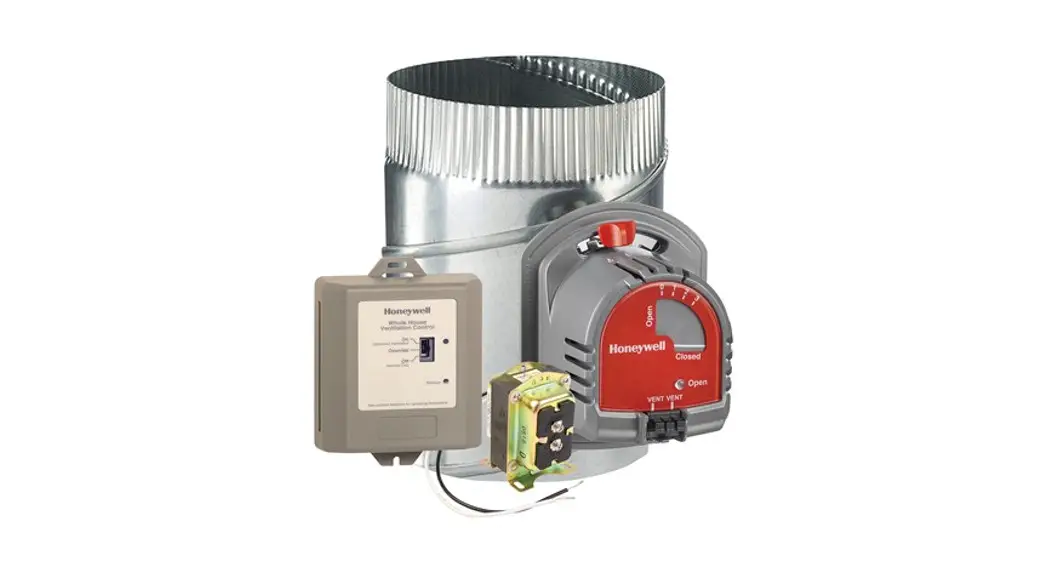
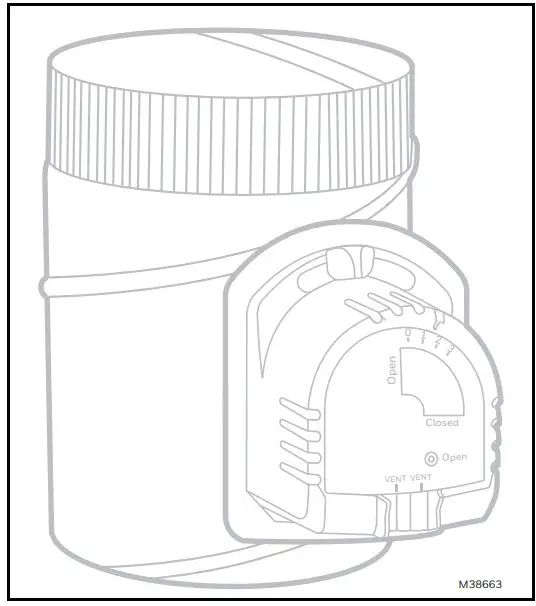
The Y8150 Fresh Air Ventilation System, W8150 Fresh Air entilation Control provide fresh air to a home. The control operates a fresh air intake damper and, when necessary,
activates the main HVAC blower to efficiently meet ASHRAE ventilation rates.
FEATURES
- Designed to help meet local ventilation codes and standards, including ASHRAE 62.2-2010 standard, “Ventilation and Acceptable Indoor Air Quality in Low-Rise Residential Buildings.”
- The microcontroller optimizes the air delivery schedule to make efficient use of normal HVAC run times.
- Easy-to-use input dials allow customized ventilation for each installation.
- Test mode that includes immediate feedback to installer to confirm that air delivery requirements of selected ventilation standard are being met.
- Economical supply-only ventilation; works with a forced-air system.
- Can be used with other equipment, such as an HRV/ERV, for balanced ventilation.
- LED to indicate whether the damper is open or closed.
- Portal to view damper position.
IMPORTANT
Please read these instructions and keep them in your records.

SPECIFICATIONS
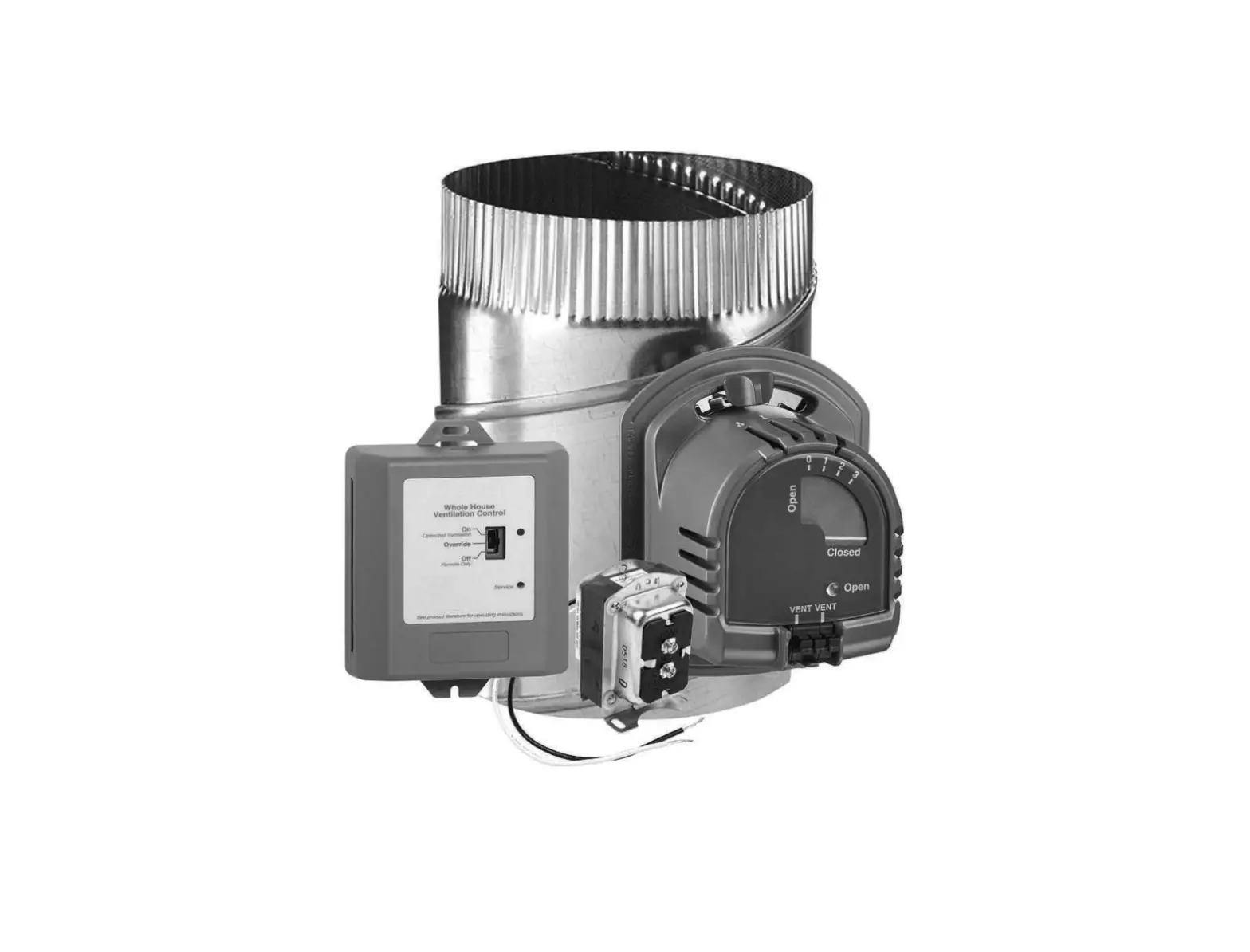
Y8150 includes:
W8150A Fresh Air Ventilation Control.
EARD6TZ Fresh Air Damper.
AT120B Transformer.
Mounting hardware for control.
Homeowner information label.
W8150 includes:
W8150 Fresh Air Ventilation Control.
Mounting hardware for control.
Homeowner information label.
Control (W8150A):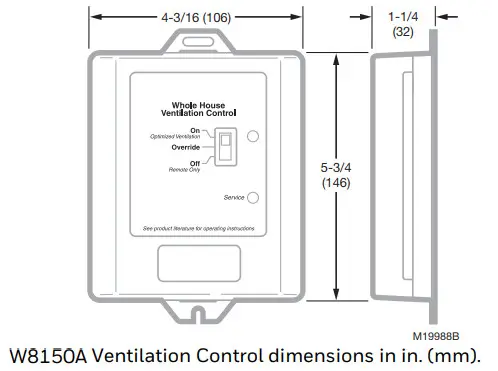
Power Supply: 20-30 Vac, 60 Hz.
Power Consumption: 3.5 VA at 24 Vac.
Thermostat Fan Load: 10 mA resistive at 24 Vac.
Thermostat Heat Load: 10 mA resistive at 24 Vac.
Remote Terminals: 10 mA resistive at 24 Vac.
Relay Contacts:
Fan: 1.5A full load, 7.5A locked rotor at 24 Vac.
Damper: 0.6A inductive, 3.1A locked rotor at 24 VacAuxiliary: 0.5A inductive, 2.5A locked rotor at 24 Vac
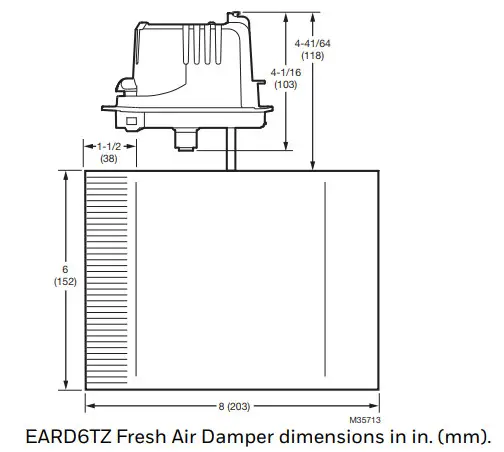
Damper (EARD6TZ): 24 Vac, 12 VA, 60 Hz.
Operation: Power-open, spring-closed.
Diameter: 6 in.
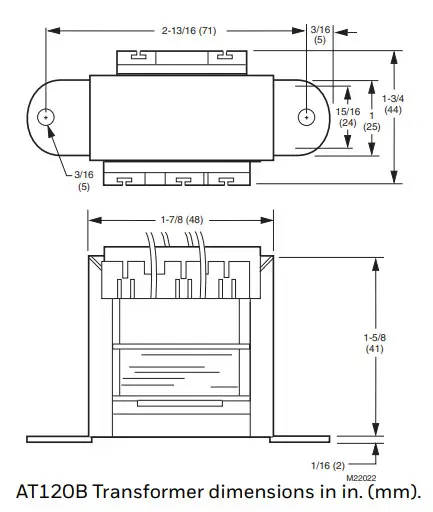
Transformer (AT120):
Input: 120 Vac.
Output: 27 Vac open circuit, 24 Vac full load at 20 VA.
Mounting: Foot mounted.
Temperature: -20 °F to 160 °F (-29 °C to 71 °C).
Humidity: 5 to 90% RH, noncondensing.
Input Setting Ranges:
Bedrooms: 2-5.
Area: 1000-4600 sq ft.
Vent Airflow: 40-160 cfm.
Composite Setting Resolution: ±12% of ASHRAE 62.22010, recommended ventilation for single-system setup.
AT120B Approvals: UL Component Recognized: Class 2, File No. 14881.
Location: device can be installed in an unconditioned space. Multiple devices can be installed when operating multiple HVAC systems.
Dimensions: See device dimension diagrams.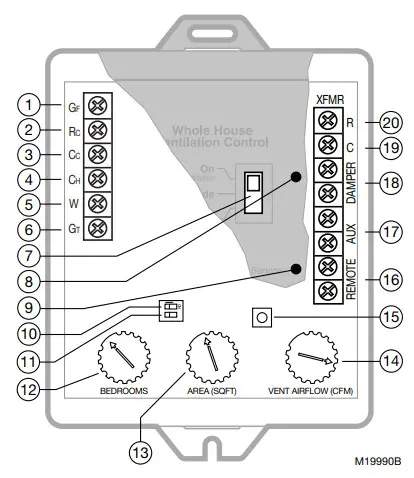 W8150 QUICK GUIDE
| No. | Name | Description | Function |
| 1 | GF | Equipment fan | Allows W8150 to pass thermostat calls and, when necessary, turn on the system fan for ventilation. This should be the only connection to G on the HVAC equipment. |
| 2 | Rc | 24 Vac cooling system power | Provides power to GF terminal to operate system fan, when necessary. |
| 3 | Cc | 24 Vac cooling system common | Allows W8150 to monitor when the system fan is energized. |
| 4 | CH | 24 Vac heating system common | Allows W8150 to monitor thermostat heat calls when W is energized. |
| 5 | W | Heating | Allows W8150 to monitor when heating is energized. |
| 6 | GT | Thermostat (or other control) fan terminal | Allows W8150 to monitor when GT is energized. All external equipment that controls the system fan should be wired to this terminal. |
| 7 | Switch | On (optimal ventilation) Override Off (Remote Only) | On (optimal ventilation) – W8150 ventilates, based on control settings. Override – W8150 runs ventilation continuously. Off (Remote Only) – W815O supplies ventilation only when there is a remote call. |
| 8 | Light | Green | Indicates device is powered and operating normally. Used in Test Mode to signal if dial settings meet chosen standard. |
| 9 | Light | Red | This indicates the device is not operating normally. Used in Test Mode to signal if dial settings do not meet the chosen standard. |
| 10 | DIP1 | Ventilation limit | Choose between 60% (default) and 100% maximum fan run time allowed by W815O for ventilation. |
| 11 | DIP2 | Ventilation standard | Choose between ASH RAE 62.2 (default) and 62-1999 ventilation standards. |
| 12 | BEDROOMS | Number of bedrooms | Used to calculate the amount of ventilation necessary. |
| 13 | AREA (SQ FT) | Square footage of conditioned space | Used to calculate the amount of ventilation necessary. |
| 14 | VENT AIRFLOW (CFM) | Air delivery rate through the fresh air duct | Used to calculate the amount of ventilation necessary. |
| 15 | Test | Test button | W8150 checks dial and switch settings activate ventilation for up to three minutes and provide feedback to validate if the chosen standard can be met. |
| 16 | REMOTE | Remote switch (two terminals) | 24 Vac-powered contacts allow a remote switch closure to call for ventilation. |
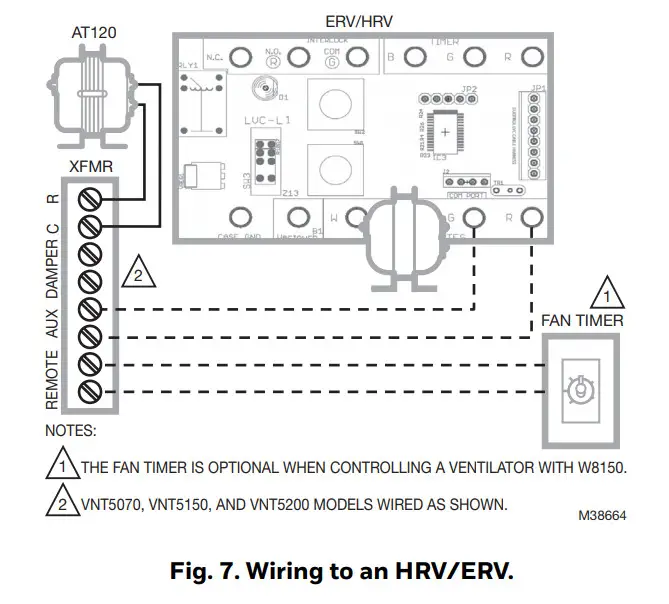
| 17 | AUX | Auxiliary (two terminals) | 24 Vac dry contacts allow W8150 to control an auxiliary device, such as an exhaust fan or HRV/ERV, with a call for ventilation. |
| 18 | DAMPER | Damper (two terminals) | 24 Vac-powered contacts control fresh air dampers. |
| 19 | XFMR C | 24 Vac ventilation control common | Supplies power to W815O and damper from transformer provided. |
| 20 | XFMR R | 24 Vac ventilation control power | Supplies power to W815O and damper from transformer provided. |
INSTALLATION
A fresh air duct and damper must be installed between the outdoors and the return side of the HVAC equipment. The W8150 control will be mounted near the HVAC system and wired between the thermostat and the fan control.
You will need…
- W8150 Fresh Air Ventilation Control.
- damper.
- transformer.
- insulated ductwork.
- outdoor weather hood.
- starting collar.
- access to 120 Vac power.
- airflow measuring tool.
TIPS: - To meet ASHRAE 62.2-2010, the system must have at least a MERV 6 filter installed.
- In cold climates, balanced ventilation is recommended. An exhaust fan or heat recovery ventilator can be used.
- Humid climates may require additional dehumidification equipment.
Choosing a location…
When choosing locations for equipment, duct connections, and fresh air intake, be sure to consult local code requirements.
| Device Number | Component | Location |
| 1 | Fresh air intake | Install away from known sources of pollutants such as auto exhaust, dryer vent exhaust, or chimney smoke. |
| 2 | Fresh air duct | Install between weather hood and upstream of equipment filter and downstream of any duct-mounted sensor. |
| 3 | Damper | Install damper in fresh air duct, where convenient. Optionally, install a heat recovery ventilator. |
| 4 | Control | Locate the control for convenient access and for easy wire routing. |
| 5 | Transformer | Locate were convenient for line voltage connection. |
| 6 | Filter | Locate filter downstream of fresh air intake. |
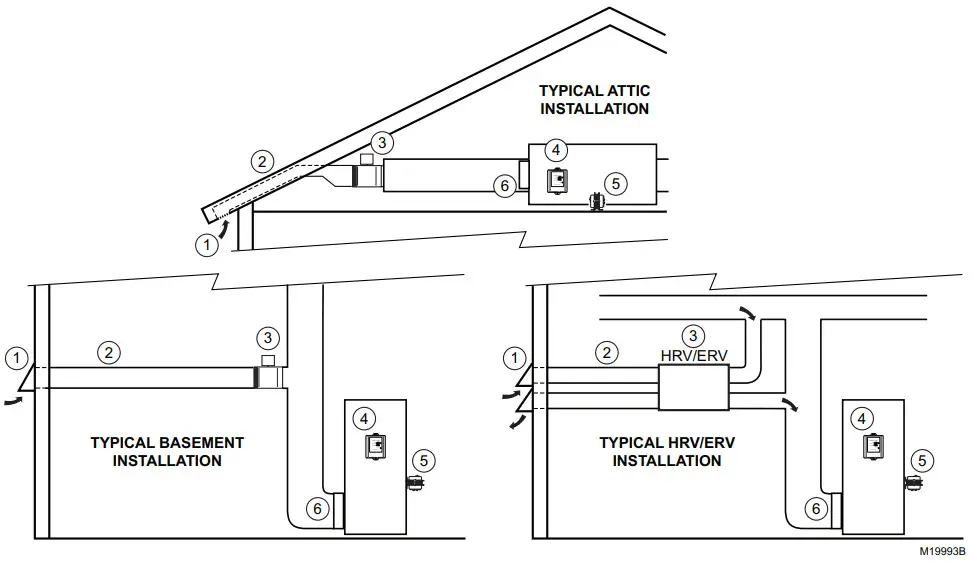
Installing fresh air damper, ducting, and control…
- Disconnect power from the HVAC system.
- Install the weather hood, ducting, and damper following local practices. Be sure all duct and insulation seams are tightly sealed.
- Mount the transformer and control.
TIPS:
- In general, larger ducting allows higher airflow, minimizes additional fan run time, and may be needed for larger homes.
- Installing a damper directly to the return duct may be convenient to support the damper and reduce ducting.
- Fresh air connection should be downstream of sensors (such as a humidistat) in return air plenum.
Wiring the control…
 CAUTION
Electrical Hazard.
Can cause personal injury or equipment damage.
Disconnect power to all systems before beginning installation.
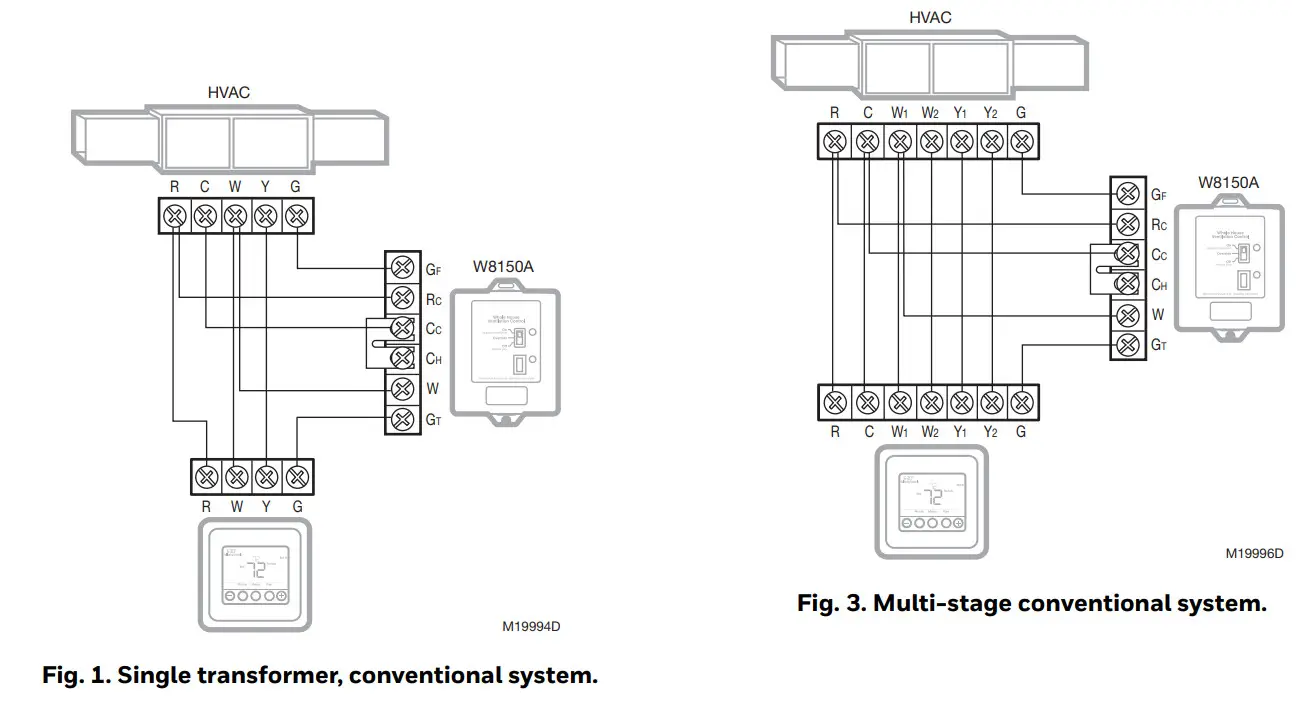
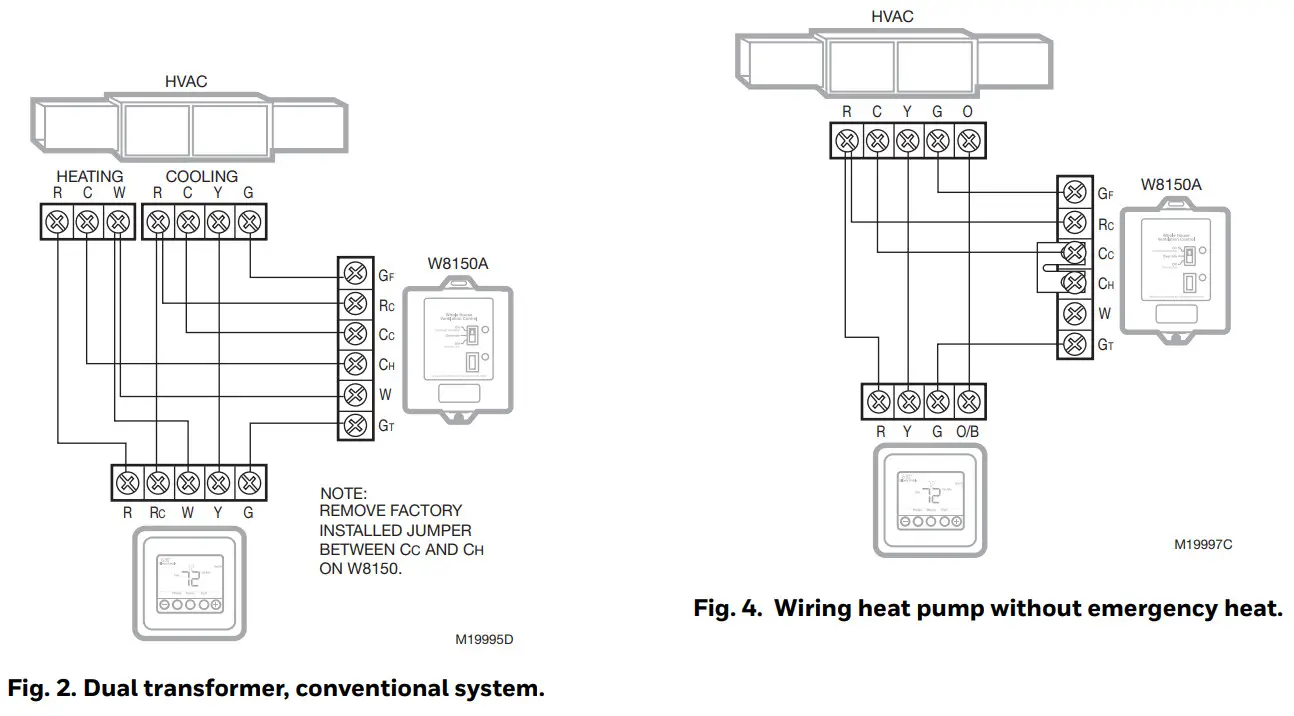
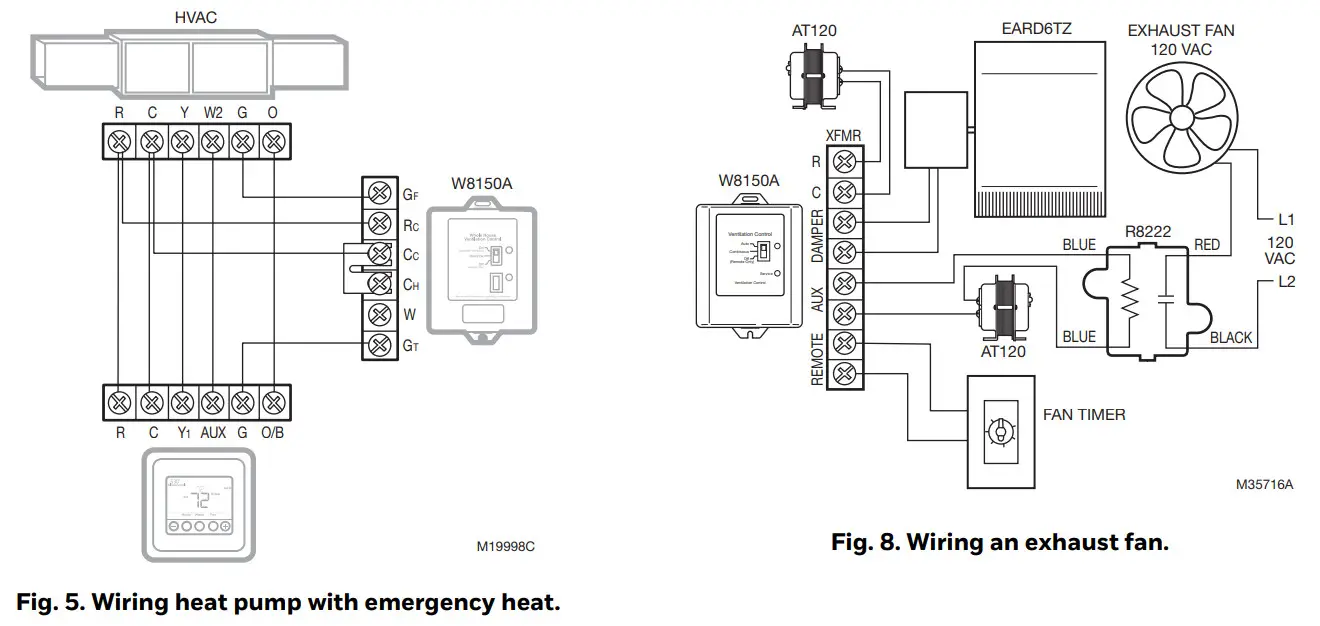
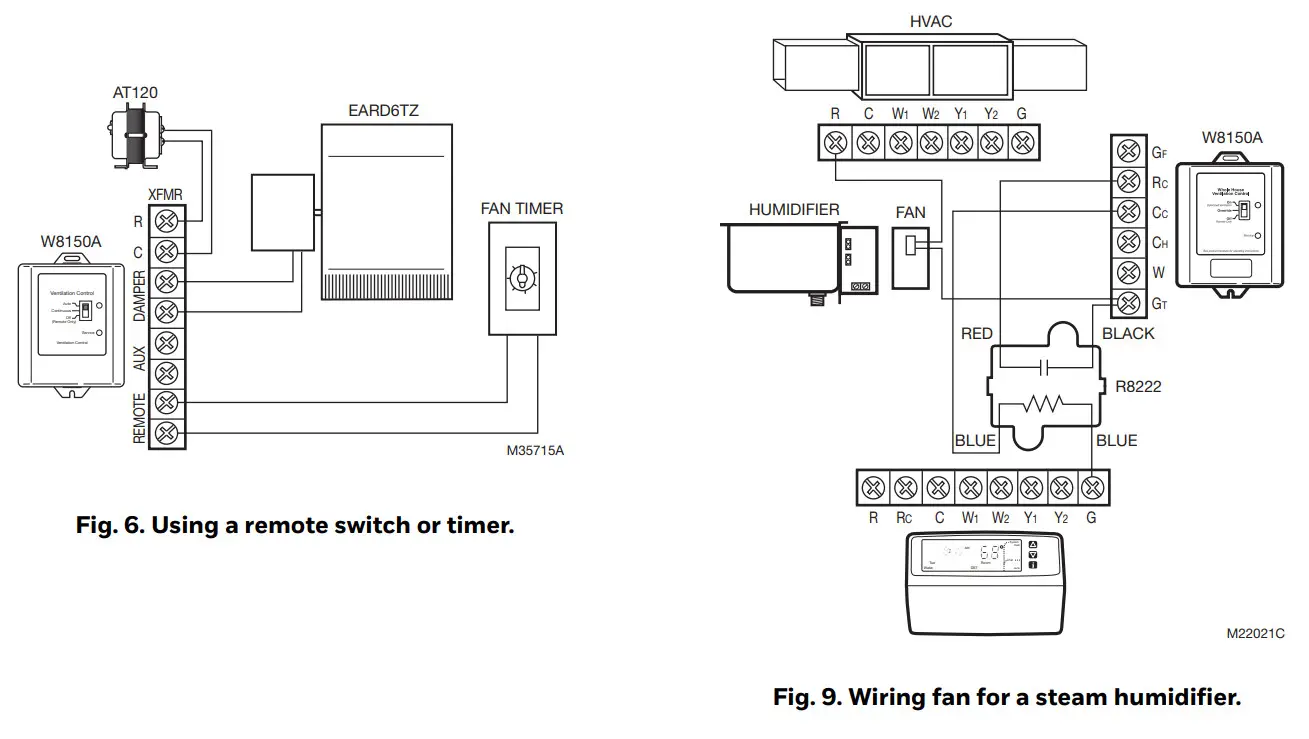
- Wire the control. See wiring diagrams in Fig. 1-10 as listed below. All wiring must comply with local codes, ordinances, and regulations.
- Reapply power to system and control.
TIP:
- The control package allows wire routing through side slots and bottom openings.
| System Hookup Diagrams | Fig. No. | Page No. |
| Single transformer, conventional | 1 | 10 |
| Dual transformer, conventional | 2 | 10 |
| Multi-stage, conventional | 3 | 10 |
| Heat pump without emergency heat | 4 | 10 |
| Heat pump with emergency heat | 5 | 11 |
| Accessory Hookup Diagrams | Fig. No. | Page No. |
| Wiring with a remote switch/timer | 7 | 11 |
| Wiring to an HRV/ERV | 8 | 11 |
| Wiring an exhaust fan | 9 | 11 |
| Wiring a fan for a steam humidifier | 10 | 12 |
Measuring airflow…
- Make sure all HVAC system air filters are clean and installed.
- Push Test button:
• Control opens the damper and turns on the HVAC fan for three minutes.
• A red or green light is flashing; you can now measure airflow. - Follow instrument instructions for measuring airflow.
TIPS:
- You can exit the test mode at any time by pressing the test button again.
- See Conversion Table (located after wiring diagrams) for the quick area and airflow setting conversions.
- For future reference, record the airflow on the inside of the device cover.
- Pitot Tubes and flow measuring stations are commonly used airflow measuring devices.
About the control settings…
Dial Settings
These settings allow the installer to customize the control to meet the ventilation requirements for the home.
Ventilation Standard
Building codes are different everywhere. The W8150
Ventilation Control can be configured to operate based on:
- ASHRAE 62.2.
- ASHRAE 62-1999
TIP: - A clear understanding of local codes and practices is required to make sure the ventilation system is installed and configured correctly. Generally, ASHRAE 62.2 control method is recommended and can meet many existing local codes.
| Code/Standard | Setting |
| General Ventilation Requirements | ASHRAE 62.2 |
| Washington State Energy Code | ASHRAE 62.2 |
| Canadian Building Code* | ASHRAE 62.2 |
| Minnesota Energy Code | 62-1999 |
| 2002 International Residential Code | 62-1999 |
*In Canada, interlocking exhaust equipment may be required for balanced ventilation.
Ventilation Limit
This setting determines the maximum amount of time that the fan runs for ventilation.
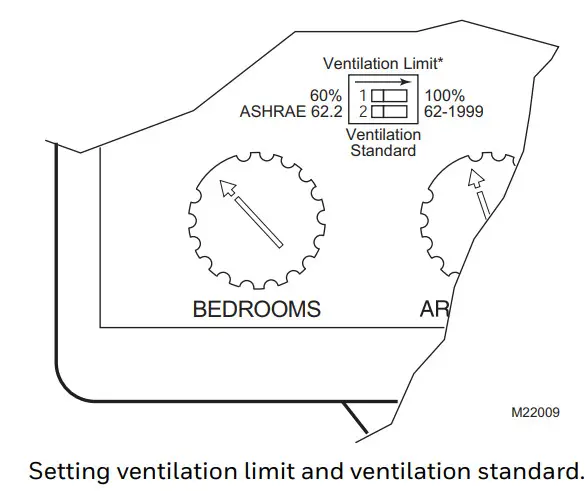
Setting the control…
- Be sure power is turned on.
- Set the Ventilation Standard on the control.
- Set the bedrooms dial.
- Set the area (sq ft) dial.
- Set the airflow (cfm) dial.
- Press the test button and observe the lights: Greenlight is flashing.
The dial settings meet the chosen standard. The red light is flashing.
There is not enough fresh air delivered to meet the requirements of the selected standard. See
Troubleshooting section. - Record settings on the label inside the cover as shown in the diagram.
TIPS:
- Ventilation control reads new dial setting only when the test button is pushed or power is cycled. To ensure dial settings are read, push the test button after any changes are made.
- For single bedroom homes, set the bedrooms to dial to 2 (this may result in more ventilation than the minimum required).
- For homes having more than five bedrooms and only a single ventilation system set the bedrooms dial to 5 (this may result in less ventilation than the minimum required).
- For conditioned square feet, set area (sq ft) dial to the nearest value.
- For airflow, set the airflow (cfm) dial to the nearest value.
- Vaulted ceilings do not need to be considered when setting this control.
- For homes with multiple systems: Resideo recommends a ventilation control and fresh air intake for each system. Measure ventilation airflow for each system independently. Refer to Multi-system Setup Example for further details.
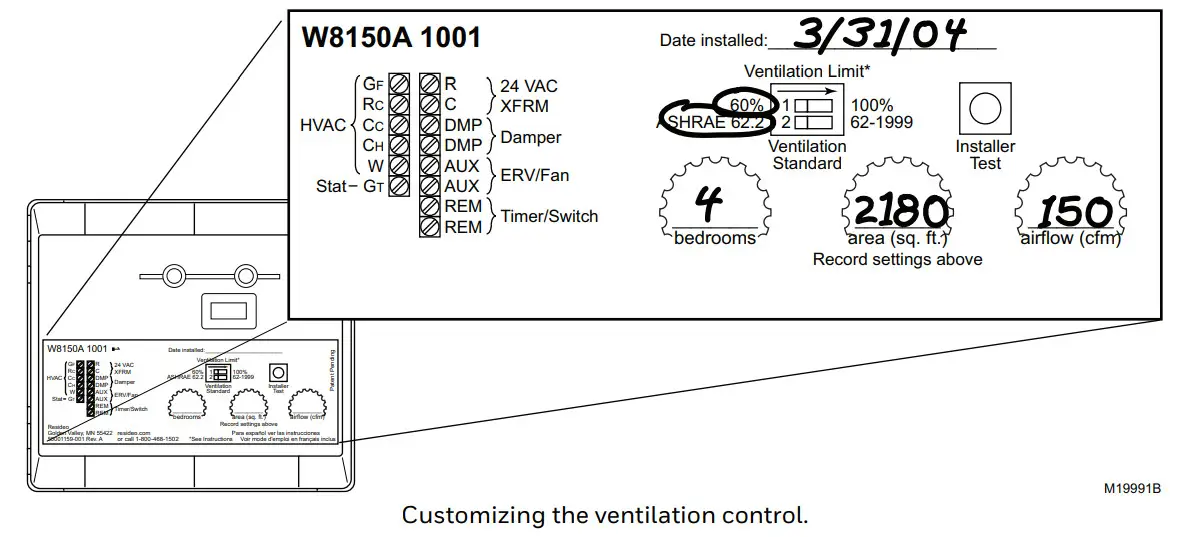
CHECKOUT
In this section, make sure the ventilation system is operating correctly.
- On the thermostat, set Fan to switch to Auto and the System switch to Off.
- Set any remote switches throughout the house in the Off position.
- On the W8150, set the control switch to Off (remote only).
- Press the Test button for two seconds to enter test mode:
• A light on the control begins flashing.
• The HVAC system fan comes on.
• The damper moves to the Open position. - Press the Test button again to exit test mode:
• No lights on the control are on.
• The HVAC system fan turns off.
• The damper returns to the closed position. - Return the thermostat, ventilation control, and
remote switches to the original settings. - Refer to the Troubleshooting section, if needed.
TIP:
• W8150 Ventilation Control automatically exits test mode after three minutes.
TROUBLESHOOTING
| Problem | Possible cause | What to do |
| Flashing red light during test mode (The current settings do not meet the selected ventilation requirement) | Not enough airflow | •Measure airflow and check dial setting. •See Problem: Not enough airflow. |
| Ventilation on-time limit setting | •If the device is set to 60%: Set the ventilation control to 100% maximum on time. This allows the HVAC fan to run up to 100% of the time. It may be preferable to increase airflow. •If the device is set to 100%: There is not enough airflow through the fresh air duct. •Ventilation continues to occur according to the settings but chosen standards may not be met. | |
| Flashing red light during normal operation | Low voltage | •Check the voltage from the transformer for at least 20 Vac. If voltage is OK, replace W8150 Control voltage is not OK, disconnect damper and remote switch connections and check again. If voltage does not return to at least 20 Vac, replace the transformer. |
| No light on ventilation control when switch set to: •On •Override Off/ •Remote Only and a remote switch is on. | No power to control | •Verify 24 volt input to R and C terminals on ventilation control. •Check wiring connections per appropriate system diagram and replace the transformer, if necessary. |
| Device malfunction | •Cycle power off to control for ten seconds and recheck. If the control does not recover, replace ventilation control. | |
| The HVAC fan does not come on after pressing the Test button. | Wiring | •Check wiring connections per appropriate system diagram. |
| The HVAC system does not have power | •Restore power to the HVAC system. |
| HVAC fan is running all the time | The device is set to override | •Move the switch to the On position to allow for automatic operation. |
| The remote switch is on | •Adjust the remote switch to the desired position. | |
| The thermostat Fan switch is in One position | •Normal operation. | |
| An HVAC system is running to satisfy heating or cooling requirements. | •Normal operation. | |
| The ventilation limit is set to 100% ventilation limit. | •Set ventilation limit to 60%. The control may not be able to meet the recommended ventilation requirements. •Increase ventilation airflow through a fresh air duct and adjust settings. | |
| Low ventilation airflow. | •See Problem: Not enough airflow. | |
| •Damper does not open during checkout or •Damper does not close. | Incorrectly wired. | •Check wiring connections per the appropriate wiring diagram. |
| Transformer output. | •Verify 24 Vac applied to the actuator. | |
| Damper actuator motor failure or mechanical failure. | •Manually open damper and verify free movement; damper should return to the closed position when no power is applied. •If the damper moves freely but does not operate when 24 volts is applied, replace the damper actuator. •If the damper does not move freely, replace the fresh air damper. | |
| The cooling compressor comes on when there is no cooling call from the thermostat. | Incorrectly wired. | •Check wiring connections per appropriate system diagram. •An isolation relay may be required when appliances are connected to the GT terminals on the ventilation control. (For example, see wiring a fan for a steam humidifier diagram.) |
| Not enough airflow | Obstruction or duct size | •Check for obstructions in the fresh air duct and weather hood. •Check for kinks in the ductwork. •Make sure all manual dampers are fully open. •Make sure the stops on the EARD damper allow it to open fully. •Increase duct size. •Add a booster fan to the fresh air duct. NOTE: After any changes to the ductwork, repeat the Measuring Air- flow section. |
WIRING DIAGRAMS
Consult thermostat Installation Instructions for alternate terminal designations.
Multi-System Setup Example
Total square feet and bedrooms should be proportionately split between the ventilation controls based on sq ft served by each system regardless of where the bedrooms are located.
Example: 5,000 sq ft, six bedrooms:
System 1:
- serves 3200 sq ft,
- two bedrooms.
- the fresh air intake was measured at 127 cm.
System 2:
- serves 1800 sq ft,
- four bedrooms
- the fresh air intake was measured at 98 cm.
Set W8150 for System 1:
- 3100 sq ft,
- four bedrooms
- 130 cfm.
Set W8150 for System 2:
- 1900 sq ft,
- two bedrooms
- 100 cfm.
CONVERSION TABLE
| Area | Airflow | ||
| sq ft | sq m | cfm | 1ps |
| 1000 | 93 | 40 | 19 |
| 1300 | 121 | 50 | 24 |
| 1600 | 149 | 60 | 28 |
| 1900 | 177 | 70 | 33 |
| 2200 | 204 | 80 | 38 |
| 2500 | 232 | 90 | 42 |
| 2800 | 260 | 100 | 47 |
| 3100 | 288 | 110 | 52 |
| 3400 | 316 | 120 | 57 |
| 3700 | 344 | 130 | 61 |
| 4000 | 372 | 140 | 66 |
| 4300 | 399 | 150 | 71 |
| 4600 | 427 | 160 | 76 |
| Airflow | ||||
| cfm | 6 In. duct (15.2 cm) | 7 In. duct (17.8 cm) | ||
| fpm | ms | fpm | ms | |
| 40 | 204 | 1.0 | 150 | 0.8 |
| 50 | 255 | 1. | 187 | 1.0 |
| 60 | 306 | 2. | 225 | 1. |
| 70 | 357 | 2. | 262 | 1. |
| 80 | 407 | 2. | 299 | 2. |
| 90 | 458 | 2. | 337 | 2. |
| 100 | 509 | 3. | 374 | 2. |
| 110 | 560 | 3. | 412 | 2. |
| 120 | 611 | 3. | 449 | 2. |
| 130 | 662 | 3. | 486 | 3. |
| 140 | 713 | 4. | 524 | 3. |
| 150 | 764 | 4. | 561 | 3. |
| 160 | 815 | 4. | 599 | 3.0 |
 Resideo Technologies, Inc.
1985 Douglas Drive North, Golden Valley, MN 55422
1-800-468-1502
33-00119—03 M.S. Rev. 07-21 | Printed in the United States
© 2021 Resideo Technologies, Inc. All rights reserved.
The Honeywell Home trademark is used under license from Honeywell International, Inc. This product is manufactured by Resideo Technologies, Inc. and its affiliates.

![Honeywell Portable Air Conditioner [mn10chesww, Mn12chesww] User Manual](https://static-data1.manualsee.com/1/img/462/16345/2020/12/Honeywell-Portable-Air-Conditioner.jpg "Honeywell Portable Air Conditioner [mn10chesww, Mn12chesww] User Manual")