Contents hide

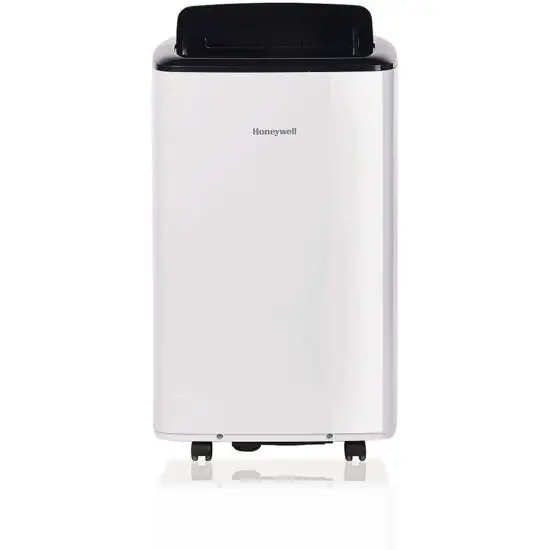
Honeywell HT09CESVWK Smart Portable Air Condition
REGISTERING AN ACCOUNT
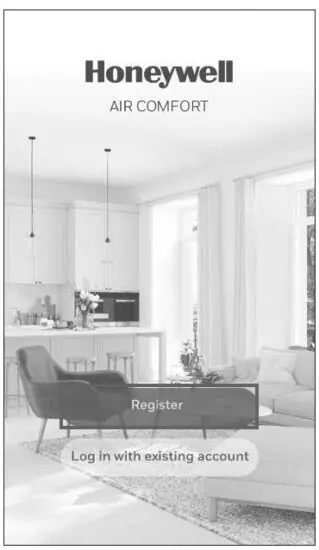
- Open the app.
- Tap Register.
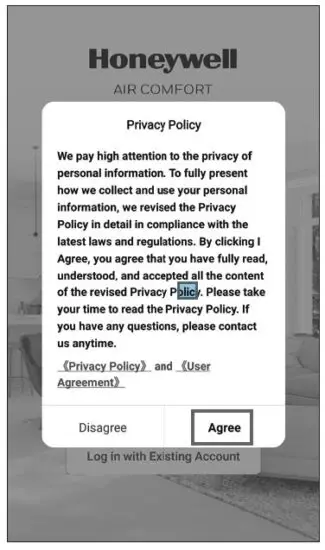
- Read the Privacy Policy. If you agree with the Privacy policy, tap Agree.
 Enter your email (3A) or mobile phone number (3B).
- Tap Get Verification Code.
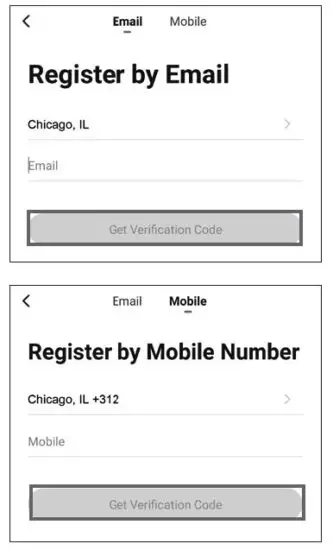 Enter your email (3A) or mobile phone number (3B).
Enter the verification code.
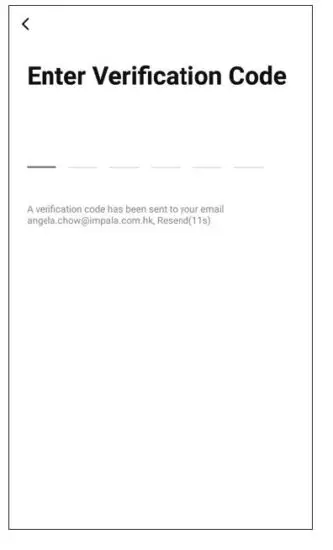
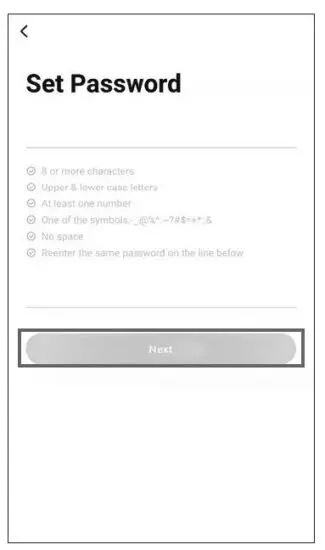
- Set the password.
- Tap Next
- The user will receive a verification email from [email protected] with contact name “Honeywell Air Comfort” and subject title Registration Verification Code.
- If email is not received in your inbox, check your junk or spam folders.
- If you didn’t receive a verification email after 60 seconds, click the resend button.
SETTING UP A GROUP
Tap Me on the bottom right.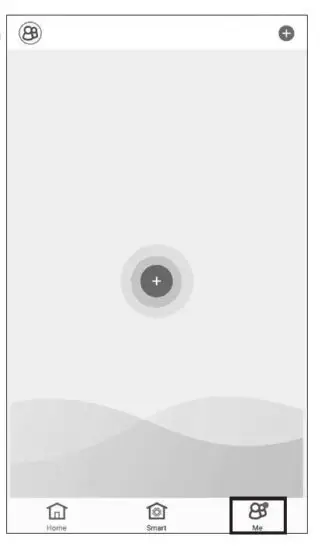
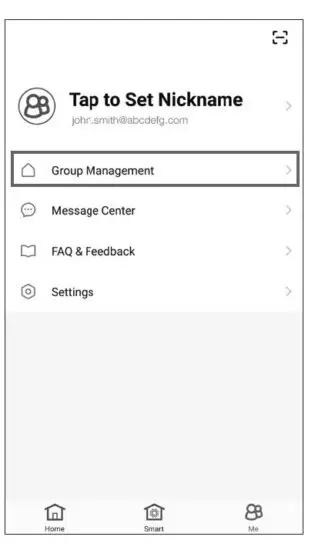
Tap Group Management.
 Set the Group Name and Location.
- Mark the location of the air conditioner.
- Tap Done.
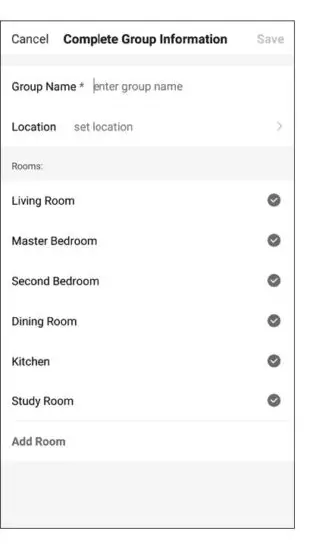 Set the Group Name and Location.
CONNECTING THE AIR CONDITIONER WITH THE APP
 Press to turn on the portable air conditioner.
- On the app, tap to add a device.
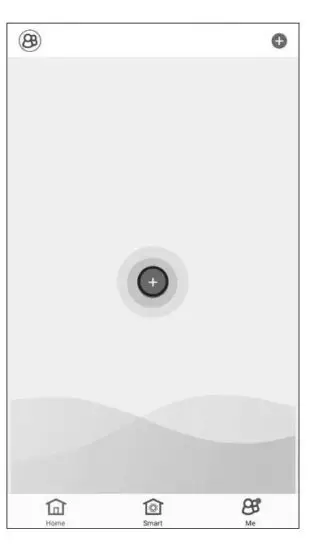 Press to turn on the portable air conditioner.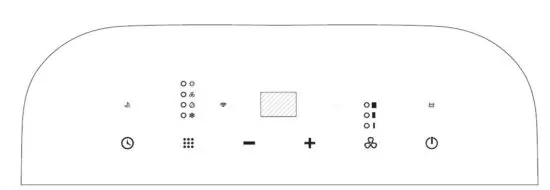
- Please make sure your product is switched on and it’s in a standby mode.
- Press and hold the Speed button on the device for a few seconds until it sounds, Wi-Fi on the portable air conditioner is now activated to connect.
- While connecting, the Wi-Fi indicator light on the control panel will flash quickly.
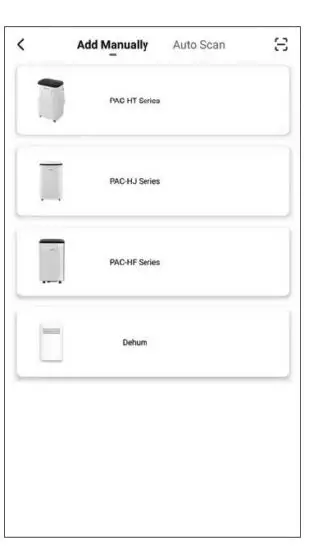
- Choose your PAC series.
 Enter the Wi-Fi password.
- Tap Confirm
 Wait until the connection is completed.
- Tap Done
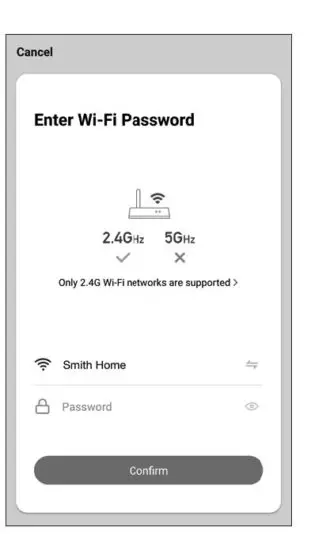 Enter the Wi-Fi password.
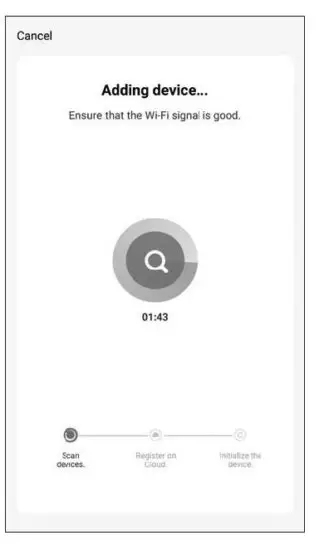 Wait until the connection is completed.
USING THE APP
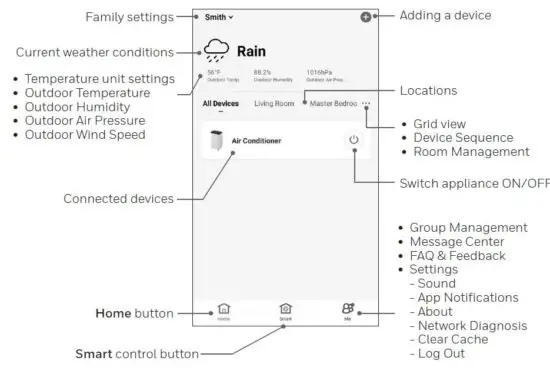
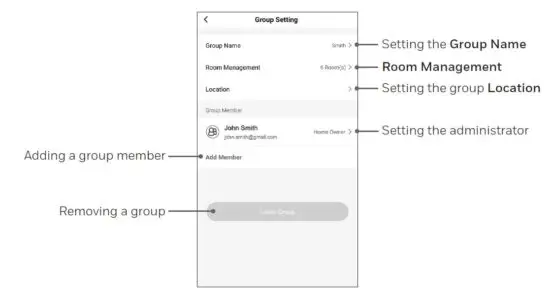
BASIC CONTROLS
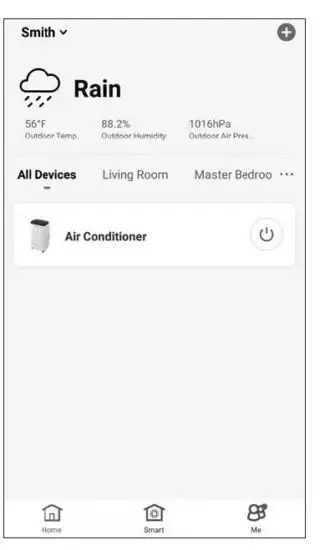
- Tap Portable Air Conditioner.
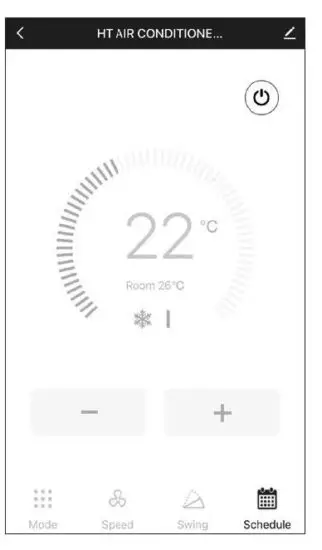
- Tap to switch the portable air conditioner on/off.
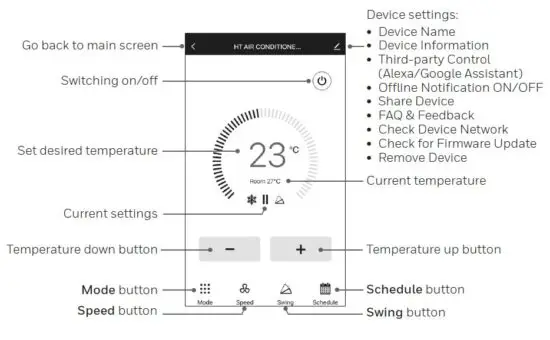
SETTING THE MODE AND FAN SPEED
 Tap Mode button.
- Select the Cool, Dry, Fan or Sleep mode.
- Tap Speed button.
- Select the High, Medium or Low fan speed setting.
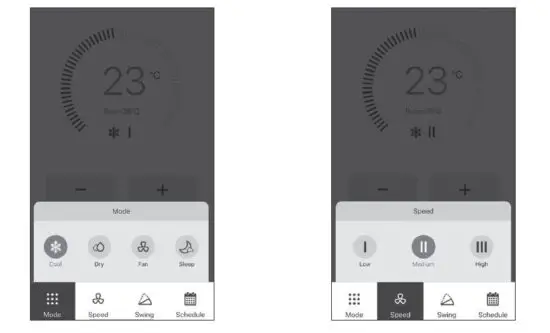 Tap Mode button.
SETTING A TIMER
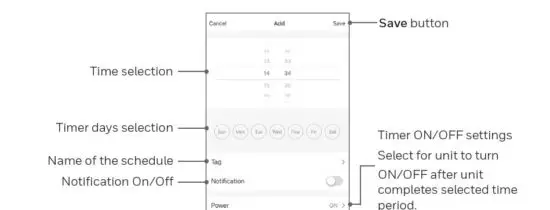
- Tap Schedule set button
- Tap Add Timing.
- Set the timer(s).
- When the timer is set, tap Save. Multiple timers can be set following the same steps.
- The air conditioner will turn off or on at the set time and operate, or stay turned OFF until it is manually switched off or activated again.
- If you would like to set the unit to turn off or on at a set time, set a second timer to automate this.
ADDING A TAP-TO-RUN
NOTE: The tap-to-run feature allows you to activate a set of air conditioner actions at the same time with one tap.
- Tap Smart control button.
- Tap Tap-to-Run.
- Tap +
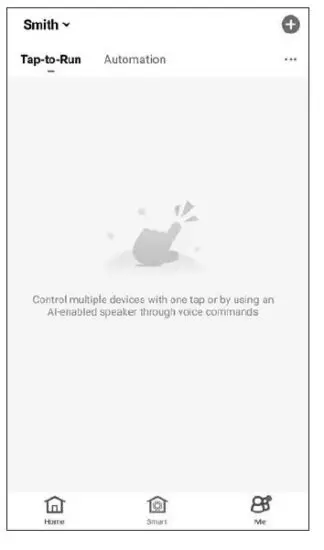
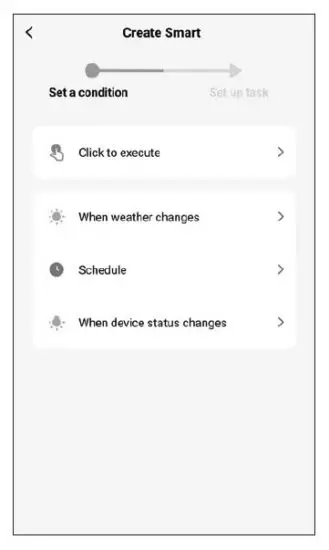
- Select condition you want to add.
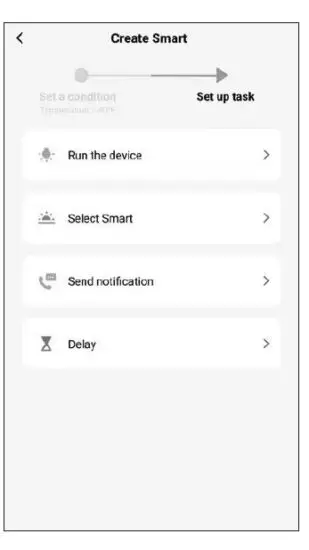
- Select the task you want to add.
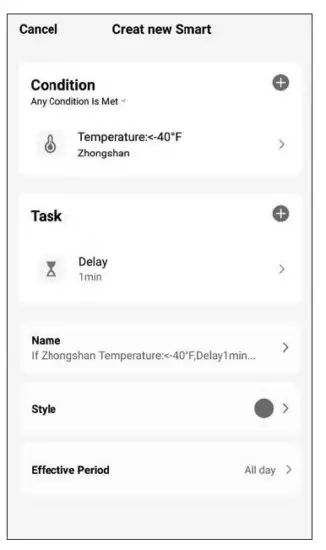
- Tap Name to set the name of the tap-to-run action.
- Tap Style to set the background color or image.
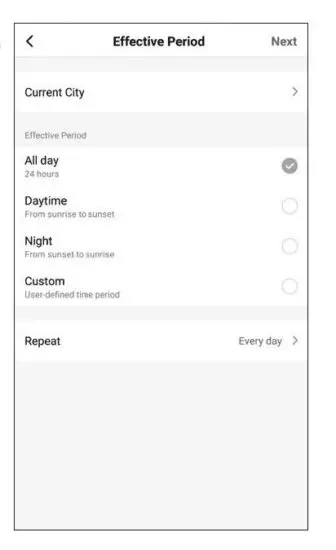
- Tap Effective Period to select when the tap-to-run action should activate.
- Tap Next.
- Tap Save.
ADDING AN AUTOMATION
NOTE: The automation feature automatically activates a set of air conditioner actions when the set conditions are met.
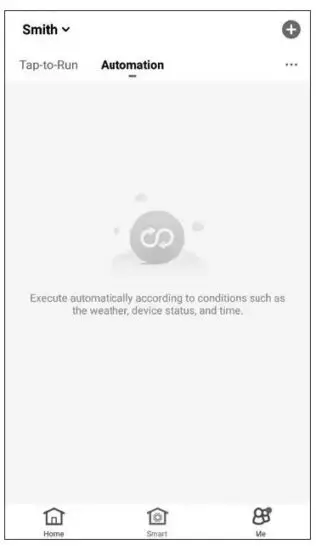
- Tap Smart control button.
- Tap “Automatic”.
- Tap
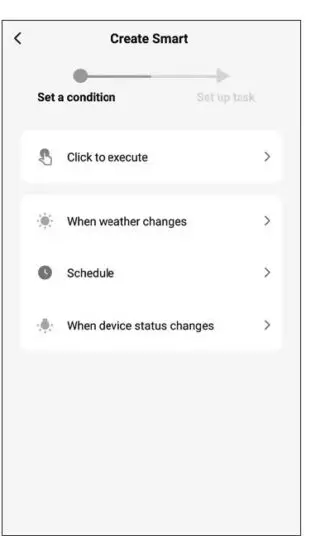
- Select condition you want to add.
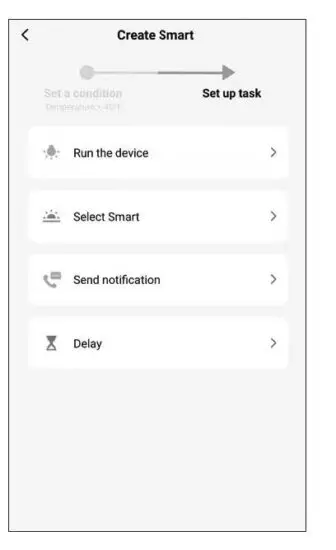
- Select the task you want to add.
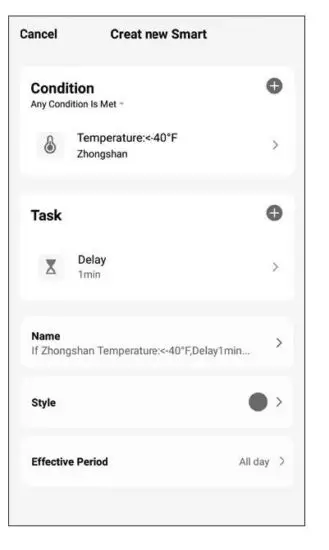
- Tap Name to set the name of the tap to run action.
- Tap Style to set the background color or image.
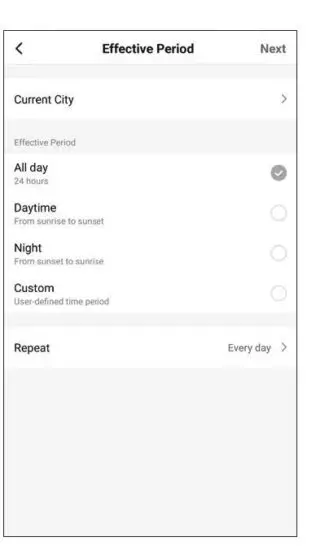
- Tap Effective Period to select when the automation action should be active.
- Tap Next.
- Tap Save.
CONNECTING TO AMAZON ECHO
NOTE: Ensure your Amazon Echo device is switched on and connected to the Wi-Fi network.
- Open the “Amazon Alexa” app on your device.
- Tap and then Skills & Games.
- Tap and type “Honeywell Air Comfort”.
- Tap the Honeywell Air Comfort skill.
- Tap ENABLE TO USE button.
- Enter your Honeywell Air Comfort App login and password.
- Tap Link Now and then tap Authorize.
- Tap Done.
- Tap DISCOVER DEVICE.
- Choose “Portable Air Conditioner”.
- Tap SET UP DEVICE. Choose a group for the device or tap SKIP.
- Choose “Portable Air Conditioner”.
- Tap DONE.
CONNECTING TO GOOGLE HOME
NOTE: Ensure your Google Home device is switched on and connected to the Wi-Fi network.
- Open the “Google Home” app on your device.
- Tap + on the top left. Tap Set up device.
- Tap Have something already set up?
- Tap and type “Honeywell Air Comfort”.
- Tap Honeywell Air Comfort.
- Enter your Honeywell Air Comfort App login and password.
- Tap Link Now and then tap Authorize.
- To add the portable air conditioner to a room, tap the Portable Air Conditioner and then tap Add to a room. Or tap the X on the top left to skip.
- Choose a room for the device, tap Next and then DONE.
SMART COMMANDS
- Switching on/off
Say: Alexa/Hey Google, turn on/off portable air conditioner. - Setting the target temperature level
Say: Alexa/Hey Google, set Portable Air Conditioner to XX. (Set between 16°C – 31°C) - Switching the Tap-To-Run/Automation on/off
Say: Alexa/Hey Google, switch <scenario name> on/off.
TROUBLESHOOTING
| Problem | Possible Cause | Solution |
| Unable to register/login to an account. | Mobile smart device’s Wi-Fi is switched off. | Switch on the mobile smart device’s Wi-Fi. |
| Wi-Fi signal is too weak. | Install a Wi-Fi extender (not included). Move the portable air conditioner closer to the Wi-Fi router. | |
| Forgot the password of your account. | At the login screen, tap “Forgot Password” and input your Mobile/ Email, then tap “Get Verification Code”. An SMS or an email will be sent to you. Follow the process to reset your password. | |
| Portable air conditioner cannot pair with the Honeywell Air Comfort App. | Portable air conditioner is not connected to the socket-outlet. | Connect the portable air conditioner to the socket-outlet. |
| The Wi-Fi setting on the device is not set properly. | Press and hold the Speed button on the device for a few seconds until it sounds, Wi-Fi on the portable air conditioner is now activated to connect. While connecting, the Wi-Fi indicator light on the control panel will flash. |
| Problem | Possible Cause | Solution |
| Portable air conditioner cannot pair with the Honeywell Air Comfort App. (Continued) | Wi-Fi signal is too weak. | Install a Wi-Fi extender (not included). Move the portable air conditioner closer to the Wi-Fi router. |
| Wi-Fi connection frequency is incorrect. | Select a 2.4 GHz Wi-Fi network. | |
| Wi-Fi password is incorrect. | Use a correct Wi-Fi password. | |
| Wi-Fi network is invisible. | Set the Wi-Fi network to visible. | |
| Wi-Fi name uses foreign characters. | Set the Wi-Fi name to use standard alphabetical characters and numbers only. | |
| The encryption method of the router’s wireless setting is wrong. | Set the encryption method of the router’s wireless setting to “WPA2-PSK” and the authentication type to “AES”, or both are set as automatic. Note: “802.11n only” is not allowed in wireless mode. | |
| The number of connected devices has reached the limit of the router. | Turn off the Wi-Fi functions of some of the connected devices. Re-configure the router. | |
| The router has enabled the wireless MAC address filter. | Remove the device from the MAC address filter on the router. Ensure the device is not prohibited by the router to connect to the network. |






![Honeywell Portable Air Conditioner [mn10chesww, Mn12chesww] User Manual](https://static-data1.manualsee.com/1/img/462/16345/2020/12/Honeywell-Portable-Air-Conditioner.jpg "Honeywell Portable Air Conditioner [mn10chesww, Mn12chesww] User Manual")