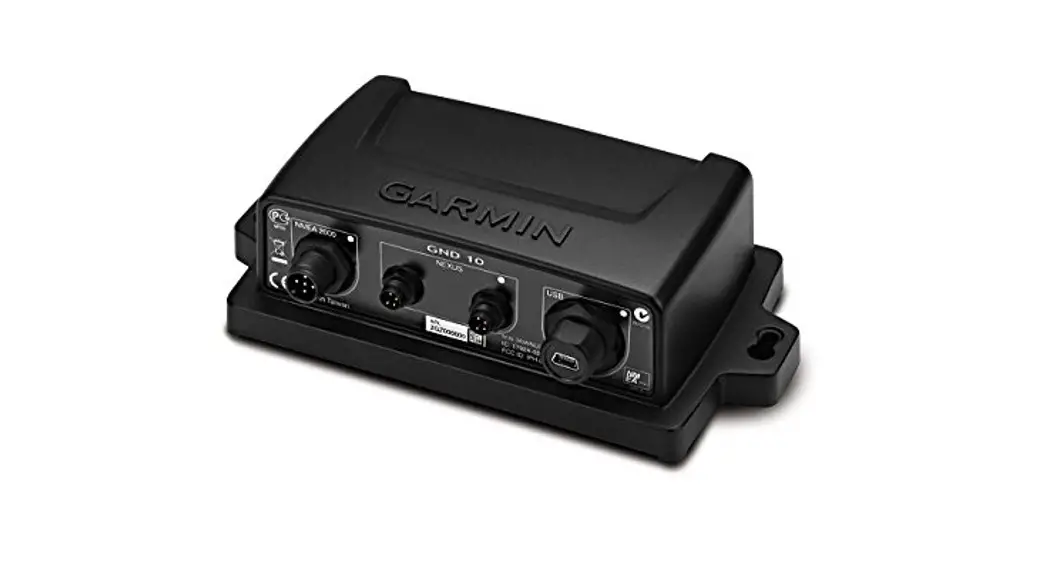
GND™ 10 Installation Instructions
This device bridges the connection between Nexus® network devices and an NMEA 2000® network. When the device is connected to a computer using the included USB cable, you can calibrate advanced wind transducers such as the gWind Race™ using the NexusRace™
software, and you can use data from the transducers with programs such as Expedition® and Adrena.
Important Safety Information
WARNING
See the Important Safety and Product Information guide in the product box for product warnings and other important information.
CAUTION
To avoid possible personal injury, always wear safety goggles, ear protection, and a dust mask when drilling, cutting, or sanding.
NOTICE
When drilling or cutting, always check what is on the opposite side of the surface to avoid damaging the vessel.
Mounting Considerations
NOTICE
This device should be mounted in a location that is not exposed to extreme temperatures or conditions. The temperature range for this device is listed in the product specifications. Extended exposure to temperatures exceeding the specified temperature range, in storage or operating conditions, may cause device failure. Extreme-temperature-induced damage and related consequences are not covered by the warranty.
When selecting a mounting location, observe these considerations.
- To avoid interference with a magnetic compass, the device should not be installed closer to a compass than the compass-safe distance value listed in the product specifications.
- You can use the included screws to mount the device on your boat. If the included screws are not appropriate for the mounting surface, suitable hardware must be purchased separately.
Mounting the Device
- Determine the mounting location.
- Using the device as a template, mark the two pilot hole locations on the mounting surface.
- Using a 1 /8 in. (3 mm) bit, drill the pilot holes.
- Use the included screws to attach the device to the mounting surface.
Connection Considerations
NMEA 2000 Connection Considerations
This device connects to an NMEA 2000 network on your boat to share information from connected Nexus network devices.
If you are unfamiliar with NMEA 2000, you should read the “NMEA 2000 Network Fundamentals” chapter of the Technical
Reference for NMEA 2000 Products. To download this document, select Manuals on the product page for your device at www.garmin.com.
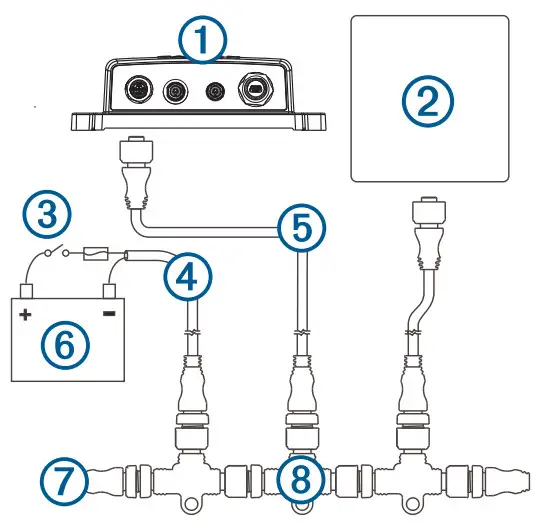
| Item | Description |
| 1 | GND 10 device |
| 2 | Garmin® marine instrument |
| 3 | Ignition or in-line switch |
| 4 | NMEA 2000 power cable |
| 5 | NMEA 2000 drop cable |
| 6 | 12 Vdc power source |
| 7 | NMEA 2000 terminator or backbone cable |
| 8 | NMEA 2000 T-connector |
Nexus Connection Considerations
You must connect a Nexus network device to one of the NEXUS ports.
NOTE: If you connect devices in addition to a gWind™ sensor on the Nexus network, you must provide a separate power supply
connected directly to the Nexus power terminals.
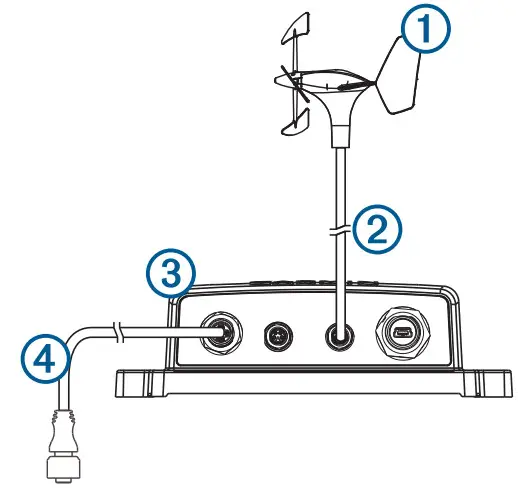
| Item | Description |
| 1 | Nexus network device, such as a wind sensor |
| 2 | Included Nexus mast cable with a field-installable connector. |
| 3 | GND 10 |
| 4 | NMEA 2000 drop cable |
Connecting to a Computer
When the device is connected to a computer using the included USB cable, you can calibrate advanced sensors such as the gWind Race using the NexusRace software. You can also use data from connected wind transducers with third-party sailing programs such as Expedition and Adrena.
- Connect the included USB cable to the USB port on the device.
- Connect the other end of the USB cable to an open USB port on your computer.
The LED near the USB port flashes green when the device is correctly connected to your computer.
The correct driver should be installed automatically by the Windows® operating system. - If the correct driver is not installed automatically, download and install the driver from www.garmin.com.
- After the device is connected correctly to the computer, download the NexusRace software from www.garmin.com and install it.
Status LEDs
The status LEDs are located on the product label near the ports and can help with troubleshooting.
| NMEA 2000 Status LED Color and Activity | Status |
| Off | There is no power over the NMEA 2000 network. |
| Solid red | The device is turning on. |
| Flashing green | The device is operating properly. |
| Flashing orange | The device software is being updated. |
| Flashing red | The device has encountered an error. For assistance, go to support.garmin.com. |
| NEXUS and USB Status LED Color and Activity | Status |
| Flashing green | The connected device is operating properly. |
| Flashing orange | The connected device is initializing. |
| Flashing red | The connected device has encountered an error. For assistance, go to support.garmin.com. |
Specifications
| Specification | Measurement |
| Dimensions (HxWxD) | 170 x 90 x 50 mm (6.7 x 3.5 x 2 in.) |
| Weight | 196 g (6.9 oz.) |
| Temperature range | From 5° to 158°F (from -15° to 70°C) |
| Compass-safe distance | 10 cm (3.9 in.) |
| Waterproof rating | IPX71 |
| NMEA 2000 power draw | 1.1 W maximum |
| NMEA 2000 input voltage | From 9 to 16 Vdc |
| NMEA 2000 LEN @ 9 Vdc | 4 |
NMEA 2000 PGN Information
Transmit
| PGN | Description |
| 126464 | Transmit and receive PGN list group function |
| 126996 | Product information |
Receive
| PGN | Description |
| 65240 | Commanded address |
| 127258 | Magnetic variance |
Transmit and Receive
| PGN | Description |
| 59392 | ISO acknowledgment |
| 59904 | ISO request |
| 60928 | ISO address claimed |
| 126208 | Request group function |
| 126993 | Heartbeat |
| 127250 | Vessel heading |
| 127257 | Attitude |
| 128259 | Speed: Water referenced |
| 128267 | Water depth |
| 129026 | COG and SOG: Rapid update |
| 129029 | GNSS position data |
| 129540 | GNSS satellites in view |
| 130306 | Wind data |
| 130310 | Environmental parameters |
| 130311 | Environmental parameters |
| 130312 | Temperature |
| 130314 | Actual pressure |
| 130316 | Temperature: Extended range |
© 2013 Garmin Ltd. or its subsidiaries Garmin®, the Garmin logo, and Nexus® are trademarks of Garmin Ltd. or its subsidiaries, registered in the USA and other countries. GND™, gWind ™, gWind Race™, and NexusRace™ are trademarks of Garmin Ltd. or its subsidiaries. These trademarks may not be used without the express permission of Garmin. NMEA 2000® and the NMEA 2000 logo are registered trademarks of the National Marine Electronics Association.
Windows ® is a registered trademark of Microsoft Corporation in the United States and other countries.
Expedition® is a registered trademark of Primavera Systems, Inc..

1 The device withstands incidental exposure to water of up to 1 m for up to 30 min.
For more information, go to www.garmin.com/waterrating.
© 2013 Garmin Ltd. or its subsidiaries
 Garmin Customer Support
 Garmin International | Home