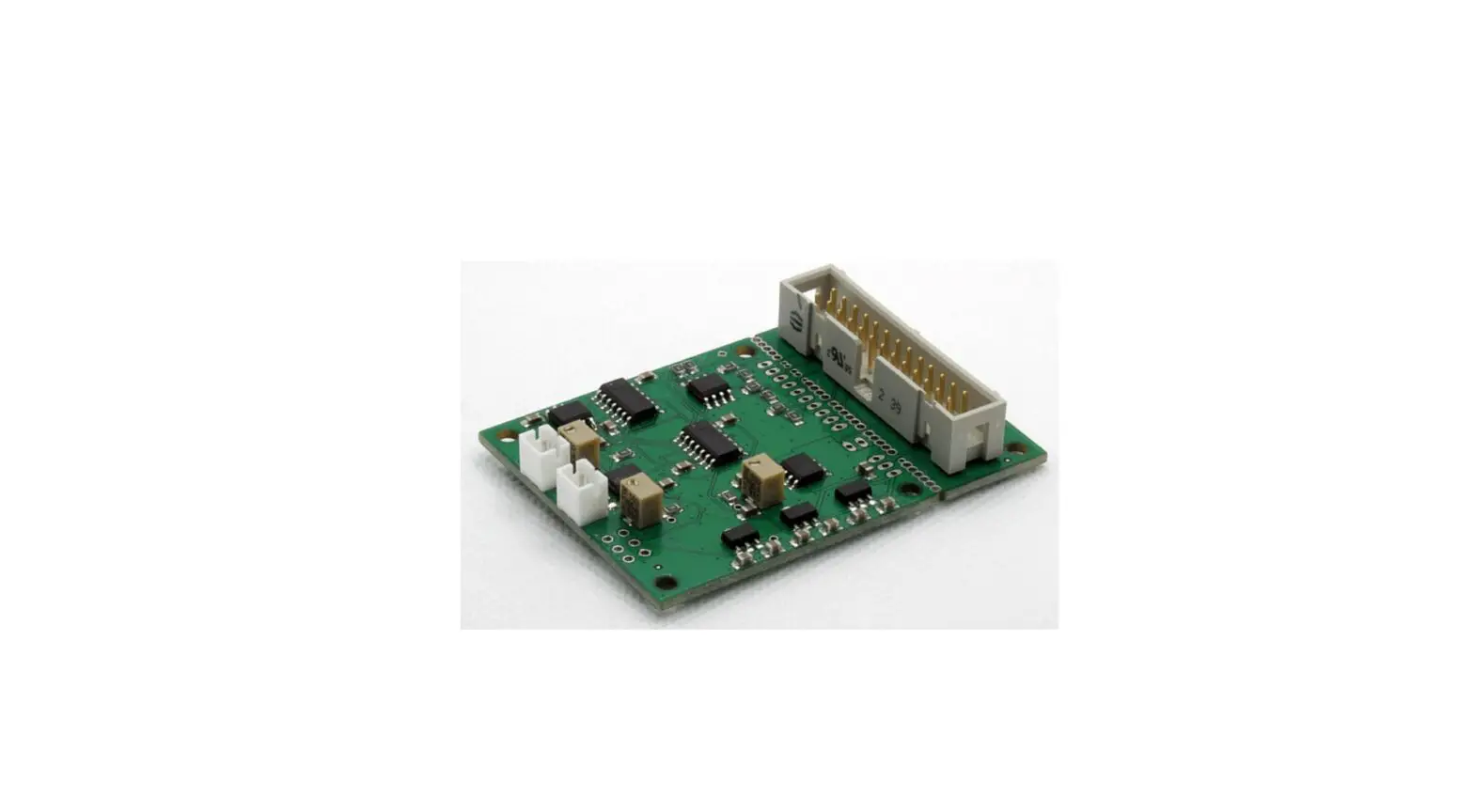

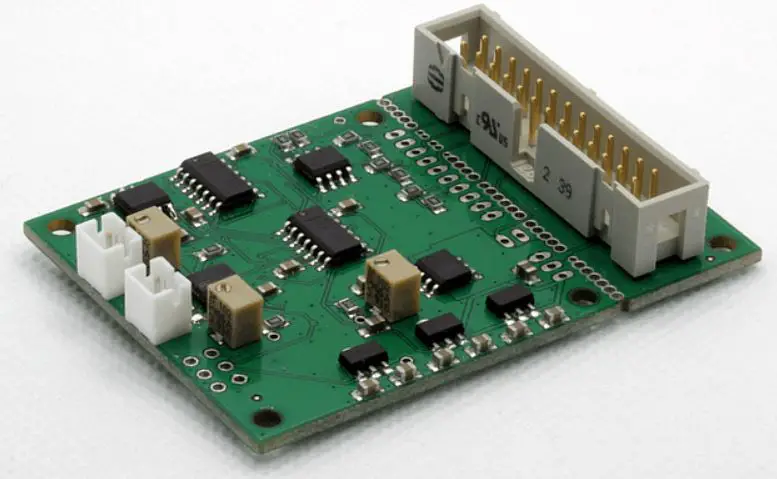
HALaser Systems HALdrive X20 Converter Board
Copyright
This document is © by HALaser Systems.
E1701 boards, their hardware and design are copyright / trademark / legal trademark of HALaser Systems.
E1803D boards, their hardware and design are copyright / trademark / legal trademark of HALaser Systems.
HALdrive and HALscan, their hardware and design are copyright / trademark / legal trademark of HALaser Systems.
XY3-100 is copyright/trademark by Laser Industry Association International.
All other names / trademarks are copyright / trademark / legal trademark of their respective owners.
History
| Date | Changes in document |
| 04/2023 | Connector description simplified |
| 03/2023 | Pin-names of XY3-100 interface clarified |
| 01/2023 | Added wiring for E1702S |
| 01/2023 | Extended power supply voltage range described |
| 12/2022 | Unused pinout removed |
| 10/2022 | Description of wiring with E1701D/E1803D extended/clarified |
| 08/2022 | Added diameter of holes in mechanical drawing section |
| 04/2022 | Maximum current for galvo outputs specified |
| 12/2021 | Pinout description extended, power supply wiring description added |
| 06/2021 | XY3-100 certified logo added |
| 05/2021 | Added pinout and description of HALdrive OEM |
| 04/2021 | Wiring schemes for E1701D and E1803D added |
| 10/2020 | Added description for 10V hardware variant |
| 07/2020 | Added section for initial operation |
| 06/2020 | Initial version |
Safety
The hardware described within this document is designed to control a laser scanner system. Laser radiation may effect a person’s health or may otherwise cause damage. Prior to installation and operation compliance with all relevant safety regulations including additional hardware-controlled safety measures has to be secured. The client shall solely be responsible to strictly comply with all applicable and relevant safety regulations regarding installation and operation of the system at any time.
Beside of that some laser equipment can be damaged in case it is controlled with wrong signals or signals outside a given specification. Thus it is highly recommended to check the output generated by this hardware using e.g. an oscilloscope to avoid problems caused by wrong configurations. This should be done prior to putting a system into operation for the first time, whenever some parameters have been changed or whenever any kind of software update was installed.
The hardware described here is shipped without any cover and without prefabricated equipment for electric installation. It is intended to be integrated in machines or other equipment. It is not a device for use “as is”, but a component which is intended to be used as part of a larger device, e.g. for integration in a machine with own housing or within an electrical cabinet. Prior to operation compliance with all relevant electric / electromagnetic safety regulations including additional hardware-controlled safety measures has to be secured. The client shall solely be responsible to strictly comply with all applicable and relevant regulations regarding installation and operation of the system at any time.
The hardware described here is an electrostatic sensitive device. This means it can be damaged by common static charges which build up on people, tools and other non-conductors or semiconductors. To avoid such a damage, it has to be handled with care and including all relevant procedures (like proper grounding of people handling the hardware, shielding/covering to not to let a person touch the hardware unwanted, proper packaging in ESD-bags, …). For more information please refer to related regulations and standards regarding handling of ESD devices. The EMC Directive (2014/30/EU) does not apply to this hardware as it is not intended for an end user (a person without knowledge of EMC) and as it is not otherwise made available on the market.
The Low Voltage Directive (2014/35/EU) does not apply to this hardware as the voltage supply is below the 50V AC / 75V DC limit.
This document describes the HALdrive digital XY3-100 to analogue converter hardware but may contain errors or may be changed without further notice.
Overview
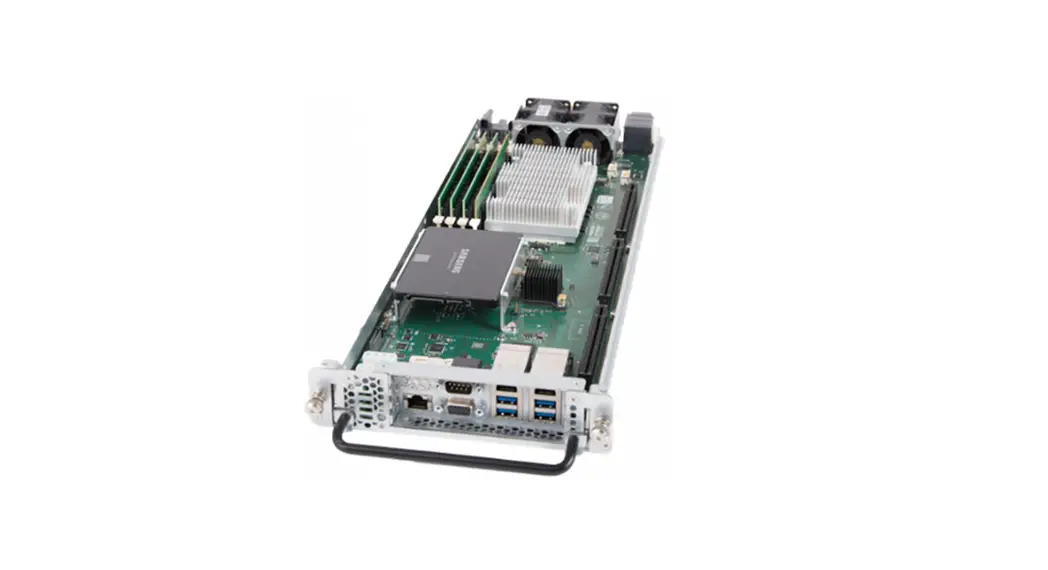
This document describes the HALdrive X20 converter board, its electrical characteristics and usage.
This board is designed to receive digital XY3-100 scanner controller signals and to convert them to 2x synchronous analogue output signals. So it acts as some kind of converter between two different signal types for controlling scanning systems/scanheads.
This board is not a ready-to-use device but a component which is intended to be integrated in larger devices or to be operated with an own housing.
Features
The HALdrive converter board provides the following features:
- accepts 2D input signals in XY3-100 format (X and Y position data, Z is ignored if available)
- synchronous output of analogue X and Y position data in +-5V.. +-10V range (values in between are available on request)
- 20 bit output resolution
- 100 kHz sampling/output frequency
- XY3-100 backchannel
- instant-on, so there is no boot-up time until the device is available
- input voltage range of +-15..+-24V, wider voltage range available on request
HALdrive Board And Connectors
The board provides the following connectors: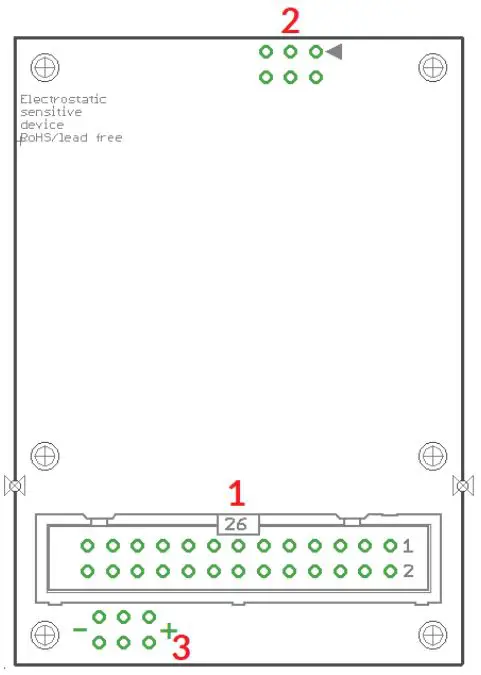
- XY3-100 interface for power supply and scanner input signals (as described below)
- 2,54mm 6pin connector for Galvo-X and Galvo Y analogue output signals
- Optional separate power supply input pin, when not already provided via connector (1)
Scanner Signals
The (optionally white) 26 pin connector expects the XY3-100 position signals and the power supply for the HALdrive board:
| Upper Row Of Pins | Signal | Voltage | Remarks | Lower Row Of Pins | Signal | Voltage | Remarks |
| 1 | SYNC- | XY3-100- compatible signals | 2 | SYNC+ | XY3-100- compatible signals | ||
| 3 | CLK- | 4 | CLK+ | ||||
| 5 | X- | 6 | X+ | ||||
| 7 | Y- | 8 | Y+ | ||||
| 9 | 10 | ||||||
| 11 | BACK- | 12 | BACK+ | ||||
| 13 | 14 | ||||||
| 15 | 16 | ||||||
| 17 | +V | +15..24V | Power supply from scanner card | 18 | +V | +15..24V | Power supply from scanner card |
| 19 | +V | +15..24V | 20 | GND | GND | ||
| 21 | GND | GND | 22 | GND | GND | ||
| 23 | -V | -15..24V | 24 | -V | -15..24V | ||
| 25 | -V | -15..24V | 26 |
When the HALdrive is used together with the E1803D scanner controller card, a direct 1:1 connection can be established between the white, 26 pin scanner signal connector of the E1803D controller and this connector. Then power has to be supplied via the three screw-connectors of the E1803D (for details please refer to manual of E1803D scanner controller card).
For all other scanner controller cards, wring has to be done according to their pinout. For further information
Galvo X and Y Signals
A standard 6 pin 2,54 mm header, to be used with an IDC connector:
| Pin | Signal | Description |
| 1 | NC | Unused and reserved for future use, do not connect! |
| 2 | NC | Unused and reserved for future use, do not connect! |
| 3 | Galvo-Y | analogue output with voltage possible in range +-5V..+-10V |
| 4 | Galvo-X | analogue output with voltage possible in range +-5V..+-10V |
| 5 | GND | Common ground for Galvo-X |
| 6 | GND | Common ground for Galvo-Y |
Pins 3 and 4 typically work in range -5V..+5V. For the +-10V hardware variant the Pins 3 and 4 work in range -10V..+10V. Pins 5 and 6 is connected to GND.
The maximum current to be pulled out of each of the outputs should never exceed 20 mA. Lower currents are recommended to avoid unnecessary heating of the whole board.
Optional Power Supply Input
These are optional separate power supply input pins which can be used when power is not or can not provided via connector (1). Here a symmetric voltage in range +-15V..+-24V can be fed in. The two outer pins marked with “-” are for -15V..-24V, the two middle pins are for GND and the two other outer pins marked with “+” are for+15V..+24V power input.
When no power supply with symmetric/bipolar outputs is available, it is possible to combine two standard power supplies, here GND of the first power supply has to be connected with +V of the second power supply and with the GND-pins of the HALdrive: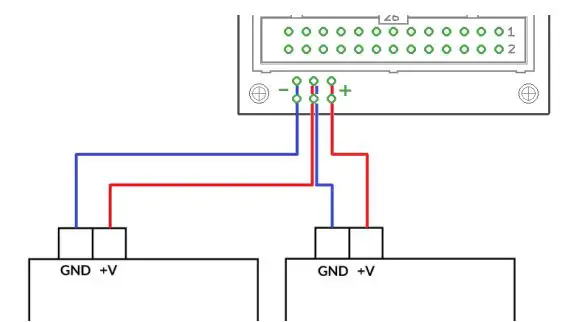
Initial Operation
After the HALdrive does not have a nameable boot-up time, putting it into operation consists of a few steps only:
- power up HALdrive and if necessary the connected scanner controller card
- power-up connected galvo drivers (can be done together with powering the HALdrive)
- start sending data from the scanner controller card to the HALdrive board
For security reasons it is recommended to not to send any data to the HALdrive while it is still turned off, so that it may start up in the middle of an already running data transmission. This may lead to a situation where the first valid position command received is at an extreme and unexpected position causing damage to the connected scanhead as it jumps to this extreme position too fast.
For the same reason also the galvo driver should be powered and be ready to use before the scanner controller sends any data, elsewhere when the connected galvos jump to an extreme position immediately, this may cause damage to the galvos and/or mirrors.
APPENDIX
APPENDIX A – Wiring between HALdrive and E1701D
To connect an E1701D scanner controller card with the HALdrive X20, a split cable is needed between the white laser/scanner interface connector of E1701D and the 26-pin connector of the HALdrive board: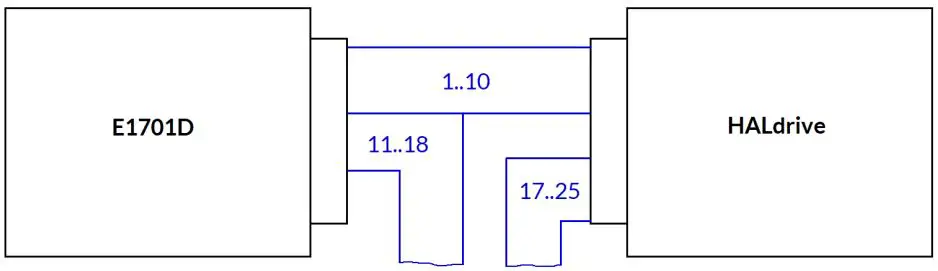
| E1701D pin | Description of signals from E1701D | Description of signals to HALdrive | HALdrive pin | ||
| 1 | – |
XY3-100 signal lines | – | 1 | |
| 2 | – | – | 2 | ||
| 3 | – | – | 3 | ||
| 4 | – | – | 4 | ||
| 5 | – | – | 5 | ||
| 6 | – | – | 6 | ||
| 7 | – | – | 7 | ||
| 8 | – | – | 8 | ||
| 9 | – | – | 9 | ||
| 10 | – | – | 10 | ||
| 11 | o |
Laser and control signals | Back-channel, optionally connect with pins 25/26 of E1701D | – | 11 |
| 12 | o | – | 12 | ||
| 13 | o | X | 13 | ||
| 14 | o | X | 14 | ||
| 15 | o | X | 15 | ||
| 16 | o | X | 16 | ||
| 17 | o | +15..+24V (from power supply) | o | 17 | |
| 18 | o | o | 18 | ||
| 19 | X | o | 19 | ||
| 20 | X | GND (from power supply) | o | 20 | |
| 21 | X | o | 21 | ||
| 22 | X | o | 22 | ||
| 23 | X | -15..-24V (from power supply) | o | 23 | |
| 24 | X | o | 24 | ||
| 25 | – | Back-channel, optionally connect with F-/F+ of HALdrive | o | 25 | |
| 26 | – | X | 26 | ||
“-” – connection to be established between E1701D and HALdrive
“o” – connection to external equipment but not between E1701D and HALdrive
“X” – no connection allowed here
APPENDIX B – Wiring between HALdrive and E1702S
To connect an E1702S scanner controller card with the HALdrive X20, a split cable is needed between the white laser/scanner interface connector of E1702S and the 26-pin connector of the HALdrive board: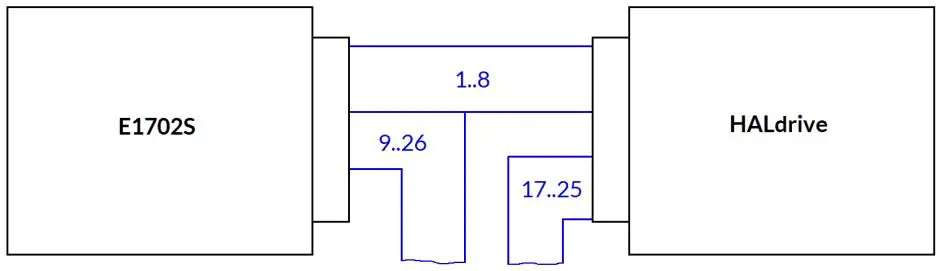
| E1702S pin | Description of signals from E1701D | Description of signals to HALdrive | HALdrive pin | ||
| 1 | – |
XY3-100 signal lines | – | 1 | |
| 2 | – | – | 2 | ||
| 3 | – | – | 3 | ||
| 4 | – | – | 4 | ||
| 5 | – | – | 5 | ||
| 6 | – | – | 6 | ||
| 7 | – | – | 7 | ||
| 8 | – | – | 8 | ||
| 9 | o | X | 9 | ||
| 10 | o | X | 10 | ||
| 11 | o |
Laser and control signals | X | 11 | |
| 12 | o | X | 12 | ||
| 13 | o | X | 13 | ||
| 14 | o | X | 14 | ||
| 15 | o | X | 15 | ||
| 16 | o | X | 16 | ||
| 17 | o | +15..+24V (from power supply) | o | 17 | |
| 18 | o | o | 18 | ||
| 19 | o | o | 19 | ||
| 20 | o | GND (from power supply) | o | 20 | |
| 21 | o | o | 21 | ||
| 22 | o | o | 22 | ||
| 23 | o | -15..-24V (from power supply) | o | 23 | |
| 24 | o | o | 24 | ||
| 25 | o | o | 25 | ||
| 26 | o | X | 26 | ||
“-” – connection to be established between E1702S and HALdrive
“o” – connection to external equipment such as Laser but not between E1702S and HALdrive
“X” – no connection allowed here
APPENDIX C – Wiring between HALdrive and E1803D
For connection between E1803D and HALdrive X20 a simple 1:1 wire is needed between the white, 26-pin IDC connector of the E1803D and the white IDC connector of the HALdrive board.
| E1803D pin | Description | HALdrive pin | |||
| 1 | – |
XY3-100 signal lines | – | 1 | |
| 2 | – | – | 2 | ||
| 3 | – | – | 3 | ||
| 4 | – | – | 4 | ||
| 5 | – | – | 5 | ||
| 6 | – | – | 6 | ||
| 7 | – | – | 7 | ||
| 8 | – | – | 8 | ||
| 9 | – | – | 9 | ||
| 10 | – | – | 10 | ||
| 11 | O | O | 11 | ||
| 12 | O | O | 12 | ||
| 13 | O | O | 13 | ||
| 14 | O | O | 14 | ||
| 15 | O | O | 15 | ||
| 16 | O | O | 16 | ||
| 17 | – | +15V..+24V (via E1803D screw terminal) | – | 17 | |
| 18 | – | – | 18 | ||
| 19 | – | – | 19 | ||
| 20 | – | GND (via E1803D screw terminal) | – | 20 | |
| 21 | – | – | 21 | ||
| 22 | – | – | 22 | ||
| 23 | – | -15V..-24V (via E1803D screw terminal) | – | 23 | |
| 24 | – | – | 24 | ||
| 25 | – | – | 25 | ||
| 26 | O | O | 26 | ||
“-” connection to be established between E1803D and HALdrive
“O” currently unused signal but can be connected
APPENDIX D – IDC connector pin numbering
Pin numbering of the white, 2,54 mm 26 pin IDC connector (according to pinout-tables shown in hardware description sections above) can be seen in below image: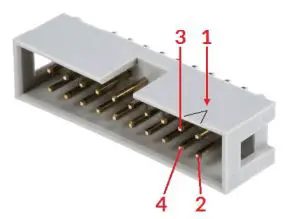
The first pin is marked by a small arrow in connector. Second pin is below of it, counting continues column-wise.
APPENDIX E – XY3-100 protocol description
For details about the XY3-100 protocol, please refer to https://lasia.org/documents.php
APPENDIX F – Board dimensions
Board dimension drawing, all values are given in unit mm.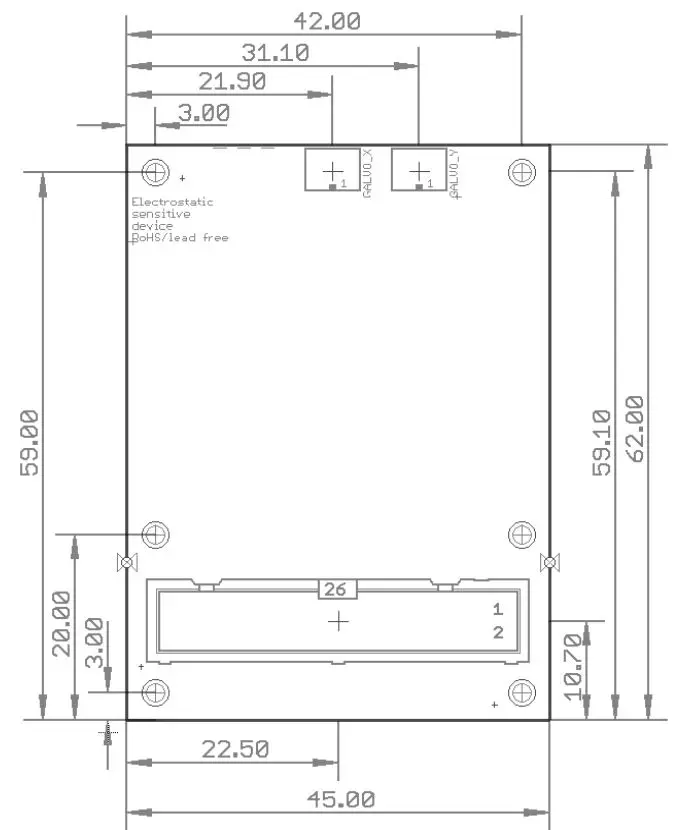
The six holes at the outer corners/edges have a diameter of 2,8 mm each.
 LasIA - Laser Industry Association