
Eccel RFID B1 EA USB External Antenna
Introduction
Device Overview
Features
- Low cost RFID Reader with MIFARE Classic®, MIFARE Ultralight® and NTAG2® support
- LED indicator of a tag presence in the antenna field
- External antenna socket
- Small footprint (34x34mm)
- Stand-alone mode (polling)
- Command interface via USB COM PORT with optional AES-128 encryption
- UART baud rate up to 921600 bps
- High transponder read and write speed
- 25°C to 85°C operating range
- 4 configurable GPIOs with interrupts
- 3 configurable PWMs
- Comparator
- ADC
- Current Output DAC
- AES-128 encryption engine
- Multiple internal reference voltages
- RoHS compliant
Applications
- Access control
- Monitoring goods
- Approval and monitoring consumables
- Pre-payment systems
- Managing resources
- Contact-less data storage systems
- Evaluation and development of RFID systems
Description
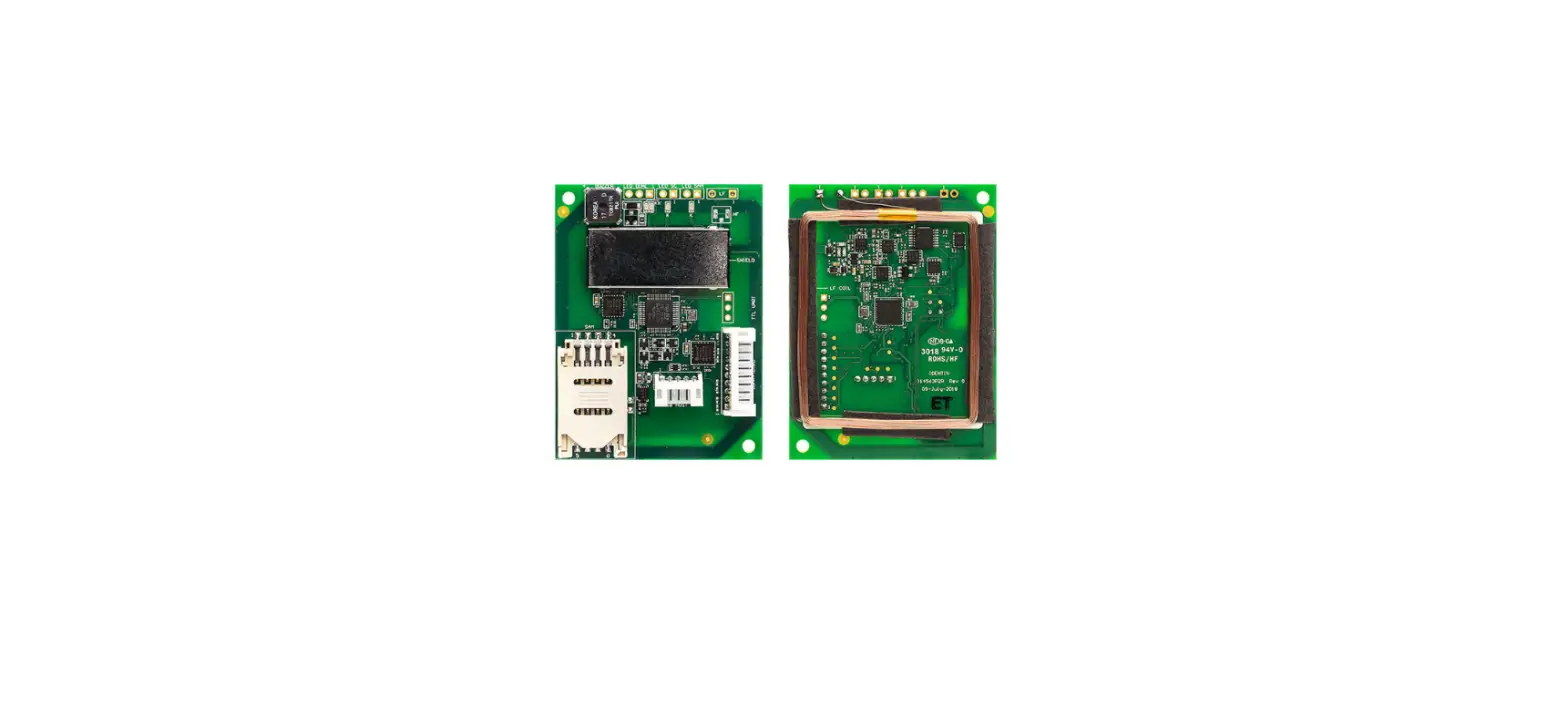
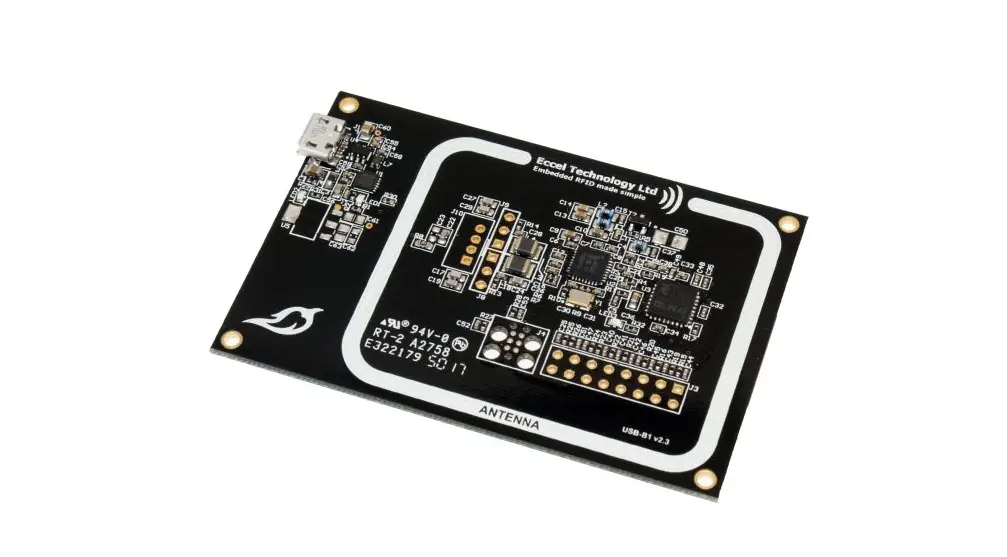
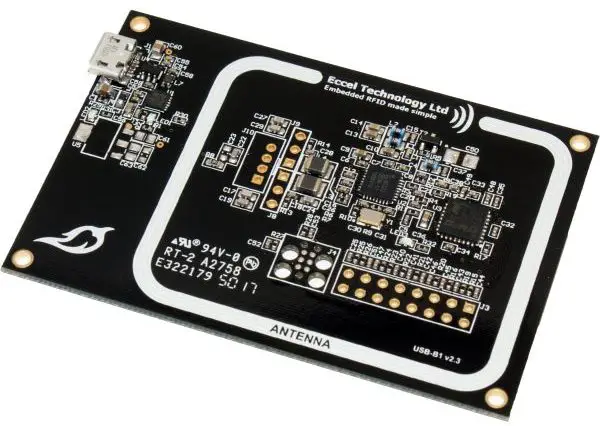
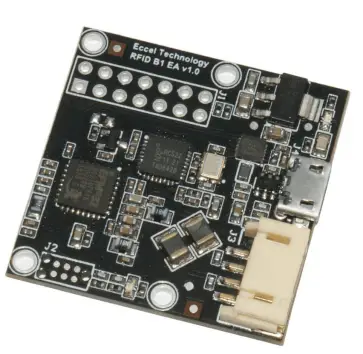
The RFID B1 EA (External Antenna) USB module is an expansion of the RFID B1 module – the second in an evolving family of 13.56 MHz sub assemblies from Eccel Technology Ltd (IB Technology). The product is designed with both embedded applications and computing / PLC platforms in mind. This product is an ideal design choice if the user wishes to add RFID capability to their design quickly and without requiring extensive RFID and embedded software expertise and time. An on board low power ARM microcontroller handles the RFID configuration setup and provides the user with a powerful yet simple command interface to facilitate fast and easy read/write access to the memory and features of the various transponders supported by this module.
System Overview
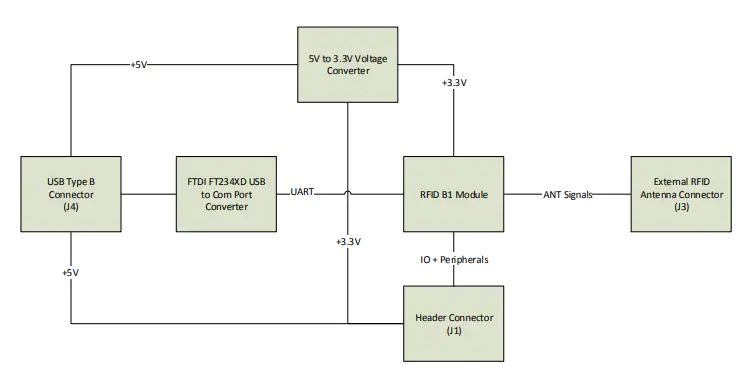
The RFID B1 EA (External Antenna) device is an extension of our RFID B1 module. Below, In Figure 1-1 the System Diagram is presented.
Features
| Parameter | Typical Value |
| Range (dependent upon antenna dimensions and tuning, tag: MIFARE Classic® 1K ISO card) a) External PCB antenna 25x25mm (RFID-ANT1356-25×25-300) b) External PCB antenna 50x50mm (RFID-ANT1356-50×50-300) a) External PCB antenna 80x80mm (RFID-ANT1356-80×80-300) |
up to 40 mm up to 50 mm up to 70 mm |
| Nominal RF frequency | 13.56 MHz |
| Supported tags | MIFARE Classic®, MIFARE Ultralight®, NTAG2® |
| Time needed to read the whole tag memory (MIFARE Classic® 1K) | 0.5 s |
| Time needed to write the whole tag memory (MIFARE Classic® 1K) | 0.6 s |
| Width x Length | 34 x 34 mm |
Connectors
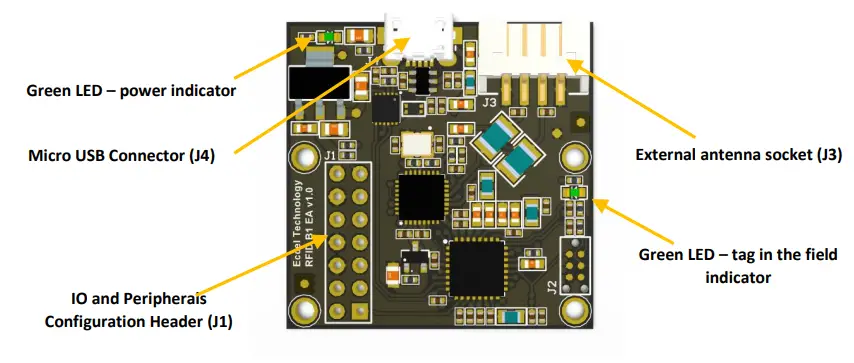
In Picture 1-1 there are marked connectors available for the user when working with the B1 EA USB device. All connectors are described below.
USB Connector (J4)
The device provides communication and power via USB connector J4. It is a micro USB Type B connector. The USB port, connected to the FTDI FT234XD chip provides USB to COM Port functionality. The user can configure the COM Port with a baud rate up to the maximum allowed by the RFID B1 module.
External antenna socket (J3)
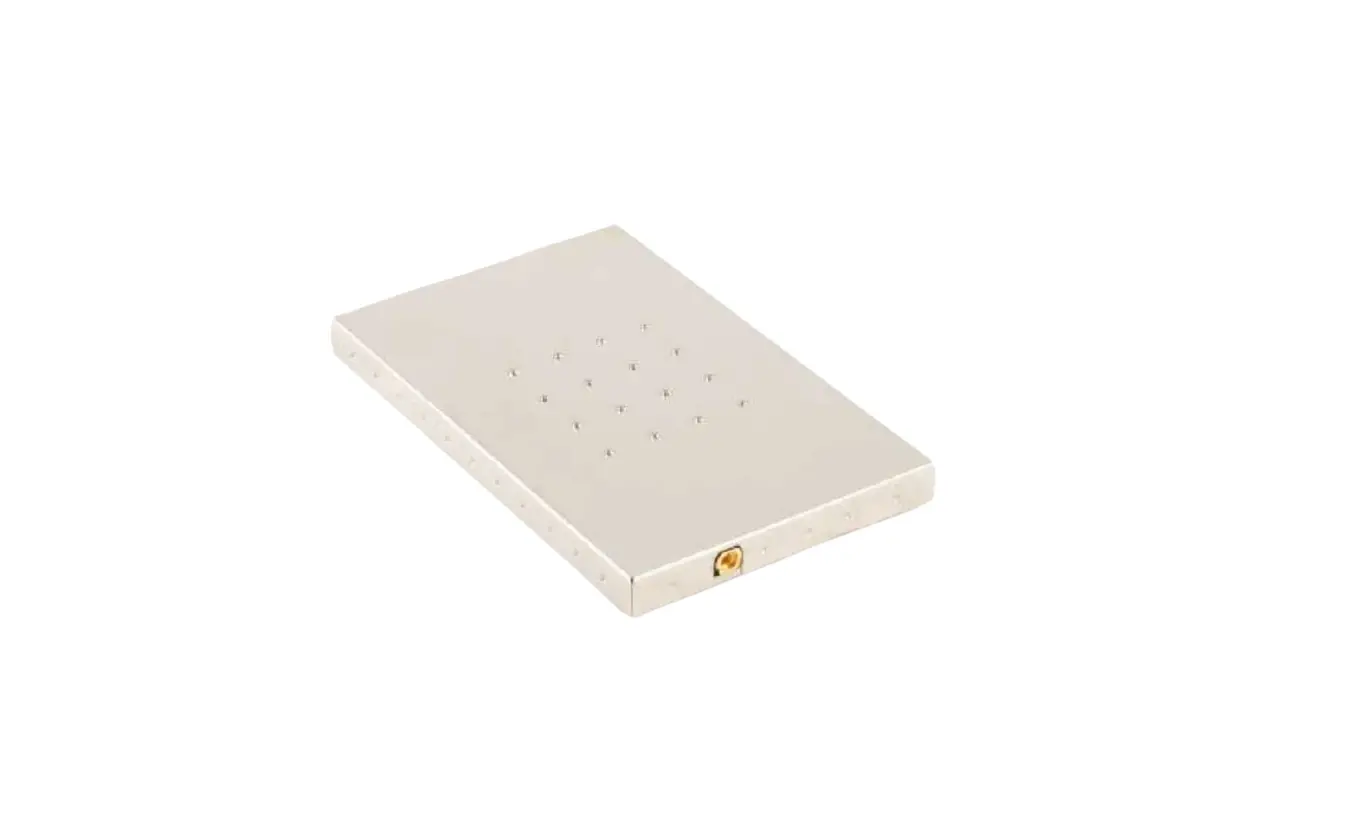
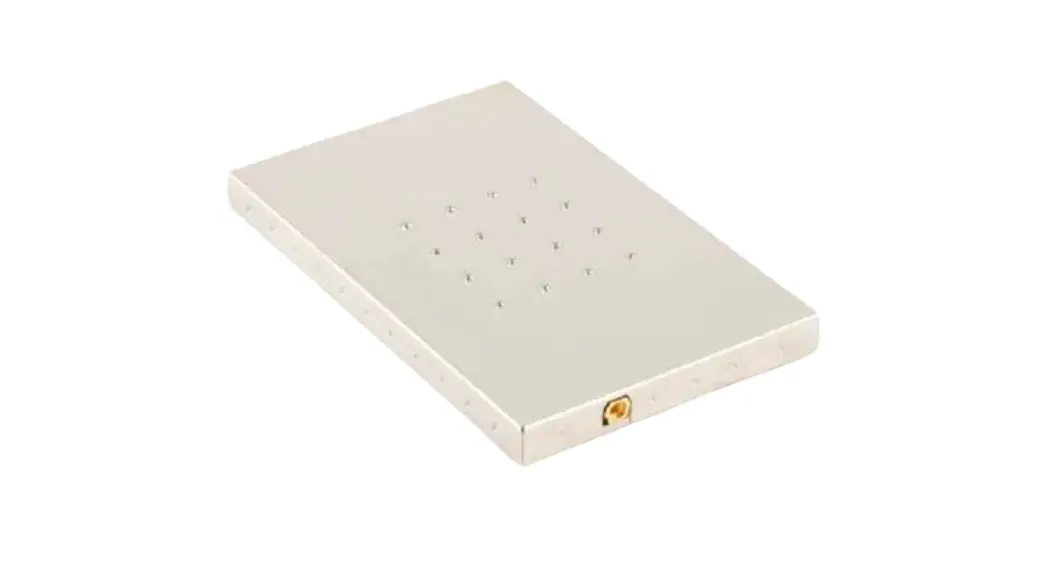
The user has the option to work with an external RFID antenna connected to the RFID B1 EA USB device. Connector J3 is where this should be connected. Eccel Technology Ltd provides a variety of RFID antennas which the user can use together with this device.
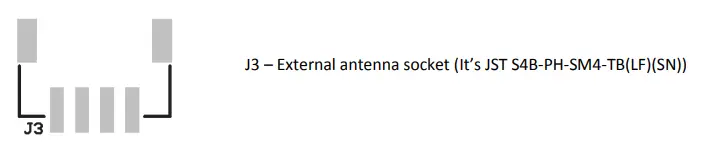
We recommend using our external antennas from series RFID-ANT1356-AAxBB-CCC, where AAxBB are the antenna dimensions in mm and CCC is the cable length in mm.
- 25×25-300 or 25×25-800
- 50×50-300 or 50×50-800
- 80×80-300 or 80×80-800
- 10×50-300 or 10×50-800
We can also design antennas with higher read range and custom dimensions on request. More information about antennas: https://eccel.co.uk/product-category/antennas/
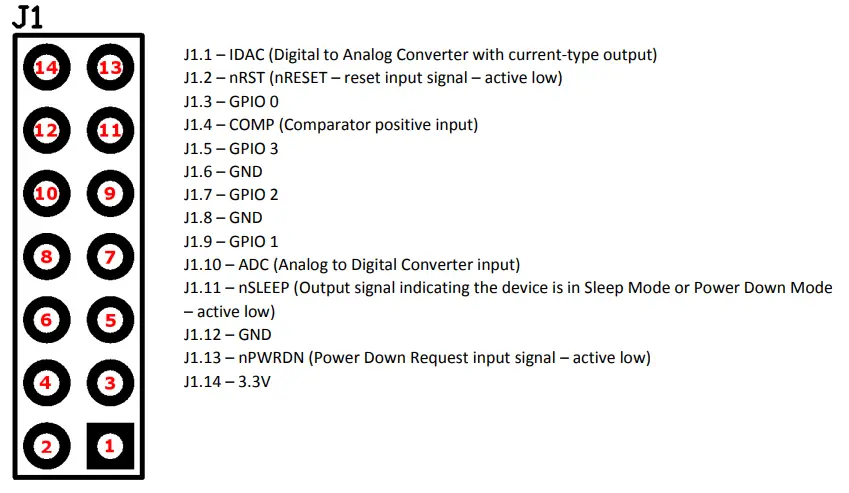
IO and Peripheral Configuration Header (J1)
The device PCB connects the pins on this header to all IOs and peripherals provided by the onboard RFID B1 module and a few pins are available providing +3.3V and GND signals.
LEDs
There are 2 LEDs installed on the board. Each of them has its own functionality:
- LED1 (next to the USB socket) – indicates that the reader is powered.
- LED2 (next to the antenna socket) – indicates a tag presence in the reader antenna field.
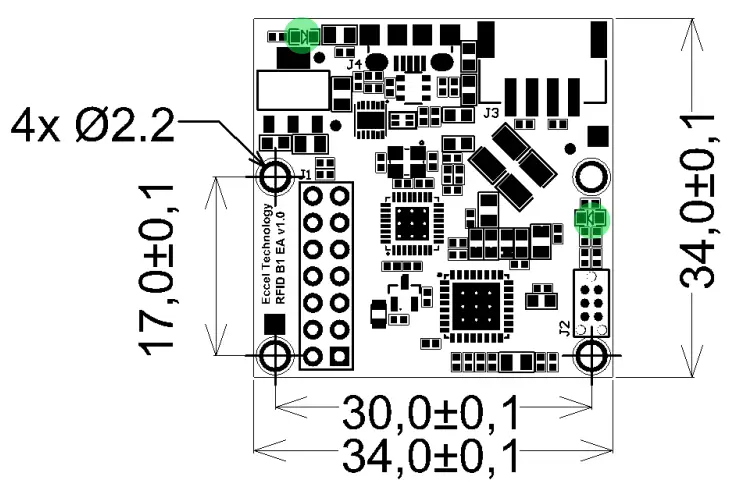
All of the LEDs are marked in green in Figure 4-1.
Electrical Characteristics
Test Conditions
Typical device parameters were measured at an ambient temperature 22°C ±3°C and using a power supply of 5V ± 5%.
Absolute Maximum Ratings
| Symbol | Parameter | Min | Max | Unit | Notes |
| TS | Storage Temperature | -40 | 150 | °C | |
| VUSBMAX | USB Supply Voltage | 0 | 5.5 | V | |
| VIOMAX | Input Pin Voltage | -0.3 | 3.5 | V | |
| IIOMAX | Output Pin Current | 0 | 6 | mA | |
| IANT | ANT1 and ANT2 Current | 0 | 100 | mA | Maximum continuous current. This depends upon the impedance of the circuit between ANT1 and ANT2 at 13.56MHz. |
Operating Conditions
| Symbol | Parameter | Min | Max | Unit |
| TO | Ambient Temperature | -25 | 85 | °C |
| VUSB | USB Supply Voltage | 4.5 | 5.5 | V |
| V3V3 | +3.3V Generated Voltage | 3.235 | 3.365 | V |
GPIO
| Symbol | Parameter | Min | Typ | Max | Unit | Notes |
| VIOIL | Input Low Voltage | 0.3V3V3 | V | |||
| VIOIH | Input High Voltage | 0.7V3V3 | V | |||
| IIOMAX | Output Pin Current | ± 6 | mA | |||
| IIOLEAK | Input Leakage Current | ± 0.1 | ± 40 | nA | High impedance IO connected to V3V3 or GND. | |
| RIOESD | Internal ESD Series Resistor | 200 | Ω | |||
| VIOHYST | IO Pin Histeresis | 0.1V3V3 | V |
Antenna Output
| Symbol | Parameter | Min | Typ | Max | Unit | Notes |
| fANT | Antenna Signal Frequency | 13.56 | MHz | ±30 ppm (-20°C – 70°C). | ||
| fANTAG | Antenna Signal Frequency Aging | 0 | 3 | ppm | At 25°C. | |
| VANTH | Antenna High Level Output Voltage | V3V3 – 0.64 | V | IANT = 80mA. | ||
| VANTL | Antenna Low Level Output Voltage | 0.64 | V | IANT = 80mA. | ||
| IANT | ANT1 and ANT2 Current | 0 | 60 | 100 | mA | Maximum continuous current. This depends upon the impedance of the circuit between ANT1 and ANT2 at 13.56MHz. |
Flash
| Symbol | Parameter | Min | Typ | Max | Unit | Notes |
| CFE | Flash Erase Cycles Before Failure | 20000 | cycles | |||
| TFDR | Flash Data Retention Time | 10 | years | For ambient temperature < 85°C | ||
| 20 | years | For ambient temperature < 70°C |
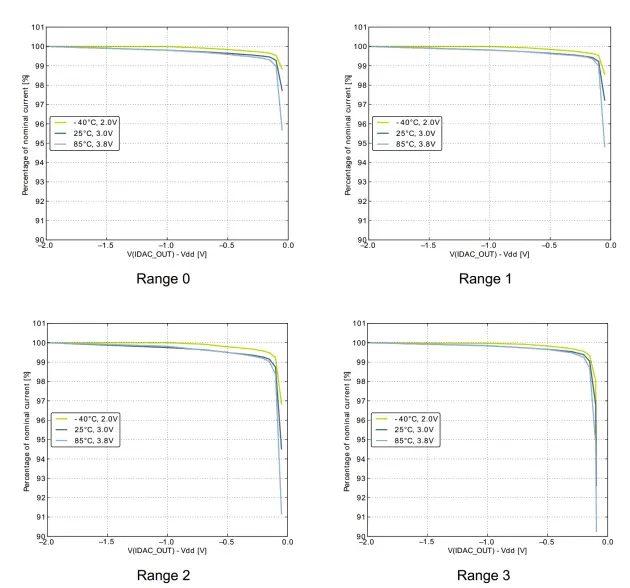
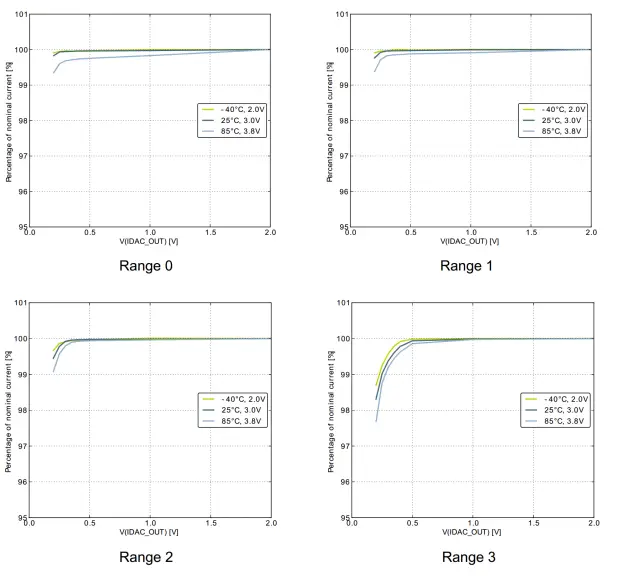
IDAC
| IDAC Parameters | |||||||||
| Precision | Source | Sink | |||||||
| Range No | Range [µA] | Step Size [nA] | Nominal Current [ µA] | Current drop at Vdd – 100 mV [%] | Temperature coefficient [nA/°C] | Voltage coefficient [nA/V] | Current drop at 200 mV [%] | Temperature coefficient [nA/°C] | Voltage coefficient [nA/V] |
| 0 | < 0 ; 1.6 > | 50 | 0.85 | 0.79 | 0.3 | 11.7 | 0.3 | 0.2 | 12.5 |
| 1 | ( 1.6 ; 4.7 > | 100 | 3.2 | 0.75 | 0.7 | 38.4 | 0.32 | 0.7 | 40.9 |
| 2 | ( 4.7 ; 16 > | 500 | 8.5 | 1.22 | 2.8 | 96.6 | 0.62 | 2.8 | 94.4 |
| 3 | ( 16 ; 64 > | 2000 | 34 | 3.54 | 10.9 | 159.5 | 1.75 | 10.9 | 148.6 |
PWM
| PWM Parameters | ||||
| Period | Frequency | |||
| Minimum [µs] | Maximum [s] | Minimum [Hz] | Maximum [kHz] | Maximum Error [%] |
| 4.81 | 3.19 | 0.313 | 207.9 | 3 |
ADC
| Symbol | Parameter | Min | Typ | Max | Unit | Notes |
| VADCIN | Input Voltage Range | 0 | 2.5 | V | Internal 2.5V reference voltage used. | |
| IADCIN | Input Current | 100 | nA | |||
| CADCIN | Input Capacitance | 2 | pF | |||
| RADCIN | Input On Resistance | 1 | MΩ |
Comparator
| Symbol | Parameter | Min | Typ | Max | Unit | Notes |
| VCMPIN | Input Voltage Range | 0 | V3V3 | V | ||
| VCMPOFST | Offset Voltage | -12 | 0 | 12 | mV | |
| VCMPHYST | Hysteresis | 50 | mV |
Installation and operation
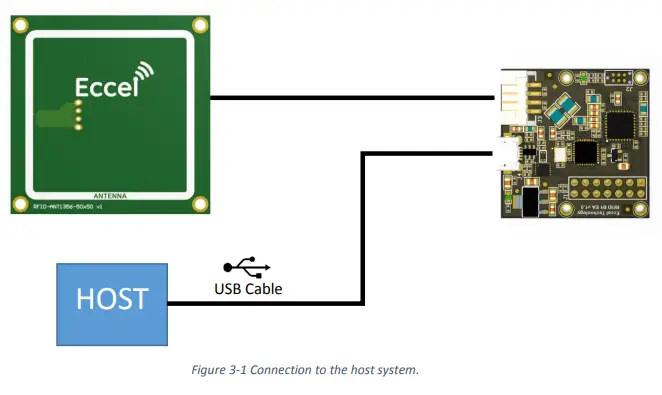
From the system and functionality point of view, the RFID B1 EA device gives the same features as the RFID B1 module, and the user should refer to the RFID B1 User Manual when working with the B1 EA. The FTDI chip expands the communication interface to the on-board RFID B1 module and allows the board to be connected to a computer and communicate with the device via a USB Com Port. Most systems have built-in drivers for such a Com Port.
For a quick test, the user can connect the RFID B1 EA to a computer and then start the B1-client application which allows the user to test all features of the device. The B1-client along with its user guide can be downloaded from here. We have also provide an application for simple configuration of the polling mode.
The best read range can be achieved when the tag is parallel to the surface of the antenna.
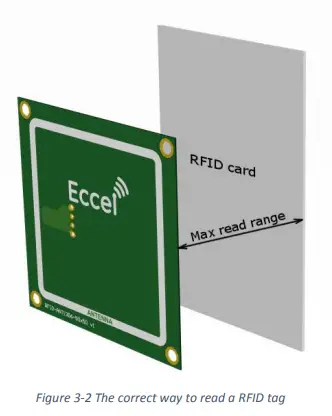
Figure 3-2 The correct way to read a RFID tag
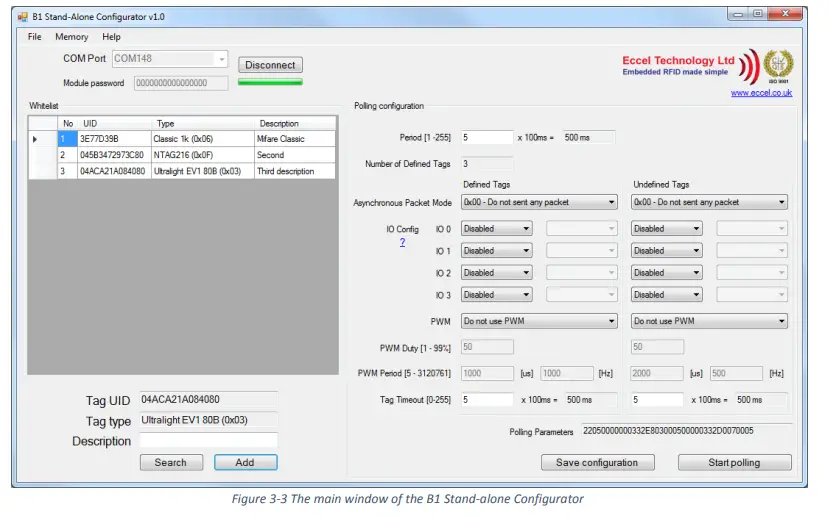
The RFID B1 EA can also operate in a stand-alone mode. The user can control all GPIO’s and add tags to the whitelist (a list of defined, authorised tags). For easy configuration of polling parameters we provide the B1 Stand-Alone Configurator application which can be downloaded from here. This application allows the user to simply search for a new tag, add it to the whitelist, configure polling parameters, enable/disable all of GPIOs and control them. For more information please refer to the RFID-B1 User Manual.
Mechanical Dimensions
Dimensions in mm. All LEDs are marked with green circles.
MIFARE, MIFARE Ultralight, MIFARE Plus, MIFARE Classic, and MIFARE DESFire are trademarks of NXP B.V.
No responsibility is taken for the method of integration or final use of the B1 based modules
More information about the B1 module and other products can be found at the Internet site: http://www.eccel.co.uk
or alternatively contact ECCEL Technology (IB Technology) by e-mail at: [email protected]
 Custom RFID/NFC solutions for your bussiness - Eccel Technology
 Antennas Archives - Eccel Technology