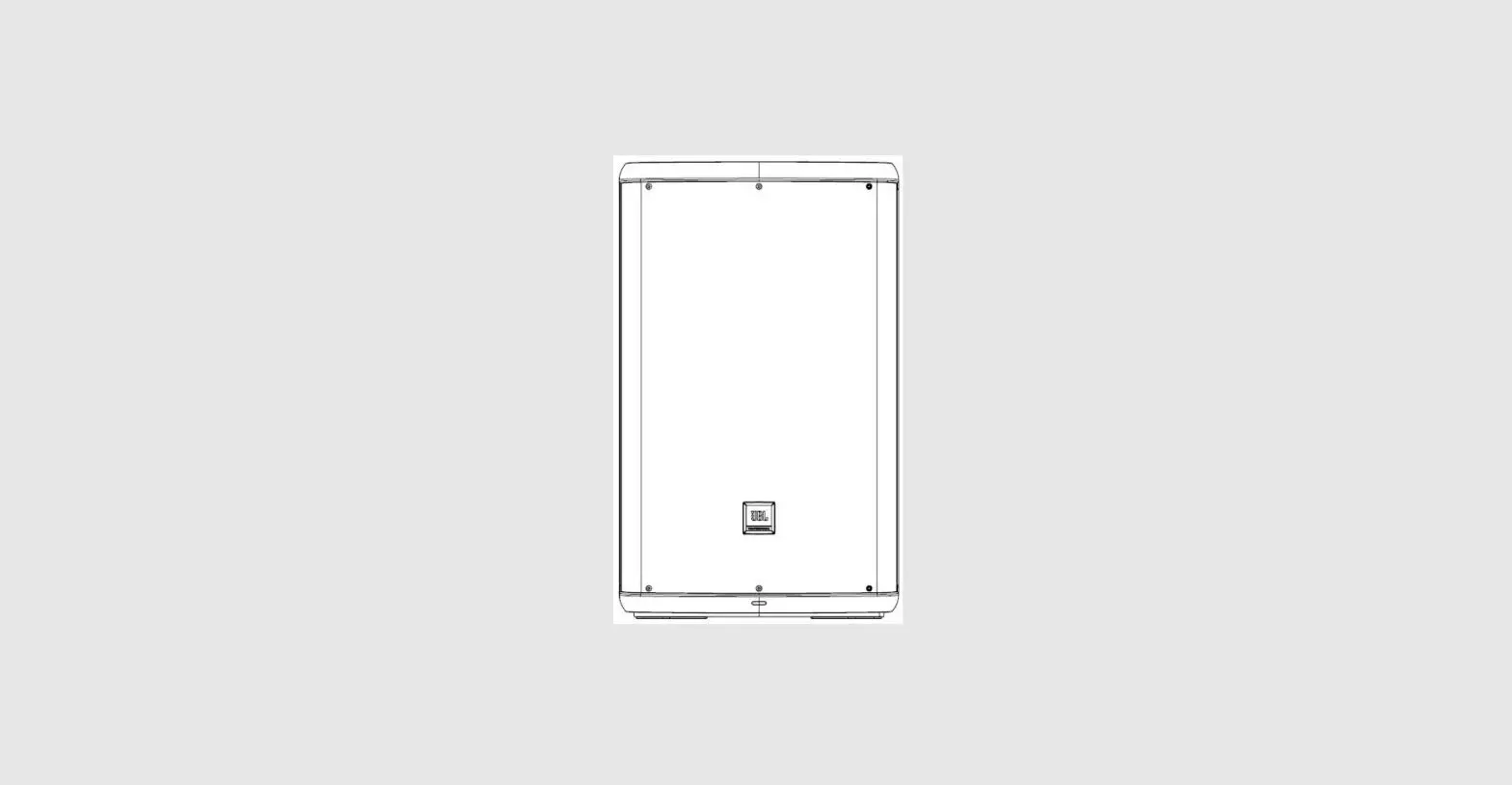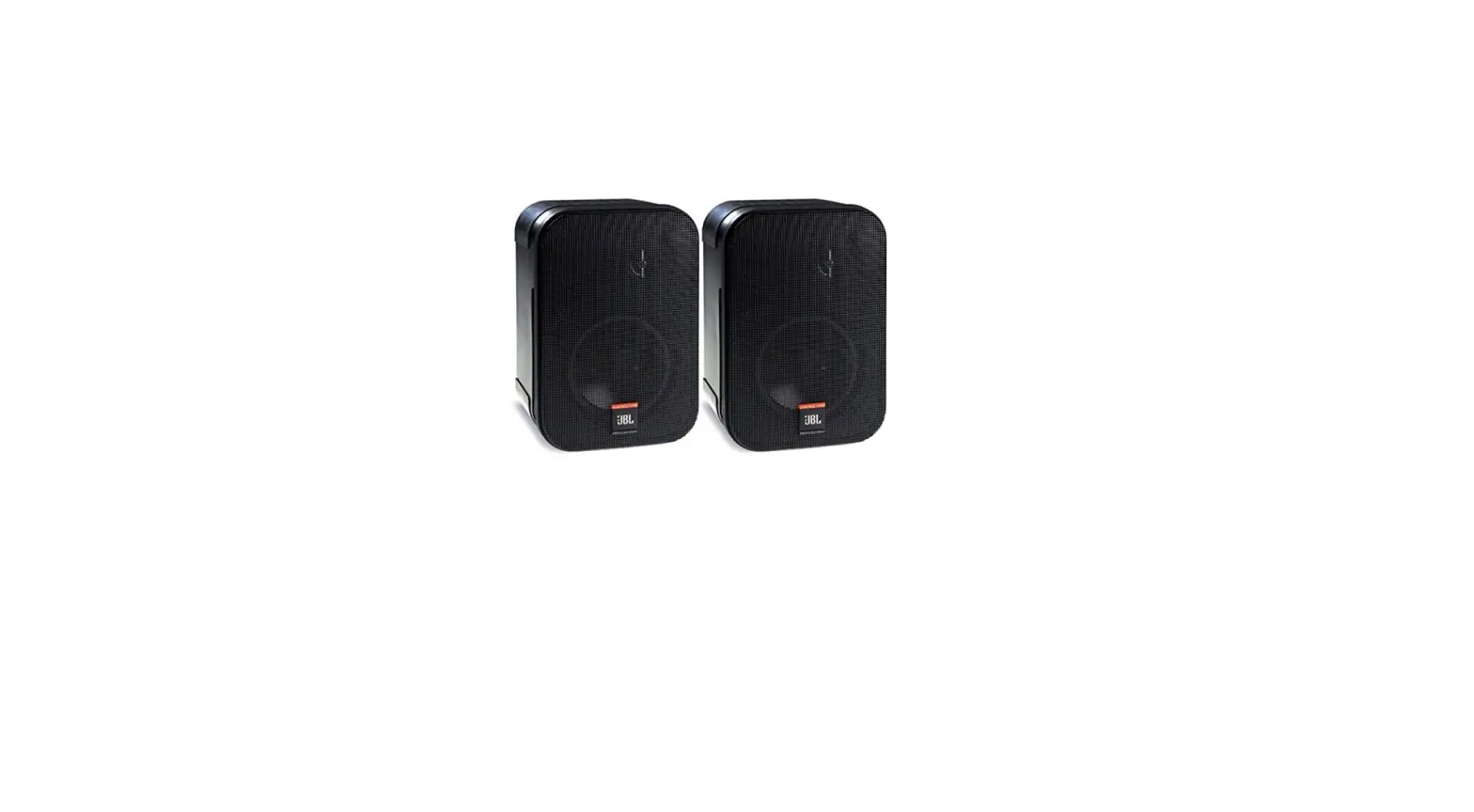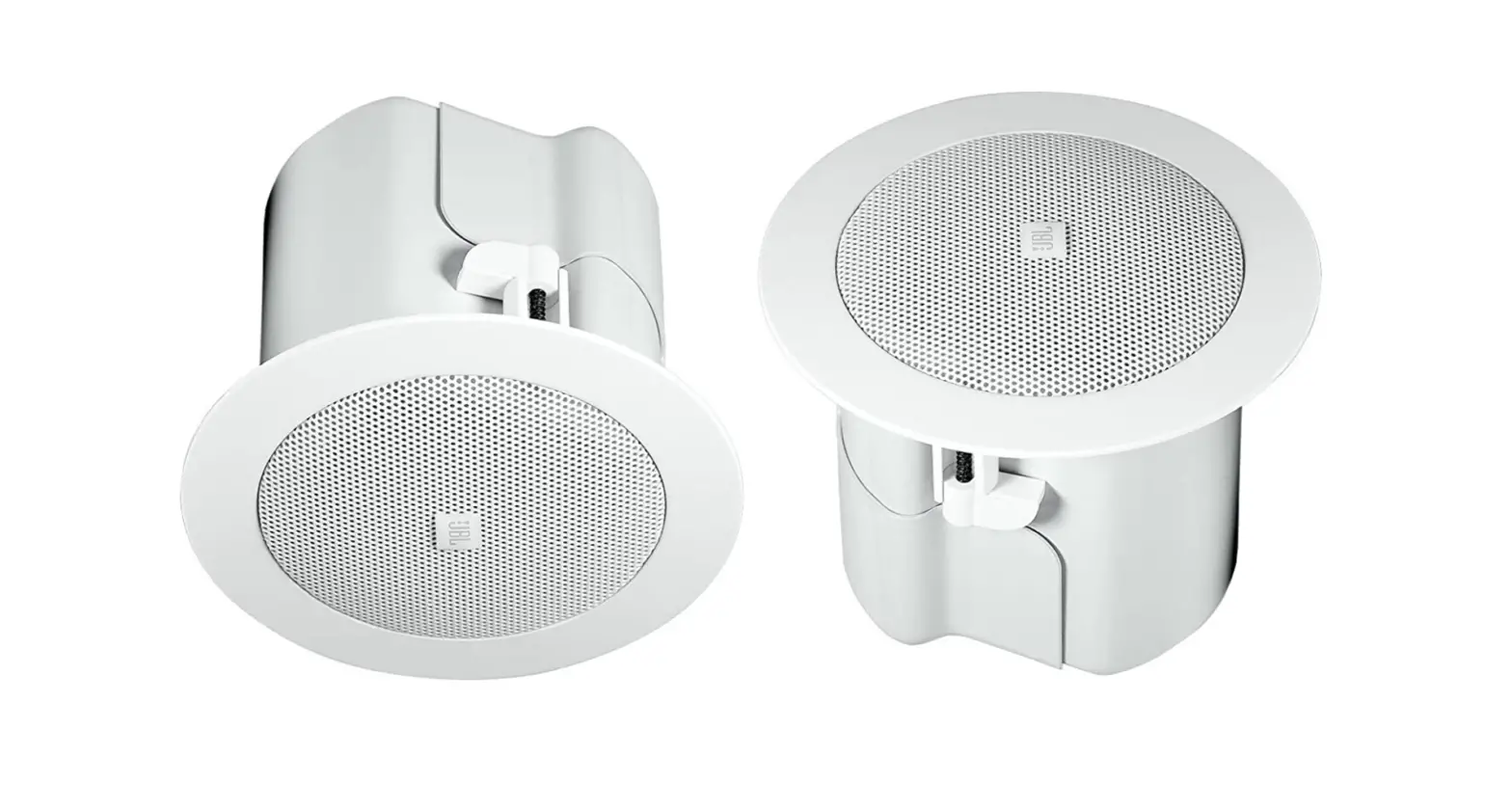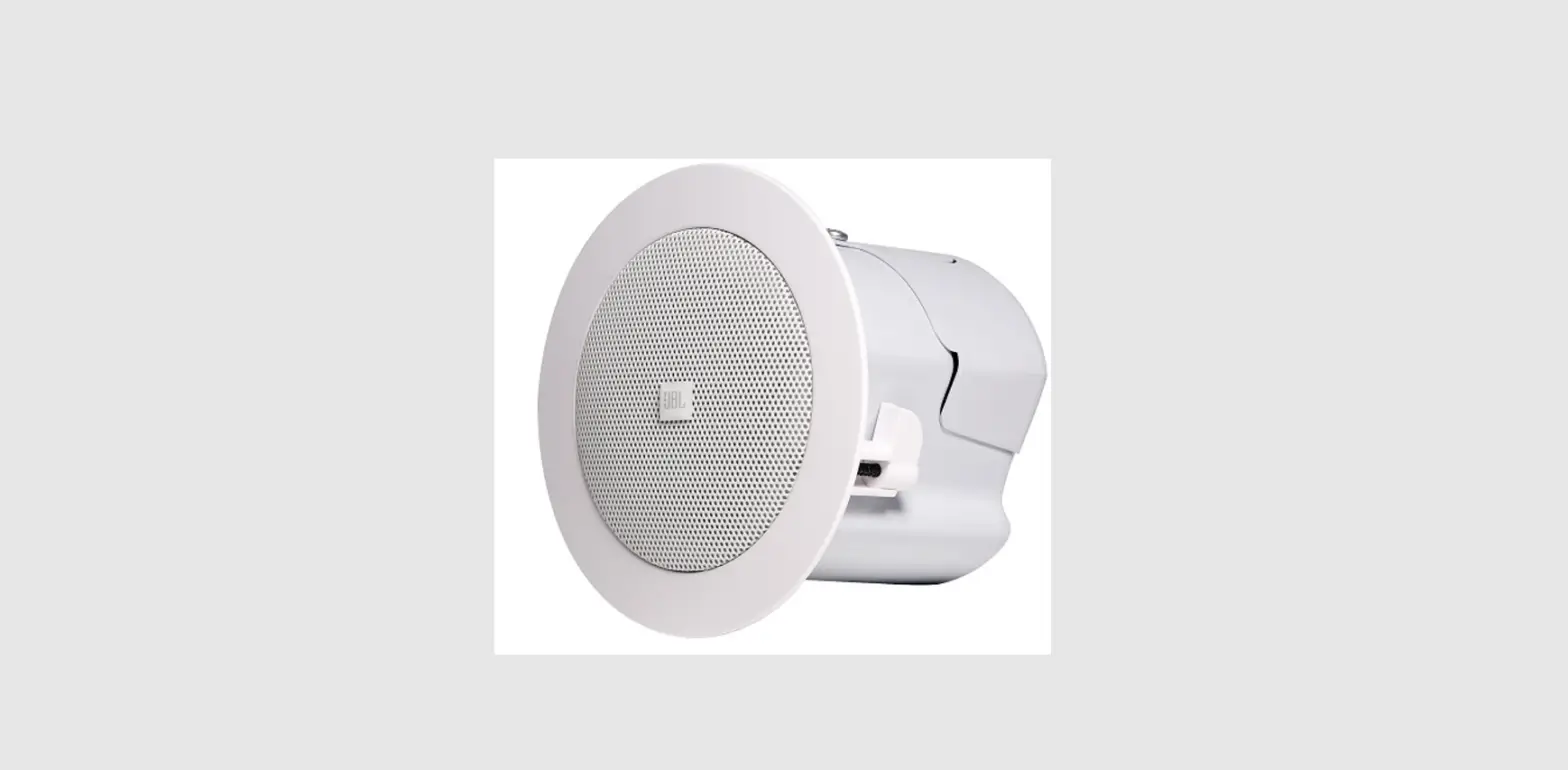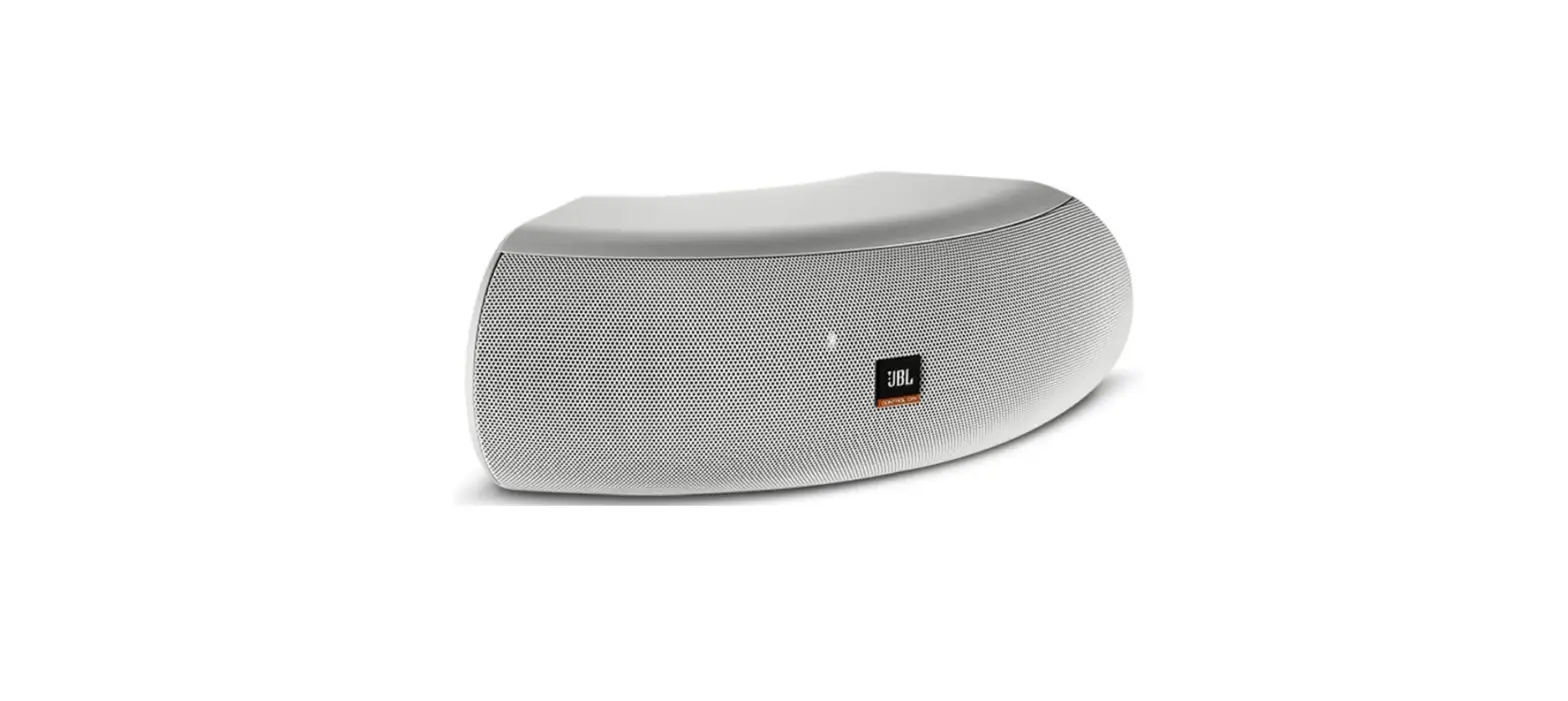

JBL Professional ControlCRV-WH High Design Loudspeaker
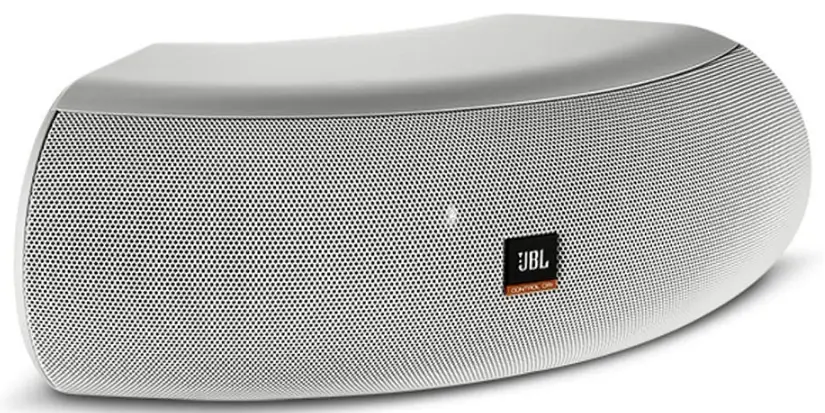
JBL CONTROL® CRV LOUDSPEAKERS
JBL Control CRV speakers are perhaps the most flexible and versatile loudspeakers ever developed. There are numerous mounting options. The JBL Control CRV speaker can be wall mounted or corner-mounted, or two, three or four speakers can be joined together to create loudspeaker solutions for a wide variety of coverage, appearance and mounting requirements.
This owner’s guide will cover the installation and wiring procedures for each mounting option. Simply decide how you will mount and use the speakers, and then follow the instructions for your specific application.
Please note that while the JBL Control CRV speaker is a general-purpose indoor/outdoor loudspeaker, it is not waterproof. The speaker should not be submerged or directly exposed to excessive amounts of water, ice, snow or sustained moisture.
UNPACKING THE SPEAKERS
If you suspect damage from transit, report it immediately to your carrier. Keep the shipping carton and packing materials for future use.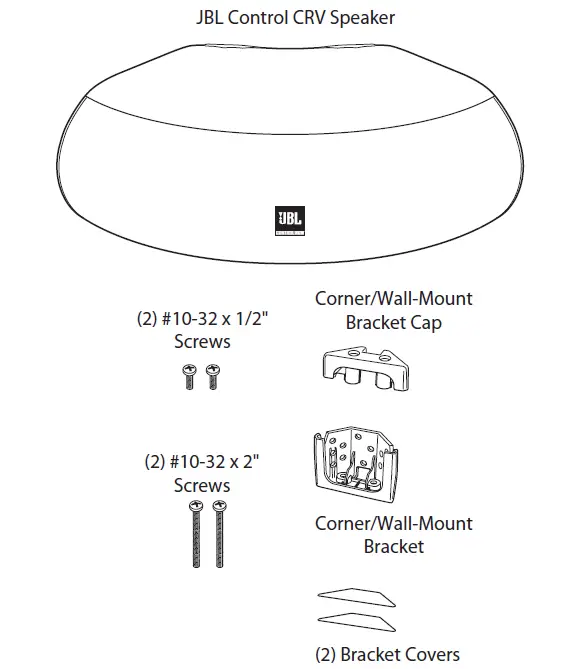
INSTALLATION
WALL SURFACE MOUNTING
CAUTION: Installation must be done by qualified persons using safe rigging standards.
The installer is responsible for proper selection and use of mounting hardware, to properly and safely wall-mount the speakers.
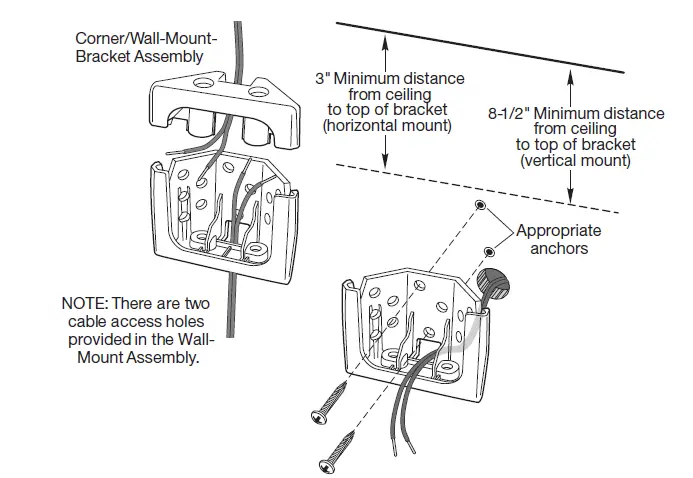
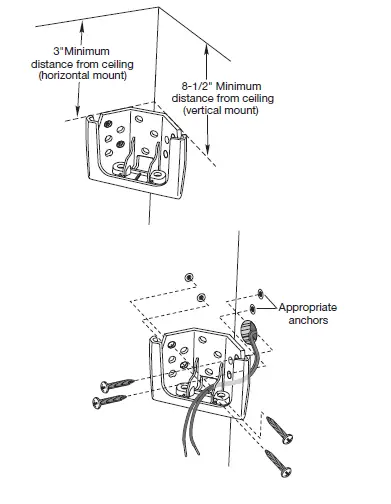
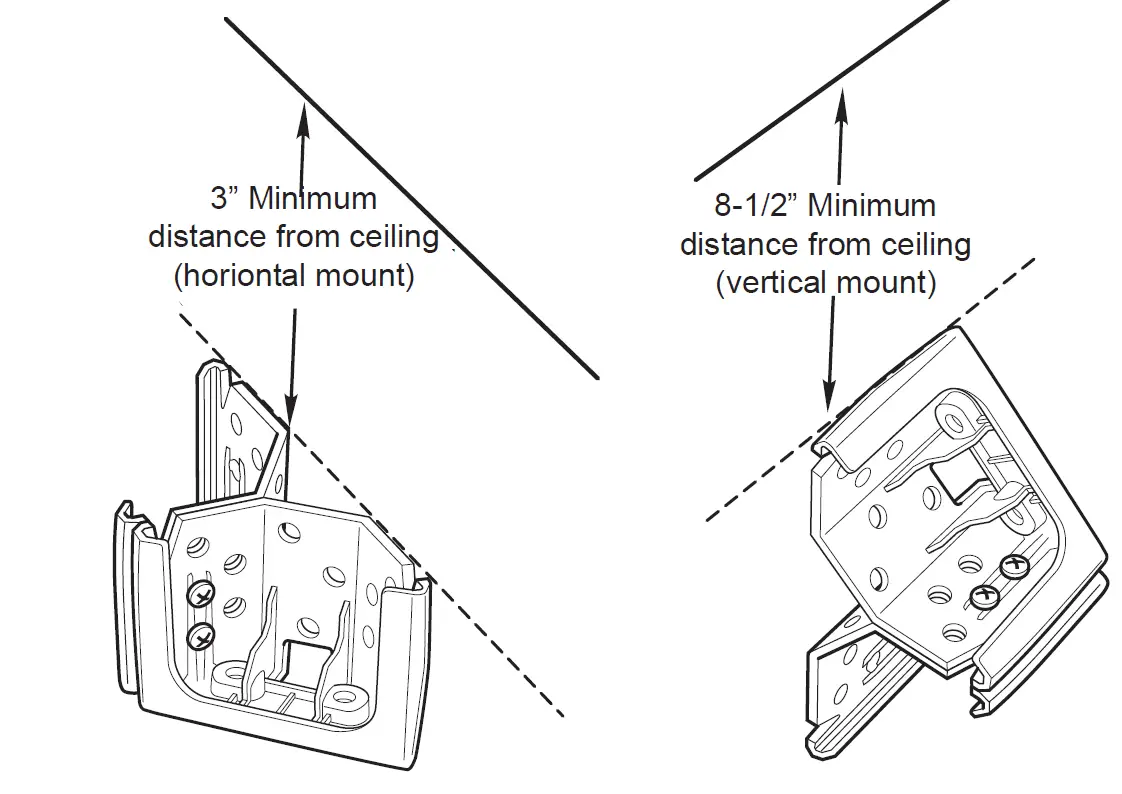
When deciding upon a location for the JBL Control CRV speaker, take care NOT to install the mounting bracket closer than 3” (7.6 cm) (horizontal) and 8-1/2” (21.5 cm) (vertical) to the ceiling. Any closer than the minimum measurements will not allow the clearance needed to position and slide the JBL Control CRV speaker into the mounting bracket.
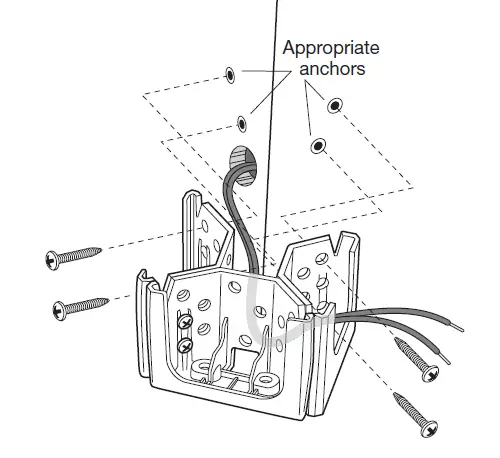
- Run the wiring to the location desired for mounting the JBL Control CRV speaker.
- Using a level, secure the mounting bracket to the wall. Be sure to use an appropriate anchor.

- Connect the stripped bare wires to the input terminals of the JBL Control CRV speaker.
- Set the tap selector switch to the desired 70V/100V tap, or to the THRU position for 4-ohm low-impedance operation.
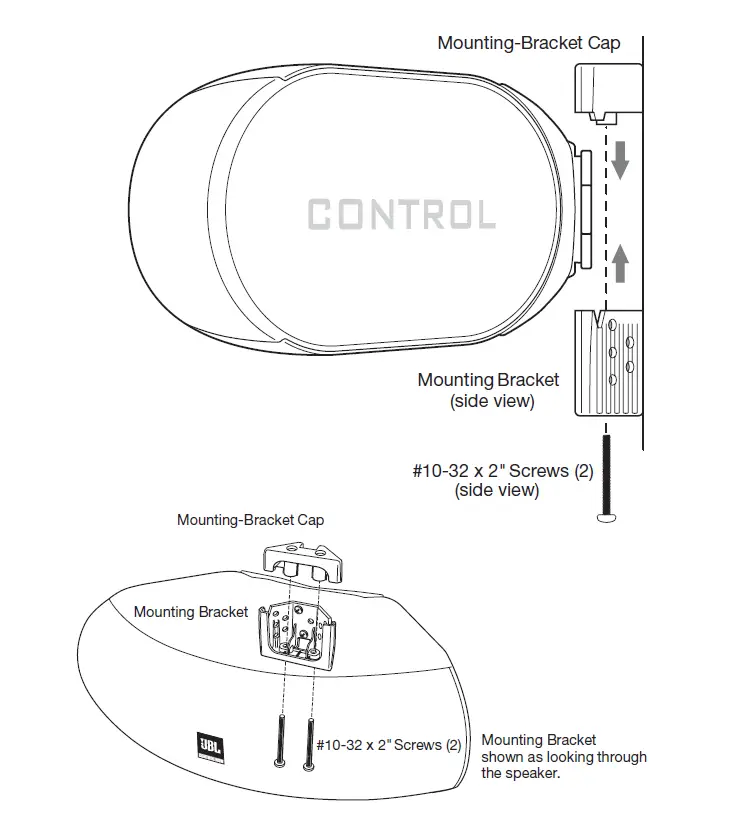
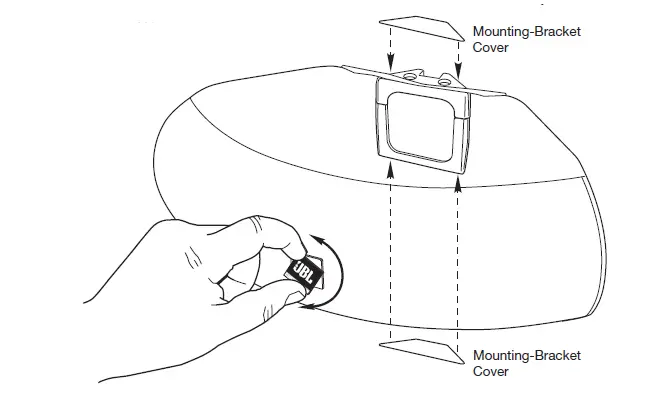
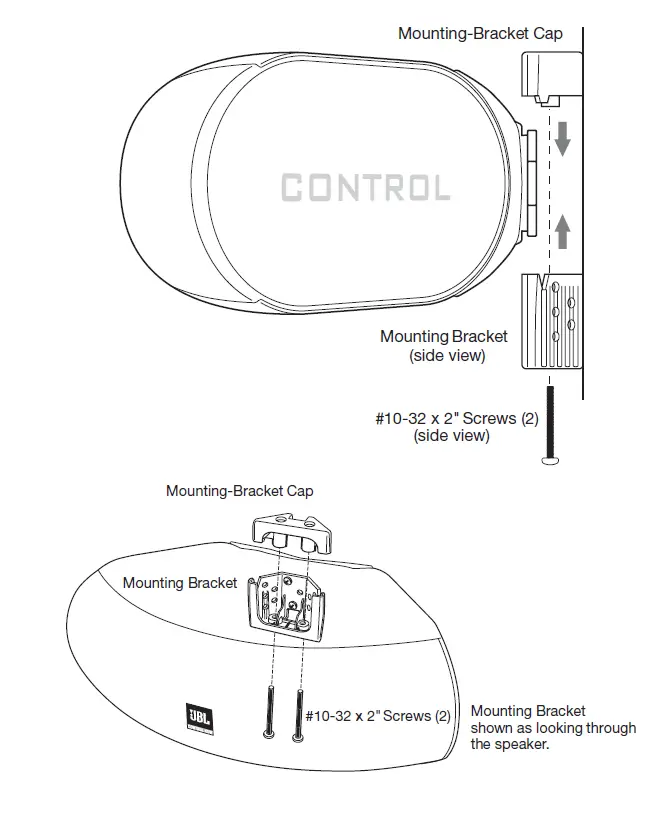
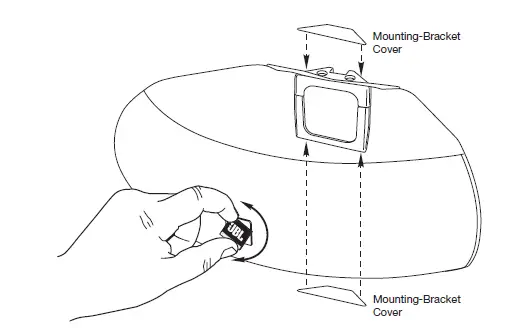
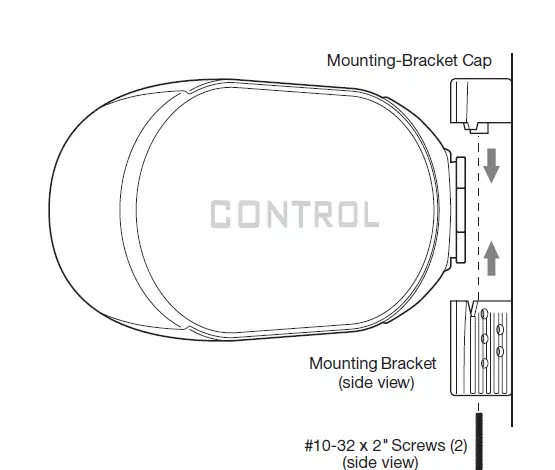
- The mounting bracket is designed to trap the flange of the JBL Control CRV speaker by securing the mounting-bracket cap with two screws through the bottom of the mounting bracket. Rest the JBL Control CRV speaker’s rear flange in the mounting bracket, as shown. This will support the weight of the speaker. Slide the mounting-bracket cap over the assembly. Secure the mounting-bracket cap by inserting two #10-32 x 2” screws (provided) in the bottom of the mounting bracket and tightening.

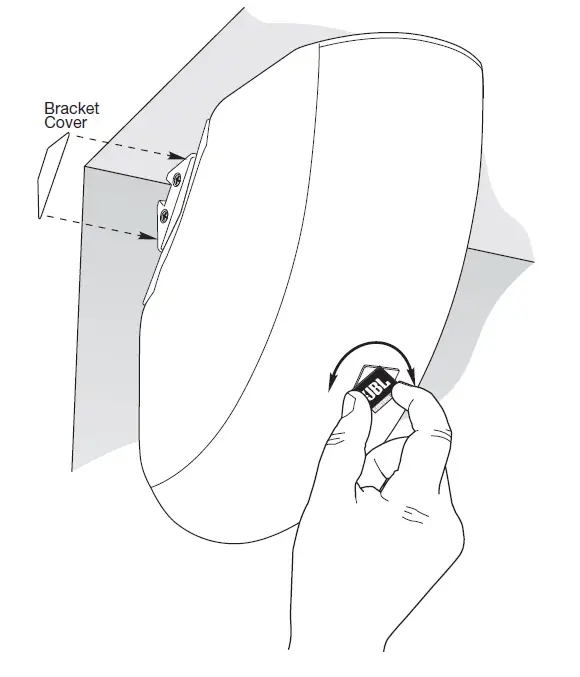
- To orient, the JBL logo into the correct position, pull the JBL logo slightly outward from the speaker grille and rotate it. The JBL logo is held in place by a spring. Peel the adhesive cover off the mounting-bracket cover and attach to the top and bottom of the mounting assembly.

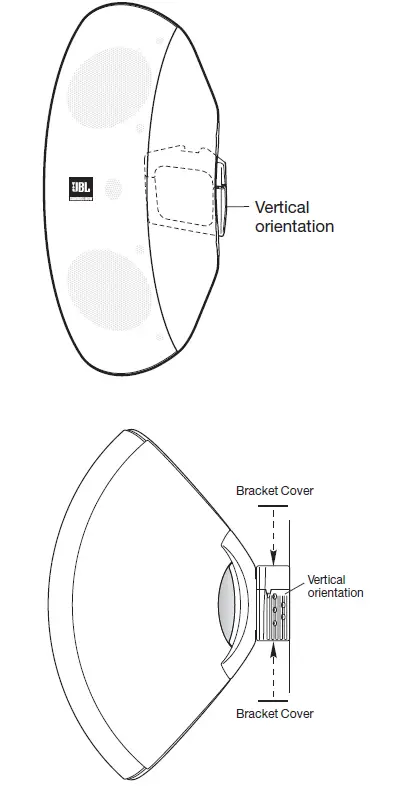
- VERTICAL BRACKET ORIENTATION —Regardless of whether you choose a vertical or horizontal orientation for the speaker,when mounting the JBL Control CRV speaker to a single wall surface, you should always install the wall-mounting bracket in a vertical orientation, as shown.

WALL CORNER MOUNTING
(Horizontal Speaker Orientation)
CAUTION: Installation must be done by qualified persons using safe rigging standards.
The installer is responsible for the proper selection and use of mounting hardware, to properly and safely wall-mount the speakers.
When deciding upon a location for the JBL Control CRV speaker, take care NOT to install the mounting bracket closer than 3” (7.6 cm) (horizontal) and 8-1/2” (21.5 cm) (vertical) to the ceiling. Any closer than the minimum measurements will not allow the clearance needed to position and slide the JBL Control CRV speaker into the mounting bracket.
- Run the wiring to the location desired for mounting the JBL Control CRV speaker.
- Attach the mounting bracket to the wall. Be sure to use appropriate anchors.

- Connect the stripped bare wires to the input terminals of the JBL Control CRV speaker.
- Set the tap selector switch to the desired 70V/100V tap, or to the THRU position for 4-ohm low-impedance operation.
- The mounting bracket is designed to trap the flange of the JBL Control CRV speaker by securing the mounting-bracket cap with two screws through the bottom of the mounting bracket. Rest the JBL Control CRV speaker’s rear flange in the mounting bracket, as shown. This will support the weight of the speaker. Slide the mounting-bracket cap over the assembly. Secure the mounting-bracket cap by inserting two #10-32 x 2” screws (provided) in the bottom of the mounting bracket and tightening.

- To orient, the JBL logo into the correct position, pull the JBL logo slightly outward from the speaker grille and rotate it. The JBL logo is held in place by a spring. Peel the adhesive cover off the mounting-bracket cover and attach to the top and bottom of the mounting assembly.

- VERTICAL BRACKET ORIENTATION —Regardless of whether you choose a vertical or horizontal orientation for the speaker when mounting the JBL Control CRV speaker to a single wall surface, you should always install the wall-mounting bracket in a vertical orientation.
WALL CEILING MOUNTING
(Vertical Speaker Orientation)
CAUTION: Installation must be done by qualified persons using safe rigging standards. The installer is responsible for the proper selection and use of mounting hardware, to properly and safely wall-mount the speakers.
When deciding upon a location for the JBL Control CRV speaker, take care NOT to install the mounting bracket closer than 3” (7.6 cm) to a side wall. Any closer than 3” (7.6 cm) will not allow the clearance needed to position and slide the JBL Control CRV speaker into the mounting bracket.
- Run the wiring to the location desired for mounting the JBL Control CRV speaker.
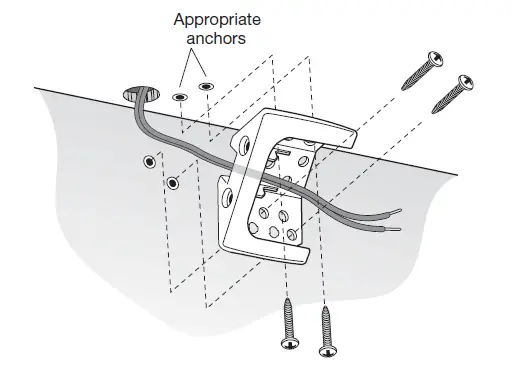
- Attach the mounting bracket to the wall. Be sure to use appropriate anchors.

- Connect the stripped bare wires to the input terminals of the JBL Control CRV speaker.
- Set the tap selector switch to the desired 70V/100V tap, or to the THRU position for 4 ohm low-impedance operation.
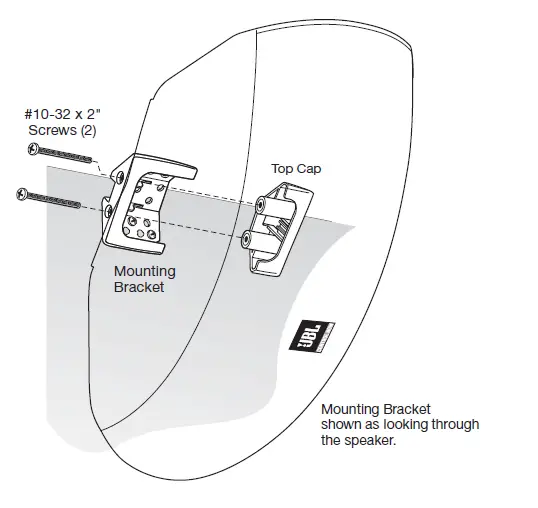
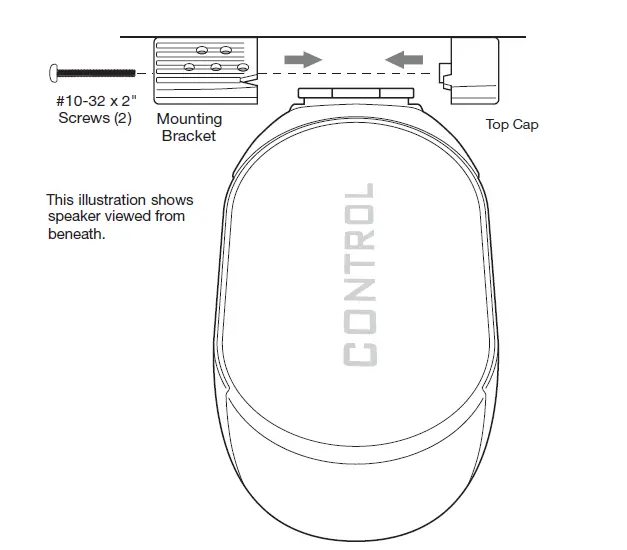
- The mounting bracket is designed to trap the flange of the JBL Control CRV speaker by securing the mounting-bracket cap with two screws through the bottom of the mounting bracket. Rest the JBL Control CRV speaker’s rear fl ange in the mounting bracket, as shown. This will support the weight of the speaker. Slide the mounting-bracket cap over the assembly. Secure the mounting-bracket cap by inserting two #10-32 x 2” screws (provided) in the bottom of the mounting bracket and tightening.


- To orient the JBL logo into the correct position, pull the JBL logo slightly outward from the speaker grille and rotate. The JBL logo is held in place by a spring. Peel the adhesive cover off the mounting-bracket cover and attach to the top and bottom of the mounting assembly.

HALF-ROUND WALL
MOUNTING
(Horizontal or Vertical Orientation)
CAUTION: Installation must be done by qualified persons using safe rigging standards.
The installer is responsible for the proper selection and use of mounting hardware, to properly and safely wall-mount the speakers.
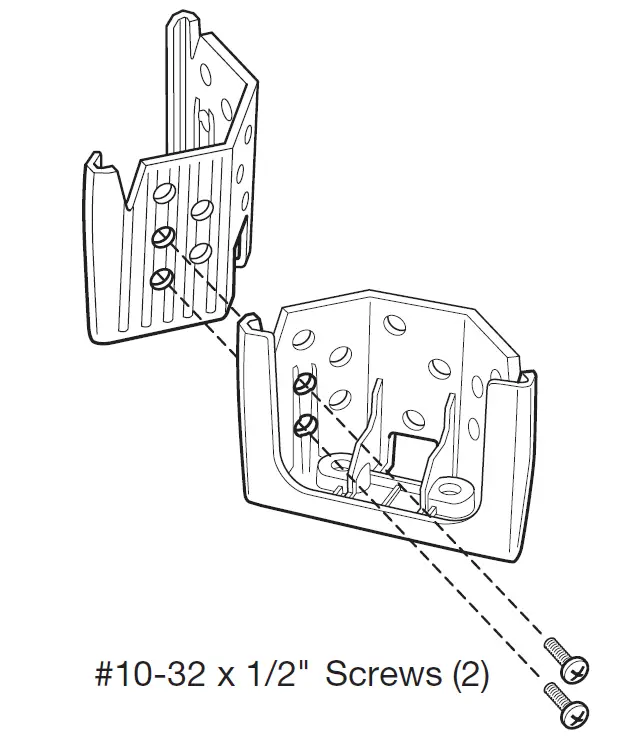
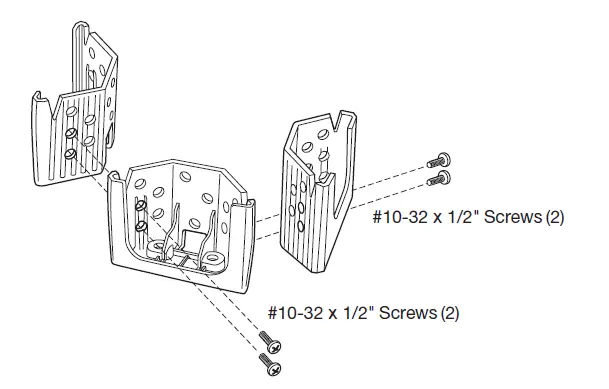
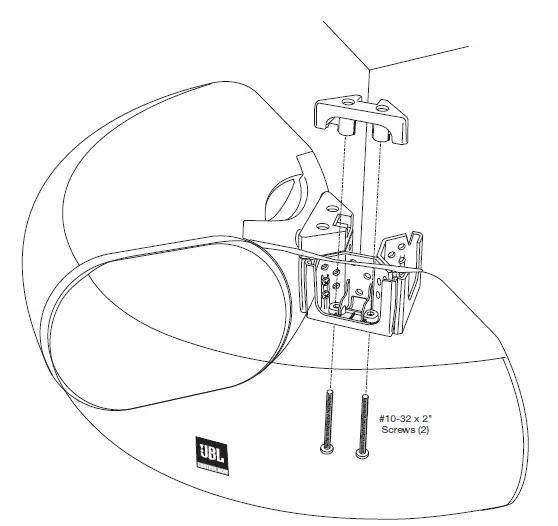
- Secure two corner/wall-mounting brackets together by using two #10-32 x 1/2” screws provided, as shown. Attach the mounting bracket to the wall.

When deciding upon a location for the JBL Control CRV speaker, take care NOT to install the mounting bracket closer than 3” (7.6 cm) (horizontal) and 8-1/2” (21.5 cm) (vertical) to the ceiling. Any closer than the minimum measurements will not allow the clearance needed to position and slide the JBL Control CRV speaker into the mounting bracket.
- Attach the mounting bracket to the wall. Be sure to use appropriate anchors.
- Connect the stripped bare wires to the input terminals of the JBL Control CRV speakers.
- Set the tap selector switches to the desired 70V/100V tap. THRU position is not advised due to parallel speakers providing too low of an impedance for most low-impedance power amplifiers.
- The mounting brackets are designed to trap the flange of the JBL Control CRV speaker by securing the mounting-bracket cap with two screws through the bottom of the mounting bracket. Run the wire through the rear cable-management hole in the mounting bracket, and rest the JBL Control CRV speaker’s rear flange in the mounting bracket, as shown. This will support the weight of the speaker. Now slide the mounting bracket caps over the assembly. Secure the mounting-bracket cap by inserting two #10-32 x 2” (M5 51 mm) screws (provided) through it and into the bottom piece of the mounting bracket and tightening.

3/4-ROUND EXTERNAL
CORNER WALL MOUNTING
(Horizontal or Vertical Orientation)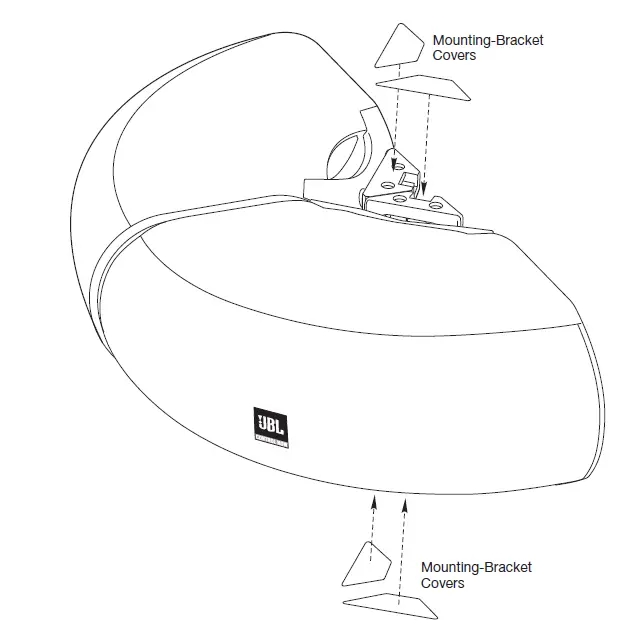
CAUTION: Installation must be done by qualified persons using safe rigging standards.
The installer is responsible for proper selection and use of mounting hardware, to properly and safely wall-mount the speakers.
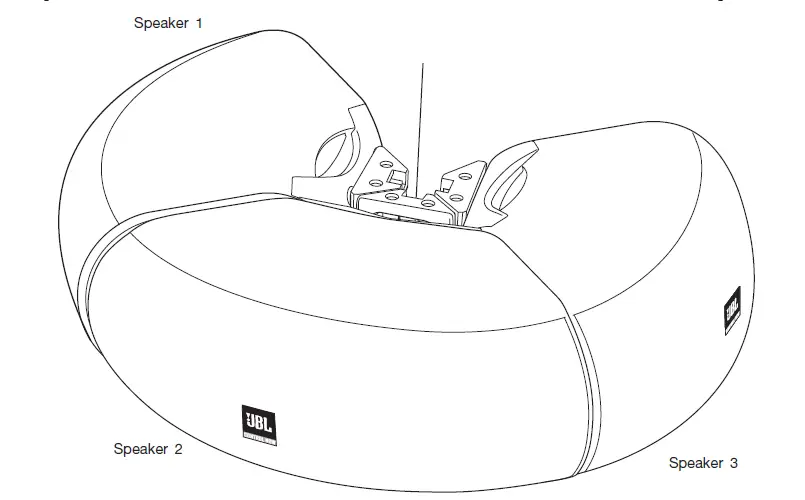
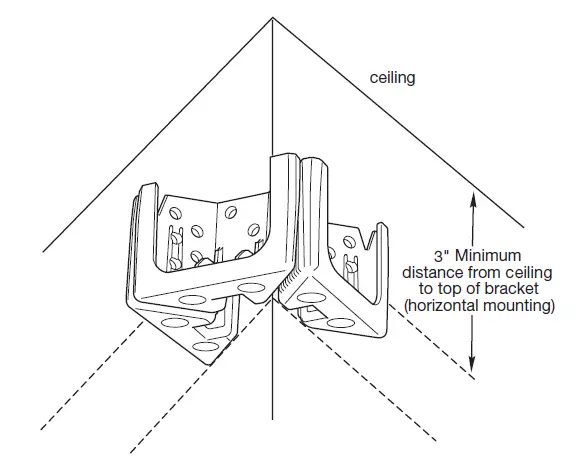
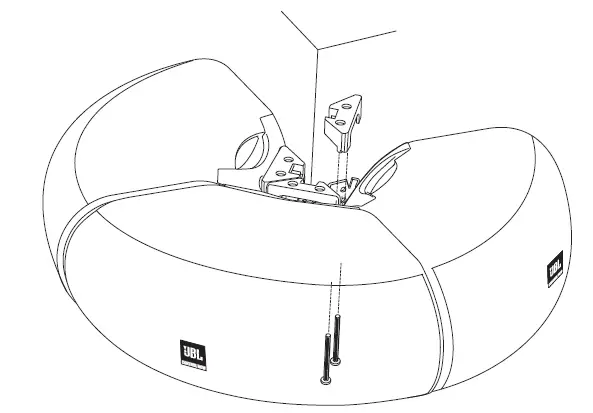
- Secure three corner/wall-mounting brackets together by using two #10-32 x 1/2” screws provided, as shown. Attach the mounting bracket to the wall.

When deciding upon a location for the JBL Control CRV speaker, take care NOT to install the mounting bracket closer than 3” (7.6 cm) to the ceiling. Any closer than 3” (7.6 cm) will not allow the clearance needed to position and slide the JBL Control CRV speaker into the mounting bracket.
- Attach the mounting bracket to the wall. Be sure to use appropriate anchors.

- Connect the stripped bare wires to the input terminals of the JBL Control CRV speakers.
- Set the tap selector switches to the desired 70V/100V tap. THRU position is not advised due to parallel speakers providing too low of an impedance for most low-impedance power amplifiers.
- The mounting brackets are designed to trap the flange of the JBL Control CRV speaker by securing the mounting-bracket cap with two screws through the bottom of the mounting bracket. Run the wire through the rear cable-management hole in the mounting bracket, and rest the JBL Control CRV speaker’s rear flange in the mounting bracket, as shown. This will support the weight of the speaker. Now slide the mounting bracket caps over the assembly. Secure the mounting-bracket cap by inserting two #10-32 x 2” screws (provided) through it into the bottom piece of the mounting bracket and tightening.

- Rest the second JBL Control CRV speaker’s rear flange in the mounting bracket, as shown. Secure the mounting bracket cap with two #10-32 x 2” (M5 51 mm) screws through the bottom of the mounting bracket.

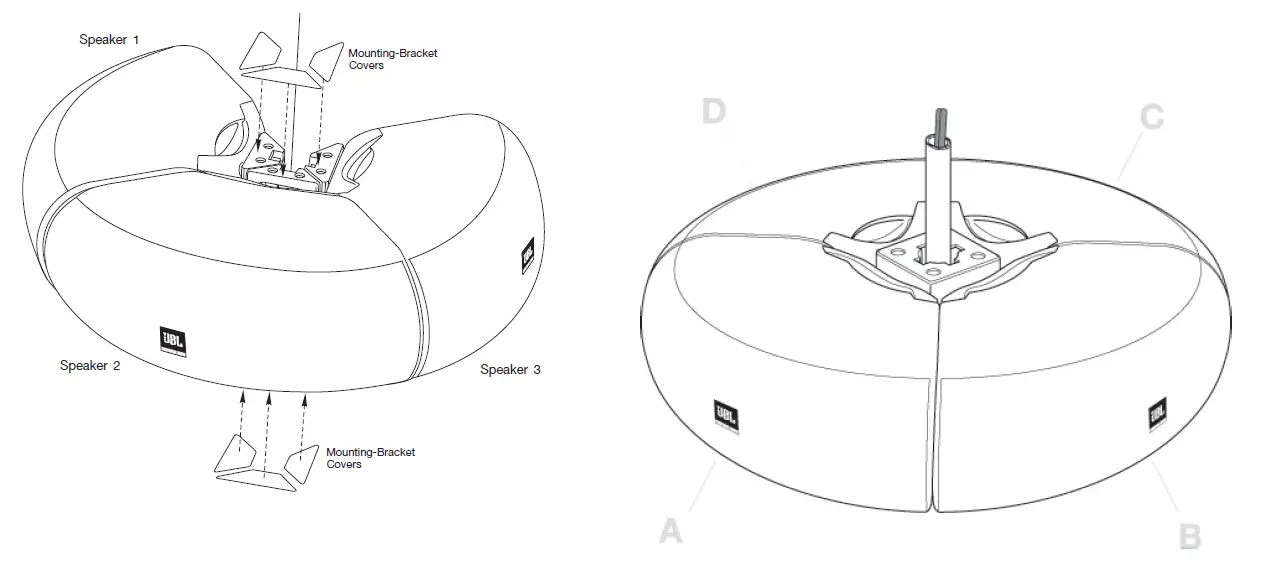
- Rest the third JBL Control NOW speaker’s rear flange in the mounting bracket as shown and complete the process. Secure the mounting-bracket cap with 2 screws through the bottom of the mounting bracket.

- To orient the JBL logo into the correct position, pull the JBL logo slightly outward from the speaker grille and rotate. The JBL logo is held in place by a spring. Peel the adhesive cover off the mounting-bracket cover and attach to the top and bottom of the mounting assembly.

FOUR-SPEAKER ARRAY USING THE OPTIONAL POLE-MOUNT BRACKET (PMB)
IMPORTANT
The JBL Control PMB Pole-Mount Bracket facilitates the installation of the JBL Control CRV loudspeakers with a variety of general-purpose ceiling-fan-pole assemblies available from many manufacturers. Since different fan-pole assemblies have different weight capacities, pole diameters, and mounting systems, it is the customer’s responsibility to check with the fan-pole-assembly manufacturer or dealer to determine whether that specific pole-mount assembly is capable of correctly and securely attaching to the PMB and handling the weight and proportions of these loudspeakers in a safe and stable manner. JBL disclaims any liability for the selection of fan-pole assemblies and/or correct compatibility between the selected fan-pole assembly and the JBL PMB Pole-Mount Bracket.
CAUTION: Installation must be done by qualified persons using safe rigging standards. The installer is responsible for the proper selection and use of mounting hardware, to properly and safely pole-mount the speakers.
UNPACKING THE BRACKET AND CABLE KIT
Carefully unpack the bracket and cable assembly. If you suspect damage from transit, report it immediately to your dealer and/or delivery service. Keep the shipping carton and packing materials for future use. Open the package and verify the following contents:
Included: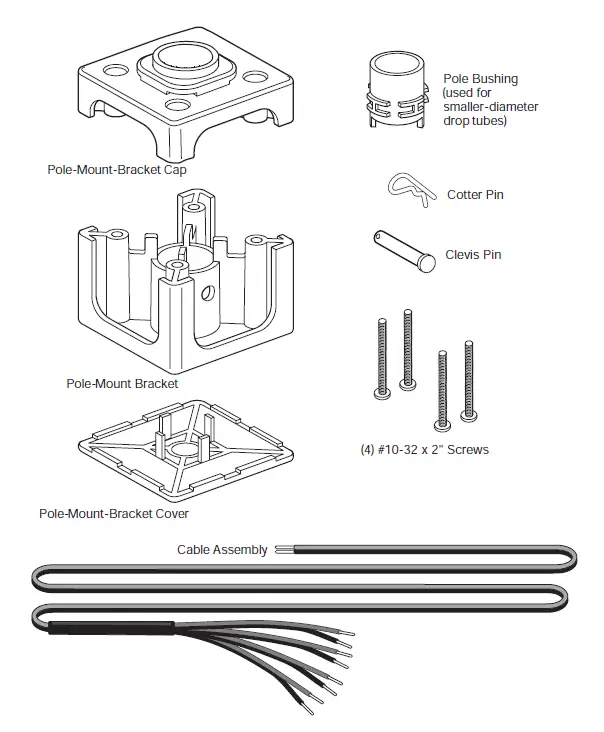
ATTACHING POLE TO POLE-MOUNT BRACKET
For Larger-Diameter Drop Tubes
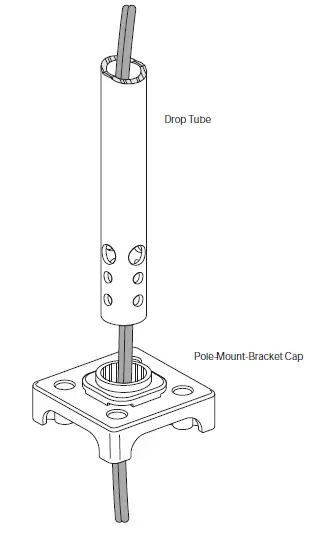
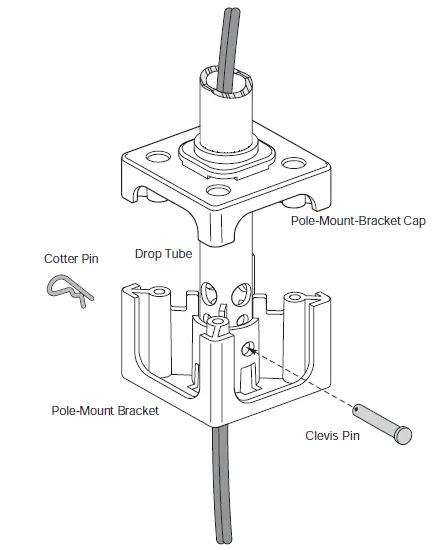
- Run the appropriate wiring down through the drop tube. Slide the drop tube through the pole-mount bracket cap.

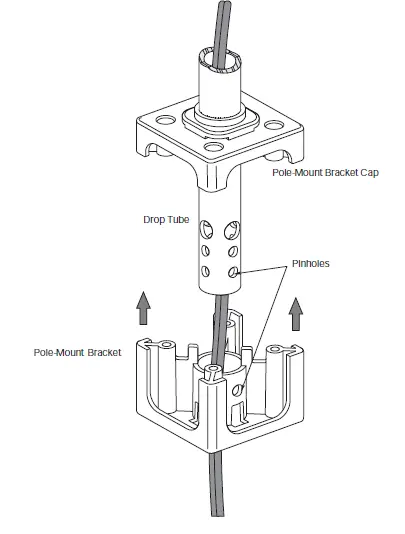
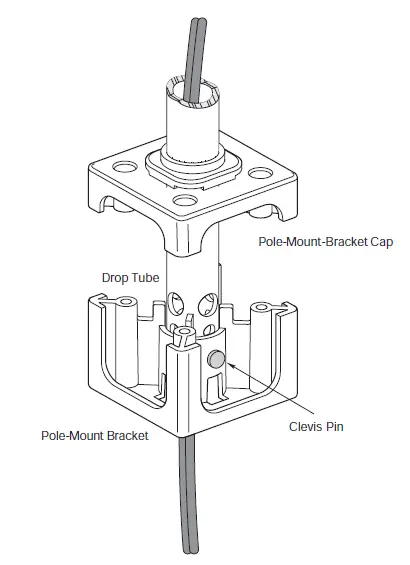
- Slide the pole-mount bracket up onto the drop tube, aligning the pinholes on the bracket with those on the drop tube.

For Smaller-Diameter Drop Tubes
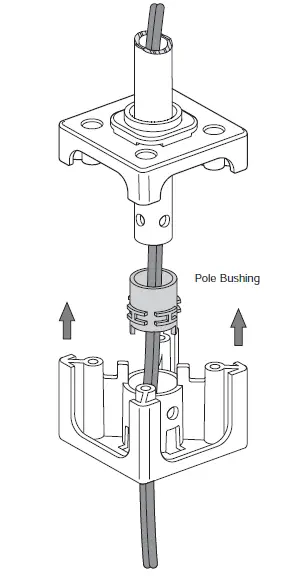
When using a smaller drop tube, use the pole bushing when running the wiring down through the pole-mount bracket cap. This will help to eliminate pole wobble.
- Slide the clevis pin through the aligned holes in the pole mount bracket and drop tube. Secure the clevis pin by inserting the cotter pin through the hole in the clevis pin.

- The pole-mount bracket can now hold the weight of the speakers.

SPEAKER MOUNTING
- Set the tap selector switches to the desired 70V/100V tap. THRU position is not advised due to parallel speakers providing too low of an impedance for most low-impedance power amplifiers.
- Connect the stripped bare wires to the input terminals of the JBL Control CRV speakers.
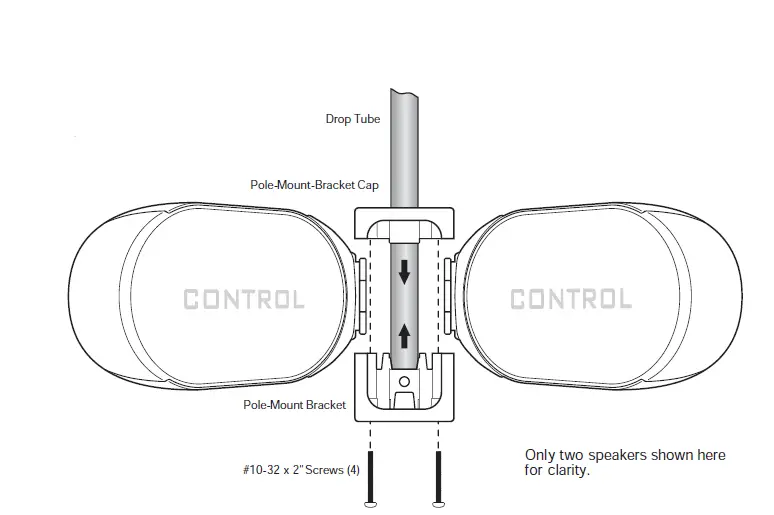
- After carefully placing all four speakers in the mounting bracket, lightly jostle the speakers into place so that the pole-mount-bracket cap will slide down into place. Tighten the pole-mount- bracket assembly with the four #10-32 x 2” (M5 51 mm) screws provided.

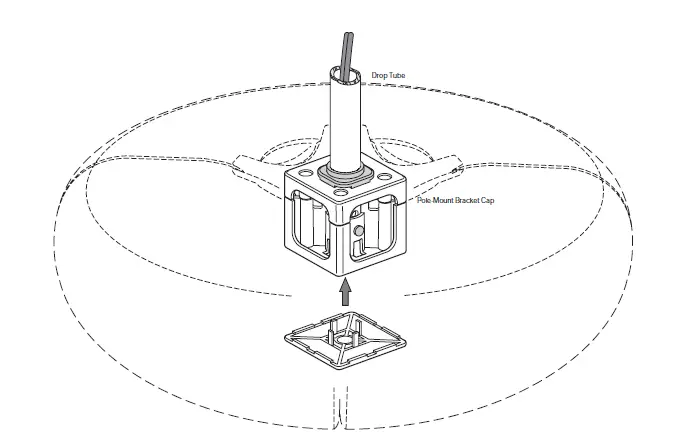
- Place the pole-mount-bracket cover over the bottom visible mounting bracket by snapping it into place.

SETTING TAP SELECTOR
The Control CRV is designed to be driven from a 70V or 100V distributed speaker line or as a 4 ohm speaker. It is important to set the tap selector switch before installing the speaker.
The rotary selector switch is recessed into the terminal cup. The legend for the tap selector switch is recessed into the top port so as to be visually unobtrusive. Once the speaker is installed in the wall or PMB bracket, the tap selector switch is protected against unintended switching. To reset the selection, the speaker must be removed from the bracket.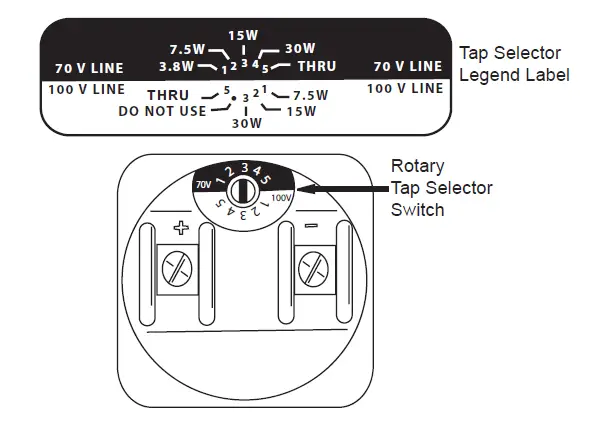
PAINTING & MAINTENANCE
PAINTING CONTROL CRV
The loudspeakers can be painted to match the decor. The speaker accepts almost any type of latex or oil based paint.
For best results, the following procedure is recommended:
- Remove the grille.
- Mask the baffl e of the speakers — it’s almost always advisable to keep the baffl e black.
- Clean the cabinet with a light solvent such as mineral spirits by rubbing the item with a lightly dampened cloth. Do not use abrasives such as sandpaper or steel wool, nor should you use gasoline, kerosene, acetone, MEK, paint thinner, harsh detergents or other chemicals. Use of these cleaners may result in permanent damage to the enclosure.
- After cleaning, apply two or more thin coats of either latex or oil-based paints. Latex paint will adhere better if an oil-based primer is used fi rst. Application can be made by rolling, brushing or spraying.
- Painting the Grille – Painting the grille requires masking of the logo before spray painting. Multiple sprayed coats using thinned paint is recommended to avoid clogging the grille holes. If the grille is rolled or brush painted, the mesh may become clogged with paint and poor sound quality may result.
CONTACTING
JBL PROFESSIONAL
These products are designed and backed by JBL Professional, the world leader in professional sound reinforcement. For complete warranty information, to order replacement parts or to ask for clarifications to this manual, contact JBL Professional.
Within the United States:
Applications Department, JBL Professional 8500 Balboa Blvd., PO Box 2200 Northridge, CA 91329 USA
In the USA you may call Monday through Friday 8:00 am to 5:00 pm Pacific Coast Time (800) 894-8850.
Outside the USA:
Contact the JBL Professional Distributor in your country. A list of JBL Professional Distributors and US Service Centers can be obtained from the JBL Professional website at: www.jblpro.com
MAINTENANCE
No maintenance to the product is required when assembled in accordance with the instructions and wiring guidelines described in this manual. When installed in harsh environments, it is advisable to inspect the structural integrity of the mounting and wiring connections periodically to ensure proper safety and performance.
SERIAL NUMBER
The serial number is located on the rear of the speaker housing. To view it, remove the four screws on the rear assembly as shown.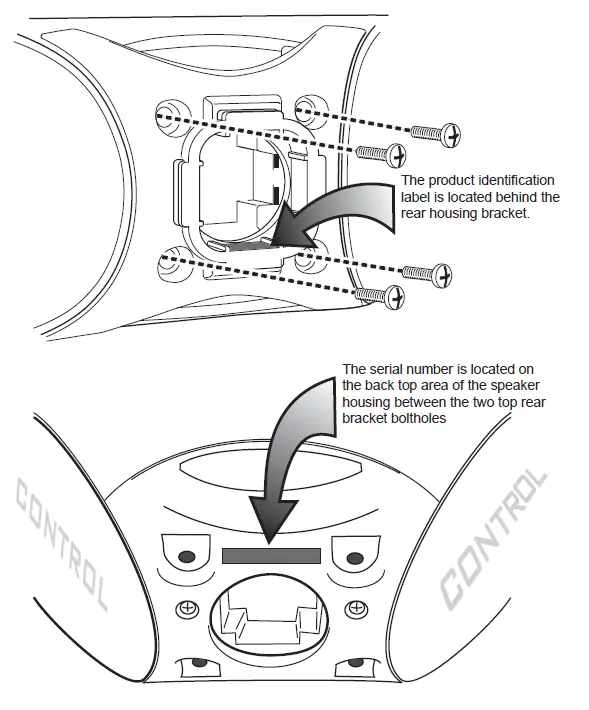
SPECIFICATIONS
- Frequency Range (–10dB)1: 80Hz – 20kHz
- Power Handling2: 75 W Continuous Pink Noise, 2 hrs 60 W Continous Pink Noise, 100 hrs 150 W Continuous Program Power 300 W Continous Peak Power
- Nominal Sensitivity: 89 dB
- Maximum SPL @ 1m3: 108 dB continuous average long-term (peaks of 114 dB)
- Nominal Coverage Angle: 105° horizontal x 80° vertical (2kHz – 16 kHz, speaker in vertical orientation)
- DI: 8.6dB (2kHz – 16kHz) Q 7.4 (2kHz – 16kHz),
- Nominal Impedance 4 Ohms
- Minimum Impedance: 4.0 Ohms @ 320 Hz
- Crossover Frequency and Type: 2 kHz – 36dB/octave tweeter; 18dB/octave woofers
- Transformer Taps: 30W, 15W, 7.5W at both 70V and 100V plus 3.7W at 70V only
- Thru position is 4 ohms
- Transducers:
- Low-Frequency Transducers : Dual 4” (100mm) PolyPlas,™ shielded woofer
- High-Frequency Transducer: 3/4” (19mm) Titanium-laminate dome tweeter, shielded; waveguide
- Physical:
- Enclosure Material: ABS
- Ports: Screened to protect against ingress of pests
- Environmental: IP-34 rating, per IEC529. Exceeds MilSpec 810 for humidy, salt spray, temperature & UV. Passes Mil-Std-202F for salt spray
- Termination: Screw-down terminal strip, nickel-plated metal screws/washers.
- Accepts up to 9 mm outside 4 mm inside open lug (#6, #8, or #10 lug) plusbare wire up to 12 AWG / 2.5 mm2.
- Safety Agency Rating: The transformer is registered per UL1876.
- Colors: Black or white (-WH)
- Dimensions: 364 mm (14.4 in) wide, 251 mm (9.9 in) max depth including wall bracket, 262 mm (10.3 in) side depth, 127 mm (5 in) height
- Net Weight (ea): 3.2 kg (7.0 lbs)
- Included Accessories: Corner/wall-mount bracket with cap and covers, screws
- Optional Accessories: PMBBK Pole-Mount Bracket and PMBWH (white)
- In half-space (on wall)
- Continuous Pink Noise rating is IEC-shaped pink noise with a 6 dB crest factor for 100 hours continuously. Continuous Program Power is a conservative expression of the system’s ability to handle normal speech and music program material and is defined as 3 dB above the Continuous Pink Noise Rating.
- Calculated from sensitivity and power handling. Power compression is not considered.
DIMENSIONS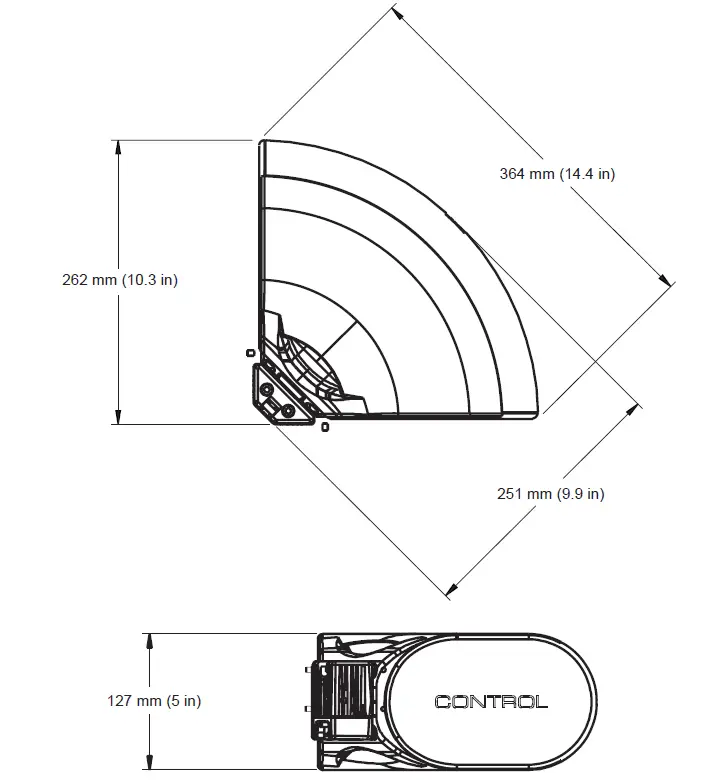
JBL Professional
8500 Balboa Boulevard, P.O. Box 2200
Northridge, CA 91329 USA
FAQS
Is this a good speaker for dialogue enhancement?
Perfect for dialogue. 7/10 for movies
will it connect to charge 3?
No.
Does this come with wall mount?
No it does not come with a wall mount.
Do you sell the remote? Mine broke quickly.
You will need to call them to order the remote. It’s not available online on their website.
Can you use your TV remote to change the volume level or must you use the soundbar remote to do that?
It’s possible to link modern TV remote volume control and the same on JBL, altho the JBL control only controls the JBL speaker volume and not the TV speakers.
How would this work in a back yard outdoor theater just purchased a projector and made a screen
It should work just fine. Remember it needs an electrical outlet.
What is the wattage?
Check the website for that kind of info. It plays loud enough for an enclosed room.
Will the boost connect to a charge 3 ?
Unfortunately, it will not connect to the Boost TV
Does it come with batteries ?
No. The speaker plugs into the wall
Can this sync with the jbl xtreme similar to how you might sync two jbl bluetooth speakers?
Yes, you can
Does the automatic on /off work with the analog input too?
yes it does
Will this bluetooth to my TV?
Yes. Assuming your tv has Bluetooth.