 U-Installer Quick Start Guide
Package Contents
Hardware Overview

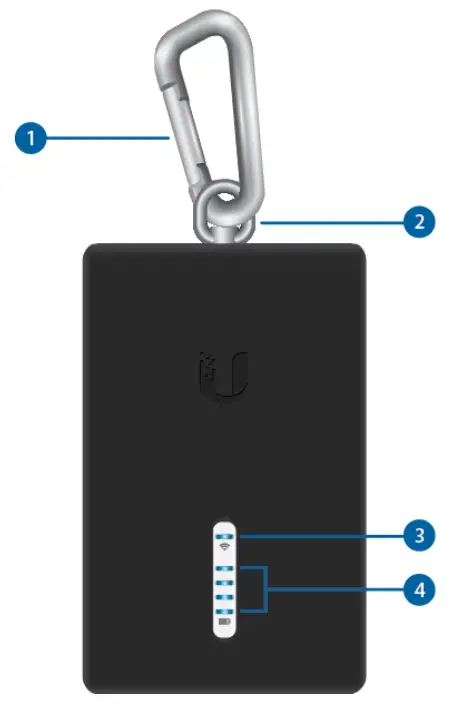
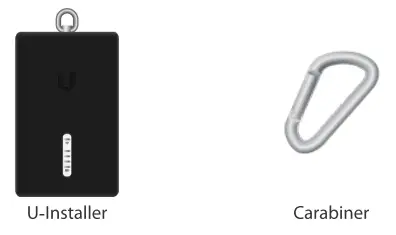
| Carabiner |
| Accessory for attaching the U-Installer to a belt (use is optional). To use, insert into the Clip Loop and attach to a belt loop or utility belt. |
| Clip Loop |
| Used to attach the Carabiner. |
| Wi-Fi LED |
| Lights blue if the U-Installer has a Wi-Fi connection to your mobile device. |
| Battery LED |
Four blue LEDs indicate the internal battery’s charge level: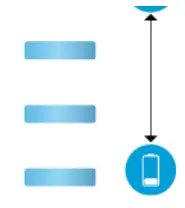 |
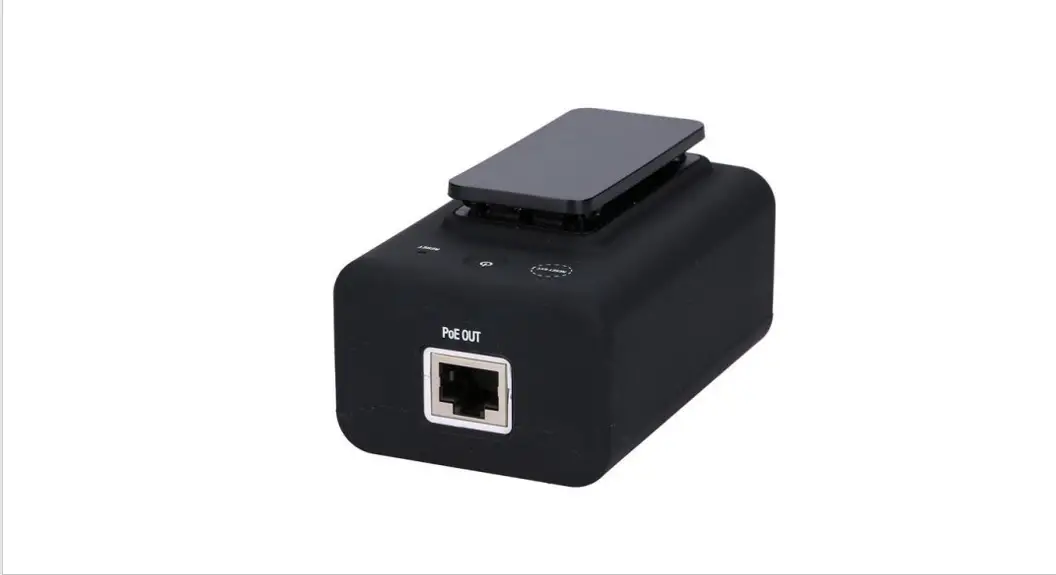
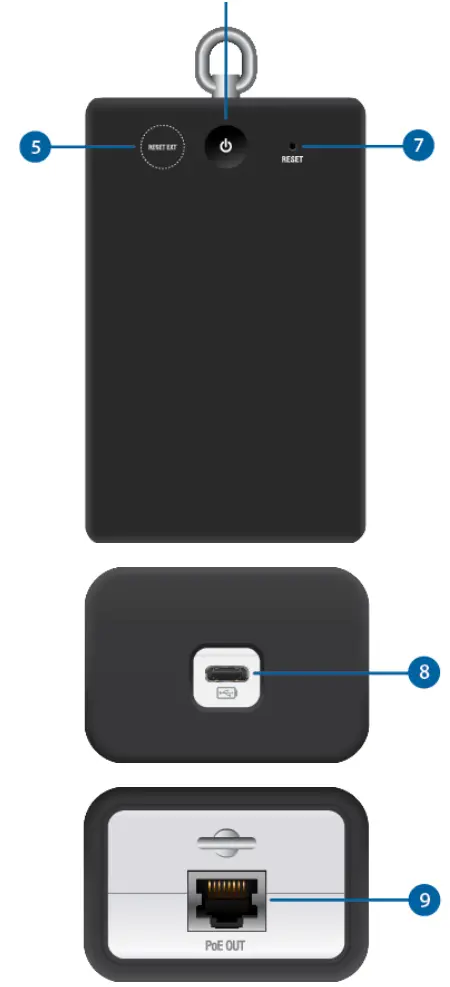
| Reset Ext Button |
| To reset the device connected to the U-Installer to factory defaults, press this button while the device is powered on. Hold the button for more than eight seconds until the LEDs on the device flash. |
| Power Button |
| Press to power the U-Installer on or off. The Battery LEDs light when power is on. |
| Reset Button |
| To reset the U-Installer to factory defaults, press and hold the Reset button while the UInstaller is powered on until the LEDs on the device flash. |
| USB-C Port |
| When there is a low charge, recharge the internal battery by connecting a power source, such as a mobile battery pack, to the USB Type C port. |
| PoE OUT Port |
| Supplies 24V passive PoE to the device being installed. |
Configuring a CPE Device
Use a mobile device (default method) or a laptop to configure the CPE device at the point of installation via the U-Installer’s Wi-Fi: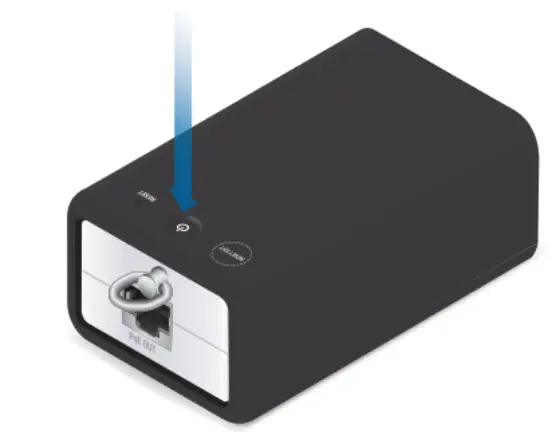
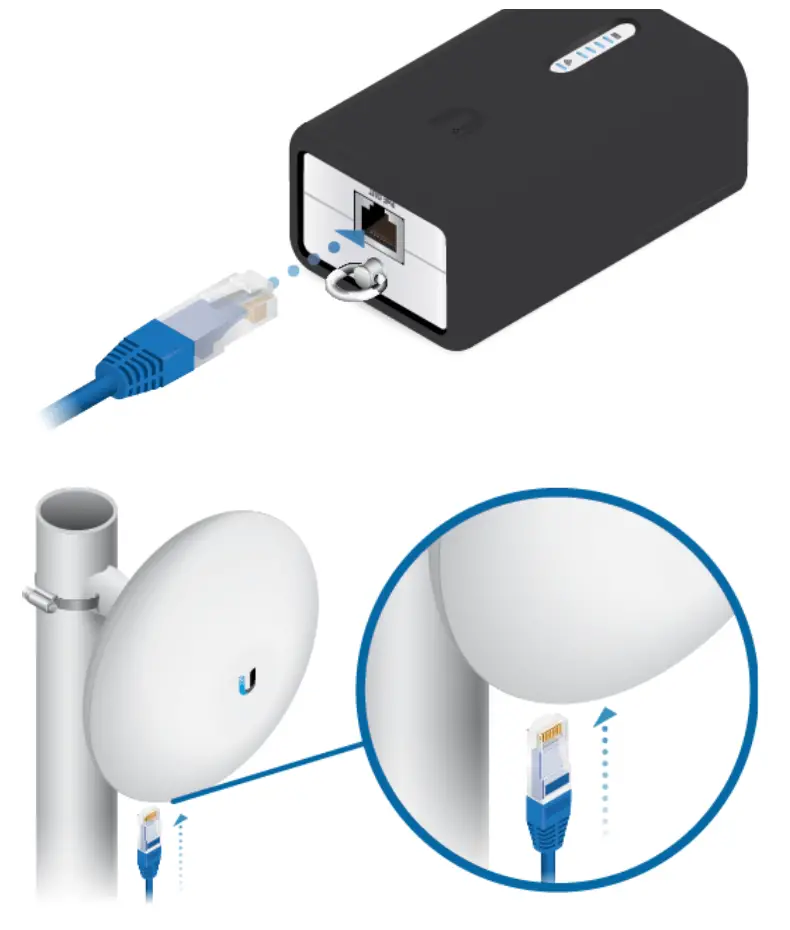
You have two options for configuration: the UNMS™ App and Web Portal.
UNMS App – Default Method
- iOS devices only: Connect your mobile device’s Wi-Fi to the U-Installer SSID named: Ubi: <MAC Address>
- Download and launch the UNMS app on your mobile device.

- Connect to the CPE device:
iOS
a. On the Connections screen, tap the CPE device.
b. Tap Log in to automatically log into the device.
Android
a. Tap, and then tap Installer.
b. The app will automatically detect and connect to the U-Installer SSID named: Ubi: <MAC_Address>
c. On the Discover screen, tap the CPE device to automatically log into the device. - Follow the on-screen instructions.

Web Portal
- Connect your device’s Wi-Fi to the U-Installer SSID named: Ubi:<MAC_Address>
- Open a web browser and go to: https://192.168.1.20
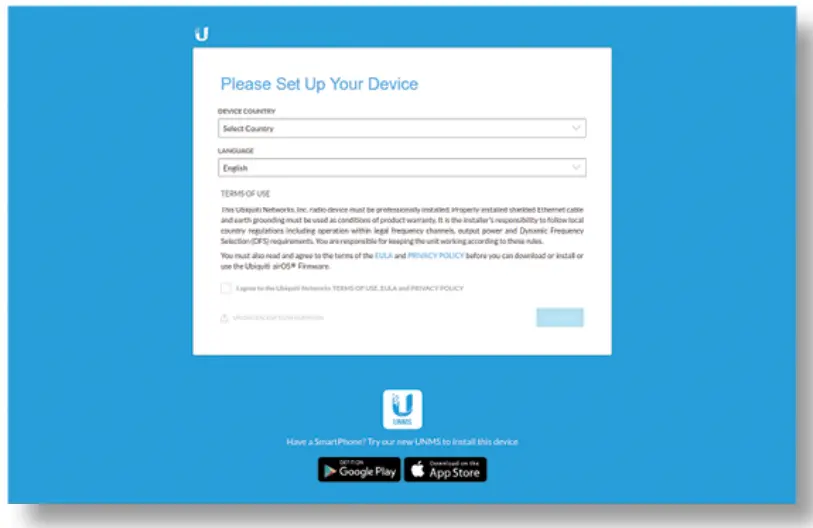
- Select your Country and Language. You must agree to the Terms of Use to use the product. Click Continue.

- Create a username and password. Confirm your new password and then click Save.
- Configure the CPE device as needed.
Removing the U-Installer
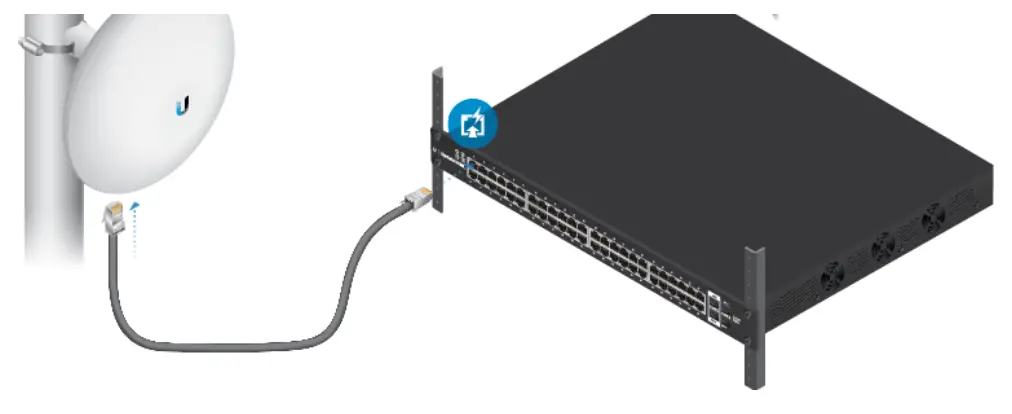
After you have configured the CPE device, remove the U-Installer: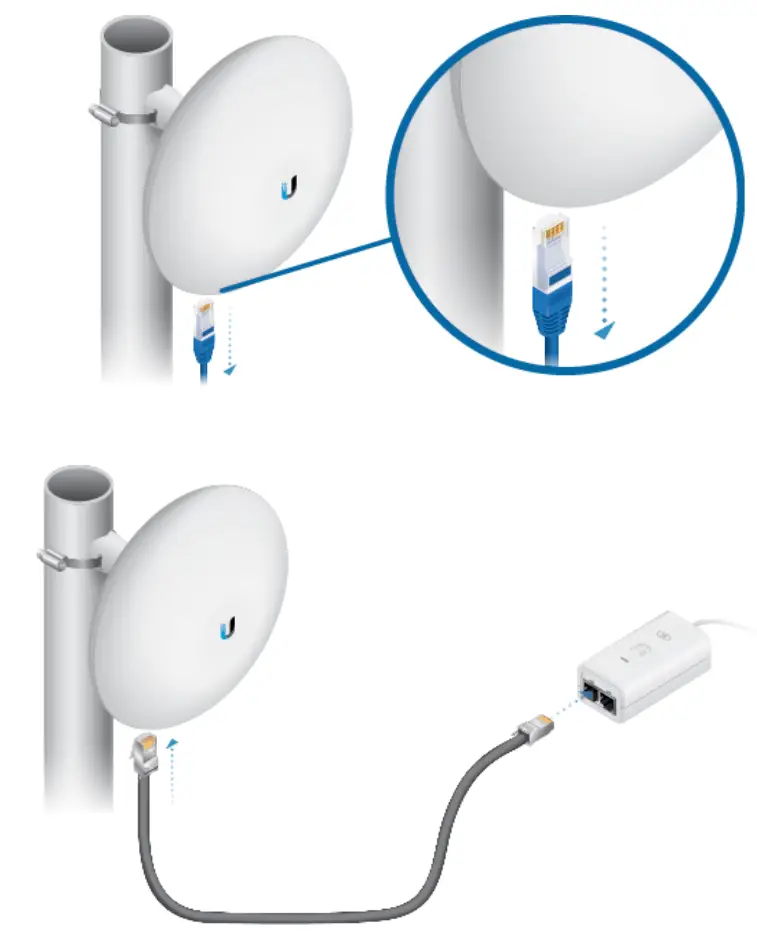
Specifications
| U-Installer | |
| Wi-Fi Frequency | 2.4 GHz |
| Max Transmit Power | 22 dBm |
| Max Power Consumption U-Installer U-Installer with CPE | 3W 15W |
Safety Notices
- Read, follow and keep these instructions.
- Heed all warnings.
- Only use attachments/accessories specified by the manufacturer.
 WARNING: Do not use this product in a location that can be submerged by water. WARNING: Avoid using this product during an electrical storm. There may be a remote risk of electric shock from lightning.
Electrical Safety Information
- Compliance is required with respect to voltage, frequency, and current requirements indicated on the manufacturer’s label. Connection to a different power source than that specified may result in improper operation, damage to the equipment, or pose a fire hazard if the limitations are not followed.
- There are no operator serviceable parts inside this equipment. Service should be provided only by a qualified service technician.
- Contact a qualified electrician or the manufacturer if there are questions about the installation prior to connecting the equipment.
- Protective earthing is provided by a Listed AC adapter. Building installation shall provide appropriate short-circuit backup protection.
- Protective bonding must be installed in accordance with local national wiring rules and regulations.
Limited Warranty
ui.com/support/warranty
The limited warranty requires the use of arbitration to resolve disputes on an individual basis, and, where applicable, specify arbitration instead of jury trials or class actions.
Compliance
Changes or modifications not expressly approved by the party responsible for compliance could void the user’s authority to operate the equipment.
This device complies with Part 15 of the FCC Rules. Operation is subject to the following two conditions.
- This device may not cause harmful interference, and
- This device must accept any interference received, including interference that may cause undesired operation.
This equipment has been tested and found to comply with the limits for a Class B digital device, pursuant to Part 15 of the FCC Rules. These limits are designed to provide reasonable protection against harmful interference in a residential installation. This equipment generates, uses and can radiate radio frequency energy and, if not installed and used in accordance with the instructions, may cause harmful interference to radio communications. However, there is no guarantee that interference will not occur in a particular installation. If this equipment does cause harmful interference to radio or television reception, which can be determined by turning the equipment off and on, the user is encouraged to try to correct the interference by one or more of the following measures:
- Reorient or relocate the receiving antenna.
- Increase the separation between the equipment and receiver.
- Connect the equipment into an outlet on a circuit different from that to which the receiver is connected.
- Consult the dealer or an experienced radio/TV technician for help.
This radio transmitter FCC ID: SWX-UINS has been approved by FCC.
ISED Canada
CAN ICES-3(B)/NMB-3(B)
This device complies with ISED Canada licence-exempt RSS standard(s). Operation is subject to the following two conditions:
- This device may not cause interference, and
- This device must accept any interference, including interference that may cause undesired operation of the device.
This radio transmitter (IC: 6545A-UINS) has been approved by ISED Canada.
RF Exposure Warning
This device has been tested and meets applicable limits for radio frequency (RF) exposure.
This device was tested with a separation distance of 0 mm under a body-worn accessory (holster) operation condition. Always carry this device within a holster, to ensure exposure levels remain at or below the as-tested levels.
Battery Warning
- Do not expose cells or batteries to heat or fire. Avoid storage in direct sunlight.
- Do not use any cell or battery which is not designed for use with the equipment.
- Always purchase the battery recommended by the device manufacturer for the equipment.
- Secondary cells and batteries need to be charged before use. Always use the correct charger and refer to the manufacturer’s instructions or equipment manual for proper charging instructions.
Australia and New Zealand
CE Marking
CE marking on this product represents the product is in compliance with all directives that are applicable to it.
 Country List

| AT | BE | BG | CY | CZ | DE | DK | EE | EL | ES | Fl | FR | HR | HU |
| IE | IT | LV | LT | LU | MT | NL | PL | PT | RO | SE | SI | SK | UK |
BFWA (Broadband Fixed Wireless Access) members noted in blue
Note: This device meets Max. TX power limit per ETSI regulations.
The following applies to products that operate in the 5 GHz frequency range:
Note: This device is restricted to indoor use only when operating in the 5150 – 5350 MHz frequency range within all member states.
Note: All countries listed may operate at 30 dBm. BFWA member states may operate at 36 dBm.
Note: Operation in the 5.8 GHz frequency band is prohibited in BFWA member states. Other countries listed may use the 5.8 GHz, frequency band.
WEEE Compliance Statement
Declaration of Conformity
Online Resources
© 2021 Ubiquiti Inc. All rights reserved.
 Ubiquiti - Warranty
 community.ubnt.com/
 WEEE Compliance Statement
 Ubiquiti - Compliance