IVP1700Ce-USB
OSD User Manual
Keypad Usage-
OSD Board Description
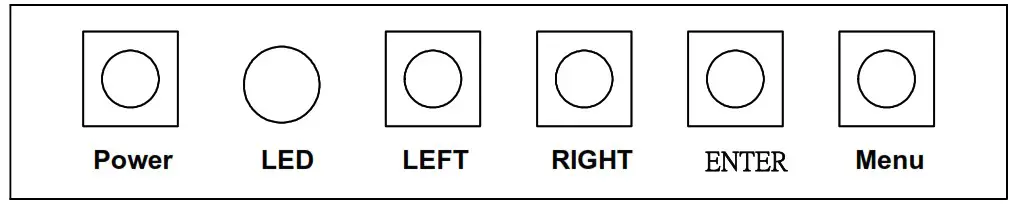
| Buttons | Description |
| Power | • Turn the monitor power ON or OFF. |
| Menu / Exit | • Activate the OSD menu. • Exit menu. |
| Up / Right / Increase / Auto | • Activate the volume control. • Move the selector to the next option. • Increase the gauge value of the selected option. • Automatically adjust the clock, phase, H-position and V-position |
| Down / Left / Decrease / Brightness | • Active volume control. • Move the selector to the previous option. • Decrease the gauge value of the selected option. |
| Enter / Input select | • Value to the most optimal settings. • Use full screen when enabling this function. • Enter/confirm the selected option. • Change input source. |
| Menu + Right | • Factory Menu |

LED Function
| DPMS ON | Green |
| DPMS STANDBY | Red |
| DPMS SUSPEND | The green light is flashing |
| DPMS OFF | Off |
OSD FUNCTION-
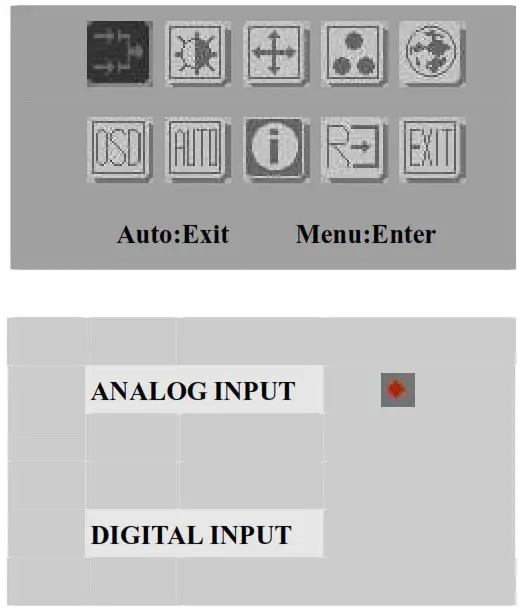
- Power: LCD monitor power on / off
- Menu / Exit : Turn off OSD menu
- Right / Down / Increase / Auto : Move the selector to the next option
- Left / Up / Decrease : Move the selector to the previous option
- Enter / Input select : Enter the selected option
Select input source

| • Power : LCD monitor power on/off | LCD monitor power on/off |
| • Menu / Exit : Return main-menu | Return su-menu |
| • Right / Up / Increase / Auto : Select next sub-menu | Increase the gauge value |
| • Left / Down / Decrease : Select previous sub-men | Decrease the gauge value |
| • Enter / Input select : Enter current sub-menu | No function |
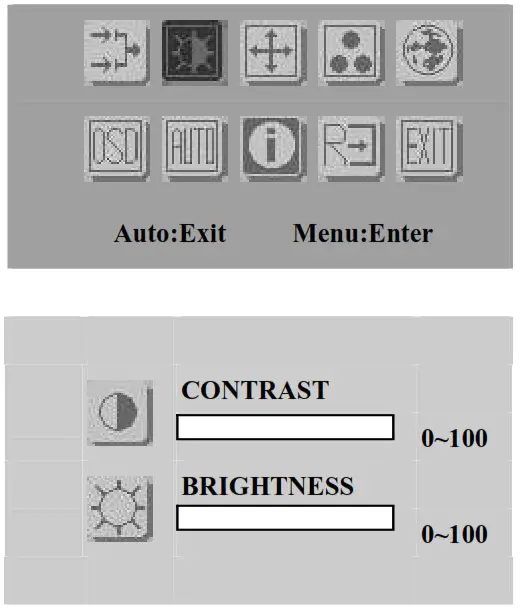
| • Power: LCD monitor power on/off | LCD monitor power on/off |
| • Menu / Exit : Return main-menu | Return su-menu |
| • Right / Up / Increase / Auto : Select next sub-menu | Increase the gauge value |
| • Left / Down / Decrease : Select previous sub-men | Decrease the gauge value |
| •Enter / Input select : Enter current sub-menu | No function |
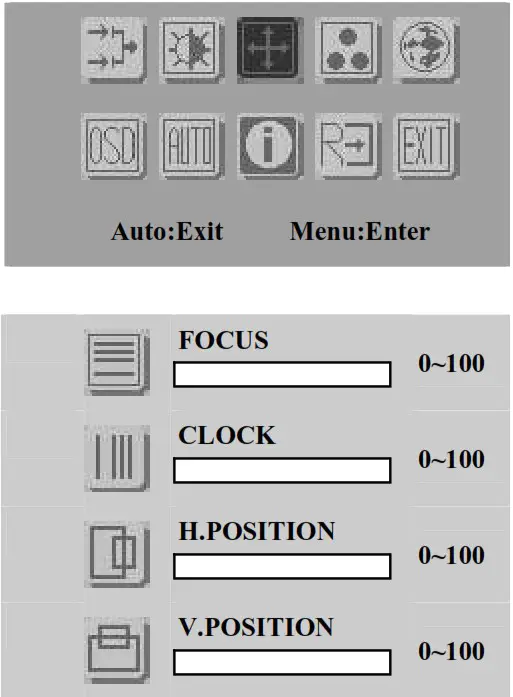
| • Power: LCD monitor power on/off | LCD monitor power on/off |
| • Menu / Exi : Return main-menu | Return su-menu |
| • Right / Up / Increase / Auto : Select next sub-menu | Increase the gauge value |
| • Left / Down / Decrease : Select previous sub-men | Decrease the gauge value |
| • Enter / Input select : Enter current sub-menu | No function |
 Power : LCD monitor power on / off
- Menu / Exit : Turn off OSD menu
- Right / Up / Increase / Auto : Move the selector to the next option
- Left / Down / Decrease : Move the selector to the previous option
- Enter / Input select : Enter the selected option
 Power : LCD monitor power on / off
| • Power: LCD monitor power on/off | LCD monitor power on/off |
| • Menu / Exit : Return main-menu | Return su-menu |
| • Right / Up / Increase / Auto : Select next sub-menu | Increase the gauge value |
| • Left / Down / Decrease : Select previous sub-men | Decrease the gauge value |
| • Enter / Input select : Enter current sub-menu | No function |
 Power : LCD monitor power on / off
- Menu / Exit : Turn off OSD menu
- Right / Up / Increase / Auto : Move the selector to the next option
- Left / Down / Decrease : Move the selector to the previous option
- Enter / Input select : Enter the selected option
 Power : LCD monitor power on / off
| • Power : LCD monitor power on/off | LCD monitor power on/off |
| • Menu / Exit : Return main-menu | Return su-menu |
| • Right / Up / Increase / Auto : Select next sub-menu | Increase the gauge value |
| • Left / Down / Decrease : Select previous sub-men | Decrease the gauge value |
| • Enter / Input select : Enter current sub-menu | No function |
 Power : LCD monitor power on / off
- Menu / Exit : Turn off OSD menu
- Right / Up / Increase / Auto : Move the selector to the next option
- Left / Down / Decrease : Move the selector to the previous option
- Enter / Input select : Enter the selected option
 Power : LCD monitor power on / off
 Power : LCD monitor power on / off
- Menu / Exit : Turn off OSD menu
- Right / Up / Increase / Auto : Move the selector to the next option
- Left / Down / Decrease : Move the selector to the previous option
- Enter / Input select : Enter the selected option
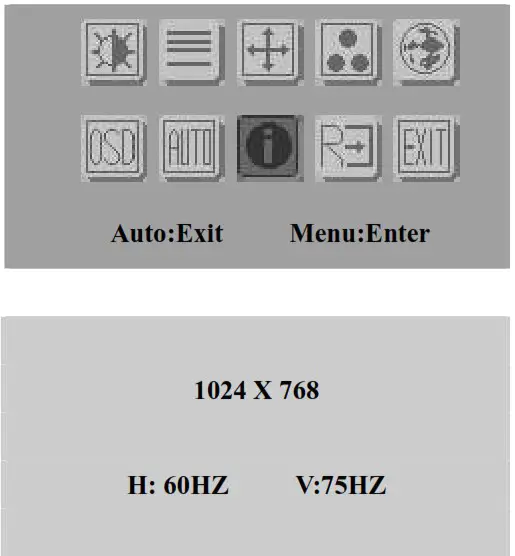 Power : LCD monitor power on / off
 Power : LCD monitor power on / off
- Menu / Exit : Turn off OSD menu
- Right / Up / Increase / Auto : Move the selector to the next option
- Left / Down / Decrease : Move the selector to the previous option
- Enter / Input select : Enter the selected option
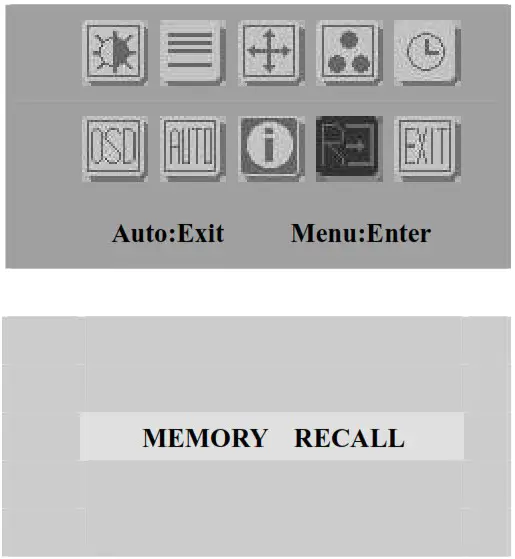 Power : LCD monitor power on / off
 Power : LCD monitor power on / off
- Menu / Exit : Turn off OSD menu
- Right / Up / Increase / Auto : Move the selector to the next option
- Left / Down / Decrease : Move the selector to the previous option
- Enter / Input select : Enter the selected option
 Power : LCD monitor power on / off
i-Tech Company LLC
TOLL FREE: (888) 483-2418 • EMAIL: [email protected] • WEB: www.iTechLCD.com