
DAIKIN CAPS100US Amy PCA Switch

Introduction
This device complies with Part 15 of the FCC Rules. Operation is subject to the following two conditions: (1) this device may not cause harmful interference, and (2) this device must accept any interference received, including interference that may cause undesired operation.
FCC CAUTION
Changes or modifications not expressly approved by the party responsible for compliance could void the user’s authority to operate the equipment.
Note: This equipment has been tested and found to comply with the limits for a Class B digital device, pursuant to part 15 of the FCC Rules. These limits are designed to provide reasonable protection against harmful interference in a residential installation. This equipment generates, uses and can radiate radio frequency energy and, if not installed and used in accordance with the instructions, may cause harmful interference to radio communications. However, there is no guarantee that interference will not occur in a particular installation. If this equipment does cause harmful interference to radio or television reception, which can be determined by turning the equipment off and on, the user is encouraged to try to correct the interference by one or more of the following measures:
- Reorient or relocate the receiving antenna.
- Increase the separation between the equipment and receiver.
- Connect the equipment into an outlet on a circuit different from that to which the receiver is connected. —Consult the dealer or an experienced radio/TV technician for help.
Features of the System
The COOPDECH Amy PCA is set and controlled by the controller via wireless communication via Comtouch. The Amy PCA Switch also allows additional doses to be administered by the patient.
Name of each part
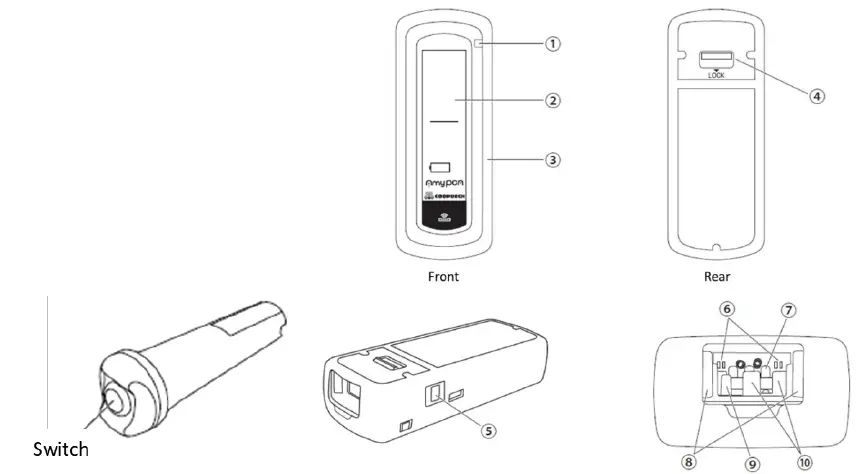
Amy PCA Switch (CAP-S100) COOPDECH Amy PCA (CAP-D100
| No. | Name | Description | |
| 1. | Pilot Lamp | Indication of operating status | The higher the priority, the higher the priority. (1) Flashing red: High priority alarm or error (2) Lights up in orange: When a low- priority alarm occurs (3) Blinking green: Standby mode (4) Red light on: Pump preparation incomplete (when the high-priority alarm is silenced, air bubbles are detected, blockage is detected, or infusion is complete) (5) flashing light blue: Infusion standby mode (6) Blue light on: connected to Comtouch |
| 2. | Indicator | Indication of operating status Indicator (indicating infusion in progress), Silence lamp, Alarm lamp, Battery level lamp, Power lamp and External communication unit. | |
| 3. | Bumper | Bumper for shock absorption | |
| 4. | Lock lever | Lever for locking the pump unit after installation | |
| 5. | Release switch | Switch for dismantling the pump unit | |
| 6. | Pomp connector | Connector for applying voltage to the pump | |
| 7. | Identification switch | Switch for detecting the pump unit | |
| 8. | Release hook | Hook for holding the pump unit | |
| 9. | Blockage Sensors | Sensor for detecting blockage downstream of the infusion line | |
| 10. | Air bubble sensor | Sensor for detecting air bubbles in the infusion line | |
Display
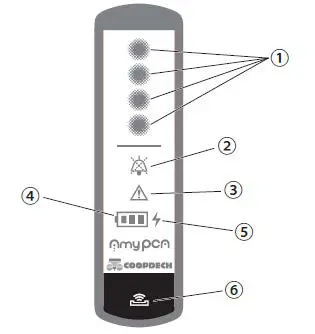
| No. | Name | Description |
| 1. | Indicator | Flashes during infusion. It also flashes sequentially at the same time as an infusion of 60 drops ≈ 1 ml. |
| 2. | Mute lamp | Lights up when the alarm sound is temporarily interrupted (muted). Red: High priority alarm silenced Orange: low priority alarm silenced |
| 3. | Alarm Lamp | Flashes or lights up in the event of an alarm. |
| 4. | Battery lamp | Flashes when the internal battery is operating. Depending on the remaining capacity of the internal battery, it may be green (1 to 3) or orange (1) or red (1) depending on the remaining capacity of the internal battery. |
| 5. | Power Lamp | Lights up when the charger is connected. Yellow when charging, green afterwards. |
| 6. | External communication part | Part for external communication |
Operating the Transmitter
Press the switch on the Amy PCA Switch to start bolus dosing. “Amy PCA Switch” Switch Press to start bolus dosing. 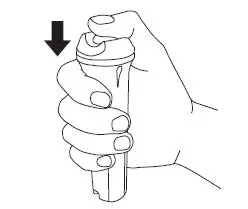
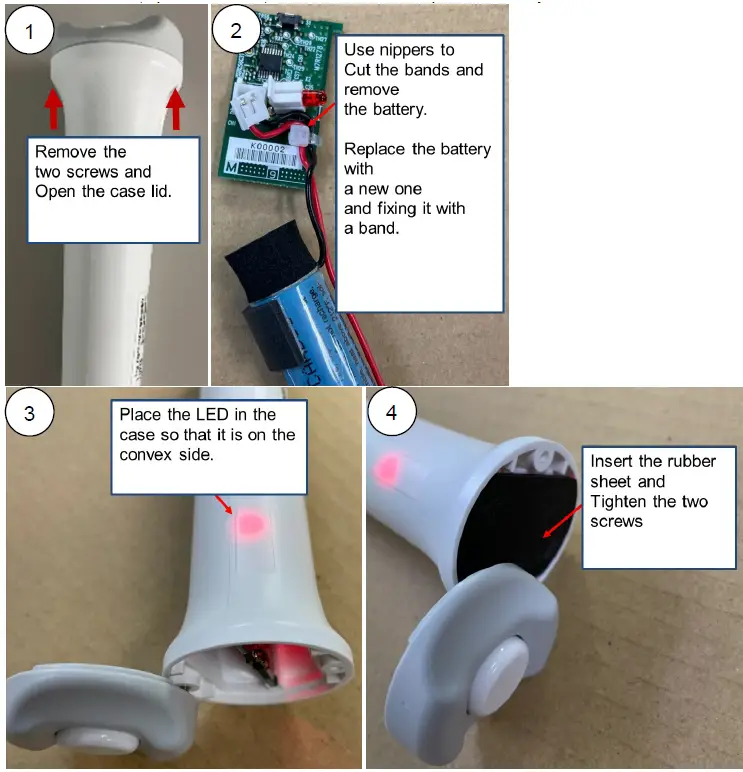
Replacement of the transmitter batteries
Remove the screws, open the case lid, remove the PCB and replace the battery.