
Installation Guide
IND504

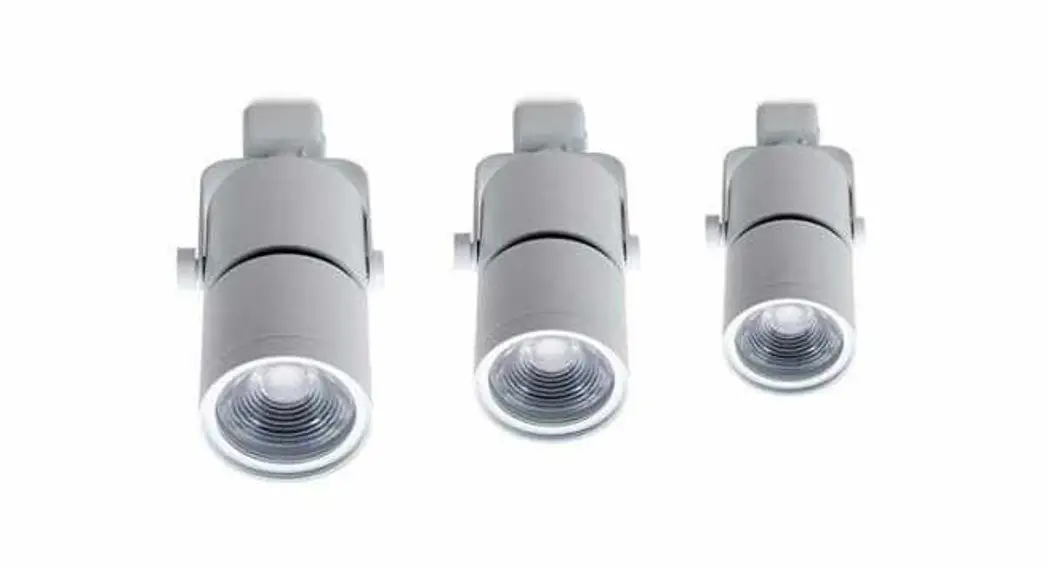
Lumination® LED Track Light
Lens Replacement
(LTC-Series)
 BEFORE YOU BEGIN
Read these instructions completely and carefully.
IMPORTANT SAFETY INSTRUCTIONS
When installing or using this track system, basic safety precautions should always be followed, including the following:
a. Read all instructions
b. Do not install this track in damp or wet locations.
c. Do not cut any track sections.
d. Do not install any part of a track system less than 5 feet above the floor.
e. Do not install any luminaire assembly closer than 6 inches from any curtain, or similar combustible material.
f. Disconnect electrical power before adding to or changing the configuration of the track.
g. Do not attempt to energize anything other than lighting track luminaires on the track. To reduce the risk of fire and electric shock, do not attempt to connect power tools, extension cords, appliances, and the like to the track.
h. Do not connect a track to more than one branch circuit unless the track is constructed so that it can be used with more than one branch circuit.
Check with a qualified electrician. Although the track lighting system may seem to operate acceptably, a dangerous overload of the neutral may occur and result in a risk of fire.
SAVE THESE INSTRUCTIONS
For future reference when adding fixtures or changing the track configuration.
FOR USE WITH CEILING-MOUNTED TRACK ONLY.
READ THE TRACK MANUFACTURER’S INSTALLATION INSTRUCTIONS FOR GUIDELINES ON TRACK INSTALLATION.
 WARNING
RISK OF ELECTRIC SHOCK
Turn the power off before inspection, installation, or removal.
| PRODUCT DESCRIPTION | MATERIAL DESCRIPTION | SKU | DISTRIBUTION |
| LTC 06/10 SPOT LENS BLACK | AK-LTC-GEN1-LE-XX-X0-BLCK-SP-10 | 93096137 | SPOT |
| LTC 06/10 FLOOD LENS BLACK | AK-LTC-GEN1-LE-XX-X0-BLCK-FL-10 | 93096138 | FLOOD |
| LTC 06/10 WIDE LENS BLACK | AK-LTC-GEN1-LE-XX-X0-BLCK-WF-10 | 93096139 | WIDE FLOOD |
| LTC 06/10 SPOT LENS WHITE | AK-LTC-GEN1-LE-XX-X0-WHTE-SP-10 | 93096140 | SPOT |
| LTC 06/10 FLOOD LENS WHITE | AK-LTC-GEN1-LE-XX-X0-WHTE-FL-10 | 93096141 | FLOOD |
| LTC 06/10 WIDE LENS WHITE | AK-LTC-GEN1-LE-XX-X0-WHTE-WF-0 | 93096142 | WIDE FLOOD |
| LTC 08/11 NARROW LENS BLACK | AK-LTC-GEN2-LE-XX-X0-BLCK-NF-10 | 93096143 | NARROW FLOOD |
| LTC 08/11 FLOOD LENS BLACK | AK-LTC-GEN2-LE-XX-X0-BLCK-FL-10 | 93096144 | FLOOD |
| LTC 08/11 WIDE LENS BLACK | AK-LTC-GEN2-LE-XX-X0-BLCK-WF-10 | 93096145 | WIDE FLOOD |
| LTC 08/11 NARROW LENS WHITE | AK-LTC-GEN2-LE-XX-X0-WHTE-NF-10 | 93096146 | NARROW FLOOD |
| LTC 08/11 FLOOD LENS WHITE | AK-LTC-GEN2-LE-XX-X0-WHTE-FL-10 | 93096147 | FLOOD |
| LTC 08/11 WIDE LENS WHITE | AK-LTC-GEN2-LE-XX-X0-WHTE-WF-0 | 93096148 | WIDE FLOOD |
| LTC 06/10 TESTER | AK-LTC-GEN1-LE-XX-X0-XXXX-STER | 93096149 | MISC |
| LTC 08/11 TESTER | AK-LTC-GEN2-LE-XX-X0-XXXX-STER | 93096150 | MISC |
Installation of Replacement Lens on the LTC Series Track Light
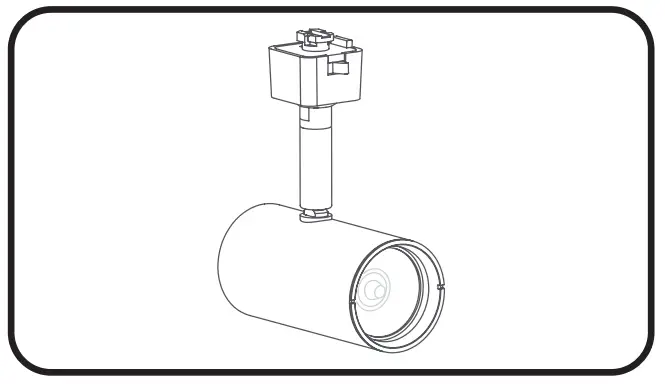
- Begin with the fixture turned off from the track.

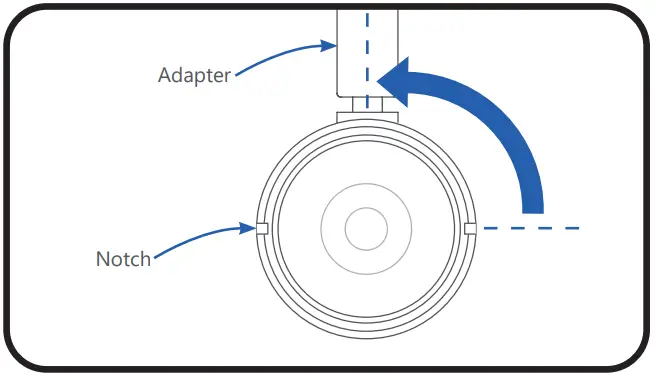
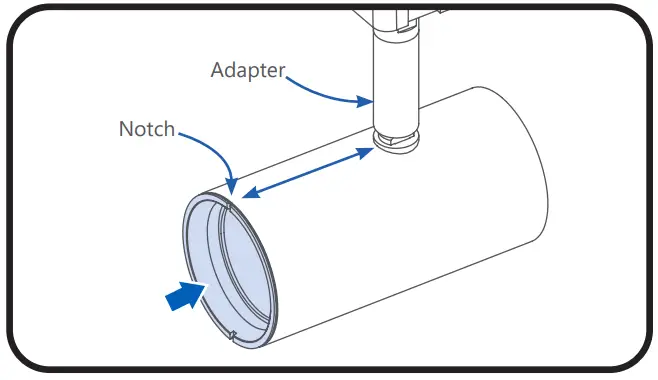
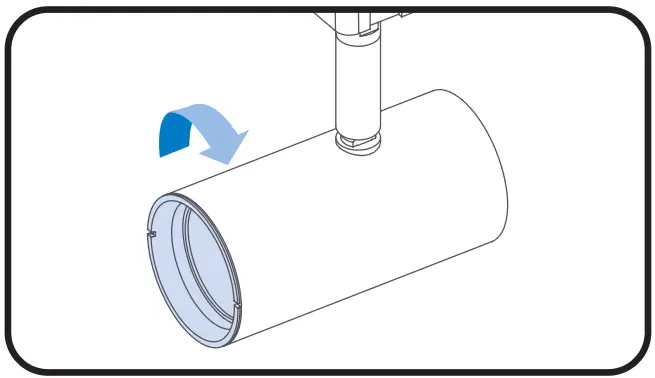
- Remove old lens: Rotate the cap 90 degrees counterclockwise until the notches fully align with the adapter and pull out.

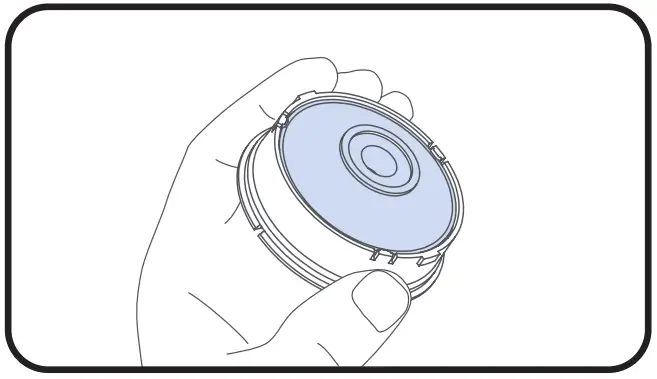
- Inspect field changeable lens to ensure no dust particles are trapped inside.

- Install the new lens: Align notch with the adapter.

- Rotate lens 90 degrees clockwise to lock it in place.
www.gecurrent.com
© 2021 Current Lighting Solutions, LLC. All rights reserved. GE and the GE monogram are trademarks of the
General Electric Company and are used under license. Information provided is subject to change without
notice. All values are design or typical values when measured under laboratory conditions.
IND504 (Rev 04/02/2021)
 Commercial Lighting and Lighting Controls | Current - GLI Brands