Olive Union SmartEar Plus Instruction Manual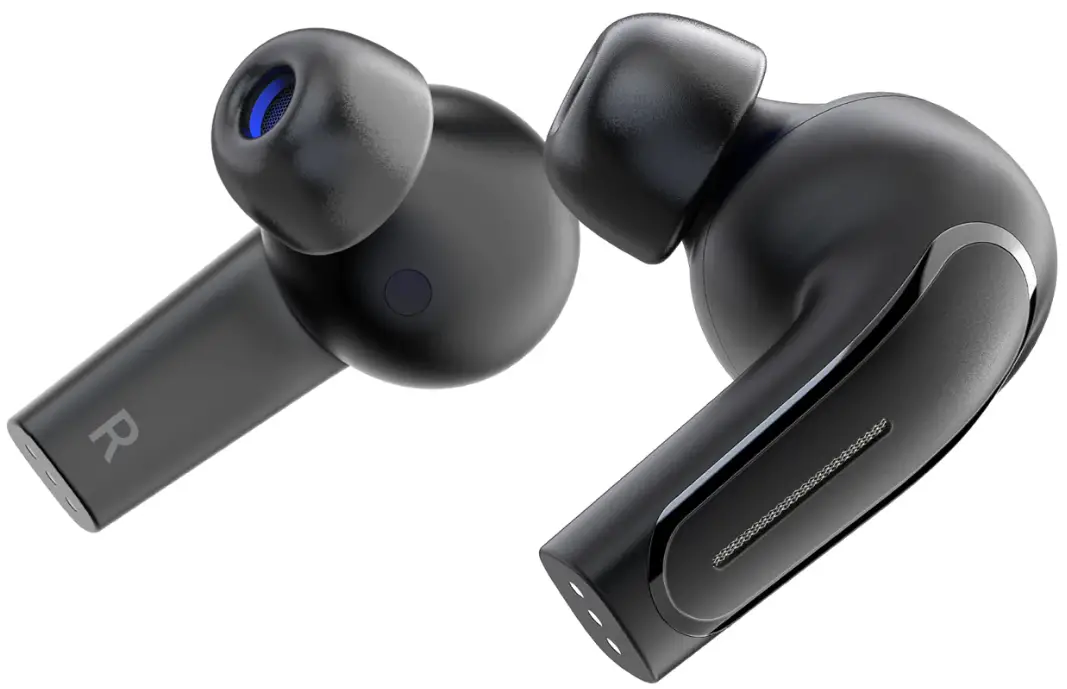
Olive SmartEar Plus Instructional Videos
Scan the QR Code to watch our instructional “How to…” Olive SmartEar Plus Videos!

| Battery | Olive: Lithium-ion battery 65mAh Charging Case: Lithium-ion battery 420mAh |
| Power input | Olive: DC 5V, 130mA Charging Case: DC 5V, 500mA |
| Usage time |
|
| Size and weight | Olive EA: 0.78in(20mm) x 0.78in(20mm) x 1.22in(31mm) / 0.22oz(6.2g)Charging Case: 2.60in(66mm) x 0.90in(23mm) x 1.77in(45mm) / 1.25oz(35.5g) |
| Main unit and accessories |
|
| Compatible models | Compatible with iOS 12 or later. Compatible with Android 5.1 or later. Usage at a distance of 10 meters or further is not guaranteed to work. Compatibility with older or newer versions of the App is not guaranteed. Compatibility with old Bluetooth standards is not guaranteed. Bluetooth radio waves may cause interference with other radio waves. Please make sure to set up indoors. |
Check Your Olive & Accessories
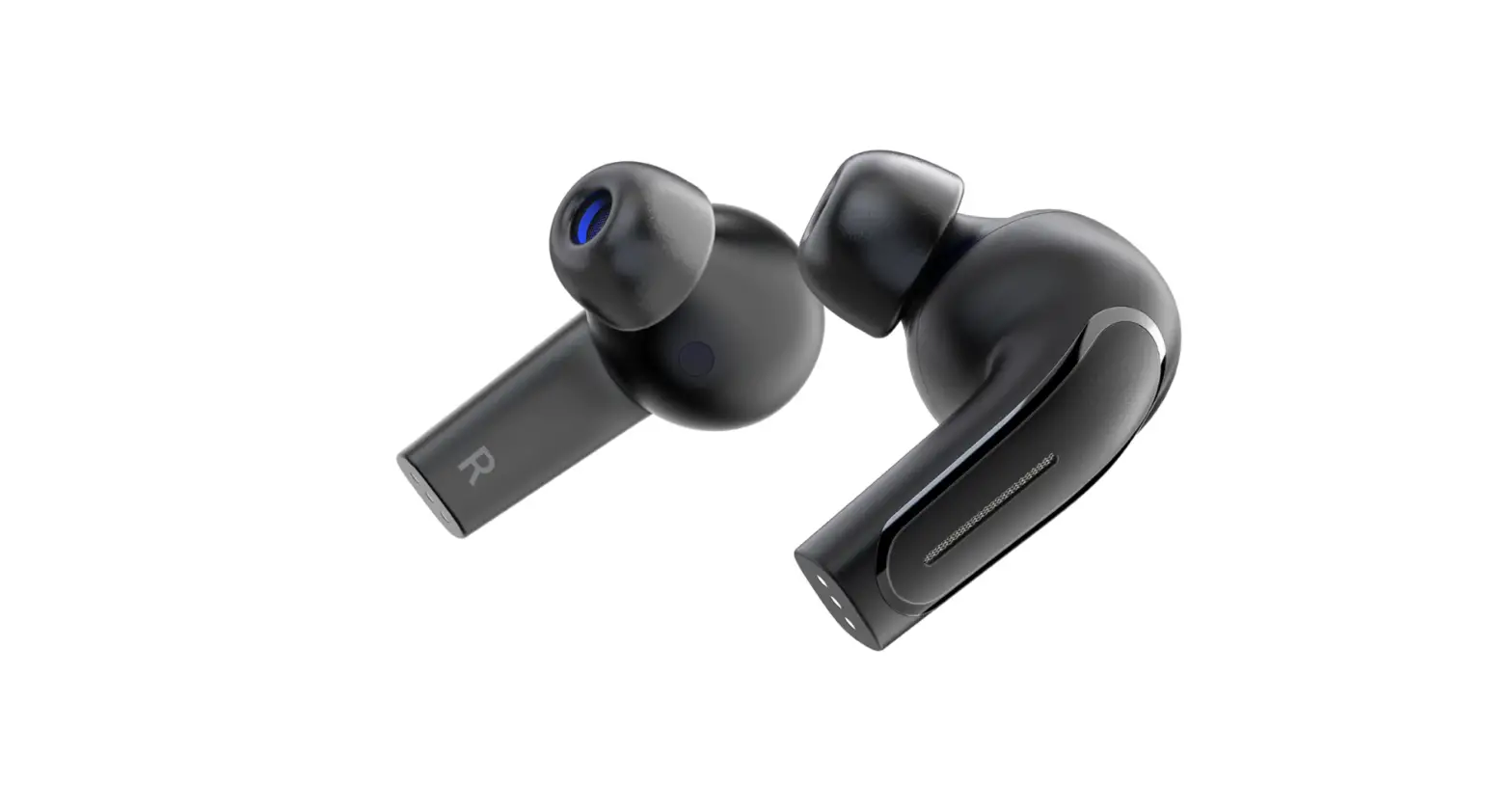
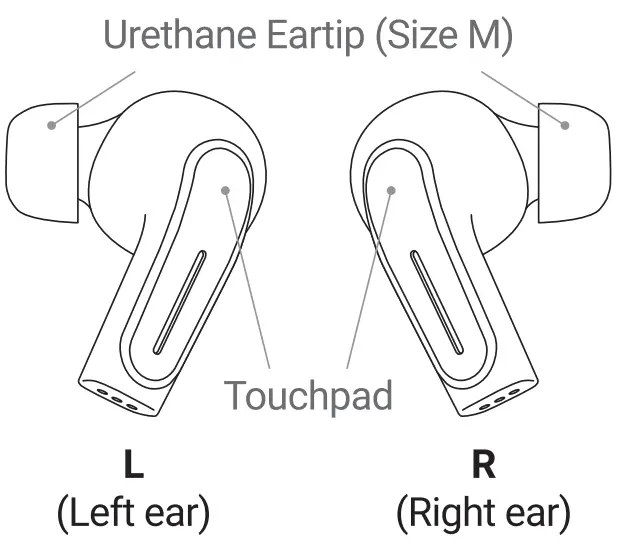
- Olive
(Left ear & Right ear)
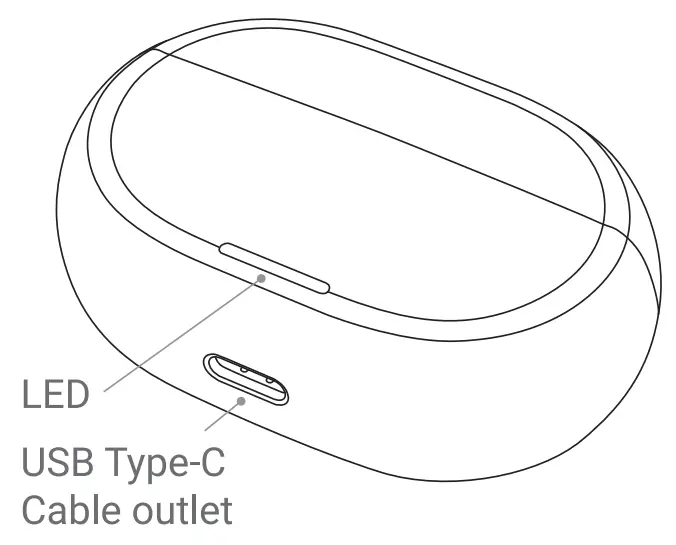
- Charging Case

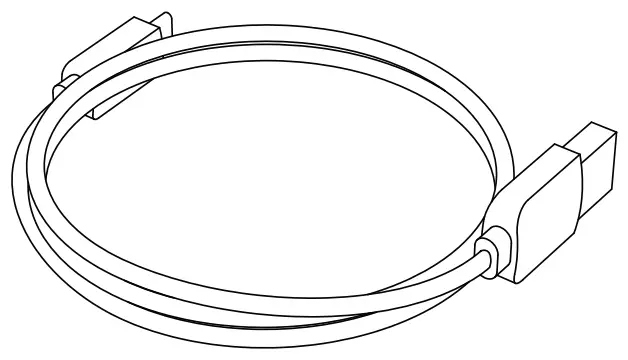
- USB Type-C Cable

- Please make sure to use the included cable.
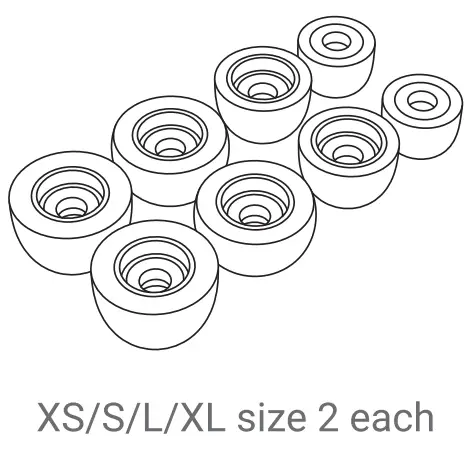
- Urethane Eartips

- Size M is attached to the left and right sides at the time of purchase.
- XS-size Yellow / S-size Red / M-size Green / L-size Blue / XL-size White
Wearing Your Olive
To experience the best hearing with your Olive SmartEar Plus, make sure you wear them correctly!
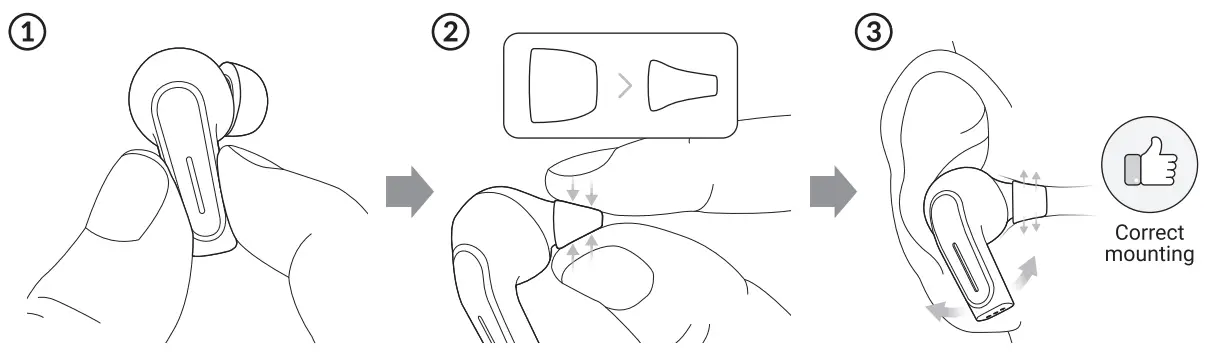
- Remove your Olive from the case and grasp it by the sides. Avoid touching the touchpad when inserting them into your ear.
- Pinch the eartip with your fingers, compressing it.
- The eartip will expand once inserted into your ear canal, creating a tight seal.
- Insert the Olive into your ear, gently twisting it slightly as you do to ensure a deep and secure fit.
How to distinguish left and right The IR] at the base of one Olive indicates the right earbud, and the [L] on the other indicates the left earbud.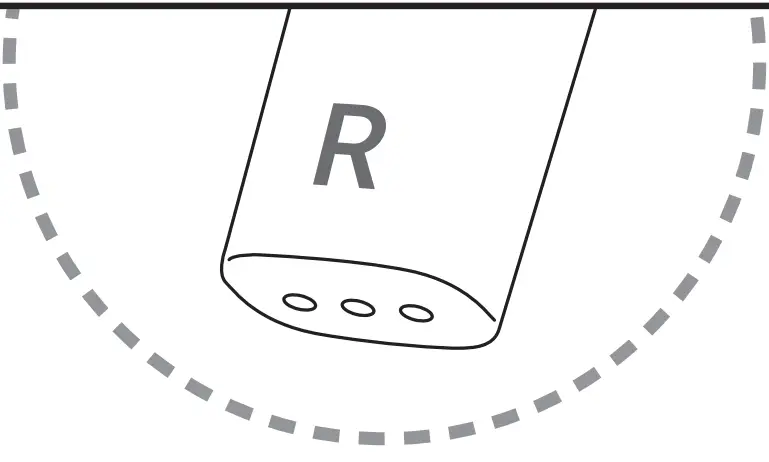
What if my Olive doesn’t fit my ears?
Finding the right fit for your Olive is very important. Make sure to try all 5 sizes (XS, S, M, L, and XL) to find the best comfort and fit.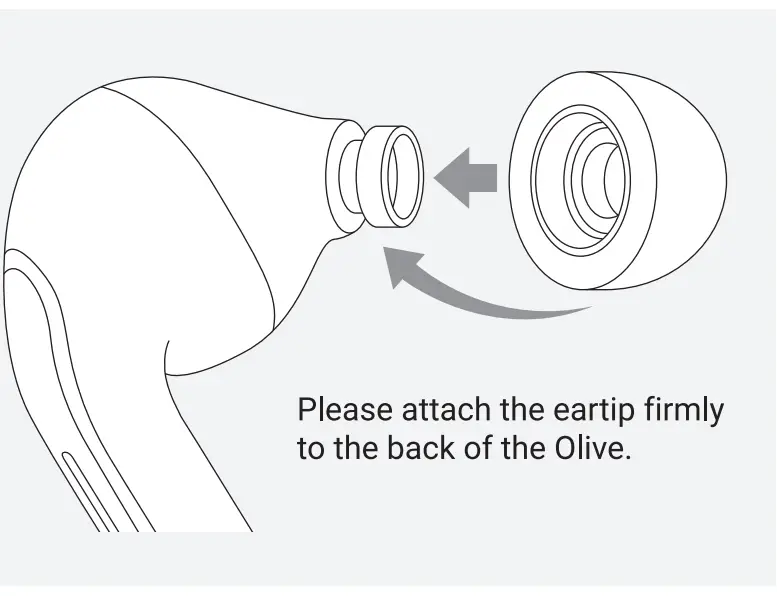
Charging Your Olive
- Put your Olive into the Charging Case and close the lid.
- Connect the Charging Case to a USB AC adapter with the included USB Type-C Cable and charge for about an hour.
- (The charging time may vary slightly depending on your environment.)

- (The charging time may vary slightly depending on your environment.)
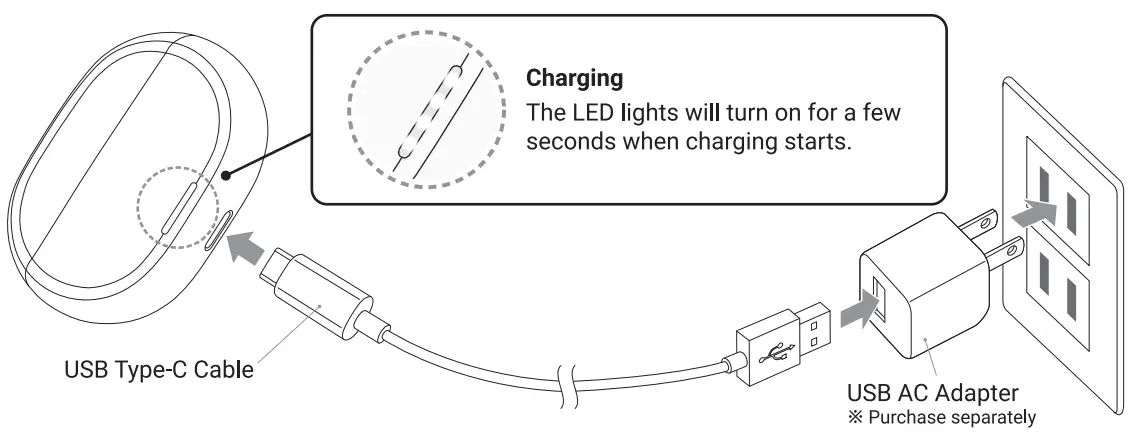
How do I charge my Olive on the go?
Your Olive can be charged by simply returning them to the Charging Case.
The Charging Case can hold around 2 full charges -you can check the Charging Case’s remaining battery life by opening the lid and looking at the LED lights.
Remaining Battery Life in Charging Case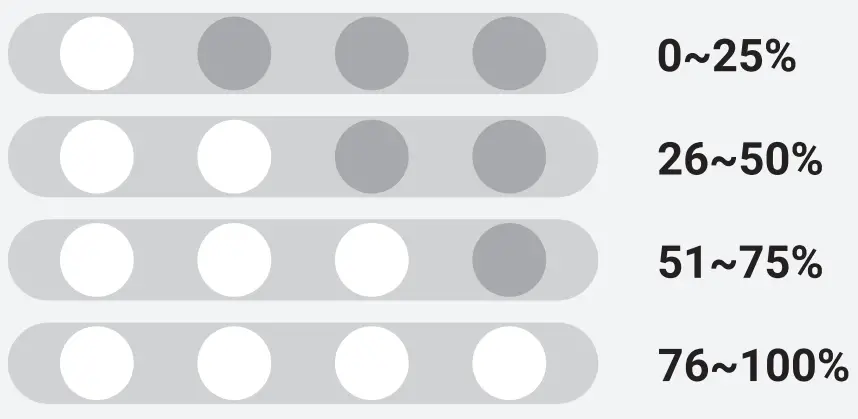
Install The Dedicated Olive Application
While your new Olive SmarEar Plus may perform well on its own, use it with the “My Olive” App to experience its full potential! Follow the instructions below to download the “My Olive” App.
- Application is free to use and download, but user is responsible for data or packet communication fees incurred during download or use.
- Open your smartphone’s camera app.

- Aim the camera at the QR code above. Once read, the “My Olive” app download screen should appear.

- Tap the pop-up or link that appears to transition to the “My Olive” app installation screen.



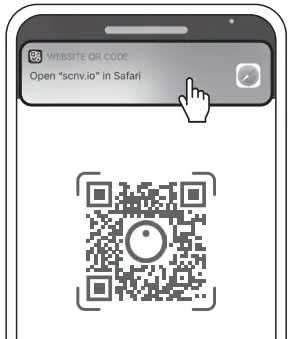
What if I’m having trouble reading the QR Code?
Search for “My Olive” in the AppStore or Google Play and download the corresponding app shown to the right.
- Alternatively, please search for “My Olive App” in the search engine and install the app below.

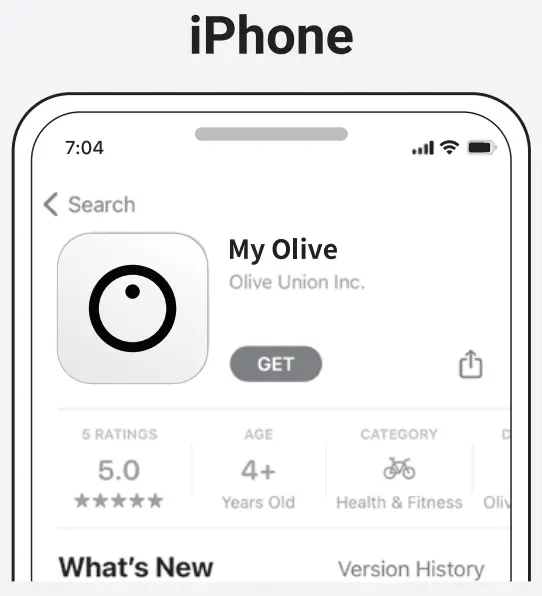
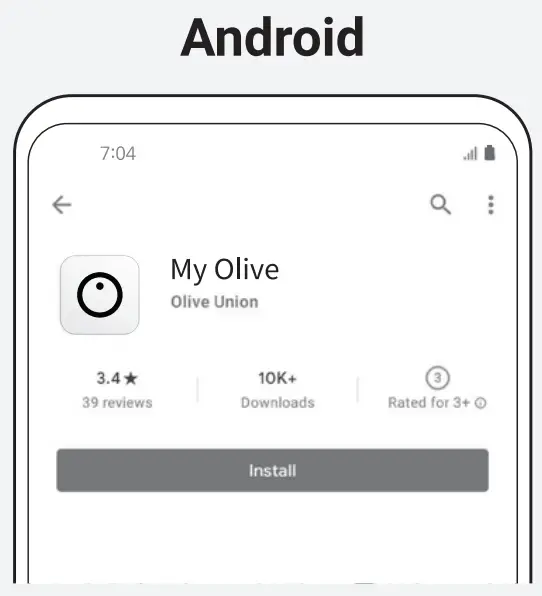
Registering Your Olive With The “My Olive” App
Start the “My Olive” app and follow the instructions on the screen to proceed.
When Bluetooth Connection appears on your screen, tap the “Go to Settings” text. When the Bluetooth settings screen appears, follow the steps below to connect to Bluetooth.
If you are using an iPhone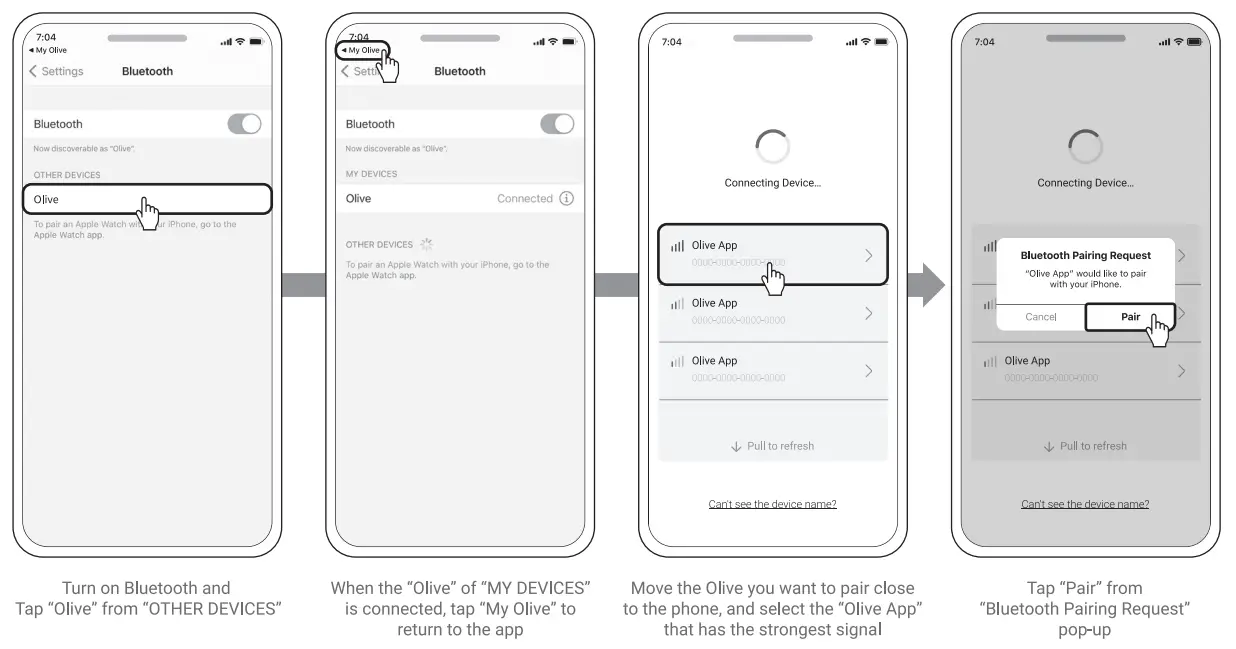
If you are using an Android smartphone
- The display may vary depending on the model

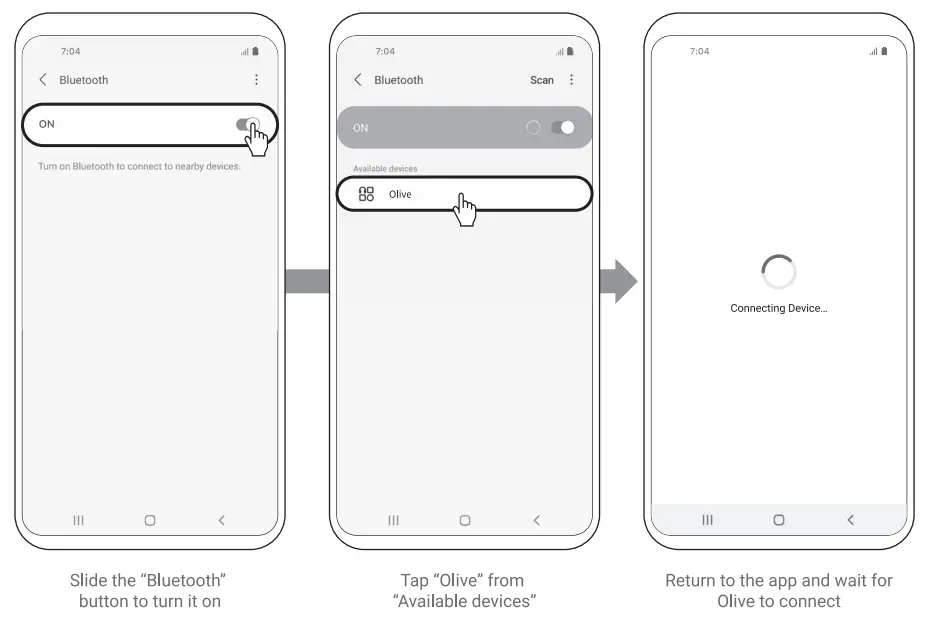
What if the connection failed and I can’t complete registration?
Please refer the “Bluetooth Connection Troubleshooting” section of this manual.
Customizing Your Olive’s Touch Controls
You can customize various touch control settings via “My Olive” App. Change them for your convenience to maximize the Olive SmartEar Plus experience.
Customizable Touchpad Configuration
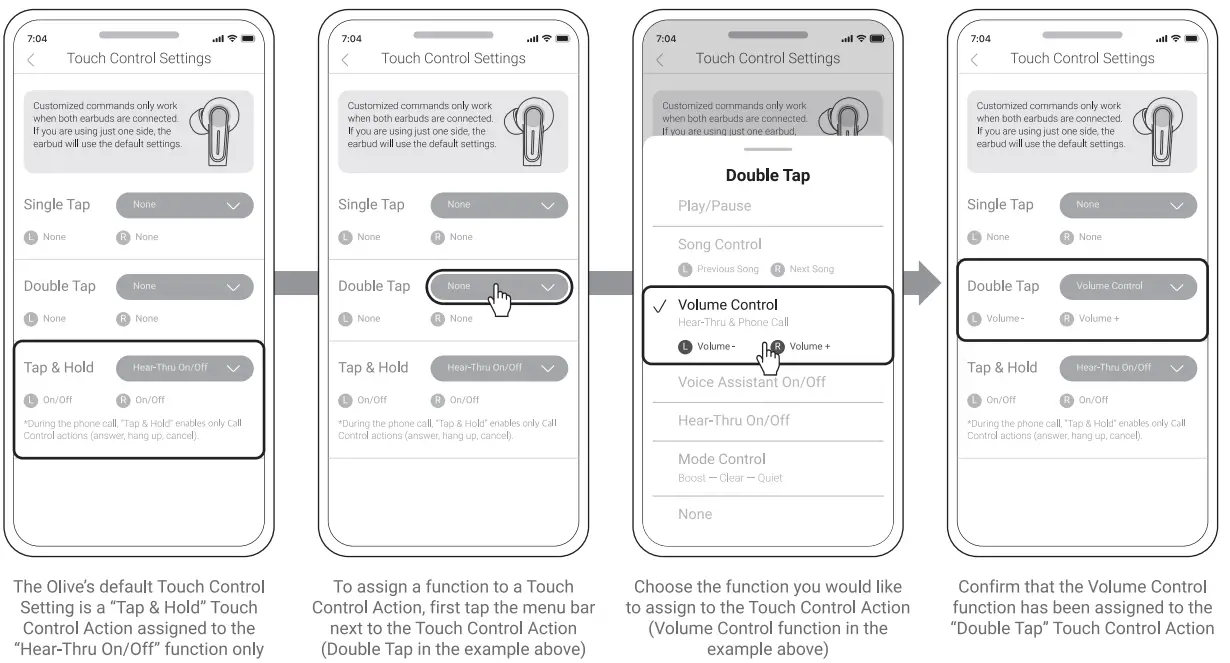
Additional customizable touch controls include Song Control, Volume Control, Mode Control, and Voice Assistant. Please note that the Call Control actions(answer, hang up, cancel) can only be assigned to the “Tap & Hold” Touch Control Action.
Bluetooth Connection Troubleshooting
If you are having issues with pairing, please try Manual Pairing and/or resetting your smartphone’s Bluetooth connection.
Before resetting Bluetooth connection.
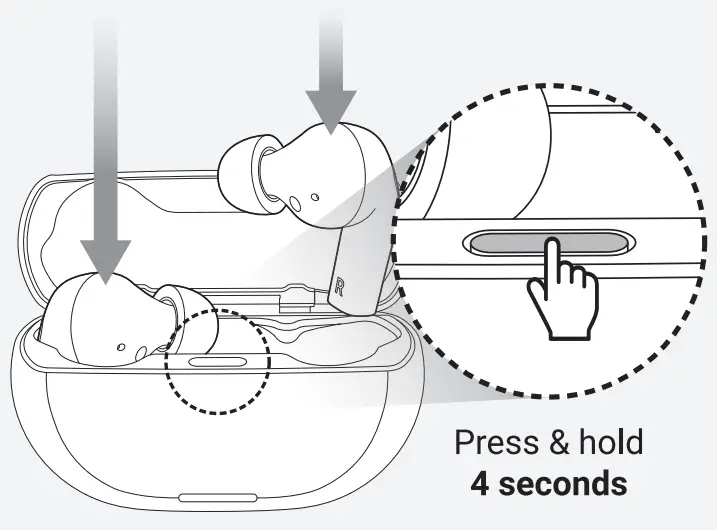
- Return Olives to the Charging Case.
- Press & hold the Charging Case button for 4 seconds to activate manual pairing.
- The Charging Case’s LED will flash 3 times and blink left to right to indicate manual pairing has activated.

For iPhone
- “Settings” > Touch “Bluetooth
- Touch the
 icon in “MY DEVICES” for “Olive”
 - Touch “Forget This Device”
- Touch the icon in “MY DEVICES” for “Olive App”
- Touch “Forget This Device”
- Uninstall the “My Olive” app.
- Restart your smartphone.
- Please install the app again and try connecting.

 icon in “MY DEVICES” for “Olive”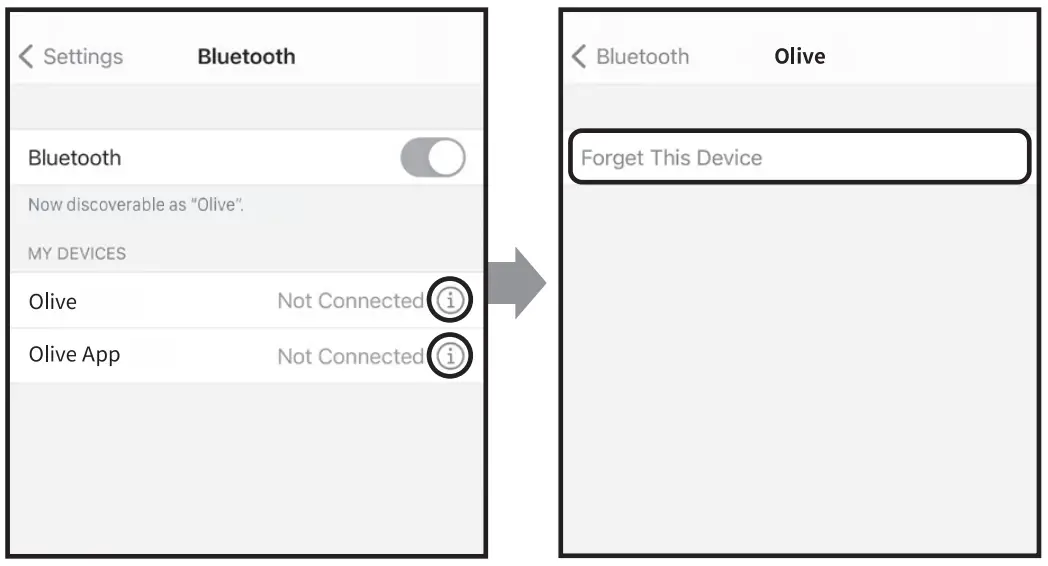
For Android
- “Settings” > “Connected Devices” > “Bluetooth”
- Touch the
 icon in “Paired devices”
 - Touch “Unpair”
- Uninstall the “My Olive” app.
- Restart your smartphone.
- Please install the app again and try connecting.

 icon in “Paired devices”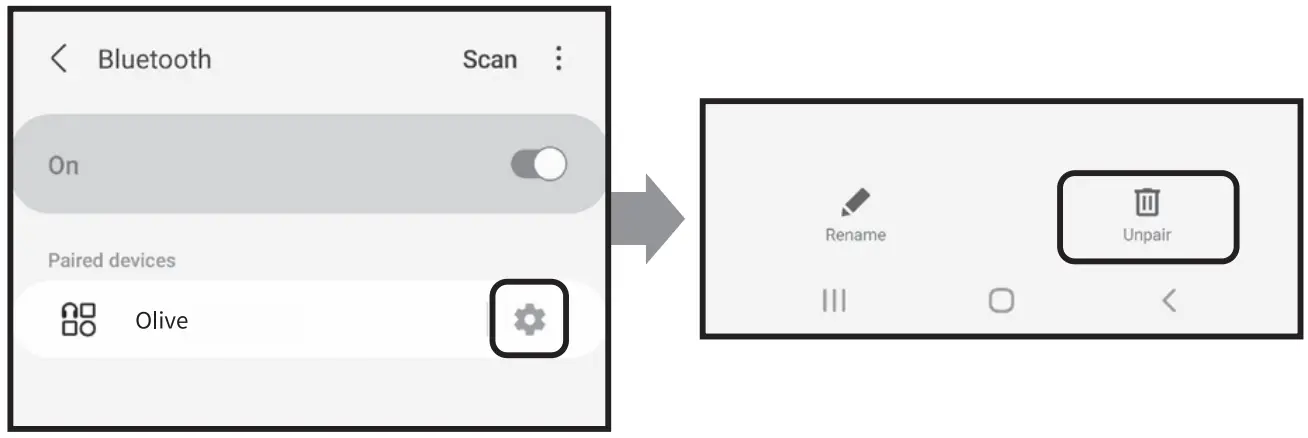
Customer Support Services
Have questions or need further assistance?
Call or email us with the contacts below!Tel: (+1) 702-848-4837
E-mail: [email protected]
Important Safety Precautions Please read and keep all safety, security, and use instructions.
The following section contains important information regarding safe use. Please read the following carefully before use. In addition, this instruction manual contains excerpts of particularly important items. Please check our website for the full text. If you have trouble finding the full text,
Please contact customer support at (+1) 702-848-4837
Safety Precautions
 Warning
Symbol indicates information that, if ignored, could possibly result in serious illness or even death.
Caution
Symbol indicates information that, if ignored, could possibly result in personal or property damage.
Description of Symbol
 Symbol indicates usage or action that should be avoided.
Handling of the main unit, charger, and other accessories
Warning
Never attempt to disassemble, remodel, or repair the product yourself.
There is a possibility of fire and/or injury.
Do not use at unnecessarily loud volume.
Use at a high volume for extended periods of time may cause hearing loss or exacerbate existing hearing loss.
Do not expose this product to water, liquids, or moisture. Do not use wet hands to handle the product.
Contact with liquids may result in electrical shock, failure, and injury.
Do not attempt to use with outlets or outlet strips that would exceed the safe, rated value.
Overloading an electrical circuit can result in fires.
Caution
Do not hit, crush, or use excessive force with the product.
Also, do not handle the parts roughly, such as forcibly pulling them. Rough and improper use can cause damage, electric shock, fire, and accidents.
Storage in the following places may cause electrical shock and failure and should be avoided.
Areas with extremely high or low temperatures/Close to heat sources and fire such as heating appliances/Hot or humid places such as bathrooms Nery dusty areas/Outdoors or in direct sunlight/Near harmful substances/Near slippery substances (grease, oil, etc.)
If you experience or notice any of the following, stop using the product immediately. Ignoring the following and continuing to use the product may cause unexpected accidents and injuries.
The product is broken or degraded. The product is damaged by chemicals. The product is deformed by heat.
Use of the product in the following ways can cause unexpected accidents, injuries, or physical damage. Do not allow children or people who require supervision to use. Furthermore the product contains small pieces which should be kept out of reach of children due to choking hazard.
Do not lend or borrow this product. Do not continue to use if broken or damaged. Do not use while sleeping.
Check before use
If you fall under any of these eight categories, please refrain from use and ask an otolaryngologist for a diagnosis.
- Has damage or deformity due to surgery, injury, etc
- Otorrhea has occurred within the last 90 days due to otitis media
- Has experienced sudden or progressive hearing loss within the last 90 days
- Has experienced hearing loss in one ear or the other within the last 90 days
- Has experienced acute or chronic dizziness
- Has lots/unusual amounts of earwax
- Has eczema, pain, or discomfort in the external auditory meatus
- Has abnormal air bone conduction in hearing at 500,1000 and 2000 Hz
Care Procedures
Before and after use, clean the main body with a dry and clean cloth or brush.
About Product Disposal
Please dispose of the product in an appropriate way according to the instructions of the local government or municipality.
 FCC ID : 2AOLHOSE300M
This device complies with part 15 of the FCC Rules. Operation is subject to the following two conditions: (1) This device may not cause harmful interference, and (2)This device must accept any interference received, including interference that may cause undesired operation.
Warranty
| Product | Olive SmarEar Plus | ||
| Warranty Period | Purchase Date Month | Day | Year |
| Retailer | Name of Retailer : Address : Phone Number : | ||
Warranty Policy
In the unlikely event that a problem or failure occurs within the warranty period, please contact Olive Customer Support.
Warranty Period: 1 year from date of purchase.
If the product breaks down under normal usage during the warranty period, we will replace it for free. However, consumable parts and accessories are not covered by the warranty.
Consumable parts: Eartips
Accessories: USB cable
For the following cases, even if within the warranty period, replacement and repairs will require payment.
- If warranty information is not properly filled out
- If this document has been lost, or the wording of this document has been modified
- Failure or damage caused by misuse or improper repair or modification
- Natural disasters such as fire, earthquake, flood, lightning, etc. Furthermore, pollution, abnormal voltage, or damage from the usage of an undesignated power supply
- Damage caused by carelessness of the customer or failure caused by improper repair, decomposition, or modification
- Failure or deterioration due to use that is not in accordance with this manual
- Exchange of consumables and accessories
This warranty is only valid in the United States of America. This manual & warranty will not be reissued, so please keep it safe and secure.

[Contact Us] Olive Customer Support
Tel. (+1) 702-848-4837
E-mail. [email protected]