
INSTRUCTIONS
- Read these instructions.
- Keep these instructions.
- Heed all warnings.
- Follow all instructions.
- Do not use this apparatus near water.
- Clean only with dry cloth.
- Do not block any ventilation openings. Install in accordance with the manufacturer’s instructions.
- Do not install near any heat sources such as radiators, heat registers, stoves, or other apparatus (including amplifiers) that produce heat.
- Do not defeat the safety purpose of the polarized or grounding-type plug. A polarized plug has two blades with one wider than the other.
- Protect the power cord from being walked on or pinched particularly at plugs, convenience receptacles, and the point where they exit from the apparatus.
- Only use attachments/accessories specified by the manufacturer.
- Use only with the cart, stand, tripod, bracket, or table specified by the manufacturer, or sold with the apparatus. When a cart is used, use caution when moving the cart/apparatus combination to avoid injury from tip-over.
- Unplug this apparatus during lightning storms or when unused for long periods of time.
- Refer all servicing to qualified service personnel.
Accessories
Please check and identify the supplied accessories.
Only for U.S.A.:
To order accessories, refer to “Limited Warranty” on the rear page.
Only for Canada:
To order accessories, contact the dealer from whom you have made your purchase.
- 1 x USB charging cord
- 1 x Detachable cord
Maintenance
- Clean this unit with a dry and soft cloth.
- Do not use solvents including benzine, thinner, alcohol, kitchen detergent, a chemical wiper, etc. This might cause the exterior case to be deformed or the coating to come off.
- Keeping the battery performance
- During the long period of disuse, full charge this unit once every 6 months to keep the battery performance
Part names
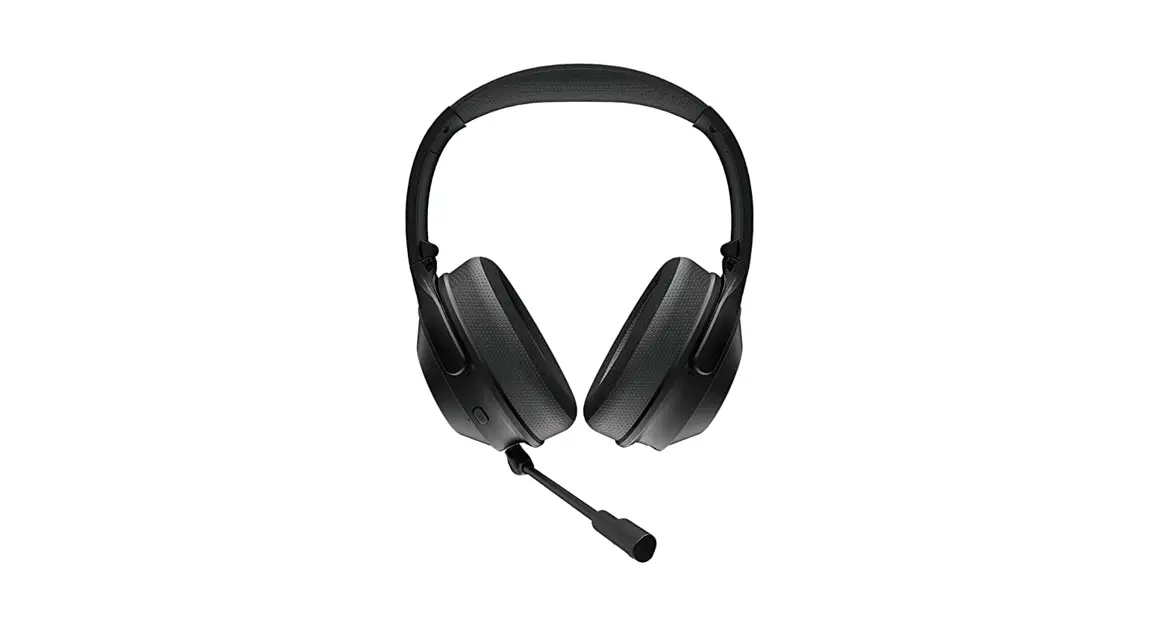
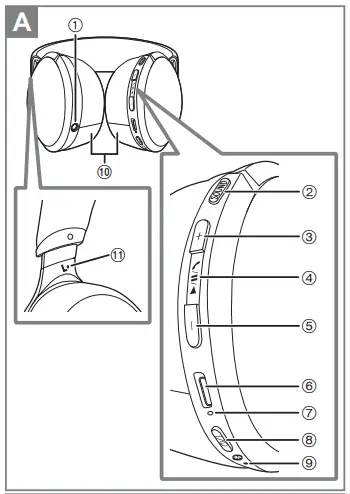
- Audio input terminal
- [SOUND] button
- button
- button
- button
- Charging terminal (DC IN)
- Power/pairing LED
- button*
- Microphone
- Earpads
- Raised dot indicating the left side
- Standby/ON

Charging
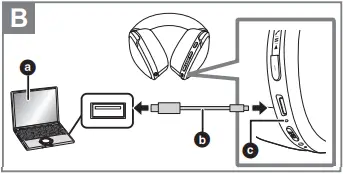
- The power/pairing LED (c) lights in red when charging is in progress. When charging is completed, the power/pairing LED will go out.
- It takes approx. 5 hours to charge the battery from empty to full.
- Check the direction of the terminals and plug in/out straight holding onto the plug. (It may result in malfunction by the deforming of the terminal if it is plugged in obliquely or in wrong direction.)
- It is not possible to turn the power on or connect to Bluetooth® devices during charging.
- Make sure the computer is turned on and is not on standby or sleep mode.
- Do not use any other USB charging cords except the supplied one.
- When the battery level starts to run low, the blinking power/pairing LED will turn from blue to red, and as it drops further, you will be notified by one beep every 1 minute.* When the battery runs out, an English guidance message will be heard and the power will turn off.

Turning the power on/off
Press and hold (a) of this unit for approx. 3 seconds until the power/pairing LED (blue) (b) blinks. A beep will sound, and the power/pairing LED (blue) will blink slowly. To turn the power off Press and hold for approximately 3 seconds. An English guidance message will be heard, and the power will be turned off. If the unit is not connected to a Bluetooth® device, an English guidance message will be heard and turn off the unit automatically approximately 5 minutes after you have stopped using it. (Auto power off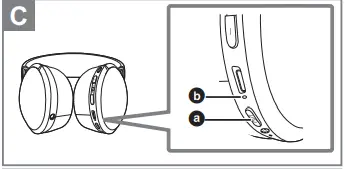
Connecting a Bluetooth® device
Bluetooth® pairing
- In the power-off state, press and hold [Í/I ( )] of this unit until the power/pairing LED blinks.
- When pairing a device for the first time: approx. 3 seconds
- When pairing a second or subsequent devices: approx. 5 seconds
- This unit will start to search for a Bluetooth® device to connect to, and the power/pairing LED will light alternately in blue and red.
- Turn on the power of the Bluetooth® device, and enable the Bluetooth® function.
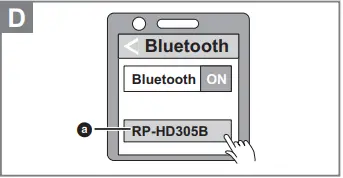
- Select “RP-HD305B” (a) from the Bluetooth® device’s menu.
- If prompted for a passkey, input the passkey “0000 (four zeros)” of this unit.
- When the power/pairing LED (blue) blinks twice every approx. 2 seconds, pairing (registration) is completed. (Connection established)
- If connection to a device is not established within approximately 5 minutes, the unit will be turned off. Perform pairing again. ∫ Connecting a paired Bluetooth® device
- Turn on this unit.
- Perform steps 2 and 3 of “Bluetooth® pairing”. (l above)
- When the power/pairing LED (blue) blinks twice every approx. 2 seconds, pairing (registration) is completed. (Connection established)
Using the headphones
- When using the functions below that are indicated with the mark, connect the Bluetooth® device and the unit.
Listening to music
- Select and play the music on the Bluetooth® device.
- The unit’s headphones will output the music or the audio of the video being played back.
- Remote controlling (Available only if your Bluetooth® device supports “AVRCP” Bluetooth® profiles)
(Operation example)
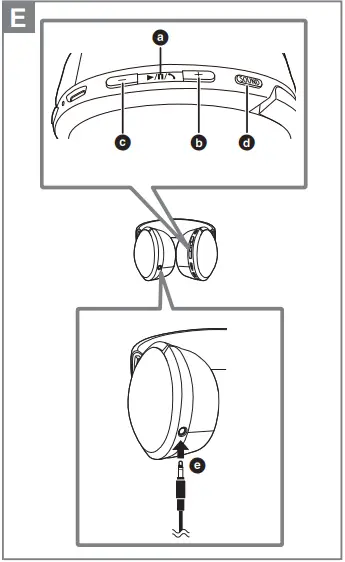
- Play / Pause: Press
- Increase the volume: Press
- Decrease the volume: Press
- Forward to the start of next track: Press twice quickly.
- Return to the start of current track: Press three times quickly.
- Fast forward: Press twice quickly; hold the second press.
- Fast rewind: Press [1/;/ ] three times quickly; hold the third press.
To remove the battery when disposing of this unit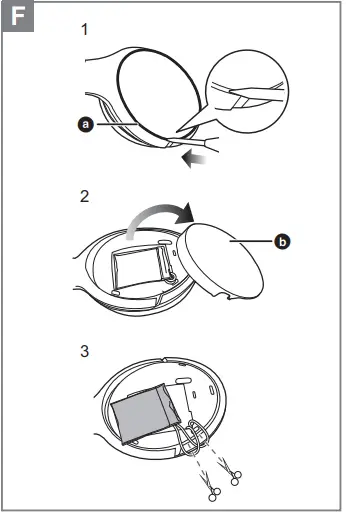
- Disassemble after the battery runs out.
- Keep disassembled parts out of reach of children.
- Regarding the handling of used batteries
- Insulate the terminals with adhesive tape or similar material.
- Do not disassemble.
Batteries
- Do not heat or expose to flame.
- Do not leave the battery(ies) in a car exposed to direct sunlight for a long period of time with doors and windows closed.
- Battery mishandling can cause electrolyte leakage which can damage items the leaked fluid comes into contact with. If electrolyte leaks from the battery, consult your dealer. Wash thoroughly with water if electrolyte comes in contact with any part of your body.
- When disposing of the batteries, please contact your local authorities or dealer and ask for the correct method of disposal.
- Insert a flat-head screwdriver into the groove on the outward-facing side of the left headphone (a).
- Use the flat-head screwdriver to pry up b.
- Remove the battery, and cut off the wires one by one with scissors.
Troubleshooting
- Make sure that the unit and the Bluetooth® enabled phone are turned on.
- Check if the unit and the Bluetooth® enabled phone are connected.
- Check the audio settings of the Bluetooth® enabled phone. Switch the calling device to the unit if it is set to the Bluetooth® enabled phone.
- If the volume of the other person’s voice is too low, increase the volume of both the unit and the Bluetooth® enabled phone.
- This unit can be reset when all operations are rejected. To reset the unit, connect the unit to a computer using the USB charging cord. (The pairing device information will not be deleted.)
- The power cannot be turned on when the detachable cord (supplied) is connected.
Specifications
General
| Power supply | DC 5 V, 300 mA (Internal battery: 3.7 V (Li-polymer)) |
| Operating time*1 | Approx. 24 hours (SBC) |
| Charging time*2 (25 oC (77 oF)) | Approx. 5 hours |
| Charging temperature range | 10 oC to 35 oC (50 oF to 95 oF) |
| Operating temperature range | 0 oC to 40 oC (32 oF to 104 oF) |
| Operating humidity range | 35 %RH to 80 %RH (no condensation) |
| Mass (Weight) | Approx. 218 g (7.7 oz) (without cord) |
Bluetooth® section
| Frequency band | 2402 MHz to 2480 MHz |
| Supported profiles | A2DP, AVRCP, HSP, HFP |
| Supported codec | SBC, AAC, Qualcomm® aptXTM, Qualcomm® aptXTM Low Latency |
Warranty
Limited Warranty
Limited Warranty Coverage If your product does not work properly because of a defect in materials or workmanship, Panasonic Corporation of North America (referred to as “the warrantor”) will, for the length of the period indicated on the chart below, which starts with the date of original purchase (“warranty period”), at its option either (a) repair your product with new or refurbished parts, (b) replace it with a new or a refurbished equivalent value product, or (c) refund your purchase price. The decision to repair, replace or refund will be made by the warrantor
Limited Warranty Limits and Exclusions
This warranty ONLY COVERS failures due to defects in materials or workmanship, and DOES NOT COVER normal wear and tear or cosmetic damage. The warranty ALSO DOES NOT COVER damages which occurred in shipment, or failures which are caused by products not supplied by the warrantor, or failures which result from accidents, misuse, abuse, neglect, mishandling, misapplication, alteration, faulty installation, set-up adjustments, misadjustment of consumer controls, improper maintenance, power line surge, lightning damage, modification, introduction of sand, humidity or liquids, commercial use such as hotel, office, restaurant, or other business or rental use of the product, or service by anyone other than a Factory Service Center or other Authorized Servicer, or damage that is attributable to acts of God.
THERE ARE NO EXPRESS WARRANTIES EXCEPT AS LISTED UNDER “LIMITED WARRANTY COVERAGE”. THE WARRANTOR IS NOT LIABLE FOR INCIDENTAL OR CONSEQUENTIAL DAMAGES RESULTING FROM THE USE OF THIS PRODUCT, OR ARISING OUT OF ANY BREACH OF THIS WARRANTY. (As examples, this excludes damages for lost time, travel to and from the servicer, loss of or damage to media or images, data or other memory or recorded content. The items listed are not exclusive, but for illustration only.) ALL EXPRESS AND IMPLIED WARRANTIES, INCLUDING THE WARRANTY OF MERCHANTABILITY, ARE LIMITED TO THE PERIOD OF THE LIMITED WARRANTY. Some states do not allow the exclusion or limitation of incidental or consequential damages, or limitations on how long an implied warranty lasts, so the exclusions may not apply to you. This warranty gives you specific legal rights and you may also have other rights which vary from state to state. If a problem with this product develops during or after the warranty period, you may contact your dealer or Service Center. If the problem is not handled to your satisfaction, then write to:
- Panasonic Corporation of North America
- Consumer Affairs Department 8th Fl.
- Two Riverfront Plaza
- Newark NJ 07102-5490
FAQS
can these work with television?
It depends on the model of the TV, if it has Bluetooth and what version it has.
Does this unit support multipoint? Can you hook up two devices simultaneously?
The product does not support multi-point connections, it can only be connected to one device. -G
Are replacement pads available for these headphones?
Negative no replace pads.
Will the cups actually cover my ear?
Also this product is cheap quality head band starts pealing arter one week.
Donde comprar las almohadillas?
Ear pads can be purchased from panasonic.encompass.com
can this be charged using a wall adapter, or just using a computer?
We recommend using only the supplied USB charging cord when connecting to a computer.
How do I know when these are fully charged? Is the light red or blue?
The power/pairing LED lights in red when charging is in progress. When charging is completed, the power/ pairing LED will go out.
How is the bass?
The bass is low as is the rest of the sound. If you do not have a portable headphone amplifier do not buy these headphones.
Can you wirelessly watch tv?
Yes, if your TV has a Bluetooth connection.
Do these headphones come with a cord (if i want to use a cd player)?
Yes it comes with a Detachable cord. While the power is turned off or the battery has no remaining charge, this unit can be used as normal headphones by connecting the detachable cord (supplied).
How do I pair my Panasonic RP HD305B?
This unit will start to search for a Bluetooth® device to connect to, and the power/pairing LED will light alternately in blue and red.
Does Panasonic 4k TV have Bluetooth?
The answer is that most do, certainly the latest Panasonic TVs and those at the higher end of the market – the ones you’d typically have front of stage in the living room.
Which Panasonic TVs have Bluetooth?
Most Panasonic TVs, such as the TX-65HZ1000B Ultra HD OLED TV, support Bluetooth.
Try pairing the device again. This system might be connected to a different device. Disconnect the other device and try pairing the device again
From your TV’s Settings, select Sound, and then select Sound Output. If the option Bluetooth Speaker List appears, then your TV supports Bluetooth.