 banggood Battery power indicator
 banggood Battery power indicator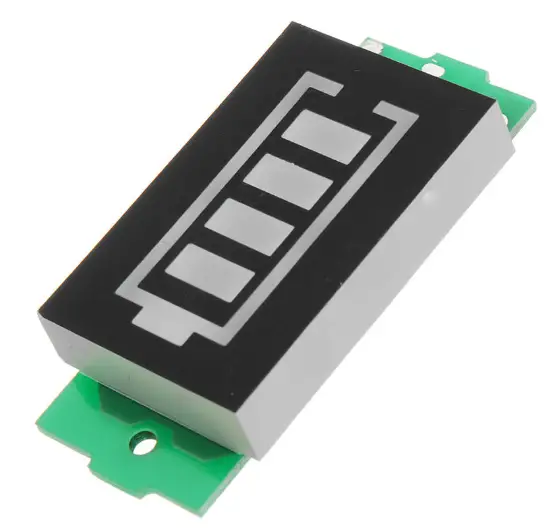
CHARACTERISTIC
- SDR: The function is determined by the loaded software.
- Frequency value: Range 50KHz~250MHz, 400MHz~2000MHz.
- Demodulation: AM, SSB, NFM, WFM.
- Powerful functions: Variable filter width, Adaptive noise suppressor, Threshold noise suppressor, Noise blazer, AGC, Equalizer.
- Demodulation chip: Use the chip msi001 with complete functions, high integration and high reliability.
- Mcu: The powerful stm32h743 with 480mhz clock frequency is applied.
- LCD: 3.5-inch display with touch screen.
- Battery: Built in battery and USB power supply, charged by USB.
Built in battery capacity up to 2000 mA/h. - Connected: USB connected to the computer, cat, IQ and audio can be transmitted.
introduction
| SN | Introduction |
| 1 | Ant: Antenna Port, SMA-K. |
|
2 | SQL, NB, NR, AGC-F, ANT, PRE, USB, ATT20, VOL50, FLT NORMAL, functions of the switch prompt display. Light means on, gray means off. Battery power indicator: Green is ok, red means low battery. When low battery, please charge in time. |
|
3 | Signal strength indication. Signal-to-noise ratio indication function. Frequency value: Frequency value, range 50KHz~250MHz, 400MHz~2000MHz.250MHz~400MHz not include. Step value: frequency step value, range 1KHz~1MHz. Audio indicator: one for headset, one for back speaker. green for enable, grey for disable. press indicator to change status. |
|
4 | Spectrum analyzer window. Time: Long press HARD menu 3 seconds then release, go into time edit. Use volume encoder to adjust time. At last, long press to confirm. Waterfall chart window. |
| 5 | Volume: Volume encoder, up and down to adjust volume value, short press to other parameters. Short press to go out the menu edit page. |
| 6 | Frequency: Frequency encoder, up and down to adjust frequency value, short press to adjust step value. Short press to go out the menu edit page. |
| 7 | Audio: Audio Port for headset. |
| 8 | Start: Short press to startup or close the screen. Long press to go to sleep mode. |
| 9 | USB: Type-c USB, Charging Port. |
| 10 | Menu lists: HARD, AUDIO, VISUAL, NR, MODE, BAND. Detailed description see below. |
| 11 | LCD: 3.5-inch display with touch screen. |
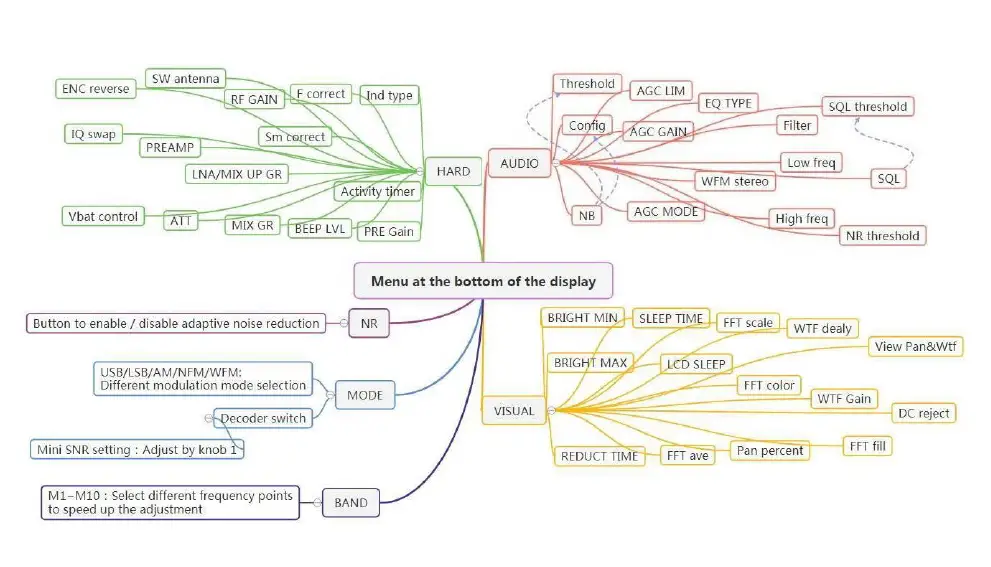
| MENU ITEM | Introduction |
|
HARD | Short press HARD menu into or out of edit. Time Setting: Long press HARD menu 3 seconds then release, go into time edit. Turn volume encoder to adjust time, short press to change position. At last, long press volume encoder to confirm. |
|
ENC reverse | En1 reverse: reverse frequency encoder direction. Default is disable, turn down to add frequency and step value. Reverse, when enable, turn up to add value. En2 reverse: reverse volume encoder direction. Default is disable, turn down to add volume value. Reverse, when enable, turn up to add value. |
| IQ swap | IQ signal swap. |
| Vbat control | Power consumption mode control. |
| User Funct | Press User Funct to enable or disable User Funct function. (Functions of versions above 1.10c) |
| SW antenna | Impedance matching selection of shortwave antenna. |
| PREAMP | Preamplifier Tianguan setting. |
| ATT | Attenuator settings: Select by touching, then adjust knob 1 to set numerical value. |
| Audio out | Switch headset or external playback mode. (Functions of versions above 1.10c) |
| RF GAIN | RF gain setting: Select by touching, then adjust knob 1 to set numerical value. |
| LNA/MIX UP GR | Press LNA/MIX UP GR to enable or disable LNA/MIX UP GR function. |
| MENU ITEM | Introduction | |
| MIX GR | Press MIX GR to enable or disable MIX GR function. | |
| PGA Gain | PGA Gain setting: Select by touching, then adjust knob 1 to set numerical value. (Functions of versions above 1.10c) | |
| F correct | Receiving frequency error correction. | |
| Sm correct | Receiving sm error correction. | |
| BEEP LVL | Adjust BEEP LVL by volume encoder. | |
| PGA BST | Press PGA BST to enable or disable PGA BST function. (Functions of versions above 1.10c) | |
| Ind type | Touch switch Ind type. | |
| Activity timer | Adjust activity timer by volume encoder. | |
| PRE Gain | Adjust PRE gain value by volume encoder. | |
| AUDIO | Short press AUDIO menu into or out of edit. | |
| NB | Threshold | Adjust noise balancer threshold by volume encoder. |
| Config | Adjust noise balancer config value by volume encoder. | |
| NB | Noise balancer. | |
| AGC | AGC LIM | Adjust AGC LIM value by volume encoder. |
| AGC GAIN | Adjust AGC gain value by volume encoder. | |
| AGC MODE | AGC has OFF, FAST, MIDDLE, SLOW, LONG mode. Adjust selection AGC MODE by volume encoder. | |
|
EQ WFM | EQ TYPE | This machine has VOICE, POP, JAZZ, BASS, ROCK, CLUB, LIVE, SOFT, OFF equalizer mode. Adjust selection EQ TYPE by volume encoder. |
| WFM stereo | Press WFM stereo to enable or disable WFM stereo function. | |
| ANF | Press ANF to enable or disable ANF function. (Functions of versions above 1.10b) | |
| PseudoStereo | Press PseudoStereo to enable or disable Pseudo Stereo function. (Functions of versions above 1.10c) | |
| MENU ITEM | Introduction | |
|
FILTER | Filter | audio filter, narrow for 8000Hz, normal for 12000Hz, wide for 15000Hz. |
| Low freq | Frequency regulation of lower cut off of filter. | |
| High freq | Frequency regulation of upper cut off of filter. | |
| SQL NR | SQL threshold | When SQL is enabled, SQL threshold can be adjusted by encoder. |
| SQL | Press SQL to enable or disable SQL function. | |
| NR threshold | When NR is enabled, the NR threshold can be adjusted by the encoder. | |
| VISUAL | Short press VISUAL menu into or out of edit. | |
| BRIGHT MIN | Adjust the minimum brightness by volume encoder. | |
| BRIGHT MAX | Adjust the maximum brightness by volume encoder. | |
| REDUCT TIME | The machine does not operate the LCD to enter the low brightness delay time. | |
| SLEEP TIME | When LCD SLEEP enable, after this value, screen will close to save battery. | |
| LCD SLEEP | When enable, after the SLEEP TIME, screen will close to save battery. | |
| FFT ave | Average speed of spectrum analyzer. | |
| FFT scale | Display range of spectrum analyzer. | |
| FFT color | FFT display color selection. | |
| Pan percent | FFT shows Pan percent. | |
| WTF delay | WTF delay. | |
| WTF Gain | WTF Gain. | |
| FFT fill | FFT display fill. | |
| View Pan&Wtf | Pan&Wtf display switch settings. | |
| DC reject | Adjust DC rejection threshold by volume encoder. | |
| Retro scale | Press Retro scale to selet European or Japanese Retro scale function. (Functions of versions above 1.10c) | |
| MENU ITEM | Introduction | ||
| NR | Press NR to enable or disable NR function. The NR indicator will be grey for disable or red for enable. | ||
|
MODE | This machine has USB, LSB, AM, NFM, WFM mode. Decoder can enable or disable CW decoder. (CW, DSB, am and det modes are added to versions above 1.10b). Automatically changing the bandwidth of the filter in CW mode. | ||
| BAND | Band menu has 5 pages and total 50 choices. Turn the frequency encoder to change page index. | ||
setting
Quick frequency setting
Press the frequency indicater to go into the quick frequency setting page. Quick input the frequency then select the right Unit.
Spectrum analyzer window Press the window to change frequency point.
Waterfall:
Waterfall Press the waterfall to change Spectrum range.
Between 86.5mhz and 109mhz, Waterfall Press the waterfall to change Display interface mode. There is a dynamic retro scale display mode that interested users can explore.
Register:
All machine have been registered at factory. Do not need to input serial numbers again. If needed, turn volume encoder to change value, short press volume encoder to change position. At last long press frequency encoder to confirm.
Reset
Long press both volume encoder and frequency encoder at the same time to reset. All setting will restore to initial factory setting. The registered info will keep.
Antenna
The Antenna come with machine is a 433MHz antenna. Select the WFM mode and set frequency to 90~110MHZ to enjoy the WFM radio. If you need to receive AM or LSB radio, please buy the right Antenna.
First time to use:
Connect the antenna to machine, select WFM mode, and set frequency to 90MHz~110MHz. Enjoy it.