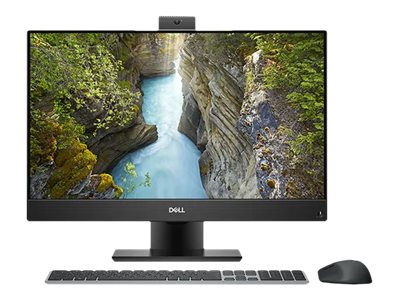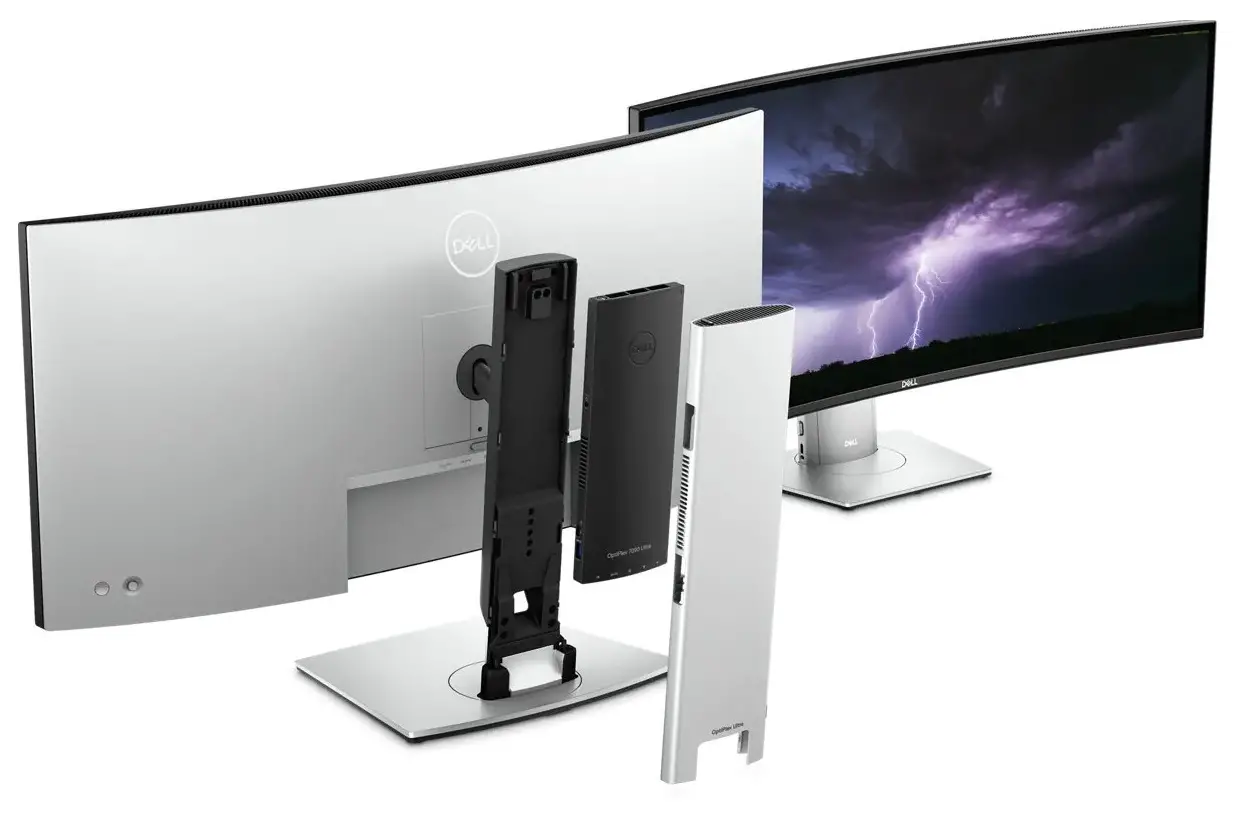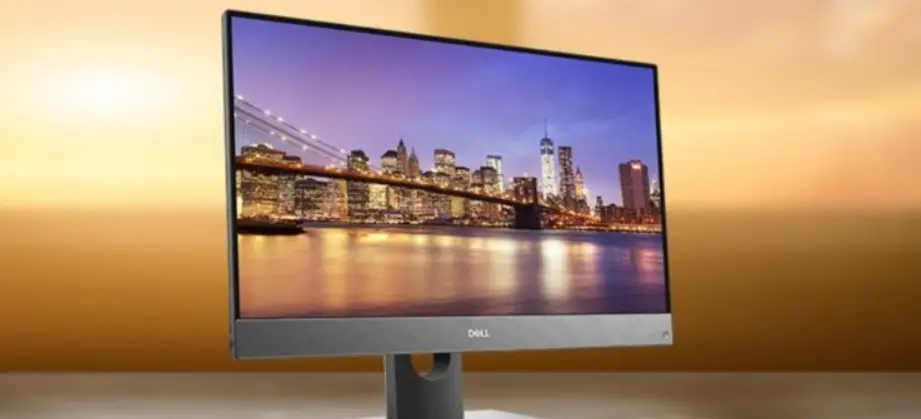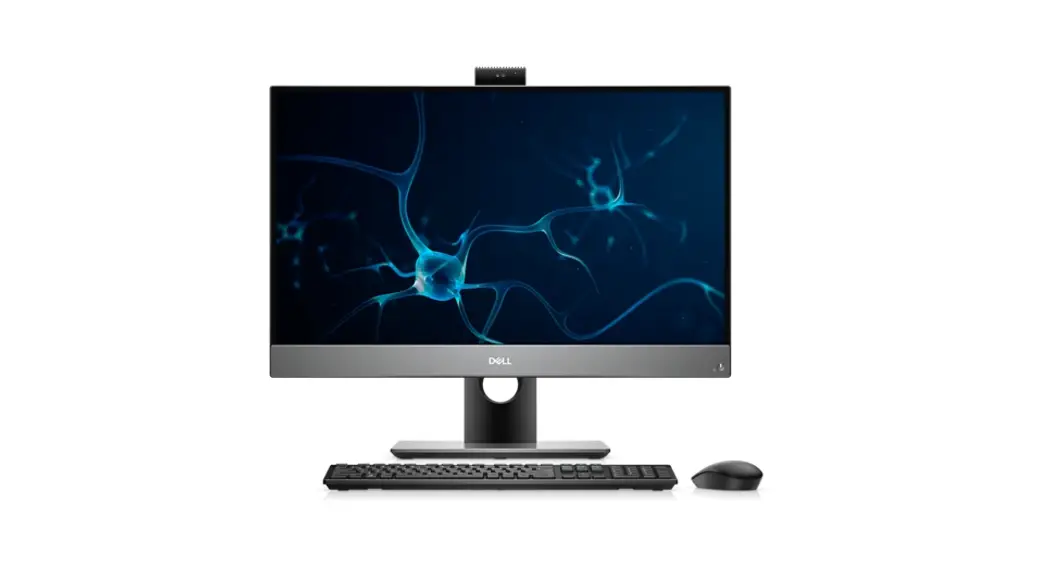

OptiPlex 7780 All-In-One
Setup and Specifications
Notes, cautions, and warnings NOTE: A NOTE indicates important information that helps you make better use of your product.
 CAUTION: A CAUTION indicates either potential damage to hardware or loss of data and tells you how to avoid the problem.
 WARNING: A WARNING indicates a potential for property damage, personal injury, or death.
© 2020-2021 Dell Inc. or its subsidiaries. All rights reserved. Dell, EMC, and other trademarks are trademarks of Dell Inc. or its subsidiaries.
Other trademarks may be trademarks of their respective owners.
Set up your computer
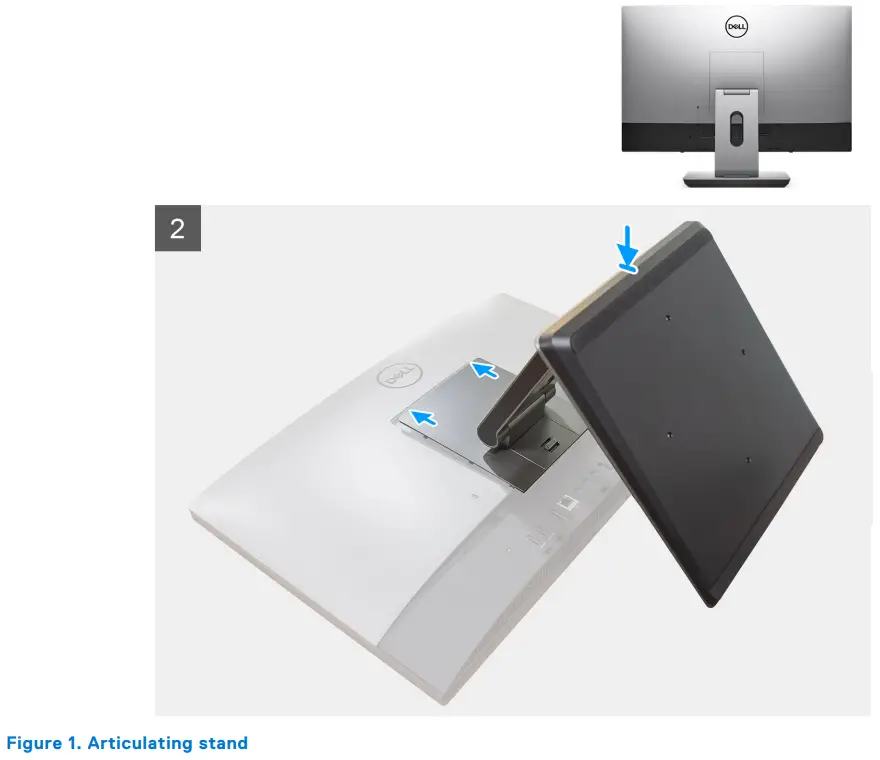
- Set up the stand.


- Set up the keyboard and mouse.
 NOTE: For setup instructions, see the documentation shipped with the keyboard and mouse.
- Route the power cable through the stand, then connect the power cable.

- Press the power button.

- Finish Windows setup.
Follow the on-screen instructions to complete the setup. When setting up, Dell recommends that you:
● Connect to a network for Windows updates. NOTE: If connecting to a secured wireless network, enter the password for the wireless network access when prompted. ● If connected to the internet, sign in with or create a Microsoft account. If not connected to the internet, create an offline account.
● On the Support and Protection screen, enter your contact details. - Locate and use Dell apps from the Windows Start menu—Recommended
Table 1. Locate Dell apps
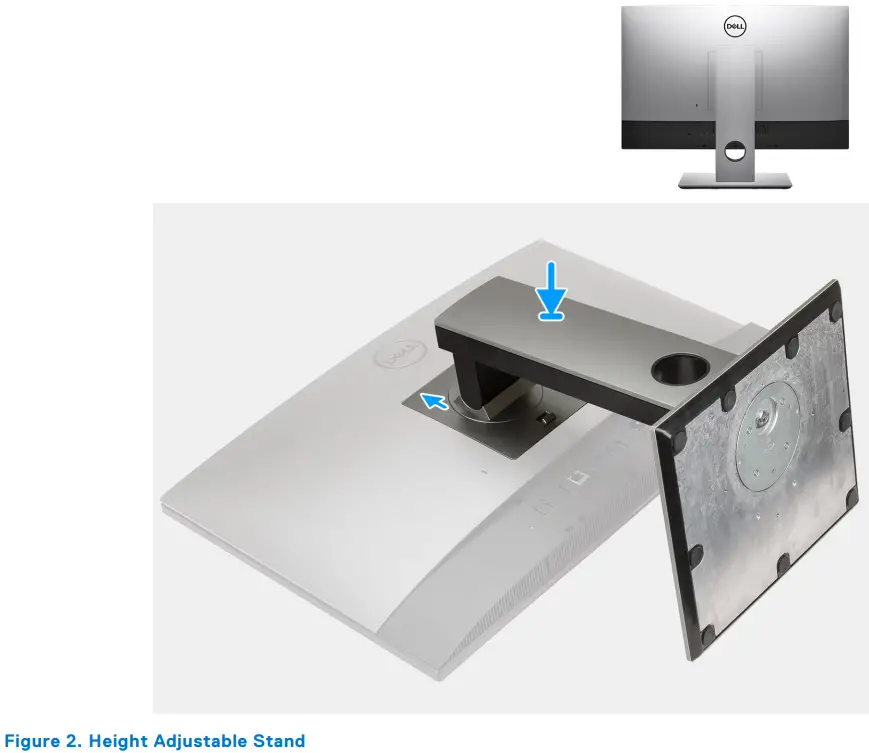
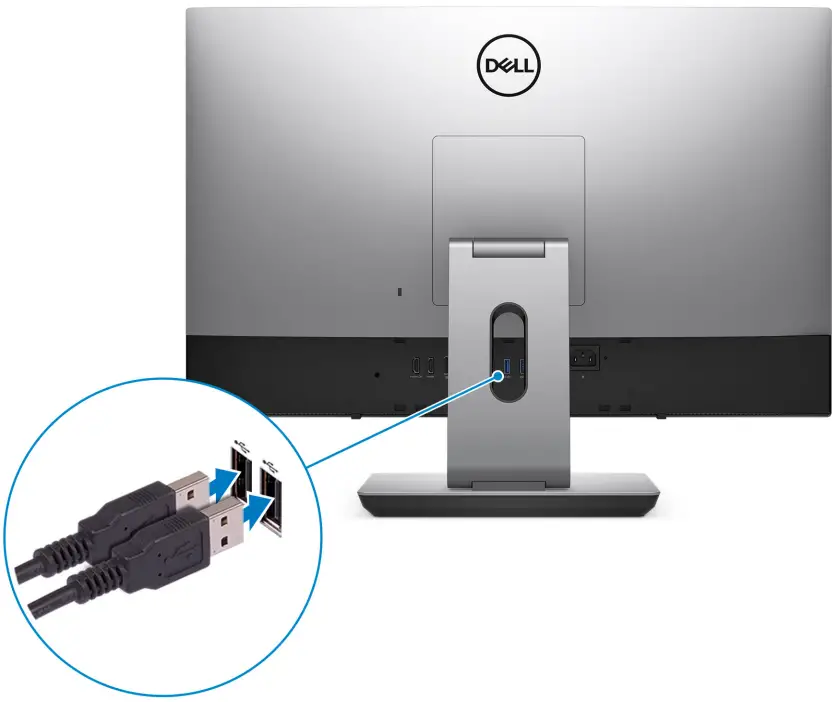
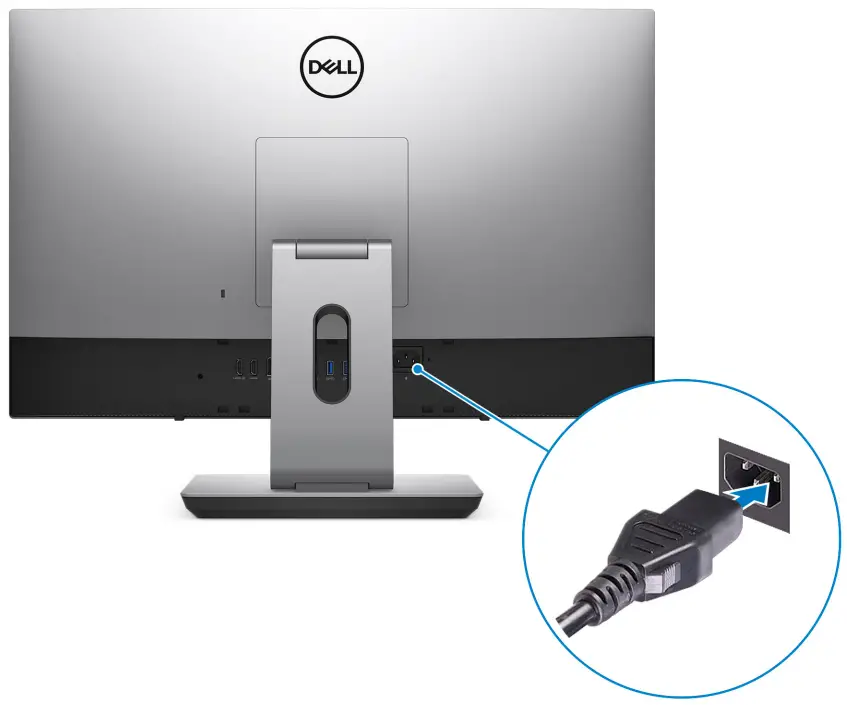
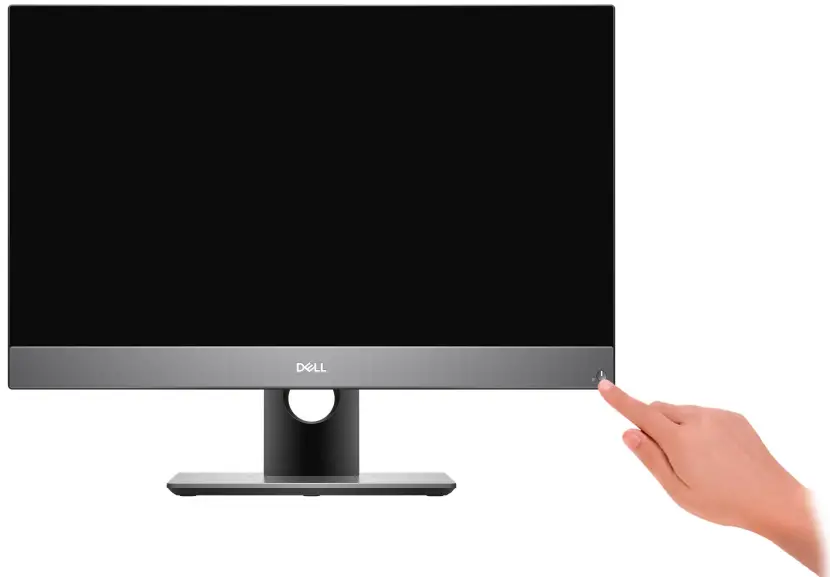
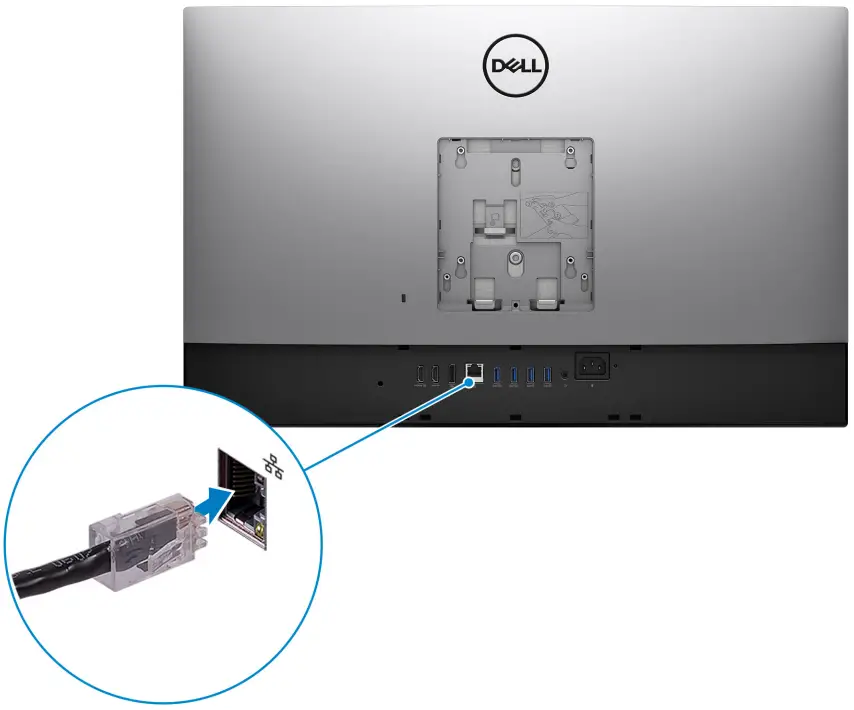 ● If connected to the internet, sign in with or create a Microsoft account. If not connected to the internet, create an offline account.
| Resources | Description |
 | SupportAssist Proactively checks the health of your computer’s hardware and software. The SupportAssist OS Recovery tool troubleshoots issues with the operating system. For more information, see the SupportAssist documentation at www.dell.com/support. NOTE: In SupportAssist, click the warranty expiry date to renew or upgrade your warranty. |
 | Dell Update Updates your computer with critical fixes and latest device drivers as they become available. For more information about using Dell Update, see the knowledge base article SLN305843 at www.dell.com/support. |
 | Dell Digital Delivery Download software applications, which are purchased but not pre-installed on your computer. For more information about using Dell Digital Delivery, see the knowledge base article 153764 at www.dell.com/support. |
Views of OptiPlex 7780 All-in-One
Front
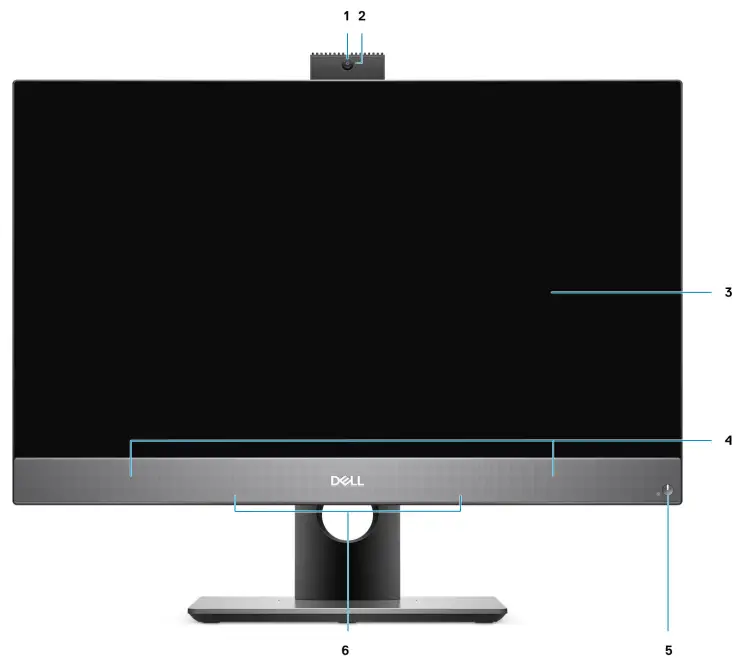
| 1. Full HD webcam 2. Camera-status light 3. Display | 4. Speakers 5. Power button/power-status indicator 6. Array microphones |
Retractable camera
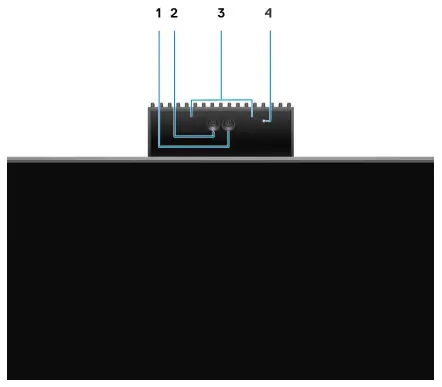
NOTE: Depending on the configuration ordered, your computer will have no camera, only Full HD camera, or both Full HD camera and infrared camera.
- Full HD camera
- Infrared camera
- Infrared emitter
- Camera-status light
Left
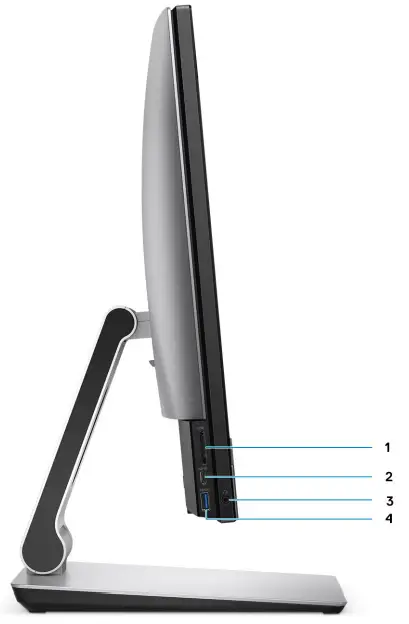
- SD 4.0 card slot
- USB 3.2 Gen 2 Type-C port
- Universal audio jack
- USB 3.2 Gen 1 Type-A port with PowerShare
Right
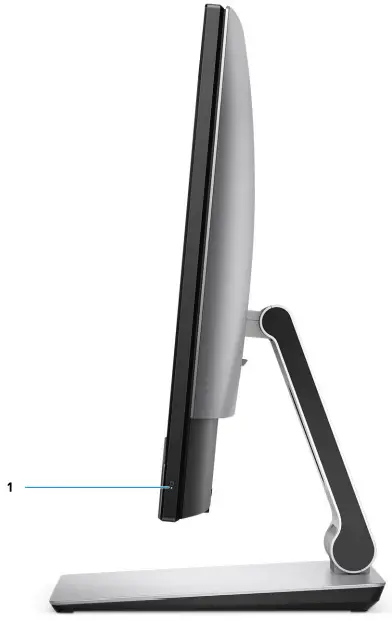
- Hard-drive status indicator
Back
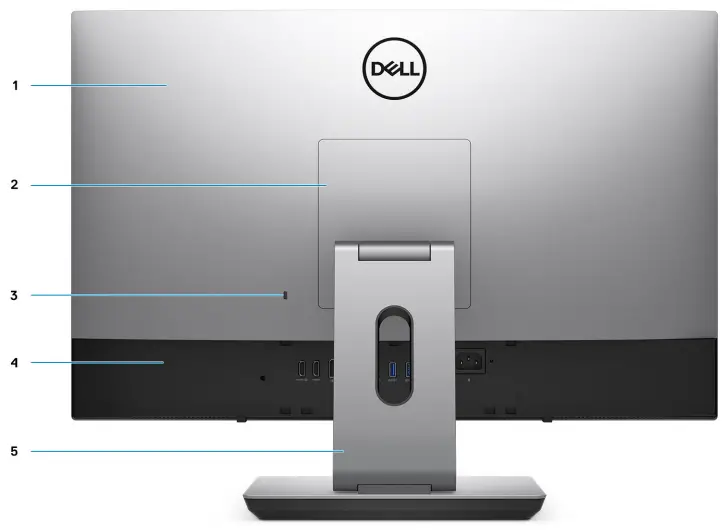
- Back cover
- Stand cover
- Kensington security-cable slot
- Bottom cover
- Stand
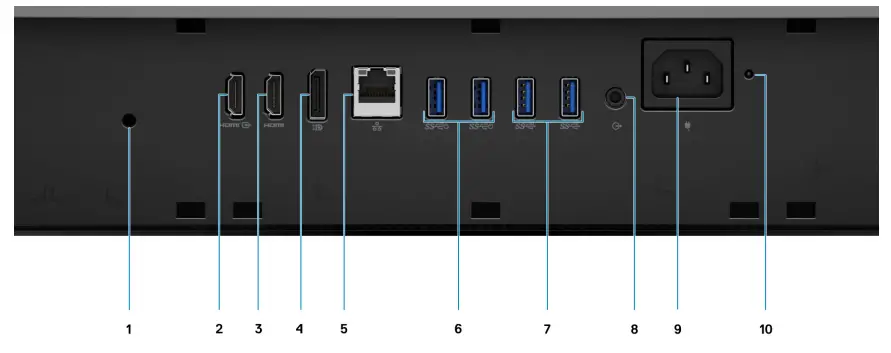
- Cable cover screw hole
- HDMI-in port
- HDMI-out port
- DP++ 1.4/HDCP 2.3 port
● HDMI 1.4b for UMA Graphics
● HDMI 2.0 for Discrete Graphics - RJ-45 port 10/100/1000 Mbps
- USB 3.2 Gen 2 Type-A ports with Smart Power On
- USB 3.2 Gen 2 Type-A ports
- Line-out audio port
- Power connector
- PSU status indicator LED
Bottom
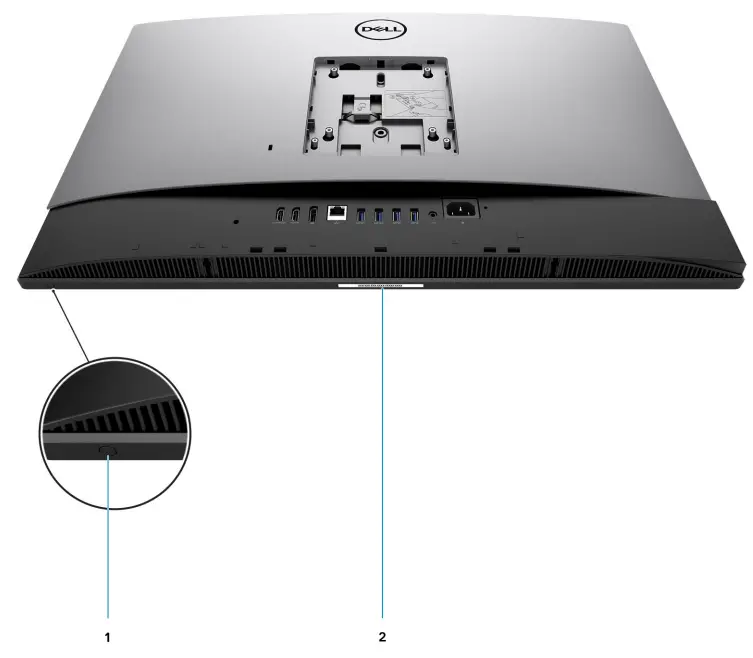
- Display Built-in Self Test button/Input-source selection button This button has two functions:
● When the computer is on, use this button to select the video input source.
Press the button to switch the display between the internal system display and HDMI input.
● When the computer is off (there is no power; neither is it in sleep state nor hibernate state), use this button to run the built-in self-test for the display.
Press and hold down this button, and then press the power button to turn on the computer. The built-in color pattern for the LCD monitor will appear on the screen.
For more information, see the Troubleshooting section in the Service Manual at www.dell.com/support/manuals. - Service tag label
System board layout
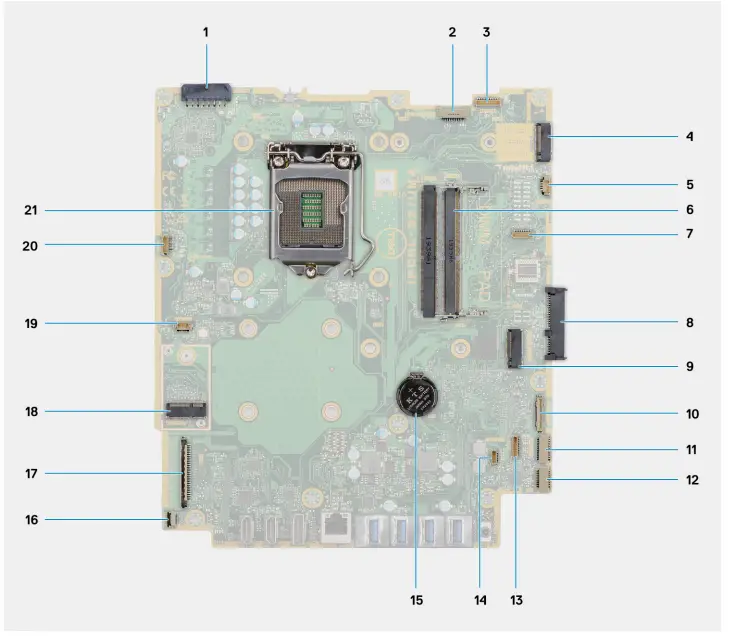
| 1. Power-supply unit (PSU) cable connector 2. Display back-light cable connector 3. Camera cable connector 4. M.2 2230/2280 solid-state drive/Intel Optane PCIe connector 5. System-fan cable connector 6. Memory modules 7. LPC debug card connector 8. Hard-drive connector 9. M.2 2230/2280 solid-state drive PCIe connector 10. SIO-signal cable connector | 11. SIO-power cable connector 12. Audio-board cable connector 13. Microphone-module cable connector 14. Speaker cable connector 15. Coin-cell battery 16. Power-button cable connector 17. Display cable connector 18. M.2 WLAN connector 19. PSU-fan cable connector 20. Touchscreen cable connector 21. Processor |
Specifications of OptiPlex 7780 All-in-One
Dimensions and weight
Table 2. Dimensions and weight
| Description | Values for touch display | Values for non-touch display |
| Height | 389.00 mm (15.31 in.) | 389.00 mm (15.31 in.) |
| Width | 614.00 mm (24.17 in.) | 614.00 mm (24.17 in.) |
| Depth | 58.00 mm (2.28 in.) | 58.00 mm (2.28 in.) |
| Weight (maximum) | 9.10 kg (20.06 lb) | 8.66 kg (19.09 lb) |
| Weight (minimum) | 8.73 kg (19.24 lb) | 8.30 kg (18.29 lb) |
| NOTE: The weight of your computer depends on the configuration ordered and the manufacturing variability. | ||
ProcessorsNOTE: Global Standard Products (GSP) is a subset of Dell’s relationship products that are managed for availability and synchronized transitions on a worldwide basis. They ensure the same platform is available for purchase globally. This allows customers to reduce the number of configurations managed on a worldwide basis, thereby reducing their costs. They also enable companies to implement global IT standards by locking in specific product configurations worldwide. Device Guard (DG) and Credential Guard (CG) are the new security features that are only available on Windows 10 Enterprise today. Device Guard is a combination of enterprise-related hardware and software security features. When you configure it together, it locks a device and it can only run trusted applications. Credential Guard uses virtualization-based security to isolate secrets (credentials) and only privileged system software can access the system. Unauthorized access to these secrets can lead to credential theft attacks. Credential Guard prevents these attacks by protecting NTLM password hashes and Kerberos Ticket Granting Tickets. NOTE: Processor numbers are not a measure of performance. Processor availability is subject to change and may vary by region/country.
Table 3. Processors
| Processors | Wattage | Core count | Thread count | Speed | Cache | Integrated graphics |
| 10th Generation Intel Core i3-10105 | 65 W | 4 | 8 | 3.7 GHz to 4.4 GHz | 8 MB | Intel UHD Graphics 630 |
| 10th Generation Intel Core i3-10305 | 65 W | 4 | 8 | 3.8 GHz to 4.5 GHz | 8 MB | Intel UHD Graphics 630 |
| 10th Generation Intel Core i5-10400 | 65 W | 6 | 12 | 2.9 GHz to 4.3 GHz | 12 MB | Intel UHD Graphics 630 |
| 10th Generation Intel Core i5-10500 | 65 W | 6 | 12 | 3.1 GHz to 4.5 GHz | 12 MB | Intel UHD Graphics 630 |
Table 3. Processors (continued)
| Processors | Wattage | Core count | Thread count | Speed | Cache | Integrated graphics |
| 10th Generation Intel Core i5-10600 | 65 W | 6 | 12 | 3.3 GHz to 4.8 GHz | 12 MB | Intel UHD Graphics 630 |
| 10th Generation Intel Core i5-10505 | 65 W | 6 | 12 | 3.2 GHz to 4.6 GHz | 12 MB | Intel UHD Graphics 630 |
| 10th Generation Intel Core i7-10700 | 65 W | 8 | 16 | 2.9 GHz to 4.8 GHz | 16 MB | Intel UHD Graphics 630 |
| 10th Generation Intel Core i9-10900 | 65 W | 10 | 20 | 2.8 GHz to 5.2 GHz | 20 MB | Intel UHD Graphics 630 |
Chipset
Table 4. Chipset
| Description | Values |
| Chipset | Intel Q470 |
| Processor | 10th Generation Intel Core i3/i5/i7/i9 |
| DRAM bus width | ● 64-bit (for single channel) ● 128-bit (for dual channel) |
| Flash EPROM | 32 MB |
| PCIe bus | Up to Gen 3 |
| Non-volatile memory | Yes |
| BIOS configuration Serial Peripheral Interface (SPI) | 256 Mbit (32 MB) located at SPI_FLASH |
| Trusted Platform Module (TPM) 2.0 (Discrete TPM Enabled) | 24 KB located at TPM 2.0 on a chipset |
| Firmware-TPM (Discrete TPM disabled) | By default, the Platform Trust Technology feature is visible to the operating system. |
| NIC EEPROM | LOM configuration contained within SPI flash ROM instead of LOM e-fuse |
Operating system
Your OptiPlex 7780 All-in-One supports the following operating systems:
- Windows 11 Home, 64-bit
- Windows 11 Pro, 64-bit
- Windows 11 Pro National Academic, 64-bit
- Windows 10 Home, 64-bit
- Windows 10 Pro, 64-bit
- Windows 10 Pro Education, 64-bit
- Windows 10 IoT Enterprise 2019 LTSC (OEM only)
- Ubuntu 18.04 LTS, 64-bit
Memory
The following table lists the memory specifications of your OptiPlex 7780 All-in-One:
Table 5. Memory specifications
| Description | Values |
| Slots | Two SO-DIMM slots |
| Type | DDR4, Non-ECC |
| Speed | 2666 MHz/2933 MHz |
| Maximum memory | 64 GB |
| Minimum memory | 4 GB |
| Memory size per slot | 4 GB, 8 GB, 16 GB, 32 GB |
| Configurations supported | ● 4 GB, 1 x 4 GB, 2666 MHz for Intel Core i3/i5 processors, 2933 MHz for Intel Core i7/i9 processors ● 8 GB, 1 x 8 GB, 2666 MHz for Intel Core i3/i5 processors, 2933 MHz for Intel Core i7/i9 processors ● 8 GB, 2 x 4 GB, 2666 MHz for Intel Core i3/i5 processors, 2933 MHz for Intel Core i7/i9 processors ● 16 GB, 1 x 16 GB, 2666 MHz for Intel Core i3/i5 processors, 2933 MHz for Intel Core i7/i9 processors ● 16 GB, 2 x 8 GB, 2666 MHz for Intel Core i3/i5 processors, 2933 MHz for Intel Core i7/i9 processors ● 32 GB, 1 x 32 GB, 2666 MHz for Intel Core i3/i5 processors, 2933 MHz for Intel Core i7/i9 processors ● 32 GB, 2 x 16 GB, 2666 MHz for Intel Core i3/i5 processors, 2933 MHz for Intel Core i7/i9 processors ● 64 GB, 2 x 32 GB, 2666 MHz for Intel Core i3/i5 processors, 2933 MHz for Intel Core i7/i9 processors |
Ports and connectors
Table 6. External ports and connectors
| Description | Values |
| External: | |
| Network | One RJ-45 port 10/100/1000 Mbps (rear) |
| USB | ● One USB 3.2 Gen 2 Type-C port (side) ● One USB 3.2 Gen 1 Type-A port with PowerShare (side) ● Two USB 3.2 Gen 2 Type-A ports with Smart Power On (rear) ● Two USB 3.2 Gen 2 Type-A ports (rear) |
| Audio | ● One Universal audio jack (side) ● One Line-out audio port (rear) |
| Video | ● One DP++ 1.4/HDCP 2.3 port (rear) ● One HDMI-IN port (rear) |
Table 6. External ports and connectors (continued)
| Description | Values |
| ● One HDMI-OUT port (rear)—HDMI 1.4b for UMA Graphics and HDMI 2.0 for Discrete Graphics | |
| Media card reader | One SD 4.0 card slot (side) |
| Docking port | Not supported |
| Power adapter port | Not supported |
| Security | One Kensington security-cable slot |
Table 7. Internal ports and connectors
| Description | Values |
| Internal: | |
| M.2 | ● One M.2 2230 slot for Wi-Fi and Bluetooth card ● Two M.2 2230/2280 slots for solid-state drive/Intel Optane NOTE: To learn more about the features of different types of M.2 cards, see the knowledge base article SLN301626. |
Communications
Ethernet
Table 8. Ethernet specifications
| Description | Values |
| Model number | Intel i219LM |
| Transfer rate | 10/100/1000 Mbps |
Wireless module
Table 9. Wireless module specifications
| Description | Values | |
| Model number | Intel Wi-Fi 6 AX201 | Qualcomm QCA61x4a |
| Transfer rate | Up to 2400 Mbps | Up to 867 Mbps |
| Frequency bands supported | 2.4 GHz/5 GHz | 2.4 GHz/5 GHz |
| Wireless standards | ● Wi-Fi 802.11 a/b/g ● Wi-Fi 4 (WiFi 802.11n) ● Wi-Fi 5 (WiFi 802.11ac) ● Wi-Fi 6 (WiFi 802.11ax) | ● Wi-Fi 802.11 a/b/g ● Wi-Fi 4 (WiFi 802.11n) ● Wi-Fi 5 (WiFi 802.11ac) |
Table 9. Wireless module specifications (continued)
| Description | Values | |
| Encryption | ● 64-bit/128-bit WEP ● AES-CCMP ● SKIP | ● 64-bit/128-bit WEP ● AES-CCMP ● SKIP |
| Bluetooth | Bluetooth 5.1 | Bluetooth 5.0 |
Audio
Table 10. Audio specifications
| Description | Values | |
| Controller | Realtek Codec ALC3289 | |
| Stereo conversion | Supported | |
| Internal interface | High-definition audio interface | |
| External interface | Universal audio jack | |
| Speakers | 2 | |
| Internal speaker amplifier | Realtek Amplifier ALC1302 | |
| External volume controls | Not supported | |
| Speaker output: | ||
| Average | 5 W | |
| Peak | 6 W | |
| Subwoofer output | Not supported | |
| Microphone | 4 | |
Storage
Your computer supports one of the following configurations:
- One 2.5-inch hard-disk drive
- One M.2 2230/2280 solid-state drive (class 35, 40)
- One M.2 2230/2280 solid-state drive (class 35, 40) and one 2.5-inch hard-disk drive
- Dual M.2 2230/2280 solid-state drives (class 35, 40)
- Dual M.2 2230/2280 solid-state drives (class 35, 40) and one 2.5-inch hard-disk drive
- One 2.5-inch hard-disk drive and one M.2 16 GB Intel Optane memory The primary drive of your computer varies with the storage configuration. For computers:
- with a M.2 drive, the M.2 drive is the primary drive
- without a M.2 drive, the 2.5-inch hard-disk drive is the primary drive
- With a M.2 16 GB Intel Optane memory, the 2.5-inch hard-disk drive is the primary drive
Table 11. Storage specifications
| Storage type | Interface type | Capacity |
| 2.5-inch, 7200 RPM, hard-disk drive | SATA | Up to 1 TB |
| 2.5-inch, 7200 RPM, Opal Self-Encrypting hard-disk drive | FIPS SATA | Up to 500 GB |
| 2.5-inch, 5400 RPM, hard-disk drive | SATA | Up to 2 TB |
| M.2 2230, Class 35 solid-state drive | Gen 3 PCIe x4 NVMe | Up to 512 GB |
| M.2 2230, Opal Self-Encrypting Class 35 solid-state drive | Gen 3 PCIe x4 NVMe | Up to 256 GB |
| M.2 2280, Class 40 solid-state drive | Gen 3 PCIe x4 NVMe | Up to 2 TB |
| M.2 2280, Opal Self-Encrypting Class 40 solid-state drive | Gen 3 PCIe x4 NVMe | Up to 1 TB |
Intel Optane memory
Intel Optane memory functions only as a storage accelerator. It neither replaces nor adds to the memory (RAM) installed on your computer. NOTE: Intel Optane memory is supported on computers that meet the following requirements:
- 7th A generation or higher Intel Core i3/i5/i7 processor
- Windows 64-bit version or higher
- Latest version of Intel Rapid Storage Technology driver
Table 12. Intel Optane memory
| Description | Values |
| Type | Memory |
| Interface | Gen 3 PCIe x4 NVMe |
| Connector | M.2 2280 |
| Configurations supported | 16 GB |
| Capacity | Up to 16 GB |
Media-card reader
Table 13. Media-card reader specifications
| Description | Values |
| Type | One Secure Digital (SD) 4.0 card |
| Cards supported | ● Secure Digital High Capacity (SDHC) ● Secure Digital Extended Capacity (SDXC) ● Secure Digital (SD) 4.0 ● SD UHS-I (UHS104) ● SD UHS-II |
Camera
Table 14. Full HD Infrared Webcam (with Windows Hello support)
| Description | Values | ||
| Number of cameras | Two | ||
| Type | FHD RGB camera/VGA Infrared camera | ||
| Location | Front camera | ||
| Sensor type | CMOS sensor technology | ||
| Resolution | |||
| Camera | |||
| Still image | 2.07 megapixel | ||
| Video | 1920 x 1080 (FHD) at 30 fps | ||
| Infrared camera | |||
| Still image | 0.30 megapixel | ||
| Video | 640 x 480 (VGA) at 30 fps | ||
| Diagonal viewing angle | |||
| Camera | 77.5 degrees | ||
| Infrared camera | 82.8 degrees | ||
Table 15. Full HD Webcam
| Description | Values | ||
| Number of cameras | One | ||
| Type | FHD RGB camera | ||
| Location | Front camera | ||
| Sensor type | CMOS sensor technology | ||
| Resolution | |||
| Camera | |||
| Still image | 2.07 megapixels | ||
| Video | 1920 x 1080 (FHD) at 30 fps | ||
| Diagonal viewing angle | 77.4 degrees | ||
Power supply unit
Table 16. Power supply unit specifications fro OptiPlex 7780 All-in-One
| Description | Values |
| Type | 220 W Platinum |
| Diameter (connector) | Not supported |
Table 16. Power supply unit specifications fro OptiPlex 7780 All-in-One (continued)
| Description | Values |
| Input voltage | 90 VAC to 264 VAC |
| Input frequency | 47 Hz to 63 Hz |
| Input current (maximum) | 3.6 A |
| Output current (continuous) | ● +19.5 VA/8.5 A ● +19.5 VB/9.2 A Standby mode: ● +19.5 VA/0.5 A ● +19.5 VB/1.75 A |
| Rated output voltage | ● +19.5 VA ● +19.5 VB |
| Temperature range: | |
| Operating | 5°C to 45°C (41°F to 113°F) |
| Storage | -40°C to 70°C (-40°F to 158°F) |
Display
Table 17. Display specifications
| Description | Values for touch display | Values for non-touch display | |
| Type | Full High Definition (FHD) | Full High Definition (FHD) | |
| Panel technology | Wide Viewing Angle (WVA) | Wide Viewing Angle (WVA) | |
| Luminance | ● 250 Nits (typical) ● 200 Nits (minimum) | ● 250 Nits (typical) ● 200 Nits (minimum) | |
| Dimensions (Active area): | |||
| Height | 336.31 mm (13.24 in.) | 336.31 mm (13.24 in.) | |
| Width | 597.89 mm (23.54 in.) | 597.89 mm (23.54 in.) | |
| Diagonal | 686 mm (27.01 in.) | 686 mm (27.01 in.) | |
| Native resolution | 1920 x 1080 | 1920 x 1080 | |
| Megapixels | 16.7 million colors | 16.7 million colors | |
| Color gamut | 72% NTSC typical | 72% NTSC typical | |
| Pixels per inch (PPI) | 81 | 81 | |
| Contrast ratio (min) | 600:01:00 | 600:01:00 | |
| Response time (max) | 25 ms | 25 ms | |
| Refresh rate | 60 Hz | 60 Hz | |
| Horizontal view angle | ● 85 +/-degrees (minimum) ● 89 +/-degrees (typical) | ● 85 +/-degrees (minimum) ● 89 +/-degrees (typical) | |
Table 17. Display specifications (continued)
| Description | Values for touch display | Values for non-touch display |
| Vertical view angle | ● 85 +/-degrees (minimum) ● 89 +/-degrees (typical) | ● 85 +/-degrees (minimum) ● 89 +/-degrees (typical) |
| Pixel pitch | 0.3114 x 0.3114 mm | 0.3114 x 0.3114 mm |
| Power consumption (maximum) | 16.60 W | 16.60 W |
| Anti-glare vs glossy finish | Anti-glare | Anti-glare |
Video
Table 18. Discrete graphics specifications
| Discrete graphics | |||
| Controller | External display support | Memory size | Memory type |
| NVIDIA GeForce GTX 1650 | ● DP++ 1.4/HDCP 2.3 port ● HDMI-out—HDMI 2.0 port | 4 GB | GDDR5 |
Table 19. Integrated graphics specifications
| Integrated graphics | |||
| Controller | External display support | Memory size | Processor |
| Intel UHD 630 Graphics | ● DP++ 1.4/HDCP 2.3 port ● HDMI-out—HDMI 1.4b port | Shared system memory | 10th Generation Intel® Core i3/i5/i7/i9 |
Computer environment
Airborne contaminant level: G1 as defined by ISA-S71.04-1985
Table 20. Computer environment
| Description | Operating | Storage |
| Temperature range | 10°C to 35°C (50°F to 95°F) | -40°C to 65°C (-40°F to 149°F) |
| Relative humidity (maximum) | 20% to 80% (non-condensing) | 5% to 95% (non-condensing) |
| Vibration (maximum)* | 0.26 GRMS | 1.37 GRMS |
| Shock (maximum) | 40 G† | 105 G† |
| Altitude (maximum) | 0 m to 3048 m (0 ft to 10000 ft) | 0 m to 10668 m (0 ft to 35000 ft) |
* Measured using a random vibration spectrum that simulates user environment.
† Measured using a 2 ms half-sine pulse when the hard drive is in use.
Security
Table 21. Security
| Security options |
| Kensington lock |
| Dell Lockable port cover (optional) |
| Chassis lock slot support |
| Noble Custom AIO Plate Lock (optional) |
| Supply chain tamper alerts |
| Chassis intrusion switch |
| Trusted Platform Module (Discrete TPM Enabled) |
| SafeBIOS including Dell Off-host BIOS Verification |
| BIOS Resilience |
| BIOS Recovery, and additional BIOS Controls |
| SafeID including Trusted Platform Module (TPM) 2.0 |
| Self-Encrypting Drives (SED) |
| Smart card keyboard (FIPS) |
| D-Pedigree (Secure Supply Chain Functionality) |
| Dell wired mouse with fingerprinter reader |
Data security
Table 22. Data security
| Data security options |
| McAfee® Small Business Security 30 Day Free Trial |
| McAfee® Small Business Security 12-month subscription |
| McAfee® Small Business Security 36-month Subscription |
| SafeGuard and Response, which is powered by VMware Carbon Black and Secureworks |
| Next Generation Anti-virus (NGAV) |
| Endpoint Detection and Response (EDR) |
| Threat Detection and Response (TDR) |
| Managed Endpoint Detection and Response |
| Incident Management Retainer |
| Emergency Incident Response |
| SafeData |
Environmental
Table 23. Environmental specifications
| Feature | Values |
| Recyclable packaging | Yes |
| BFR/PVC—free chassis | No |
| Vertical orientation packaging support | Yes |
| Multi-Pack packaging | No |
| Energy-Efficient Power Supply | Standard |
| ENV0424 compliant | Yes |
NOTE: Wood‐based fiber packaging contains a minimum of 35% recycled content by total weight of wood‐based fiber.
Packaging that contains wood‐based fiber can be claimed as Not Applicable. The anticipated required criteria for EPEAT 2018.
Regulatory
Table 24. Regulatory
| Regulatory compliance |
| EPEAT registered configurations available |
| ENERGY STAR compliant configurations available |
| TCO 8.0 certified configurations available |
| CEL |
| WEEE |
| Japan Energy Law |
| South Korea E-standby |
| South Korea Eco-label |
| EU RoHS |
| China RoHS |
Accessories
Table 25. Accessories
| Accessories |
| Audio Optional external speakers, Dell Pro Stereo Headset UC350 |
| Keyboard Dell wired keyboard, Dell wireless keyboard, Dell Smart Card Keyboard |
| Mouse Dell wired mouse, Dell wireless mouse, Dell USB Laser mouse, Dell Fingerprint Reader mouse |
| Stylus |
Table 25. Accessories (continued)
| Accessories |
| Targus Stylus for Capacitive Touch Devices |
| Additional Monitor Qualified with select Dell UltraSharp, Professional, and E-series monitors |
| Locks Noble custom AIO Plate Lock, Dell Combination Lock LC300, Dell Premium Lock LP500, KensingtonTwin Head Lock, Dell Lockable Port Cover |
| Stands ● Articulating Stand ● Height Adjustable Stand |
Service and support
Table 26. Service and support
| Warranty | Accidental Damage Service |
| 3 Years Hardware Service with Onsite/In-Home Service after Remote Diagnosis, warranty extensions up to 5 years | Accidental Damage Service is available to complement certain warranty options Optional. |
| ProSupport with Next Business Day Onsite Service is available to complement certain warranty options. | |
| ProSupport Plus for Client is available to complement certain warranty options. |
Getting help and contacting Dell
Self-help resources
You can get information and help on Dell products and services using these self-help resources:
Table 27. Self-help resources
| Self-help resources | Resource location |
| Information about Dell products and services | www.dell.com |
| Tips |  |
| Contact Support | In Windows search, type Contact Support, and press Enter. |
| Online help for operating system | www.dell.com/support/windows www.dell.com/support/linux |
| Troubleshooting information, user manuals, setup instructions, product specifications, technical help blogs, drivers, software updates, and so on. | www.dell.com/support |
| Dell knowledge base articles for a variety of computer concerns. | 1.Go to https://www.dell.com/support/home/? app=knowledgebase. 2. Type the subject or keyword in the Search box. |
Contacting Dell
To contact Dell for sales, technical support, or customer service issues, see www.dell.com/contactdell. NOTE: Availability varies by country and product, and some services may not be available in your country. NOTE: If you do not have an active internet connection, you can find contact information on your purchase invoice, packing slip, bill, or Dell product catalog.
Regulatory Model: W26C
Regulatory Type: W26C001/W26C002
August 2021
Rev. A02
References
 Computers, Monitors & Technology Solutions | Dell USA
-
Contact Support | Dell US
-
Support | Dell US
-
Dell - Dell Linux - Community Web
-
Manuals | Dell US
-
Windows Operating Systems | Dell US
-
Computers, Monitors & Technology Solutions | Dell USA
-
Contact Support | Dell US
-
Support | Dell US
-
How to distinguish the differences between M.2 cards | Dell US
-
What is Dell Digital Delivery? | Dell US
-
Dell Update and Alienware Update - Overview and common questions | Dell US
-
Support | Dell US
-
Support Library | Dell US
-
Support for SupportAssist for Home PCs | Documentation | Dell US
-
Dell - Dell Linux - Community Web
-
Windows Operating Systems | Dell US
 Computers, Monitors & Technology Solutions | Dell USA