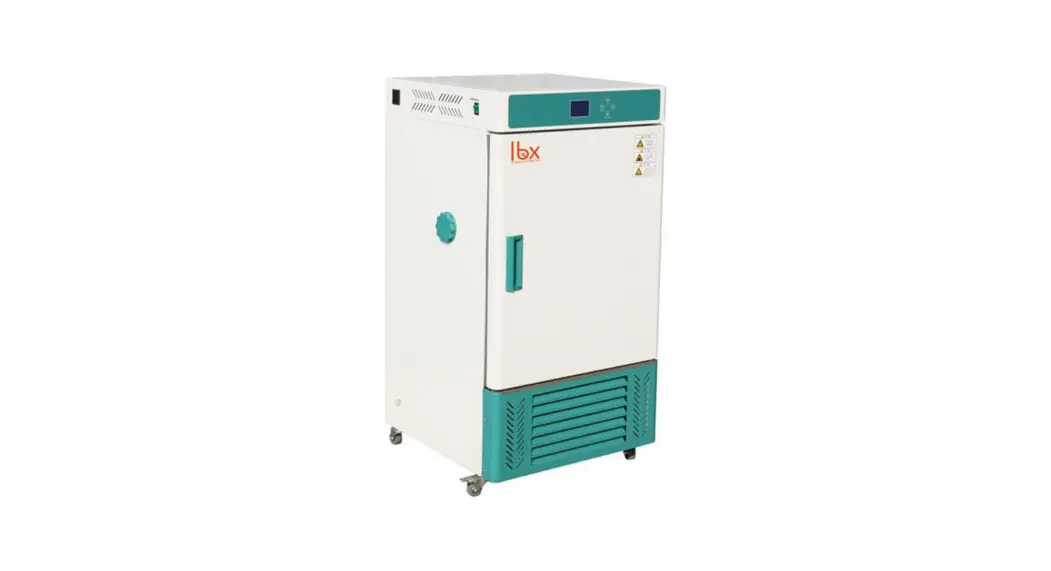
 LBX INC-R Refrigerated Incubator
User Manual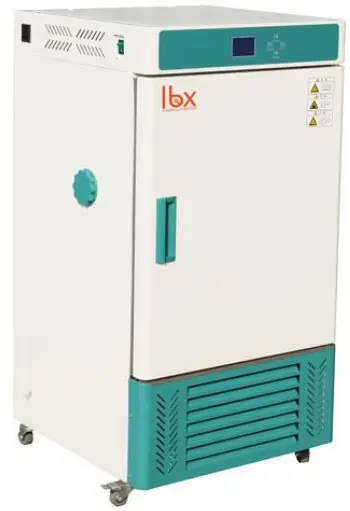
LBX INC-R Refrigerated
Please read the User Manual carefully before use, and follow all operating and safety instructions!
Preface
Users should read this Manual carefully, follow the instructions and procedures, and beware of all the cautions when using this instrument.
Service
If help is needed, you can always contact your dealer or Labbox via www.labbox.com (declare an incidence)
Please, provide the customer service representative with the following information:
- Serial number
- Description of the problem
- Your contact information
Warranty
This instrument is guaranteed to be free from defects in materials and workmanship under normal use and service, for a period of 24 months from the date of invoice. The warranty is extended only to the original purchaser. It shall not apply to any product or parts which have been damaged on account of improper installation, improper connections, misuse, accident or abnormal conditions of operation.
For claim under the warranty, please contact your supplier.
Structure features
- The case is made of high quality cold-rolled steel plate with plastic spraying on the surface.
- Mirror-stainless working room, easy cleaning, shelves can be adjusted.
- Micro-Computer Temp. Controller and Automatic defrosting system, big LCD Screen.
- Sole Temp. limited alarm system. Over-Temp. electric cut off and timing function.
- R134A compressor and fans.
- Double doors, inner door is of mirror stainless steel, silicon seal, outside door is of magnetic silicon.
- 50mm diameter test hole.
Product specifications
| Model | INCR-070-001 | INCR-150-001 |
| Voltage | 220~240V 50Hz/60Hz | |
| Temp. Range | 0-65℃ | |
| Temp. Motion | ±0.5℃ | |
| Temp. Uniformity | ±1,5℃ | |
| Cryogen | R134a | |
| Power | 800W | 1000W |
| Inner Chamber size (cm) | 35 x 41,5 x 50 | 40 x 49 x 75 |
| Exterior Size (cm) | 56 x 57 x 103 | 62 x 64 x 129 |
Inner Chamber Temp. Distribution map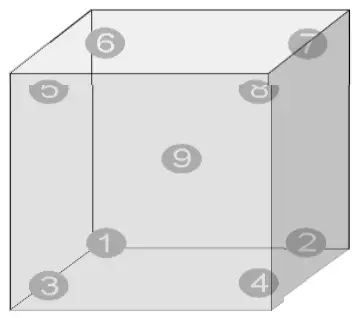
| Temp. point | Temp. (℃) | Temp. point | Temp.(℃) |
| ① | 36.63 | ⑤ | 36.91 |
| ② | 36.93 | ⑥ | 36.86 |
| ③ | 37.50 | ⑦ | 36.88 |
| ④ | 37.33 | ⑧ | 36.64 |
| ⑨ | 37.15 |
Temperature Graph
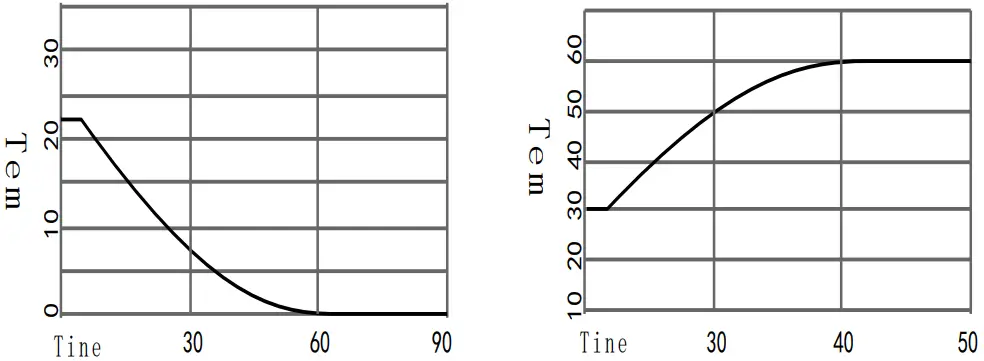
Note: The above specification testing has been made in a 25 ºC environment
Working conditions
- Environment Temp.: 5~32℃ (if setting temp.≦10℃,environment≦28℃).
- Humidity:≦80%RH 3. Air Pressure: 80-106Kpa
- There must be no shaking of the incubator and no caustic air around the chamber.
- Should avoid light and cooling environment.
- Keep distance of dust, install horizontally and make sure there is distance between the equipment and wall.
Safety information
- After you receive the equipment, to avoid the damage of the compressor during a long transportation period, please keep the machine without moving during one day before using it. To make sure equipment safety, please install outer protection and also supply power as the equipment requires.
- Do not test the flammable, combustible, poisonous or corrosive material.
- The equipment should be installed horizontally.
- Only trained personnel can disassembly and repair the equipment.
- If you add one working equipment into the chamber, if the power is bigger than 2A, plug the power outside, do not use this equipment power.
- When the chamber temp.≧50 ℃, please do not set the low temp. settings to make sure the compressor can be used for a long time.
- Anyone who operates the equipment must first read this manual
Operation cautions
- There is a test hole at the top of the incubator. If you add another equipment inside the chamber, please do it through this hole.
- If there is no need for U.V. light, turn off the U.V. lamp to avoid influence on temperature.
- Before operating the cooling function, please dry the chamber for 1 hour under 50 ºC.
- The chamber has a vertical air system. Please do not fully fill the shelfs with materials, the test material must occupy less than 1/3 of the shelf.
- Once the test environment > 35℃ or Use Temp. > 50℃, do not set the low temp. setting.
- Please clean the chamber and surface of the machine with pure water. When the machine is not used, please plug off the electricity, and make sure the inside and outside is clean and dry.
Controller operation instruction
ⅰ. Controller Specification
Temp. setting range: 0.0 – 60.0 ℃
Timer setting range: 0 – 99minutes 59 seconds
Display error: < 0.5%
Sensor: PT100
ⅱ. Instruction of panel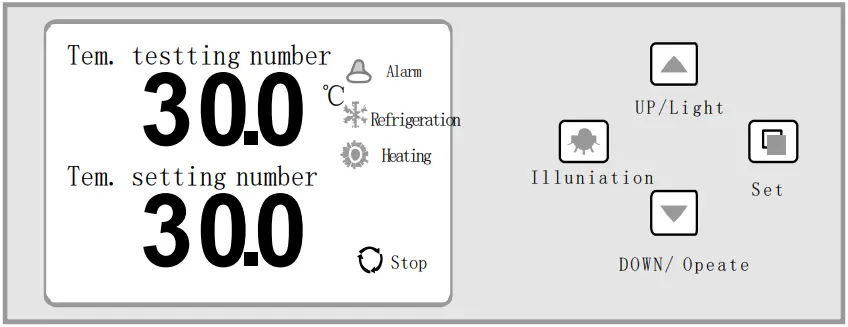
ⅲ. Temperature time operation
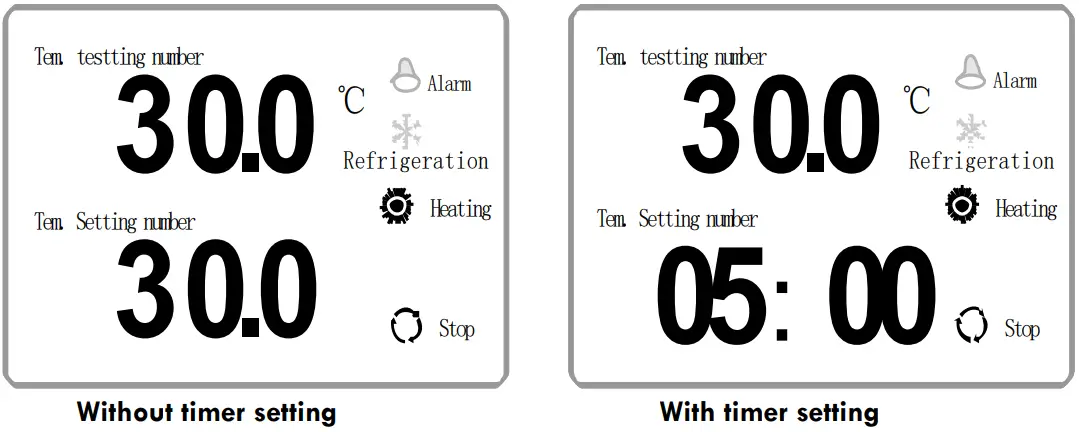
Example: Set temperature to 30 ºC, once reached, 5 hours later, stop the machine (T = 30 ºC. Timer = 5 h)
- Click the set button to enter into the setting temp. condition, set the temp. at 30℃ using up and down keys.
- Click the set button, to enter the timer set condition, change the hours from “0” to “5” using up and down keys, once you need to set the minutes, also follow the above step.
When the timer is set to “0”, it is means there is no timing function, and the incubator runs continuously.
When the timer is not set to “0”, when the inner chamber temp. reaches the set temp. the timer will initiate, when the time ends, the machine will stop. When it stops, the light will turn on, the buzzer will tweet 30 seconds, press the down keyboard for 4 seconds, the system will start working again, when the buzzer sounds, please click any keyboard to stop the sound. - Illumination: click the illumination button and then it will turn on, click again and it will close.
ⅳ. Inner Chamber Specification setting
Press the set button for more than 3 seconds, the screen will show “LC”. Modify the number to “3” using up and down keys, click the set button again to access the parameters. By clicking the set button, you can change through the parameters in the next table and modify each specification, press the set button for 3 seconds to exit the settings, the specification will be saved automatically. If during 30 seconds, no button is pressed, it will exit settings automatically and will not keep the specification.
- The internal parameters as follows:
Parameter Name Function (Range) Factory Specification Lc Password :“Lc=3”can modify the specification P– Proportional band : Time proportional adjust function: Down P, can heat fast, UP P will reduce the over adjust (2.0~25.0) 15.0 AL– Over-Temp. Display error alarm:
Under “PV﹤SP+Al”, buzzer tweeting and make refrigeration(0.0~20.0) 3.0℃ CT– Compressor operate delay:
Compressor delay protect time, operate twice time﹥﹦cT minutes(0.~10.0Min) 3 Min Up– Heating refrigeration backlash: compressor in manual mode, when “PV﹥﹦SP+uP” and compressor delay time out, then compressor begin to work (-50.0~50.0) 0.2 Dn– Cooling refrigeration backlash: compressor in manual model, when “PV<﹦SP+dn”, the compressor shut down. -51.0~uP-0.1) 0 T– Control cycle (1~60sec) 5 P– Proportional band (1.0~measure value) 35 I– Integration time (1~1000sec) 200 d– Differential time (1~1000sec) 200 Pb– “0” adjust: Sensor zero display error adjusts.
Pb= actual temp.-display number(-9.9~9.9) 0.0 Pk– Full adjust: Sensor full error adjusts.
PK=1000*(actual temp.-display number)/meter test number(-999~999) 0 Note: 1. To make sure the precise result, can modify the P ( range between 10.0~20.0), normally it does not need any change, please use the factory specification.
2. When display error, normally change the Pb, no need change the PK. - Check ambient Temperature
Press the set button for more than 3 seconds, it will show “LC”, change it to “18” using up and down keys. Click set button and screen will show the ambient temperature. Press set button 3 seconds to exit this screen, the specification will keep automatically. If during 30 seconds, no button is pressed, it will exit settings automatically and will not keep the specification.Parameter Name Function (Range)factory value Lc- Password when “Lc=18”, we can check the ambient temperature. Hd- Ambient temp. - Compressor operating mode and frost related parameters
Press the set button for more than 3 seconds, it will show “LC”, change it to “123” using up and down keyboard, click set button, can check the internal parameter value. Press the SET key to change parameters and up and down arrows to modify each parameter value and then click SET button for more than 3 seconds to leave this screen, the specification will keep automatically. If during 30 seconds, no button is pressed, it will exit settings automatically and will not keep the specification.Parameter Parameter Function (range)Factory value Lc– “Lc=123”can see and modify each parameter. S-H When “ambient temp.-SH” > Temp. Setting value, the compressor normally open operation. On the contrary, the compressor break-off work.
Note: when” S-H=50.0”, the compressor doesn’t work.(-20.0~50.0) 40.0 Ft- Fan delay, stop the fan when frost; After frost melting, fan delay Ft- second start. (0~99s)50S dt1 SP≤15℃ Frost interval 1 (0~250Hours) 12Hours Hs1 Frost melting output 1 (0~250S) 60S dt2 15℃<SP≤30℃ Frost interval 2 (0~250Hours) 12Hours Hs2 Frost melting output 2 (0~250S) 55S HA Compressor switched on and off automatically. 1 is to automatically judge the switch compressor according to the ambient temperature. 0 is to control the compressor on and off according uP and dn. (0~1)1 cH Frosting and evaporator switching options, 0 for frosting, 1 for evaporation switching (0~1)0
XI. Fault Analysis
| Phenomenon | Cause analysis | Treatment |
| Power director does not show | Without power | Inspect the plug |
| Fuse broken | Change fuse | |
| Temp. Controller shows“□□□□” | Sensor broken | Change sensor |
| Controller broken | Change controller | |
| Evaporator frost or Chamber with frost | Open the door frequently when doing the Low-Temp. test | Over 50 degree make dry and reduce open door |
| Left hole with bad seal | Inject the inner hole by rubber | |
| Door opening | Close the door | |
| Hard to make the Temp. down | Evaporator frost | Dry the chamber |
| Environment Temp. too high | Down environment Temp. | |
| Fan works or not | Check fuse and fan | |
| Compressor works or not | Change Compressor | |
| Compressor works but not refrigeration | Check the cryogen Check the ice or oil block | |
| Specification mixed | Setting correct and restart | |
| Temp. up continue | Evaporator frost | Dry the chamber |
| Abnormal Knocking | Circle Fans loose | Check and adjust |
| Condenser, Fan, compressor loose | Check and adjust or contact with us | |
| Bad evenness degree | Sample hot | Reduce sample quantity |
| Evaporator frost, wind block | Dry the chamber, Restart | |
| Controller instability | Power do not match | Change the Power |
| Voltage instability | Make sure stability voltage | |
|
Hard make Temp. up | Over-Temp. setting too low | Adjust the Temp. correct |
| Meter setting too low | Set the Temp. correct | |
| Meter heating director on but without input function | Change the meter | |
| Meter heating but the heater doesn’t work | Change the heater | |
| Fan doesn’t work | Change fan or fuse | |
| Sensor broken | Change sensor | |
| Temp. over bigger than setting | Meter setting incorrect | Set again and the manual |
| Heater working do not stop | Change Controller |
Important note for electronic devices sold in Spain
Instructions on environmental protection and disposal of electronic devices: Electrical and electronic equipment marked with this symbol may not be disposed of in landfills.
Pursuant to Directive 2002/96/EC, users in the European Union of electrical and electronic equipment, have the opportunity to return the instrument for their disposal to the dealer or manufacturer of the equipment after the purchase of a new one. The Illegal disposal of electrical and electronic equipment is punishable by a fine administrative.
Important note for electronic equipment sold in France
Information on environmental protection and disposal of electronic waste:

Electrical and electronic devices bearing this symbol cannot be discarded in landfills.
In response to regulations, Labbox fulfills its end-of-life obligations electrical laboratory equipment that it puts on the market by financing the sector recycling center dedicated to Pro WEEE, which takes them back free of charge (plus information at www.recylum.com).
Illegal disposal of electrical and electronic devices is punishable by fine administration.
 Lab supplies - Labbox Export
 ecosystem : une deuxième vie pour vos équipements électriques