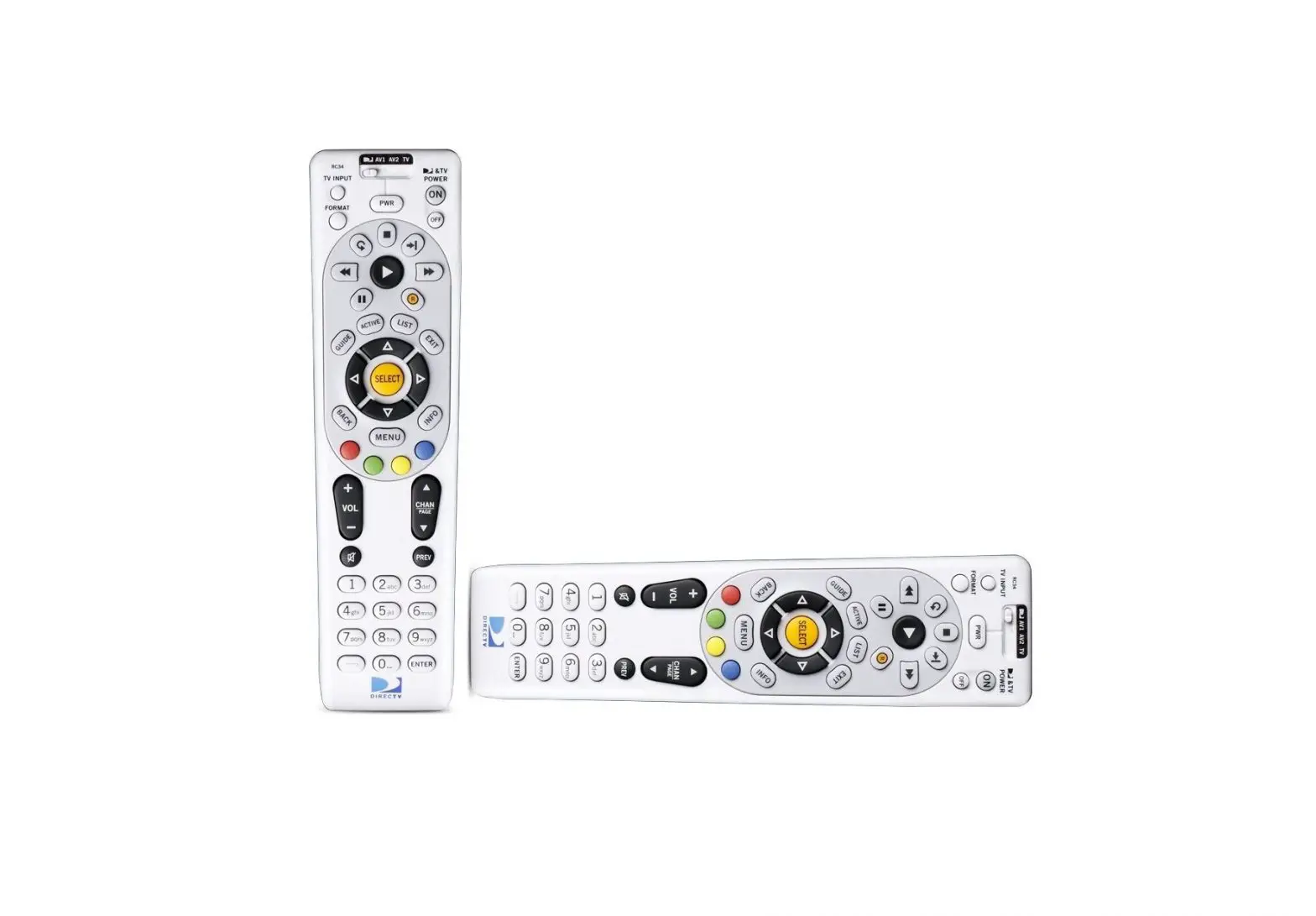
DirecTV Universal Remote Control User Guide
INTRODUCTION
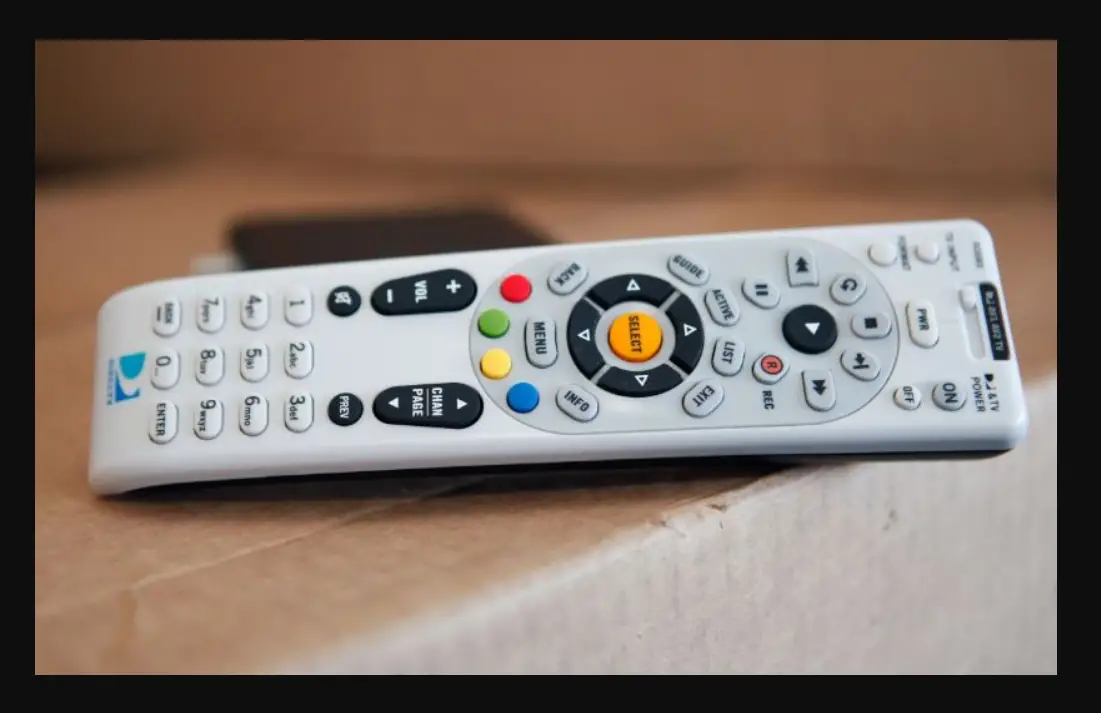
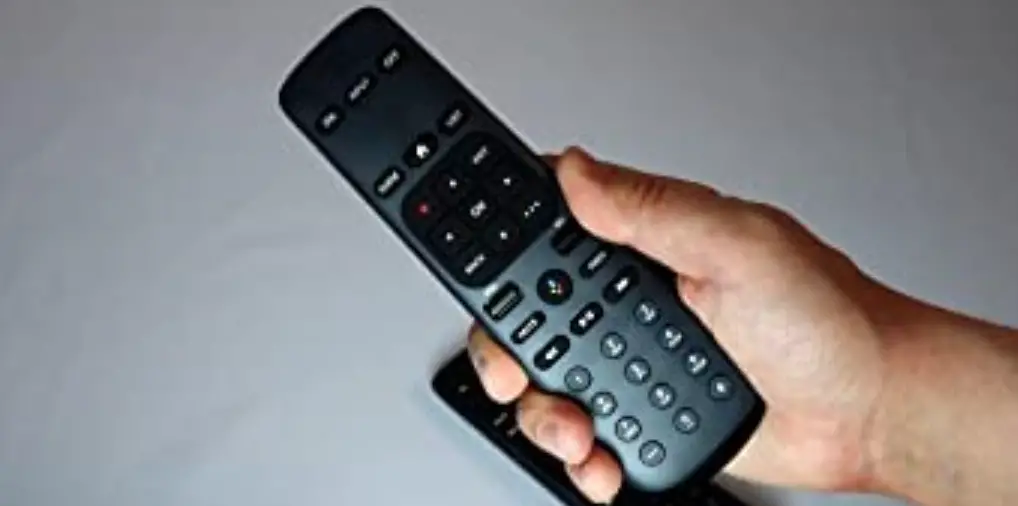
Congratulations! You now have an exclusive DIRECTV® Universal Remote Control that will control four components, including a DIRECTV Receiver, TV, and two stereo or video components (for example, a DVD, stereo, or second TV). Moreover, its sophisticated technology allows you to consolidate the clutter of your original remote controls into one easy-to-use unit that’s packed with features such as:
- Four-position MODE slide switch for easy component selection
- Code library for popular video and stereo components
- Code search to help program control of older or discontinued components
- Memory protection to ensure you will not have to reprogram the remote when the batteries are replaced
Before using your DIRECTV Universal Remote Control, you may need to program it to operate with your particular component. Please follow the instructions detailed in this guide to set up your DIRECTV Universal Remote Control so you can start enjoying its features.
FEATURES AND FUNCTIONS
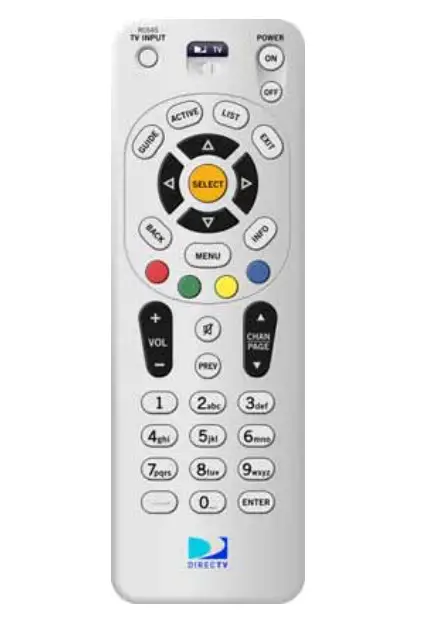
| Press this key | To |
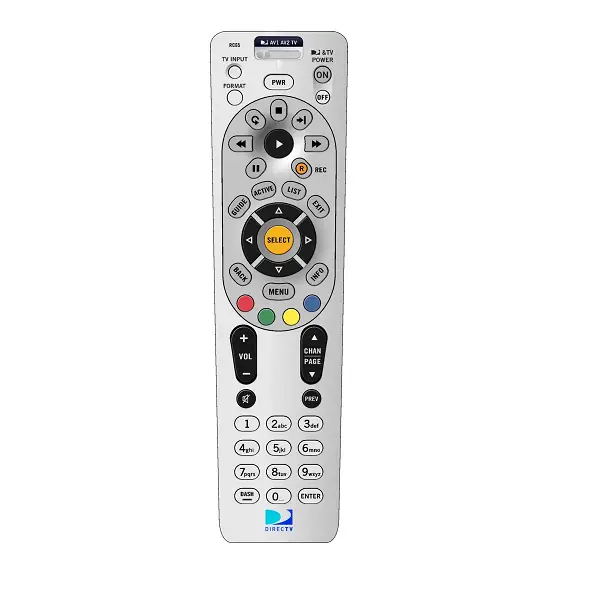
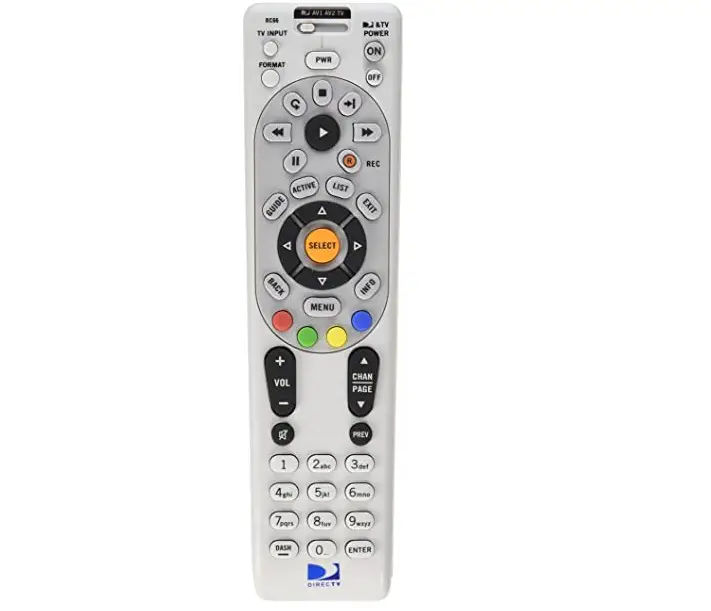
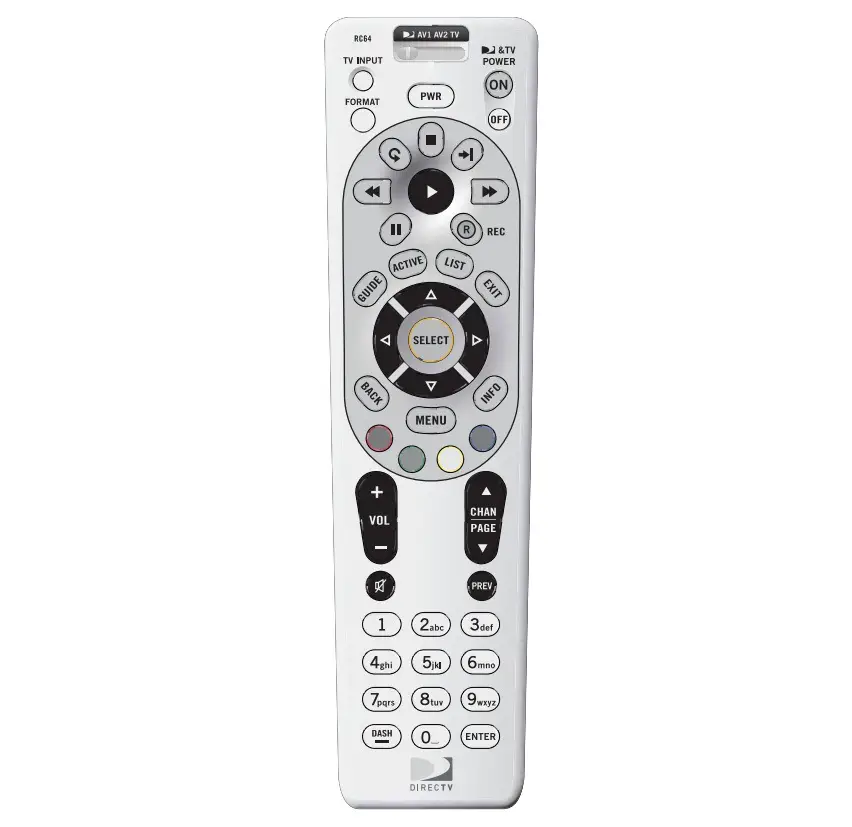
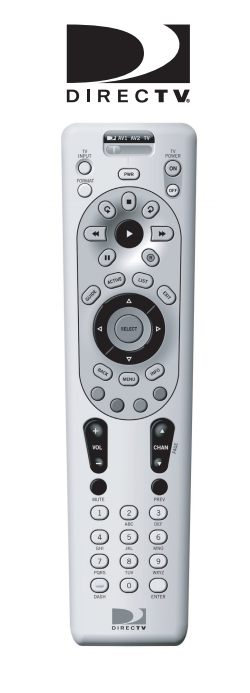
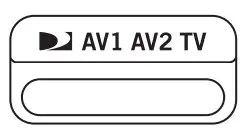 | Slide the MODE switch to the DIRECTV, AV1, AV2 or TV positions to select the component you want to control. A green LED under each switch position indicates the component being controlled |
 | Press TV INPUT to select the available inputs on your TV. NOTE: Additional setup is required to activate the TV INPUT key. |
 | Press FORMAT to cycle through the resolution and screen formats. Each press of the key cycles to the next available format and /or resolution. (Not available on all DIRECTV® Receivers.) |
 | Press PWR to turn the selected component on or off |
 | Press TV POWER ON/OFF to turn the TV and DIRECTV Receiver on or off. (NOTE: These keys are only active after the remote has been setup for your TV.) |
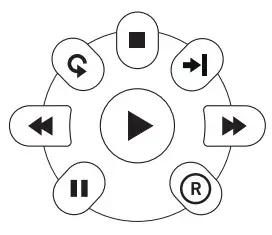 | Use these keys to control your DIRECTV DVR or your VCR, DVD, or CD/DVD player.
|
 | Use GUIDE to display the DIRECTV Program Guide. |
 | Press ACTIVE to access special features, services, and the DIRECTV Information channel |
 | Press LIST to display your TO DO list of programs. (Not available on all DIRECTV® Receivers.) |
 | Press EXIT to exit menu screens and the Program Guide and return to live TV |
 | Press SELECT to choose highlighted items in menu screens or the Program Guide. |
 | Use the ARROW keys to move around in the Program Guide and menu screens. |
 | Press BACK to return to the previously displayed screen. |
 | Press MENU to display the Quick Menu in DIRECTV mode, or other menu for another selected device. |
 | Use INFO to display current channel and program information when watching live TV or in the Guide |
 | Press YELLOW in full-screen TV to cycle through alternate audio tracks Press BLUE in full-screen TV to display the Mini-Guide. Press RED in the Guide to jump 12 hours back. Press GREEN in the Guide to jump 12 hours forward. Other functions vary–look for onscreen hints or refer to your DIRECTV® Receiver’s user guide. (Not available on all DIRECTV Receivers.) |
 | Press VOL to raise or lower the sound volume. The volume key is only active when the remote is set up for your TV |
 | While watching TV, press CHAN (or CHAN (or CHAN ) to select the next higher (or lower) channel. While in the DIRECTV Program Guide or menu, press PAGE+ (or PAGE-) to page up (or down) through available channels in the Guide ) to select the next higher (or lower) channel. While in the DIRECTV Program Guide or menu, press PAGE+ (or PAGE-) to page up (or down) through available channels in the Guide |
 | Press MUTE to turn the sound off or back on. |
 | Press PREV to return to the last channel viewed |
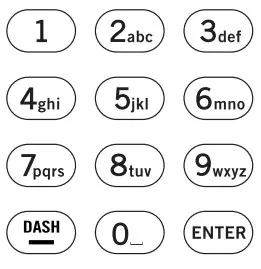 | Press the number keys to directly enter a channel number (e.g. 207) while watching TV or in the Guide. Press DASH to separate main and subchannel numbers. Press ENTER to activate number entries quickly |

 Jumps back 6 seconds and plays video from that location.
INSTALLING BATTERIES
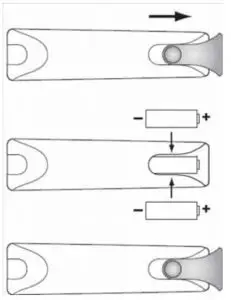
- On the back of the remote control, push down on the door (as shown), slide the battery cover off, and remove the used batteries.
- Obtain two (2) new AA alkaline batteries. Match their +and – marks to the + and – marks in the battery case, then insert them.
- Slide the cover back on until battery door clicks into place.
CONTROLLING YOUR DIRECTV® RECEIVER
The DIRECTV® Universal Remote Control comes programmed to work with most DIRECTV Receivers. Should the remote control not work with your DIRECTV Receiver, you will need to set up the remote control by performing the following steps.
Setting Up Your DIRECTV Remote
- Locate the DIRECTV Receiver’s brand and model number (on the back or bottom panel) and write it in the spaces below.
BRAND: …………………………………………………………….
MODEL: …………………………………………………………….
- Locate the 5-digit code for your DIRECTV®
- Power on the DIRECTV Receiver.
- Slide the MODE switch to the DIRECTV position.
- Press and hold the MUTE and SELECT keys until the green light under the DIRECTV position flashes twice, then release both keys.
- Using the number keys, enter the 5-digit code. If performed correctly, the green light under the DIRECTV position flashes twice.
- Aim the remote at your DIRECTV Receiver and press the PWR key once. The DIRECTV Receiver should turnoff; if it does not, repeat steps 3 and 4, trying each code for your brand until you find the correct code.
- For future reference, write down the working code for your DIRECTV Receiver in the blocks below:
ONSCREEN REMOTE SETUP
Once your remote is setup to work with your DIRECTV Receiver, you can set it up for your other equipment using the steps detailed on the following pages, or you can set it up onscreen by pressing MENU, then SELECT on Settings, Setup in the Quick Menu, then selecting Remote from the left menu.
CONTROLLING YOUR TV
Once you have successfully set up your DIRECTV Remote to operate your DIRECTV Receiver, you can set it up to control your TV. We recommend you use the on-screen steps , but you can also use the manual method below:
- Turn on the TV.
NOTE: Please read steps 2-5 completely before proceeding. Highlight or write down the codes and component you wish to set up before moving on to step 2.
- Locate the 5-digit code for your TV. (See “Setup Codes for TVs” )
- Slide the MODE switch to the TV position.
- Press and hold the MUTE and SELECT keys at the same time until the green light under the TV position flashes twice, then release both keys.
- Using the number keys enter the 5-digit code for your brand of TV. If performed correctly, the green light under TV flashed twice.
- Aim the remote at your TV and press the PWR key once. Your TV should turn off. If it does not turn off, repeat steps 3 and 4, trying each code for your brand until you find the correct code.
- Slide the MODE switch to the DIRECTV Press TV POWER. Your TV should turn on.
- For future reference, write down the working code for your TV in the blocks below:
SETTING UP THE TV INPUT KEY
Once you have setup the DIRECTV® Remote control for your TV, you can activate the TV INPUT key so you can change the “source”—the piece of equipment whose signal is displayed on your TV:
- Slide the MODE switch to the TV
- Press and hold the MUTE and SELECT keys until the green light under the TV position flashes twice, then release both keys.
- Using the number keys enter 9-6-0. (The green light under the TV position flashes twice.)
You now can change the input for your TV.
Deactivating the TV Input Select Key
If you want to deactivate the TV INPUT key, repeat steps 1 through 3 from the previous section; the green light will blink 4 times. Pressing the TV INPUT key will now do nothing.
CONTROLLING OTHER COMPONENTS
The AV1 and AV2 switch positions can be setup to control a
VCR, DVD, STEREO, second DIRECTV Receiver or second TV. We recommend you use the onscreen steps, but you can also use the manual method below:
- Turn on the component you wish to control (e.g. your DVD Player).
- Locate the 5-digit code for your component. (See “Setup Codes, Other Devices”) 3. Slide the MODE switch to the AV1 (or AV2) position.
- Press and hold the MUTE and SELECT keys at the same time until the green light under AV1 (or AV2) flashes twice, then release both keys.
- Using the NUMBER keys, enter the 5-digit code for the brand of component being set up. If performed correctly, the green light under the selected position flashes twice.
- Aim the remote at your component and press the PWR key once. The component should turn off; if it does not, repeat steps 3 and 4, trying each code for your brand until you find the correct code.
- Repeat steps 1 through 6 to set up a new component under AV2 (or AV1).
- For future reference write down the working code for the component(s) set up under AV1 and AV2 below:
AV1:
COMPONENT: ___________________ AV2:
COMPONENT:___________________
SEARCHING FOR TV, AV1 OR AV2 CODES
If you were unable to find the code for your brand of TV or component, you can try a code search. This process may take up to 30 minutes.
- Turn on the TV or component. Insert a tape or disk if applicable.
- Slide the MODE switch to the TV, AV1 or AV2 position, as desired.
- Press and hold the MUTE and SELECT keys at the same time until the green light under the selected switch position flashes twice, then release both keys.
- Enter 9-9-1 followed by one of the following fourdigits:
COMPONENT TYPE COMPONENT ID #
| Satellite | 0 |
| TV | 1 |
| VCR/DVD/PVR | 2 |
| Stereo | 3 |
- Press PWR, or other functions (e.g. PLAY for VCR) you want to use.
- Point the remote at the TV or component and press CHAN
 . Repeatedly press CHAN until the TV or component turns off or performs the action you selected in step 5.
NOTE: Every time CHAN is pressed the remote advances to the next code and power is transmitted to the component.
- Use the CHAN key to step back a code.
- When the TV or component turns off turns off or performs the action you selected in step 5, stop pressing the CHAN Then, press and release the SELECT key.
NOTE: If the light flashes 3 times before the TV or component responds, you’ve cycled through all codes and the code you need is not available. You must use the remote that came with your TV or component.
Verifying the Codes
Once you have set up the DIRECTV® Universal Remote Control using the above steps, use the following instructions to find out the 5-digit code to which your component responded:
- Slide the MODE switch to the appropriate position.
- Press and hold the MUTE and SELECT keys at the same time until the green light under the selected switch position flashes twice, then release both keys.
- Enter 9-9-0. (The green light under the selected switch position flashes twice.)
- To view the first digit in the code, Press and release then number 1 Wait three seconds, and count the number of times the green light flashes. Write this number down in the leftmost TV, AV1 or AV2 code box.
- Repeat step 4 four more times for the remaining digits; i.e., press number 2 for the second digit, 3 for the third digit, 4 for the fourth digit and 5 for the final digit.
CHANGING VOLUME LOCK
Depending on how you set up your remote, the VOL and MUTE may control the volume only on your TV, regardless of the position of the MODE switch. This remote can be set up so that the VOL and MUTE keys work only with the component selected by the MODE switch. To enable this feature, perform the following steps:
- Press and hold the MUTE and SELECT keys until the green light under the DIRECTV position flashes twice, then release both keys.
- Using the number keys, enter 9-9-3. (The green light will flash twice after the 3.)
- Press and release the VOL+ (The green light flashes 4 times.)
Now the VOL and MUTE keys will work only for the component selected by the MODE switch position.
Locking Volume to AV1, AV2 or TV
- Slide the MODE switch to the AV1, AV2 or TV position to lock the volume.
- Press and hold the MUTE and SELECT keys until the green light under the selected switch flashes twice and release both keys.
- Using the number keys, enter 9-9-3. (The green light flashes twice.)
- Press and release the SELECT (The green light flashes twice.)
NOTE: DIRECTV® Receivers don’t have volume control, so the remote will not allow the user to lock volume to the DIRECTV mode.
RESTORING FACTORY DEFAULT SETTINGS
To reset all the functions of the remote control to the factory defaults (the original, out-of-the-box settings), follow these steps:
- Press and hold the MUTE and SELECT keys at the same time until the green light flashes twice, then release both keys.
- Using the number keys, enter 9-8-1. (The green light flashes 4 times.)
TROUBLESHOOTING
PROBLEM: Light at the top of the remote blinks when you press a key, but the component does not respond. SOLUTION 1: Try replacing the batteries .
SOLUTION 2: Make sure you are aiming the DIRECTV® Universal Remote Control at your home entertainment component and that you are within 15 feet of the component you are trying to control.
PROBLEM: The DIRECTV Universal Remote Control does not control component or commands are not recognized properly.
SOLUTION: Try all listed codes for the device brand being set up. Make sure all components can be operated with an infrared remote control.
PROBLEM: TV/VCR combo does not respond properly.
SOLUTION: Use the VCR codes for your brand. Some combo units may require both a TV code and a VCR code for full operation .
PROBLEM: CHAN , CHAN, and PREV do not work for your RCA TV.
SOLUTION: Due to RCA design for certain models (19831987), only the original remote control will operate these functions.
PROBLEM: Changing channels does not work properly.
SOLUTION: If original remote control required pressing
ENTER to change channels, press ENTER on the DIRECTV
Universal remote control after entering a channel number.
PROBLEM: Remote control does not turn on Sony or Sharp TV/VCR Combo.
SOLUTION: For power on, these products require setting up
TV codes on the remote control. For Sony, use TV code 10000 and VCR code 20032. For Sharp, use TV code 10093 and VCR code 20048. (See “Controlling Other Components”)
DIRECTV SETUP CODES
Setup Codes for DIRECTV® Receivers
| DIRECTV all models | 00001, 00002 |
| Hughes Network Systems (most models) | 00749 |
| Hughes Network Systems models GAEB0, GAEB0A, GCB0, GCEB0A, HBH-SA, HAH-SA | 01749 |
| GE models GRD33G2A and GRD33G3A, GRD122GW | 00566 |
| Philips models DSX5500 and DSX5400 | 00099 |
| Proscan models PRD8630A and PRD8650B | 00566 |
| RCA models DRD102RW, DRD203RW, DRD301RA, DRD302RA, DRD303RA, DRD403RA, DRD703RA, DRD502RB, DRD 503RB, DRD505RB, DRD515RB, DRD523RB, and DRD705RB | 00566 |
| DRD440RE, DRD460RE, DRD480RE,DRD430RG, DRD431RG, DRD450RG, DRD451RG, DRD485RG,DRD486RG, DRD430RGA, DRD450RGA, DRD485RGA, DRD435RH, DRD455RH, and DRD486RH | 00392 |
| Samsung model SIR-S60W | 01109 |
| Samsung models SIR-S70, SIRS75, SIR-S300W, and SIRS310W | 01108 |
| Sony models (All models except TiVo and Ultimate TV) | 01639 |
Setup Codes for DIRECTV HD Receivers
| DIRECTV all models | 00001, 00002 |
| Hitachi model 61HDX98B | 00819 |
| HNS models HIRD-E8, HTL-HD | 01750 |
| LG model LSS-3200A, HTL-HD | 01750 |
| Mitsubishi model SR-HD5 | 01749, 00749 |
| Philips model DSHD800R | 01749 |
| Proscan model PSHD105 | 00392 |
| RCA models DTC-100, DTC-210 | 00392 |
| Samsung model SIR-TS360 | 01609 |
| Samsung models SIR-TS160 | 0127615 |
| Setup Codes for DIRECTV® DVRs SETUP CODES, OTHER DEVICES Setup Codes for TVs Sony models SAT-HD100, 200, 300 | 01639 |
| Toshiba models DST-3000, DST-3100, DW65X91 | 01749, 01285 |
| Zenith models DTV1080, HDSAT520 | 01856 |
Setup Codes for DIRECTV® DVRs
| DIRECTV all models | 00001, 00002 |
| HNS models SD-DVR80, SDDV40, SD-DVR120, HDVR2, GXCEBOT, GXCEBOTD | 01442 |
| Philips models DSR704, DSR708, DSR6000, DSR600R, DRS700/17 | 01142, 01442 |
| RCA models DWD490RE, DWD496RG | 01392 |
| RCA models DVR39, 40, 80, 120 | 01442 |
| Sony model SAT-T60 | 00639 |
| Sony model SAT-W60 | 01640 |
| Samsung models SIR-S4040R, SIR-S4080R, SIR-S4120R | 01442 |
SETUP CODES, OTHER DEVICES
Setup Codes for TVs
| 3M | 11616 |
| A-Mark | 10003 |
| Abex | 10032 |
| Accurian | 11803 |
| Action | 10873 |
| Admiral | 10093, 10463 |
| Advent | 10761, 10783, 10815, 10817, 10842, 11933 |
| Adventura | 10046 |
| Aiko | 10092, 11579 |
| Aiwa | 10701 |
| Akai | 10812, 10702, 10030, 10098, 10672, 11207, 11675, 11676, 11688, 11689, 11690, 11692, 11693, 11903, 11935 |
| Akura | 10264 |
| Alaron | 10179, 10183, 10216, 10208, 10208 |
| Albatron | 10700, 10843 |
| Alfide | 10672 |
| Ambassador | 10177 |
| America Action | 10180 |
| Ampro | 1075116 |
| Amstrad | 10412 |
| Anam | 10180, 10004, 10009, 10068 |
| Anam National | 10055, 10161 |
| AOC | 10030, 10003, 10019, 10052, 10137, 10185, 11365 |
| Apex Digital | 10748, 10879, 10765, 10767, 10890, 11217, 11943 |
| Archer | 10003 |
| Astar | 11531, 11548 |
| Audinac | 10180, 10391 |
| Audiovox | 10451, 10180, 10092, 10003, 10623, 10710, 10802, 10846, 10875, 11284, 11937, 11951, 11952 |
| Aventura | 10171 |
| Axion | 11937 |
| Bang & Olufsen | 11620 |
| Barco | 10556 |
| Baysonic | 10180 |
| Baur | 10010, 10535 |
| Belcor | 10019 |
| Bell & Howell | 10154, 10016 |
| BenQ | 11032, 11212, 11315 |
| Blue Sky | 10556, 11254 |
| Blaupunkt | 10535 |
| Boigle | 11696 |
| Boxlight | 10752 |
| BPL | 10208 |
| Bradford | 10180 |
| Brillian | 11007, 11255, 11257, 11258 |
| Brockwood | 10019 |
| Broksonic | 10236, 10463, 10003, 10642, 11911, 11929, 11935, 11938 |
| Byd:sign | 11309, 11311 |
| Cadia | 11283 |
| Candle | 10030, 10046, 10056, 10186 |
| Carnivale | 10030 |
| Carver | 10054, 10170 |
| Casio | 11205 |
| CCE | 10037, 10217, 10329 |
| Celebrity | 10000 |
| Celera | 10765 |
| Champion | 11362 |
| Changhong | 10765 |
| Cinego | 11986 |
| Cineral | 10451, 1009217 |
| Citizen | 10060, 10030, 10092, 10039,10046, 10056, 10186, 10280, 11928, 11935 |
| Clairtone | 10185 |
| Clarion | 10180 |
| Commercial Solutions | 11447, 10047 |
| Concerto | 10056 |
| Contec | 10180, 10157, 10158, 10185 |
| Craig | 10180, 10161 |
| Crosley | 10054 |
| Crown | 10180, 10039, 10672, 11446 |
| Crown Mustang | 10672 |
| Curtis Mathes | 10047, 10054, 10154, 10451, 10093, 10060, 10702, 10030, 10145, 10166, 11919, 11347, 11147, 10747, 10466, 10056, 10039, 10016 |
| CXC | 10180 |
| CyberHome | 10794 |
| Cytron | 11326 |
| Daewoo | 10451, 10092, 11661, 10019, 10039, 10066, 10067, 10091, 10623, 10661, 10672, 11928 |
| Daytron | 10019 |
| De Graaf | 10208 |
| Dell | 11080, 11178, 11264, 11403 |
| Delta | 11369 |
| Denon | 10145, 10511 |
| Denstar | 10628 |
| Diamond Vision | 11996, 11997 |
| Digital Projection Inc. | 11482 |
| Dumont | 10017, 10019, 10070 |
| Durabrand | 10463, 10180, 10178, 10171,11034, 10003 |
| Dwin | 10720, 10774 |
| Dynatech | 10049 |
| Ectec | 10391 |
| Electroband | 10000, 10185 |
| Electrograph | 11623, 11755 |
| Electrohome | 10463, 10381, 10389, 10409 |
| Elektra | 10017, 11661 |
| Emerson | 10154, 10236, 10463, 10180, 10178, 10171, 11963, 11944, 11929, 11928, 11911, 11394, 10623, 10282, 10280, 10270, 10185, 10183, 10182, 10181, 10179, 10177, 10158, 10039, 10038, 10019 |
| Emprex | 11422, 1154618 |
| Envision | 10030, 10813, 11365 |
| Epson | 10833, 10840, 11122, 11290 |
| Erres | 10012 |
| ESA | 10812, 10171, 11944, 11963 |
| Ferguson | 10005 |
| Fidelity | 10082 |
| Finlandia | 10208 |
| Finlux | 10070, 10105 |
| Fisher | 10154, 10159, 10208 |
| FlexVision | 10710 |
| Frontech | 10264 |
| Fujitsu | 10179, 10186, 10683, 10809, 10853 |
| Funai | 10180, 10171, 10179, 11271, 11904, 11963 |
| Futuretech | 10180, 10264 |
| Gateway | 11001, 11002, 11003, 11004, 11755, 11756 |
| GE | 11447, 10047, 10051, 10451,10178, 11922, 11919, 11917,11347, 10747, 10282, 10279,10251, 10174, 10138, 10135,10055, 10029, 10027, 10021 |
| Gibralter | 10017, 10030, 10019 |
| Go Video | 10886 |
| GoldStar | 10178, 10030, 10001, 10002,10019, 10032, 10106, 10409,11926 |
| Goodmans | 10360 |
| Gradiente | 10053, 10056, 10170, 10392,11804 |
| Granada | 10208, 10339 |
| Grundig | 10037, 10195, 10672, 10070,10535 |
| Grunpy | 10180, 10179 |
| H & B | 11366 |
| Haier | 11034, 10768 |
| Hallmark | 10178 |
| Hannspree | 11348, 11351, 11352 |
| Hantarex | 11338 |
| HCM | 10412 |
| Harley Davidson | 10043, 10179, 11904 |
| Harman/Kardon | 10054, 10078 |
| Harvard | 10180, 10068 |
| Havermy | 10093 |
| Helios | 10865 |
| Hello Kitty | 1045119 |
| Hewlett Packard | 11088, 11089, 11101, 11494,11502, 11642 |
| Himitsu | 10180, 10628, 10779 |
| Hisense | 10748 |
| Hitachi | 11145, 10145, 11960, 11904,11445, 11345, 11045, 10797,10583, 10577, 10413, 10409,10279, 10227, 10173, 10151,10097, 10095, 10056, 10038,10032, 10016, 10105 |
| HP | 11088, 11089, 11101, 11494, 11502, 11642 |
| Humax | 11501 |
| Hyundai | 10849, 11219, 11294 |
| Hypson | 10264 |
| ICE | 10264 |
| Intervision | 10264 |
| iLo | 11286, 11603, 11684, 11990 |
| Infinity | 10054 |
| InFocus | 10752, 11164, 11430, 11516 |
| Initial | 11603, 11990 |
| Innova | 10037 |
| Insignia | 10171, 11204, 11326, 11517,11564, 11641, 11963, 12002 |
| Inteq | 10017 |
| IRT | 10451, 11661, 10628, 10698 |
| IX | 10877 |
| Janeil | 10046 |
| JBL | 10054 |
| JCB | 10000 |
| Jensen | 10761, 10050, 10815, 10817,11299, 11933 |
| JVC | 10463, 10053, 10036, 10069,10160, 10169, 10182, 10731,11253, 11302, 11923, 10094 |
| Kamp | 10216 |
| Kawasho | 10158, 10216, 10308 |
| Kaypani | 10052 |
| KDS | 11498 |
| KEC | 10180 |
| Ken Brown | 11321 |
| Kenwood | 10030, 10019 |
| Kioto | 10054, 10706, 10556, 10785 |
| KLH | 10765, 10767, 11962 |
| Kloss | 10024, 10046, 10078 |
| KMC | 10106 |
| Konka | 10628, 10632, 10638, 10703,10707, 11939, 1194020 |
| Kost | 11262, 11483 |
| Kreisen | 10876 |
| KTV | 10180, 10030, 10039, 10183, 10185, 10217, 10280 |
| Leyco | 10264 |
| Local India TV | 10208 |
| LG | 11265, 10178, 10030, 10056,10442, 10700, 10823, 10829,10856, 11178, 11325, 11423,11758, 11993 |
| Lloyd’s | 11904 |
| Loewe | 10136, 10512 |
| Logik | 10016 |
| Luxman | 10056 |
| LXI | 10047, 10054, 10154, 10156,10178, 10148, 10747 |
| M & S | 10054 |
| MAG | 11498 |
| Magnasonic | 11928 |
| Magnavox | 11454, 10054, 10030, 10706,11990, 11963, 11944, 11931,11904, 11525, 11365, 11254,11198, 10802, 10386, 10230,10187, 10186, 10179, 10096,10036, 10028, 10024, 10020 |
| M Electronic | 10105 |
| Manesth | 10264 |
| Matsui | 10208 |
| Mediator | 10012 |
| Metz | 10535 |
| Minerva | 10070, 10535 |
| Minoka | 10412 |
| Mitsubishi | 10535 |
| Majestic | 10015, 10016 |
| Marantz | 10054, 10030, 10037, 10444,10704, 10854, 10855, 11154,11398 |
| Matsushita | 10250, 10650 |
| Maxent | 10762, 11211, 11755, 11757 |
| Megapower | 10700 |
| Megatron | 10178, 10145, 10003 |
| MEI | 10185 |
| Memorex | 10154, 10463, 10150, 10178,10016, 10106, 10179, 10877,11911, 11926 |
| Mercury | 10001 |
| MGA | 10150, 10178, 10030, 10019,10155 |
| Micro | 1143621 |
| Midland | 10047, 10017, 10051, 10032,10039, 10135, 10747 |
| Mintek | 11603, 11990 |
| Minutz | 10021 |
| Mitsubishi | 10093, 11250, 10150, 10178,11917, 11550, 11522, 11392,11151, 10868, 10836, 10358,10331, 10155, 10098, 10019,10014 |
| Monivision | 10700, 10843 |
| Motorola | 10093, 10055, 10835 |
| Moxell | 10835 |
| MTC | 10060, 10030, 10019, 10049,10056, 10091, 10185, 10216 |
| Multitech | 10180, 10049, 10217 |
| NAD | 10156, 10178, 10037, 10056,10866, 11156 |
| Nakamichi | 11493 |
| NEC | 10030, 10019, 10036, 10056, 10170, 10434, 10497, 10882, 11398, 11704 |
| Netsat | 10037 |
| NetTV | 10762, 11755 |
| Neovia | 11338 |
| Nikkai | 10264 |
| Nikko | 10178, 10030, 10092, 10317 |
| Niko | 11581, 11618 |
| Nisato | 10391 |
| Noblex | 10154, 10430 |
| Norcent | 10748, 10824, 11089, 11365,11589, 11590, 11591 |
| Norwood Micro | 11286, 11296, 11303 |
| Noshi | 10018 |
| NTC | 10092 |
| Olevia | 11144, 11240, 11331, 11610 |
| Olympus | 11342 |
| Onwa | 10180 |
| Optimus | 10154, 10250, 10166, 10650 |
| Optoma | 10887, 11622, 11674 |
| Optonica | 10093, 10165 |
| Orion | 10236, 10463, 11463, 10179,11911, 11929 |
| Osaki | 10264, 10412 |
| Otto Versand | 10010, 10535 |
| Panasonic | 10250, 10051, 11947, 11946,11941, 11919, 11510, 11480,11410, 11310, 11291, 10650,10375, 10338, 10226, 10162,1005522 |
| Panama | 10264 |
| Penney | 10047, 10156, 10051, 10060, 10178, 10030, 11926, 11919, 11347, 10747, 10309, 10149, 10138, 10135, 10110, 10039, 10032, 10027, 10021, 10019, 10018, 10003, 10002 |
| Petters | 11523 |
| Philco | 10054, 10463, 10030, 10145, 11661, 10019, 10020, 10028, 10096, 10302, 10786, 11029, 11911 |
| Philips | 11454, 10054, 10037, 10556,10690, 11154, 11483, 11961,10012, 10013 |
| Phonola | 10012, 10013 |
| Protech | 10264 |
| Pye | 10012 |
| Pilot | 10030, 10019, 10039 |
| Pioneer | 10166, 10038, 10172, 10679,10866, 11260, 11398 |
| Planar | 11496 |
| Polaroid | 10765, 10865, 11262, 11276,11314, 11316, 11326, 11327,11328, 11341, 11498, 11523,11991, 11992 |
| Portland | 10092, 10019, 10039 |
| Prima | 10761, 10783, 10815, 10817,11933 |
| Princeton | 10700, 10717 |
| Prism | 10051 |
| Proscan | 11447, 10047, 10747, 11347,11922 |
| Proton | 10178, 10003, 10031, 10052,10466 |
| Protron | 11320, 11323 |
| Proview | 10835, 11401, 11498 |
| Pulsar | 10017, 10019 |
| Quasar | 10250, 10051, 10055, 10165,10219, 10650, 11919 |
| Quelle | 10010, 10070, 10535 |
| RadioShack | 10047, 10154, 10180, 10178,10030, 10019, 10032, 10039,10056, 10165, 10409, 10747,1190423 |
| RCA | 11447, 10047, 10060, 12002,11958, 11953, 11948, 11922,11919, 11917, 11547, 11347,11247, 11147, 11047, 10747,10679, 10618, 10278, 10174,10135, 10090, 10038, 10029,10019, 10018 |
| Realistic | 10154, 10180, 10178, 10030, 10019, 10032, 10039, 10056, 10165 |
| Radiola | 10012 |
| RBM | 10070 |
| Rex | 10264 |
| Roadstar | 10264 |
| Rhapsody | 10183, 10185, 10216 |
| Runco | 10017, 10030, 10251, 10497,10603, 11292, 11397, 11398,11628, 11629, 11638, 11639,11679 |
| Sampo | 10030, 10032, 10039, 10052,10100, 10110, 10762, 11755 |
| Samsung | 10060, 10812, 10702, 10178,10030, 11959, 11903, 11575,11395, 11312, 11249, 11060,10814, 10766, 10618, 10482,10427, 10408, 10329, 10056,10037, 10032, 10019, 10264 |
| Samsux | 10039 |
| Sansei | 10451 |
| Sansui | 10463, 11409, 11904, 11911,11929, 11935 |
| Sanyo | 10154, 10088, 10107, 10146,10159, 10232, 10484, 10799,10893, 11142, 10208, 10339 |
| Saisho | 10264 |
| SBR | 10012, 10013 |
| Schneider | 10013 |
| Sceptre | 10878, 11217, 11360, 11599 |
| Scimitsu | 10019 |
| Scotch | 10178 |
| Scott | 10236, 10180, 10178, 10019,10179, 10309 |
| Sears | 10047, 10054, 10154, 10156,10178, 10171, 11926, 11904,11007, 10747, 10281, 10179,10168, 10159, 10149, 10148,10146, 10056, 10015 |
| Semivox | 10180 |
| Semp | 10156, 11356 |
| SEG | 1026424 |
| SEI | 10010 |
| Sharp | 10093, 10039, 10153, 10157,10165, 10220, 10281, 10386,10398, 10491, 10688, 10689,10818, 10851, 11602, 11917,11393 |
| Sheng Chia | 10093 |
| Sherwood | 11399 |
| Shogun | 10019 |
| Signature | 10016 |
| Signet | 11262 |
| Siemens | 10535 |
| Sinudyne | 10010 |
| SIM2 Multimedia | 11297 |
| Simpson | 10186, 10187 |
| SKY | 10037 |
| Sony | 11100, 10000, 10011, 10080,10111, 10273, 10353, 10505,10810, 10834, 11317, 11685,11904, 11925, 10010 |
| Soundesign | 10180, 10178, 10179, 10186 |
| Sova | 11320, 11952 |
| Soyo | 11520 |
| Sonitron | 10208 |
| Sonolor | 10208 |
| Space Tek | 11696 |
| Spectricon | 10003, 10137 |
| Spectroniq | 11498 |
| Squareview | 10171 |
| SSS | 10180, 10019 |
| Starlite | 10180 |
| Studio Experience | 10843 |
| Superscan | 10093, 10864 |
| Supre-Macy | 10046 |
| Supreme | 10000 |
| SVA | 10748, 10587, 10768, 10865,10870, 10871, 10872 |
| Sylvania | 10054, 10030, 10171, 10020,10028, 10065, 10096, 10381,11271, 11314, 11394, 11931,11944, 11963 |
| Symphonic | 10180, 10171, 11904, 11944 |
| Syntax | 11144, 11240, 11331 |
| Tandy | 10093 |
| Tatung | 10003, 10049, 10055, 10396,11101, 11285, 11286, 11287,11288, 11361, 11756 |
| Teac | 10264, 1041225 |
| Telefunken | 10005 |
| Technics | 10250, 10051 |
| Technol Ace | 10179 |
| Technovox | 10007 |
| Techview | 10847, 12004 |
| Techwood | 10051, 10003, 10056 |
| Teco | 11040 |
| Teknika | 10054, 10180, 10150, 10060,10092, 10016, 10019, 10039,10056, 10175, 10179, 10186,10312, 10322 |
| Telefunken | 10702, 10056, 10074 |
| Tera | 10031 |
| Thomas | 11904 |
| Thomson | 10209, 10210 |
| TMK | 10178, 10056, 10177 |
| TNCi | 10017 |
| Tophouse | 10180 |
| Toshiba | 10154, 11256, 10156, 10093,11265, 10060, 11356, 11369,11524, 11635, 11656, 11704,11918, 11935, 11936, 11945,12006, 11343, 11325, 11306,11164, 11156, 10845, 10832,10822, 10650, 10149, 10036,10070 |
| Tosonic | 10185 |
| Totevision | 10039 |
| Trical | 10157 |
| TVS | 10463 |
| Ultra | 10391, 11323 |
| Universal | 10027 |
| Universum | 10105, 10264, 10535, 11337 |
| US Logic | 11286, 11303 |
| Vector Research | 10030 |
| VEOS | 11007 |
| Victor | 10053 |
| Video Concepts | 10098 |
| Vidikron | 10054, 10242, 11292, 11302,11397, 11398, 11628, 11629,11633 |
| Vidtech | 10178, 10019, 10036 |
| Viewsonic | 10797, 10857, 10864, 10885,11330, 11342, 11578, 11627,11640, 11755 |
| Viking | 10046, 10312 |
| Viore | 11207 |
| Visart | 1133626 |
| Vizio | 10864, 10885, 11499, 11756, 11758 |
| Wards | 10054, 10178, 10030, 11156,10866, 10202, 10179, 10174,10165, 10111, 10096, 10080,10056, 10029, 10028, 10027,10021, 10020, 10019, 10016 |
| Waycon | 10156 |
| Westinghouse | 10885, 10889, 10890, 11282,11577 |
| White Westinghouse | 10463, 10623 |
| WinBook | 11381 |
| Wyse | 11365 |
| Yamaha | 10030, 10019, 10769, 10797,10833, 10839, 11526 |
| Yoko | 10264 |
| Zenith | 10017, 10463, 11265, 10178,10092, 10016, 11904, 11911, 11929 |
| Zonda | 10003, 10698, 10779 |
Setup Codes for TVs (DLP)
| Hewlett Packard | 11494 |
| HP | 11494 |
| LG | 11265 |
| Magnavox | 11525 |
| Mitsubishi | 11250 |
| Optoma | 10887 |
| Panasonic | 11291 |
| RCA | 11447 |
| Samsung | 10812, 11060, 11312 |
| SVA | 10872 |
| Toshiba | 11265, 11306 |
| Vizio | 11499 |
Setup Codes for TVs (Plasma)
| Akai | 10812, 11207, 11675, 11688,11690 |
| Albatron | 10843 |
| BenQ | 11032 |
| Byd:sign | 11311 |
| Daewoo | 10451, 10661 |
| Dell | 11264 |
| Delta | 11369 |
| Electrograph | 11623, 11755 |
| ESA | 10812 |
| Fujitsu | 10186, 10683, 10809, 10853 |
| Funai | 1127127 |
| Gateway | 11001, 11002, 11003, 11004,11755, 11756 |
| H & B | 11366 |
| Helios | 10865 |
| Hewlett Packard | 11089, 11502 |
| Hitachi | 10797 |
| HP | 11089, 11502 |
| iLo | 11684 |
| Insignia | 11564 |
| JVC | 10731 |
| LG | 10178, 10056, 10829, 10856,11423, 11758 |
| Marantz | 10704, 11398 |
| Maxent | 11755, 11757 |
| Mitsubishi | 10836 |
| Monivision | 10843 |
| Motorola | 10835 |
| Moxell | 10835 |
| Nakamichi | 11493 |
| NEC | 11398, 11704 |
| NetTV | 11755 |
| Norcent | 10824, 11089, 11590 |
| Norwood Micro | 11303 |
| Panasonic | 10250, 10650, 11480 |
| Philips | 10690 |
| Pioneer | 10679, 11260, 11398 |
| Polaroid | 10865, 11276, 11327, 11328 |
| Proview | 10835 |
| Runco | 11398, 11679 |
| Sampo | 11755 |
| Samsung | 10812, 11312 |
| Sharp | 10093 |
| Sony | 10000, 10810, 11317 |
| Studio Experience | 10843 |
| SVA | 865 |
| Sylvania | 11271, 11394 |
| Tatung | 11101, 11285, 11287, 11288,11756 |
| Toshiba | 10650, 11704 |
| US Logic | 11303 |
| Viewsonic | 10797, 11755 |
| Viore | 11207 |
| Vizio | 11756, 11758 |
| Yamaha | 10797 |
| Zenith | 10178 |
Setup Codes for TV/DVD Combos
Controlled by the TV
| Accurian | 11803 |
| Advent | 11933 |
| Akai | 11675, 11935 |
| Apex Digital | 11943 |
| Audiovox | 11937, 11951, 11952 |
| Axion | 11937 |
| Boigle | 11696 |
| Broksonic | 11935 |
| Cinego | 11986 |
| Citizen | 11935 |
| Diamond Vision | 11997 |
| Emerson | 11394, 11963 |
| ESA | 11963 |
| Funai | 11963 |
| Hitachi | 11960 |
| iLo | 11990 |
| Initial | 11990 |
| Insignia | 11963, 12002 |
| Jensen | 11933 |
| KLH | 11962 |
| Konka | 11939, 11940 |
| LG | 11993 |
| Magnavox | 11963, 11990 |
| Mintek | 11990 |
| Panasonic | 11941 |
| Philips | 11961 |
| Polaroid | 11991 |
| Prima | 11933 |
| RCA | 11948, 11958, 12002 |
| Samsung | 11903 |
| Sansui | 11935 |
| Sova | 11952 |
| Sylvania | 11394, 11963 |
| Techview | 12004 |
| Toshiba | 11635, 11935, 12006 |
Setup Codes for TV/DVD Combos
Controlled by the DVD
| Advent | 21016 |
| Akai | 20695 |
| Apex Digital | 20830 |
| Audiovox | 21071, 21121, 21122 |
| Axion | 21071 |
| Broksonic | 20695 |
| Cinego | 2139929 |
| Citizen | 20695 |
| Diamond Vision | 21610 |
| Emerson | 20675, 21268 |
| ESA | 21268 |
| Funai | 21268 |
| Go Vision | 21071 |
| Hitachi | 21247 |
| iLo | 21472 |
| Initial | 21472 |
| Insignia | 21013, 21268 |
| Jensen | 21016 |
| KLH | 21261 |
| Konka | 20719, 20720 |
| LG | 21526 |
| Magnavox | 21268, 21472 |
| Mintek | 21472 |
| Naxa | 21473 |
| Panasonic | 21490 |
| Philips | 20854, 21260 |
| Polaroid | 21480 |
| Prima | 21016 |
| RCA | 21013, 21022, 21193 |
| Samsung | 20899 |
| Sansui | 20695 |
| Sova | 21122 |
| Sylvania | 20675, 21268 |
| Toshiba | 20695 |
Setup Codes for TV/VCR Combos
Controlled by the TV
| America Action | 10180 |
| Audiovox | 10180 |
| Broksonic | 11911, 11929 |
| Citizen | 11928 |
| Curtis Mathes | 11919 |
| Daewoo | 11928 |
| Emerson | 10236, 11911, 11928, 11929 |
| Funai | 11904 |
| GE | 11917, 11919, 11922 |
| GoldStar | 11926 |
| Gradiente | 11804 |
| Harley Davidson | 11904 |
| Hitachi | 11904 |
| JVC | 11923 |
| Lloyd’s | 11904 |
| Magnasonic | 11928 |
| Magnavox | 11904, 1193130 |
| Memorex | 11926 |
| Mitsubishi | 11917 |
| Orion | 11911, 11929 |
| Panasonic | 11919 |
| Penney | 11919, 11926 |
| Quasar | 11919 |
| RadioShack | 11904 |
| RCA | 11917, 11919, 11922 |
| Samsung | 11959 |
| Sansui | 11904, 11911, 11929 |
| Sears | 11904, 11926 |
| Sony | 11904, 11925 |
| Sylvania | 11931 |
| Symphonic | 11904 |
| Thomas | 11904 |
| Toshiba | 11918, 11936 |
| Zenith | 11904, 11911, 11929 |
Setup Codes for TV/VCR Combos
Controlled by the VCR
| America Action | 20278 |
| Audiovox | 20278 |
| Broksonic | 20002, 20479, 21479 |
| Citizen | 21278 |
| Colt | 20072 |
| Curtis Mathes | 21035 |
| Daewoo | 20637, 21278 |
| Emerson | 20002, 20479, 20593, 21278,21479 |
| Funai | 20000 |
| GE | 20240, 20807, 21035, 21060 |
| GoldStar | 21237 |
| Gradiente | 21137 |
| Harley Davidson | 20000 |
| Hitachi | 20000 |
| LG | 21037 |
| Lloyd’s | 20000 |
| Magnasonic | 20593, 21278 |
| Magnavox | 20000, 20593, 21781 |
| Magnin | 20240 |
| Memorex | 20162, 21037, 21162, 21237,21262 |
| MGA | 20240 |
| Mitsubishi | 20807 |
| Optimus | 20162, 20593, 21162, 21262 |
| Orion | 20002, 20479, 21479 |
| Panasonic | 20162, 21035, 21162, 2126231 |
| Penney | 20240, 21035, 21237 |
| Philco | 20479 |
| Quasar | 20162, 21035, 21162 |
| RadioShack | 20000, 21037 |
| RCA | 20240, 20807, 21035, 21060 |
| Samsung | 20432, 21014 |
| Sansui | 20000, 20479, 21479 |
| Sanyo | 20240 |
| Sears | 20000, 21237 |
| Sony | 20000, 21232 |
| Sylvania | 21781 |
| Symphonic | 20000, 20593 |
| Thomas | 20000 |
| Toshiba | 20845, 21145 |
| White Westinghouse | 20637 |
| Zenith | 20000, 20479, 20637, 21479 |
Setup Codes for VCRs
| ABS | 21972 |
| Admiral | 20048, 20209 |
| Adventura | 20000 |
| Aiko | 20278 |
| Aiwa | 20037, 20000, 20124, 20307 |
| Akai | 20041, 20061, 20106 |
| Alienware | 21972 |
| Allegro | 21137 |
| America Action | 20278 |
| American High | 20035 |
| Asha | 20240 |
| Audiovox | 20037, 20278 |
| Bang & Olufsen | 21697 |
| Beaumark | 20240 |
| Bell & Howell | 20104 |
| Blaupunkt | 20006, 20003 |
| Broksonic | 20184, 20121, 20209, 20002,20295, 20348, 20479, 21479 |
| Calix | 20037 |
| Canon | 20035, 20102 |
| Capehart | 20020 |
| Carver | 20081 |
| CCE | 20072, 20278 |
| Cineral | 20278 |
| CineVision | 21137 |
| Citizen | 20037, 20278, 21278 |
| Colt | 20072 |
| Craig | 20037, 20047, 20240, 20072,2027132 |
| Curtis Mathes | 20060, 20035, 20162, 20041,20760, 21035 |
| Cybernex | 20240 |
| CyberPower | 21972 |
| Daewoo | 20045, 20278, 20020, 20561,20637, 21137, 21278 |
| Daytron | 20020 |
| Dell | 21972 |
| Denon | 20042 |
| DirecTV | 20739, 21989 |
| Durabrand | 20039, 20038 |
| Dynatech | 20000 |
| Electrohome | 20037 |
| Electrophonic | 20037 |
| Emerex | 20032 |
| Emerson | 20037, 20184, 20000, 20121,20043, 20209, 20002, 20278,20068, 20061,20036, 20208,20212, 20295, 20479, 20561,20593, 20637, 21278, 21479,21593 |
| ESA | 21137 |
| Fisher | 20047, 20104, 20054, 20066 |
| Fuji | 20035, 20033 |
| Funai | 20000, 20593, 21593 |
| Garrard | 20000 |
| Gateway | 21972 |
| GE | 20060, 20035, 20240, 20065,20202, 20760, 20761, 20807,21035, 21060 |
| Go Video | 20432, 20526, 20614, 20643,21137, 21873 |
| GoldStar | 20037, 20038, 21137, 21237 |
| Gradiente | 20000, 20008, 21137 |
| Grundig | 20195 |
| Harley Davidson | 20000 |
| Harman/Kardon | 20081, 20038, 20075 |
| Harwood | 20072, 20068 |
| Headquarter | 20046 |
| Hewlett Packard | 21972 |
| HI-Q | 20047 |
| Hitachi | 20000, 20042, 20041, 20065,20089, 20105, 20166 |
| Howard Computers | 21972 |
| HP | 21972 |
| Hughes Network Systems | 20042, 20739 |
| Humax | 20739, 21797, 21988 |
| Hush | 2197233 |
| iBUYPOWER | 21972 |
| Jensen | 20041 |
| JVC | 20067, 20041, 20008, 20206 |
| KEC | 20037, 20278 |
| Kenwood | 20067, 20041, 20038 |
| Kioto | 20348 |
| KLH | 20072 |
| Kodak | 20035, 20037 |
| LG | 20037, 21037, 21137, 21786 |
| Linksys | 21972 |
| Lloyd’s | 20000, 20208 |
| Logik | 20072 |
| LXI | 20037 |
| Magnasonic | 20593, 21278 |
| Magnavox | 20035, 20039, 20081, 20000,20149, 20110, 20563, 20593,21593, 21781 |
| Magnin | 20240 |
| Marantz | 20035, 20081 |
| Marta | 20037 |
| Matsushita | 20035, 20162, 21162 |
| Media Center PC | 21972 |
| MEI | 20035 |
| Memorex | 20035, 20162, 20037, 20048,20039, 20047, 20240, 20000,20104, 20209,20046, 20307,20348, 20479, 21037, 21162,21237, 21262 |
| MGA | 20240, 20043, 20061 |
| MGN Technology | 20240 |
| Microsoft | 21972 |
| Mind | 21972 |
| Minolta | 20042, 20105 |
| Mitsubishi | 20067, 20043, 20061, 20075,20173, 20807, 21795 |
| Motorola | 20035, 20048 |
| MTC | 20240, 20000 |
| Multitech | 20000, 20072 |
| NEC | 20104, 20067, 20041, 20038,20040 |
| Nikko | 20037 |
| Nikon | 20034 |
| Niveus Media | 21972 |
| Noblex | 20240 |
| Northgate | 21972 |
| Olympus | 2003534 |
| Optimus | 21062, 20162, 20037, 20048,20104, 20432, 20593, 21048,21162, 21262 |
| Optonica | 20062 |
| Orion | 20184, 20209, 20002, 20295,20479, 21479 |
| Panasonic | 21062, 20035, 20162, 20077,20102, 20225, 20614, 20616,21035, 21162, 21262, 21807 |
| Penney | 20035, 20037, 20240, 20042,20038, 20040, 20054, 21035,21237 |
| Pentax | 20042, 20065, 20105 |
| Philco | 20035, 20209, 20479, 20561 |
| Philips | 20035, 20081, 20062, 20110,20618, 20739, 21081, 21181,21818 |
| Pilot | 20037 |
| Pioneer | 20067, 21337, 21803 |
| Polk Audio | 20081 |
| Portland | 20020 |
| Presidian | 21593 |
| Profitronic | 20240 |
| Proscan | 20060, 20202, 20760, 20761,21060 |
| Protec | 20072 |
| Pulsar | 20039 |
| Quarter | 20046 |
| Quartz | 20046 |
| Quasar | 20035, 20162, 20077, 21035,21162 |
| RadioShack | 20000, 21037 |
| Radix | 20037 |
| Randex | 20037 |
| RCA | 20060, 20240, 20042, 20149,20065, 20077, 20105, 20106,20202, 20760, 20761, 20807,20880, 21035, 21060, 21989 |
| Realistic | 20035, 20037, 20048, 20047,20000, 20104, 20046, 20062,20066 |
| ReplayTV | 20614, 20616 |
| Ricavision | 21972 |
| Ricoh | 20034 |
| Rio | 21137 |
| Runco | 20039 |
| Salora | 20075 |
| Samsung | 20240, 20045, 20432, 20739,21014 |
| Samtron | 20643 |
| Sanky | 20048, 20039 |
| Sansui | 20000, 20067, 20209, 20041,20271, 20479, 21479 |
| Sanyo | 20047, 20240, 20104, 20046 |
| Scott | 20184, 20045, 20121, 20043,20210, 20212 |
| Sears | 20035, 20037, 20047, 20000,20042, 20104, 20046, 20054,20066, 20105, 21237 |
| Semp | 20045 |
| Sharp | 20048, 20062, 20807, 20848,21875 |
| Shintom | 20072 |
| Shogun | 20240 |
| Singer | 20072 |
| SKY | 22032 |
| Sky Brazil | 22032 |
| Sonic Blue | 20614, 20616, 21137 |
| Sony | 20035, 20032, 20033, 20000,20034, 20636, 21032, 21232,21886, 21972 |
| Stack | 21972 |
| STS | 20042 |
| Sylvania | 20035, 20081, 20000, 20043,20110, 20593, 21593, 21781 |
| Symphonic | 20000, 20593, 21593 |
| Systemax | 21972 |
| Tagar Systems | 21972 |
| Tatung | 20041 |
| Teac | 20000, 20041 |
| Technics | 20035, 20162 |
| Teknika | 20035, 20037, 20000 |
| Thomas | 20000 |
| Tivo | 20618, 20636, 20739, 21337,21996 |
| TMK | 20240, 20036, 20208 |
| Toshiba | 20045, 20043, 20066, 20210,20212, 20366, 20845, 21008,21145, 21972, 21988, 21996 |
| Totevision | 20037, 20240 |
| Touch | 21972 |
| UEC | 22032 |
| UltimateTV | 21989 |
| Unitech | 20240 |
| Vector | 2004536 |
| Vector Research | 20038, 20040 |
| Video Concepts | 20045, 20040, 20061 |
| Videomagic | 20037 |
| Videosonic | 20240 |
| Viewsonic | 21972 |
| Villain | 20000 |
| Voodoo | 21972 |
| Wards | 20060, 20035, 20048, 20047,20081, 20240, 20000, 20042,20072, 20149, 20062, 20212,20760 |
| White Westinghouse | 20209, 20072, 20637 |
| XR-1000 | 20035, 20000, 20072 |
| Yamaha | 20038 |
| Zenith | 20039, 20033, 20000, 20209,20034, 20479, 20637, 21137,21139, 21479 |
| ZT Group | 21972 |
Setup Codes for DVD Players
| Accurian | 21072, 21416 |
| Adcom | 21094 |
| Advent | 21016 |
| Aiwa | 20641 |
| Akai | 20695, 20770, 20899, 21089 |
| Alco | 20790 |
| Allegro | 20869 |
| Amoisonic | 20764 |
| Amphion Media Works | 20872, 21245 |
| AMW | 20872, 21245 |
| Apex Digital | 20672, 20717, 20755, 20794,20795, 20796, 20797, 20830,21004, 21020, 1056, 21061,21100 |
| Arrgo | 21023 |
| Aspire Digital | 21168, 21407 |
| Astar | 21489, 21678, 21679 |
| Audiologic | 20736 |
| Audiovox | 20790, 21041, 21071, 21072,21121, 21122 |
| Axion | 21071, 21072B & K 20655, 20662 |
| Bang & Olufsen | 21696 |
| BBK | 21224 |
| Bel Canto Design | 21571 |
| Blaupunkt | 20717 |
| Blue Parade | 20571 |
| Bose | 2202337 |
| Broksonic | 20695, 20868, 21419 |
| Buffalo | 21882 |
| Cambridge Soundworks | 20690 |
| Cary Audio Design | 21477 |
| Casio | 20512 |
| CAVS | 21057 |
| Centrios | 21577 |
| Cinea | 20831 |
| Cinego | 21399 |
| Cinematrix | 21052 |
| CineVision | 20876, 20833, 20869, 21483 |
| Citizen | 20695, 21277 |
| Clatronic | 20788 |
| Coby | 20778, 20852, 21086, 21107,21165, 21177, 21351 |
| Craig | 20831 |
| Curtis Mathes | 21087 |
| CyberHome | 20816, 20874, 21023, 21024,21117, 21129, 21502, 21537 |
| D-Link | 21881 |
| Daewoo | 20784, 20705, 20770, 20833,20869, 21169, 21172, 21234,21242, 21441, 1443 |
| Denon | 20490, 20634 |
| Desay | 21407, 21455 |
| Diamond Vision | 21316, 21609, 21610 |
| DigitalMax | 21738 |
| Digix Media | 21272 |
| Disney | 20675, 21270 |
| Dual | 21068, 21085 |
| Durabrand | 21127 |
| DVD2000 | 20521 |
| Emerson | 20591, 20675, 20821, 21268 |
| Encore | 21374 |
| Enterprise | 20591 |
| ESA | 20821, 21268, 21443 |
| Fisher | 20670, 21919 |
| Funai | 20675, 21268, 21334 |
| Gateway | 21073, 21077, 21158, 21194 |
| GE | 20522, 20815, 20717 |
| Genica | 20750 |
| Go Video | 20744, 20715, 20741, 20783,20833, 20869, 21044, 21075,21099, 21144, 21148, 21158,21304, 21443, 21483, 21730 |
| Go Vision | 21071, 21072 |
| GoldStar | 20741 |
| GPX | 20699, 2076938 |
| Gradiente | 20651 |
| Greenhill | 20717 |
| Grundig | 20705 |
| Harman/Kardon | 20582, 20702 |
| Hitachi | 20573, 20664, 20695, 21247,21919 |
| Hiteker | 20672 |
| Humax | 21500, 21588 |
| iLo | 21348, 21472 |
| Initial | 20717, 21472 |
| Innovative Technology | 21542 |
| Insignia | 21013, 21268 |
| Integra | 20627 |
| InterVideo | 21124 |
| IRT | 20783 |
| Jaton | 21078 |
| JBL | 20702 |
| Jensen | 21016 |
| JSI | 21423 |
| JVC | 20558, 20623, 20867, 21164,21275, 21550, 21602, 21863 |
| jWin | 21049, 21051 |
| Kawasaki | 20790 |
| Kenwood | 20490, 20534, 20682, 20737 |
| KLH | 20717, 20790, 21020, 21149,21261 |
| Konka | 20711, 20719, 20720, 20721 |
| Koss | 20651, 20896, 21423 |
| Kreisen | 21421 |
| Krell | 21498 |
| Lafayette | 21369 |
| Landel | 20826 |
| Lasonic | 20798, 21173 |
| Lenoxx | 21076, 21127 |
| Lexicon | 20671 |
| LG | 20591, 20741, 20801, 20869,21526 |
| LiteOn | 21058, 21158, 21416, 21440,21656, 21738 |
| Loewe | 20511, 20885 |
| Magnavox | 20503, 20539, 20646, 20675,20821, 21268, 21472, 21506 |
| Malata | 20782, 21159 |
| Marantz | 20539 |
| McIntosh | 21273, 21373 |
| Memorex | 20695, 20831, 21270 |
| Meridian | 21497 |
| Microsoft | 20522, 2170839 |
| Mintek | 20839, 20717, 21472 |
| Mitsubishi | 21521, 20521 |
| MixSonic | 21130 |
| Momitsu | 21082 |
| NAD | 20692, 20741 |
| Nakamichi | 21222 |
| Naxa | 21473 |
| NEC | 20785 |
| Nesa | 20717, 21603 |
| NeuNeo | 21454 |
| Next Base | 20826 |
| NexxTech | 21402 |
| Norcent | 21003, 20872, 21107, 21265,21457 |
| Nova | 21517, 21518, 21519 |
| Onkyo | 20503, 20627, 20792, 21417,21418, 21612 |
| Oppo | 20575, 21224, 21525 |
| OptoMedia Electronics | 20896 |
| Oritron | 20651 |
| Panasonic | 20490, 20632, 20703, 21362,21462, 21490, 21762 |
| Philco | 20690, 20733, 20790, 20862,21855, 22000 |
| Philips | 20503, 20539, 20646, 20671,20675, 20854, 21260, 21267,21340, 21354 |
| Pioneer | 20525, 20571, 20142, 20631,20632, 21460, 21512, 22052 |
| Polaroid | 21020, 21061, 21086, 21245,21316, 21478, 21480, 21482 |
| Polk Audio | 20539 |
| Portland | 20770 |
| Presidian | 20675, 21072, 21738 |
| Prima | 21016 |
| Primare | 21467 |
| Princeton | 20674 |
| Proscan | 20522 |
| ProVision | 20778 |
| Qwestar | 20651 |
| RCA | 20522, 20571, 20717, 20790,20822, 21013, 21022, 21132,21193, 21769 |
| Recco | 20698 |
| Rio | 20869, 22002 |
| RJTech | 21360 |
| Rotel | 20623, 20865, 21178 |
| Rowa | 2082340 |
| Sampo | 20698, 20752, 21501 |
| Samsung | 20490, 20573, 20744, 20199,20820, 20899, 21044, 21075 |
| Sansui | 20695 |
| Sanyo | 20670, 20695, 20873, 21919 |
| Seeltech | 21338 |
| Semp | 20503 |
| Sensory Science | 21158 |
| Sharp | 20630, 20675, 20752, 21256 |
| Sharper Image | 21117 |
| Sherwood | 20633, 20770, 21043, 21077,21889 |
| Shinsonic | 20533, 20839 |
| Sigma Designs | 20674 |
| SilverCrest | 21368 |
| Sonic Blue | 20869, 21099, 22002 |
| Sony | 20533, 21533, 20864, 21033,21070, 21431, 21432, 21433,21548, 21824, 1892, 22020,22043 |
| Sound Mobile | 21298 |
| Sova | 21122 |
| Sungale | 21074, 21342, 21532 |
| Superscan | 20821 |
| SVA | 20860, 21105 |
| Sylvania | 20675, 20821, 21268 |
| Symphonic | 20675, 20821 |
| TAG McLaren | 20894 |
| Teac | 20758, 20790, 20809 |
| Technics | 20490, 20703 |
| Technosonic | 20730 |
| Techwood | 20692 |
| Terapin | 21031, 21053, 21166 |
| Theta Digital | 20571 |
| Tivo | 21503, 21512 |
| Toshiba | 20503, 20695, 21045, 21154,21503, 21510, 21515, 21588,21769, 21854 |
| Tredex | 20799, 20800, 20803, 20804 |
| TYT | 20705 |
| Urban Concepts | 20503 |
| US Logic | 20839 |
| Valor | 21298 |
| Venturer | 20790 |
| Vialta | 21509 |
| Viewmage | 21374 |
| Vizio | 21064, 21226 |
| Vocopro | 21027, 2136041 |
| Wintel | 21131 |
| Xbox | 20522, 21708 |
| Xwave | 21001 |
| Yamaha | 20490, 20539, 20545 |
| Zenith | 20503, 20591, 20741, 20869 |
| Zoece | 21265 |
Setup Codes for PVRs
| ABS | 21972 |
| Alienware | 21972 |
| CyberPower | 21972 |
| Dell | 21972 |
| DirecTV | 20739, 21989 |
| Gateway | 21972 |
| Go Video | 20614, 21873 |
| Hewlett Packard | 21972 |
| Howard Computers | 21972 |
| HP | 21972 |
| Hughes Network Systems | 20739 |
| Humax | 20739, 21797, 21988 |
| Hush | 21972 |
| iBUYPOWER | 21972 |
| LG | 21786 |
| Linksys | 21972 |
| Media Center PC | 21972 |
| Microsoft | 21972 |
| Mind | 21972 |
| Mitsubishi | 21795 |
| Niveus Media | 21972 |
| Northgate | 21972 |
| Panasonic | 20614, 20616, 21807 |
| Philips | 20618, 20739, 21818 |
| Pioneer | 21337, 21803 |
| RCA 20880, | 21989 |
| ReplayTV | 20614, 20616 |
| Samsung | 20739 |
| Sharp | 21875 |
| SKY | 22032 |
| Sonic Blue | 20614, 20616 |
| Sony | 20636, 21886, 21972 |
| Stack | 9 21972 |
| Systemax | 21972 |
| Tagar Systems | 21972 |
| Tivo | 20618, 20636, 20739, 21337 |
| Toshiba | 21008, 21972, 21988, 21996 |
| Touch | 2197242 |
| Setup Codes for Audio Receivers UEC | 22032 |
| UltimateTV | 21989 |
| Viewsonic | 21972 |
| Voodoo | 21972 |
Setup Codes for Audio Receivers | |
| ZT Group | 21972 |
| ADC | 30531 |
| Aiwa | 31405, 30158, 30189, 30121,30405, 31089, 31243, 31321,31347, 31388, 31641 |
| Akai | 31512 |
| Alco | 31390 |
| Amphion Media Works | 31563, 31615 |
| AMW | 31563, 31615 |
| Anam | 31609, 31074 |
| Apex Digital | 31257, 31430, 31774 |
| Arcam | 31120, 31212, 31978, 32022 |
| Audiophase | 31387 |
| Audiotronic | 31189 |
| Audiovox | 31390, 31627 |
| B & K | 30701, 30820, 30840 |
| Bang & Olufsen | 30799, 31196 |
| BK | 30702 |
| Bose | 31229, 30639, 31253, 31629,31841, 31933 |
| Brix | 31602 |
| Cambridge Soundworks | 31370, 31477 |
| Capetronic | 30531 |
| Carver | 31189, 30189, 30042, 31089 |
| Casio | 30195 |
| Clarinette | 30195 |
| Classic | 31352 |
| Coby | 31263, 31389 |
| Criterion | 31420 |
| Curtis | 30797 |
| Curtis Mathes | 30080 |
| Daewoo | 31178, 31250 |
| Dell | 31383 |
| Delphi | 31414 |
| Denon | 31360, 30004, 31104, 31142,31311, 31434 |
| Emerson | 30255 |
| Fisher | 30042, 31801 |
| Garrard | 30281, 30286, 30463, 30744 |
| Gateway | 31517 |
| GE | 3137943 |
| Glory Horse | 31263 |
| Go Video | 31532 |
| GPX | 30744, 31299 |
| Harman/Kardon | 30110, 30189, 30891, 31304,31306 |
| Hewlett | 31181 |
| Hitachi | 31273, 31801 |
| Hitech | 30744 |
| Initial | 31426 |
| Insignia | 31030, 31893 |
| Integra | 30135, 31298, 31320 |
| JBL | 30110, 30281, 31306 |
| JVC | 30074, 30286, 30464, 31199,31263, 31282, 31374, 31495,31560, 31643, 31811, 31871 |
| Kenwood | 31313, 31570, 31569, 30027,31916, 31670, 31262, 31261,31052, 31032, 31027, 30569,30337, 30314, 30313, 30239,30186, 30077, 30042 |
| Kioto | 30797 |
| KLH | 31390, 31412, 31428 |
| Koss | 30255, 30744, 31366, 31497 |
| Lasonic | 31798 |
| Lenoxx | 31437 |
| LG | 31293, 31524 |
| Linn | 30189 |
| Liquid Video | 31497 |
| Lloyd’s | 30195 |
| LXI | 30181, 30744 |
| Magnavox | 31189, 31269, 30189, 30195,30391, 30531, 31089, 31514 |
| Marantz | 31189, 31269, 30039, 30189,31089, 31289 |
| MCS | 30039, 30346 |
| Mitsubishi | 31393 |
| Modulaire | 30195 |
| Musicmagic | 31089 |
| NAD | 30320, 30845 |
| Nakamichi | 30097, 30876, 31236, 31555 |
| Norcent | 31389 |
| Nova | 31389 |
| NTDE Geniesom | 30744 |
| Onkyo | 30135, 30380, 30842, 31298,31320, 31531, 3180544 |
| Optimus | 31023, 30042, 30080, 30181,30186, 30286, 30531, 30670,30738, 30744, 30797, 30801,31074 |
| Orient Power | 30744 |
| Oritron | 31366, 31497 |
| Panasonic | 31308, 31518, 30039, 30309,30367, 30763, 31275, 31288,31316, 31350, 31363, 31509,31548, 31633, 31763, 31764 |
| Penney | 30195 |
| Philco | 31390, 31562, 31838 |
| Philips | 31189, 31269, 30189, 30391,31089, 31120, 31266, 31268,31283, 31365, 31368 |
| Pioneer | 31023, 30014, 30080, 30150,30244, 30289, 30531, 30630,31123, 31343, 31384 |
| Polaroid | 31508 |
| Polk Audio | 30189, 31289, 31414 |
| Proscan | 31254 |
| Quasar | 30039 |
| RadioShack | 30744, 31263 |
| RCA | 31023, 31609, 31254, 30054,30080, 30346, 30530, 30531,31074, 31123, 31154, 31390,31511 |
| Realistic | 30181, 30195 |
| Recco | 30797 |
| Regent | 31437 |
| Rio | 31383, 31869 |
| Rotel | 30793 |
| Saba | 31519 |
| Samsung | 30286, 31199, 31295, 31500 |
| Sansui | 30189, 30193, 30346, 31089 |
| Sanyo | 30801, 31251, 31469, 31801 |
| Semivox | 30255 |
| Sharp | 30186, 31286, 31361, 31386 |
| Sharper Image | 30797, 31263, 31410, 31556 |
| Sherwood | 30491, 30502, 31077, 31423,31517, 31653, 31905 |
| Shinsonic | 31426 |
| Sirius | 31602, 31627, 31811, 31987 |
| Sonic | 30281 |
| Sonic Blue | 31383, 31532, 3186945 |
| Setup Codes for Audio Amplifiers Sony | 31058, 31441, 31258, 31759,31622, 30158, 31958, 31858,31822, 31758, 31658, 30168,31558, 31547, 31529, 31503,31458, 31442, 30474, 31406,31382, 31371, 31367, 31358,31349, 31131, 31158 |
| Soundesign | 30670 |
| Starlight | 30797 |
| Stereophonics | 31023 |
| Sunfire | 31313, 30313, 30314, 31052 |
| Sylvania | 30797 |
| Teac | 30463, 31074, 31390, 31528 |
| Technics | 31308, 31518, 30039, 30309,30763, 31309 |
| Techwood | 30281 |
| Thorens | 31189 |
| Toshiba | 31788 |
| Venturer | 31390 |
| Victor | 30074 |
| Wards | 30158, 30189, 30014, 30054,30080 |
| XM | 31406, 31414 |
| Yamaha | 30176, 30082, 30186, 30376,31176, 31276, 31331, 31375,31376, 31476 |
| Yorx | 30195 |
| Zenith | 30281, 30744, 30857, 31293,3152 |
Setup Codes for Audio Amplifiers
| Accuphase | 30382 |
| Acurus | 30765 |
| Adcom | 30577, 31100 |
| Aiwa | 30406 |
| AudioSource | 30011 |
| Arcam | 30641 |
| Bel Canto Design | 31583 |
| Bose | 30674 |
| Carver | 30269 |
| Classe | 31461, 31462 |
| Curtis Mathes | 30300 |
| Denon | 30160 |
| Durabrand | 31561, 31566 |
| Elan | 30647 |
| GE | 30078 |
| Harman/Kardon | 3089246 |
| JVC | 30331 |
| Kenwood | 30356 |
| Left Coast | 30892 |
| Lenoxx | 31561, 31566 |
| Lexicon | 31802 |
| Linn | 30269 |
| Luxman | 30165 |
| Magnavox | 30269 |
| Marantz | 30892, 30321, 30269 |
| Mark Levinson | 31483 |
| McIntosh | 30251 |
| Nakamichi | 30321 |
| NEC | 30264 |
| Optimus | 30395, 30300, 30823 |
| Panasonic | 30308, 30521 |
| Parasound | 30246 |
| Philips | 30892, 30269, 30641 |
| Pioneer | 30013, 30300, 30823 |
| Polk Audio | 30892, 30269 |
| RCA | 30300, 30823 |
| Realistic | 30395 |
| Regent | 31568 |
| Sansui | 30321 |
| Sharp | 31432 |
| Shure | 30264 |
| Sony | 30689, 30220, 30815, 31126 |
| Soundesign | 30078, 30211 |
| Technics | 30308, 30521 |
| Victor | 30331 |
| Wards | 30078, 30013, 30211 |
| Xantech | 32658, 32659 |
| Yamaha | 30354, 30133, 30143, 3050 |
REPAIR OR REPLACEMENT POLICY
If the DIRECTV® Universal Remote Control does not function properly, DIRECTV will, at our sole discretion, repair or replace the DIRECTV Universal Remote Control, provided that:
- You are a customer of DIRECTV and your account is in good standing; and
- The problem with the DIRECTV Universal Remote Control was not caused by abuse, mishandling, alteration, accident, failure to follow operating, maintenance or environmental instructions set forth in this User Guide, or service performed by someone other than DIRECTV
THE DIRECTV UNIVERSAL REMOTE CONTROL IS PROVIDED ON AN AS-IS, AS-AVAILABLE BASIS, SOLELY FOR YOUR NON-COMMERCIAL, RESIDENTIAL USE. DIRECTV DOES NOT MAKE ANY REPRESENTATIONS OR WARRANTIES OF ANY KIND, WHETHER STATUTORY, EXPRESS OR IMPLIED, REGARDING THE DIRECTV UNIVERSAL REMOTE CONTROL, INCLUDING ANY IMPLIED WARRANTY OF MERCHANTABILITY, NONINFRINGEMENT OR FITNESS FOR A PARTICULAR PURPOSE OR IMPLIED WARRANTIES ARISING FROM A COURSE OF DEALING OR COURSE OF PERFORMANCE. DIRECTV EXPRESSLY DISCLAIMS ANY REPRESENTATION OR WARRANTY THAT THE DIRECTV UNIVERSAL REMOTE CONTROL WILL BE ERROR FREE. NO ORAL ADVICE OR WRITTEN INFORMATION GIVEN BY DIRECTV, ITS EMPLOYEES, AND LICENSORS OR THE LIKE SHALL CREATE A WARRANTY; NOR SHALL CUSTOMER RELY ON ANY SUCH INFORMATION OR ADVICE. UNDER NO CIRCUMSTANCES, INCLUDING NEGLIGENCE, SHALL DIRECTV OR ANYONE ELSE INVOLVED IN ADMINISTERING, DISTRIBUTING, OR PROVIDING THE DIRECTV UNIVERSAL REMOTE CONTROL BE LIABLE FOR ANY INDIRECT, INCIDENTAL, SPECIAL OR CONSEQUENTIAL DAMAGES, INCLUDING, WITHOUT LIMITATION, LOSS OF REVENUES OR INABILITY TO USE THE DIRECTV UNIVERSAL REMOTE CONTROL, MISTAKES, OMISSIONS, INTERRUPTIONS, DEFECTS, FAILURE OF PERFORMANCE, EVEN IF DIRECTV HAS BEEN ADVISED OF THE POSSIBILITY OF SUCH LOSSES.
Because some states do not allow the exclusion or limitation of liability for consequential or incidental damages, in such states, DIRECTV’s liability is limited to the greatest extent permitted by law.
ADDITIONAL INFORMATION
This product does not have any user-serviceable parts.Opening the case, except for the battery cover, may cause permanent damage to your DIRECTV Universal Remote Control.
For help via the Internet, visit us at: DIRECTV.com
Or ask for technical support at: 1-800-531-5000
Copyright 2006 by DIRECTV, Inc. No part of this publication may be reproduced, transmitted, transcribed, stored in any retrieval system, or translated to any language, in any form or by any means, electronic, mechanical, magnetic, optical, manual, or otherwise, without prior written permission of DIRECTV,
Inc. DIRECTV and the Cyclone Design logo are registered trademarks of DIRECTV,
Inc. M2982C for use with the URC2982 DIRECTV Universal Remote Control. 05/06
COMPLIANCE WITH FCC RULES AND REGULATIONS
This equipment has been tested and found to comply with the limits for a Class B digital device, pursuant to part 15 of the FCC Rules. These limits are designed to provide reasonable protection against harmful interference in a residential installation. This equipment generates, uses and can radiate radio frequency energy and if not used in accordance with the instructions, may cause harmful interference to radio communications.
However, there is no guarantee that interference will not occur in a particular installation. If this equipment does cause harmful interference to radio or television reception, the user is encouraged to try to correct the interference by one or more of the following measures:
- Increase or decrease the separation between the equipment and receiver.
- Consult the dealer or an experienced remote control/TV technician for help.
DirecTV Universal Remote Control User Guide – Download [optimized]
DirecTV Universal Remote Control User Guide – Download
![Directv Blue Remote Control Manual [universal Remote Control]](https://static-data1.manualsee.com/1/img/250/2777/2018/08/DirecTV-Blue-Remote-Control-Manual-Universal-Remote-Control-featured-1568x1215.jpg "Directv Blue Remote Control Manual [universal Remote Control]")