
Cyrusher Ovia 52V Step through Full Suspension Air Shock Ebike
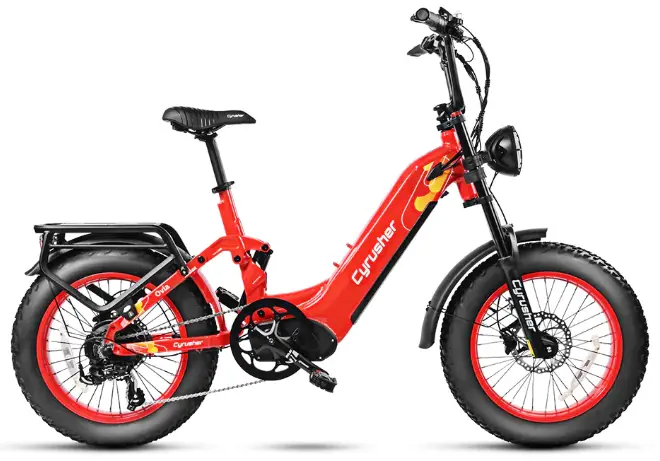
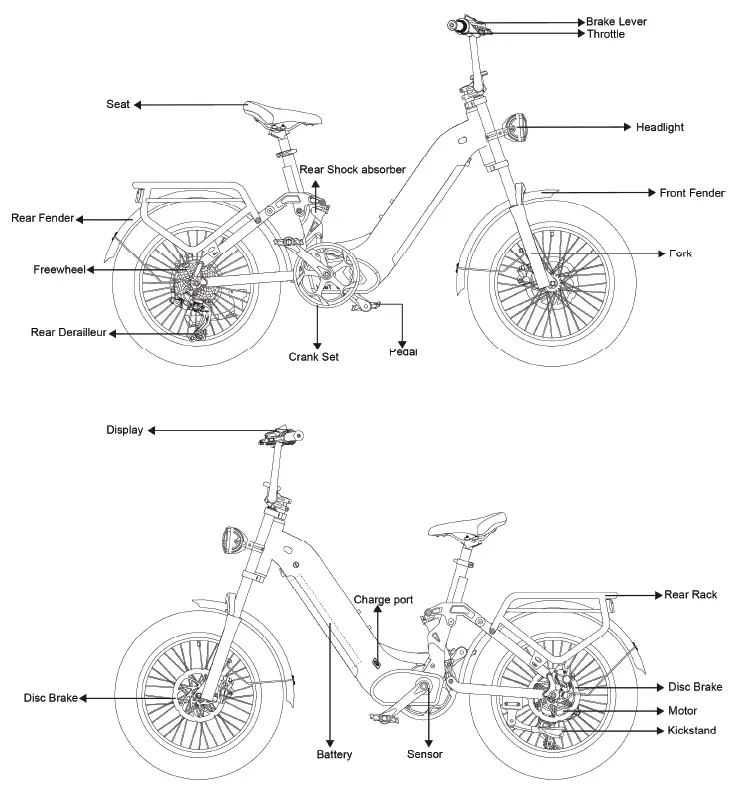
Bike Diagram
First Ride
We know you are excited about getting going but please:
- Reseat and charge the battery before the first ride
- Make sure the pedals are tight
- Make sure the front wheel is installed properly and tight
- Check to be sure the tires are inflated properly
- Learn how to use the LCD display
- Wear a helmet before riding
Please Note: Bike may need further adjustments after assembly
If you have any trouble with setup, please contact us on line https://www.cyrusher.com/pages/contact
Assembling
- Read all of the instructions carefully. Be familiar with the proper operation of all items.
- This quick guide is intended to list the steps needed to assemble your bike with some mechanical skills. It is not a complete manual or training. If you do not feel comfortable or lack some of the skills to assemble it yourself, reach out to a cyclist friend, a local bike mechanic or one of our support technicians for guidance.
- Our QA mechanics have assembled and tested your bike beforehand.
- To assemble your bike, work on a clean area with enough space to maneuver.
- If installed, remove the battery from the bike to start the assembly.
- Inspect the bike completely to be sure no damage occurred during shipping.
- The kickstand is designed to support the bicycle only. Not the rider mounted.
- You can adjust your saddle position and the tilt on your handlebar items for comfort.
- Check all screws and parts are tight and properly fixed. We recommend a pre-trip inspection before your first rides.
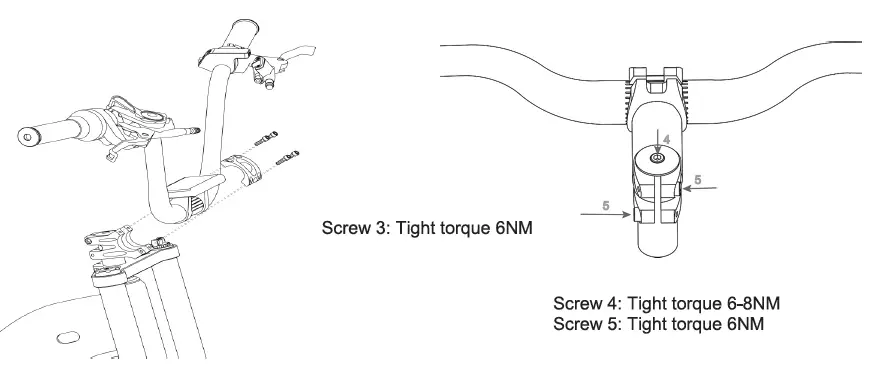
Installing Your Handlebars
- Point the headset towards the front of the bike.
- Place the handlebar in the handlebar mount being careful with the wires.
- Face the mounting brackets on the front end of the mount with the round edges facing outward.
- Insert the screws into the screw holes and tighten alternating sides until secure (4mm alien wrench with 6NM tight torque).
- Verify your front tire lines up with your headset.
- Tighten screws on stem end (4mm alien wrench with 6N strength) and top of the stem (5mm alien wrench with 6-BN strength).
- Check all headset items are tight.
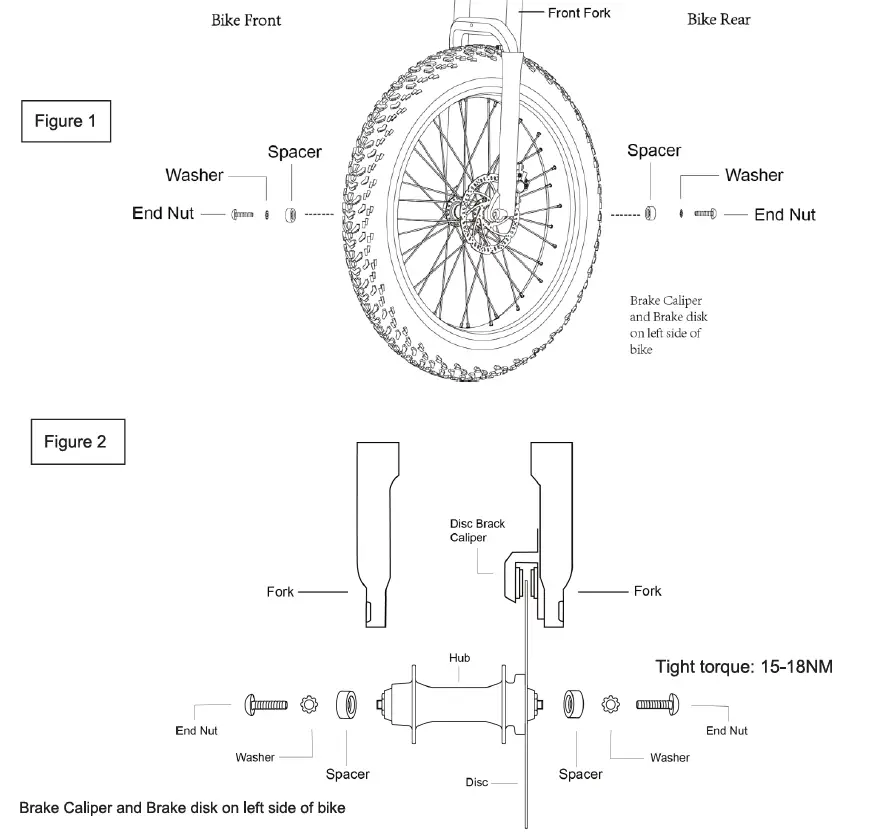
 Installing Your Front Wheel
- Insert the front wheel between the front fork on the bike. Be sure to align the disk between the brake caliper as shown in Figure 2.
- Now on the outside add the spacer, washer and end nut on each side and hand turn until almost tight.
- Using 5mm alien wrench, tighten each side end nut putting your weight into the wrench.
- The End Nut must be very tight, be sure to re-tighten after your first couple rides, its tight torque shall be 15-18NM.
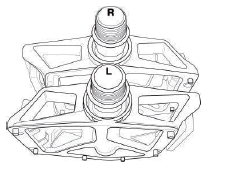
Installing Your Pedals
- Warning: Incorrect installation will cause damage. Please read the instructions and watch our videos if needed.
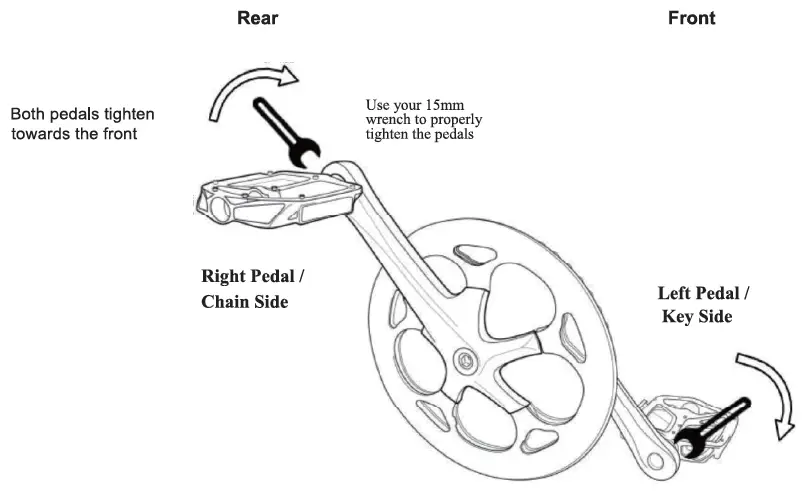
- Identify the Left and Right markings on the pedals. They can only be installed in their respective side.
- a. Lis for the Left Pedal and it goes on the Left Crank Arm.
- b. R is for the Right pedal and it goes on the Right Crank Arm (Chain Side).

- Sitting on your bike the pedals go on the Left and Right side respectively.
- Keep the pedal Horizontal while hand screwing to get the thread started. Then Use your 15mm wrench to tighten them.
- Both pedals tighten towards the front of the bike. The left pedal is reverse threaded to allow this.
- The pedals need to be very tight, be sure to retighten after your first couple rides.
Installing Your Headlight
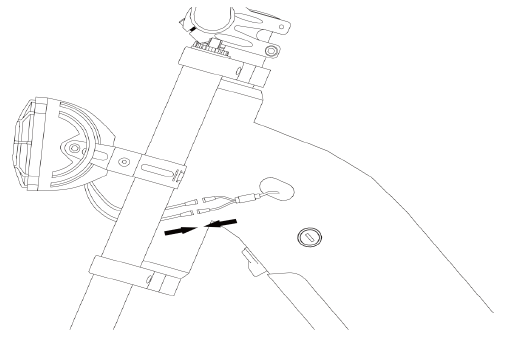
- Place the headlight with its bracket in front of the fork gantry. Push the screw provided on the headlight through the installing hole on the fork gantry. Tighten the fixing nut onto the screw.(You might need to secure the fixing nut tightly so the screw doesn’t turn).
- Connect the headlight cable with the wire coming out from the downtube.
Battery
To Install the Battery
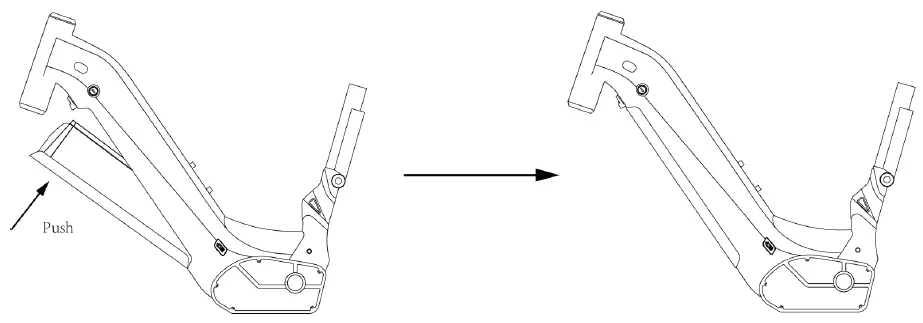
- Turn the key counterclockwise to release the lock.
- Seat the bottom of the battery into the receptacle first and push the upper side of the battery into the frame tightly until it gets locked with a clatter sound. Seat your battery securely, turn the key clockwise to lock the battery. Remove the key from the lock before each riding.

To Remove the Battery
- Turn off the LCD display.
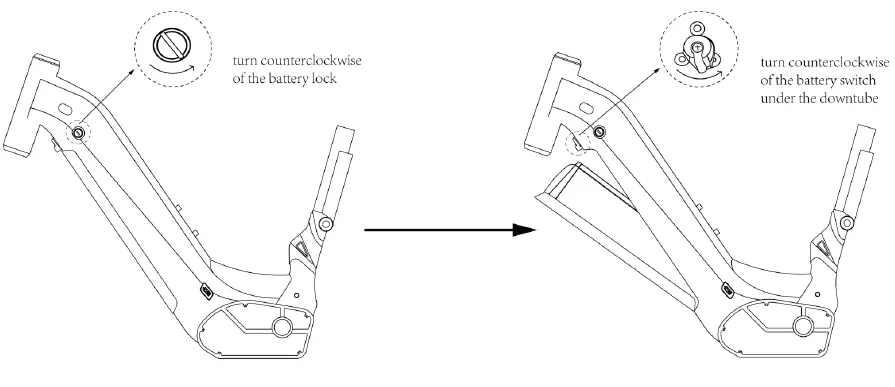
- The battery is secured with a double-lock mechanism. Use the key to release the first lock.
- Keep your left hand holding the battery. Use your right hand to turn the lock switch under the downtube counterclockwise and the battery will drop off. When the lock is released, hold the battery with both hands and take it off from the bike.
Note: Please hold the battery tight with one hand at least as it will drop off when the lock is released.
Display
Function overview and Functional areas
Functional overview
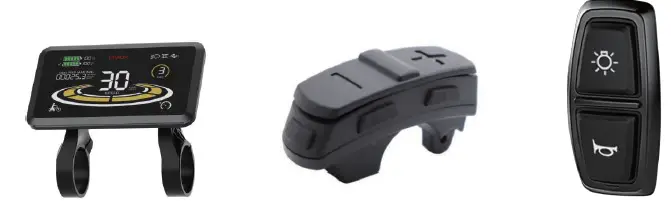
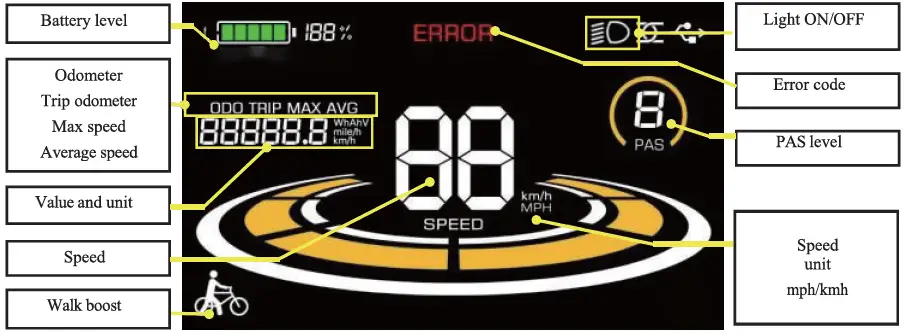
The display offers a variety of features to suit your riding needs, including:
- Battery level indicator
- Pedal assist (PAS) level indicator
- Speed (current speed, maximum speed, average speed)
- Mileage display (single and total mileage)
- Walk boost mode
- Light ON/OFF
- Error code indicator
Functional areas
Button definition
The display is equipped with buttons on the corresponding operating unit: power on/off , plus
 , minus
  and toggle
 . Light
  and horn button
  is on a separate button set.
Routine operation
- Power on/off
Long press to power on/off the display. When the display is off, it will not use the battery power and the leakage current is less than 1 uA.
The display will automatically shut off if it is not used for more than 5 minute - Turning on/off lights and horn
Press the to turn on the lights and the display backlight becomes dim. Press again to turn off the lights and the backlight restore brightness. Press
 to turn on the horn.
 - Display interface switching
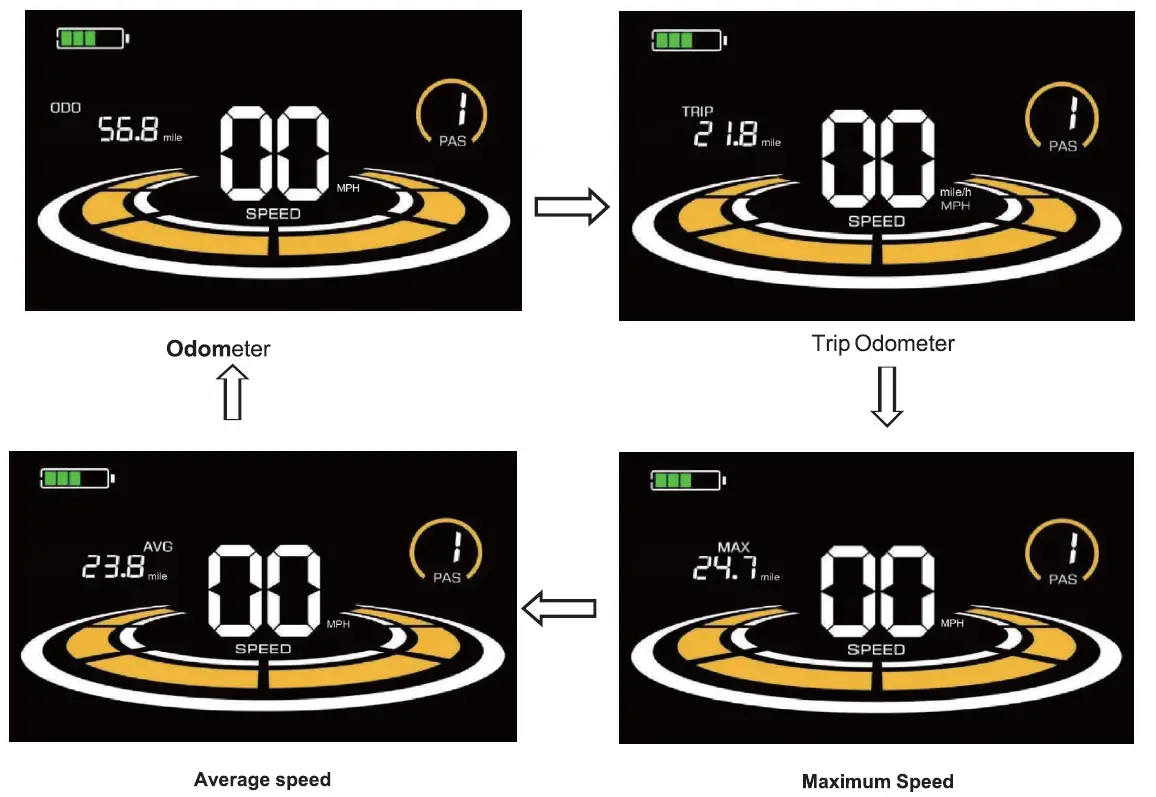
When the display is powered on, it will show the Current Speed (MPH) and Odometer (mile) by default. Short press to switch between Odometer (mile), Trip Odometer(mile), Maximum Speed (MPH), and Average Speed(MPH).
Walk boost mode
Long Press and hold , the electric bicycle enters the walk boost mode. The electric bicycle will walk at a fixed speed of 6 km per hour and the display shows . Release the button to stop
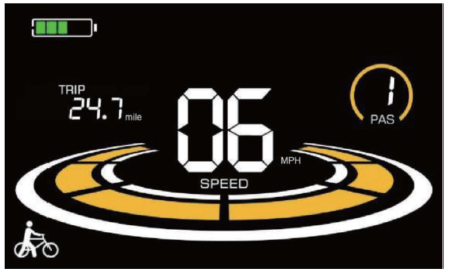
the power output immediately and restore to the state before walk boost. Figure 5-2 Helping to implement the display screen The walk boost mode can only be used when pushing the electric bicycle, please do not use it while riding
PAS level selection
Press / to switch PAS level of electric bicycle, thus changing the motor output power.

Battery level display
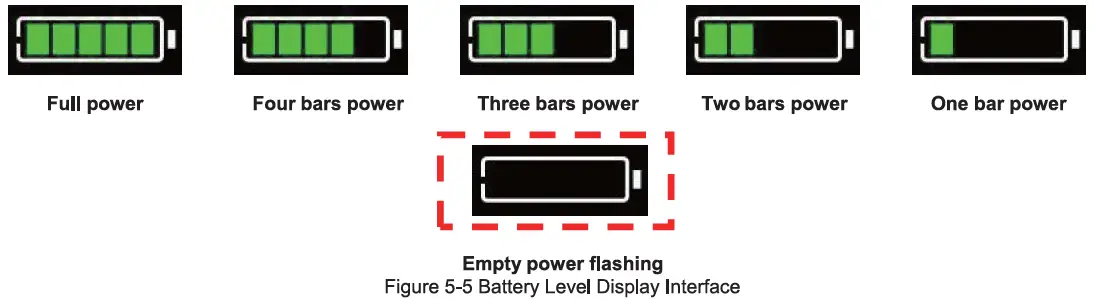
The Battery level is shown as 5 bars. When the battery is full charged, all of the 5 bars lighten up. When the battery is fully depleted, the bar will begin to flash, warning the user to charge the battery as soon as possible
Error code display
If there is a fault occurs in the electronic system of the electric bicycle, the display will automatically show an error code, see Schedule 1 for a detailed definition of the error code.
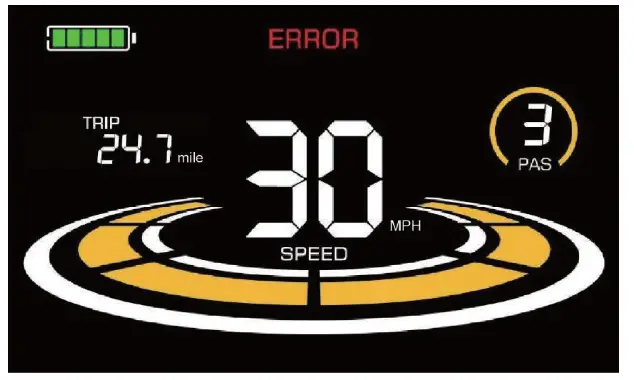
When the error code appears on the display, please troubleshoot the problem in time, the electric bicycle will not be able to drive normally after the problem occurs.
Before Riding
- Read all instructions carefully, be familiar with the proper operation of all items. Check for detailed information and guidance on our product page.
- Warning: Basic electric precautions should always be followed to avoid issues or malfunction.
- Charge your battery fully in preparation for your first ride.
- Push the battery pack into the downtube tightly until it gets locked with a clatter sound. Seat your battery securely and remove the key from the lock.
- Check all the tires, tightness of fasteners and brakes before every riding.
Charging
There are two ways to charge your battery.
- Charge the battery ON the bike
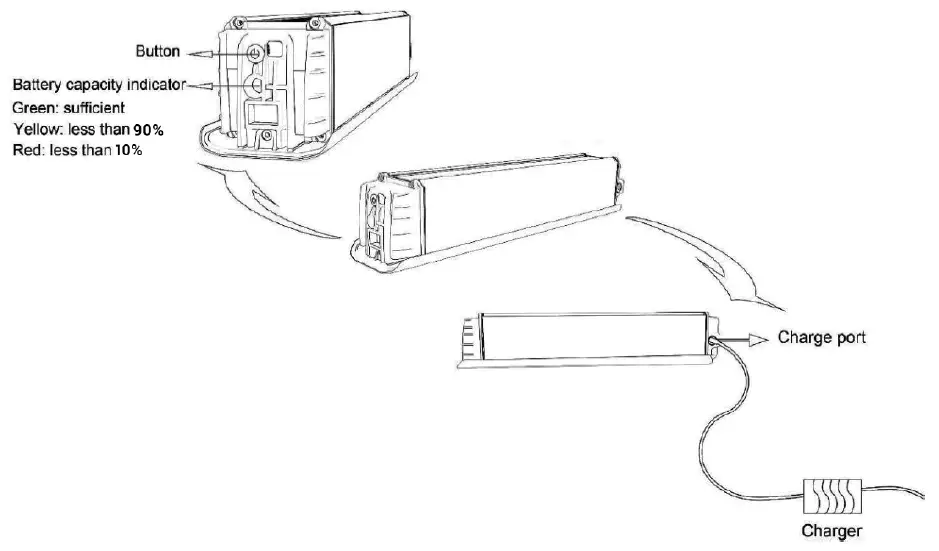
- Find the Charge Port at the bottom of the downtube.
- Pull out the cover to show the charge port and insert the charger output plug into the port. Connect the input plug to the power supply.
- Charge the battery OFF the bike
- Take off the battery from your bike.
- Place the battery in a clean and flat place in room temperature.
- Insert the charger output plug into the charge port. Connect the input plug to the power supply.
- There is a capacity indicator at the top of the battery. Press the button beside to check the charge status. Green means sufficient of charge. Yellow means less than 90%. Red means less than 10%.
Notes of Charging:
- Charging time varies from 8 to 10 hours. Never charge a battery for more than 12 hours at a time.
- The small LED light on the charger in RED indicates it is in charge; The small LED light on the charger in GREEN indicates it is fully charged.
- Insufficient charging will not influence the battery lifecycle. AVOIDING deep discharge is helpful to protect the battery and extend its lifecycle.
- If the battery will not be used for a long period, take it off from the bike and discharge its capacity to 60%-80% for stock. Disconnect it from the charger and place it in a dry, ventilated place without direct sunlight. In order to maintain a long lifecycle, it is recommended to charge the battery every two months even when it is in static without use.
- Pay attention to check whether the surface temperature of the battery case rises too high during charging. It is FORBIDDEN to cover the battery during charging.
- Due to high temperature in summer time, it is NOT advisable to charge it immediately after riding. In winter, it is FORBIDDEN to charge the battery in environment below 0°C. You are recommended to charge it in room temperature.1
Trouble shooting
Error Codes
| Error Code | Error | Notes |
| E001 | Open Throttle Fault | Throttle has not returned to the start position on start-up. Check to see if the throttle can return to the start position or if there is something blocking the throttle unit. |
| E005 | Throttle Fault | Throttle may be damaged. Check the throttle or throttle cable for damage. |
| E006 | Low Voltage Protection | The battery voltage is too low to operate. Incorrect battery was used on the bike. The battery is in sleep mode or not functioning correctly. |
| E007 | Over Voltage Protection | The battery voltage is too high to operate. Incorrect battery was used on the bike. Check to be sure that the correct battery is being used on the bike |
| EOOS | Motor Hall Signal Fault | At least one of the motor’s hall sensor wires have been disconnected or damaged. Disconnect and reconnect the motor cable. |
| E009 | Motor Phase Line Fault | At least one of the motor’s phase wires has been disconnected or damaged. Or phase line connector fault. |
| E010 | High Temperature Fault | The controller has reached the highest allowable temperature. Allow the controller to cool down before using the e-bike again. |
| E011 | Motor High Temperature Protection | Allow the motor to cool down and check if it recovers. |
| E012 | Current Sensor Fault | The controller’s current sensor has become disconnected or damaged. Contact technical support. |
| E014 | Motor Temperature Sensor Fault | The motor temperature sensor fault. Contact technical support. |
| E015 | Controller Temperature Sensor Fault | The controller temperature sensor fault. Contact technical support. |
| E021 | Motor Speed Sensor Fault | The motor speed sensor has become disconnected or damaged. Check if motor cable loose. Disconnect and re-connect the cable. If doesn’t recover, contact technical support. |
| E025 | Torque Signal Fault | Torque sensor-torque signal fault. Contact technical support. |
| E026 | Speed Signal Fault | Torque sensor -speed signal fault. Contact technical support. |
| E030 | Communication Fault | Poor connection between the controller and the display. Check all cable connectors. Check for corrosion damage. |
Solutions
| SYMPTOMS | CAUSES | SOLUTIONS |
|
Throttle and pedal assist not working | • Battery off | • Turn on battery |
| • Battery installation | • Reseat battery | |
| • LCD display not on | • Turn on LCD display | |
| • Discharged battery | • Charge battery | |
| • Brake sensors engaged | • Inspect brake lever | |
| Reduced speed | • Low battery power | • Charge battery |
|
Reduced battery range | • Low battery power | • Charge battery |
| • Low tire pressure | • Inspect tire | |
| • Heavy load on bike | • Adjust bike load | |
| • Driving on rough terrain | • Adjust route | |
| • Using throttle only | • Include pedal assist | |
|
Battery does not charge | • Charger not properly connected | • Inspect connections |
| • Battery temperature | • Read the user manual for best practices | |
| • Damaged charger | • Replace charger | |
| • Issue with battery | • Contact Support Team | |
|
E-bike making strange noises | • Loose hardware | • Tune-up and inspection needed |
| • Issue on drivetrain | • Maintenance needed | |
| • Issue with motor | • Contact Support Team |