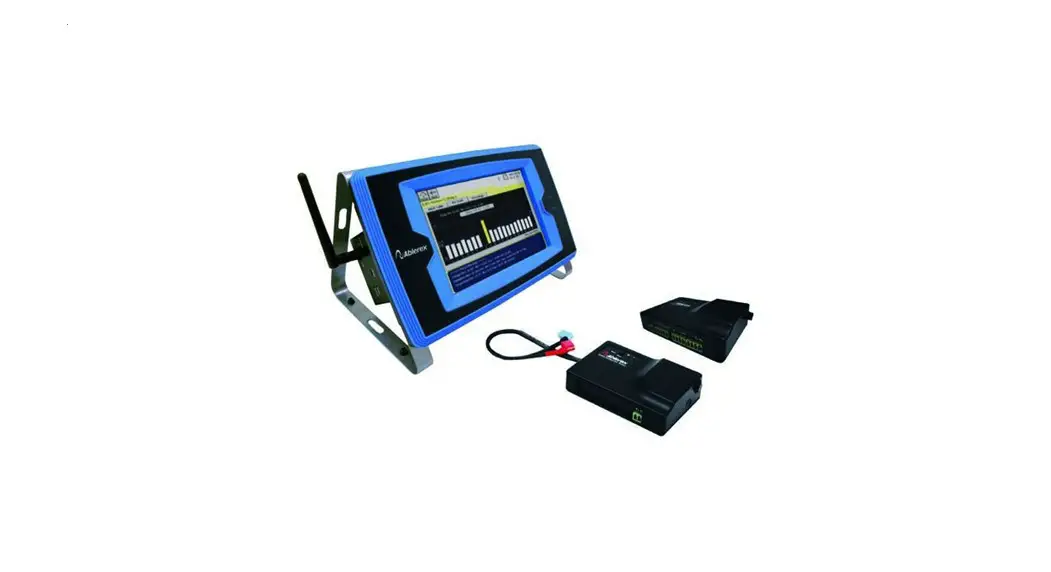

Ablerex Power Master
The information presented in this manual is not warranted by Ablerex to be authoritative, error-free,or complete. Ablerex assumes no liability for damages, violations of codes, improper installation, system failures, or any other problems that could arise based on the use of this publication.
Ablerex reserves the right to make changes or updates with respect to or in the content of the publication or the format thereof at any time without notice.
Copyright, intellectual, and all other proprietary rights in the content (including but not limited to software, audio, video, text, and photographs) rests with Ablerex or its licensors. All rights in the content not expressly granted herein are reserved.
No rights of any kind are licensed or assigned or shall otherwise pass to persons accessing this information.
Installation Instructions
The free software is available for all single-phase UPS models and downloadable from www.ablerex.eu/download
System requirements
| Support OS: | ||
| O.S | x86/x64 | Version |
| Ubuntu | x64 | 14.04.6/16.04/18.04/20.04/21.1 |
| Ubuntu | x86 | 16.04.6 |
| Debian | x64 | 9/10 |
| Debian | x86 | 9 |
| Mint | x64 | 20.3 |
| SUSE Linux Enterprise | x64 | 12/15 |
| Red Hat Enterprise | x64 | 8 |
| CentOS | x64 | 8 |
| Deepin | x64 | 23 |
| Peripherals: Com Port(RS-232) or USB | ||
Install Ablerex PowerMaster
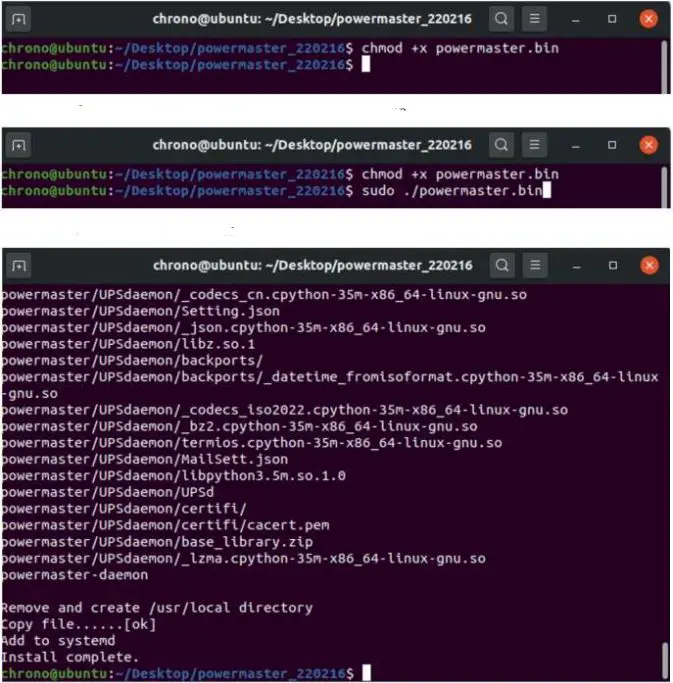
Install Ablerex PowerMaster
- Step 1. Input command: chmod +x powermaster.bin
- Step 2. Input command: sudo ./powermaster.bin
- Step 3. Install Complete

- Step 5. Click “Next” to next step


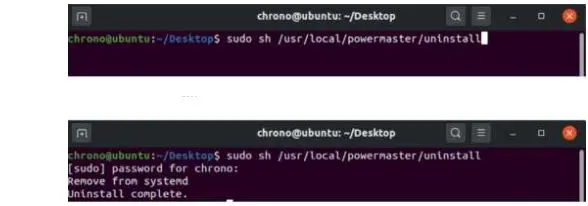
Uninstall Ablerex PowerMaster
- Step 1. Input command: sudo sh /usr/local/powermaster/uninstall
- Step 2. Uninstall Complete.

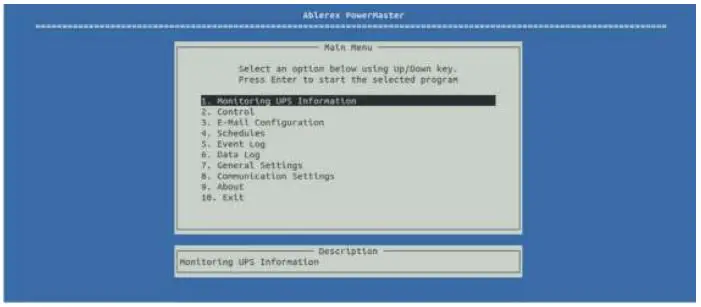
Press “Up” or “Down” key and then press “Enter”Key to into each function. The following chapters introduce each function.
Monitoring UPS Information
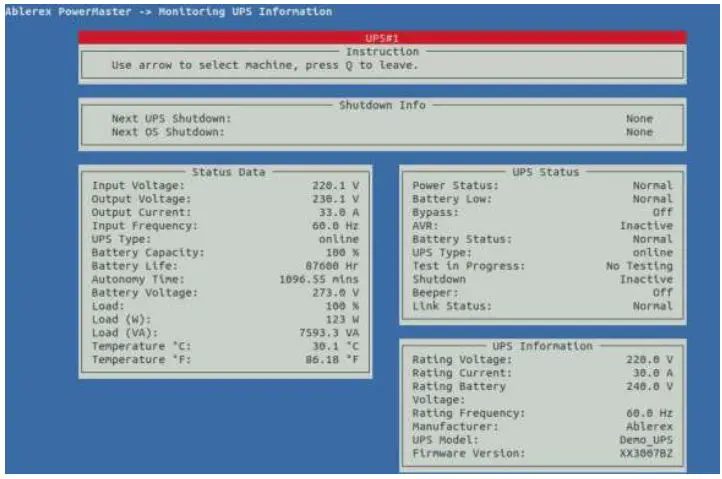
The function will be divided into four blocks.
- Shutdown Info
That will be shown the shutdown time of UPS or OS when UPS has events occurs (e.g., Power Failed). - Status Data
The real-time information for UPS e.g., Input Voltage, Output Voltage, Frequency…etc. - UPS Status
The real-time status for UPS e.g., Power status, Battery Low…etc. - UPS Information
The rating and information for UPS e.g., Rating Voltage/Current, Manufacturer, UPS Model…etc.
Shutdown Info
| Function | Function Describe | Remark |
| Next OS Shutdown | That will be shown the shutdown time of UPS or OS when UPS has events occurs. | |
| Next UPS Shutdown |
Status Data
| Function | Function Describe | Remark |
| Input Voltage | UPS Input Voltage | |
| Output Voltage | UPS Output Voltage | |
| Output Current | UPS Output Current |
| Function | Function Describe | Remark |
| Input Frequency | UPS Input Frequency | |
| UPS Type | UPS Type (e.g. On-Line/Off-Line) | |
| Battery Capacity | Battery capacity of UPS | |
| Battery Life | Battery Life of UPS | Battery Life Function need to Enable on configure menu. |
| Autonomy time | Autonomy time of UPS | Autonomy time Function need to Enable on configure menu. |
| Battery Voltage | Battery Voltage of UPS. | Additional Function need to Enable on configure menu. |
| Load | Load percentage of UPS. | |
| Load(W) | Output Active power of UPS | Additional Function need to Enable on configure menu. |
| Load(VA) | Output Apparent Power of UPS | |
| Temperature °C | Temperature of UPS(Celsius) | |
| Temperature °F | Temperature of UPS(Fahrenheit) |
UPS Status
| Function | Function Describe | Remark |
| Power Status | Input utility normal or not | |
| Battery Low | Battery Low normal or not | |
| Bypass | Bypass mode status | |
| AVR | UPS Boost/trim status | |
| Battery Status | Battery damage/ Disconnection or not | |
| UPS Type | UPS type (On-Line/Off-Line) | |
| Test in Progress | Under test in Progress or not | |
| Shutdown | UPS shutdown status | |
| Beeper | UPS beeper status | |
| Link Status | UPS communication status |
UPS Information
| Function | Function Describe | Remark |
| Rating Voltage | UPS Rating Voltage | |
| Rating Current | UPS Rating Current | |
| Rating Battery Voltage | UPS Rating Battery Voltage | |
| Rating Frequency | UPS Rating Frequency | |
| Manufacturer | Manufacturer information | |
| UPS Model | UPS Model information | |
| Firmware Version | UPS Firmware information |
Control
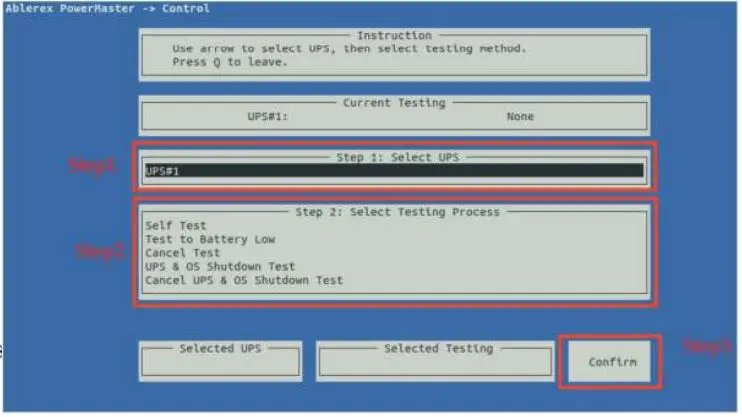
Command UPS directly for the following test
- UPS Self-Test
- UPS Test to Battery Low
- Cancel UPS Self-Test
- UPS & OS Shutdown Test
- Cancel UPS & OS Shutdown Test
Please follow the below procedure to do.
- Step 1.Select which UPS to be tested
- Step 2. Select which command to be sent
- Step 3.Press “Confirm” to send command
Email Configuration
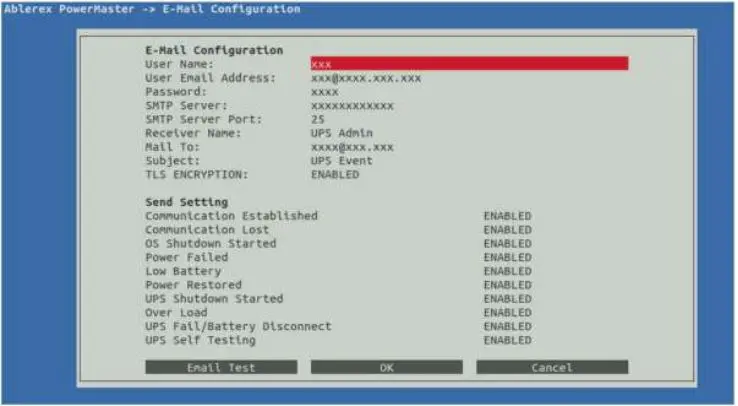
Configure to send the event message (e.g., AC Power Fail) to specific one by email. The following section is for the detail configuration approach.
| Function | Function Describe |
| User Name | Sender |
| User email Address | select a sender email |
| Password | Password of your email server |
| SMTP Server | SMTP server or IP address |
| SMTP Server Port | SMTP Server port |
| Receiver Name | name of receiver |
| Mail To | Mail address of receiver If you want to send an email to more than 1 email address, you must use “,” to separate email addresses. |
| Subject | Subject of email |
| TLS ENCRYPTION | Enable TLS encryption or not |
| When it is Enable, it can be sent by E-mail if detects an abnormality event in the UPS | |
| Function | Function Describe |
| Communication Established | UPS Communication Established |
| Communication Lost | UPS Communication disconnection |
| OS Shutdown Started | Operating OS will start shutdown |
| Power Failed | Input utility abnormal |
| Low Battery | UPS Battery Low |
| Power Restored | Input utility normal |
| UPS Shutdown Started | UPS will start shutdown |
| Over Load | UPS over loading |
| UPS Fail/Battery Disconnect | Battery damage or Disconnection |
| UPS Self Testing | UPS test in Progress |
After setting, you can press “Email Test” to confirm that have received test mail or not. If received, press “OK” to save
Schedules
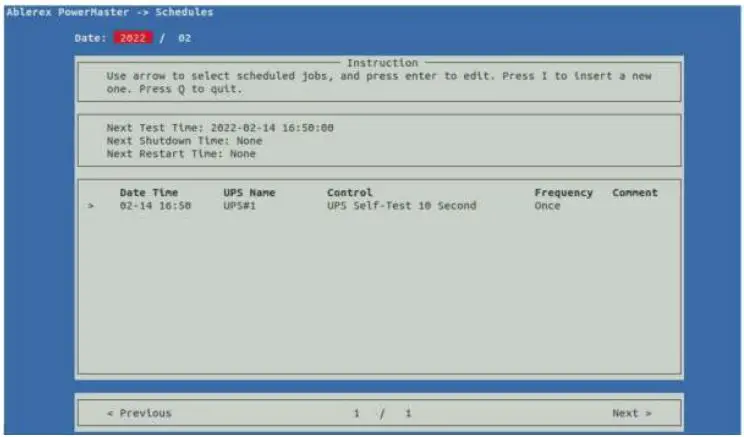
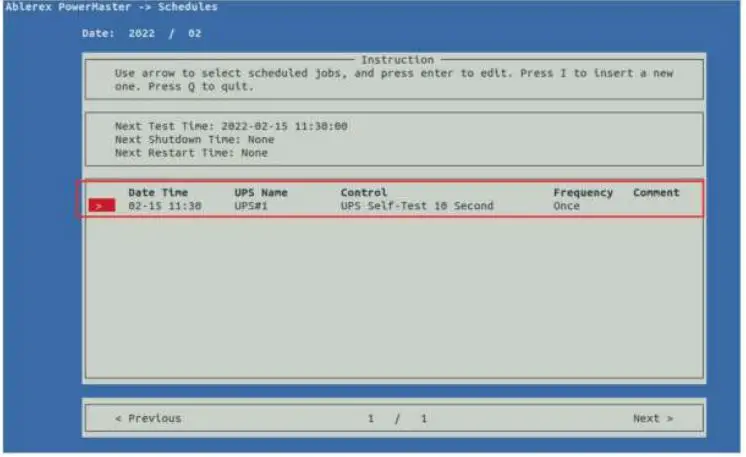
PowerMaster supports the scheduling self test, turn-off function for UPS. The following section is for the detail configuration approach.
Add Schedules:
Press” I” key to add new schedule.
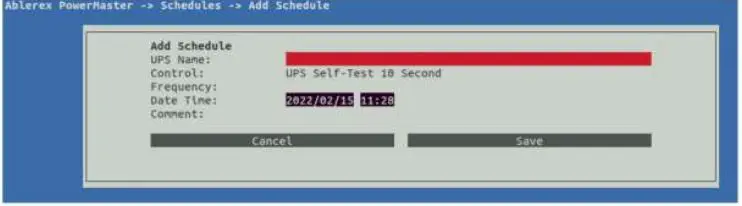
| Function | Function Describe |
| UPS Name | Select which UPS to be tested |
| Control | Select which command of schedule UPS Self-Test 10 Second Self Test (1-99)Minutes(The test time can be define by the user) UPS Self-Test Until Battery Capacity UPS Self Test Until Low Battery Condition Shutdown Operating System and UPS, then Turn on UPS Shutdown Operating System and UPS |
| Frequency | Set execute cycle of the schedule |
| Date Time | Date and time for schedule setting |
Edit Schedules:
Use “UP” and Down” key to select the schedule you want to modify and press “Enter” key to modify task.
Event Log
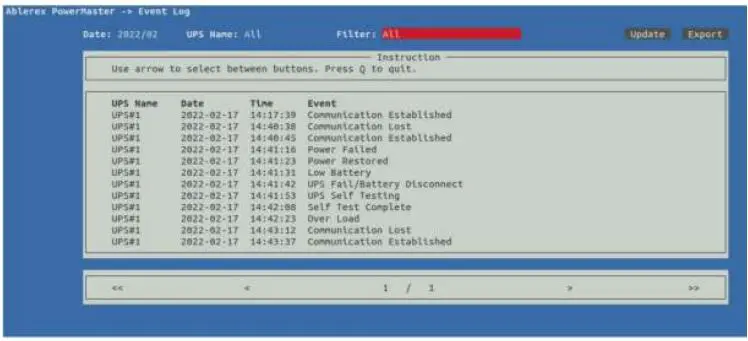
The event log can be read directly via PowerMaster or export to an file with txt format for application. The following chapter is for the detail operation.
| Function | Function Describe |
| Date | Select which date to be view |
| UPS Name | Select which UPS to be view |
| Filter | Select which Event to be view |
| Update | For data refreshing |
| Export | Export data save to below folder: /usr/local/powermaster/UPS/ |
| < , > | Select Previous/Next page |
| << , >> | Select First/Last page |
Data Log
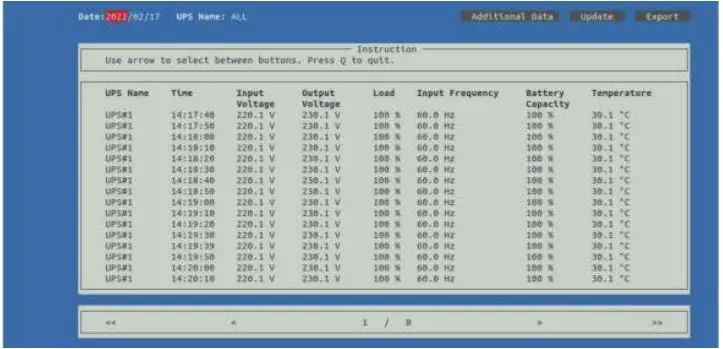
Set the file to be executed before the system shutdown. The selectable time is from 0 min. to 20 min.
| Function | Function Describe |
| Date | Select which date to be view |
| UPS Name | Select which UPS to be view |
| Additional Data | Press” Additional Data” to see additional data of UPS. Additional Function need to Enable on configure menu. |
| Update | For data refreshing |
| Export | Export data save to below folder /usr/local/powermaster/UPS/ |
| < , > | Select Previous/Next page |
| << , >> | Select First/Last page |
General Settings
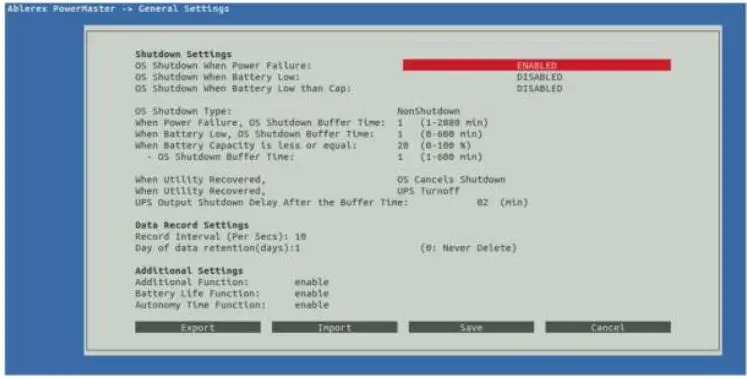
Allows user to select and set to Data Log function and set to turn of UPS or OS condition etc.
| Shutdown Setting Block | |
| Function | Function Describe |
| OS Shutdown When Power Failure | Set the O.S shutdown operation after Power Failure |
| OS Shutdown When Battery Low | Set the O.S shutdown operation after Battery Low |
| OS Shutdown When Battery Low than Cap. | Set the O.S shutdown operation after Battery Low than Cap. |
| OS Shutdown Type | O.S shutdown options 1. Shutdown 2. NonShutdown 3. Hibernate |
| When Power Failure, OS Shutdown Buffer Time | Set the Buffer Time for O.S shutdown operation after Power Failure |
| When Battery Low, OS Shutdown Buffer Time | Set the Buffer Time for O.S shutdown operation after Battery Low |
| When Battery Capacity is less or equal | Set the Buffer Time for O.S shutdown operation after Battery Capacity is less or equal |
| -OS Shutdown Buffer Time | |
|
When Utility Recovered | When utility Recovered O.S system can be set to: OS Continues Shutdown OS Cancels Shutdown UPS can be set to: Turn off UPS None |
| UPS Output Shutdown Delay After the Buffer Time | Set time interval from Windows shut- down to UPS turn-off |
| Data Record Settings Block | |
| Function | Function Describe |
| Record Interval (Per Secs) | Set Record timer interval |
| Day of data retention(days) | Set data storage retention(days) of the record list. The data base will be not deleted if set to 0 |
| Additional Settings Block | |
| Function | Function Describe |
|
Additional Function | PowerMaster will collect additional data(e.g., Output Current, Battery Volta- ge…etc.) from UPS ,if Enable Additional function Please check with your distributor to see if UPS has support |
| Autonomy Time Function | PowerMaster will collect Autonomy Time information, if Enable Autonomy Time function Please check with your distributor to see if UPS has support |
| Battery Life Function | PowerMaster will collect Battery Life in- formation, if Enable Battery Life function Please check with your distributor to see if UPS has support |
| Export Setting | Export Setting save to below folder /usr/ local/powermaster/UPS/ |
| Import Setting | Select the Setting file which you want and Import the Settings to PowerMaster |
Communication Settings
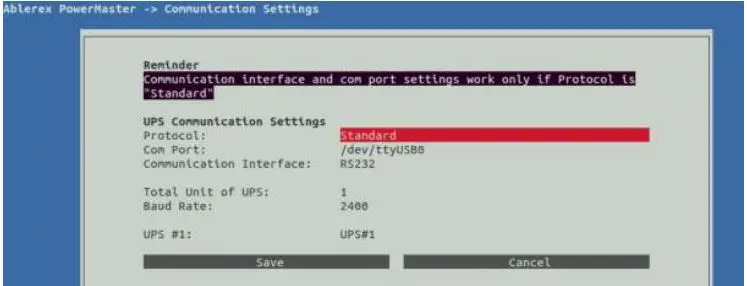
Allows user to select and set the connecting RS-232/USB or Remote etc.
| Function | Function Describe |
| Protocol | Standard: Communicate with UPS via Com Port/USB Remote: The “ Remote “ is for connecting the PowerMaster, which installed on another computer, and the IP address should be the master PC, which connected UPS. |
| Connect IP | Please refer to above describe |
| Com Port | Setting Serial port path (e.g.: /dev/ttyXRUSB0) |
| Communication Interface | Select which Interface of UPS to be communicated |
| Total unit of UPS | Setting amount of unit |
| Baud Rate | Setting Baud Rate of UPS |
| UPS #1 | Setting UPS name |
About
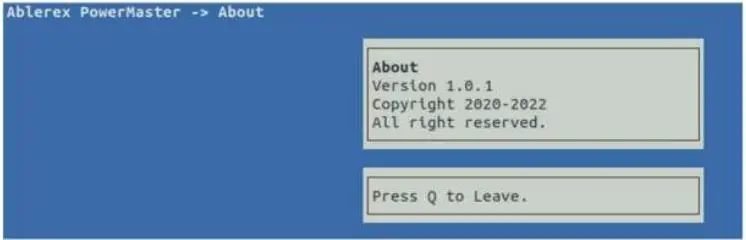
It displays copyright and version information of PowerMaster.
Ablerex Electronics Italy srl
Viale Milanofiori
Strada 6 · Palazzo N1
20089 Rozzano (MI)
[email protected]
Tel. +39 02 36696420
www.ablerex.eu
 Ablerex | Experts in Power Conversion - Homepage