tp-link Smart Switches User Manual
Overview
TP-Link’s brand new Jetstream gigabit smart switches provide huge upgrade comparing with previous versions. The switches can be managed by Omada SDN Controller, which provides professional and reliable one-step solutions. Integrated L2 and L2+ features such as 802.1Q VLAN, QoS, IGMP Snooping and static routing provide cost-effective networking solutions for small and medium-sized businesses without sacrificing enhanced usability and strong performance.
Omada Solution

Software Defined Networking (SDN) with Cloud Access
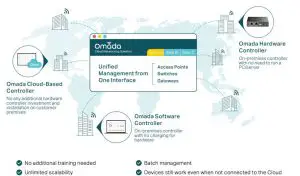
Omada Software Defined Networking (SDN) platform integrates network devices, including access points, switches and gateways, providing 100% centralized cloud management. Omada creates a highly scalable network——all controlled from a single interface. Seamless wireless and wired connections are provided, ideal for use in hospitality, education, retail, offices, and more.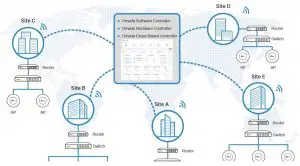
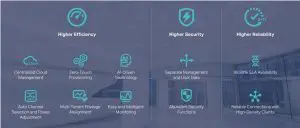
Hassle-Free Centralized Cloud Management
100% centralized cloud management of the whole network from different sites——all controlled from a single interface anywhere, anytime.
Zero-Touch Provisioning for Efficient Deplyment
Omada zero-touch provisioning allows remotely deployment and configuration of multi-site networks, so there’s no need to send out an engineer for on-site configuration. The Omada Cloud ensures efficient deployment with lower costs.
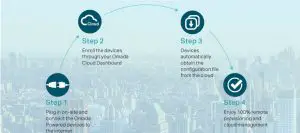
1. Zero-Touch Provisioning is supported when using Omada Cloud-Based Controller.
AI-Driven Technology for Stronger Performance and Easy Network Maintenance
Intelligent Network Analysis, Warning, and Optimization*
- Analyzes potential network problems and sends optimization for higher network efficiency.
- Locates network faults, warms and notify users, and generates solutions to reduce network risk
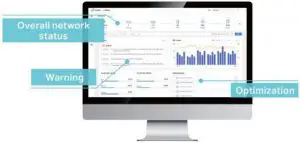
*Intelligent Network Analysis, Warning and Optimization are being developed are scheduled to be released in 2020.
Auto Channel Selection and Power Adjustment
Provides powerful wireless performance while greatly reducing Wi-Fi interface by automatically adjusting the channel setting and transmission power levels of neighboring APs in the same network.

- Channel 1
- Channel 11
- Channel 6
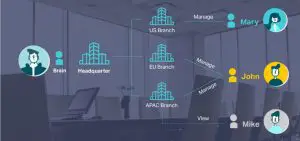
Assign Different Management Roles
Multi-tenant privilege assignment is available to increase management efficiency and security. Multi-person management, multi-level permissions, and the ability to add admins as needed, enable flexible network operation and maintenance.
Easy and Intelligent Network Monitoring
The easy-to-use dashboard makes it easy to see your real-time network status; check network usage and traffic distribution; receive network condition logs, abnormal event warnings, and notifications; or even track key data for better business results. Network topology helps IP admins quickly see and troubleshoot connection at a glance.

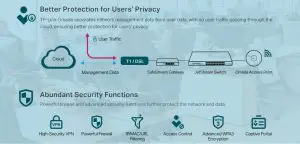
Comprehensive Protection for the Whole Network
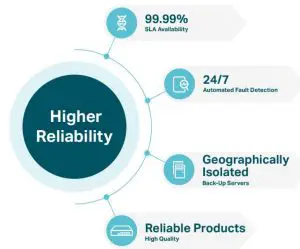
Multiple Factors Guarantee Higher Reliability
Higher reliability of cloud service is guaranteed with 99.99% SLA availability, 24/7 automated fault detection, geographically isolated backup servers, and reliable product quality. Your network functions even if management traffic is interrupted.
Reliable Connections Even with High-Density Clients
Equipped with enterprise chipsets, dedicated antennas, advanced RF functions, auto channel selection, and power adjustment, Omada Wi-Fi 6 and Wi-Fi 5 APs have high concurrency capacities for remarkable performance in high-density environments.

Switch Product Features
Highlights
- Gigabit Ethernet connections on all ports provide full speed of data transferring.
- L2+ Feature ——Static Routing, helps route internal traffic for more efficient use of network resources.
- Advanced security features include IP-MAC-Port Binding, ACL, Port Security, DoS Defend, Storm Control, DHCP Snooping, 802.1X and Radius Authentication.
- L2/L3/L4 QoS and IGMP Snooping optimize voice and video applications
- Comprehensive IPv6 support for management, QoS and ACL
- Web/CLI managed modes, SNMP, RMON and Dual Image bring abundant management features.
Advanced QoS features
To integrate voice, data and video service on one network, the switch applies rich QoS policies. Administrator can designate the priority of the traffic based on a variety of means including Port Priority, 802.1P Priority and DSCP Priority, to ensure that voice and video are always clear, smooth and jitter free. In conjunction with the Voice VLAN that the switches support, Voice Applications will perform better and smoother.
Abundant L2 and L2+ features
TP-Link JetStream smart switches support a complete lineup of L2 features, including IGMP Snooping/ MLD Snooping, 802.1Q/MAC/Protocol VLAN, STP/RSTP/MSTP, Link Aggregation Group (LAG), Port Isolation, Port Mirroring, and 802.3x Flow control function. IGMP Snooping ensures the multicast stream be forwarded intelligently to the appropriate subscribers by the switch, while IGMP Throttling & Filtering restricts each subscriber on a certain level to prevent unauthorized multicast access. Besides, these smart switches also support L2+ features like static routing. It is a simple way to provide segmentation of the network with internal routing through the switch and helps network traffic to be more efficient.
Enterprise Level Management Features
TP-Link JetStream smart switches support multiple user-friendly standard management features such as intuitive web-based Graphical User Interface (GUI), industrially standard Command Line Interface (CLI) and SNMP (v1/v2c/v3). These switches support RMON (Remote Network Monitoring), which enables the switch to be polled for valuable status information and send traps when encountering abnormal events. Also, this series of switches support Dual Image function, which makes there be less ‘down-time’ when switches are being upgraded/downgraded.
IPv6 Support
TP-Link JetStream smart switches support comprehensive IPv6 features including IPv6 management, ACL, QoS and MLD Snooping, all of these features help to ensure a smooth migration to IPv6-based network without
changing switches in the future.
Specifications
Hardware Features & Performance
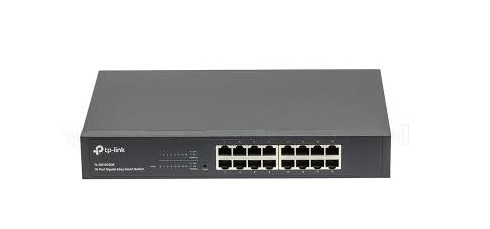
| Product Picture | 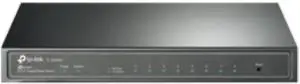 | 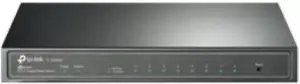 | 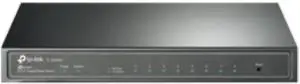 | |
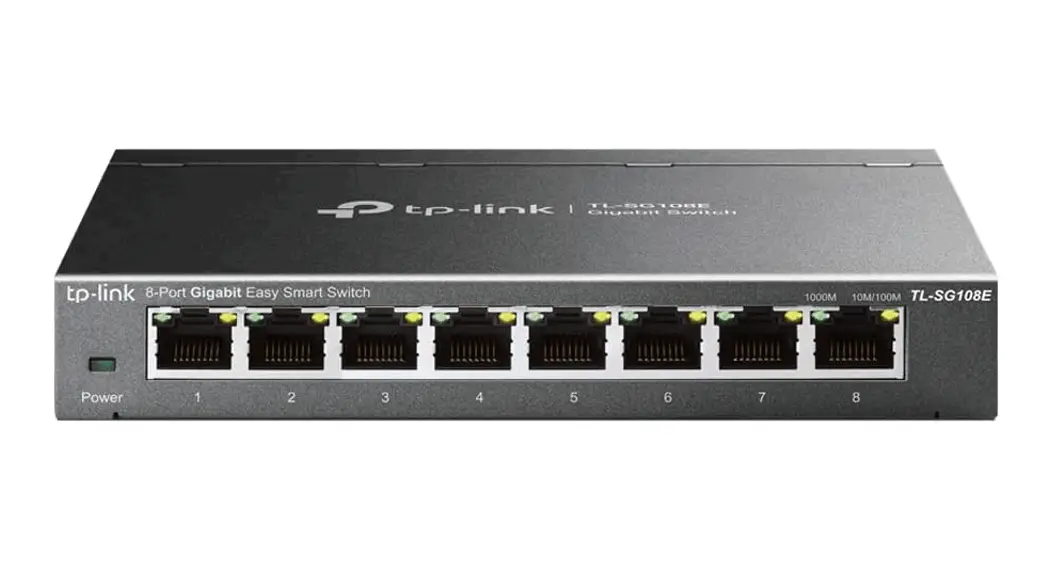
| Model | TL-SG2008 V3 | TL-SG2008P | TL-SG2210P V3.20 | |
| General | Interface | 8 10/100/1000Mbps RJ45 Ports | 8 10/100/1000Mbps RJ45 ports | 8 10/100/1000Mbps RJ45 Ports 2 Gigabit SFP Slots |
|
PoE | PoE Standard |
— | 802.3af/at | 802.3af/at |
| PoE Ports | 4, up to 30W | 8, up to 30W | ||
| PoE Power Budget | 62 W | 61 W | ||
|
Performance | Switching Capacity | 16 Gbps | 16 Gbps | 20 Gbps |
| Packet Forwarding Rate | 11.90 Mpps | 14.88 Mpps | ||
| MAC Address Table | 8K | |||
| Packet Buffer | 4.1 Mbit | |||
| Number of IP Interfaces | 16 | 1 | 16 | |
| Number of Static Routers | 32 (IPv4, IPv6) | — | 32 (IPv4, IPv6) | |
| Jumbo Frame | 9 KB | |||
|
Physical & Environmet | Power Supply | 12 VDC/1 A External Adapter or Obtain Power from PoE Source | 53.5 VDC/1.31A External Adapter | |
| Max Power Consumption | 6.4 W (220 V/50 Hz) | 7.9 W (220 V/50 Hz) (no PD connected) 69.7 W (220 V/50 Hz) (with 62 W PD connected) | 10.3 W (220 V/50 Hz) (no PD connected) 76.5 W (220 V/50 Hz) (with 61 W PD connected) | |
| Max Heat Dissipation | 21.84 BTU/h (220 V/50 Hz) | 26.95 BTU/h (220 V/50 Hz) (no PD connected) 237.82 BTU/h (220 V/50 Hz) (with 62 W PD connected) | 35.14 BTU/h (220 V/50 Hz) (no PD connected) 261.02 BTU/h (220 V/50 Hz) (with 61 W PD connected) | |
| Dimensions (W x D x H) | 8.2 × 4.9 × 1.0 in (209 × 126 × 26 mm) | |||
| Fan Quantity | Fanless | |||
| Installation | Desktop/Wall-Mounting | |||
| Operating Temperature | 0 °C to 40 °C (32 °F to 104 °F) | |||
| Storage Temperature | -40 °C to 70 °C (-40 °F to 158 °F) | |||
| Operation Humidity | 10% to 90% RH, non-condensing | |||
| Storage Humidity | 5% to 90% RH, non-condensing | |||
| Certification | CE, FCC, RoHS | |||
Hardware Features & Performance
| Product Picture | 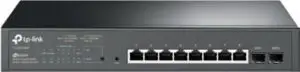 |  | |
| Model | TL-SG2210MP | TL-SG2428P | |
| General | Interface | 8 10/100/1000Mbps RJ45 Ports 2 Gigabit SFP Slots | 24 10/100/1000Mbps RJ45 ports 4 Gigabit SFP Slots |
|
PoE | PoE Standard | 802.3af/at | |
| PoE Ports | 8, up to 30W | 24, up to 30W | |
| PoE Power Budget | 150 W | 250 W | |
|
Performance | Switching Capacity | 20 Gbps | 56 Gbps |
| Packet Forwarding Rate | 14.88 Mpps | 41.66 Mpps | |
| MAC Address Table | 8K | ||
| Packet Buffer | 4.1 Mbit | ||
| Number of IP Interfaces | 1 | 16 | |
| Number of Static Routers | — | 32 (IPv4, IPv6) | |
| Jumbo Frame | 9 KB | ||
|
Physical & Environmet | Power Supply | 100-240V AC, 50/60Hz | |
| Max Power Consumption | 12.2 W (110 V/60 Hz) (no PD connected) 173.9 W (110 V/60 Hz) (with 150 W PD connected) | 32.1 W (110 V/60 Hz) (no PD connected) 308.6 W (110 V/60 Hz) (with 250 W PD connected) | |
| Max Heat Dissipation | 41.63 BTU/h (110 V/60 Hz) (no PD connected) 539.35 BTU/h (110 V/60 Hz) (with 150 W PD connected) | 109.53 BTU/h (110 V/60 Hz) (no PD connected) 1052.94 BTU/h (110 V/60 Hz) (with 250 W PD connected) | |
| Dimensions (W x D x H) | 11.6 x 7.1 x 1.7 in (294 x 180 x 44 mm) | 17.3 × 8.7 × 1.7 in (440 × 220 × 44 mm) | |
| Fan Quantity | 1 | 2 | |
| Installation | Rackmount/Desktop | Rackmount | |
| Operating Temperature | 0 °C to 50 °C (32 °F to 122 °F) | ||
| Storage Temperature | -40 °C to 70 °C (-40 °F to 158 °F) | ||
| Operation Humidity | 10% to 90% RH, non-condensing | ||
| Storage Humidity | 5% to 90% RH, non-condensing | ||
| Certification | CE, FCC, RoHS | ||
Software Features | ||
| Model | TL-SG2008P / TL-SG2210MP | TL-SG2008 V3 / TL-SG2210P V3.20 / TL-SG2428P |
|
SDN Support | • Support Omada Hardware Controller (OC200/ OC300), Software Controller, Cloud-Based Controller • Automatic Device Discovery • Batch Configuration • Batch Firmware Upgrading | • Intelligent Network Monitoring • Abnormal Event Warnings • Unified Configuration • Reboot Schedule • ZTP (Zero-Touch Provisioning)* |
|
L2+ Features | • DHCP Relay – DHCP VLAN Relay • DHCP L2 Relay | • 16 IP Interfaces – Support IPv4/IPv6 Interface • Static Routing – 32 IPv4/IPv6 Static Routes • DHCP Server • DHCP Relay – DHCP Interface Relay – DHCP VLAN Relay • DHCP L2 Relay • Static ARP • Proxy ARP • Gratuitous ARP |
|
L2 Features | • Link Aggregation – Static link aggregation – 802.3ad LACP – Up to 8 aggregation groups and up to 8 ports per group • Spanning Tree Protocol – 802.1D STP – 802.1w RSTP – 802.1s MSTP – STP Security: TC Protect, BPDU Filter/Protect, Root Protect • Loopback Detection | • Flow Control – 802.3x Flow Control • Mirroring – Port Mirroring – CPU Mirroring – One-to-One – Many-to-One – Flow-Based – Ingress/Egress/Both • Device Link Detect Protocol (DLDP) • 802.1ab LLDP/ LLDP-MED |
|
L2 Multicast | • 511 IPv4, IPv6 shared multicast groups • IGMP Snooping – IGMP v1/v2/v3 Snooping – Fast Leave – IGMP Snooping Querier – Static Group Config • Multicast VLAN Registration (MVR) • Multicast Filtering | • MLD Snooping – MLD v1/v2 Snooping – Fast Leave – MLD Snooping Querier – Static Group Config • Limited IP Multicast (256 profiles and 16 entries per profile) |
|
VLAN | • VLAN Group – Max. 4K VLAN Groups • 802.1Q tag VLAN • MAC VLAN | • Protocol VLAN • GVRP • Voice VLAN |
|
QoS | • 802.1p CoS/DSCP priority • 8 priority queues • Priority Schedule Mode – SP (Strict Priority) – WRR (Weighted Round Robin) • Queue Weight Config | • Bandwidth Control – Port/Flow based Rating Limit • Smoother Performance • Storm Control – Multiple Control Modes(kbps/ratio) – Broadcast/Multicast/Unknown-Unicast Control |
* Zero-Touch Provisioning is supported when using Omada Cloud-Based Controller
|
ACL | • Support up to 230 entries • IPv6 ACL • Time-Range • Combined ACL – Time Slice • Rule Operation – Week Time-Range – Permit/Deny – Absolute Time-Range • Policy Action – Holiday – Mirror • Time-based ACL – Rate Limit • MAC ACL – Redirect – Source MAC – QoS Remark – Destination MAC • ACL Rules Binding – VLAN ID – Port Binding – User Priority – VLAN Binding – Ether Type • Actions for flows • IP ACL – Mirror (to supported interface) – Source IP – Redirect (to supported interface) – Destination IP – Rate Limit – IP Protocol – QoS Remark – TCP Flag – TCP/UDP Source Port – TCP/UDP Destination Port – DSCP/IP TOS |
|
Management | • Web-based GUI • Dual Image, Dual Configuration • Command Line Interface (CLI) through telnet • CPU Monitoring • SNMPv1/v2c/v3 • Cable Diagnostics • SNMP Trap/Inform • EEE • RMON (1,2,3,9 groups) • SNTP • SDM Template • System Log • DHCP/BOOTP Client |
|
MIBs | • MIB II (RFC1213) • Radius Authentication Client MIB (RFC2618) • Bridge MIB (RFC1493) • Remote Ping, Traceroute MIB (RFC2925) • P/Q-Bridge MIB (RFC2674) • Support TP-Link private MIBs • Radius Accounting Client MIB (RFC2620) • RMON MIB(RFC1757, rmon 1,2,3,9) |
 WiFi Networking Equipment for Home & Business | TP-Link