
USER MANUAL
Model: FL-100
START OF THE CORE TEXT
Get started by downloading the app “Flow – Depression” .
| Document Name of document Issued by (Name/Signature) Isac Salman Approved by (Name/Signature) Erik Rehn | Doc.ld. GR 21-005 | Version 01 Date 2021-02-17 Date 2021-02-17 |
| RECORD HISTORY | |||
| VER | CHANGE | ISSUED BY | DATE |
| 1 | First issue (edited copy of GR 17-015 Core text for IFU- Flow FL-100 ver12) | Isac Salman | 2021-02-17 |
| Template Core Text Template | Doc.id. FL 09-04-01 TMP | Version 03 |
Approval Table
| 1 | PROJECT MANAGER | YES | NO | NA |
| 1.1 | Coherence to specifications & technical documentation | ✓ | ||
| 1.2 | Procedures are safe, effective, accurate & complete | ✓ | ||
| 1.3 | Illustrations are technically accurate | ✓ | ||
| 1.4 | Warnings & cautions included where necessary | ✓ | ||
| 1.5 | Project Manager Signature | Approved | ||
| 2 | MARKETING & SALES | YES | NO | NA |
| 2.1 | Document & language is accurate (Proofread) | ✓ | ||
| 2.2 | Material is professional | ✓ | ||
| 2.3 | Agrees with the experience of the intended user | ✓ | ||
| 2.4 | Marketing and Sales Manager Signature | Approved | ||
| 3 | QUALITY | YES | NO | NA |
| 3.1 | Correct symbols are used | ✓ | ||
| 3.2 | Hazardous situations are highlighted with adequate symbols & warnings | ✓ | ||
| 3.3 | MDD and ISO 13485 requirements are met | ✓ | ||
| 3.4 | Requested changes (CR) are implemented | ✓ | ||
| 3.5 | The document ID is correct | ✓ | ||
| 3.6 | The document is within Intended Use | ✓ | ||
| 3.7 | All claims are correct according to regulatory approvals | ✓ | ||
| 3.8 | Quality Manager Signature | Approved | ||
| 4 | SUPPLY | YES | NO | NA |
| 4.1 | Item numbers, terminology, and pricing will be applicable | ✓ | ||
| 4.2 | The product (IFU) will work in production | ✓ | ||
| 4.3 | Supply Manager Signature | Approved | ||
Instruction for Use – Flow
- Instructions on how to use the Flow headset and the accompanying smartphone app.
- IFU Version and Issuing date: Ver 2020-08-21
- Product model: FL-100.
- The latest version of this manual is also available to download from flowneuroscience.com.
Manufacturer
Flow Neuroscience AB
Intended Use
- Flow is a class IIa Medical Device intended for home-based treatment of adults (18+) diagnosed with Major Depressive Disorder (MDD).
- Flow does not require any special training before use.
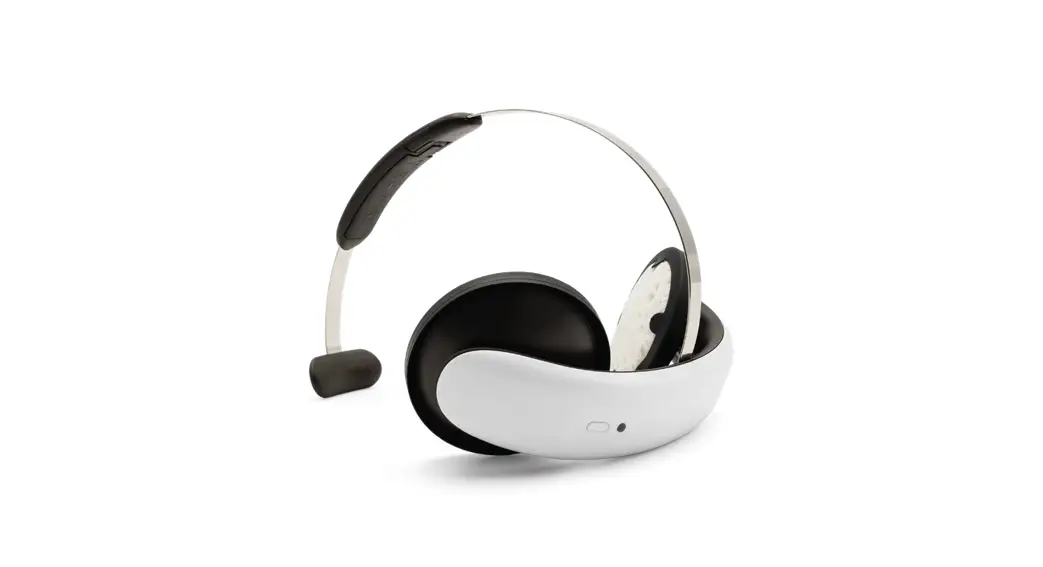
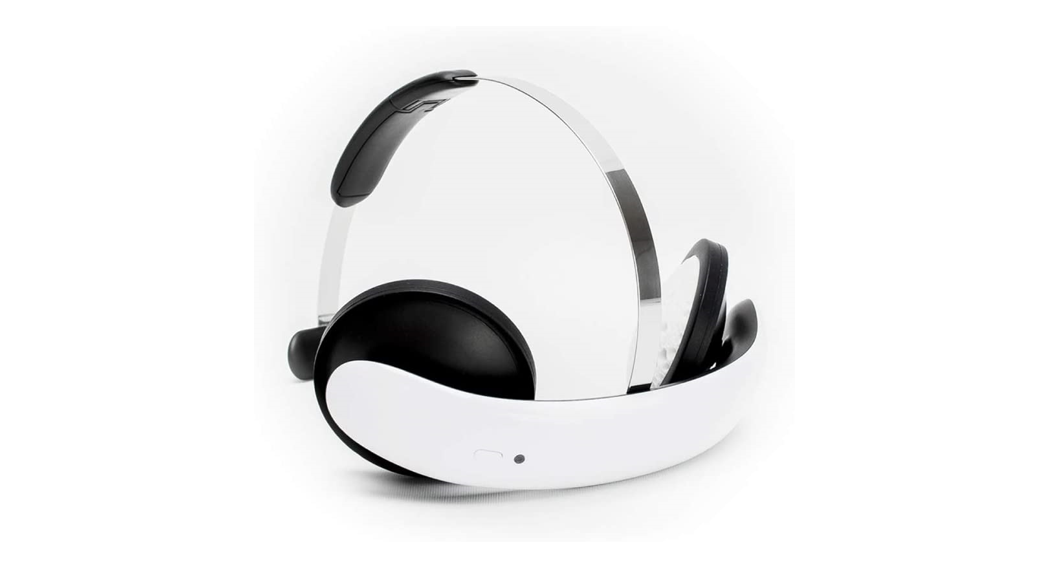
Box Contents & the Headset
- Instructions for Use
- Micro-USB Charger & Cord
- Two Pad Holder Rings
- Flow Headset
- Button
- LED indicator
- Electrodes
- Metal arch
- Back piece
- Pads
- Charger port cover
After each use, put the headset and other parts back in the box.
Accessories
| ACCESSORIES | |
| ITEMS | DEFINITION |
| HEADSET PADS | A BOX OF HEADSET PADS CONTAINING 20 POUCHES (SINGLE USE) |
| MICRO USB CHARGER | AN LXCP12-005 CHARGER AND CORD |
More Pads can be ordered online at flowneuroscience.com.
Reuse of pads may cause skin damage. Always start a stimulation session with a new pair of Headset pads.
Precautions
 Caution; Do NOT use this device without first consulting a doctor or other healthcare professional.
Using this device poses a minimal risk of injury. Even so, it is recommended to consider multiple treatment options. If symptoms worsen, make sure to contact a healthcare
professional.
The Flow device should only be used by people over 18 years of age who have been diagnosed with depression (Major Depressive Disorder).
Always consult a physician before making any changes to your current medication.
Take extra precautions and make sure to consult your physician under the following circumstances:
- Pregnancy (or suspected pregnancy)
- Suicidal thoughts (thoughts about ending your life)
- Bipolar disorder (or having a history of hypomanic/manic episodes)
- Epilepsy (or having a history of seizures)
- Heart disease (or suspected heart disease)
- A neurological or neuropsychiatric condition
- Having recently had a surgical procedure
- Having a defect in neurocranium and/or an implant inside the skull
- Having an active, implanted medical device (e.g. cardiac pacemaker, spinal cord stimulator, vagal nerve stimulator, auricular stimulator, deep-brain stimulating electrodes, cochlear implant, implanted hearing aid or defibrillator) or other implanted metallic or electronic device.
Warnings
- Apply the headset ONLY on the head as directed and not on other body parts.
- Keep the headset dry and out of sunlight.
- Keep the headset out of the reach of children.
- Do not apply the headset over areas of skin that lack normal sensations.
- Do not apply the headset outdoors or close to water.
- Do not apply the headset while driving.
- Do not apply the headset during any activity creating a significant risk of injury.
- Do not apply the headset while intoxicated or incapacitated.
- Do not apply the headset in environments with strong magnetic fields.
- Do not apply the headset without the supplied Headset Pads.
- Do not apply the headset with dried-out Headset Pads (Pads are single-use).
- Do not charge the headset with any other charger than the one supplied with the headset.
- Worsening of symptoms: If you experience a significant worsening of your symptoms while using this device, consult a physician before continuing the treatment.
Possible Adverse Reactions
- Some skin redness under the electrode or near the electrode sites is normal, due to increased local blood flow and will normally subside within approximately an hour of
the end of use. - DO NOT apply the device over open wounds, or broken or damaged skin. This might create further irritation and/or skin damage.
- Skin irritation might be experienced beneath the stimulation electrodes. In this case, electrodes should NOT be reapplied to the irritated skin.
- Discontinue treatment if the sensation of tingling, itching or burning under electrodes becomes severe (mild sensation of tingling, itching or burning is normal).
- Discontinue treatment if you experience a mild headache that does not pass within an hour after the end of a session.
- Discontinue treatment if you experience tinnitus (noise or ringing in the ears) during or after using the device.
- Discontinue treatment in case of any other adverse reaction from the device.
NOTE: Any serious incident that has occurred in relation to the device should be reported to Flow Neuroscience and the local competent authority.
Prerequisites
- A smartphone or other device running either Apple iOS 11+ or Android 5.0+.
The Treatment Programme
- The Flow treatment program consists of 15 sessions during the first 3 weeks, as shown in the table below.
- After this first treatment period, 1-2 sessions are recommended per week.
- The number of sessions you can do per week is restricted and you can only do 1 per day.
- Each session lasts 30 minutes, plus a few minutes of preparation time.
| WEEK | W1 | W2 | W3 | W4 | W5+ |
| No. of Sessions | 5 | 5 | 5 | 1-2 | 1-2 |
First-Time Use
- Download the “Flow – Depression” app to your mobile device.
- Create an account in the downloaded “Flow – Depression” app using an email address you have access to and a new password of your choosing.
NOTE: IT security measures, including protection against unauthorized access, are secured in accordance with GDPR regulations.
How to Perform a Treatment Session
- Ensure your forehead is free from any makeup or hair products before you start.
- If you have a fringe, it is recommended that you use a hair tie to remove it from your forehead.
- Take out the headset from the box.
- Press the button on the headset and make sure it blinks twice. If not, charge the headset.
- Make sure Bluetooth is enabled on your smartphone.
- Start the Flow app and log in with the email address & password you chose in section 9 above.
- Select the next session in the app and press “Start” to start the session. Note that how often you can use the headset is restricted per week and day.
- Follow the instructions given by the virtual therapist in the app.
- When told to, follow the instructions on how to prepare the headset, as below:
■ Take a new pair of Headset Pads from the pouch. Attach them to the electrodes using the Pad Holder Rings.
■ Adjust the length of the metal arch by sliding the back piece.
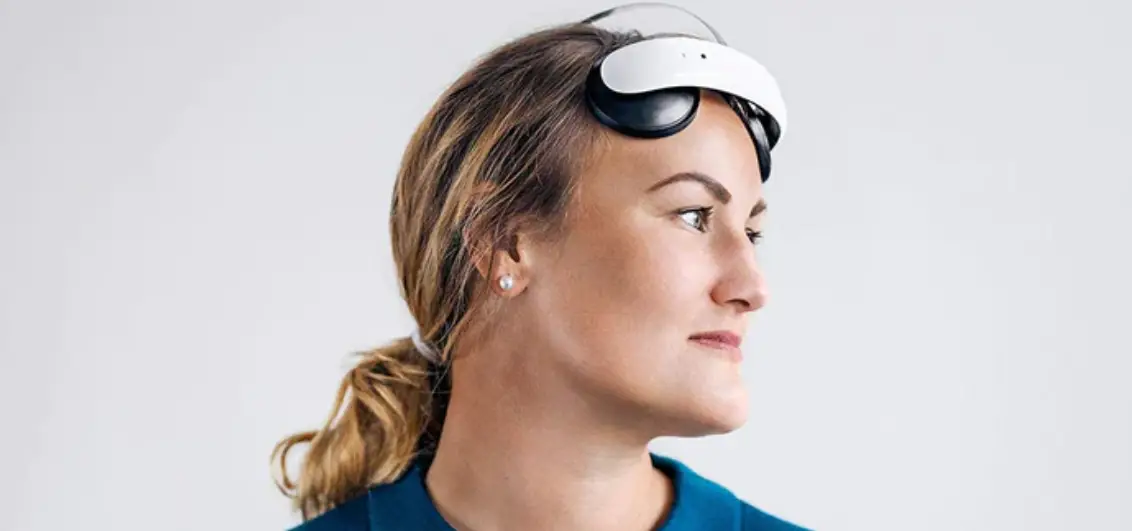
■ The end of the arch should sit comfortably on the back of your head. Make sure the headset does not sit too low.
■ The app shows you how to correctly position the headset using the camera on your device.
■ Before starting the simulation, you can press and hold the “Tingle” button in the app to test how the stimulation feels. Hold the “Tingle” button for at least 10 seconds.
■ Start the stimulation by pressing the “Start stimulation” button in the app. - The current will now slowly increase to its maximum of 2 mA, as shown in the app.
- If you at any point want to pause the stimulation, press the pause button in the app or the button on the headset.
- Follow the instructions in the app during the rest of the session. The session will last for 30 minutes.
- When the time is up, the headset will automatically start decreasing the current.
- Do not remove the headset before the app indicates that the stimulation has stopped.
- The headset gives a “beep” signal when the simulation has finished.
- After the session, dispose of the Headset Pads and put the Pad Holder Rings and headset back in the box.
- The headset will automatically turn itself off after a few minutes of inactivity. Start it again by pressing the button on the headset.
NOTE: Most users who experience reduced symptoms of depression do so within 3-4 weeks.
For a summary of safety & clinical performance, see flowneuroscience.com.
Charging the Headset
- Charge the headset if the LED indicator on the front of the headset does not blink when pressing the button.
- Remove the charger port cover and charge using the supplied Micro-USB charger and cable.
- The LED indicator blinks during charging and shows a steady light when the headset is fully charged.
- Recharging a fully flat battery takes approximately an hour.
- Be sure to close the charger port cover again after charging.
Cleaning of the Headset
- It is recommended to clean the headset and especially the electrodes after each use.
- To clean the device, ensure that the Micro-USB cable is not connected to the headset and remove the pads.
- Use an IPA (isopropanol) wet wipe (70% is a good choice).
- Clean the electrodes using a circular motion.
- Neither the device nor its accessories are supplied sterilized nor require sterilization prior to use.
FCC
Federal Communications Commission (FCC) Statement
FCC ID: 2AYSJFL-100
This equipment has been tested and found to comply with the limits for a Class B digital device, pursuant to Part 15 of the FCC Rules. These limits are designed to provide reasonable protection against harmful interference in a residential installation. This the equipment generates, uses, and can radiate radio frequency energy and, if not installed and used in accordance with the instructions, may cause harmful interference to radiocommunications. However, there is no guarantee that interference will not occur in a particular installation.
If this equipment does cause harmful interference to radio or television reception, which can be determined by turning the equipment off and on, the user is encouraged to try to correct the interference by one or more of the following measures:
- Reorient or relocate the receiving antenna.
- Increase the separation between the equipment and receiver.
- Connect the equipment into an outlet on a circuit different from that to which the receiver is connected.
- Consult the dealer or an experienced radio/TV technician for help.
This device complies with Part 15 of the FCC Rules. Operation is subject to the following two conditions:
- This device may not cause harmful interference, and
- this device must accept any interference received, including interference that may cause undesired operation.
FCC CAUTION: Any changes or modifications not expressly approved by the party responsible for compliance could void the user’s authority to operate the equipment.
FCC Radiation Exposure Statement:
This equipment complies with FCC radiation exposure limits set forth for an uncontrolled environment.
This transmitter must not be co‐located or operating in conjunction with any other antenna or transmitter.
Compliance Notice
IC: 26931-FL100
This device complies with Industry Canada license-exempt RSS standard(s). Operation is subject to the following two conditions:
- This device may not cause interference, and
- this device must accept any interference, including interference that may cause undesired operation of the device.
ISEDC Radiation Exposure Statement:
This equipment complies with ISEDC radiation exposure limits set forth for an uncontrolled environment.
This transmitter must not be co‐located or operating in conjunction with any other antenna or transmitter.
Device Specifications
| PERFORMANCE CHARACTERISTICS | |
| PARAMETER | NOMINAL VALUE |
| MAX. STIMULATION CURRENT | 2.0 + 0.05 mA |
| MAX. STIMULATION VOLTAGE | 24 V |
| MICRO-USB CHARGER | 5 V D.C. |
| BATTERY | RECHARGEABLE LiPo 3.7 V; 250 mAh |
| ELECTRODE SIZE | 22.9 cm2 (5.4 cm diameter) |
| DEVICE WEIGHT | ~110 g |
| WATER INGRESS PROTECTION | IP22 |
| DEVICE EXPECTED LIFETIME | 3 YEARS |
| OPERATING ENVIRONMENT | HOME OR CLINICAL ENVIRONMENT |
| OPERATING TEMP. RANGE | 5 to 35°C (41 to 95°F) |
| STORAGE/TRANSPORT TEMP. RANGE | -10 to 40°C (14 to 104°F) |
| OPERATING HUMIDITY RANGE | 10% to 93%, NON-CONDENSING |
| STORAGE/TRANSPORT HUMIDITY RANGE | 10% to 93%, NON-CONDENSING |
| OPERATING ALTITUDE RANGE | 0–3000 m |
| STORAGE/TRANSPORT ALTITUDE RANGE | 0–3000 m |
Markings
| MARKINGS | |
| ICON | DEFINITION |
 | Consult Instruction for Use (IFU) |
 | Caution: Consult Accompanying Documentation |
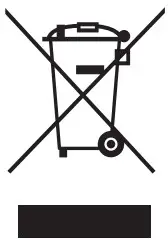 | Separate collection for electrical and electronic equipment per EC Directive 2012/19/EU. Waste Electrical and Electronic Equipment (WEEE). |
 | Type BF Applied part |
 | Manufacturing Year |
 | Keep Dry |
 | Manufactured by Flow Neuroscience AB Baltzarsgatan 23, 211 36, Sweden Web: flowneuroscience.com |
 | Water ingress protection: 22 |
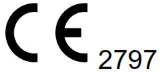 | Notified Body No. |
 | Bluetooth Low Energy |
Product Disposal
- Headset Pads are cellulose sponges and can safely be disposed of as household waste.
- The headset and charger should be disposed of as electronic waste according to the local legislation.
Contact Us
If you have any questions regarding Flow, don’t hesitate to contact customer support at [email protected]
Flow Neuroscience AB
EMC – Test Results
The device does not emit any radiation intended for medical purposes, neither hazardous nor potentially hazardous radiation.
| EMISSION LIMITS & MEASUREMENT | ||||
| PHENOMENON | STANDARD | TEST METHOD | TEST LEVELS | RESULT |
| RADIATED RF EMISSION | IEC 60601-1-2 | CISPR 11 ETSI EN 301 489-1 | 30~1000 MHz; 1~3 GHz & 3~6 GHz (Measurement Uncertainty 4.24 dB) | PASS |
| CONDUCTED RF EMISSION | IEC 60601-1-2 | CISPR 11ETSI EN 301 489-1 | 0,15~30 MHz(Measurement Uncertainty 3.35 dB) | PASS |
| VOLTAGE FLUCTUATION & FLICKER | IEC 60601-1-2 | IEC 61000-3-3 | EUT VALUES & LIMITS Pst: 0.028 ; Limit 1.00 | PASS |
| IMMUNITY LIMITS & MEASUREMENT | ||||
| PHENOMENON | STANDARD | TEST METHOD | TEST LEVELS | RESULT |
| ELECTROSTATIC DISCHARGE | IEC 60601-1-2 | IEC 61000-4-2 | ±2 kV, ±4 kV, ± 6 kV, ± 8 kV – Contact Discharge± 2 kV, ± 4 kV, ± 8 kV, ± 15 kV – Air Discharge | PASS |
| RF ELECTROMAGNETIC FIELDS | IEC 60601-1-2 | IEC 61000-4-3 | 10 V/m 80 – 2700 MHz 80 % AM at 1 kHz | PASS |
| EL FAST TRANSIENTS COMMON MODE / BURSTS | IEC 60601-1-2 | IEC 61000-4-4 | ± 2 kV for A.C. Power Lines 100 kHz Burst Frequency | PASS |
| SURGES LINE TO LINE | IEC 60601-1-2 | IEC 61000-4-5 | ± 0.5 kV & ±1 kV At 0°, 90°, 180°, 270° ; Repetition Rate: 60 S | PASS |
| SURGES LINE TO GROUND | IEC 60601-1-2 | IEC 61000-4-5 | ± 0.5 kV, ±1 & ±2 kV At 0°, 90°, 180°, 270° | PASS |
| RF COMMON MODE | IEC 60601-1-2 | IEC 61000-4-6 | 3 & 6 V for A.C. Main Port ; 80%, 1 kHz Amplitude Modulation) Frequency: 150kHz to 80MHz | PASS |
| VOLTAGE DIPS & INTERRUPTIONS | IEC 60601-1-2 | IEC 61000-4-11 | 0 % UT; 0,5 Cycle At 0°, 45°,90°, 135°,180°, 225°, 270°, 315°, 0 % UT; 1.0 Cycle 70 % UT; 25/30 Cycles | PASS |