
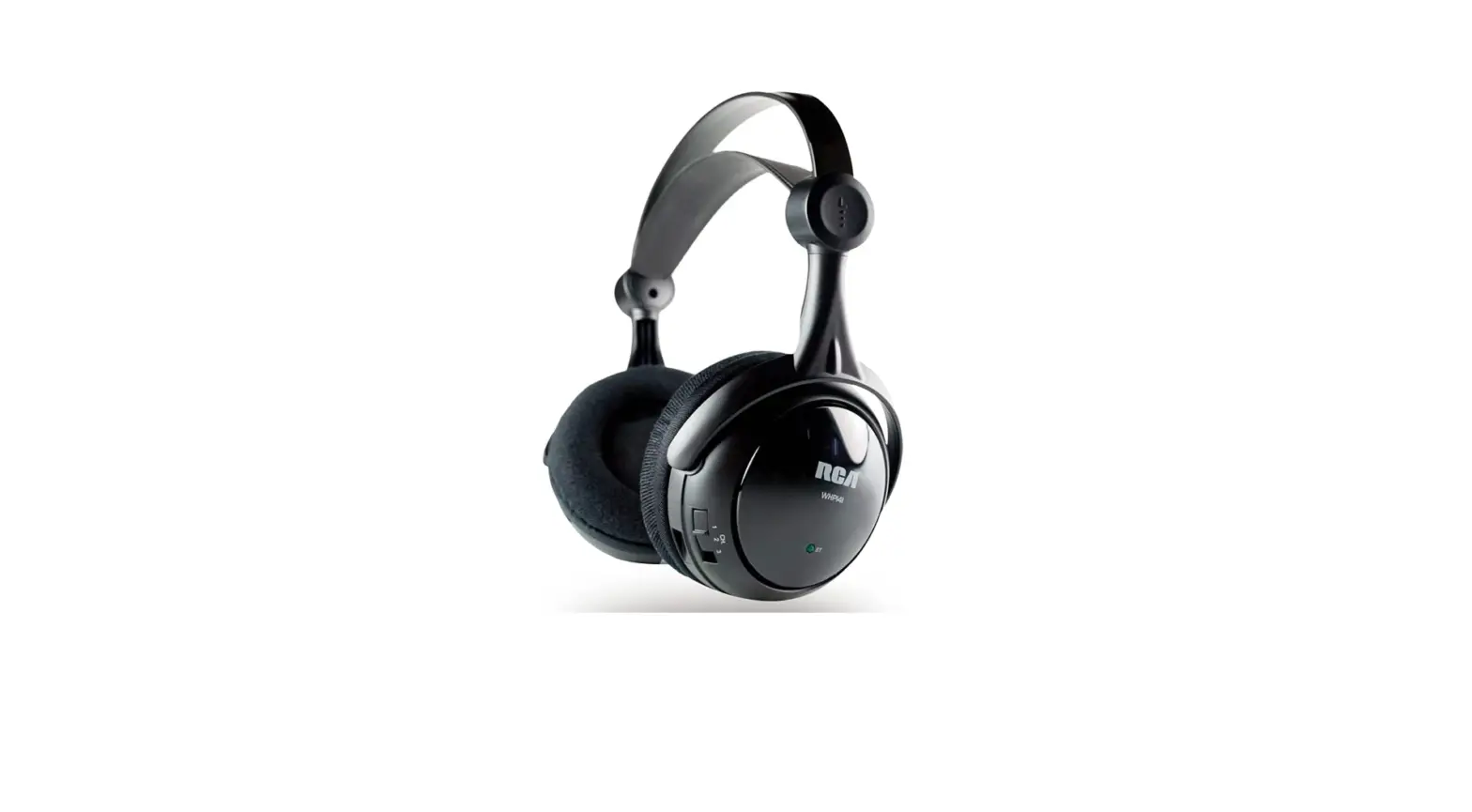

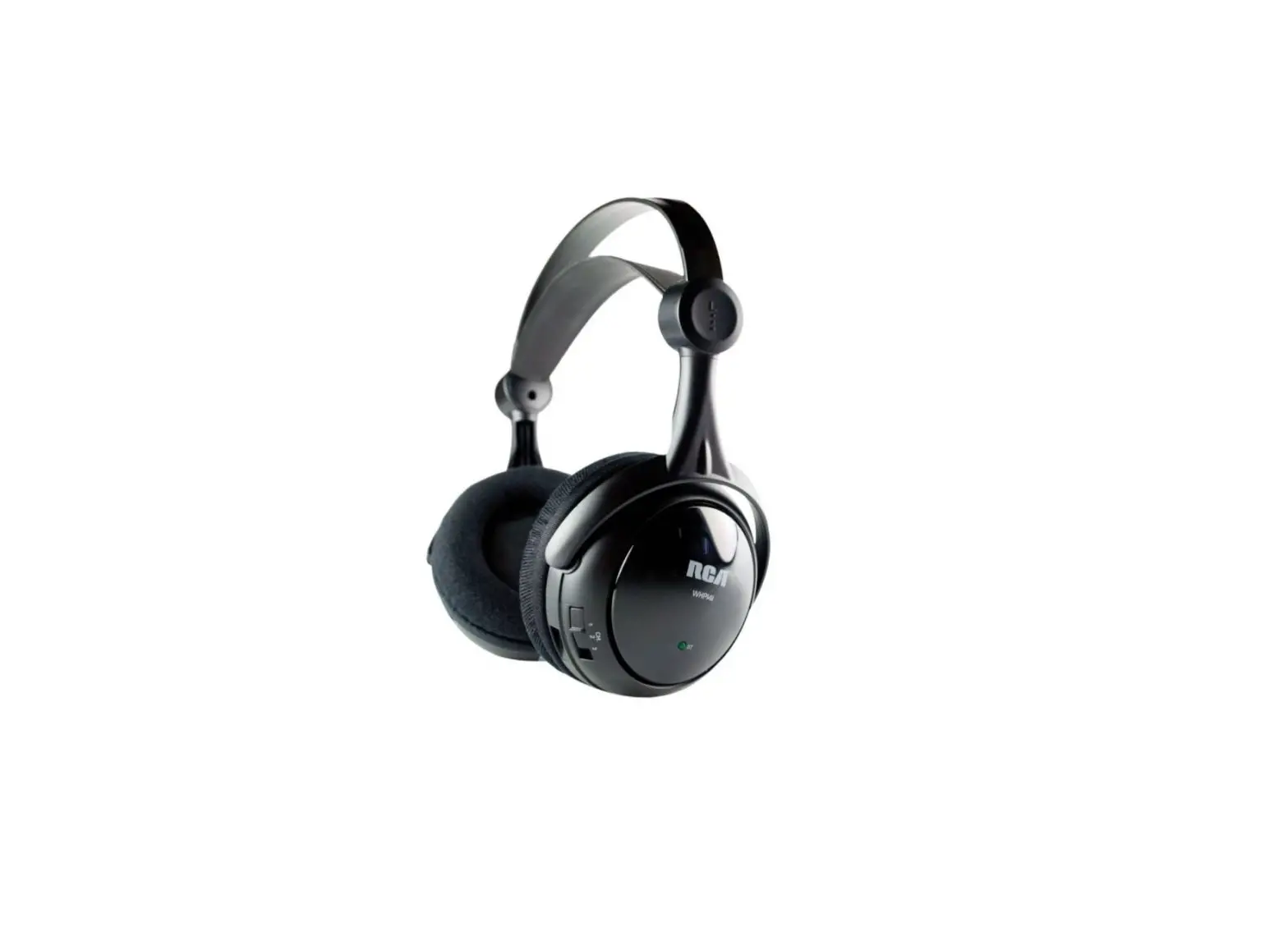
RCA Wireless Overear Stereo Headphones, Transmits Audio Signal up to 150 Feet, 40mm Speakers
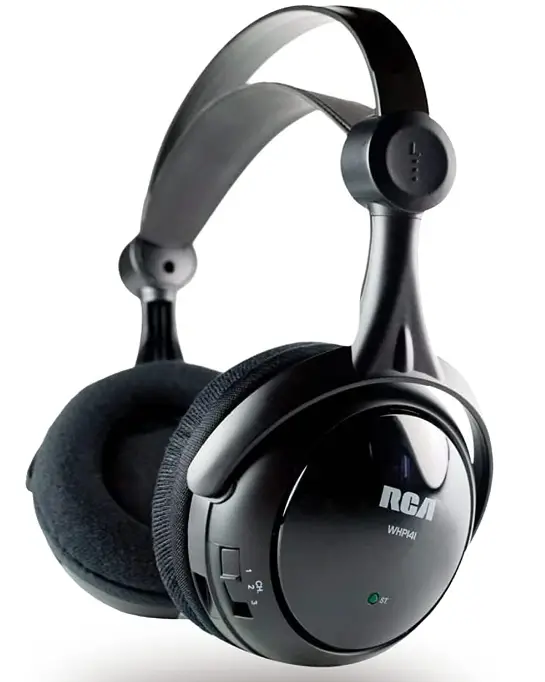
Specifications
- Product Dimensions
11.5 x 6 x 6 inches - Item Weight
1 pound - Batteries
1 Lithium-Ion battery - Ear Placement
On-Ear - Connectivity Technology
Wireless - Brand
RCA
Introduction
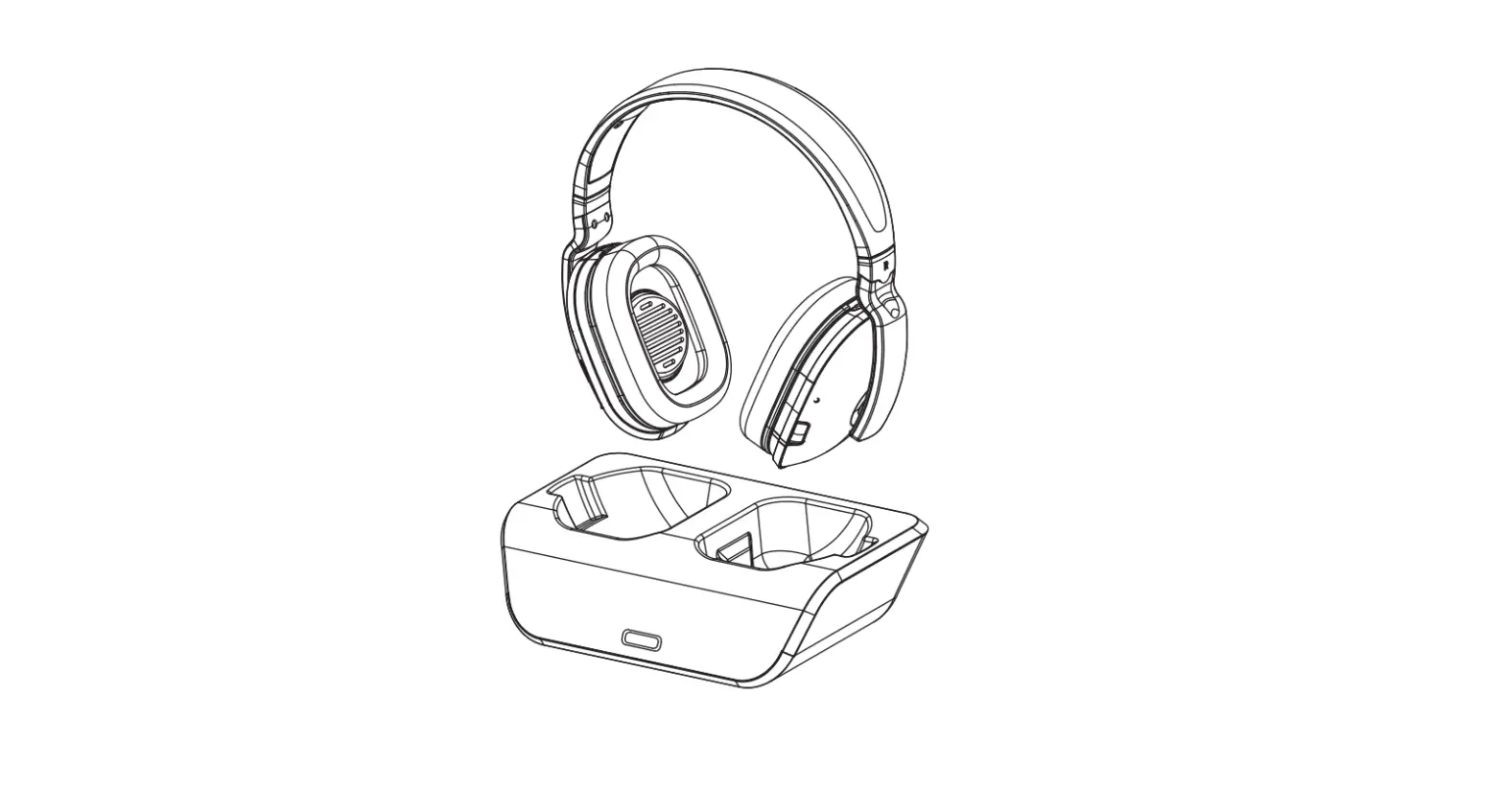
Thanks to the RCA proprietary RF transmission technology, the WHP141B Wireless Headphones give you complete flexibility of wireless, personal sound with no line of sight restrictions. You may move around practically anywhere in your home while enjoying crystal clear music or TV sound thanks to the headphone cradle and transmitter’s use of double Phase Lock Loop technology, which maintains a clean and constant audio signal. Additionally, our wireless headphones are lightweight, the ergonomic design delivers rich, full sound without the bulk of most other full-size headphones. Although the range may vary depending on the environment and nearby structures, the WHP141 RCA Wireless Headphones can broadcast audio signals up to 150 feet through walls, floors, and ceilings. To prevent signal loss, phase-lock loop technology locks in frequency. Outstanding sound quality is delivered by 40mm speakers, and the headphones and transmitter both have a three-channel selection for simple tuning. For simple storage and use, headphones can be charged on the transmitter.
What’s In the Box?
- Wireless Stereo Headphones
- Base/Transmitter
- Batteries
- Power Supply
- 1-Nonstandard Battery Batteries
- User Manual
HEADSET SAFETY
Follow these precautions to ensure the safe usage of your wireless headphones.
- These wireless headphones have been designed for residential use and should not be used for industrial purposes. The headphones should be installed and used in accordance with the instructions contained in this manual.
- Read through these instructions completely before installation. Follow the instructions carefully and carry them out in the correct order. Keep the manual on hand for future reference.
- The power for this headphone system is delivered with batteries. Before charging, read the instructions in this manual. Disconnect the power supply from the cradle/transmitter before installing or removing batteries.
- Always leave easy access to the main power supply.
- Disconnect the unit from the main power supply during storms, or if you will be absent for a long period of time.
- If you observe smoke or detect a burning odor, immediately disconnect the device from the main power supply.
- Never open the unit yourself; you may receive a severe electric shock, leading to serious injury or even death. Take the unit to a qualifi ed service center when service is required.
- Never push objects of any kind into the openings on the cradle/transmitter. They may touch dangerous voltage points and could cause a fi re, serious electric shock or even death.
- Protect the unit from dust, humidity, and sources of excessive heat (e.g., fi replace or radiator).
- The power source should not be in contact with liquids or exposed to the risk of dripping or splashing liquid. Be careful not to place the power source or cradle/transmitter near any object containing liquid (e.g., a vase, glass, or bottle).
- Do not expose the unit to direct sunlight. Its maximum ambient temperature is 35° Celsius (95° Fahrenheit).
- The ventilation should not be impeded by covering the unit with any items, such as newspapers, tablecloths, curtains, etc.
- No fl same sources, such as lighted candles, should be placed on or close to the cradle/transmitter.
- This unit has been designed for use in a dry environment. If, for exceptional reasons, you must utilize the unit out of doors (balcony, veranda, etc.), take care to protect it from dampness (dew, rain, or splashes of liquid).
- The maximum ambient humidity that the device supports is 85 percent. If the unit is cold and you wish to use it in a warm room, wait until any condensation on the unit evaporates by itself before you turn it on.
- Clean the unit with a soft cloth soaked in a neutral detergent. You may damage the unit if you use an alcohol-based product. If you are unsure if the detergent is alcohol-based, test the cleaning product on the underside of the unit.
- Unplug this product and take it to a qualifi ed service center under the following conditions:
- If liquid has been spilled into the product.
- If the product has been exposed to rain or water.
- If the product does not operate normally when following the operating instructions.
Audiovox declines all liability for any use that does not comply with the instructions in this User’s Manual. This device complies with Part 15 of the FCC Rules. Operation of this device is subject to the following two conditions: (1) This device may not cause harmful interference, and (2) this device must accept any interference received, including interference that may cause undesired operation.
WARNING
Modifi cation of this device to receive cellular radio-telephone service signals is prohibited under FCC rules and federal law.
Changes or modifi cations to this unit not expressly approved by the party responsible for compliance could void the user’s warranty.
Keep your sales receipt to obtain warranty parts and service and for proof of purchase. Attach it here and record the serial and model numbers. These numbers are located on the product.
- Model No
- Serial No
- Purchase Date
- Dealer/Address/Phone
Congratulations on your purchase of this wireless headphone system. The WHP141 utilizes wireless, radio frequency transmission. The headphones and the cradle/transmitter incorporate Double Phase Lock Loop (PLL) technology, which locks in the frequency on three channels for clear and stable radio transmission reception. This 900 MHz stereo wireless headphone system features a compact design that enables you to enjoy music and TV sound just about anywhere inside or outside your home. It’s simple to connect this system to any sound source, such as a DVD, DBS, CD, TV, VCR, stereo receiver, or radio.
FEATURES
900 MHz RF technology lets you roam freely throughout your house Operating distances up to 150ft/45m* No line-of-sight limitations Convenient power, volume and tuning controls located on headphones Automatic Level Control (ALC) and Auto On/Off function.
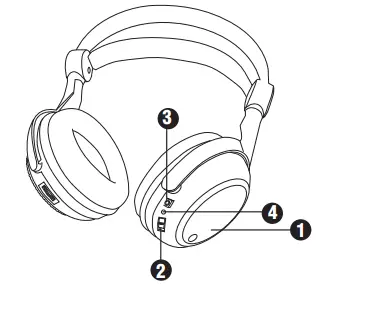
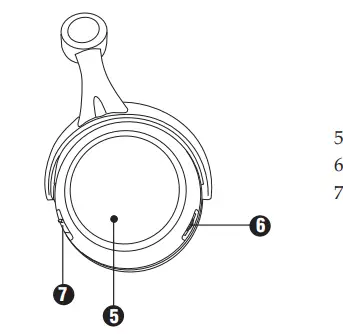
HEADPHONE SET DESCRIPTION
For stand-alone functioning, it is recommended that your wireless headphones be powered by rechargeable batteries. The rechargeable batteries should be installed into the battery compartment and recharged before use. (See Battery Installation and Information, page 7).
- Rechargeable battery compartment
- ON/OFF switch
- Recharging input
- Power LED indicator light

- Stereo LED indicator light
- VOLUME control
- CHANNEL switch

- Charging LED indicator light
- Audio Signal LED indicator light
- Charging cable
- DC IN power supply socket
- CHANNEL switch
- Audio input cable
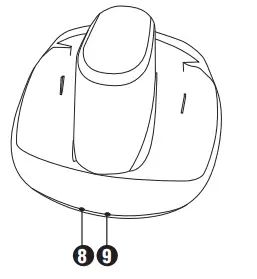
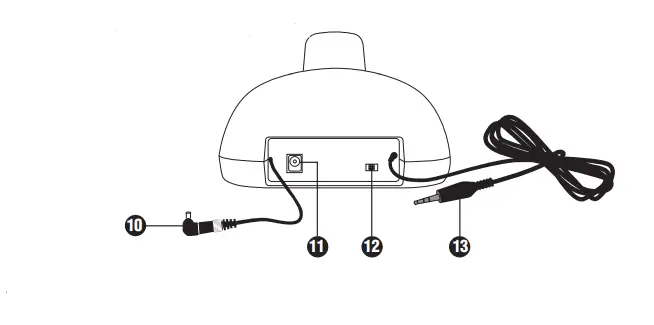
SUPPLIED ACCESSORIES
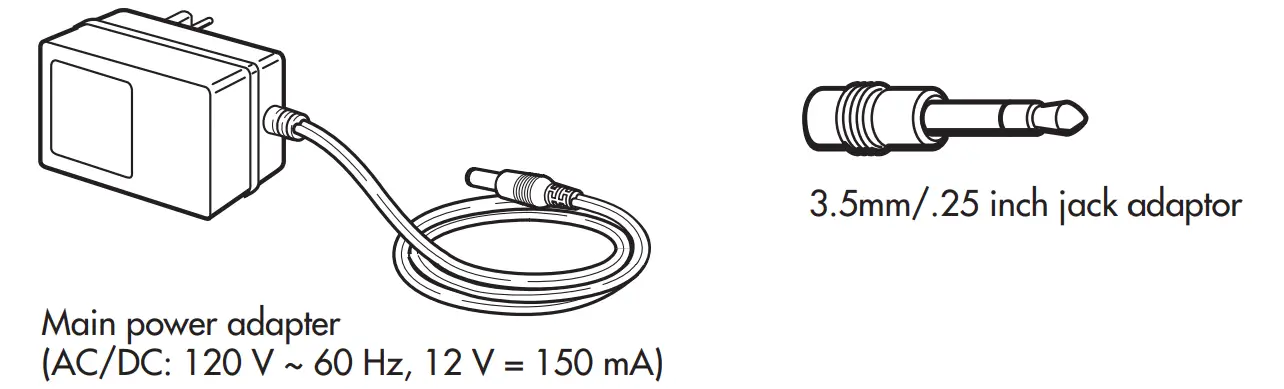
This headphone system includes accessories that enable you to use your wireless headphone set in a number of ways. (See section on Operation and Standard Usage, page 9)
BATTERY INSTALLATION AND INFORMATION
Your wireless headphone unit requires two rechargeable AAA batteries. Rechargeable batteries are uncharged when you purchase them. Before you can use the wireless headphones, the batteries must be charged for 16 hours. Follow these steps to install and charge the batteries.
Installing the Rechargeable Batteries
Take care to follow these steps to correctly install the batteries.
- On the right headphone, locate the battery compartment (1). Use the fi nger depression on the compartment to turn the battery compartment cover counterclockwise to remove the cover.
- Insert two AAA rechargeable batteries, carefully following the markings inside to ensure the batteries are inserted properly, with the + and – ends in the correct positions.
- Replace the battery compartment cover.
Charging the Rechargeable Batteries
To recharge the headset unit, follow the directions below. Note: The cradle/transmitter on the WHP141 is not a recharging cradle, although you may place the headset in the cradle during recharging.
Follow these steps to recharge the NiMH rechargeable batteries.
- Make sure the ON/OFF switch (2), located on the right headphone, is in the OFF position.
- Connect the AC/DC main power adapter to the DC IN power supply socket (11), located on the back of the cradle/transmitter.
- Plug the adapter into an electrical outlet.
- Connect the charging cable (10), located on the back of the cradle/transmitter to the recharging input (3), located on the right headphone. The headphones can either be placed in the cradle/transmitter or placed next to the unit. If the headphones are connected correctly, the charging LED indicator light on the cradle/transmitter (8) illuminates.
The LED indicator on the cradle/transmitter will be on whenever the headphones are properly plugged in to charge. Note that the light does not go out when the batteries are fully charged. The charge current to the headphone is very low and there is no danger in leaving them connected for extended periods of time. - Charge the rechargeable batteries for 16 hours before using the headphones for the fi rst time. After the initial charge, an overnight charge of 6-8 hours should be enough to return the batteries to a full charge after use.
- New batteries should normally last approximately eight hours before recharging is necessary. Over time, battery replacement may be necessary for maximum life.
NiMH Rechargeable Battery Memory Effect
When a NiMH rechargeable battery is fi first used, it is important to fully charge it and then allow it to discharge three times in order to maximize the battery’s storage capacity. Avoid recharging the battery until it is fully discharged. When a battery is recharged before it is completely discharged, it develops a memory that will limit the amount of charge in the future. This reduces the battery’s storage capacity for subsequent charges and so reduces the amount of time your headphones can be used before recharging is necessary.
NiMH Natural Power Discharge
Due to their chemical design, all rechargeable batteries incur some degree of natural discharge. This means they automatically lose their charge in varying degrees, and the battery’s capacity drops even when not in use. The size of this power loss varies, depending on the battery’s type, size, design, internal resistance, and, most especially, the temperature. The higher the temperature, the greater the power loss through natural discharge.
NiMH Battery Warning
If you are using NiMH or NiCd batteries, the batteries will charge when the headphones are powered with the AC power adapter. Do not power the headphones with the AC power adapter if you installed alkaline or other non-rechargeable batteries—this could cause the batteries to leak. Do not mix batteries with different chemistry types (for example, a zinc battery with an alkaline battery). Do not mix new and used batteries. Do not leave batteries installed in the product when not in use for long periods. Respect the environment and the law. Before disposing of rechargeable batteries, ask your distributor if they can be recycled and whether or not the distributor collects rechargeable batteries for recycling.
CONNECTING THE CRADLE/TRANSMITTER
Follow this quick setup guide to ensure the trouble-free installation of your headphones. To connect the cradle/transmitter to the audio source, follow these steps.
- Connect the AC/DC main power adapter to the DC IN power supply socket (11) at the back of the cradle/transmitter. Then, connect the adaptor to an electrical outlet. Important: This power unit is intended to be correctly oriented in a vertical or floor mount position.
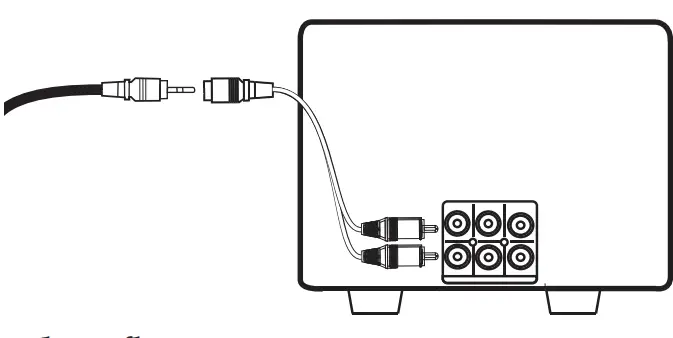
- Insert the audio input cable (13), located on the back of the cradle/transmitter into the headphone jack of your audio source (e.g., stereo, TV, CD player, DVD, etc.). Plugging the transmitter into the headphone outlet of a TV may cause the TV speakers to mute. This is normal. The TV simply thinks the user would like private listening and turns the speakers off. If you would like to listen to the WHP141 headphones and have the TV speakers on, you must use the stereo audio outputs of the TV, usually located on the back or side panels. To use any RCA stereo (red/white RCA jack) output from any device such as a TV, cable box, or AV receiver will require the purchase of a 3.5mm female to RCA stereo Y adapter (not included with the WHP141 model). To use the adapter, simply plug the 3.5 mm jack from the transmitter into the adapter jack, and plug the RCA ends into the audio output of your source. Some TV models may require that you switch the audio outputs to on, usually through the menu system. Please consult your TV owner’s manual for specifi c instructions. Note that this headphone model is compatible with analog stereo outputs only. It is not compatible with digital outputs such as optical or coaxial SPDIF.
- The audio signal LED indicator light (9), located on the front of the cradle/transmitter, illuminates as soon as you have connected the power adapter to the outlet and the audio cable to an active signal source.
OPERATION
Standard Usage
- Switch on the audio source (TV, DVD, CD player, etc.) to which the cradle/transmitter is connected. If your audio source is a DVD or CD player, start a disc.
Warning: The cradle/transmitter has an automatic function that switches it off if it does not receive an audio signal for approximately 4 minutes. If the volume on the audio source is too low, the cradle/transmitter also switches off after four minutes. This feature
was installed to comply with current legislation that reduces the number of radio emissions in the environment. To ensure that this function is not accidentally triggered, set the audio source volume at approximately 50 percent capacity. Consult your component user’s manual for details on how to set the volume for headphones. - The cradle/transmitter is now ready to receive an audio signal. The cradle/transmitter is activated automatically when receiving an audio signal from the audio source.
- Check to make sure the audio signal LED indicator light (9) on the front of the cradle/transmitter is lit, indicating that the unit is ready.
- Place the headphone ON/OFF switch (2), located on the right headphone, to the ON position.
- Check to make sure the stereo LED indicator light (5) on the left headphone is lit, indicating a strong signal.
- The cradle/transmitter and the headphones feature double phase lock loops (PLL) for radio frequency transmissions. Select one of the three channels on the back of the cradle/transmitter (12) and the corresponding channel on the left headphone (7). Be sure
that the same channel (1, 2 or 3) is selected on both the cradle/transmitter and the headphones. The Phase Lock Loop (PLL) function automatically locks the chosen channel, providing
top-quality audio reception with no sound loss. - Before wearing headphones adjust the volume using the VOLUME control (6), located on the left headphone, to a comfortable volume level.
- When you are through using the headphones, switch them off using the ON/OFF switch (2), and place the audio source on standby.
Maximum Performance
When the audio source offers a variable volume output, maximum performance can be achieved. Variable volume outputs include headphone jacks, computer speakers, and some TV RCA output jacks.
Variable Volume Output
When using an audio source with a variable output jack, you can reduce any distortion and achieve maximum performance by following these steps:
- Set the volume of the audio source component to mid-level.
- Adjust the headphone VOLUME control (6) until the desired result is achieved.
- If the headphone volume is not sufficient, adjust the source volume.
- If distortion occurs, reduce the volume on the source component.
Fixed Volume Output
When using an audio source with a fixed volume output, regulating the volume can be achieved through the headphone VOLUME control (6) only. Examples of fi xed volume outputs are RCA jacks (VCR, Tape, Video, or CD outputs).
TROUBLESHOOTING
Refer to this troubleshooting section if you encounter any diffi culties in setting up and using your headphones.
PROBLEM SOLUTION
- No sound heard Check that your audio source, cradle/transmitter, and through headphones are connected, supplied properly and headphones turned on.
- Check to ensure that the rechargeable batteries are installed in the headset correctly and have been recharged properly.
Check to ensure the cradle/transmitter is running and the audio signal LED indicator light (9) on the unit is lit.
Check that the audio source is deliverfii cnige na tsuf signal to the cradle/transmitter through the audio input cable (13). Use the VOLUME control (6) to increase the sound level.
Check to ensure the audio outputs of your TV are “live” when you are connecting to the stereo audio outputs (RCA jack). You may need to go into the TV menu system to ensure these outputs are turned on. Refer to your TV user manual for more details.
Check that the headphone and transmitter are set to the same channel. - Poor sound quality or interference
Check to ensure that the sound provided by the audio source is loud enough and of suffi cient quality. Make sure the stereo LED indicator light (5) is lit.
Check if the batteries in the headphones fihcaievne power. Recharge or replace them, if necessary.
Check to see if you have selected the best transmission channel (1, 2, or 3) to provide the optimum signal reception. If necessary, try another channel on both the headphones (7) and the cradle/transmitter (12).
Check if the distance between the headphones and the cradle/transmitter is within the operating range. (The effective range of this device is approximately 150ft/45m.*) Move
closer to the cradle/transmitter to receive the sound.
Check that the audio source provides stereo sound. - Power cut-off The cradle/transmitter has an automatic power-off function. When no signal is received through the cradle/transmitter’s audio input cable, it switches off. Switch on your audio source again, and use the CHANNEL switches (7 & 12) to adjust reception. If necessary, increase the audio source’s volume.
12-MONTH LIMITED WARRANTY
Audiovox Electronics Corporation (the “Company”) warrants to the original retail purchaser of this product that should this product or any part thereof, under normal use and conditions, be proven defective in material or workmanship within 12 months from the date of original purchase, such defect(s) will be repaired or replaced (at the Company’s option) without charge for parts and repair labor. To obtain repair or replacement within the terms of this Warranty, the product along with any accessories included in the original packaging is to be delivered with proof of warranty coverage (e.g. dated bill of sale), specifi cation of the defect(s), transportation prepaid, to the Company at the address shown below. Do not return this product to the Retailer.
This Warranty is not transferable and does not cover products purchased, serviced, or used outside the United States or Canada. The warranty does not extend to the elimination
of externally generated static or noise, to costs incurred for the installation, removal, or reinstallation of the product. The warranty does not apply to any product or part thereof that, in the opinion of the company, has suffered or been damaged through alteration, improper installation, mishandling, misuse, neglect, accident or exposure to moisture. This warranty does not apply to damage caused by an AC adapter not provided with the product, or by leaving non-rechargeable batteries in the product while plugged into an AC outlet.
THE EXTENT OF THE COMPANY’S LIABILITY UNDER THIS WARRANTY IS LIMITED TO THE REPAIR OR REPLACEMENT PROVIDED ABOVE AND, IN NO EVENT, SHALL THE COMPANY’S LIABILITY EXCEED THE PURCHASE PRICE PAID BY THE PURCHASER FOR THE PRODUCT. This Warranty is in lieu of all other express warranties or liabilities. ANY IMPLIED WARRANTIES, INCLUDING ANY IMPLIED WARRANTY OF MERCHANTABILITY OR FITNESS FOR A PARTICULAR PURPOSE, SHALL BE LIMITED TO THE DURATION OF THIS WARRANTY. ANY ACTION FOR BREACH OF ANY WARRANTY HEREUNDER, INCLUDING ANY IMPLIED WARRANTY, MUST BE BROUGHT WITHIN A PERIOD OF 24 MONTHS FROM THE DATE OF ORIGINAL PURCHASE. IN NO CASE SHALL THE COMPANY BE LIABLE FOR ANY CONSEQUENTIAL OR INCIDENTAL DAMAGES WHATSOEVER.
No person or representative is authorized to assume for the Company any liability other than expressed herein in connection with the sale of this product. Some states/provinces do not allow limitations on how long an implied warranty lasts or the exclusion or limitation of incidental or consequential damage so the above limitations
or exclusions may not apply to you. This Warranty gives you specifi c legal rights and
you may also have other rights which vary from state/province to state/province.
U.S.A.: Audiovox Electronics Corporation, 150 Marcus Blvd., Hauppauge, New York 11788 CANADA: Audiovox Return Center, c/o Genco, 6685 Kennedy Road, Unit 3, Door 16, Mississauga, Ontario L5T 3A5
Frequently Asked Questions
- Will TV sound still be heard when this headphone is plugged in and on?
Yes, That’s the nice thing about these headphones. My wife who has great hearing can have the tv turned down as low as she wants and I ( when wearing the headphones) can turn the sound up on the headphones as loud as I want. - Am I able to add a 2nd pair to watch TV together?
You can have up to 3 pair of the charger where your set rest as 3 channels so you can use the ONE set for the 3 Chanel on 3 different TV but you will need 3 different pair,on my case got 2nd pair and it work perfect on 2 TV set just change the Chanel on your set,like TV 1 on Chanel 1 and TV 2 on channel 2 or Chanel 3 and they work great on my case. - I need the headphones due to hearing loss my question can the tv be heard by others in the room while using the headphones?
These earphones can be used both ways for both sounds through TV and headphones or just headphones. It is all in the way you connect them. My dad was very hard of hearing and it had gotten to where we couldn’t watch TV with him because the TV was so loud. These headphones were lifesavers. - Will it work using a computer?
The directions say to plug into the headphone jack of your audio source (e.g., stereo, TV, CD player, DVD, etc.). The plug is the right size to fit in the computer jack. I have not tried them with the computer but I don’t know why they wouldn’t work. - I am having such a hard time just trying to get the battery cover open on my new set. I’ve been at it for an hour now and it won’t budge. Is it supposed to be this difficult, or is this headset just defective?
Yes, it is difficult. The cover must be turned counter clockwise as indicated on the cover. Try pushing and turning with one finger in the indentation and another finger on the opposite side of the cover. This works for me. I’ll try the palm method next time. - Where do I connect the transmitter wire to the TV?
If you have a 1/8″(3.5mm) headphone jack on your TV, it will plug directly into it. If there is no headphone jack, look for RCA female audio-out connectors. If this is the case, then you will need to get a 1/8 female to RCA male cord to run between the base and the. - Will these turn off automatically when the TV turns off? And do they make any noise when doing so?
You have to manually turn them off – there is a little switch on the side of the headphones. That switch doesn’t make any noise other than a very very quiet click, softer than turning off a tv.
If you are worried about noise coming thru the headphones – turn them off before turning off the tv. - The headphone will not work. A charge is working. Is there a warranty?
The headphone will not charge unless it is turned off. - Will they hook up to a sound Samsung sound strip?
I just looked up a couple of samsung sound strips and didn’t see any RCA type jack output or1/8″ stereo outputs only one HDMI out. You will have to find an audio output on your amp or receiver, maybe a headphone output, the only trouble is the audio usually shut off when a plug is inserted in the headphone jack. - I sleep with headphones on & need a pair that are not too thick to lie down on. Would these be comfortable with my head lying on the pillow?
I actually used these headphones in bed. They are not bad. Like any headphones, you are limited to laying on your back. One problem I had with these headphones is background noise from other shows that the headphones would pick up.
![Wired Headphones With [four Speakers], High-fidelity Noise-cancelling Stereo Subwoofer Earbuds-complete Features/user Guide](https://static-data1.manualsee.com/1/img/10/3710244/2022/07/Wired-Headphones-with-Four-Speakers-high-Fidelity-Nois-Cancelling-Stereo-subwoofer0Earbuds-featured-1568x864.png "Wired Headphones With [four Speakers], High-fidelity Noise-cancelling Stereo Subwoofer Earbuds-complete Features/user Guide")