iKONVERT Gateway
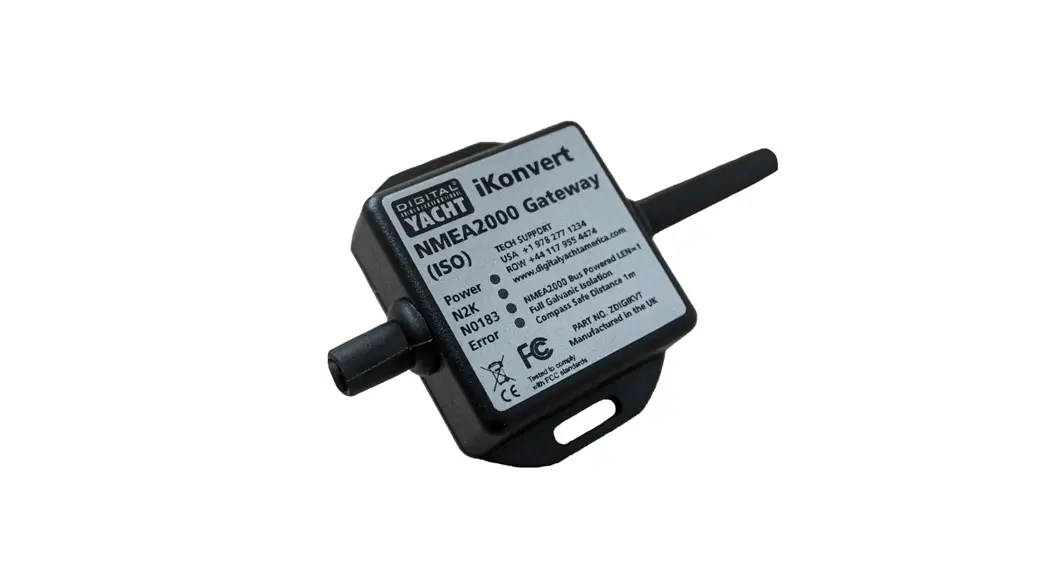
iKONVERT GATEWAY (ISO)
Congratulations on the purchase of your iKonvert (ISO) Gateway.
This product is designed to allow NMEA0183 devices to either send
data to or receive data from an NMEA2000 network. With more and
more equipment moving to the newer NMEA2000 interfacing standard,
it is very common for boats to have a mixture of NMEA0183 and
NMEA2000 equipment onboard. iKonvert allows the safe and accurate
bi-directional conversion of data between the two NMEA formats.
There is no standard wiring colors or connector for NMEA0183
systems, so the NMEA0183 ISO cable of the iKonvert just has bare
ended wires for connecting to other NMEA0183 equipment. Making
these wiring connections requires a level of practical ability and
electrical knowledge and if you are not comfortable with
electrics/electronics, we recommend you have the converter
installed by a professional installer/dealer.
Before operating the unit, you should also familiarize yourself
again with the user manual of the NMEA2000 and NMEA0183 equipment
that you will be using iKonvert with. Pay particular attention to
the NMEA2000 or NMEA0183 Interfacing Menu options and any other
settings that need to be configured for correct operation.
Before you start
To install and test the iKonvert (ISO) converter, you will
need:
- SeaTalkNG (Raymarine P/No A06045)
- Simnet (Simrad P/No 24006199)
Installation
Before starting installation, select a suitable location for the
iKonvert. The unit is water-resistant; however, it should be
installed below deck in a dry location. When locating the unit, you
should consider:
- Connecting to NMEA2000 Network
Mounting
Dimension drawing
ISO Connection
The iKonvert Gateway (ISO) has an integral 1m ISO cable that can
be wired to NMEA0183 devices as shown in the diagrams below. The
first diagram shows the more common Differential (Two Wire)
connections where the device has an Input+ and Input- or an Output+
and Output- (sometimes referred to as A and B)…
The second diagram shows the older Common Ground type connection
where, to reduce the number of wires, the manufacturer just has a
single Input or Output connection and it relies upon the two pieces
of connected equipment having a common DC ground (Negative Battery
Supply)…
Operation
Operating Modes
Table of iKonvert Conversion Modes (V3.16 Firmware or
higher):
| Switches MODE (1234) | Interface | BAUD | Sentences |
|---|---|---|---|
| Gateway Mode | NMEA0183 | NMEA DATA 4800 | RMC, HDG, VHW, MWV, DPT, MTW, MDA, APB, RMB, VLW, XTE, ROT, RSA |
| Gateway HS Mode | NMEA0183 | 38400 | RMC, HDG, VHW, MWV, DPT, MTW, MDA, APB, RMB, VLW, XTE, ROT, RSA, VDO and VDM |
| GPS Mode (1Hz) | NMEA0183 | 4800 | GPS/Navigation/Instruments |
| GPS HS Mode (10Hz) | NMEA0183 | 38400 | RMC, GSA, GSV, ZDA |
| GPS Only (10Hz) | NMEA0183 | 38400 | RMC, GSA, GSV, ZDA |
iKONVERT GATEWAY (ISO)
1. Introduction
Congratulations on the purchase of your iKonvert (ISO) Gateway. This product is designed to allow NMEA0183 devices to either send data to or receive data from an NMEA2000 network. With more and more equipment moving to the newer NMEA2000 interfacing standard, it is very common for boats to have a mixture of NMEA0183 and NMEA2000 equipment onboard. iKonvert allows the safe and accurate bi-directional conversion of data between the two NMEA formats.
There is no standard wiring colours or connector for NMEA0183 systems, so the NMEA0183 ISO cable of the iKonvert just has bare ended wires for connecting to other NMEA0183 equipment. Making these wiring connections requires a level of practical ability and electrical knowledge and if you are not comfortable with electrics/electronics, we recommend you have the converter installed by a professional installer/dealer.
Before operating the unit you should also familiarise yourself again with the user manual of the NMEA2000 and NMEA0183 equipment that you will be using iKonvert with. Pay particular attention to the NMEA2000 or NMEA0183 Interfacing Menu options and any other settings that need to be configured for correct operation.
2. Before you start
You can extend the ISO cable of the iKonvert converter using any reasonable quality multi-core cable. Security Alarm cabling is usually a good choice and we would recommend using screened cable, particularly at the higher 38400 baud rate. The cable screen should only be grounded at the NMEA0183 device not at both ends of the cable.
To install and test the iKonvert (ISO) converter you will need:
· Suitable tools and connectors to connect the iKonvert to the NMEA2000 network · Suitable tools and connectors to connect the iKonvert to the NMEA0183 device · M3 or M4 screws or other fixings appropriate to the mounting location · Installation manual for the NMEA0183 device that shows wire colours and how it should wired to other devices
3. Installation
Before starting installation select a suitable location for the iKonvert. The unit is water resistant; however it should be installed below deck in a dry location. When locating the unit you should consider:
· Routing of NMEA2000 and NMEA0183 cables to the unit · Provision of sufficient space around the unit for comfortable cable routing. · Maintaining the compass safe distance of 0.5m
3.1 Connecting to NMEA2000 Network
· The iKonvert, has an integral NMEA2000 cable terminated with a male connector that is designed to connect straight in to a standard NMEA2000 network via a spare “T-Piece”. If you are creating a new NMEA2000 network, then you may wish to consider Digital Yacht’s NMEA2000 Starter Kit, that provides all of the cables, connectors and terminators required for a basic NMEA2000 network.
· iKonvert takes its power and data from the NMEA2000 network.
· If you are connecting iKonvert to a non-standard NMEA2000 network, then a suitable adaptor cable will need to be sourced from the relevant manufacturer;
o SeaTalkNG (Raymarine P/No A06045)
o Simnet (Simrad P/No 24006199)
Quick Start Guide for iKonvert (ISO) V2.05 TEL + 44 1179 554474 www.digitalyacht.co.uk [email protected]
3.2 Mounting
· The iKonvert Gateway has two slotted 4mm Diameter fixing holes. Use suitable fixings (not supplied) to fix the converter to a flat surface using the dimensions and details shown in the drawing below. Note that the unit may be installed in any orientation.
Dimension drawing
3.3 ISO Connection
The iKonvert Gateway (ISO) has an integral 1m ISO cable that can be wired to NMEA0183 devices as shown in the diagrams below. The first diagram shows the more common Differential (Two Wire) connections where the device has an Input+ and Input- or an Output+ and Output- (sometimes referred to as A and B)…
Quick Start Guide for iKonvert (ISO) V2.05 TEL + 44 1179 554474 www.digitalyacht.co.uk [email protected]
The second diagram shows the older Common Ground type connection where, to reduce the number of wires, the manufacturer just has a single Input or Output connection and it relies upon the two pieces of connected equipment having a common DC ground (Negative Battery Supply)…
4. Operation
4.1 Operating Modes
The iKonvert Gateway will support a number of different operating modes, which can be configured by changing the positions of four DIP switches inside the unit. To open the iKonvert Gateway, just unscrew the two cross head screws in the base of the unit. By default iKonvert is set to Mode 0, where all of the four DIP switches are OFF. In this mode it will convert all of the common GPS/Nav/Instrument data at 4800 baud. On the following page is a table showing all of the currently supported modes. In many cases, the default mode will be fine, but if you want iKonvert to do a specific conversion i.e. Wind or Heading, or you want to convert more data at a higher baud rate, then select the required mode via the DIP switches. Once you have set the DIP switches, power cycle iKonvert (OFF…wait 2 seconds…ON) and when it powers up, it will be in the selected mode. The operating modes have been defined to satisfy the installation scenarios most commonly found on pleasure boats. If you have an installation requirement, that is not covered by one of these modes, please let us know.
Quick Start Guide for iKonvert (ISO) V2.05 TEL + 44 1179 554474 www.digitalyacht.co.uk [email protected]
Table of iKonvert Conversion Modes (V3.16 Firmware or higher)…
Switches MODE
(1234)
Gateway Mode Gateway HS Mode GPS Mode (1Hz)
Interface NMEA0183 NMEA0183 NMEA0183
BAUD NMEA DATA 4800 GPS/Navigation/Instruments 38400 GPS/Navigation/Instruments/AIS 4800 GPS Only (1Hz)
Sentences
RMC, HDG, VHW, MWV, DPT, MTW,MDA, APB, RMB, VLW, XTE, ROT, RSA RMC, HDG, VHW, MWV,DPT, MTW, MDA, APB, RMB, VLW, XTE,ROT, RSA,VDO and VDM RMC, GSA, GSV, ZDA
GPS HS Mode (10Hz)
NMEA0183
38400 GPS Only (10Hz)
RMC, GSA, GSV, ZDA
Wind Mode (5Hz)
NMEA0183
4800 Wind Only (5Hz)
MWV
AIS Mode
NMEA0183
38400 AIS + GPS Only
VDO, VDM, RMC, DPT
Mag Heading Mode
NMEA0183
4800 Heading and Rate of Turn (10Hz) HDM + ROT
Instrument Mode
NMEA0183
38400 GPS/Navigation/Instruments (1Hz) RMC, HDG, VHW, MWV, DPT, MTW,MDA, APB, RMB, VLW, XTE, ROT, RSA
Depth Mode
NMEA0183
4800 Depth+Water Temp+GPS (1Hz)
DPT, MTW,MDA, VHW, VLW, RMC
Legacy Autopilot Mode
NMEA0183
4800 Navigation+Wind
APB, RMB, VHW, VWR (from NMEA2000 to NMEA0183)
N2K Autopilot Mode
NMEA0183
4800 Navigation+Wind
APB, RMB, VHW, VWR + RMC
True Heading Mode
NMEA0183
4800 Heading and Rate of Turn (10Hz) HDT + ROT
For Future Use
For Future Use Full Mode RAW Mode
NMEA0183 115200 All Supported Sentences N2Net Protocol 230400 RAW NMEA2000 data over serial
APB,RSA,VHW,HDG,ROT,DPT,VLW,RMC,XTE,VDR,GSV,GSA,MWV,MWD, MDA,MTW,GGA,VTG,ZDA,VWR,RMB,VDO,VDM
RAW NMEA2000 data over serial
Some examples of how these Operating Modes can be used are;
1) You have an older DSC VHF that needs GPS data in NMEA0183 format, you can set iKonvert to GPS (1Hz) Mode and the VHF radio will receive this data from the NMEA2000 network.
2) You have an AIS unit with an NMEA0183 Output and you want to use it with a new Chart Plotter that only has an NMEA2000 interface, you can set iKonvert to AIS Mode and the AIS data will be converted to NMEA2000.
3) You have a navigation software package running on a PC/Mac and want to convert all of your NMEA2000 data in to NMEA0183, which is the only format the software supports, set iKonvert to Gateway HS (High Speed) mode and all of the data NMEA2000 supported by NMEA0183 sentences will be converted.
Note that conversions are in both directions, so for example in Depth Mode, if NMEA0183 Depth data is received it will be converted to NMEA2000 or if NMEA2000 Depth is on the network, then this will be converted to NMEA0183.
For software applications or devices that know how to read NMEA2000 PGNs, we have developed a special “RAW Data” Mode that takes the NMEA2000 binary PGN data and encapsulates it in a Digital Yacht proprietary NME0183 sentence. The same application can also transmit data on to the NMEA2000 network, by sending another proprietary sentence with the binary PGN data back to iKonvert.
To set iKonvert in to this special “RAW Data” mode, simply set all of the DIP switches to “ON” and all of the NMEA2000 data will be available in the proprietary sentences at 230400 baud.
As more modes are added, Digital Yacht will release firmware updates and revisions to this manual.
Quick Start Guide for iKonvert (ISO) V2.05 TEL + 44 1179 554474 www.digitalyacht.co.uk [email protected]
4.2 LED Behaviour
iKonvert has four LEDs, which behave as follows;
LED Power N2K N0183 Error
State ON FLASH FLASH ON
Meaning iKonvert is powered up NMEA 2000 data being received NMEA 0183 data being received Serious Error condition contact Digital Yacht
4.3 Further Information
iKonvert is available in two versions;
1) USB version for use with PCs, Macs, Raspbery Pi and LINUX computers 2) ISO version with an opto-isolated NMEA0183 interface for use with dedicated hardware
Both versions will run the same firmware and they will support a number of different NMEA0183 conversion modes, plus the “RAW Data” mode that requires software developers to integrate/support it on their applications.
We know of a number of developers who are working on this “RAW Data” Mode integration and it is already compatible with CANBoat and the Node Signal K server.
We have created a dedicated GitHub site for iKonvert that will always have the latest Developer’s Guide, Firmware and technical information on iKonvert.
https://github.com/digitalyacht/iKonvert
For iKonvert technical support please email [email protected]
Quick Start Guide for iKonvert (ISO) V2.05 TEL + 44 1179 554474 www.digitalyacht.co.uk [email protected]
 Digital Yacht - Light years ahead in marine electronics technology.
 NMEA2000 Cabling Kit - Digital Yacht
 GitHub - digitalyacht/iKonvert: iKonvert NMEA2000 Gateway SDK