
 SKMEI 1602 Operation Manual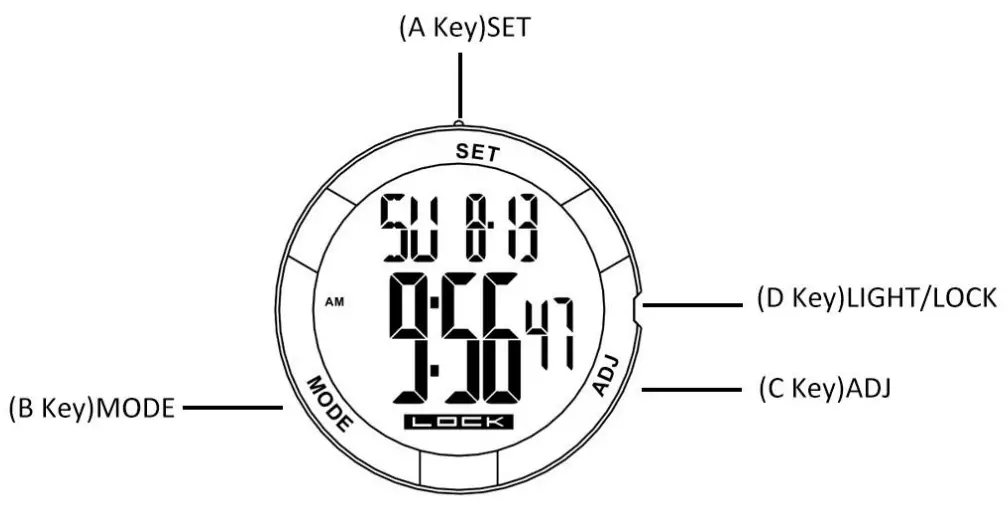
Features :
- Time function: hour, minute, second, year (2000-2099) Month, day,12H/24H .
- The stopwatch function, the maximum range is 23:59′ 59”,1/100S.
- 24-hour countdown function.
- 5 groups alarm reminder function, hourly chime function.
- Dual time.
- LED backlight.
- Touch screen setting function.
B.Backlight and Unlock :
- Press D key to light the LED backlight
- Press and hold D key for 3 seconds to Unlock and enter normal time mode.
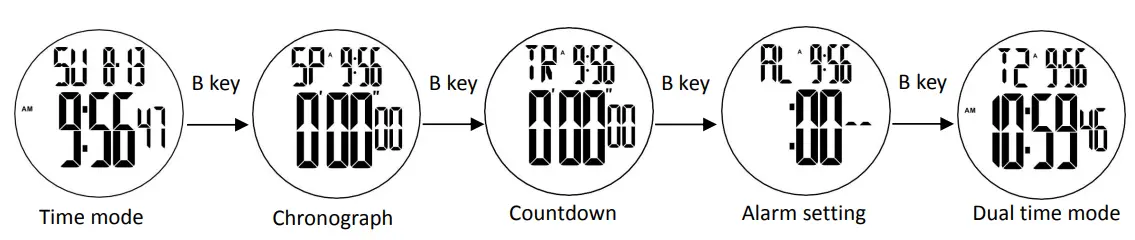
C. Mode Switch
- Press B key to switch the function modes.
D.Time and date setting :
- In normal time mode. Press C key to switch between 12H/24H mode.
- In normal time mode, press and hold A key for 2 seconds to enter time setting mode, and the second flashes.
- Press B key to switch settings

- Press C key to increase value, keep pressing C key to quickly increase value.
- Press A Key to exit the setting
Remark:Automatically locked after 1 minute without key operation and display “lock”.

E.Chronograph function :
- In the chronograph mode, press C key to start the running seconds, press C key again to stop the second, and press A key when the running seconds stop to return to zero.
- In the chronograph mode, press C key to start timing, press A key to enter the split function,and the symbol (“
 ”) appear .Press A key again to get the first group ecord,but the second group still processing in the back group,press A key again to continue the second group,press A key again to read the second group record……When the final group finished, press C key to stop the SPL function,press A key read the final group (SUM)record,press C key again to clear the record to zero.
 ”) appear .Press A key again to get the first group ecord,but the second group still processing in the back group,press A key again to continue the second group,press A key again to read the second group record……When the final group finished, press C key to stop the SPL function,press A key read the final group (SUM)record,press C key again to clear the record to zero.
F.Count down function :
- In the countdown mode, press A key for 2 seconds to enter the countdown mode.
1.Press B to select the adjustment item in the following order: 2.Press C Key to adjust the selected item.
3.Press A key to confirm and return to the countdown display status. - Press C key to start/stop the countdown
- Press A key to set and reset the countdown mode.
Remarks: When the countdown time is up, the warning tone will last for 1 minute, the symbol flashes; press any key to interrupt ,and countdown time will restart .It will automatically exits the setting status without any key operation within one-minute.
 2.Press C Key to adjust the selected item.
Alarm setting :
- Alarm mode, press C key to turn on/off the hourly chime(
 )
) - Press D key to select AL1-AL5
- Press C key to turn the alarm on/off (A)(
 )
) - Press the A key button for 2 seconds to set the alarm time
- Press B key to switch settings.
- Press C key to adjust the selected item
- Press A key to exit time setting
Remarks: 1: Enters the alarm setting state, the alarm is automatically turned on.
2 : When the alarm time is up, and the alarm warning tone will last for 1 minute.
 )
) )
)H.Dual time setting :
- Dual time mode, press A key for 2 seconds to enter time setting
- Press B key to switch settings.
- Press C key to adjust the selected item
- Press A key to exit time setting
Remarks: Setting the dual time ,set in 30-minute /units, does not affect the hour.