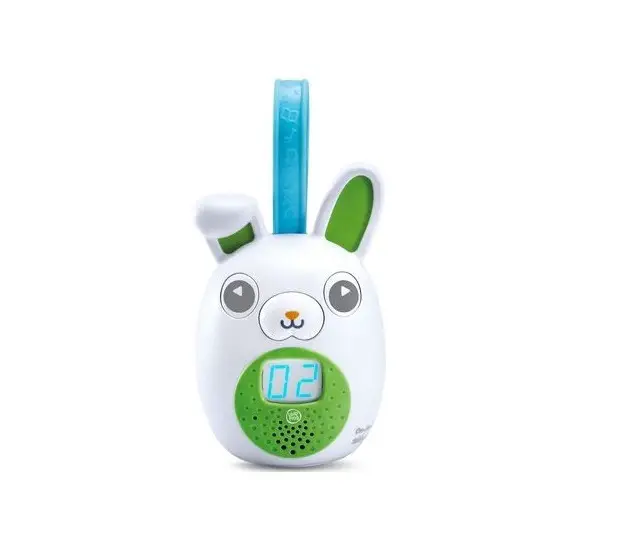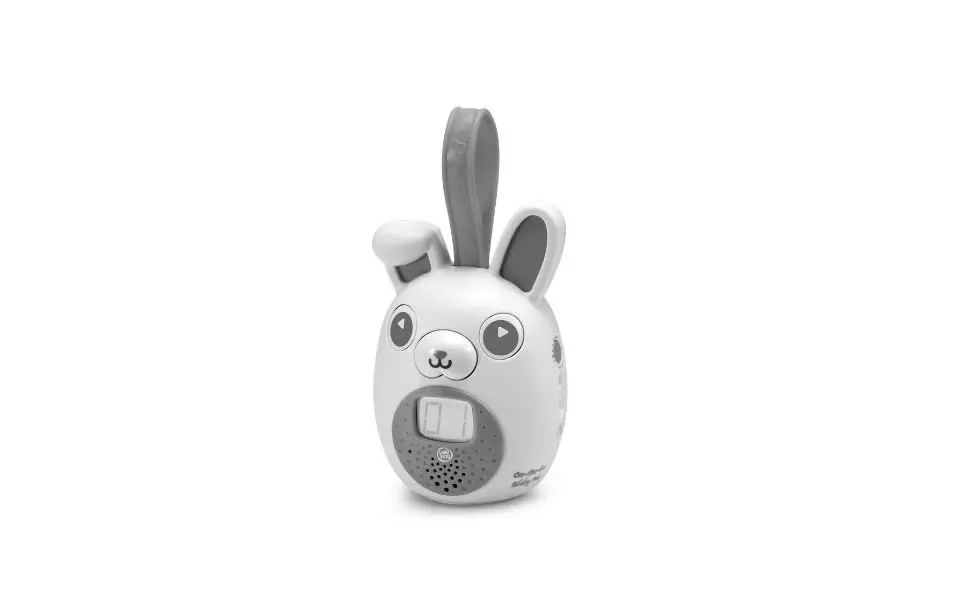

LeapFrog 80-613700 On-The-Go Story Pal
INTRODUCTION
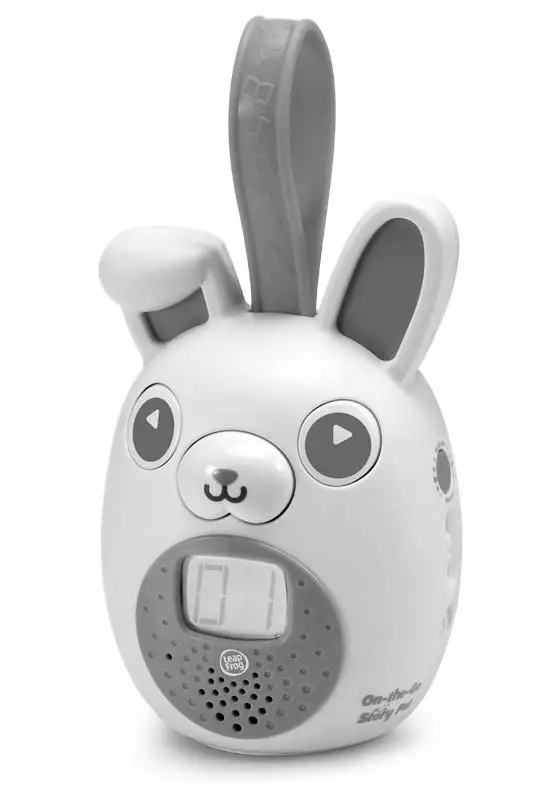
Thank you for purchasing the On-the-Go Story Pal™ device!Get ready to enter a magical world of storytelling, music and learning!
INCLUDED IN THIS PACKAGE
- On-the-Go Story Pal™ device
- Parent’s guide
WARNING:
All packing materials such as tape, plastic sheets, packaging locks, removable tags, cable ties, cords and packaging screws are not part of this toy and should be discarded for your child’s safety.
NOTE:
Please keep this parent’s guide as it contains
important information.
This toy is only to be connected to equipment bearing either the following symbols:  or
or  .
.
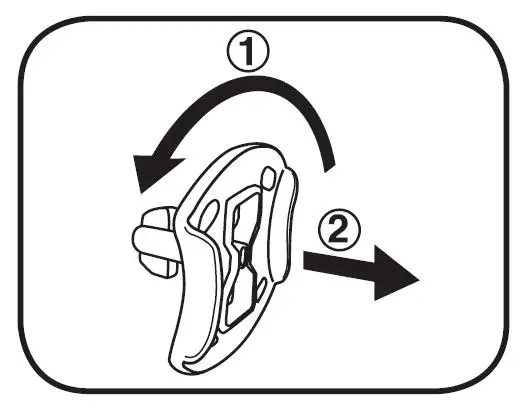
Unlock the Packaging Locks
- Rotate the packaging locks 90 degrees anticlockwise.
- Pull out the packaging locks and discard.

INSTRUCTIONS
BATTERY REMOVAL AND INSTALLATION
- Make sure the unit is turned OFF.
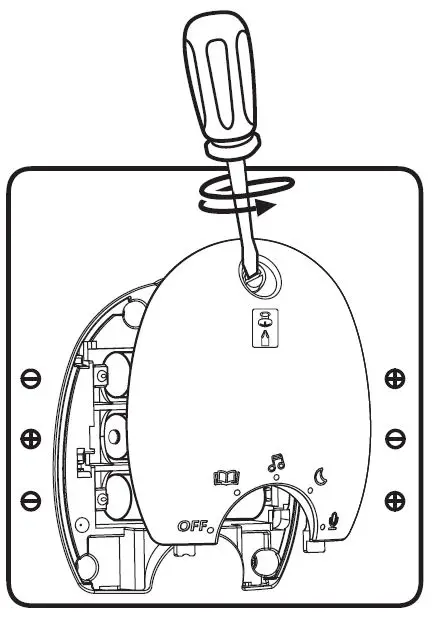
- Locate the battery cover on the back of the unit. Use a screwdriver to loosen the screw.
- If used batteries are present, remove these batteries from the unit by pulling up on one end of each battery.
- Install 3 new ‘AA’ (AM-3/LR6) batteries following the diagram inside the battery box. For best performance, alkaline batteries or fully charged Ni-MH rechargeable batteries are recommended.
- Replace the battery cover and tighten the screw to secure.

WARNING:
Adult assembly required for battery installation. Keep batteries out of reach of children.
IMPORTANT: BATTERY INFORMATION
- Insert batteries with the correct polarity (+ and -).
- Do not mix old and new batteries.
- Do not mix alkaline, standard (carbon-zinc) or rechargeable batteries.
- Only batteries of the same or equivalent type as recommended are to be used.
- Do not short-circuit the supply terminals.
- Remove batteries during long periods of non-use.
- Remove exhausted batteries from the toy.
- Dispose of batteries safely. Do not dispose of batteries in fire.
RECHARGEABLE BATTERIES
- Remove rechargeable batteries from the toy before charging.
- Rechargeable batteries are only to be charged under adult supervision.
- Do not charge non-rechargeable batteries.
Disposal of batteries and product
The crossed-out wheelie bin symbols on products and batteries, or on their respective packaging, indicates they must not be disposed of in domestic waste as they contain substances that can be damaging to the environment and human health.
The chemical symbols Hg, Cd or Pb, where marked, indicate that the battery contains more than the specified value of mercury (Hg), cadmium (Cd) or lead (Pb) set out in Battery Directive (2006/66/EC).
The solid bar indicates that the product was placed on the market after 13th August, 2005.
Help protect the environment by disposing of your product or batteries responsibly.
LeapFrog® cares for the planet.
Care for the environment and give your toy a second life by disposing of it at a small electricals collection point so all its materials can be recycled.
In the UK:
Visit www.recyclenow.com to see a list of collection points near you.
In Australia & New Zealand:
Check with you local council for kerbside collections.
Note: Maximum output voltage ≤ 150mV.
ACTIVATE NORMAL PLAY MODE
This product is in Try-Me mode in the packaging. To activate normal play mode, please complete the following steps:
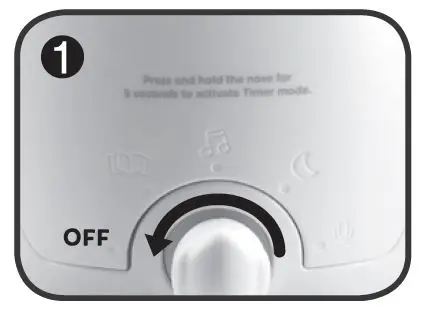
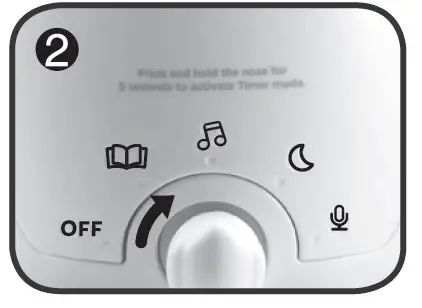
- Rotate the On/Off/Mode Selector Dial to the Off position.

- Rotate the On/Off/Mode Selector Dial to the Stories position to activate normal play mode.

PRODUCT FEATURES
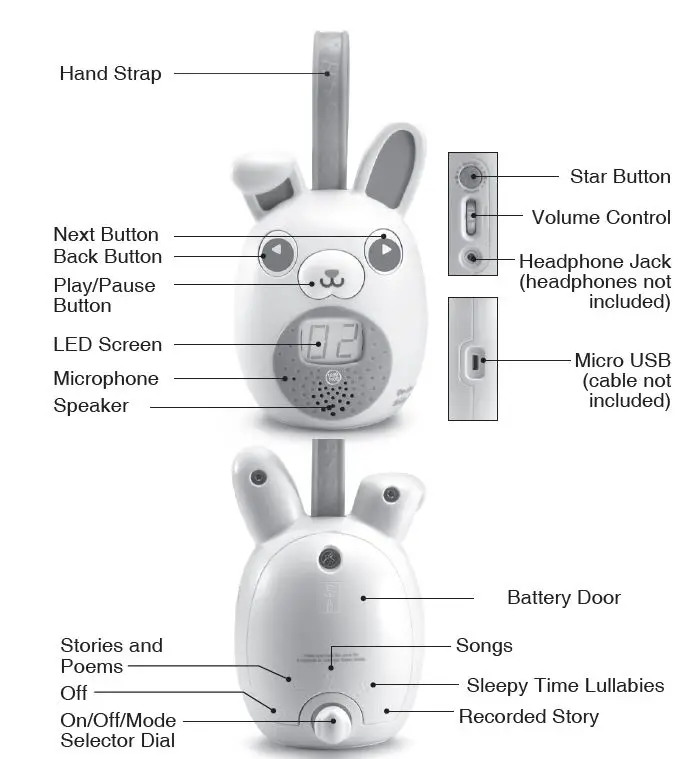
- On/Off/Mode Selector Dial
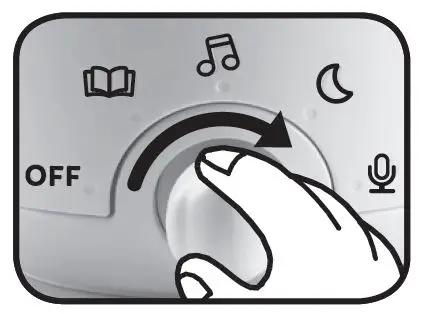
Rotate the On/Off/Mode Selector Dial to choose a category. Categories include: Stories and Poems; Songs; Sleepy Time Lullabies and Recorded Story. Rotate the On/Off/Mode Selector Dial to the Off position to turn the toy off.
- Play/Pause Button
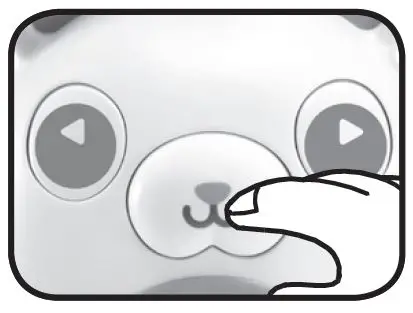
Press to pause the story, song or poem. Press again to play.
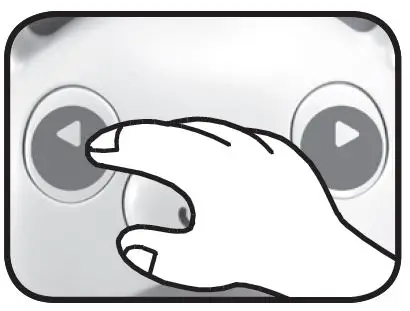
- Back Button
Press to select the previous story, song or poem.
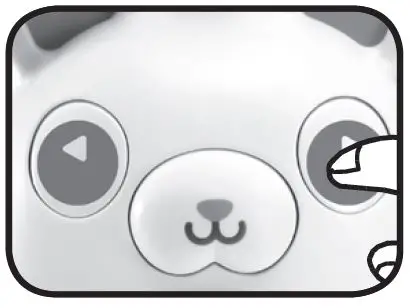
- Next Button
Press to select the next story, song or poem.
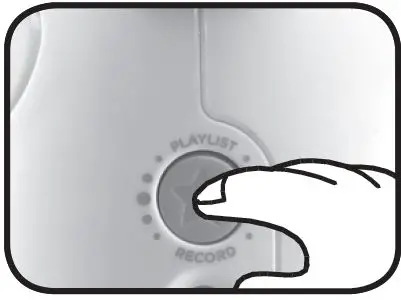
- Star Button
In the Recorded Story mode, follow the audio instructions and press the Star Button to begin recording.
In other modes, quickly press the Star Button to hear your playlist. To save a story/music to the playlist, press and hold the Star Button until it beeps.
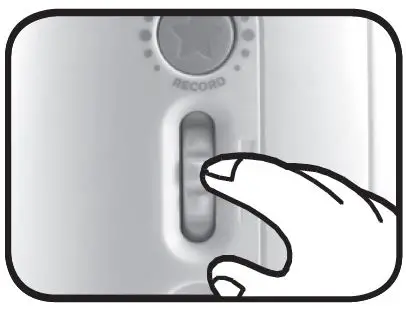
- Volume Control
Turn the dial up or down to adjust the volume level.
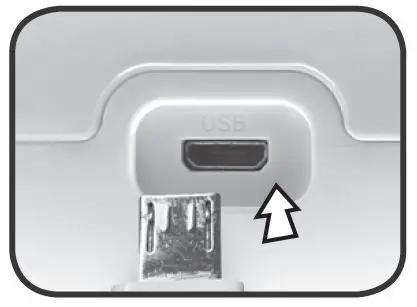
- USB Port
To download additional stories, follow the instructions in the Downloadable Content section later in this guide.
- Set Timer
Press and hold the Play/Pause Button for 5 seconds, then follow the audio instructions to set the timer. - Automatic Shut-Off
To preserve battery life, the On-the-Go Story Pal™ will automatically shut off after approximately 60 seconds if a story or song is not playing. The unit can be turned on by pressing any button.
ACTIVITIES
Listen to a Story, Poem or Song
Rotate the On/Off/Mode Selector Dial to choose a category. After selecting a category, press the Next Button to toggle through the story options. Stories will play automatically after their titles are announced.
Stories & Poems
- The Three Little Pigs
- Cinderella
- Little Red Riding Hood
- Peter Pan
- The Tale of Peter Rabbit
- The Gingerbread Man
- Goldilocks and the Three Bears
- The Three Billy Goats Gruff
- Robin Hood and the Golden Arrow
- The Boy Who Cried Wolf
- The Ugly Duckling
- Chicken Little
- The Elves and the Shoe Maker
- The Emperor’s New Clothes
- Jacob & the Wise Man
Songs
- Counting 1 to 10
- All The Colours Of The Rainbow
- The Days of the Week
- London Bridge is Falling Down
- Old MacDonald Had a Farm
Sleepy Time Lullabies
- Hush Little Baby
- Frère Jacques
- Brahm’s Lullaby
- Ocean Waves – Music of the Sea
- Rainfall in Forest
- Animals Round the World Go to Sleep at Night
- It’s Bedtime Solar System
- Humpty Dumpty
- Ocean Dreams
- Moonlight Music Meditation
Recorded Story
The toy is capable of recording five stories. Maximum recording time is 10 minutes per story.
Timer
Use the arrows to choose how many stories, songs, lullabies to play before your device goes to sleep.
Playlist
Choose your top five stories, songs, poems or lullabies to listen to in your playlist.
To Add an Item to Your Playlist
- Use the On/Off/Mode Selector Dial to choose a category.
- Use the Next/Back Buttons to navigate to a story or song.
- Press and hold the Star Button for three seconds to add the item to your playlist.
- Audio will confirm when the item has been added.
To Delete an Item From Your Playlist
- Use the On/Off/Mode Selector Dial to choose a category.
- Use the Next/Back Buttons to navigate to a story or song in your playlist.
- Press and hold the Star Button for three seconds to delete the item from your playlist.
- Audio will confirm when the item has been deleted.
To Listen to Your Playlist
- Quickly press the Star Button to enter your playlist.
- Your playlist will automatically begin playing after a few seconds, or use the arrow buttons to navigate to a particular story in your playlist.
Note: To preserve battery life, you may want to limit the amount of stories in your playlist to three or less.
Downloadable Content
Download additional stories, songs and poems using your computer and add them to your On-the-Go Story Pal™ device.
- Power Up and Connect
Locate the On/Off/Mode Selector Dial on the back of your On-the-Go Story Pal™ device and rotate it to the Stories category. Then, connect the device to your computer using a micro USB cable (micro USB cable not included). - Set Up
Install the LeapFrog® Connect application for the On-the-Go Story Pal™ device onto your PC or Mac computer
from leapfrog.com/connect - Download
Follow the on-screen instructions to install additional content. - Play and Learn!
Eject the On-the-Go Story Pal™ device and your child is ready to play!
Warning: Do not power off the device or disconnect the micro USB cable while the device is being updated.
System Requirements for Computer Connection
High-speed Internet connection; parent account registration; monitor resolution of 1024 x 768; available USB port; 1 GB of RAM; 500 MB free disk space.
PC Requirements: Pentium® 4 or equivalent (2 GHz processor or faster recommended); 64-bit version of Windows® 8 or Windows® 10 operating system with latest service pack.
Mac Computer Requirements: Apple computer (1 GHz processor or faster recommended); Mac OS X 10.13+ operating
system software.
WINDOWS is a trademark of Microsoft Corp., registered in the U.S. and other countries. PENTIUM and INTEL are trademarks of Intel Corp., registered in the U.S. and other countries. Macintosh and Mac logos are trademarks of Apple Inc. in the United States and other countries. All other trademarks are the property of their respective owners..
CARE & MAINTENANCE
- Keep the unit clean by wiping it with a slightly damp cloth.
- Keep the unit out of direct sunlight and away from any direct heat sources.
- Remove the batteries if the unit will not be in use for an extended period of time.
- Do not drop the unit on hard surfaces and do not expose the unit to moisture or water.
IMPORTANT SAFETY INSTRUCTIONS
Adult supervision required at all times while children are playing with this product.
Not suitable for children under 18 months.
Routinely check this toy for proper and safe condition. If there is any damage or broken parts, remove toy from use.
Long-term exposure to loud sounds, at high volume, may result in permanent hearing loss. When using headphones or ear buds, it is recommended that the product is listened to at lower volumes for shorter periods of time. Set the volume while in a quiet environment; turn the volume down if you cannot hear people speaking near you. The louder the volume, the less time required before your hearing may be affected. If you experience ringing in your ears or hear muffled speech, stop listening and have your hearing checked.
Headphones should not be used by children under the age of 36 months.
TROUBLESHOOTING
If for some reason the unit stops working or malfunctions, please follow these steps:
- Turn the unit Off.
- Interrupt the power supply by removing the batteries.
- Let the unit stand for a few minutes, then replace the batteries.
- Turn the unit On. The unit should now be ready to use again.
- If the unit still does not work, install a new set of batteries.
| Problem | Possible Cause | Correction |
| The On-the-Go Story Pal™ device has stopped working or does not turn on | Incorrect battery polarities | Ensure that the batteries are installed correctly |
| Weak batteries | Replace with new batteries | |
| Cannot download additional stories | The LeapFrog® Connect application is not installed | Install the LeapFrog® Connect application on your PC or Mac at leapfrog.com/connect |
| The LeapFrog® Connect application is not working | Disconnect the On-the-Go Story Pal™ device and restart the LeapFrog® Connect application. Then, reconnect the On-the- Go Story Pal™ device to your computer again using a micro USB cable. | |
| Cannot find any story in the device | The data in the On-the-Go Story Pal™ device has crashed | Connect the On-the-Go Story Pal™ device to your computer, run the LeapFrog® Connect application, select Reset under Settings and your On-the-Go Story Pal™ device will be restored. Your recorded story will be erased. |
Environmental Phenomena
The unit may malfunction if subjected to radio-frequency interference. It should revert to normal operation when the interference stops. If not, it may become necessary to turn the power OFF and back ON, or remove and reinstall the batteries. In the unlikely event of an electrostatic discharge, the unit may malfunction and lose memory, requiring the user to reset the device by removing and reinstalling the batteries.
DISCLAIMER AND LIMITATION OF LIABILITY
LeapFrog Enterprises, Inc. and its suppliers assume no responsibility for any damage or loss resulting from the use of this guide. LeapFrog Enterprises, Inc. and its suppliers assume no responsibility for any loss or claims by third parties that may arise through the use of this product. LeapFrog Enterprises, Inc. and its suppliers assume no responsibility for any damage or loss caused by deletion of data as a result of malfunction, dead battery, or repairs.
Dear customer,
Following the new European data protection law (GDPR), we’ve updated our Privacy Policy.
Please check the following resource to get full information regarding how your personal data is handled by LeapFrog: leapfrog.com/legal
CONSUMER SERVICES
Creating and developing LeapFrog® products is accompanied by a responsibility that we at LeapFrog® take very seriously. We make every effort to ensure the accuracy of the information, which forms the value of our products. However, errors sometimes can occur. It is important for you to know that we stand behind our products and encourage you to call our Consumer Services Department with any problems and/ or suggestions that you might have. A service representative will be happy to help you.
UK Customers:
Phone: 01702 200244 (from UK) or +44 1702 200244 (outside UK) Website: www.leapfrog.co.uk/support
Australian Customers:
Phone: 1800 862 155
Website: leapfrog.com.au/support
NZ Customers:
Phone: 0800 400 785
Website: leapfrog.com.au/support
PRODUCT WARRANTY/ CONSUMER GUARANTEES
UK Customers:
Read our complete warranty policy online at leapfrog.com/legal. Australian Customers:
VTECH ELECTRONICS (AUSTRALIA) PTY LIMITED –CONSUMER GUARANTEES
Under the Australian Consumer Law, a number of consumer guarantees apply to goods and services supplied by VTech Electronics (Australia) Pty Limited. Please refer to leapfrog.com/legal for further information.
Visit our website for more
information about our products, downloads, resources and more. leapfrog.com
Read our complete warranty and
legal policies online at leapfrog.com/legal
LeapFrog Enterprises, Inc.,
A subsidiary of VTech Holdings Limited. TM & © 2021 LeapFrog Enterprises, Inc. All rights reserved. 91-003934-009 UK