 Quick Guide
TF Visualizer
Control Panel
The control panel is shaped like the number pad the numbers line up with the circles on the panel.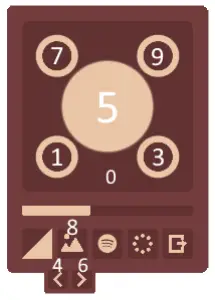
 Connecting Spotify
 Change color
 Enable background
 Extra settings
 Exit
Exit
Intensity slider
Visualizer places visualized
Key bindings (for no numb pad)
Change position visualizer: 1, 2, 3, 4 and 5
Change transparency: 6
Enable background: arrow up
Change background: Left and Right Arrows
Key bindings (for numb pad)
Change position visualizer: 1, 3, 4, 7 and 9
Change transparency: 0
Enable background: 8
Change background: 4 and 6
Drag visualizer to different screen
Press “.” and drag program to other screen