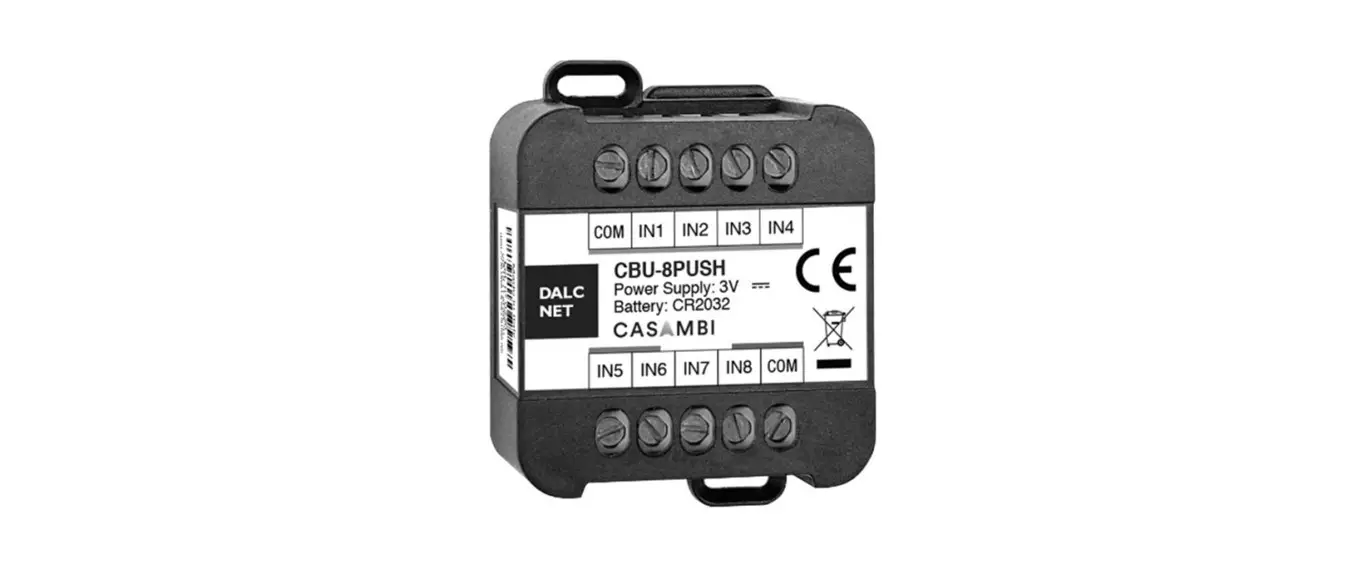
 CBU-8PUSH Lighting System
Instruction Manual
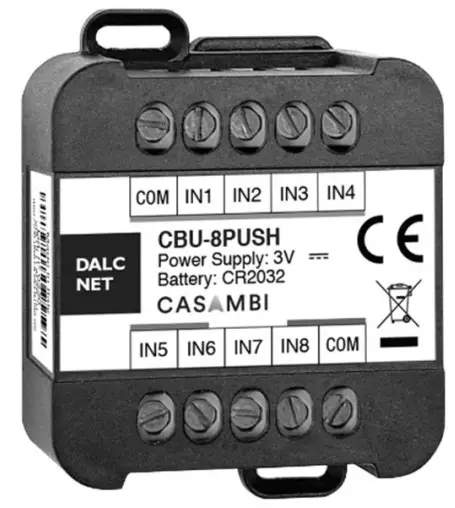
FEATURES
- CASAMBI PUSH BUTTONS
- Command: CASAMBI APP
- Local Command: up to n°8 Push Buttons N.O. (Normally Open)
- Possible to set more fixture
- Control a single Luminaire
- Control all Luminaires
- Smooth Dimming
- Control and Recall a Scenes
- Recall Animations
- Change of color temperature
- Power Supply: CR 2032 Battery
- 100% Functional Test
PRODUCT DESCRIPTION
CBU-8PUSH is a wireless user interface that can be configured by Casambi APP.
The device has up to 8 inputs to connect so many push buttons. Their operation depends on the type of Fixture set through the Casambi APP.
The pushbuttons can smooth dimming the luminaire pre-set, control a luminaire, control a group of luminaires or all luminaires into the network, control a scene, control an animation all this can be set via the Casambi app.
TYPE OF FIXTURE:
4 IN: With this fixture, it is possible to configure up to 4 N.O. push buttons. Each push button can control a luminaire, control a group of luminaires, control a scene or an animation. This configuration is possible to set by Casambi APP.
UP & DOWN: With this fixture, it is possible to set 4 couples of N.O. push buttons, where each couple has got one button for dimming UP luminaire and one for dimming Down. In total there can be connected 8 N.O. push buttons.
X7: With this fixture, it is possible to set up a maximum of 4 N.O. push buttons. Each push button can control a luminaire, control a group of luminaires, control a scene or an animation. This configuration is possible to set by Casambi APP.
By means of two pushbuttons configurated for dimming it is possible to dim UP or dim Down the selected luminaire.
This fixture enables another push-button used to switch off the luminaires.
XPRESS: With this fixture, it is possible to set up 4 N.O. push buttons. Each push button can control a luminaire, control a group of luminaires, control a scene or an animation, SAME FUNCTIONS AS IN “4 in” Fixture. This configuration is possible to seby Casambi APP.
The other two pushbuttons are configurated for dimming UP or dimming Down the selected luminaire.
By means of another button, it is possible to control the color temperature if the luminaire is a Tuneable White.
Download the free Casambi APP on APP STORE or PLAY STORE.
Necessary conditions for a correct function are:

- Device with S.O. APPLE iOS 8.2 or later version
- Device with S.O. ANDROID 4.4 or later version
- Normally Open Push Buttons (N.O.)
- Casambi APP, download for free on APP Store or Play Store
→ For the whole and updated Device, Manual refers to the producer’s website: http://www.dalcnet.com
→ For the correct functioning of the Casambi APP refer to the Support CASAMBI website: https://support.casambi.com/support/home
PRODUCT CODE
| CODE | BATTERY | COMMANDS |
| CBU-8PUSH | CR2032 Lithium coin cell | CASAMBI APP – n°8 N.0. Pushbuttons |
TYPES OF PROFILES
| PROFILES | COMMAND | LOCAL COMMAND |
| 4 IN | APP CASAMBI | Up to n°4 buttons |
| UP & DOWN | APP CASAMBI | Up to n°8 buttons |
| X7 | APP CASAMBI | Up to n°7 buttons |
| XPRESS | APP CASAMBI | Up to n°8 buttons |
TECHNCIAL SPECIFICATIONS
| CBU-8PUSH | |
| Supply voltage | 3V battery CR2032 |
| Operating frequencies | 2,400…2,483 GHz¹ |
| Maximum output power | 4dBm¹ |
| Storage Temperature | min: -25 max: +60 °C |
| Ambient Temperature² | min: -10 max: +40 °C |
| Wiring | 1.5mm² – 30/15 AWG |
| Wire preparation length | 6 mm |
| Protection grade | IP20 |
| Casing material | Plastic |
| Packaging unit (pieces/unit) | Single Carton Box 1 pz |
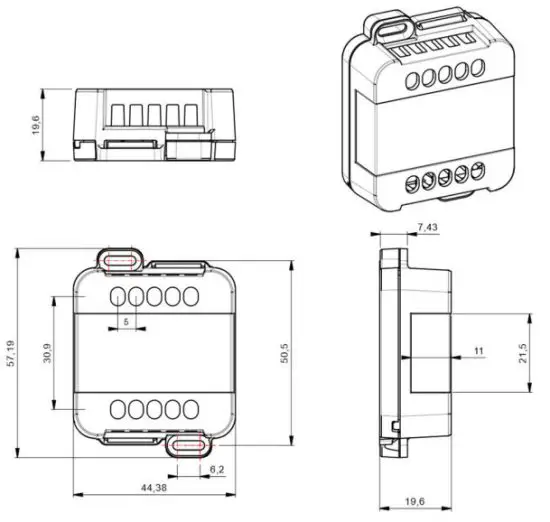
| Mechanical dimension | 44 x 57 x 19 mm |
| Package dimension | 56 x 68 x 35 mm |
| Weight | 30g |
This value depends on the configuration of the Casambi module
Maximum value depends on the ventilation conditions.
INSTALLATION
To be able to view the button in the CASAMBI application, two buttons must be pressed together (usually PUSH1 and PUSH2) for 4 seconds.
| FIXTURE | INSTALLATION | PUSH BUTTONS SETTING |
| IN 4 | 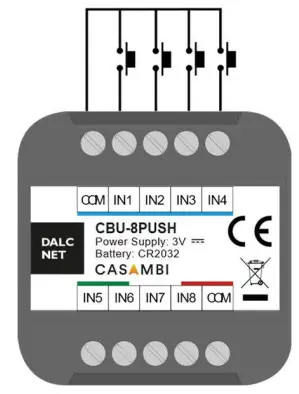 | 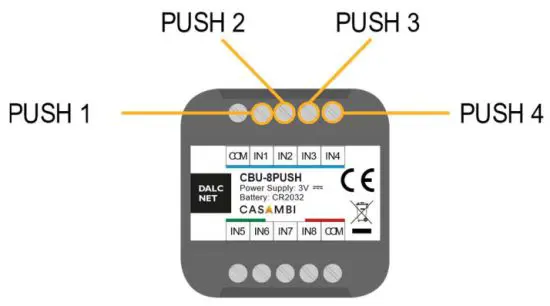 |
| With this fixture, it is possible to configure up to 4 N.O. push buttons. Each push button can control a luminaire, control a group of luminaires, control a scene or an animation. This configuration is possible to set by Casambi APP. | ||
| UP & DOWN | 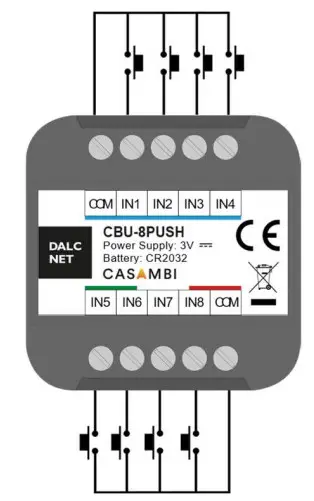 | 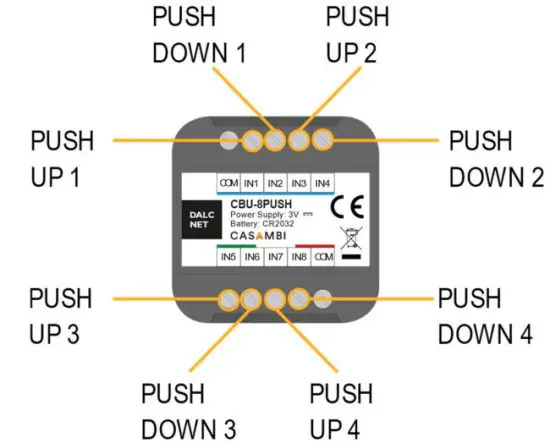 |
| With this fixture, it is possible to set 4 couples of N.O. push buttons, where each couple has got one button for dimming UP luminaire and one for dimming Down. In total there can be connected 8 N.O. push buttons. | ||
| X7 | 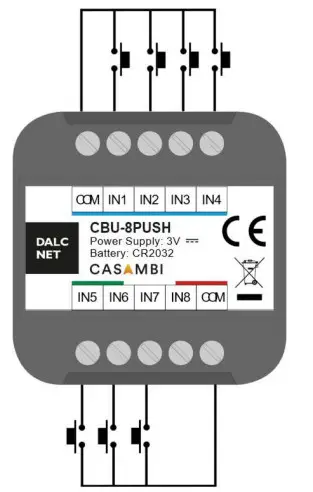 | 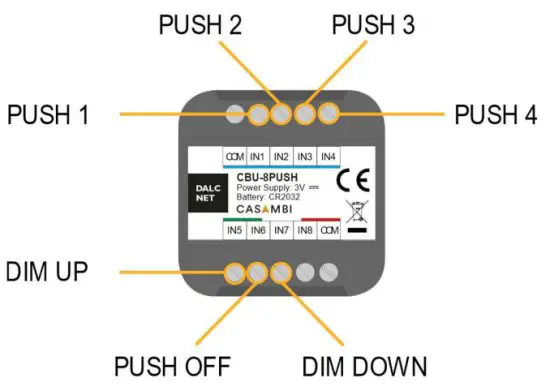 |
| With this fixture, it is possible to set up a maximum of 4 N.O. push buttons. Each push button can control a luminaire, control a group of luminaires, control a scene or an animation. This configuration is possible to set by Casambi APP. By means of two pushbuttons configurated for dimming it is possible to dim UP or dim Down the selected luminaire. This fixture enables another push-button used to switch off the luminaires. | ||
| XPRESS | 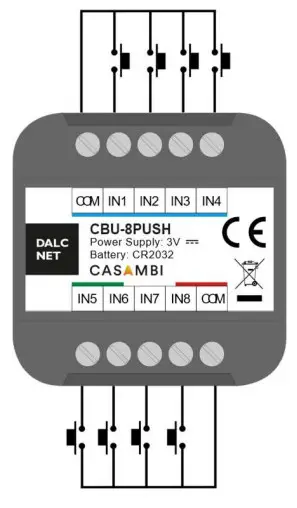 | 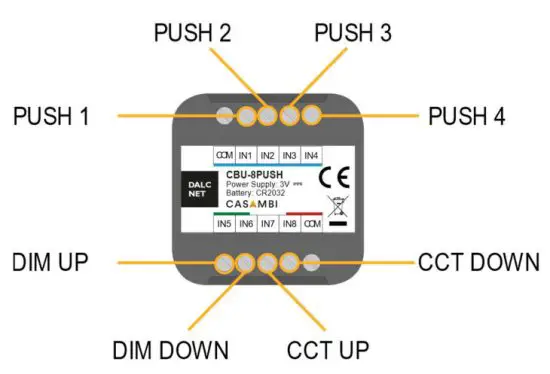 |
| With this fixture, it is possible to set up 4 N.O. push buttons. Each push button can control a luminaire, control a group of luminaires, control a scene or an animation, SAME FUNCTIONS AS IN “4 in” Fixture. This configuration is possible to set by Casambi APP. The other two pushbuttons are configurated for dimming UP or dimming Down the selected luminaire. By means of another button, it is possible to control the color temperature if the luminaire is a Tuneable White. Special feature: if you press PUSH 1 and PUSH 2 at the same time, all the lights on the network will turn off. | ||
Note: For cable length see the paragraph “Technical Note”.
For the N.O. Push-button functions refer to the Support CASAMBI website: https://support.casambi.com/support/home
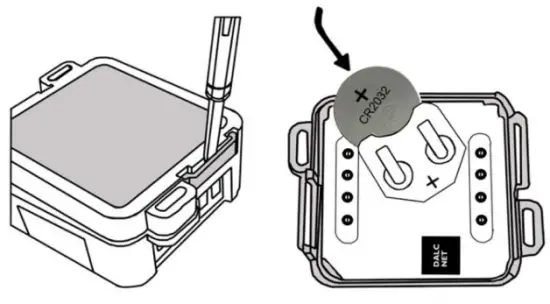
BATTERY INSTALLATION:
MECHANICAL DIMENSION:
Note: The inserted battery of type CR 2032 can last from 2-5 years.
TECHNICAL NOTE
Installation:
- Installation and maintenance must be performed only by qualified personnel in compliance with current regulations.
- The product must be installed inside an electrical panel protected against overvoltages.
- The product must be installed in a vertical or horizontal position with the cover/label upwards or vertically; Other positions are not permitted. It is not permitted to bottom-up position (with the cover/label down).
- Keep separated the circuits at 230V (LV) and the circuits, not SELV from circuits to low voltage (SELV) and from any connection with this product. It is absolutely forbidden to connect, for any reason whatsoever, directly or indirectly, the 230V mains voltage to the bus or to other parts of the circuit.
Power supply:
- For the power supply use, only a battery is specified into manual, no other type of power supply is permitted.
Command:
The length of the connection ca
- bles between the local commands (N.O. Push button or other) and the product must be less than 3m; the cables must be dimensioned correctly and they should be isolated from every wiring or part at a voltage, not SELV. Use double insulated shielded and twisted cables.
WARNING: For optional functionality of the Bluetooth signal, do not put the device into metal or aluminum boxes and do not shield the device.
As with any other Bluetooth product, should not be placed in a metal enclosure or next to large metal structures. Metal will effectively block all radio signals which is crucial to the operation of the product.
D ALCNET S.r.l, Registered office: Via Lago di Garda, 22 – 36077 Altavilla Vicentina (VI) – Italy
Headquarters: Via Lago di Garda, 22 – 36077 Altavilla Vicentina (VI) – Italy
VAT: IT04023100235 – Tel. +39 0444 1836680 – www.dalcnet.com – [email protected]
 Led dimmer and RGB controller for professional lighting systems
 Support : Casambi Support