
CHAUVET PROFESSIONAL VIPDRIVE105NOVA Vip Drive 10-5 Nova Video Processor for Video Panel
About This Guide
The VIP Drive 10-5 Nova Quick Reference Guide (QRG) has basic product information such as connection and menu options. Download the User Manual from www.chauvetvideo.com for more details.
Disclaimer
The information and specifications contained in this QRG are subject to change without notice.
LIMITED WARRANTY
FOR WARRANTY REGISTRATION AND COMPLETE TERMS AND CONDITIONS PLEASE VISIT OUR WEBSITE. For Customers in the United States and Mexico: www.chauvetlighting.com/warranty-registration.
For Customers in the United Kingdom, Republic of Ireland, Belgium, the Netherlands, Luxembourg, France, and Germany: www.chauvetlighting.eu/warranty-registration.
Chauvet warrants that this product shall be free from defects in material and workmanship under normal use, for the period specified in, and subject to the exclusions and limitations set forth in the full limited warranty on our website. This warranty extends only to the original purchaser of the product and is not transferable. To exercise rights under this warranty, you must provide proof of purchase in the form of an original sales receipt from an authorized dealer that shows the product name and date of purchase. THERE ARE NO OTHER EXPRESS OR IMPLIED WARRANTIES. This warranty gives you specific legal rights. You may also have other rights that vary from state to state and country to country. This warranty is valid only in the United States, United Kingdom, Republic of Ireland, Belgium, the Netherlands, Luxembourg, France, Germany, and Mexico. For warranty terms in other countries, please consult your local distributor.
Safety Notes
These Safety Notes include important information about installation, use, and maintenance.
- • DO NOT open this product. It contains no user-serviceable parts.
- • To eliminate unnecessary wear and improve its lifespan, during periods of non-use completely disconnect the product from power via breaker or by unplugging it.
- CAUTION: When transferring product from extreme temperature environments, (e.g., cold truck to warm humid ballroom) condensation may form on the internal electronics of the product. To avoid causing a failure, allow product to fully acclimate to the surrounding environment before connecting it to power.
- CAUTION: This product’s housing may get hot when operating.
- DO NOT leave any flammable material within 50 cm of this product while operating or connected to power.
- •USE a safety cable when mounting this product overhead.
- DO NOT operate this product outdoors or in any location where dust, excessive heat, water, or humidity may affect it. (IP20)
- • DO NOT operate this product if the housing or cables appear damaged.
- DO NOT connect this product to a dimmer or rheostat.
- ONLY connect this product to a grounded and protected circuit.
- ONLY use the hanging/mounting bracket or the handles to carry this product.
- In the event of a serious operating problem, stop using immediately.
- The maximum ambient temperature is 113 °F (45 °C). Do not operate this product at higher temperatures.
FCC Compliance
This device complies with Part 15 Part B of the FCC Rules. Operation is subject to the following two conditions:
- This device may not cause harmful interference, and
- This device must accept any interference received, including interference that may cause undesired operation.
Any changes or modifications not expressly approved by the party responsible for compliance could void the user’s authority to operate the equipment.
Contact
Outside the U.S., U.K., Ireland, Benelux, France, Germany, or Mexico, contact your distributor to request support or return a product. Refer to Contact Us at the end of this QRG for contact information.
What is Included
- VIP Drive 10-5 Nova
- IEC power cord
- USB cable
- DVI signal cable
- HDMI signal cable
- Cat5e ethernet 3 ft jumper cable
- Quick Reference Guide
AC Power
This product has an auto-ranging power supply that can work with an input voltage range of 100–240 VAC, 50/60 Hz
AC Plug
| Connection | Wire (U.S.) | Wire (Europe) | Screw Color |
| AC Live | Black | Brown | Yellow/Brass |
| AC Neutral | White | Blue | Silver |
| AC Ground | Green/Yellow | Green/Yellow | Green |
To eliminate unnecessary wear and improve its lifespan, during periods of non-use completely disconnect the product from power via breaker or by unplugging it.
Mounting
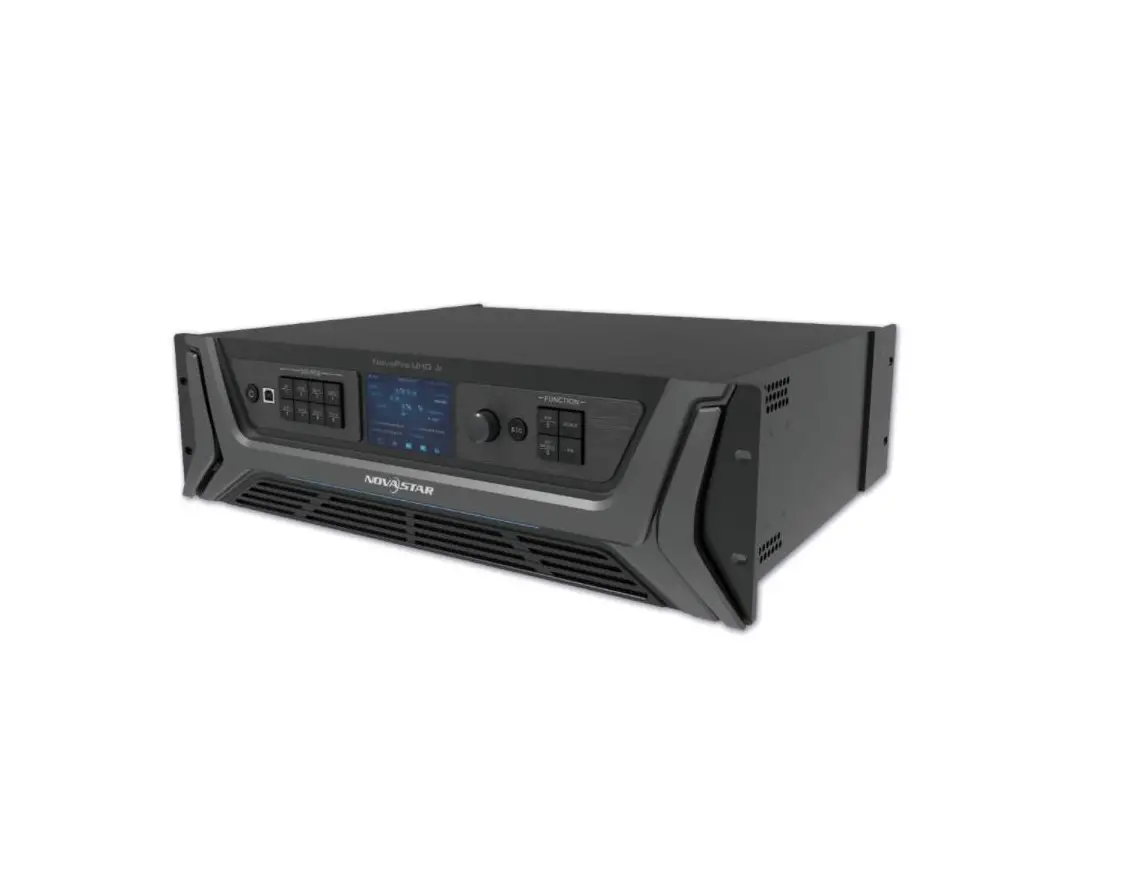
The VIP Drive 10-5 Nova fits on a standard 19-inch rack, or it can be placed on its rubber feet on a flat level surface.
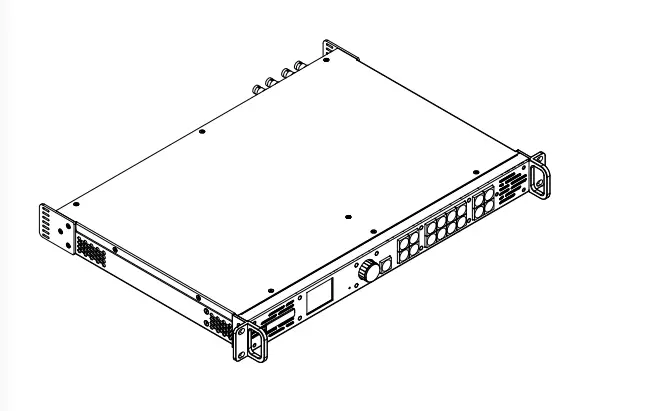
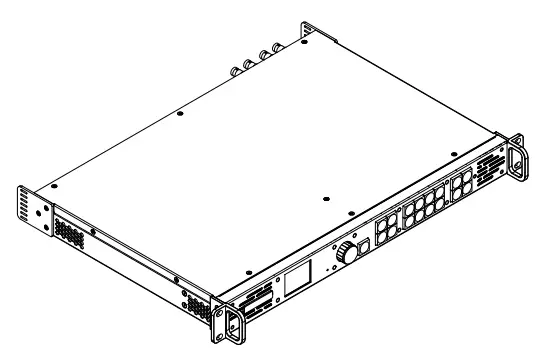
Product Front Overview

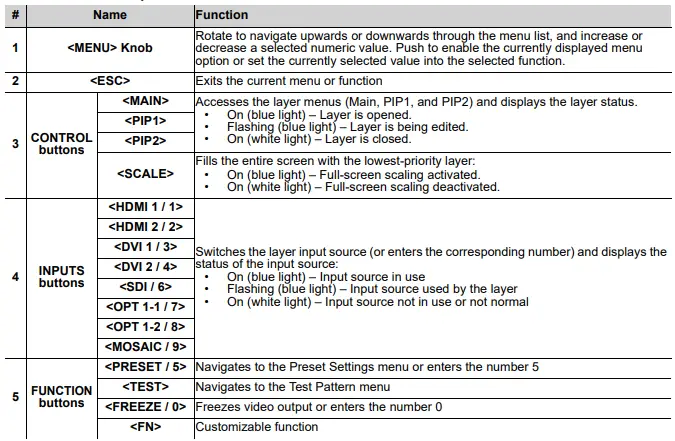
Control Panel Description
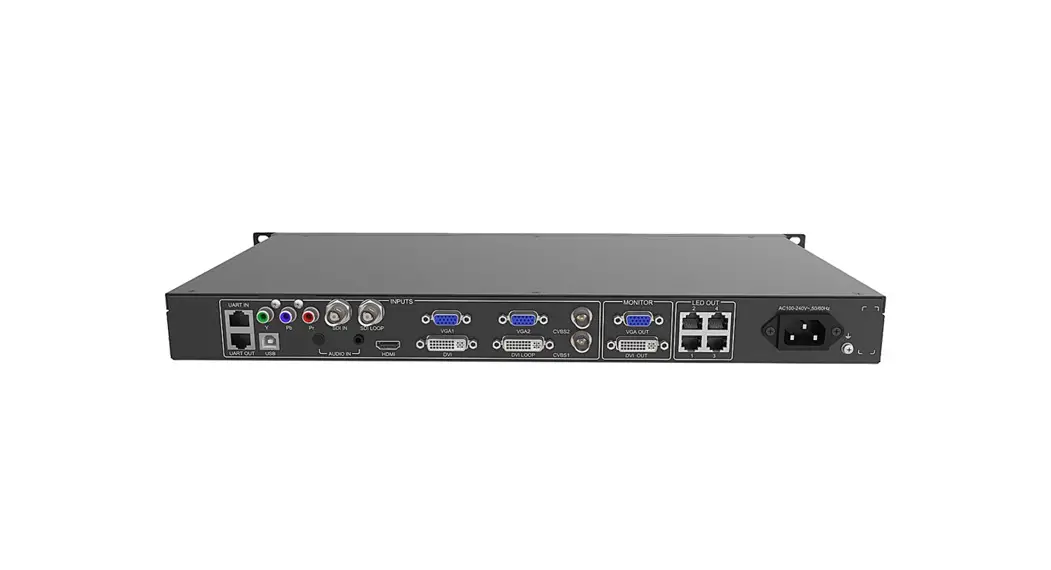
Product Rear Overview
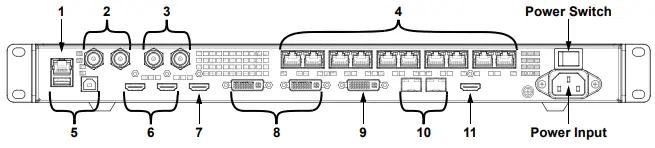
Rear Panel Description
| # | Name | Function |
| 1 | ETHERNET | RJ45 port for connecting to a personal computer |
| 2 | GENLOCK IN | Locking BNC connectors for signal synchronization of devices with an external video switcher or clock generator |
| GENLOCK LOOP | ||
| 3 | 3G-SDI IN | 3G-SDI video port supporting deinterlacing processing but not input resolution or bit depth settings |
| 3G-SDI LOOP | 3G-SDI video loop output port | |
| 4 | OUTPUT 1–10 | RJ45 ports for output to LED video products. Ports 1 and 2 have audio output support for use with a multifunction card to parse audio. |
| 5 | USB (Type A) | USB type A output port for cascading to other devices |
| USB (Type B) | USB type B input port for cascading from other devices or connecting to a personal computer | |
| 6 | HDMI 1.4 1 IN | HDMI video input port supporting interlaced signal inputs. Supports mosaic of 2 HDMI 1.4 inputs. |
| HDMI 1.4 1 LOOP | HDMI 1.4 video loop output port | |
| 7 | HDMI 1.4 2 | HDMI video input port supporting interlaced signal inputs. Supports mosaic of 2 HDMI 1.4 inputs. |
| 8 | DVI (HDMI 1.4) 1 IN | DVI video input port supporting interlaced signal inputs. Supports mosaic of 2 HDMI 1.4 inputs. |
| DVI (HDMI 1.4) 1 LOOP | DVI video loop output port | |
| 9 | DVI (HDMI 1.4) 2 | DVI video input port supporting interlaced signal inputs. Supports mosaic of 2 HDMI 1.4 inputs. |
| 10 | OPT 1-1 | SFP ports (master and backup) for sending/receiving fiber optic data at distance via SFP modules |
| OPT 1-2 | ||
| 11 | HDMI 1.3 | HDMI 1.3 video output port for monitor |
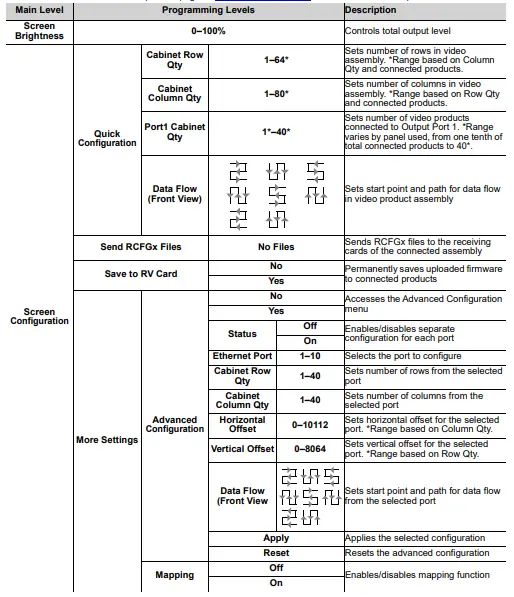
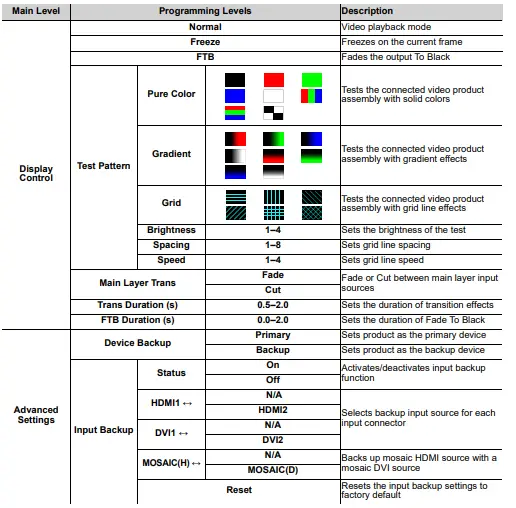
Menu Map
Refer to the VIP Drive 10-5 Nova product page on www.chauvetvideo.com for the latest menu map.
| Main Level | Programming Levels | Description | |||
|
Screen Settings (cont.) |
More Settings (cont.) |
LED Screen Color | Gamma | 1.0–4.0 | Sets the Gamma value |
|
Temperature | Standard | Sets the color temperature mode of the output | |||
| Cool | |||||
| Warm | |||||
| Custom | |||||
| R | 000–255 | Sets the custom color temperature values | |||
| G | |||||
| B | |||||
| Reset | Resets the screen color settings | ||||
|
Output Frame Rate | 23.98 |
Selects preset output frame rate | |||
| 24 | |||||
| 25 | |||||
| 29.97 | |||||
| 30 | |||||
| 47.95 | |||||
| 48 | |||||
| 50 | |||||
| 59.94 | |||||
| 60 | |||||
| 71.93 | |||||
| 72 | |||||
| 75 | |||||
| 85 | |||||
| 100 | |||||
| 119.88 | |||||
| 120 | |||||
|
Layer Settings |
Main Layer PIP1 PIP2 | Status | On | Activates/deactivates the selected layer | |
| Off | |||||
|
Input Source | HDMI1 |
Sets the input source for the selected layer | |||
| HDMI2 | |||||
| DVI1 | |||||
| DVI2 | |||||
| SDI | |||||
| OPT1-1 | |||||
| OPT1-2 | |||||
| MOSAIC | |||||
| Scaling Mode | Full Screen | Scales the layer to the entire connected video assembly | |||
| Pixel to Pixel | Scales the layer 1:1 | ||||
| Custom | Scales the layer manually | ||||
| Main Level | Programming Levels | Description | |||
|
Layer Settings (cont.) |
Main Layer (cont.) PIP1 (cont.) PIP2 (cont.) | H Width | 64–32768 | Sets the layer width | |
| V Height | 64–32768 | Sets the layer height | |||
| Initial X | -32768–32768 | Sets the layer’s horizontal offset | |||
| Initial Y | -32768–32768 | Sets the layer’s vertical offset | |||
| Priority | 1–3 | Sets the layer’s priority level | |||
|
Input Crop | Status | On | Activates/deactivates the cropping function | ||
| Off | |||||
| H Width | 64–32768 | Sets the layer’s crop width | |||
| V Height | 64–32768 | Sets the layer’s crop height | |||
| Initial X | -32768–32768 | Sets the horizontal crop offset | |||
| Initial Y | -32768–32768 | Sets the vertical crop offset | |||
| Opacity | 0–100% | Sets the layer’s transparency | |||
|
Input Settings |
HDMI1 HDMI2 DVI1 DVI2 |
EDID (Extended Display ID) | Mode | Standard | Uses standard resolution |
| Custom | Allows a custom resolution | ||||
|
Resolution (Standard) | 1024 x 768 | Standard EDID resolution. Available frame rates (Hz): 48, 50, 59.94, 60, 75, 85 | |||
| 1280 x 720 | Available frame rates (Hz): 23.98, 24, 25, 29.97, 30, 48, 50, 59.94, 60 | ||||
| 1280 x 1024 | Available frame rates (Hz): 48, 50, 59.94, 60, 75, 85 | ||||
| 1366 x 768 | Available frame rates (Hz): 50, 59.94, 60 | ||||
| 1440 x 900 | Available frame rates (Hz): 60, 75, 85 | ||||
| 1600 x 1200 | Available frame rates (Hz): 48, 50, 59.94, 60 | ||||
| 1680 x 1050 | Available frame rates (Hz): 60 | ||||
| 1920 x 1080 | Available frame rates (Hz): 23.98, 24, 25, 29.97, 30, 48, 50, 59.94, 60 | ||||
| 1920 x 1200 | Available frame rates (Hz): 50, 59.94, 60 | ||||
| 1920 x 2160 | Available frame rates (Hz): 23.98, 24, 25, 29.97, 30, 48, 50, 59.94, 60 | ||||
| 2048 x 1080 | Available frame rates (Hz): 30, 48, 50, 59.94, 60 | ||||
| 2048 x 1152 | Available frame rates (Hz): 30, 60 | ||||
| 2560 x 1080 | Available frame rates (Hz): 50, 59.94, 60 | ||||
| 2560 x 1600 | Available frame rates (Hz): 50, 59.94, 60 | ||||
| 3840 x 1080 | Available frame rates (Hz): 30, 50, 59.94, 60 | ||||
| 3840 x 2160 | Available frame rates (Hz): 30 | ||||
| Main Level | Programming Levels | Description | |||
|
Input Settings (cont.) |
HDMI1 (cont.) HDMI2 (cont.) DVI1 (cont.) DVI2 (cont.) |
EDID (Extended Display ID, cont.) |
Frame Rate (Hz) (Standard) | 23.98 |
Preset EDID frame rate. Availability based on selected resolution. |
| 24 | |||||
| 25 | |||||
| 29.97 | |||||
| 30 | |||||
| 48 | |||||
| 50 | |||||
| 59.94 | |||||
| 60 | |||||
| 75 | |||||
| 85 | |||||
| Width (Custom) | 800–4092 | Custom EDID resolution width. Range depends on height. | |||
| Height (Custom) | 600–3981 | Custom EDID resolution height. Range depends on width. | |||
|
Frame Rate (Hz) (Custom) | 23.98 |
Custom EDID frame rate. Availability based on selected resolution. | |||
| 24 | |||||
| 25 | |||||
| 29.97 | |||||
| 30 | |||||
| 47.95 | |||||
| 48 | |||||
| 50 | |||||
| 59.94 | |||||
| 60 | |||||
| Frame Rate (Hz) (Custom, cont.) | 72 |
Custom EDID frame rate. Availability based on selected resolution. | |||
| 75 | |||||
| 85 | |||||
| 100 | |||||
| 120 | |||||
| Apply | Applies selected EDID settings | ||||
|
Input Color | Brightness | 0–100 | Adjusts the input brightness | ||
| Contrast | Adjusts the input contrast | ||||
| Saturation | Adjusts the input saturation | ||||
| Hue | -180–180 | Adjusts the input hue | |||
| Reset | Resets the input color settings | ||||
| Color/Sample | RGB 4:4:4 | Displays color space and sample rate of the input source | |||
| Limited to Full | On | Activates/deactivates color range conversion from RGB Limited to RGB Full | |||
| Off | |||||
| Main Level | Programming Levels | Description | |||
|
Input Settings (cont.) |
SDI |
Input Color | Brightness | 0–100 | Adjusts the input brightness |
| Contrast | Adjusts the input contrast | ||||
| Saturation | Adjusts the input saturation | ||||
| Hue | -180–180 | Adjusts the input hue | |||
| Reset | Resets the input color settings | ||||
| Color/Sample | YCbCr 4:2:2 | Displays color space and sample rate of the input source | |||
|
MOSAIC | Layout |
| Selects the mosaic layout orientation | ||
| Width | 64–2048 | Sets the width of the mosaic | |||
| Height | 64–2048 | Sets the height of the mosaic | |||
|
Total Resolution _ _ _ _x_ _ _ _ |
_ _ _ _ _ _ _ _ _ _ _ _ | HDMI1 | Selects HDMI mosaic and top or left input | ||
| HDMI2 | |||||
| DVI1 | Selects DVI mosaic and top or left input | ||||
| DVI2 | |||||
| OPT1-1 | Selects optic mosaic and top or left input | ||||
| OPT1-2 | |||||
| Apply | Applies the selected mosaic settings | ||||
| Reset | Resets the mosaic settings to factory default | ||||
|
Preset Settings |
Preset 1–10 | Save | Saves the current settings to the selected preset | ||
| Load | Loads saved preset settings | ||||
| Clear | Clears the selected preset | ||||
| Copy To | Copies the selected preset to another preset slot | ||||
|
Image Mosaic | Status | On | Activates/deactivates image mosaic function | ||
| Off | |||||
| Total H Pixels | 64–32768 | Sets the total height in pixels | |||
| Total V Pixels | 64–32768 | Sets the total width in pixels | |||
| Load Area Width | 64–640 | Sets the output width of this VIP Drive 10-5 Nova in pixels | |||
| Load Area Height | 64–640 | Sets the output height of this VIP Drive 10-5 Nova in pixels | |||
| Load Area Initial X | 0–32668 | Sets the horizontal offset of this product’s output | |||
| Load Area Initial Y | 0–32668 | Sets the vertical offset of this product’s output | |||
| Reset | Resets the image mosaic settings to factory default | ||||
| Main Level | Programming Levels | Description | ||
|
Advanced Settings (cont.) |
Synchronization | Status | On | Enables/disables synchronization of cascaded products or primary and backup |
| Off | ||||
|
Source | Genlock |
Selects the sync source | ||
| HDMI1 | ||||
| HDMI2 | ||||
| DVI1 | ||||
| DVI2 | ||||
| SDI | ||||
| OPT1-1 | ||||
| OPT1-2 | ||||
|
HDMI Output | Mode | Monitor | Selects monitor signal output | |
| Video Output | Selects video signal output | |||
|
Resolution | 1024 x 768 | Monitor resolution. Available frame rates (Hz): 48, 50, 59.94, 60, 75, 85 | ||
| 1280 x 720 | Available frame rates (Hz): 23.98, 24, 25, 29.97, 30, 48, 50, 59.94, 60 | |||
| 1280 x 1024 | Available frame rates (Hz): 48, 50, 59.94, 60, 75, 85 | |||
| 1366 x 768 | Available frame rates (Hz): 50, 59.94, 60 | |||
| 1440 x 900 | Available frame rates (Hz): 60, 75, 85 | |||
| 1600 x 1200 | Available frame rates (Hz): 48, 50, 59.94, 60 | |||
| 1680 x 1050 | Available frame rate (Hz): 60 | |||
| 1920 x 1080 | Available frame rates (Hz): 23.98, 24, 25, 29.97, 30, 48, 50, 59.94, 60 | |||
| 1920 x 1200 | Available frame rates (Hz): 50, 59.94, 60 | |||
|
Frame Rate (Hz) | 23.98 |
Monitor frame rate. Availability based on selected resolution. | ||
| 24 | ||||
| 25 | ||||
| 29.97 | ||||
| 30 | ||||
| 48 | ||||
| 50 | ||||
| 59.94 | ||||
| 60 | ||||
| 75 | ||||
| 85 | ||||
| Apply | Applies the selected HDMI output settings | |||
| Main Level | Programming Levels | Description | ||
|
Advanced Settings (cont.) |
Synchronization | Status | On | Enables/disables synchronization of cascaded products or primary and backup |
| Off | ||||
|
Source | Genlock |
Selects the sync source | ||
| HDMI1 | ||||
| HDMI2 | ||||
| DVI1 | ||||
| DVI2 | ||||
| SDI | ||||
| OPT1-1 | ||||
| OPT1-2 | ||||
|
HDMI Output | Mode | Monitor | Selects monitor signal output | |
| Video Output | Selects video signal output | |||
|
Resolution | 1024 x 768 | Monitor resolution. Available frame rates (Hz): 48, 50, 59.94, 60, 75, 85 | ||
| 1280 x 720 | Available frame rates (Hz): 23.98, 24, 25, 29.97, 30, 48, 50, 59.94, 60 | |||
| 1280 x 1024 | Available frame rates (Hz): 48, 50, 59.94, 60, 75, 85 | |||
| 1366 x 768 | Available frame rates (Hz): 50, 59.94, 60 | |||
| 1440 x 900 | Available frame rates (Hz): 60, 75, 85 | |||
| 1600 x 1200 | Available frame rates (Hz): 48, 50, 59.94, 60 | |||
| 1680 x 1050 | Available frame rate (Hz): 60 | |||
| 1920 x 1080 | Available frame rates (Hz): 23.98, 24, 25, 29.97, 30, 48, 50, 59.94, 60 | |||
| 1920 x 1200 | Available frame rates (Hz): 50, 59.94, 60 | |||
|
Frame Rate (Hz) | 23.98 |
Monitor frame rate. Availability based on selected resolution. | ||
| 24 | ||||
| 25 | ||||
| 29.97 | ||||
| 30 | ||||
| 48 | ||||
| 50 | ||||
| 59.94 | ||||
| 60 | ||||
| 75 | ||||
| 85 | ||||
| Apply | Applies the selected HDMI output settings | |||
| Main Level | Programming Levels | Description | |||
|
System Settings |
FN | Synchronization | <FN> accesses the Synchronization menu | ||
| HDMI Output | <FN> accesses the HDMI Output menu | ||||
| FTB | <FN> toggles Fade To Black | ||||
| Return to Home (s) | 30–3600 | Sets Home Screen timeout | |||
|
Diagnostics | No | Runs a diagnostic to test all product functions and sensors | |||
| Yes | |||||
| F_VERSION | _ _ _ _ _ _ _ |
Displays current diagnostic data | |||
| F_CONNECT | _ _ | ||||
| F_VCCINT | _ _._ _(V) | ||||
| F_VCCAUX | _ _._ _(V) | ||||
| F_VCCBRAM | _ _._ _(V) | ||||
| F_TEMP | _ _._ _(C) | ||||
| F_D_CLK_ST | _ _ | ||||
| F_DISP_CLK | _ _._ _(MHz) | ||||
| F_M_CLK_ST | _ _ | ||||
| F_MONT_CLK | _ _._ _(MHz) | ||||
| F_DDR | _ _ | ||||
| F_MMCM_LK | _ _ | ||||
| F_GTX_LK_ST0 | _ _ | ||||
| F_GTX_LK_FRE0 | _ _ _._ _(MHz) | ||||
| F_GTX_LK_ST1 | _ _ | ||||
| F_GTX_LK_FRE1 | _ _ _._ _(MHz) | ||||
| A_MEM_PER | _ _(%) | ||||
| A_CPU_PER | _ _(%) | ||||
| A_EMMC_PER | _ _(%) | ||||
| M_VERSION | _ _ _ _ _ _ _ _ | ||||
| S_VERSION | _ _ _ _ _ _ _ _ | ||||
| H_VERSION | _ _ | ||||
| H_TEMP_BD | _ _._ (C) | ||||
| H_VCC_BD | _ _._(V) | ||||
| H_TEST_COUNT | _ _ | ||||
| S0_TEMP | _ _._ _(C) | ||||
| S1_TEMP | _ _._ _(C) | ||||
| About | Firmware Version | _ _._._ _._ _ | Displays the current firmware version | ||
| Main Level | Programming Levels | Description | ||
|
Factory Reset | Reset (Save IP) | No | Resets the settings (except communication settings) to factory defaults | |
| Yes | ||||
| Partial Reset | No | Resets the settings (except for communication, FN, language settings, imported files, and device name) to factory default | ||
| Yes | ||||
| Reset All | No | Resets all settings to factory default | ||
| Yes | ||||
|
Communication | Mode | LAN Preferred | Sets Ethernet connection as priority | |
| USB Preferred | Sets USB connection as priority | |||
|
Network | Mode | Automatic | Assigns IP address to the product automatically | |
| Manual | Sets the IP address, gateway, and subnet mask manually | |||
| IP Address | _ _ _._ _ _._ _ _._ _ _ | Displays/sets the product’s IP address | ||
| Subnet Mask | _ _ _._ _ _._ _ _._ _ _ | Displays/sets the product’s subnet mask | ||
| Gateway | _ _ _._ _ _._ _ _._ _ _ | Displays/sets the product’s gateway | ||
| Apply | Applies network settings | |||
| Reset | Resets network settings | |||
|
Working Mode | Video Controller | Sets the device as the main control for all video settings | ||
| Fiber Converter | Sets the device to process fiber optic video input to Ethernet output | |||
| ByPass | Deactivates video processing functions | |||
| Language | English | Sets display language to English | ||
| 中文 | Sets display language to Chinese | |||
Contact Us
Visit the applicable website above to verify our contact information and instructions to request support. Outside the U.S., U.K., Ireland, Mexico, France, Germany, or Benelux, contact the dealer of record.