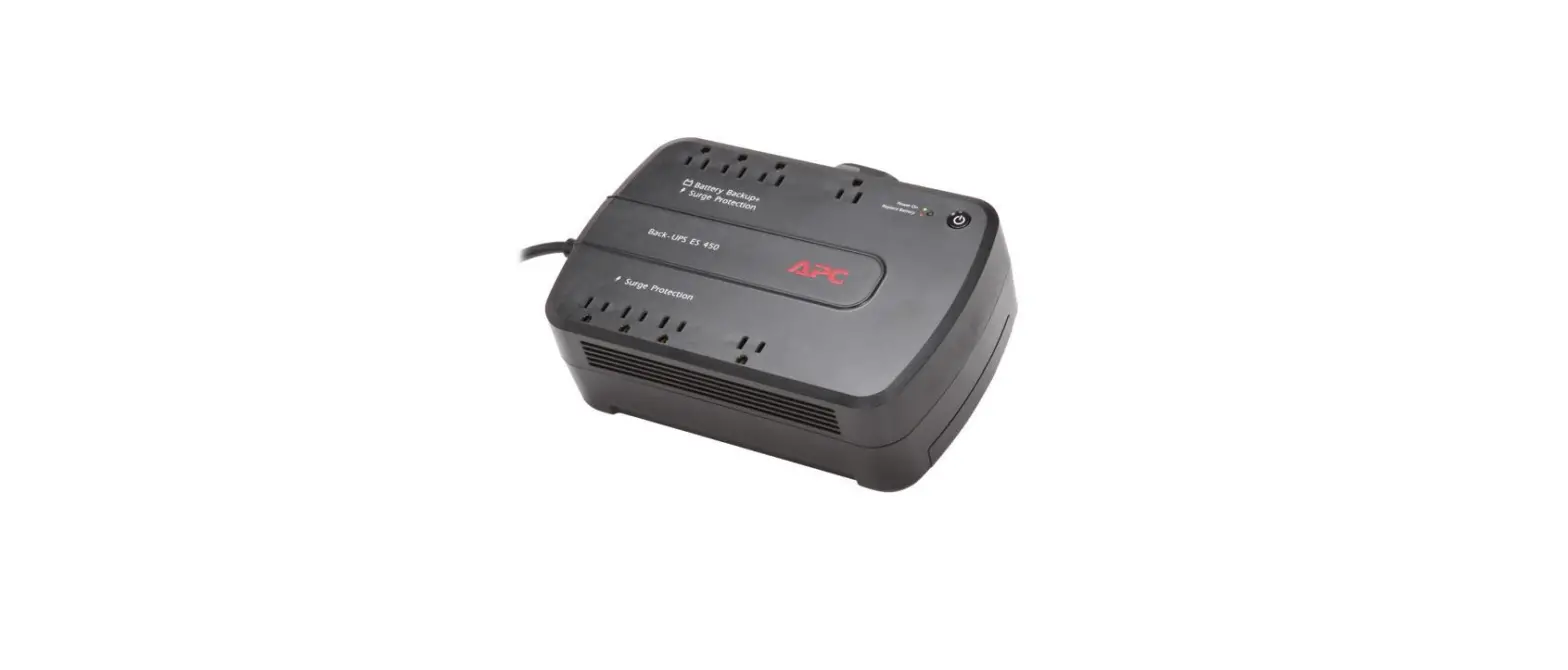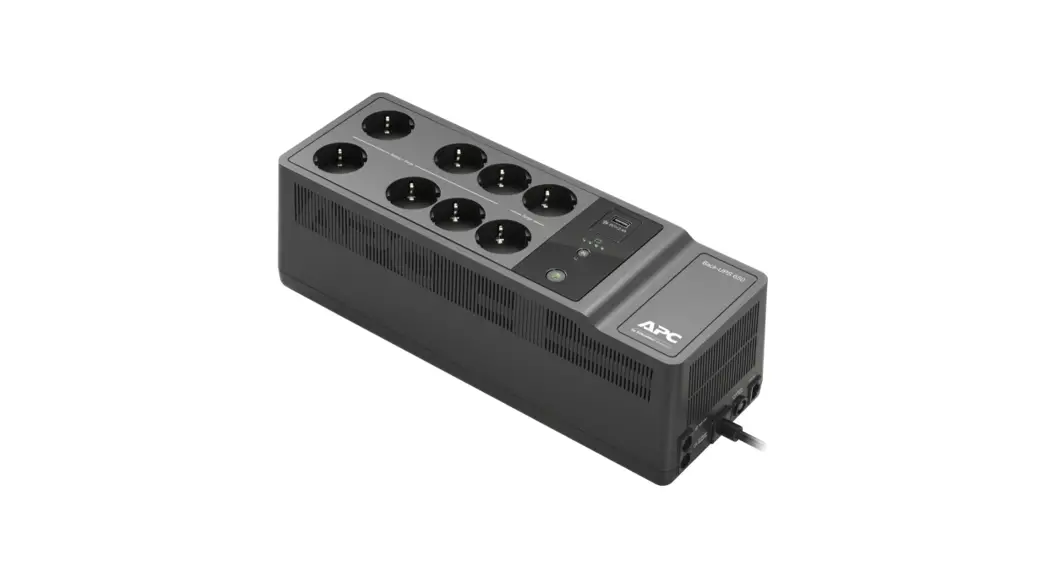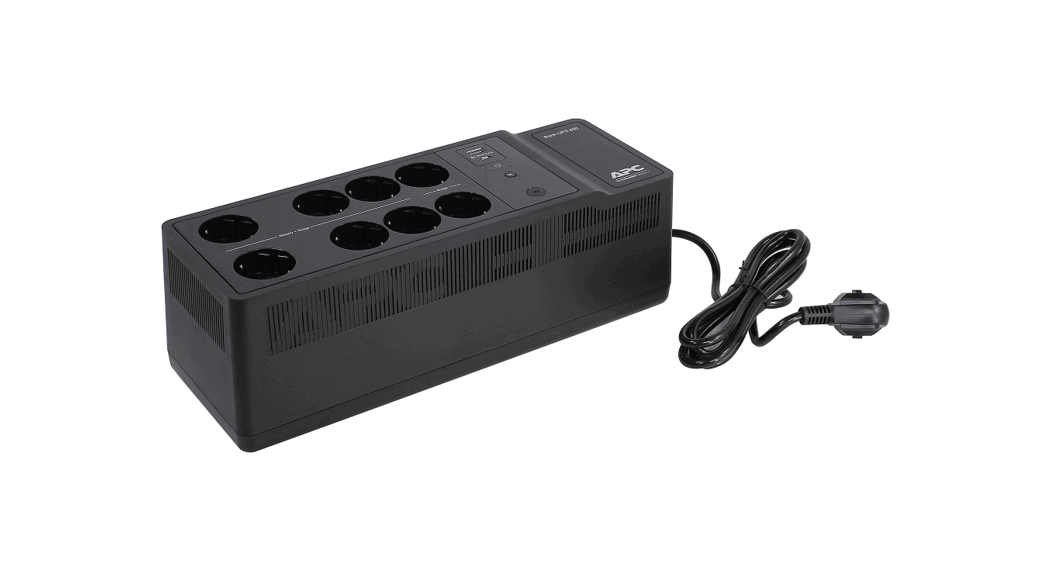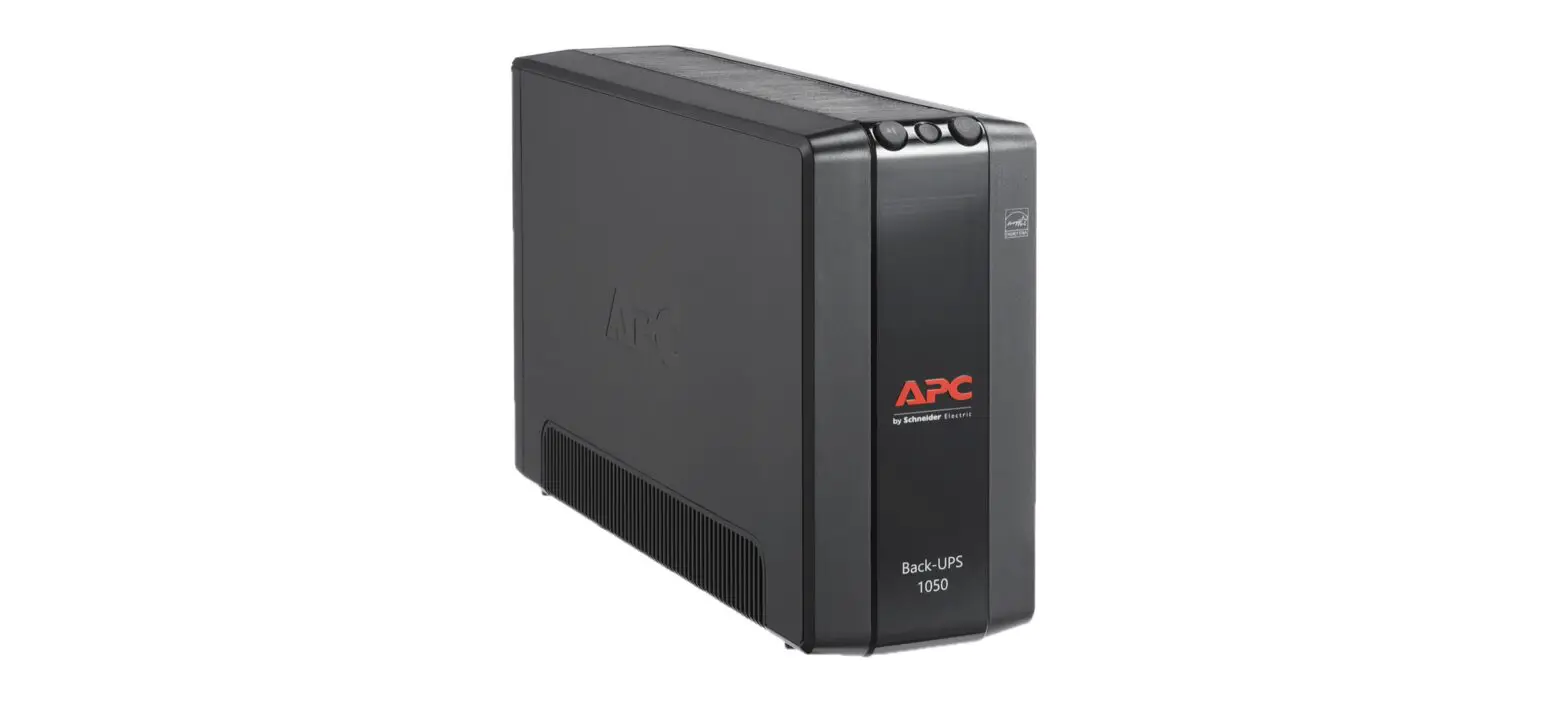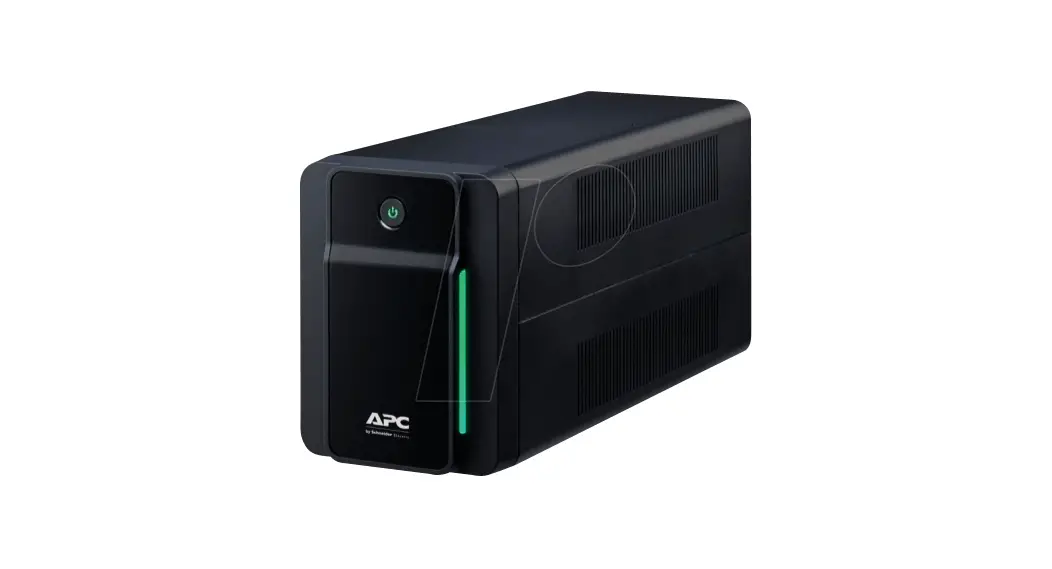
 APC BE425M/425M-LM Back-UPS User Manual
 APC BE425M/425M-LM Back-UPS User Manual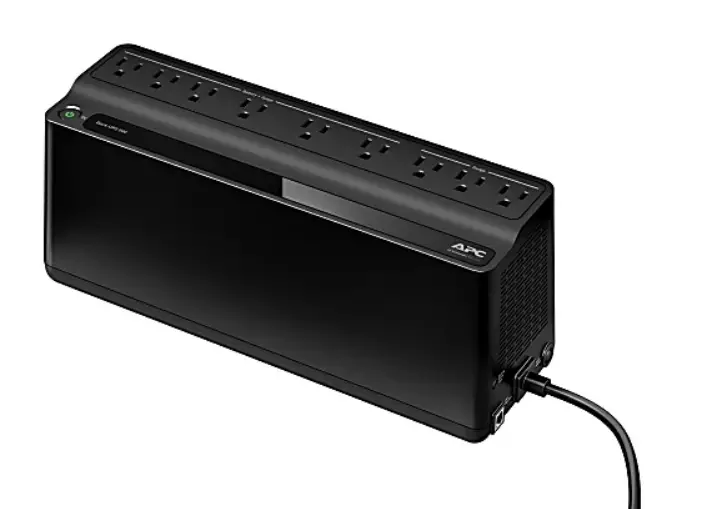
Safety and General Information
Inspect the package contents upon receipt. Notify the carrier and dealer if there is any damage.
SAVE THESE INSTRUCTIONS – This section contains important instructions that should be followed during the installation and maintenance of the UPS and batteries.
DANGER
- This up is intended for indoor use only.
- Do not operate this UPS in direct sunlight, in contact with fluids, or where there is excessive dust or humidity.
- Connect the UPS power cable directly to a wall outlet.
- Be sure the air vents on the UPS are not blocked. Allow adequate space for proper ventilation.
- Failure to follow these instructions will result in death or serious injury.
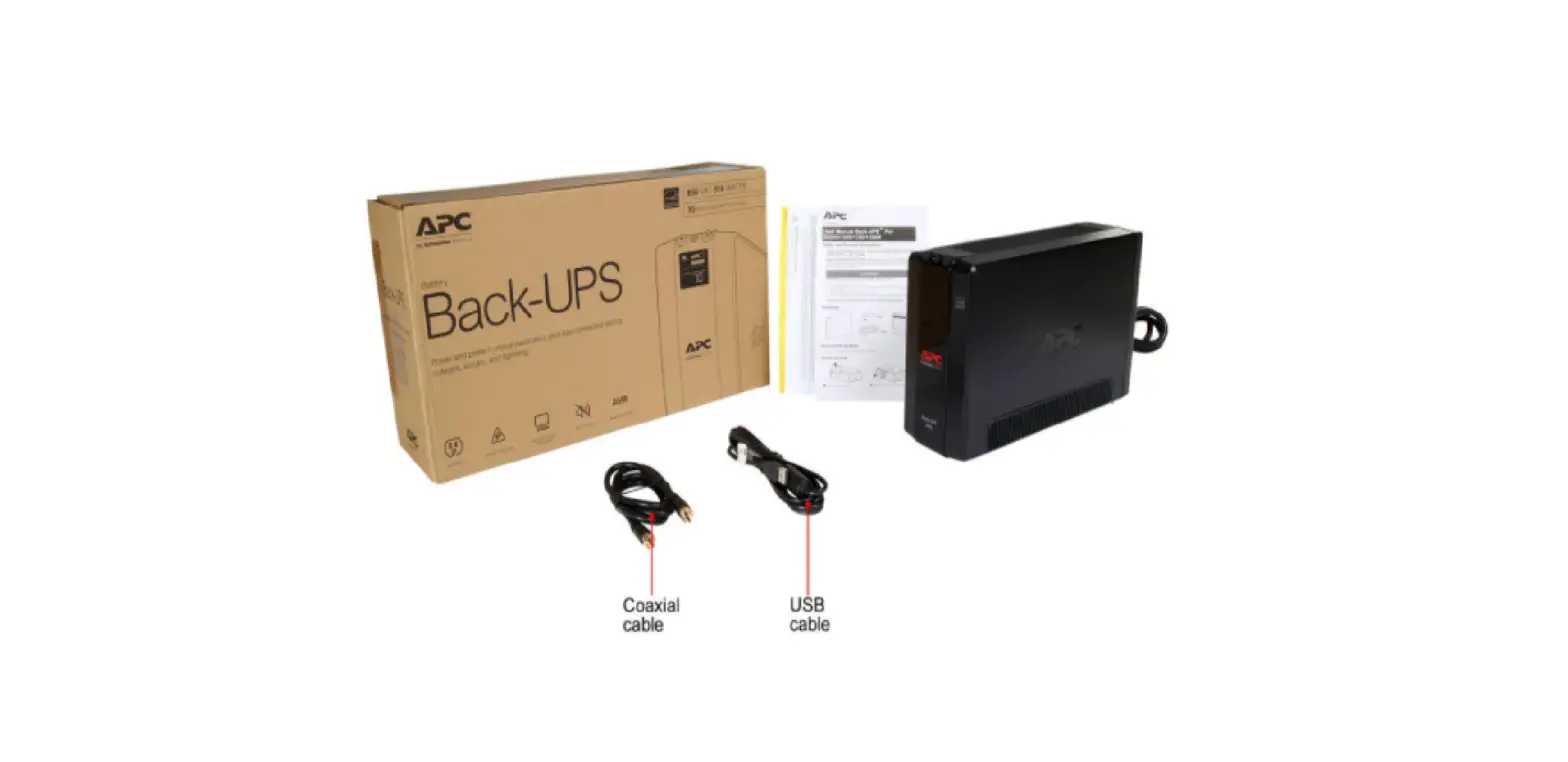
Inventory
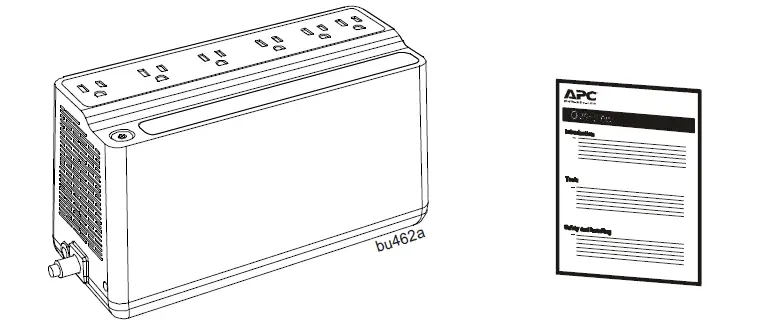
Connect the Battery
The Back-UPS is shipped with one battery cable disconnected. 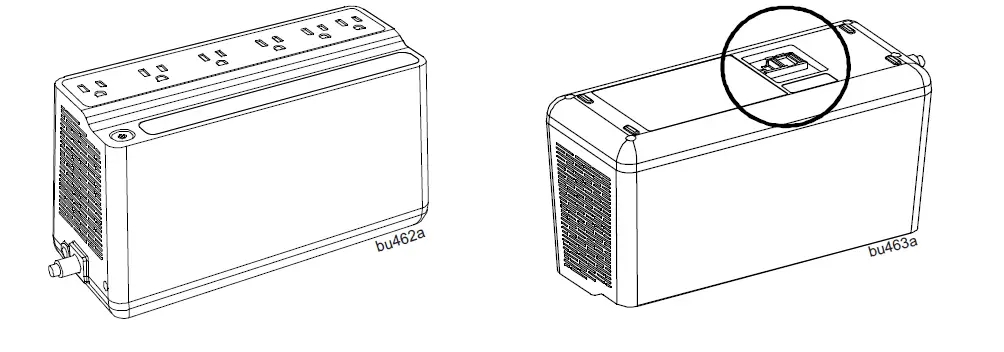
- Remove the “Stop! Connect the Battery” label that covers the outlets.
- The battery connector is located on the underside of the unit.
- Slide the battery connector handle away from its disconnected position.
- Turn the battery connector to a 90-degree upright position and push it into the unit.
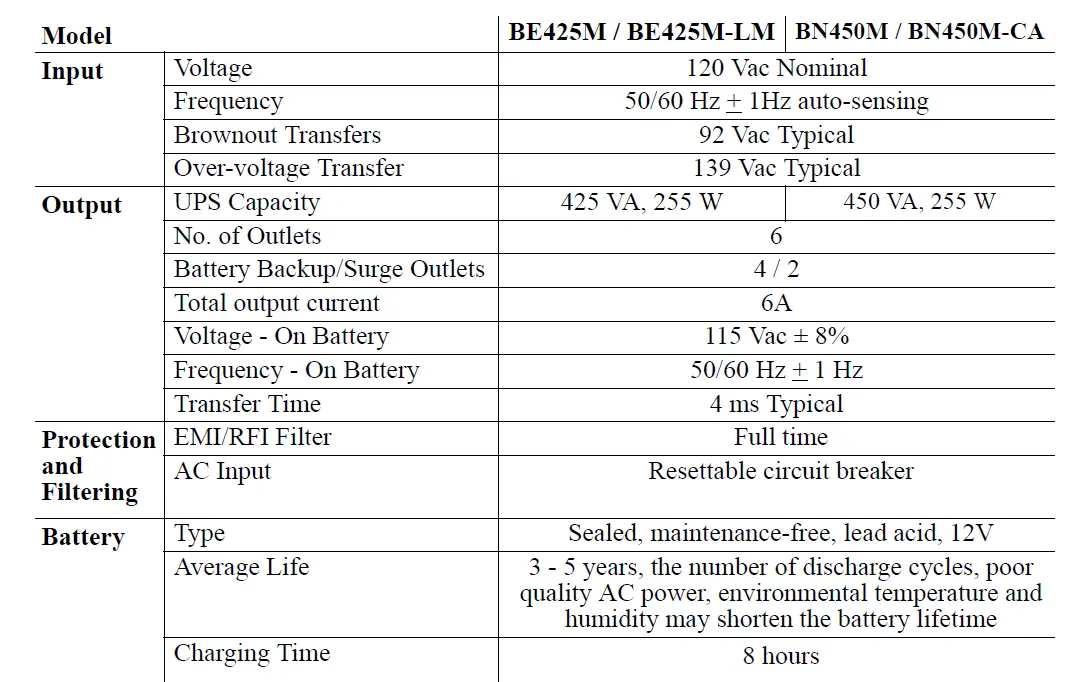
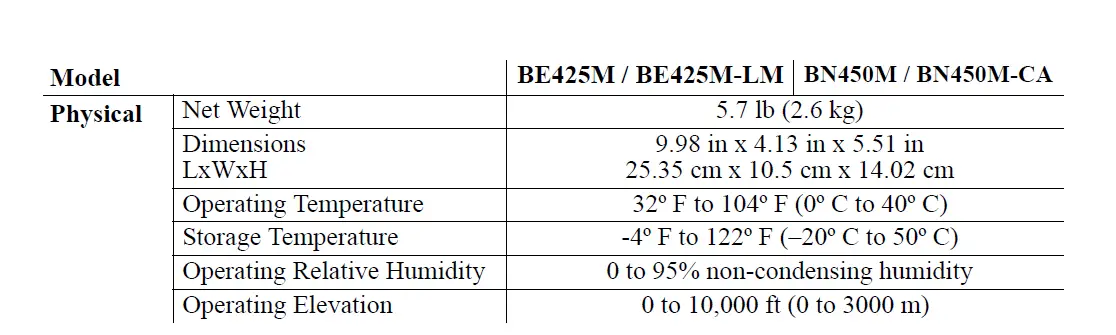
Specifications

Connect Equipment
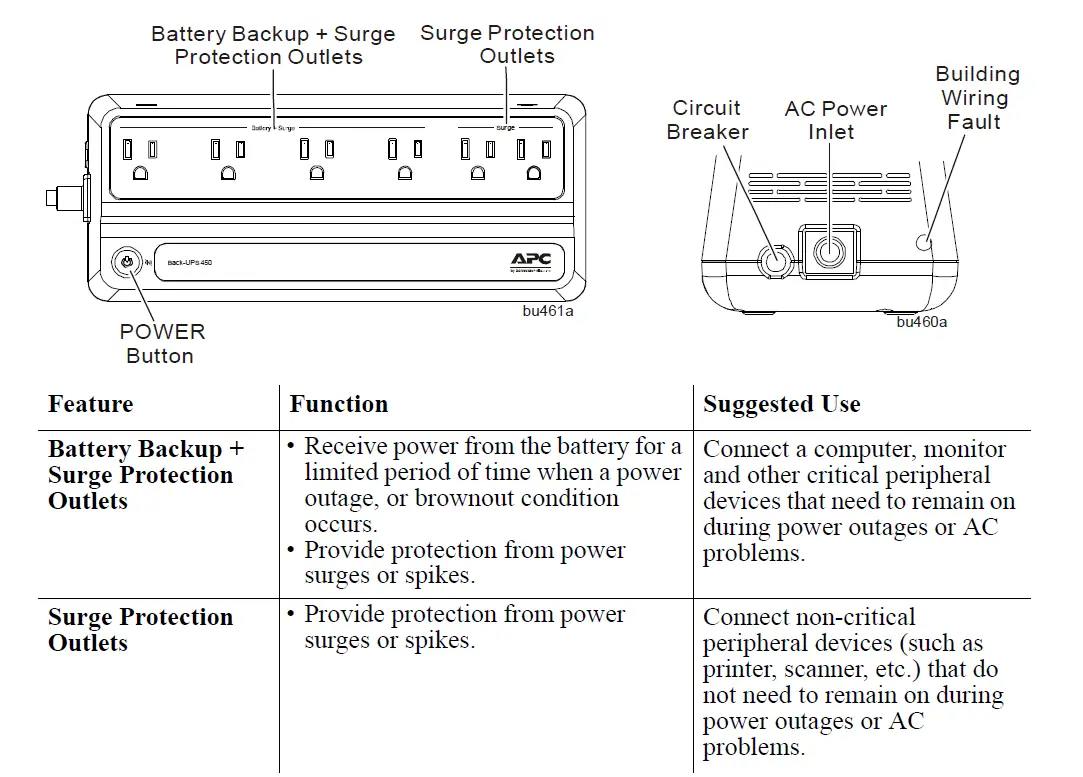
Turn On the Back-UPS
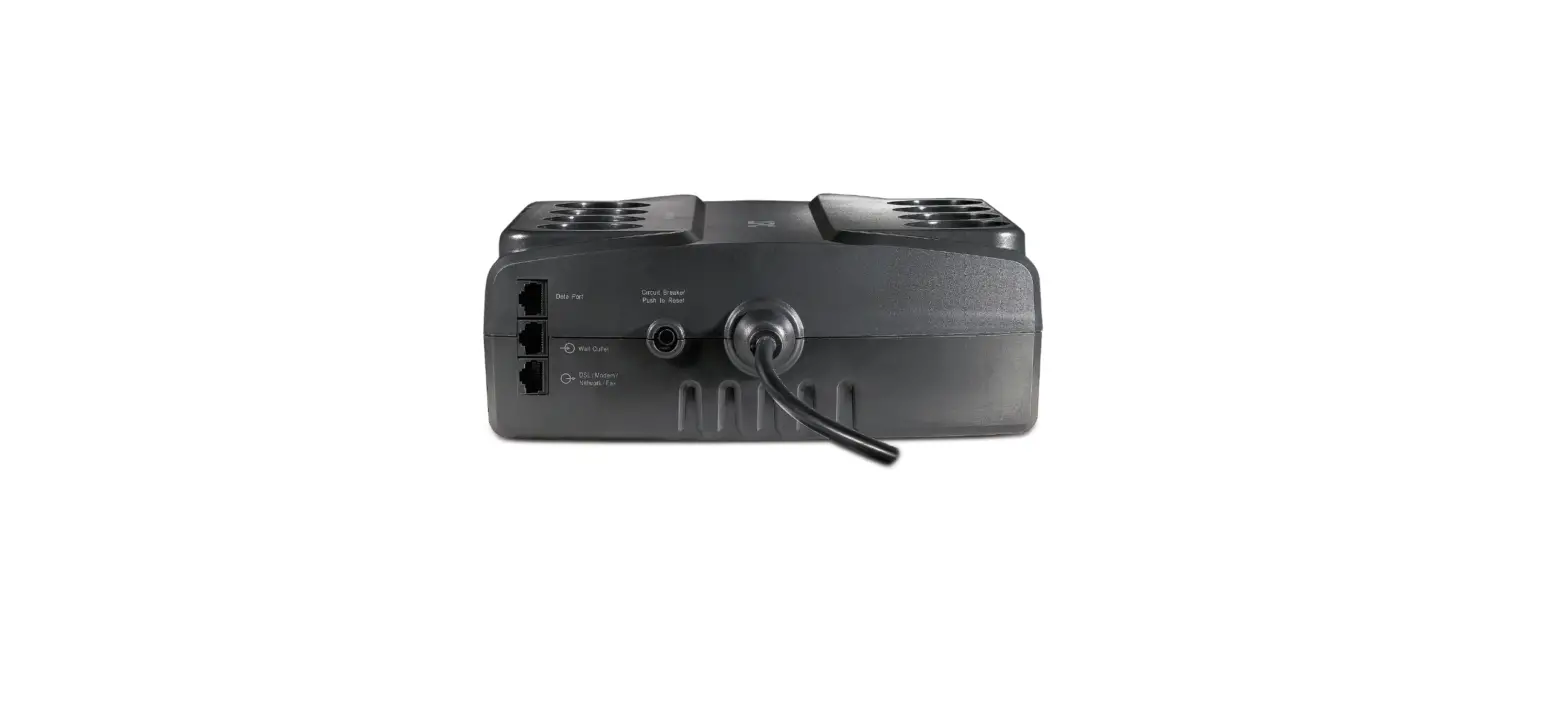
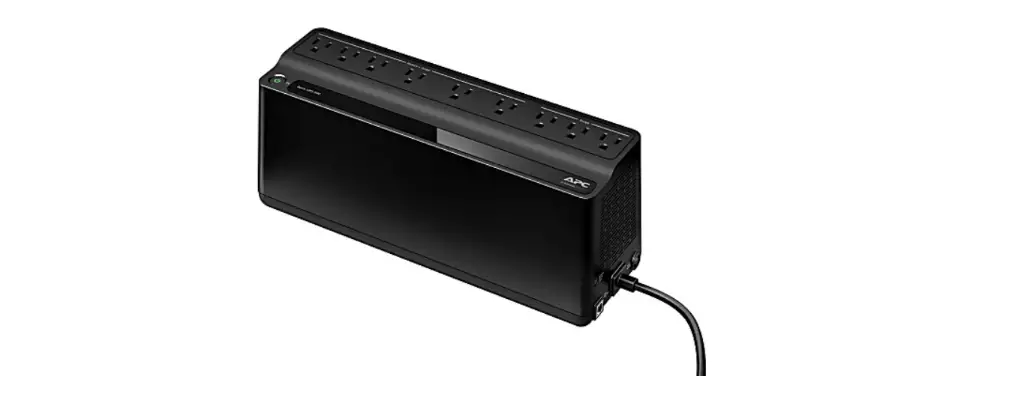
Press the POWER button. It will illuminate green and a single short beep indicating that the Back-UPS is on and providing protection for connected equipment. The Back-UPS battery will charge regardless of whether the Back-UPS is switched on or off as long as it is connected to AC power. The UPS will have full runtime capability after the initial 24-hour charging period, connected to AC power. If the red Building Wiring Fault indicator (located on the end near the power cord) is lit, your building wiring may present a shock hazard that should be corrected by a qualified electrician.
Turn Off the Back-UPS
Press the POWER button for at least 2 seconds. At the first beep, release the button and the UPS will turn off. A 2-second delay has been added to mitigate unintentional contact with the POWER button.
Quick Mute
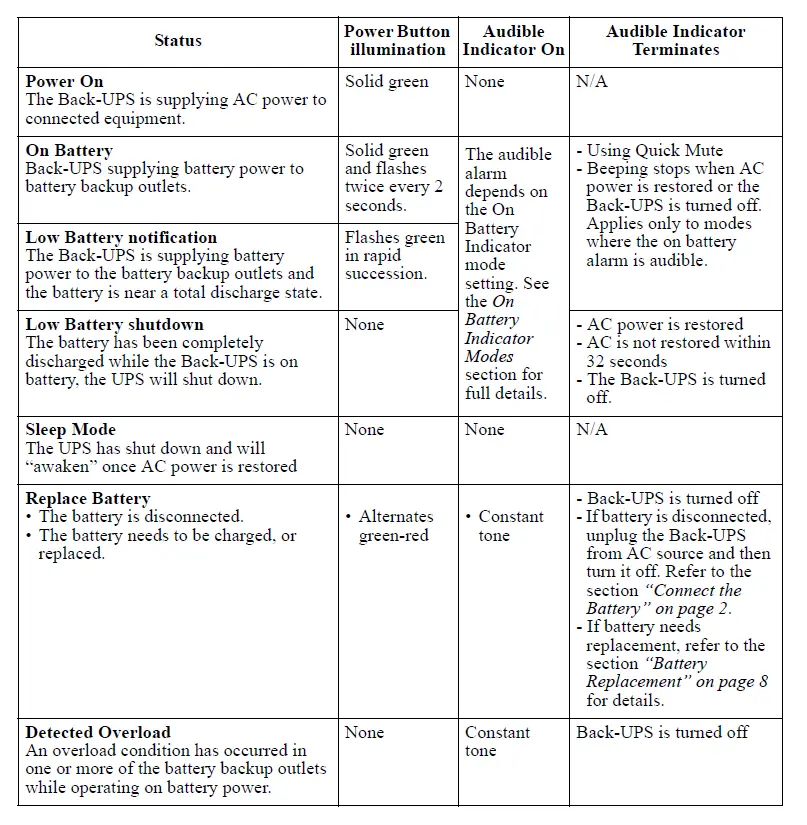
The Back-UPS is able to temporarily mute user-correctable alarms such as On Battery. During such alarms, a short press (less than 2 seconds) of the POWER button will temporarily mute the alarm until the condition has been reset. A short double beep will confirm that Quick Mute has been activated. Pressing the POWER button for more than 2 seconds will turn off the UPS. Other critical events such as Battery replacement and Charger notifications can not be temporarily muted. The unit in these cases must be turned off.
On Battery Indicator Modes
With the UPS turned on, configuring the On Battery Indicator modes below is done by holding down the POWER button and waiting for the third beep. At the third beep, the POWER button will cycle red/green. Release the POWER button and its color will indicate the mode the UPS is in. Press the POWER button to cycle through each mode. See the following table for the 3 mode selection colors. Once the mode has been selected, wait 5 seconds and the setting will be committed to the UPS.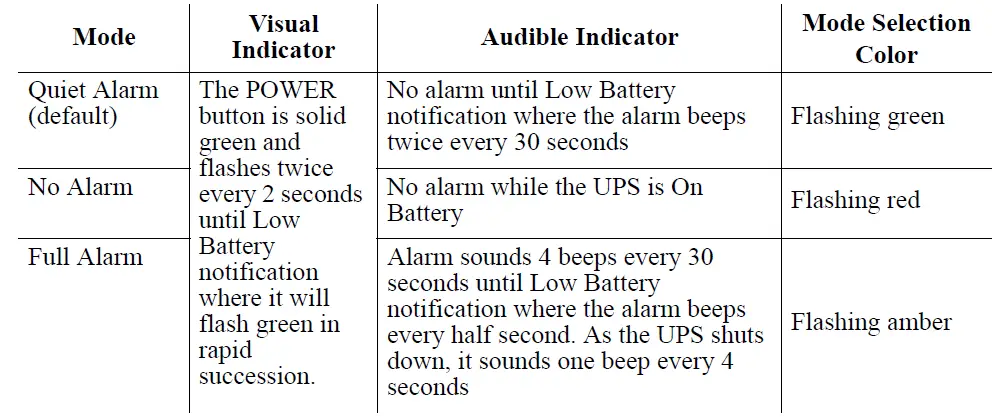
Voltage Sensitivity Adjustment (optional)
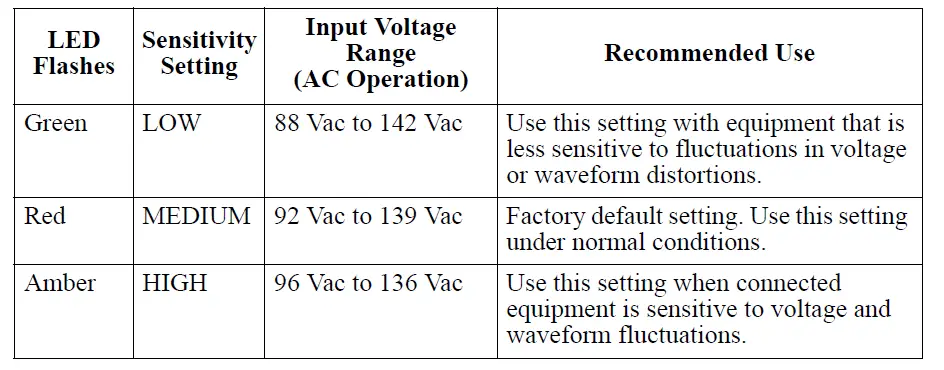
The Back-UPS detects and reacts to line voltage distortions by transferring to battery backup power to protect connected equipment. In situations where either the Back-UPS or the connected equipment is too sensitive for the input voltage level, it is necessary to adjust the transfer voltage.
- Turn off the UPS while connected to a wall outlet.
- Press and hold the ON/OFF button for 10 seconds. The POWER button will alternate green-red to indicate that the Back-UPS is in Program mode.
- The POWER button will flash either green, amber, or red to indicate the current sensitivity level. Refer to the table for an explanation of the transfer voltage sensitivity levels.
- To exit Program mode wait five seconds and all LED indicators will extinguish. The program mode is no longer active.

Status Indicators
Troubleshooting
Wall Mount Installation
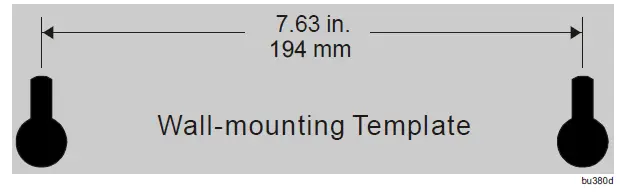
- For horizontal installation, use 2 screws 7.63” (194 mm) apart.
- Allow 5/16” (8 mm), of the screw to protrude from the wall.

Service
If the unit requires service, do not return it to the dealer. Follow these steps:
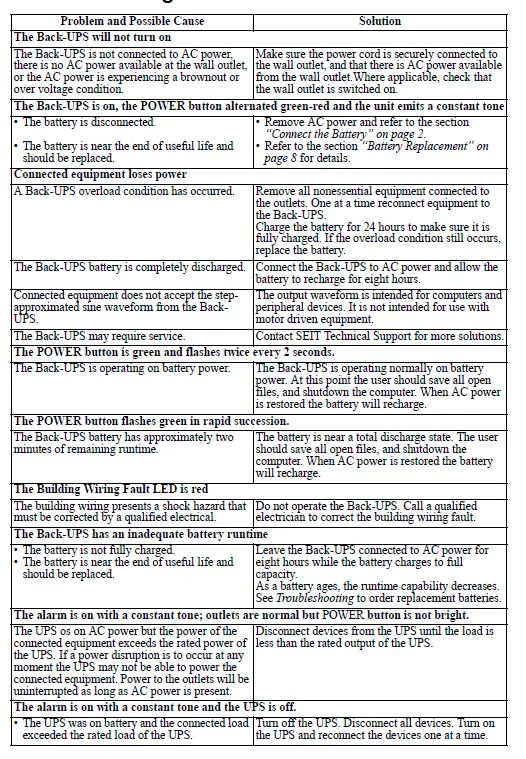
- Review the Troubleshooting section of the manual to eliminate common problems.
- If the problem persists, contact Schneider Electric IT (SEIT) Customer Support through the APC by Schneider Electric Web site, www.apc.com.
- Note the model number and serial number and date of purchase. The model and serial numbers are located on the rear panel of the unit and are available through the LCD display on select models.
- Call SEIT Customer Support and a technician will attempt to solve the problem over the phone. If this is not possible, the technician will issue a Returned Material Authorization Number (RMA#).
- If the unit is under warranty, the repairs are free.
- Service procedures and returns may vary internationally. Refer to the APC by Schneider Electric Web site for country-specific instructions.
- Pack the unit in the original packaging whenever possible to avoid damage in transit. Never use foam beads for packaging. Damage sustained in transit is not covered under warranty.
- Always DISCONNECT THE UPS BATTERIES before shipping. The United States Department of Transportation (DOT), and the International Air Transport Association (IATA) regulations require that UPS batteries be disconnected before shipping. The internal batteries may remain in the UPS.
- Write the RMA# provided by Customer Support on the outside of the package.
- Return the unit by the insured, pre-paid carrier to the address provided by Customer Support.
Battery Replacement
CAUTION
HAZARD OF EXPLOSION
- Do not dispose of the batteries in a fire. The batteries may explode.
- Do not open or mutilate the batteries. Release electrolytes may be toxic and it is harmful to the skin and eyes.
Failure to follow these instructions can result in injury.
The battery in the Back-UPS is not user-replaceable. Contact SEIT Technical Support for a list of authorized service centers near you.
Warranty
Register your product online.http://warranty.apc.com
The standard warranty is three (3) years from the date of purchase. Schneider Electric IT (SEIT) standard procedure is to replace the original unit with a factory-reconditioned unit. Customers who must have the original unit back due to the assignment of asset tags and set depreciation schedules must declare such a need at first contact with a SEIT Technical Support representative. SEIT will ship the replacement unit once the defective unit has been received by the repair department or cross-ship it upon the receipt of a valid credit card number. The customer pays for shipping the unit to SEIT. SEIT pays ground freight transportation costs to ship the replacement unit to the customer.
APC by Schneider Electric IT Customer Support Worldwide
- .For country-specific customer support, go to the APC by Schneider Electric Web site, www.apc.com.
EMC Compliance
This device complies with part 15 of the FCC rules. Operation is subject to the following two conditions: This device may not cause harmful interference, and This device must accept any interference received, including interference that may cause undesired operation.*1Select models are ENERGY STAR® qualified For more information.
Safety Information – SAVE THIS GUIDE
This Safety Guide contains important instructions that should be followed during the installation and maintenance of the APC by Schneider Electric equipment and batteries. It is intended for APC by Schneider Electric customers who set up, install, relocate, or maintain APC by Schneider Electric equipment. Read, understand, and follow ALL safety instructions contained in this manual. Failure to follow safety instructions and warnings could result in equipment damage, serious injury, or death. Changes and modifications to this unit not expressly approved by APC by Schneider Electric could void the warranty.
WARNING! Handling Safety
WARNING! Deenergize Safety
The UPS contains internal batteries and may present a shock hazard even when disconnected from the branch circuit (mains). Before installing or servicing the equipment verify the following:
- A mains circuit breaker is in the OFF position.
- Internal UPS batteries are removed.
- XLBP battery modules are disconnected.
WARNING! Electrical Safety
- Adhere to all national and local electrical codes.
- Do not work alone under hazardous conditions.
- This unit contains no user-serviceable parts. Some UPS models have user-replaceable internal batteries.
- To avoid personal injury due to energy hazards, remove wristwatches and jewelry such as rings when replacing the batteries.
- Use tools with insulated handles.
- High current through conductive materials could cause severe burns.
- Do not handle any metallic connector before the power has been disconnected.
- Check that the power cord(s), plug(s), and receptacles are in good condition.
- If the ground cannot be verified, disconnect the equipment from the utility power outlet before installing or connecting to other equipment. Reconnect the power cord only after all connections are made.
- The protective earth conductor for the UPS carries the leakage current from the load devices (computer equipment). An insulated ground conductor must be installed as part of the branch circuit that supplies the UPS. The conductor must have the same size and insulation material as the grounded and ungrounded branch circuit supply conductors. The conductor will be green, with or without a yellow stripe.
- The ground conductor must be grounded to earth at the service equipment, or if supplied by a separately derived system, at the supply transformer or motor generator set.
- Connect the equipment to a three-wire utility outlet (two poles plus ground). The receptacle must be connected to the appropriate branch circuit/mains protection (fuse or circuit breaker). Connection to any other type of receptacle may result in risk of electrical shock.
- Leakage current for a pluggable Type A UPS may exceed 3.5 mA when a separate ground terminal is used.
WARNING! Battery Safety
- This equipment contains potentially hazardous voltages. Do not attempt to disassemble the unit. The only exception is for a UPS containing user-replaceable batteries. Refer to the battery replacement procedures detailed in the user manual.
- Do not dispose of batteries in a fire. The batteries may explode.
- Do not open or mutilate batteries. They contain an electrolyte that is toxic and harmful to the skin and eyes.
- Replace batteries with the same number and type of batteries as originally installed in the equipment.
- are owned by Schneider Electric Industries S.A.S., or their affiliated companies. All other trademarks are the property of their respective owners.
THIS POLICY IS NOT A WARRANTY. REFER TO THE LIMITED WARRANTY FOR INFORMATION CONCERNING THE WARRANTY FOR YOUR APC PRODUCT. THE LIMITATIONS AND CONDITIONS IN THIS POLICY DO NOT AFFECT THE TERMS OF THE WARRANTY.
“Equipment Protection Policy”
’In the 50 US States, Canada, and Bermuda for 120 Volt Products’
If your electronic equipment is damaged by power line transients on an AC power line (120 volts), while directly and properly connected to a standard Schneider Electric IT Corporation (SEIT), the 120-volt product covered by the Equipment Protection Policy (“connected equipment”), and if all of the remaining conditions specified below are met, SEIT will, at sole option of SEIT, during the period specified below, replace the SEITproduct and either (a) pay for the repair of the equipment or (b) reimburse you for the fair market value, as determined by the then current price list of the Orion Blue Book (or equivalent), of the connected equipment, in an amount not to exceed the dollar limits stated below, if SEIT determines that the damage was caused by the failure of the SEIT product to protect against power line transients,(telephone line, network, or CATV transients, if applicable). Power line transients that APC products have been designed to protect against, as recognized by industry standards, include spikes and surges on AC power lines (not designed as protection against swells as defined by IEEE 1100-1992). Protection from telephone line transients applies only to SEIT products that offer telephone line protection, and in cases in which such protection is available, telephone service equipment must include a properly installed and operating “primary protection” device at the service entrance (such devices are normally added during telephone installation) in order to be covered for telephone line transients. Protection of CATV (Cable Television) connected equipment from transients applies only to SEIT products that offer such protection, and in such cases, the CATV service must be properly grounded according to the codes set forth in the National Electric Code (NEC) in order to be covered for CATV transients. Protection from network line transients applies only to SEIT products that offer network line protection.
This SEIT policy applies to SEIT ProtectNet products if the power line to the equipment it is protecting is using only SEIT products, with an applicable Equipment Protection Policy, to protect against power line transients. The coverage of ProtectNet product will then be covered under the SEIT power protection product Equipment Protection Policy. This policy does not apply to SEIT ProtectNet products if used individually without SEIT AC power protection products. SEIT reserves the right to determine whether the damage to the connected equipment is due to SEIT product failure by requesting that damaged equipment be sent to SEIT for inspection. This policy is in excess of, and applies only to the extent necessary beyond any coverage for the connected equipment provided by other sources, including, but not limited to, any manufacturer’s warranty, and any extended warranty coverage.
Equipment Protection Policy Dollar Limits
For customers that meet the qualifications and conditions set forth in this policy, SEIT will provide reimbursement (cost of repair or fair market value) up to the dollar amount listed at http://www.apcc.com/support/service/equipment_protection_ policy. com. You can also call 1-800-800-4APC or fax us at 1-401-788-2743 to request this information. Eligibility for coverage under the Equipment Protection Policy:
- You must register the product by returning to SEIT the warranty card provided with the product within 10 days of purchase. All information must be filled in, and you should retain a copy for your records. The warranty card must clearly identify the types of electronic equipment that will be plugged into the APC product for which protection under this policy is claimed. All connected equipment must be UL or CSA-approved.
- The SEIT product must be plugged into properly wired and grounded outlets; no extension cords, adapters, other ground wires, or electrical connections may be used, with the sole exception of another standard SEIT 120-volt product. The installation must not include power protection products made by any manufacturer other than SEIT. The installation must comply with all applicable electrical and safety codes set forth pursuant to the National Electrical Code (NEC).
- Any claim under the Equipment Protection Policy must be made within 10 days of the date of alleged damage to the connected equipment.
- The Equipment Protection Policy covers only standard SEIT 120-volt products used in the 50 US states, Canada, and Bermuda.
What is not covered under the Product Policy:
- Restoration of lost data and reinstallation of software are not covered.
- This policy does not cover damage from a cause other than AC power line transients, except for damage due to the telephone line, network, or CATV transients, which is covered only if the SEIT product offers such protection.In addition, the following are expressly excluded from coverage:
- Damage caused by failure to provide a suitable installation environment for the product (including, but not limited to, lack of a good electrical ground).
- Damage caused by the use of the SEIT product for purposes other than those for which it was designed.
- Damage caused by accidents, or disasters such as fire, flood, or wind.
- Damage caused by abuse, misuse, alteration, modification, or negligence.
- This policy is null and void if, in view of SEIT, the SEIT product has been tampered with or altered in any way.
- EXCEPT AS EXPRESSLY PROVIDED IN THIS POLICY, IN NO CASE SHALL APC BE LIABLE UNDER THE TERMS OF THIS POLICY FOR ANY DAMAGES WHATSOEVER, INCLUDING, BUT NOT LIMITED TO, DIRECT, INDIRECT, SPECIAL, INCIDENTAL, CONSEQUENTIAL, OR MULTIPLE DAMAGES ARISING OUT OF THE USE OF THE APC PRODUCT OR DAMAGE TO THE CONNECTED EQUIPMENT, REGARDLESS OF THE LEGAL THEORY ON WHICH SUCH CLAIM IS BASED, EVEN IF ADVISED OF THE POSSIBILITY OF SUCH DAMAGE. SUCH DAMAGES INCLUDE, BUT ARE NOT LIMITED TO, LOSS OF PROFITS, LOSS OF SAVINGS OR REVENUE, LOSS OF USE OF THE APC PRODUCT OR THE CONNECTED EQUIPMENT OR ANY ASSOCIATED EQUIPMENT, LOSS OF SOFTWARE, COST OF CAPITAL, COST OF ANY SUBSTITUTE EQUIPMENT, FACILITIES OR SERVICES, LABOR, DOWNTIME, THE CLAIMS OF THIRD PARTIES, INCLUDING CUSTOMERS, AND INJURY TO PROPERTY.
Submitting an Equipment Protection Policy Claim:
- If all of the conditions for coverage are satisfied, call the SEIT customer service department at (800) 800-4APC and obtain an EPP RMA (Equipment Protection Policy Returned Material Authorization) number. SEIT will forward to you an Equipment Protection Policy claim form, which must be completed and filed within 30 days.
- Mark the Equipment Protection Policy RMA number on the SEIT product you are returning.
- Pack the product in its original packaging (or request packing materials from SEIT if the packaging has been discarded). Mark the EPP RMA number clearly on the outside of box.
- Ship the product (one-way shipping charges paid by you) with the completed Equipment Protection Policy claim form as described in the instruction document.
- SEIT will evaluate the product to determine its level of functionality and will examine the product for evidence of damage from AC power line transients (telephone line, network and CATV transients, if applicable). (A) If the SEIT evaluation provides no evidence of damage from power line transients (telephone line, network or CATV transients, if applicable), SEIT will send to the customer (I) a report summarizing the tests performed and (ii) a rejection of claim notice. (B) If the SEIT product shows evidence of damage from power line transients (telephone line, network or CATV transients, if applicable), SEIT will request that all connected equipment for which an Equipment Protection Policy claim has been submitted, be sent for evaluation to either SEIT or an authorized service center. If it is determined that the connected equipment has been damaged from AC power line transients (telephone line, network or CATV transients, if applicable), SEIT will, at its discretion, either authorize you to have the equipment repaired or reimburse you for the fair market value of the damaged equipment, up to the dollar limits stated above. Please save the damaged connected equipment or all damaged parts.
- If you are authorized by SEIT to have the connected equipment repaired, the repair must be performed at a service center that is authorized by the manufacturer of the connected equipment. SEIT reserves the right to contact the authorized service center directly to discuss repair costs and repair diagnosis, and damage to the connected equipment to determine if it was caused by AC power line transients (telephone line, network or CATV transients, if applicable) and the right to request that the service center forward the connected equipment or components of the connected equipment to SEIT for inspection.
- SEIT will, after determining that the damage was caused by the failure of the SEIT product to protect against AC power line transients (telephone line, network or CATV transients, if applicable), issue payment to you, in its sole discretion, for either costs of repair or the fair market value of the connected equipment, up to the dollar limits stated above. SEIT reserves the right to require you to transfer title and deliver the connected equipment to SEIT if it chooses to reimburse you for the fair market value of the connected equipment.
- Unless modified in a writing signed by SEIT and you, the terms of this policy are understood to be the complete and exclusive agreement between the parties, superseding all prior agreements, oral and written, and all other communications between the parties relating to the subject matter of this agreement. No employee of SEIT or any other party is authorized to make any representations beyond those made in this agreement concerning the Equipment Protection Policy.
Data Recovery Policy
If data is lost from the hard drive in the protected computer due to a malfunction of a properly connected SEIT product, SEIT will, at its sole discretion, provide data recovery services from Ontrack® data recovery labs. This warranty will be offered to customers to the extent commercially reasonable, as determined by SEIT at its sole discretion. Ontrack will make every commercially reasonable effort to retrieve customer data, however, due to the nature of data loss, recovery is not guaranteed. The data recovery warranty is available on all SEIT products mentioned in the chart that follows with the exception of SEIT Basic and Personal SurgeArrest™ models. Data recovery is limited to physical hard drives within protected computing equipment. Expressly excluded from this warranty are any type of external storage devices. SEIT reserves the right to determine whether the damage to the connected equipment is due to SEIT product failure by requesting that damaged equipment be sent to SEIT for inspection. This policy is in excess of, and applies only to the extent necessary beyond, any coverage for the connected equipment provided by other sources, including, but not limited to, any manufacturer’s warranty, extended warranty coverage and homeowner’s insurance 2013 APC by Schneider Electric. APC, the APC logo, are owned by Sch- neider Electric Industries S.A.S. All other trademarks are property of their respective owners.
Note: The Data Recovery Policy does not apply to all products.