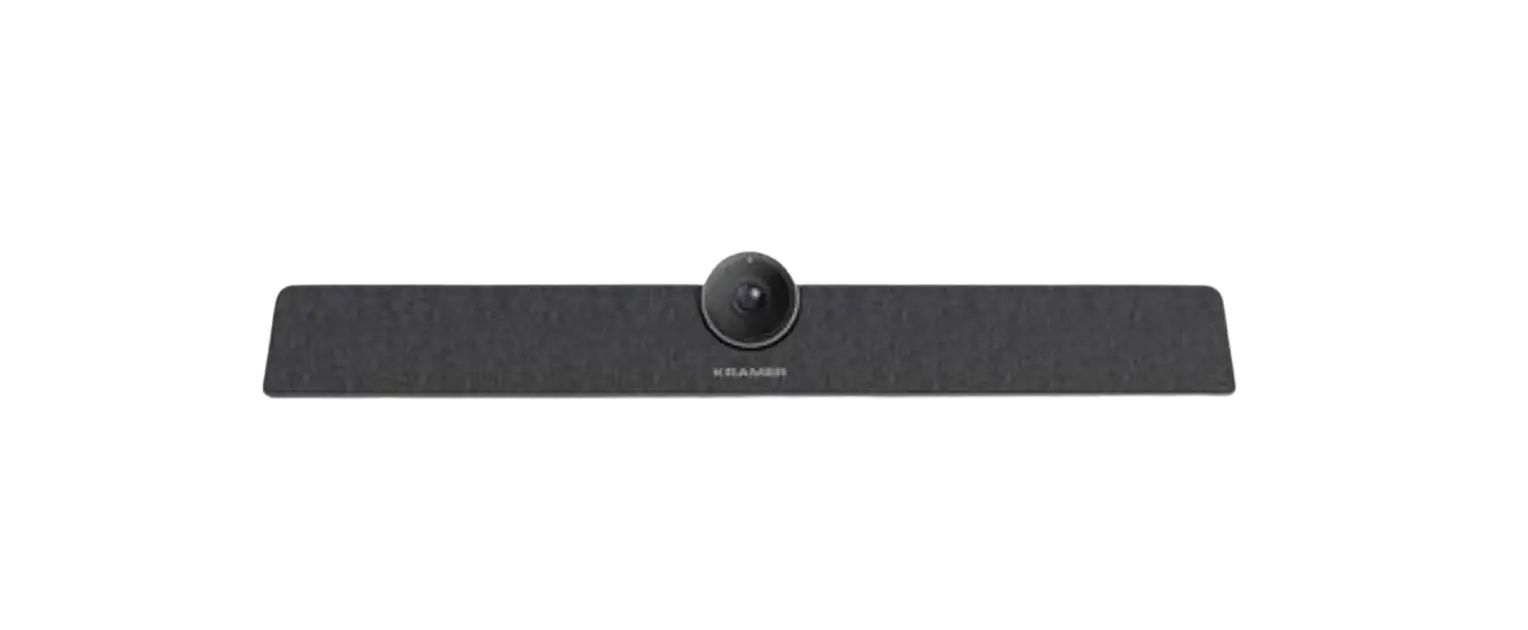
KRAMER K-Bar Communication Bar User Guide
SAFETY WARNING
Disconnect the unit from the power supply before opening and servicing
For the latest information on our products and a list of Kramer distributors, visit our Web site where updates to these installation instructions may be found. We welcome your questions, comments, and feedback.
Website: http://www.kramerav.com/
Email: [email protected]
K-Bar Communication Bar
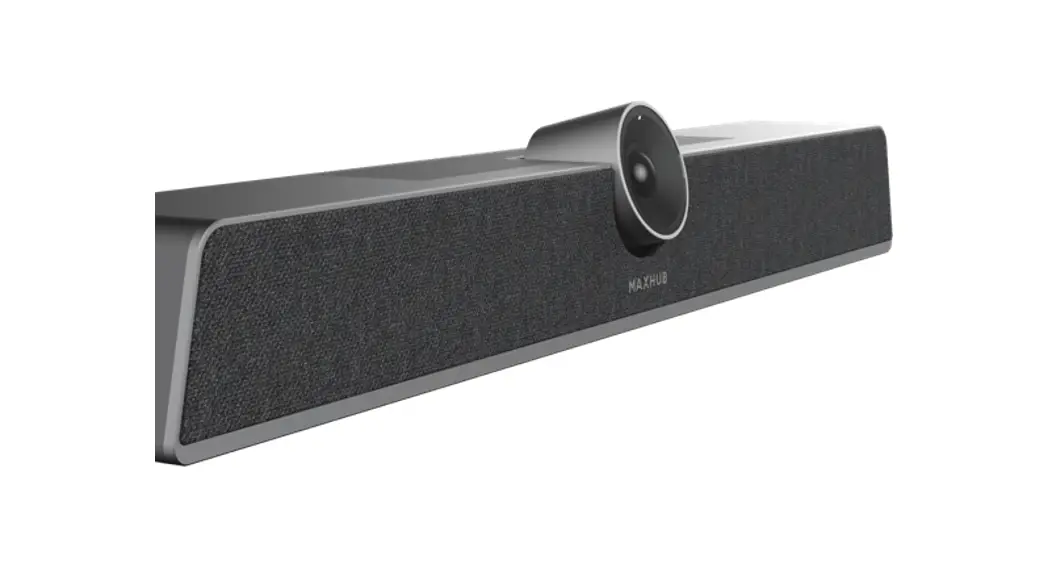
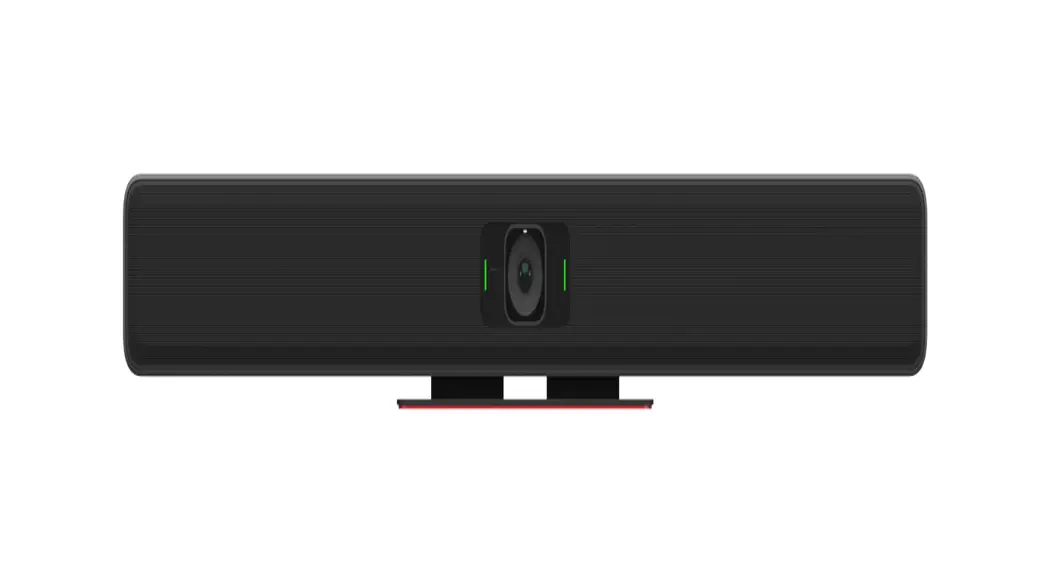
Congratulations on purchasing your Kramer K-Bar Communication Bar. K-Bar \provides a 3 in 1 compact design, including a camera, a speaker, and a microphone. Control K-Bar via the IR remote controller.
Get to know your K-Bar
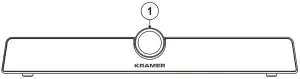
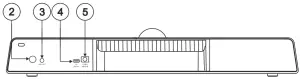
| # | Feature | Function |
| 1 | Camera | High quality Camera. |
| 2 | On/OFF Push Button | Press to toggle microphone on/off. |
| 3 | AUX OUT 3.5mm Mini Jack | Connect to an audio acceptor. |
| 4 | DEVICE USB-C 2.0 Port | Connect to a computer. |
| 5 | 12V, 2A Input | Connect to the power adapter. |
Mounting K-Bar
You can place your K-Bar on a surface, mount it on the wall or on top of the display (using the special TV mount, purchased separately).
- Ensure that the environment (e.g., dust, maximum ambient temperature, humidity & air flow) is compatible for the device.
- Avoid exposing the product to direct sunlight or any other heat source.
- Keep away from children – product includes small accessories and components.
- Avoid uneven mechanical loading.
- Do not insert any sharp objects into the product.
- Avoid dropping or hitting the product to avoid damaging the product.
- For maintenance, call tech support.
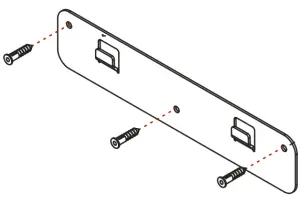
To attach K-Bar onto a wall:
- Find the correct location on the wall.
- In the desired location, Drill 3 holes (using a 6mm drill-bit).
- Attach the wall bracket to the wall using the 3 supplied screws

- Attach the device bracket to the K-Bar using smaller size screw

- Slide the fixed device bracket onto the wall bracket.

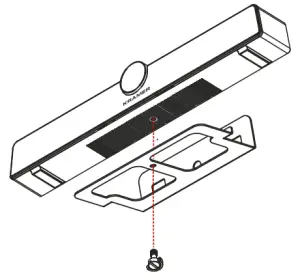
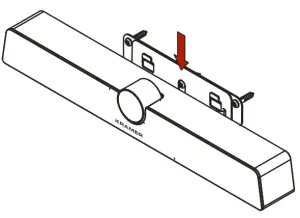
Connecting the K-Bar
Always switch OFF the power on each device before connecting it to your K-Bar.
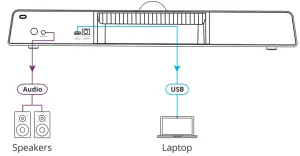
Connect the power cord to the K-Bar and plug it into the mains electricity.
Safety Instructions (See www.kramerav.com for updated safety information)
 Caution:
- There are no operator serviceable parts inside the unit.
Warning
- Use only the power cord that is supplied with the unit.
- Disconnect the power and unplug the unit from the wall before installing.
- Do not open the unit. High voltages can cause electrical shock! Servicing by qualified personnel only.
- To ensure continuous risk protection, replace fuses only according to the rating specified on the product label which located on the bottom of the unit.
Controlling K-Bar
You can operate K-Bar via the remote IR, or via your PC, as follows:
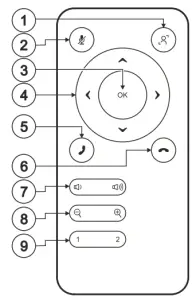
| # | Feature | Function | |
| 1 | Auto framing | Press to enable/disable auto-framing feature. | |
| 2 | Mute Button | Press to turn Mic on or off. | |
| 3 | Arrows Button | Press, after zooming, to move the camera direction. | |
| 4 | OK | Button | Press to restore camera image to original settings. |
| 5 | Start Call Button | Press to start a Microsoft Teams® call. | |
| 6 | End Call Button | Press to end a Microsoft Teams® call. | |
| 7 | Volume Button | Press to increase/decrease volume level. | |
| 8 | Zoom Button | Press zoom camera in or out. | |
| 9 | Presets Button | Press and hold a number (1 or 2) to save the current view settings (including zoom level and viewing angle information). Available only when camera is on, and auto- framing is disabled. | |
| / | / | / | / |
Technical Specifications
| Ports | 1 USB-C 2.0 | On a USB-C connector |
| AUX OUT | On a 3.5mm mini jack | |
| Camera | Pixel | 12M |
| Max. Field of View (FOV) | 120° (D) | |
| Adjustable Angle (Manual) | ±15° (Up/Down) | |
| Focus Mode | Fixed focus | |
| Focus Distance | 2m | |
| Resolution and Frame Rate | H.264/MJPG: 3840×2160; 2560×1440; 1920×1080; 1280×720; 1024×576; 960×540; 800×600; 640×480; 640×360; 480×270; 352×288; 320×240 | |
| YUY2: 640×480; 640×360; 480×270; 352×288; 320×240 | ||
| Output Format | MJPG/YUY2/H.264 | |
| Sound Reinforcement | Sound Channel 1.0 | Sound Channel 1.0 |
| Output Power 1x8W | Output Power 1x8W | |
| Microphone | Quantity | 6 |
| Voice Pickup Distance | Up to 8 meters | |
| Controls | Remote control | |
| Power | Consumption | 12V DC, 1A max. |
| Source | 12V DC, 2A | |
| Standby Power | ≤0.5W | |
| Environmental Conditions | Operating Temperature | 0° to +40°C (32° to 104°F) |
| Storage Temperature | -20° to +60°C (-4° to 140°F) | |
| Humidity | 10% to 90%, RHL non-condensing | |
| Altitude | Below 5000 meters | |
| Regulatory Compliance | Safety | CE, FCC |
| Environmental | RoHs WEEE | |
| Enclosure | Type | Aluminum and plastic |
| General | Net Dimensions (W, D, H) | 46cm x 9.7cm x 7.3cm (18.1″ x 3.8″ x 2.9″) |
| Shipping Dimensions (W, D, H) | 53cm x 16.5cm x 15.7cm (20.8″ x 6.5″ x 6.2″) | |
| Net Weight | 1.05kg (2.3lbs) approx. | |
| Shipping Weight | 2.3kg (5.1lbs) approx. | |
| Accessories | Included | 1 USB-C cable, remote control, power cord and adapter, lens cover, wall bracket kit, screws set |
Specifications are subject to change without notice at www.kramerav.com