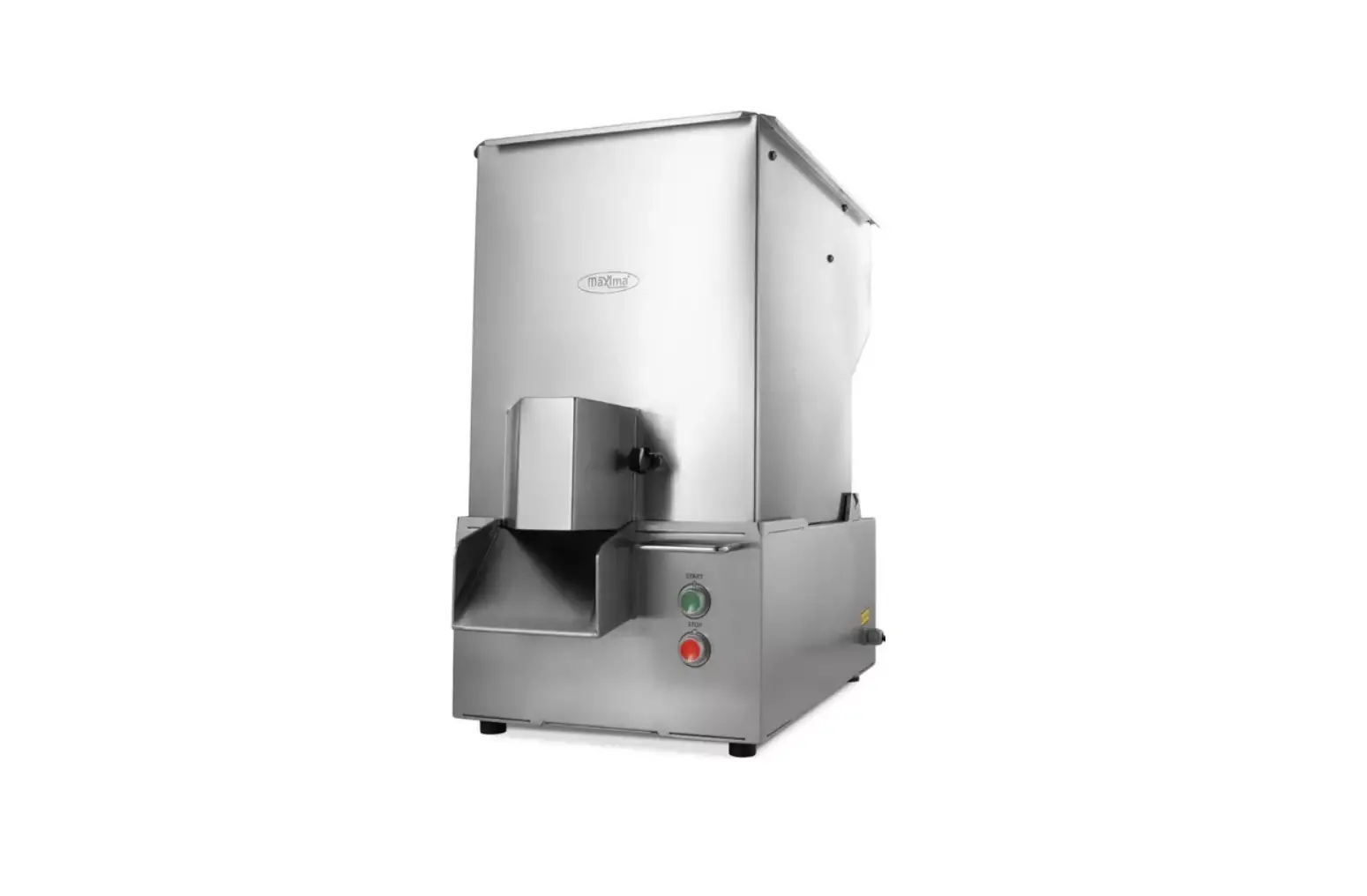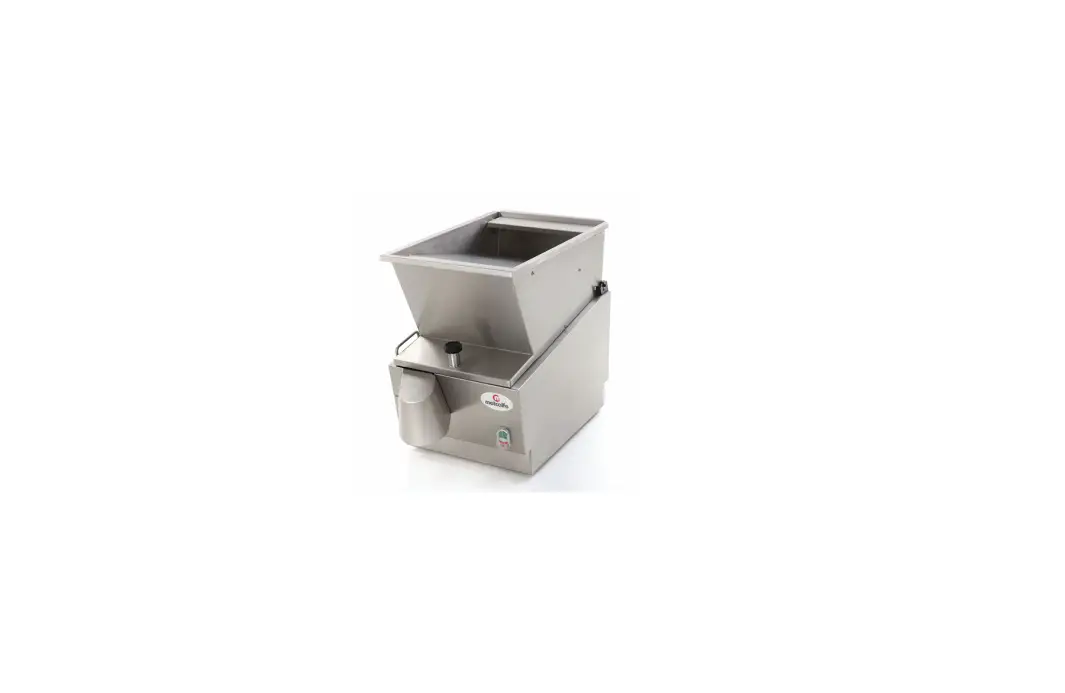
Metcalfe EC12 Electrically Operated Potato Chipping Machine Instruction Manual

DELIVERY
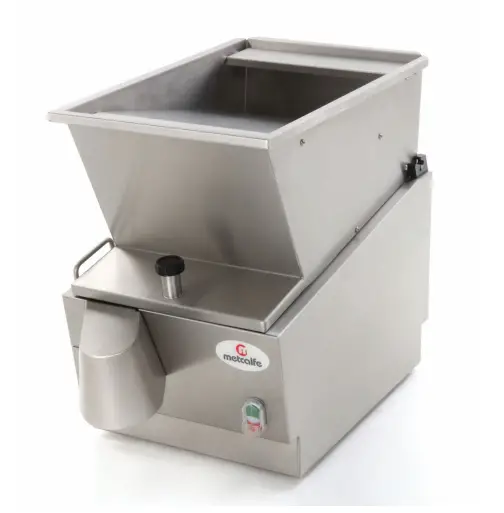
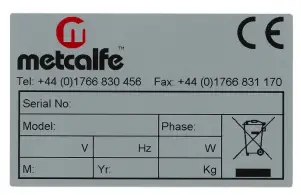
The packaged machine consists of one chipper unit and one instruction booklet. Please notify both the carrier and the supplier within three days of receipt if anything is missing or damaged.Check that the correct machine has been supplied and that the voltage, marked on the rating plate, is suitable for the supply available. The rating plate is located on the right-hand side of the case.
INTRODUCTION
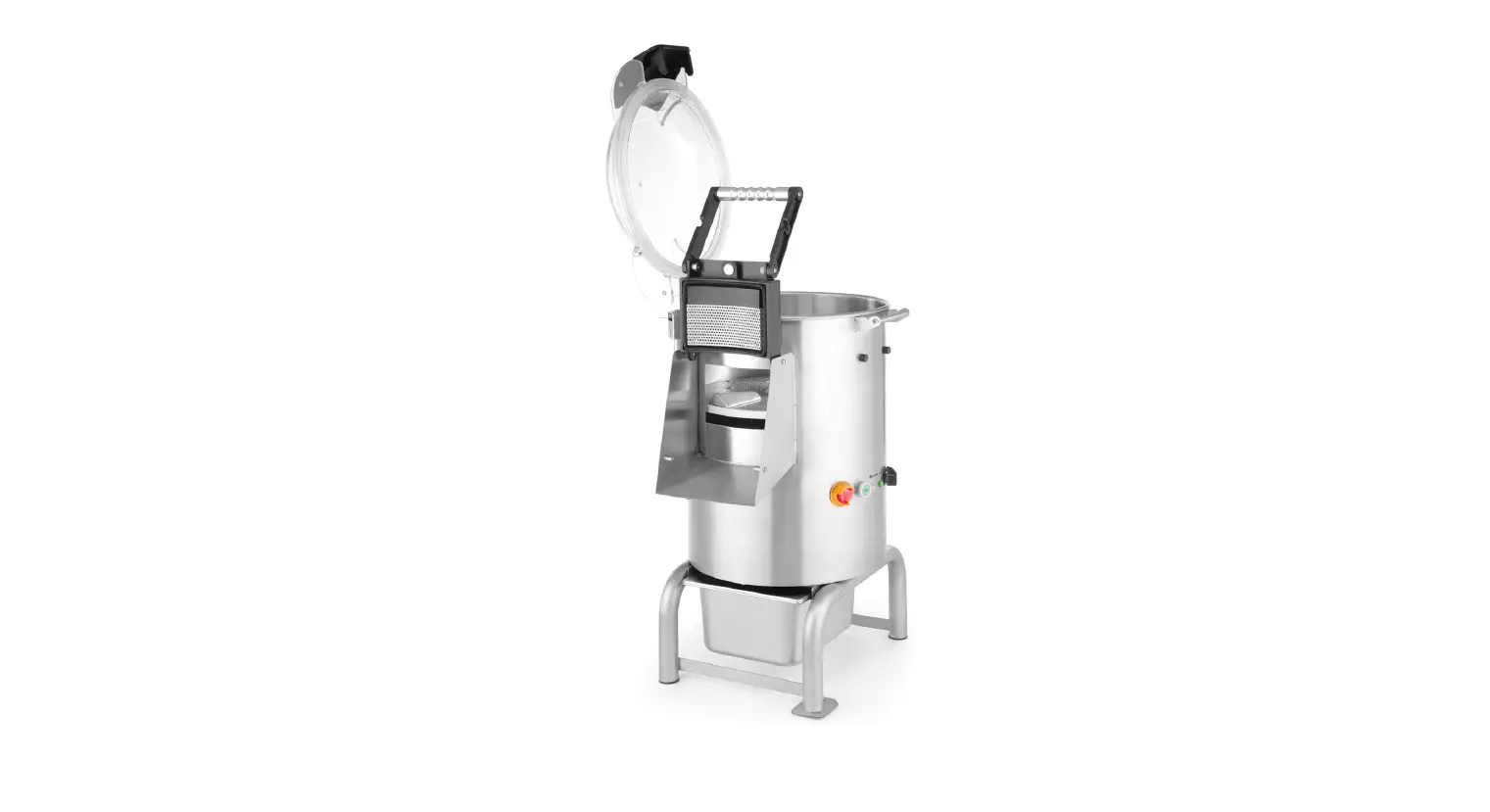
The chipper is intended for cutting peeled potatoes into chips or scallops, in a batch process
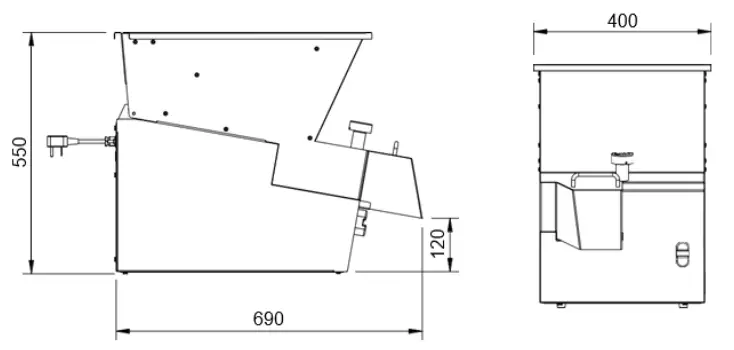
CHIPPER DIMENSIONS
All dimensions are in mm.
For the Installer:
These instructions contain important information designed to help the user obtain the maximum benefit from the investment in a Metcalfe Chipper.
Please read them carefully before starting work, and consult with the supplier in the event of any queries.
Be sure to leave this Instruction Manual with the user after installation of the machine is complete.
Procedure
The unit is designed to stand on a bench, table, or on a draining board. Ensure that whatever is used for this purpose is sturdy and rigid and not more than 750 mm high. A higher table makes it difficult to load the machine.
The Chipper should be placed where supplies of peeled potatoes from the peeling machine are readily accessible, after which the output of chips need to be in easy reach of the fryer
The EC12 Chipper has a top loading hopper into which potatoes can be tipped from either side or from the front. It is not handed, and no consideration need be given to its loading direction. The discharge of chips is from the chute at the front of the machine, and the machine should be placed so that this chute is directly over the receiving container.
ELECTRICITY SUPPLY CONNECTION
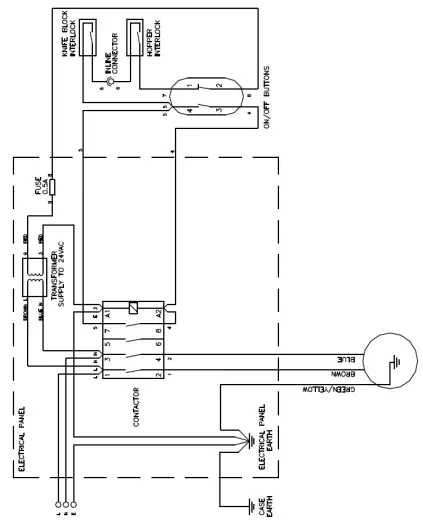
A Wiring Diagram is shown on Page 9.
Position the Chipper in the chosen site. The electricity supply connection should be made to a power outlet socket or isolator mounted on the wall close to the machine. This socket or isolator must be accessible once the machine is installed. Before connecting, check that the voltage shown on the rating is correct for the electricity supply you have available. The outlet should be fused at 13 amps.
NOTE: The plug is fitted with a 10amp fuse. WARNING: This machine must be earthed.
Should the supply cord become damaged then an approved electrician must fit a replacement. The IEE Codes of Practice must be observed.
An equipotential bonding terminal is provided at the back of the unit near the cable outlet for external earth bonding. Provision of an earth bond does not remove the requirement for an earth in the electrical supply
COMMISSIONING
Open the hopper by fully unscrewing the interlock knob at the front and lifting up until the hopper is fully resting back on its hinges. Turn the rotor by hand to ensure that it is completely free to rotate and that the knife block assembly is properly in position. Replace the hopper and screw down the interlock knob until it is tight.
It is now safe to switch on at the wall socket and to start the machine by pressing the start button on the front of the machine (green button). To stop the machine, press the red button.
One of the safety features provided on the Metcalfe Chipper are the interlock devices that ensures that the machine cannot run unless both the knife block and the hopper are properly and fully in position. This makes it impossible for the operator to touch the spinning rotor whilst it is running.
To confirm that the interlock is operating correctly press the start button to switch the machine on. Then whilst it is still running, unscrew the hopper interlock knob. After two or three turns the machine should switch off, but there are still two or three further turns of the knob necessary before the hopper can be opened. The rotor should be stationary within 2 seconds of the hopper being opened. If the knife block is not in place, another interlock will prevent the machine from running.
OPERATION
With the machine running, feed peeled potatoes into the hopper. It will hold approximately 15kg of potatoes, which self-feed into the mechanism of the machine and discharge as cut chips from the chute. Some care is necessary when loading, as the rotor will not accept abnormally large potatoes, so these must be cut into two. The hopper is specially designed not to pass potatoes which are over size and which could otherwise clog the mechanism. It is also essential that only potatoes be fed in to this machine.NOTE: take great care to ensure that there are no stones mixed in with the potatoes.
A stone or any other foreign object will damage the cutting knives and could cause the machine to jam. In this event the machine has an inbuilt protection device, which will switch it off before the electric motor burns out. This overload protection feature will automatically reset itself when it cools down but it is necessary to wait a few minutes for this to happen. After clearing the jam resume operation by pressing the start button. Should a stone damage the knife blades they must be replaced as further use could break the blades.
This Chipper is designed for batch process work; switch the machine off once all the potatoes have been cut. The motor is fitted with a thermal trip that will stop the machine if the motor overheats. This protection feature will automatically reset itself when it cools down but it is necessary to wait a few minutes for this to happen.
The machine will switch itself off in the event of failure of the electricity supply whilst operating. When the supply is restored the machine must again be switched on. It is fitted with no-volt release.
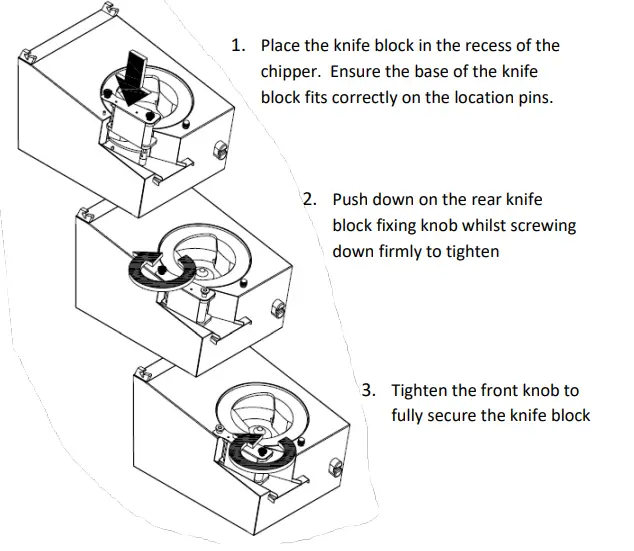
KNIFE BLOCK FITTING
CHANGE CHIP SIZE
To change to a different size of chip, change the knife block assembly. Spare knife block assemblies are available from Metcalfe. Open the hopper, lift out the knife block and replace with the alternative selected. Knife blocks are available in the following sizes from the standard range: 12mm, 14mm, 14 x 17mm and 17 x 21mm.
CLEANING
It is essential to clean the machine at least once a day, preferably at the end of each period of operation.
- Switch off at the socket or isolator
- Fully unscrew the interlock knob, open the hopper and lift it out of its hinge seating at the back
- Clean the hopper in a sink, dishwasher, pot wash or by hosing with a spray
- Remove the knife block by lifting upwards, off its locating dowels
NOTE: Take care when handling the knife block. The blades are sharp.
- Clean the knife block under a spray or running tap and remove any residual pieces of Visually inspect all blades for wear or damage, and replace the knife pack as necessary. Do not attempt to straighten a bent blade – bent blades should be replaced immediately.
- Lift the rotor carefully off its
- Clean the rotor in a sink, pot wash, etc.
- Clean out the interior of the base unit and wipe over the exterior with a damp soft cloth. Do not hose down the exterior of the
DO NOT USE CLEANING MATERIALS CONTAINING ABRASIVES OR BLEACHES.
- Reassemble the machine, reversing the above disassembly
When replacing the rotor, ensure that it is put back square on its spindle. Make sure that it is properly seated on its cross pin by turning it slowly until it drops onto this seating. When replacing the knife block it should slip down easily on to its dowel pins, make certain that it is fully down.
CHANGING KNIFE BLADES
The knife blades are supplied as a pack and individual blades cannot be changed. Change the knife blade pack as soon as it is damaged or blunt. To change the knife blade pack remove the knife block and undo the two screws securing the knife blade pack. Dispose of the old blades carefully and screw the new knife blade pack in place. See diagram below.
For optimum performance Metcalfe recommend changing the blade pack every 6 months, or sooner depending on usage.
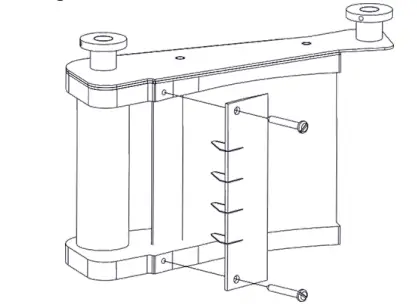
NOTE: Take care when handling the knife block. The blades are sharp.
EC12 WIRING DIAGRAM
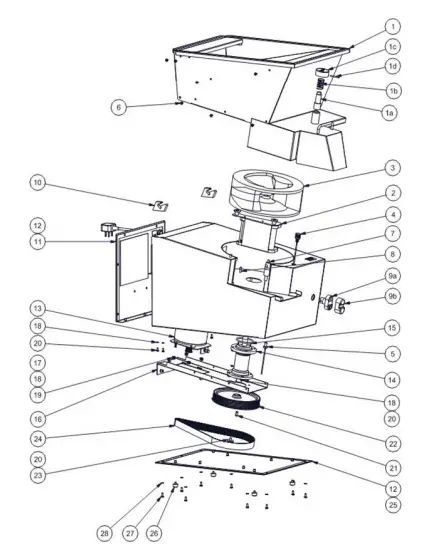
EXPLODED VIEW
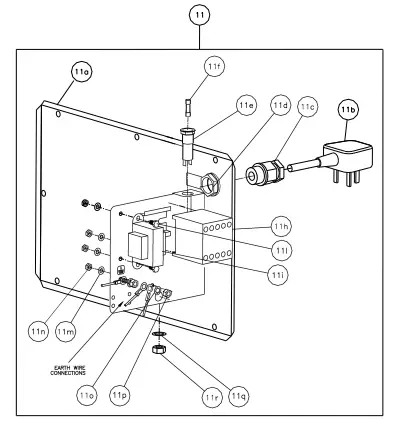
ELECTRICAL CONTROL PARTS
PARTS LIST
| ITEM | PART NO | DESCRIPTION |
| 1 | S61/150 | HOPPER ASSEMBLY, INCORPORATING: |
| 1a | M81A | INTERLOCK BODY & MAGNET |
| 1b | A12/011 | INTERLOCK SPRING |
| 1c | L61/024 | HOPPER KNOB |
| 1d | D26/017 | INTERLOCK PIN |
|
2a | S61/184 | 21x17mm KNIFE BLOCK |
| S61/145 | 12mm KNIFE BLOCK | |
| S61/151 | 14mm KNIFE BLOCK | |
| S61/144 | 14x17mm KNIFE BLOCK | |
|
2b | S61/183 | 21x17mm KNIFE PACK ASSY |
| S61/134 | 12mm KNIFE PACK | |
| S61/129 | 14mm KNIFE PACK | |
| S61/128 | 17mm KNIFE PACK | |
| 3 | C61/002 M1 Z | ROTOR |
| 4 | S61/178 | HOPPER MAGNETIC SWITCH ASSY |
| 5 | S61/179 | KNIFE BLOCK MAGNETIC SWITCH ASSY |
| 6 | D19/138 | SCREW M5 X 8 SKT BUTTON HEAD |
| 7 | L61/025 | KNIFE BLOCK LOCATING PIN, INCORPORATING: |
| 7a | D25/003 | SPRING WASHER M10 S.S. |
| 7b | D20/015 | M10 FULL NUT S.S. |
| 8 | L34/005 | KNIFE BLOCK SHORT PIN, INCORPORATING: |
| 8a | D25/052 | PLAIN WASHER M6 ST STEEL |
| 8b | D20/013 | NUT M6 FULL SS |
| 9 | G45/109 | PUSH BUTTON RED & GREEN, INCORPORATING: |
| 9a | G45/110 | BOOT FOR PUSH BUTTON |
| 9b | G45/111 | BUTTON CONTACTORS NO & NC |
| 10 | A13/024 | HOPPER TRUNNION, INCORPORATING: |
| 10a | D25/033 | WASHER M4 SHAKEPROOF S.S. |
| 10b | D19/120 | SCREW M4 X 8MM HEX S.S. |
| 11 | S61/176 | ELECTRIC PANEL ASSY, INCORPORATING: |
| 11a | E61/133 | REAR PLATE |
| 11b | G60/101 M4 | PLUG & CABLE ASSY |
| 11c | A10/266 | M20 CABLE GLAND BLACK |
| 11d | A10/224 | M20 GLAND LOCKNUT |
| 11e | G35/012 | FUSE HOLDER |
| 11f | G35/004 | FUSE 0.5A SEMI DELAY |
| 11h | G30/343 | 24V AC MINI CONTACTOR |
| 11i | G60/427 | TRANSFORMER TERMINATED |
| 11l | D19/110 | SCREW M4 X 10MM HEX.S.S. |
| 11m | D25/033 | WASHER M4 SHAKEPROOF S.S. |
| 11n | D20/011 | NUT M4 FULL S.S. |
| ITEM | PART NO | DESCRIPTION |
| 11o | D25/004 | WASHER M5 SHAKEPROOF |
| 11p | D20/038 | NUT M5 FULL S.S. |
| 11q | D25/062 | LOCK WASHER M8 S.S. |
| 11r | D20/014 | M8 FULL S.S. NUT |
| 12 | K08/043 | GASKET STRIP |
| 13 | S61/177 | MOTOR ASSY, INCORPORATING: |
| 13a | E61/014 | MOTOR MOUNTING BRACKET |
| 13b | D19/032 | SCREW M5 X 12MM HEX S.S. |
| 13c | D19/115 | SCREW M6 X 30MM HEX S.S. |
| 13d | D20/013 | NUT M6 FULL SS |
| 13e | A06/099 | DRIVE PULLEY WITH KEYWAY |
| 13f | L61/041 | BUSH (FOR DRIVE PULLEY) |
| 13g | D19/142 | SCREW M4 x 25L HEX SS (FOR DRIVE PULLEY) |
| 13h | G60/323 | MOTOR CABLE ASSY 1PH |
| 14 | S61/118 | BEARING HOUSING ASSEMBLY |
| 15 | A02/068 | O-RING |
| 16 | E61/015 | DRIVE BRACKET |
| 17 | D25/052 | PLAIN WASHER M6 ST STEEL |
| 18 | D25/005 | WASHER M6 SHAKEPROOF S.S. |
| 19 | D20/013 | NUT M6 FULL S.S. |
| 20 | D19/038 | SCREW M6 X 12MM HEX S.S. |
| 21 | D27/031 | DRIVE KEY |
| 22 | A06/090 | DRIVE PULLEY 114-5M-25F |
| 23 | D25/019 | M6 WASHER 25OD |
| 24 | A05/041 | DRIVE BELT 850 – 5M – 25 |
| 25 | E61/107 | BASE PLATE |
| 26 | A13/108 | FOOT, BLACK POLYTHENE |
| 27 | D21/044 | M5 X 12 PAN HEAD SCREW |
| 28 | D25/004 | WASHER M5 SHAKEPROOF |
SPARE PARTS AND SERVICE
For more information on Metcalfe spare parts, accessories and service support, please contact us on the details below.
Please always quote the Serial Number of the machine. This can be found on the serial number plate which is located on the rear of the machine.
Metcalfe Sales & Spares Department [email protected] Metcalfe Service Department
[email protected] Metcalfe Website www.metcalfecatering.com
Metcalfe Telephone Number 01766 830 4
Additional copies of this instruction manual can be obtained by either visiting our website or contacting the sales department.

All Metcalfe products are guaranteed against defects in material and workmanship for a period of one year from date of Invoice, except where specially noted.
The Company’s obligation under this warranty is limited to repairing or replacing, without charge, any part or parts found to be defective under normal use, in accordance with the specified operations manual and capacity ratings.
On all return to factory warranty items, it is the responsibility of the purchaser to return the entire unit to the factory, in a clean condition, properly packed and labelled.
All repairs, alterations or replacement of materials or parts not authorised by Metcalfe will automatically void all warranties in their entirety.
All Metcalfe slicers (except Simple Line) are covered by a 2-year warranty (1st year parts and labour, 2nd year parts only) and full after sales service.
All Metcalfe MP mixers are covered by a 3-year warranty (1st year parts and labour, 2nd & 3rd year parts only) and full after sales service.
There is a limited 6-month warranty on the following:
- Mixer attachments (beater, whisk and dough hook)
- Parts purchased or supplied for the repair of Metcalfe equipment
This warranty does not cover the following:
- Failure due to neglect, abuse, careless handling or misuse of machine
- Failure caused due to improper maintenance
- Blender clutches
- Knives and gears on can openers
- Sharpening of slicer blades
- General wear and tear
Metcalfe and its suppliers reserve the right to make changes in design and specification to any product without prior notification.
Other products in the Metcalfe portfolio:
 Metcalfe Catering Equipment | Metcalfe UK | Catering Distributor