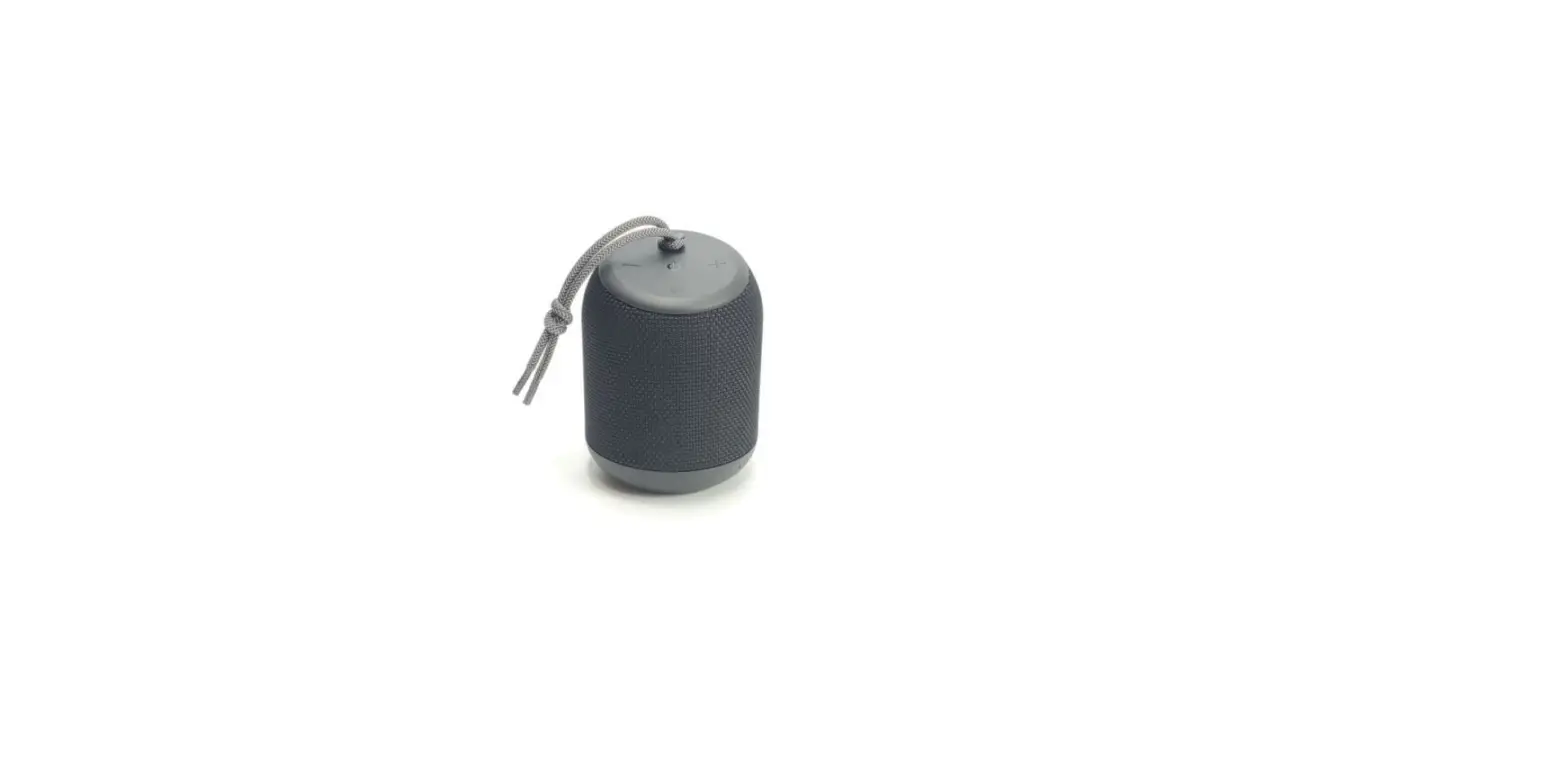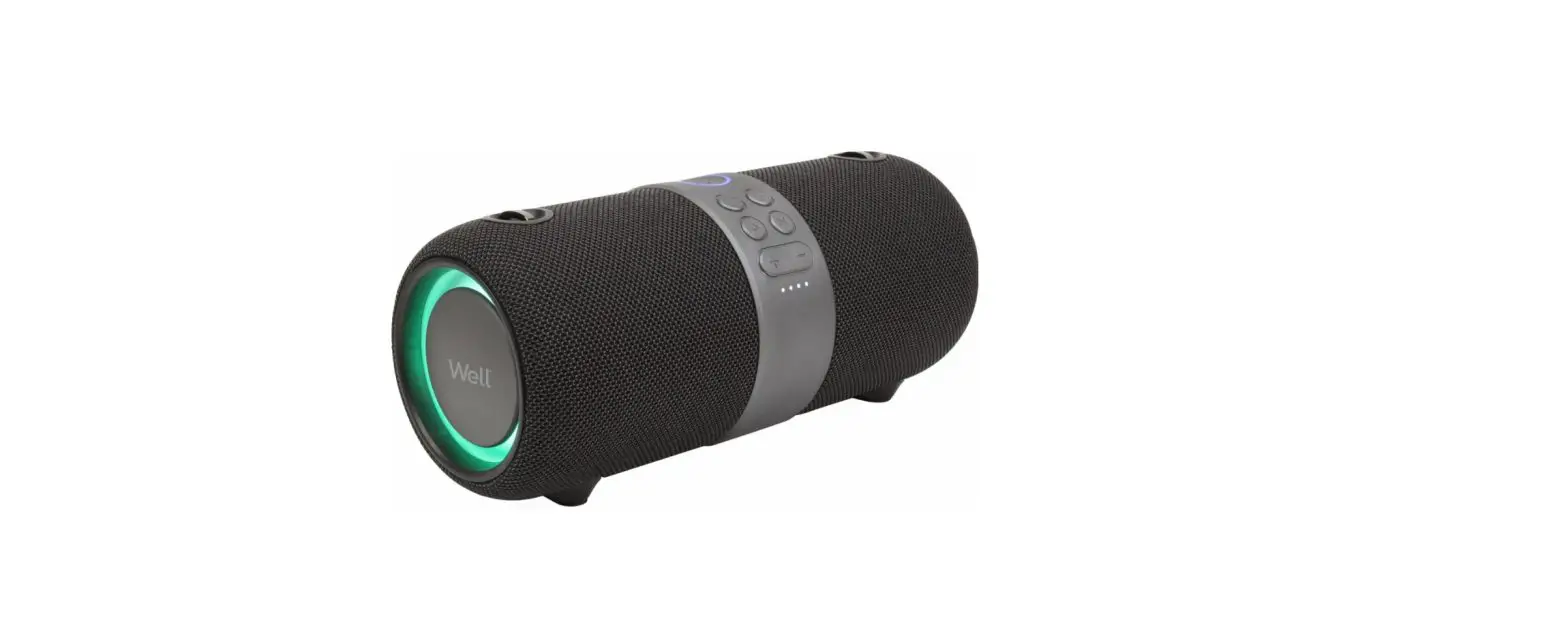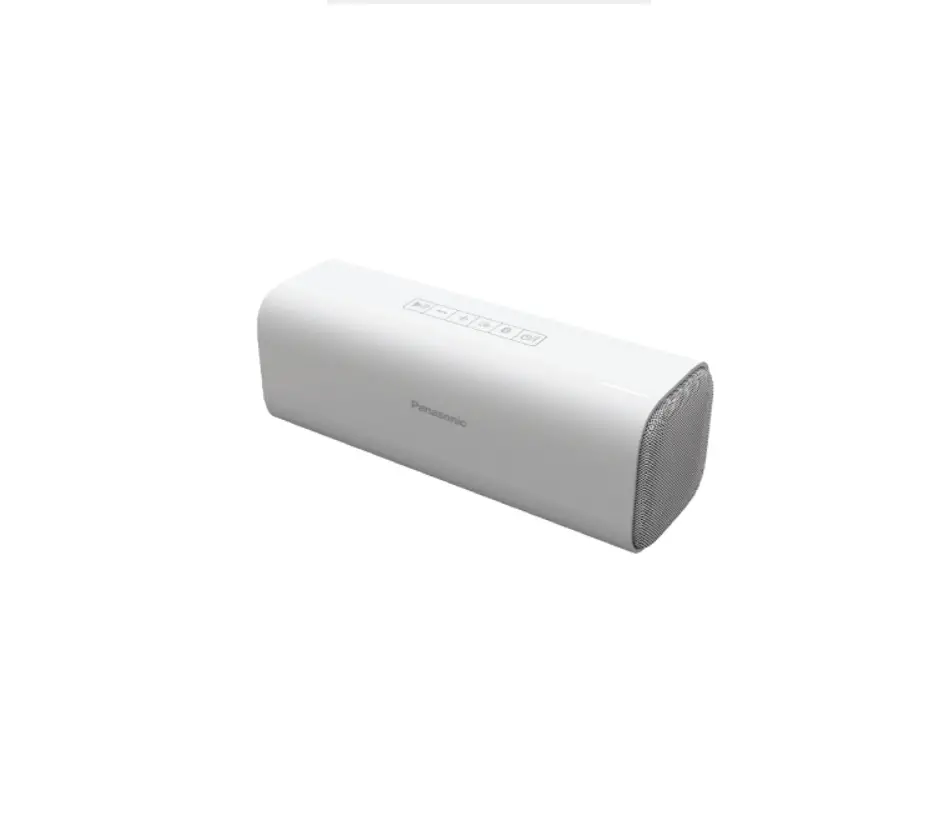
Pansaonic Portable Bluetooth Speaker Instruction Manual

Dear Customer
Thank you for purchasing this producl For optimum performance and safety, please read these instructions carefully.
Before connecting, operating or adjusting this product, please read the instructions completely.
Please keep this manual for future reference.
The illustrations shown may differ from your unit.
 Disposal of Old Equipment and Batteries Only for European Union and countries with recycle systems
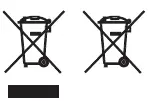 Disposal of Old Equipment and Batteries Only for European Union and countries with recycle systems
These symbols are only valid in the European Union and countries with recycle systems.
If you wish to discard this product, please contact your local authorities
or dealer and ask for the correct method of disposal.
Do & Don’t: E Waste Management Guidelines
S.No. | Do | Don’t |
| 1 | All electrical and electronic products are required to be handed over only to an authorization recycler | The product should not be opened by the User himself/ herself, but only by authorization service personnel. |
| 2 | This product should be handed over only to authorization recycler for disposal. | The product is not meant for re-sale any authorization agencies/scrap dealer. |
| 3 | Keep the product in isolated area, after it becomes functional//un-repairable so as to prevent its accidental breakage. | The product is not meant for mixing into household waste stream. |
| 4 | Always dispose products that have reached end-of life at authorization collection centers, a registered dismantlers, recycler or Panasonic service center. | Do not keep any replaced spare part(s) from the product in exposed area. |
| 5 | Wherever possible or as instructed, separate the packaging material according to responsible waste disposal options and sorting for recycling. | Do not dispose your product in garbage bins along with municipal waste that ultimately reaches landfill. |
Important
 CAUTION!
- Product Identification Marking is located on the bottom of the unit.
- Never charge the unit with 9V/12V adaptor.
- Never remove the casing of this speaker.
- Never lubricate any part of this speaker.
- Never place this speaker on other electrical equipment.
- Keep this speaker away from direct sunlight, naked flames or heat.
Safety precautions Unit ≥
To reduce the risk of fire, electric shock or product damage
- Do not let water or other liquids drip or splash inside the unit.
- Do not expose accessories (AC mains lead, and etc.) to rain, moisture, dripping or splashing.
- Do not place objects filled with liquids, such as vases, on this unit. Use only the recommended accessories.
- Do not remove covers.
- Do not repair this unit by yourself. Refer servicing to qualified service personnel.
- Do not let metal objects fall inside this unit.
- Do not place any item on top of this unit. This unit is intended for use in moderate climate.
Warning
Risk of fire, explosion and burns. Do not disassemble, heat above 100 C or incinerate
USB charging lead ≥
To reduce the risk of fire, electric shock or product damage
- Ensure that the power supply voltage corresponds to the voltage printed on this unit.
- Insert the USB charging lead fully into the USB socket on the back of the unit.
- Insert the other end of the USB charging lead into a USB/AC Adaptor (not included)
- Do not pull, bend, or place heavy items on the lead.
- Do not handle the lead with wet hands.
- Do not use a damaged mains plug or socket outlet.
Unit ≥
This unit has a built-in battery.
Unit ≥
- Do not place sources of naked flames, such as lighted candles, on this unit.
- Do not leave the unit in a car exposed to direct sunlight for a long period of time with doors and windows closed.
- This unit may receive radio interference caused by mobile telephones during use. If such interference occurs, please increase separation between this unit and the mobile telephone.
Placement ≥
- Place this unit on an even surface.
- To reduce the risk of fire, electric shock or product damage, Ensure this unit is well ventilated.
- Do not obstruct this unit’s ventilation openings with newspapers, tablecloths, curtains, and similar items.
- Do not expose this unit to direct sunlight, high temperatures, high humidity, and excessive vibration.
Overview of the Speaker
Introduction
With this speaker, you can
- enjoy audio from your Bluetooth-enabled devices such as mobile phones, tablet PCs, laptops etc.
- enjoy audio from your other external devices via AUX input such as MP3 player, personal computers etc.
Standard accessories
Check and identify the contents of your package:
- 1 x Speaker Unit
- 1 x 3.5mm Stereo Cable
- 1 x User Manual
- 1 x USB Charging Cable
The symbols on this product (including the accessories ) represent the following:
 DC
DC
 DC
DC On
On
 Standby
 On
On Standby
 Press and hold to switch on or off
 Press to enter into Bluetooth pairing mode. During AUX playback, press to switch to Bluetooth pairing mode
 Press to switch to AUX input mode when audio in cable is inserted
 Press to increase the volume Press and hold for more than 2 seconds mode to play next song
 Press to reduce the volume Press and hold for more than 2 seconds mode to play previous song
 Press to play or pause the song During Bluetooth playback, press and hold for more than 2 seconds to exit Bluetooth playback During AUX playback, press the
  button to mute
- AUDIO IN
Connect an external audio device - RESET
Reset the unit to factory default - DC IN 5V
Recharge the built-in battery - CHARGE
Indicate charging status LED indicator in red color: being charged LED indicator in green color: fully charged - INDICATOR
Indicate input mode or low battery Flash slowly in blue color when the unit is in Bluetooth pairing mode In solid blue color when the unit is connected
successfully with Bluetooth device In solid red color when the unit is in AUX mode Flash in both red and blue when the unit is in low battery status - G et started
Always follow the instructions in this chapter in sequence.
 Press and hold to switch on or off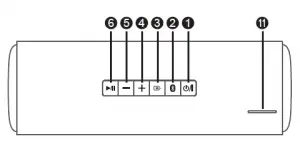
 Press to enter into Bluetooth pairing mode. During AUX playback, press to switch to Bluetooth pairing mode
 Press to switch to AUX input mode when audio in cable is inserted
 Press to increase the volume Press and hold for more than 2 seconds mode to play next song
 Press to reduce the volume Press and hold for more than 2 seconds mode to play previous song
 Press to play or pause the song During Bluetooth playback, press and hold for more than 2 seconds to exit Bluetooth playback During AUX playback, press the
  button to mute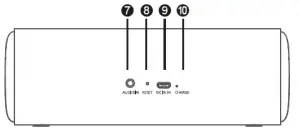
Charge the built-in battery
The speaker is powered by a built in rechargeable battery.
- Before use, fully charge the built-in battery.
- The micro USB socket is for charging only.
- Rechargeable battery has a limited number of charge cycles. Battery life and number of charge cycles vary by use and settings.
- Charging the unit with 9V/12V adaptor may damage the product.
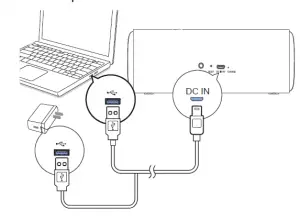
Co nnect the USB cable between
- the USB charging socket on the speaker, and
- a USB socket on a computer or a 5V DC adaptor.

The LED indicator on the backside of the speaker indicates the battery status.LED indicator on Battery status
the backside of the speaker
Solid red Under charging
Solid green when the speaker Fully charged
is switched on
Switch on/off
- Press and hold to switch the speaker on.
» The LED indicator on the top turns solid blue.
» For first-time setup,the LED indicator on the top flashes blue,indicating that the speaker is in pairing mode. - To switch off, press and hold again
» The LED indicator on the top turns off.

Auto off function
- In Bluetooth mode, if Bluetooth connection is invalid or music playback is stopped for 5 minutes, this speaker switches to off mode automatically.
»To switch on from off mode, turn on the unit again.
U se Bluetooth devices
With this speaker, you can listen to audio from Bluetooth-enabled devices.
Connect a Bluetooth device
Note
- Make sure that your Bluetooth device is compatible with this speaker.
- Any obstacle between this speaker and a Bluetooth device can reduce the operational range.
- Keep away from any other electronic device that may cause interference.
- The operational range between this speaker and a Bluetooth device is approximately 10 meters (30 feet).
- Make sure that the speaker is in pairing mode, that is, the LED indicator on the top flashes blue.
- On your Bluetooth device, enable Bluetooth and search for Bluetooth devices (refer to the user manual of the device).
- When [Panasonic SC-NA07] is displayed on your device, select it to start pairing and connection. If necessary, enter default password “ 0000 ”.
After successful pairing and connection, the speaker beeps twice, and the LED indicator on the top turns solid blue.
After successful pairing and connection,
- the speaker beeps twice, and the LED
- indicator on the top turns solid blue.
- Move the device beyond the communication range.
To reconnect the Bluetooth enabled device:
- For a paired Bluetooth device on which automatic reconnection is enabled, this product reconnects with it once it is detected.
- For a paired Bluetooth device that does not support automatic reconnection, reconnect it with this product manually.
- To connect another Bluetooth-enabled device: Disable Bluetooth on the current device, and connect another device.
LED indicator on the top
Description
Flashing blue Connecting or waiting
for connection
Note
- Bluetooth speaker may deliver low audio output for some mobile phones and other compatible devices when connected via Bluetooth.
Play from Bluetooth device
Note
- If there is an incoming call on the connected mobile phone, music play pauses
- After successful Bluetooth connection, play audio on the Bluetooth device. Audio streams from your Bluetooth device to the speaker.
Other features
Listen to an external device
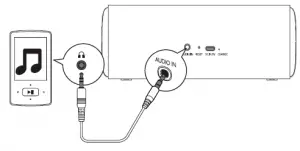
With this speaker, you can also listen to an external audio device such as an MP3 player.
- Connect an audio input cable with a 3.5 mm connector on both ends to
• the AUDIO IN socket on this speaker, and
• the headphone socket on the external device.
The speaker switches to the AUDIO IN source automatically.
- Play audio on the external device (refer to its user manual).
Note
• When you unplug the 3.5mm audio cable, the speaker switches to the Bluetooth source automatically.
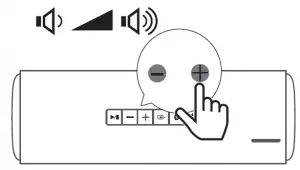
Adjust volume
- Press +/- to increase or decrease the volume
Low battery warning
- While the battery is running low, the unit beeps every 5 minute for warning
- While the battery is running low, the indicator on top of the unit flashes between red and blue.
Sound becomes low while in use
The sound may become low in the following cases. This is not a malfunction.
- When the built-in battery is running low and the indicator on top flashes between red and blue, while the speaker is being powered by the built-in battery only.
- When the built-in battery is running low as a result of using the speaker at a loud volume for a long time even if the speaker is connected to an AC outlet via a USB AC adaptor (commercially available), or connected to a booted computer.
If the sound becomes low while in use, follow the procedure below.
- Turn off the speaker.
- Charge the built-in battery sufficiently.
Note
- This speaker is designed to reduce the maximum volume to about half when the remaining built-in battery power becomes less than 20% in order to protect the circuit
due to extreme voltage fluctuation by using at a loud volume. Even in this case, you can charge the built-in battery, but the volume does not return to the normal. To return the volume to the normal, charge the built-in battery until the remaining built-in battery power reaches 20% or more, turn off the speaker and turn it on again, and then
adjust the volume.
Technical Specifications
| Rated Output Power | 10W RMS |
| Frequency Response | 20 – 20000Hz |
| Bluetooth version | V5.0 |
| Bluetooth | 2.402GHz ~ |
| Frequency Band | 2.48GHz |
| Range | 10 m (Free space) |
| Speaker Impedance | 4 ohm |
| Speaker Driver | 50 mm in diameter |
| Power Supply (through USB socket) | DC 5V, 1A |
| Built-in Battery | + Lithium ion battery (3.7V, 2000mAh) |
| Battery life | Up to 8 hours |
| Operation temperature | 0˚C~45˚C |
| Storage temperature | -10˚C~70˚C |
| Dimensions – Main Unit (L x B x H) | 17.8 x 5.6x 6.2 cm |
| Weight – Main Unit | 405g |
Note
- Product information is subject to change without prior notice.
- After full charge, battery playtime is up to 8 hours when played at 40%-50% of the MAX. volume.
About Bluetooth device
The audio quality is poor after connection
with a Bluetooth-enabled device.
- The Bluetooth reception is poor. Move the device closer to this product or remove any obstacle between them.
- The Bluetooth function of the device is not enabled. Refer to the user manual of the device for how to enable the function.
- This product is already connected with another Bluetooth-enabled device. Disconnect that device and then try again. The paired device connects and disconnects constantly. The paired device connects and disconnects constantly.
- The Bluetooth reception is poor. Move the device closer to this product or remove any obstacle between them.
- For some devices, Bluetooth connection may be deactivated automatically as a power-saving feature. This does not indicate any malfunction of this product.
Troubleshooting
 CAUTION!
- Never remove the casing of this device.
- To keep the warranty valid, never try to repair the system yourself
- If you encounter problems when using this device, check the following points before requesting service. If the problem remains unsolved, please contact Panasonic customer support
- When you contact Panasonic customer care, please make sure that the device is nearby and the model number and serial number are available
General
No power
- Recharge your speaker
No sound - Adjust volume on the speaker or the
Bluetooth-connected device. - Make sure that your Bluetooth device is within the effective operational range.
No response from the speaker - Restart the speaker.
Frequency band used
- This system uses the 2.4GHz frequency band.
Certification of this device
- This system conforms to frequency restrictions and has received certification based on frequency laws. Thus, a wireless permit is not necessary.
- The actions below are punishable by law in some countries: Taking apart or modifying the system. Removing specification indications
Restrictions of use
- Wireless transmission and/or usage with all Bluetooth equipped devices is not guaranteed.
- All devices must conform standards set by Bluetooth SIG, Inc.
- Depending on the specifications and settings of a device, it can fail to connect or some operations can be different.
- This system supports Bluetooth security features. But depending on the operating environment and/ or settings, this security is possibly not sufficient. Transmit data wirelessly to this system with caution.
- This system cannot transmit data to a Bluetooth device.
Range Of use
- Use this device at a maximum range of 10 m. The range can decrease depending on the environment, obstacles or interference.
Interference from other devices
- This system may not function properly and troubles such as noise and sound jumps may arise due to radio wave interference if this system is located too close to other
Bluetooth devices or the devices that use the 2.4GHz band. - This system may not function properly if radio waves from a nearby broadcasting station, etc. is too strong.
Intended usage
- This system is for normal, general use only.
- Do not use this system near an equipment or in an environment that is sensitive to radio frequency interference (example: airports, hospitals, laboratories, etc).
License
The Bluetooth word mark and logos are registered trademarks owned by Bluetooth SIG, Inc. and any use of such marks by
Panasonic Corporation is under license. Other trademarks and trade names are those of their respective owners.