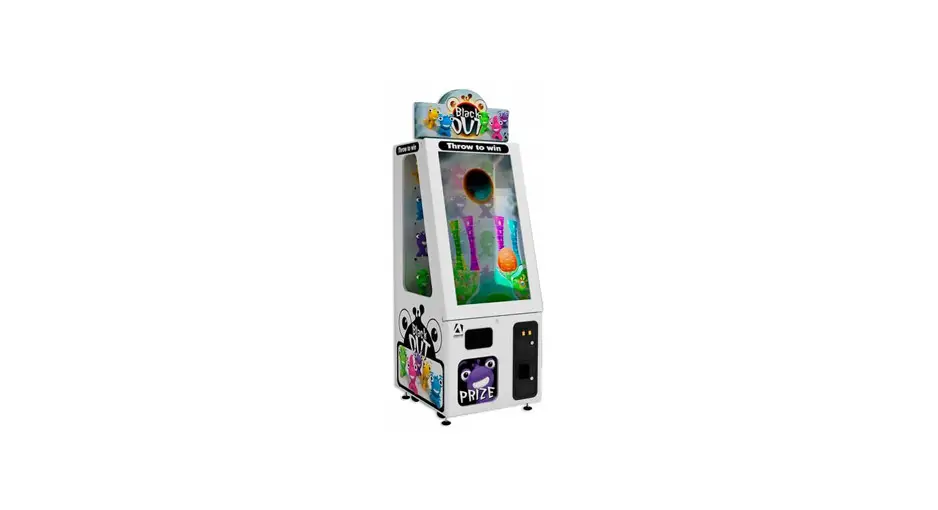
 BO-46-1000 – Blackout Prize
Operation & Service Manual
Prize with IR sensors- Version 1.2
* Read this manual before use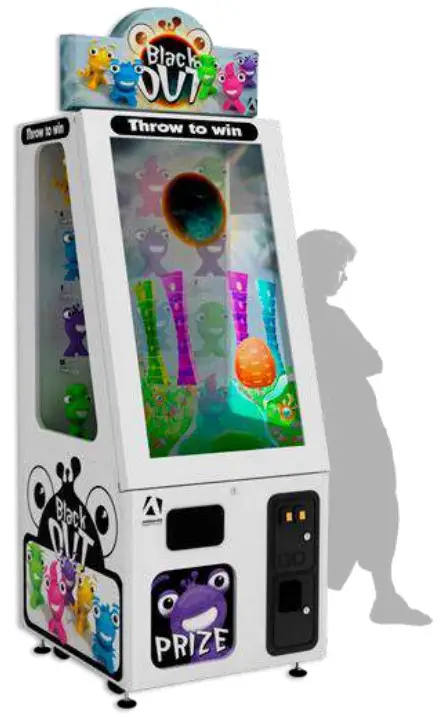
General Remark
If you encounter any difficulties or if you need support on how to update and/ or install your Blackout product, we invite you to contact your local distributor or reach us at [email protected] or by calling our support line +1-450-824-1671
 Adrenaline Amusements Team
Adrenaline Amusements
1150 Levis, Suite 302
Terrebonne, Qc
Canada
J6W 5S6
Chapter 01 – Preface
Please read this page before preparing your Blackout product for game play.
The following safety instructions apply to all game operators and service personnel. Specific warnings and cautions will be included throughout this manual.
Use the following safety guidelines to help protect the system from potential damage and to ensure your personal safety:
- Electronic components in the game cabinet run on 110V AC 60Hz (220V/ 50Hz in most ofEurope, the Middle East and the Far East delivered units).
- To help prevent electric shock, plug the system into a properly grounded power source.
These cables are equipped with 3-prong plugs to help ensure proper grounding. Do not use adapter plugs or remove the grounding prong from a cable. If you must use an extension cable, use a 3-wire cable with properly grounded plugs. - To help protect your system from sudden increases and decreases in electrical power, use a surge suppressor, line conditioner or Uninterruptible Power Supply (UPS).
- Be sure nothing rests on the system’s cables and that the cables are not located where they can be stepped on or tripped over.
- Keep your system far away from radiators and other heat sources.
- Do not block cooling vents.
Precaution for Game Operation
Adrenaline Amusements Inc. assumes no liability for injuries incurred while playing our games.
Operators should be aware that certain health and physical conditions may make people susceptible to injury when playing video games.
Safety To avoid electrical shock, unplug the cabinet before performing installation or service procedures.
If a power cord is damaged, it must be replaced by the equivalent power cord available from your distributor. Adrenaline Amusement Inc. assumes no liability for any damages or injuries incurred while setting up or servicing the cabinet. Only qualified service personnel should perform installation or service procedures.
Environmental Conditions
Cabinet is intended for indoor use only. Be sure to keep the cabinet dry and maintain operating temperatures of 59° – 86° (15° – 30°C).
Chapter 02 – Unit Features
Hardware Features
- Multitouch Screen
- 46’’ transparent Monitor
- Windows based computer
- 12 Prize dispensers
- InfraRed Sensors
Cabinet Facts
Cabinet Dimensions
Length = 30’’
Depth = 32’’
Height = 86’’
Weight = 450 lbs
Shipping Dimensions
Length = 30’’
Depth = 36’’
Height = 80’’
Weight = 450 lbs.
Voltage
| Voltage | Operating |
| 110V AC | 4 AMP |
| 220V AC | 2 AMP |
Chapter 03 – Unit Installation
Assembling your Blackout Unit
- Carefully remove the Cabinet from the shipping container, giving yourself enough space.
- Move the cabinet to the desired location.
- Lift the top Header to upright position. To do so you will need to press on the spring pins on each side of the hinge.
- Plug in the power cord on the back of the cabinet.
Chapter 04 – Procedure to refill Prizes
* Very important to perform step 6 and 7
- Unlock and open front door.
- Unscrew the pin in the middle of the prize dispenser.
- Install prizes on dispenser.
- Re-install the middle pin to secure the prize in the unit
- Lock the front door.
- Access the operator menu using the Operator Button located inside the coin door.
- Enable all dispensers Loaded by pressing the prize dispenser icon (number 1 to 12). The icon is yellow when enabled and grey when disabled. (see figure 5.1 below).
- Only the prize dispenser in yellow will be available to players if they win.
- You can test the sensor using rotor #5. (See figure 5.3 below).
- Press icon “return to Game” when finished.
Refilling Prize Dispensers Steps
| 1. Unscrew and pull out the prize Rod | 2. Hang the Prize on the Spiral |
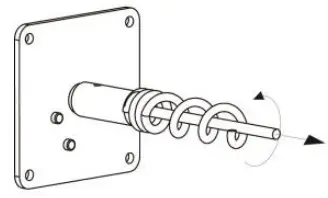 | 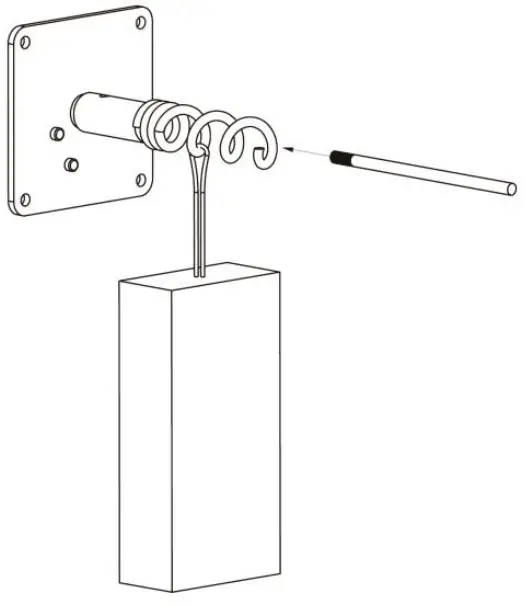 |
| 3 Insert&Screw the Prize Rod | 4. The Prize Dispenser is refilled |
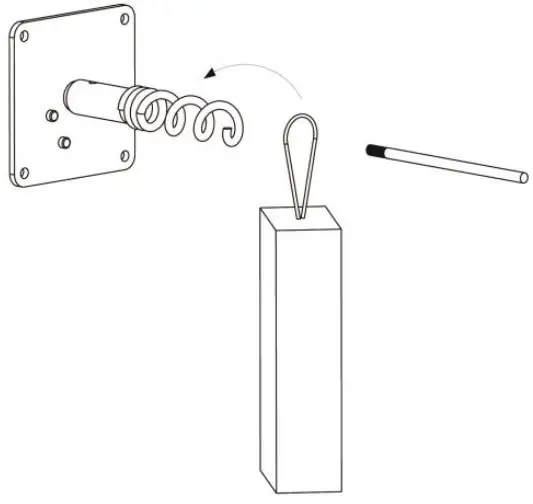 | 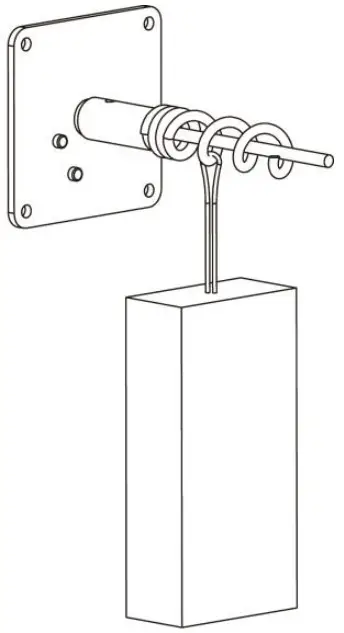 |
*NOTE: PLEASE DO NOT HANG THE PRIZE ON THE ROD
This chapter describes how to use and navigate the Operator Menu to set up your product and adjust all of the game’s parameters. To access the operator Menu, use the Operator Button located inside the coin door. To navigate the menu, you can touch the arrows to change the option’s value.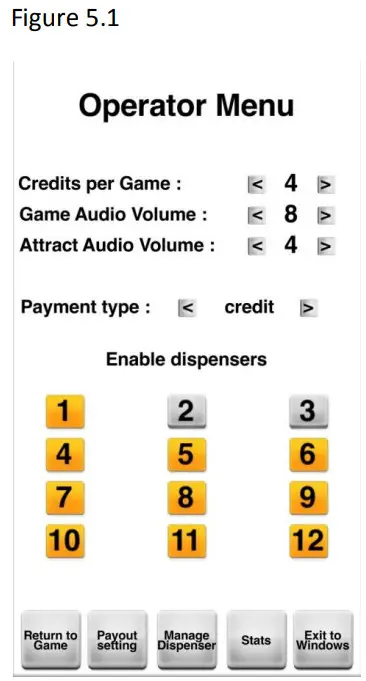
| Operator Menu | What it does |
| Credits per Games | Number of credits needed to start a game |
| Game Volume | Game sound volume |
| Attract Mode Volume | Attract Mode Volume |
| Payment type | Display ‘Swipe card’ instead of ‘Insert credits’ in the game |
| Enable Dispensers | Each number represents a prize dispenser inside the cabinet. The prize dispenser needs to be enabled to allow the winner to select this prize slot. Yellow enable/grey Disabled. |
| Return to game | Press to exit the operator menu and return to the game |
| Payout setting | Press to access the payout setting page (see figure 5.2) |
| Manage Dispenser | Press to access the manage dispenser page (see figure 5.3) |
| Stats | Press to access the stats page (see figure 5.4) |
| Exit to Windows | Press to close the game and go to windows |
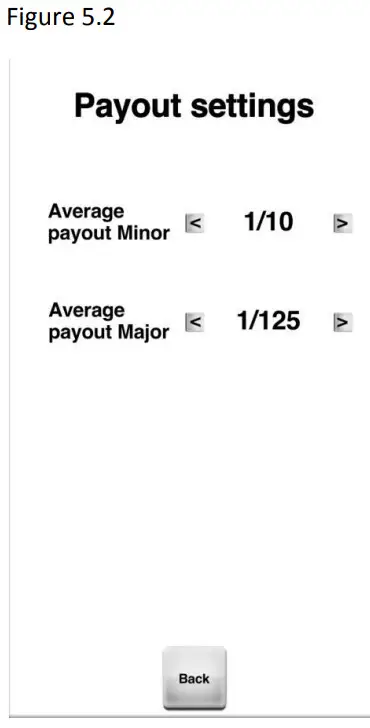
| Payout Settings | What it does |
| Average payout Minor | Payout adjustable from 1/5 to 1/2500. |
| Average payout Major | Payout adjustable from 1/25 to 1/2500. |
| Back | Press to return to the operator menu |
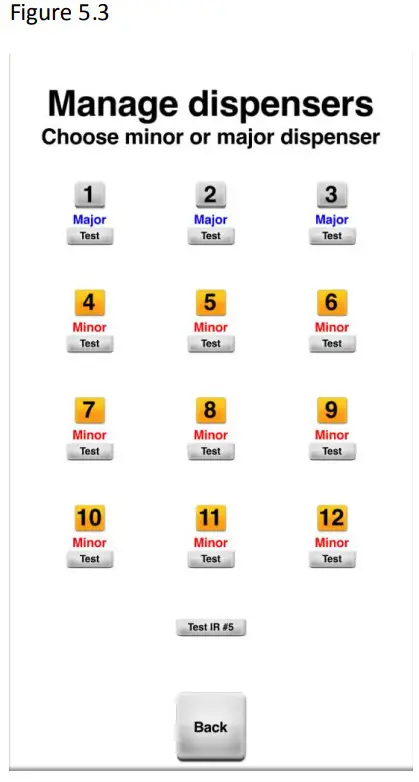
| Manage dispensers | What it does |
| Number 1 to 12 | Press on the number to select which prize dispenser is minor or Major |
| Test | Press to activate a prize dispenser to test if the mechanism is working adequately |
| Test IR #5 | This will enable rotor #5 and will stop turning when the prize fall in the chute |
| Back | Press to return to the operator menu |
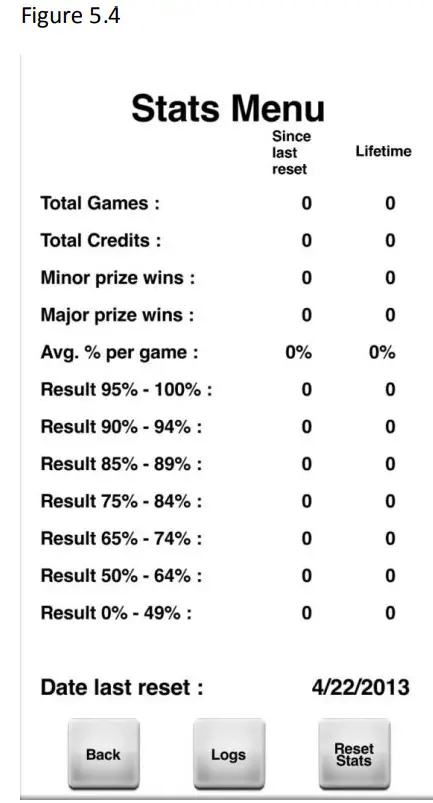
| Stats Menu | What it does |
| Total Games | Number of game plays |
| Total credits | Number of credits inserted in the unit. |
| Minor prize wins | Minor prizes dispensed |
| Major prize wins | Major prizes dispensed |
| Avg. % per game | Average score obtained by the player. |
| Date last reset | Date of the last manual reset of the stats |
| Result xx% – xx% | Number of games ended in that % range |
| Back | Press to return to the operator menu |
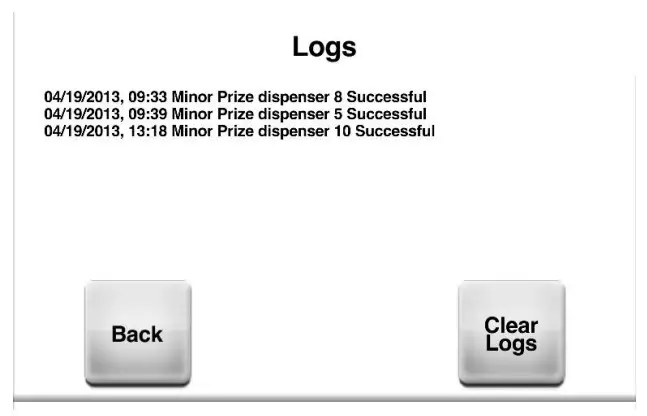
| Logs | View Prize dispensers date/time logs |
| Reset stats | Press to reset the stats |
| Clear Logs | Press to reset the Dispensers logs |
Chapter 06 – Parts
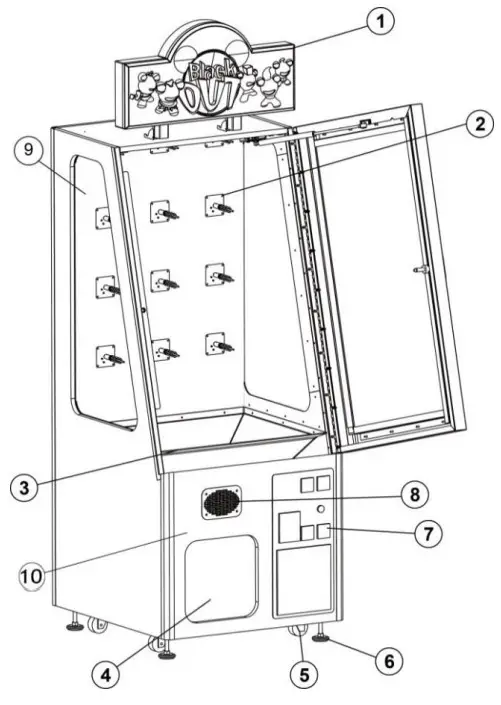
| Ref | Part Description | Part Number |
| 1 | Header | INV-09-1004 |
| 2 | Dispenser | INV-14-0005 |
| 3 | Prize Chute | INV-07-1010 |
| 4 | Prize Door | INV-01-0000 |
| 5 | Caster | INV-62805K-39 |
| 6 | Leveling | INV-62805K-39 |
| 7 | Coin Door | ADR-40-3000 |
| 8 | Speaker&Grill | INV-04-0004 |
| 9 | Side Glass | INV-07-1020 |
| 10 | Sensor Kit | INV-25-115-0020 |
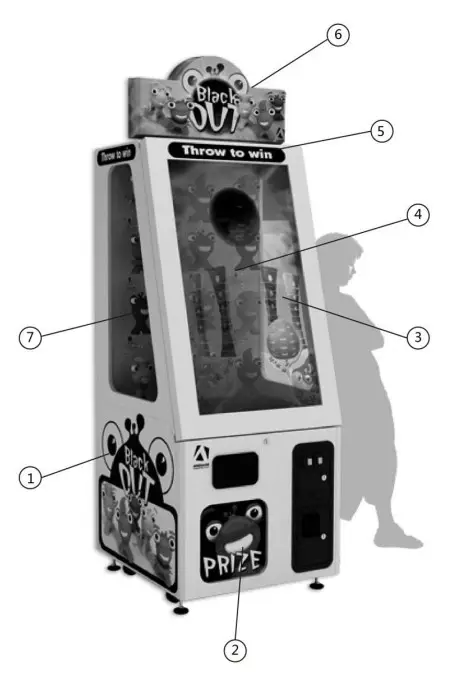
| Ref | Part Description | Part Number |
| 1 | 3 Side Decal Kit | INV-09-1001 |
| 2 | Door Decal | INV-09-1003 |
| 3 | Decal Window Right | INV-09-1006 |
| 4 | Back Decal | INV-09-1008 |
| 5 | Throw to Win | INV-09-1002 |
| 6 | Header | INV-09-1004 |
| 7 | Decal Window Left | INV-09-1007 |
Screen Assembly INV-01-0001
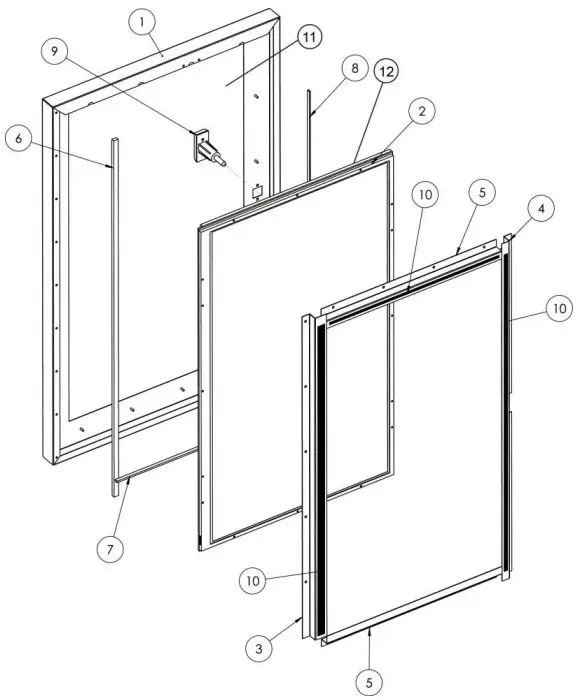
| Ref | Part Description | Part Number |
| 1 | Steel Sheet Door. 16GA | INV-01-1020 |
| 2 | Transparent LCD | INV-00-1300 |
| 3 | TV Bracket Vertical | INV-01-1010 |
| 4 | Side Screen Frame | INV-01-1011 |
| 5 | Top Screen Frame | INV-01-1012 |
| 6 | Plastic Spacer, Vertical | INV-07-1002 |
| 7 | Plastic Horizontal Spacer, | INV-07-1001 |
| 8 | Plastic Spacer, Vertical | INV-07-1003 |
| 9 | T-Handle Lock | ADR-30-183800 |
| 10 | LED Strip | INV-14-1006 (07 for Horizontal) |
| 11 | Tempered Glass | INV-07-1021 |
| 12 | Touch Screen Sensor | INV-10-0002 |
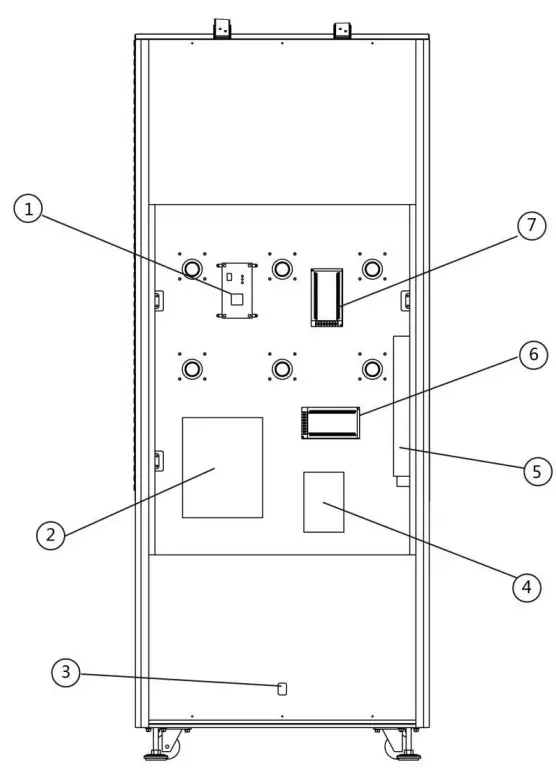
| Ref | Part Description | Part Number |
| 1 | ADRIO FX + Board | INV-04-1200 |
| 2 | Computer | INV-11-1001 |
| 3 | Power Inlet | ADR-05-1241 |
| 4 | Audio Amplifier | ADR-310-308 |
| 5 | Power Strip | ADR-05-1240 |
| 6 | 24V Power Supply | ADR-80-1206-00 |
| 7 | 5V-12V Power Supply | ADR-80-0210-00 |
| N | Video AD Board | INV-14-0010 |
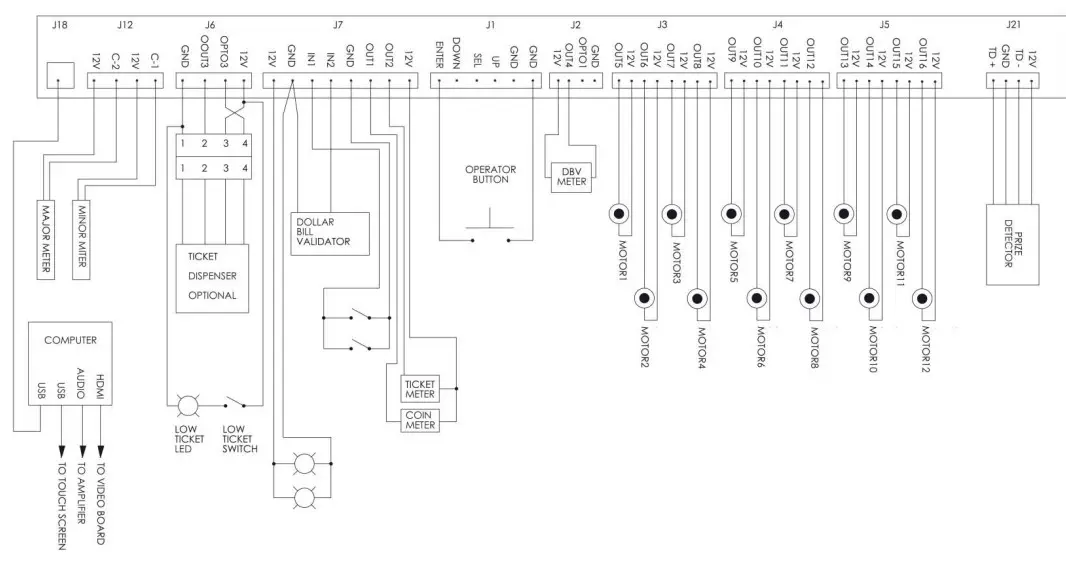
Electronic Wiring
Power Distribution Diagram
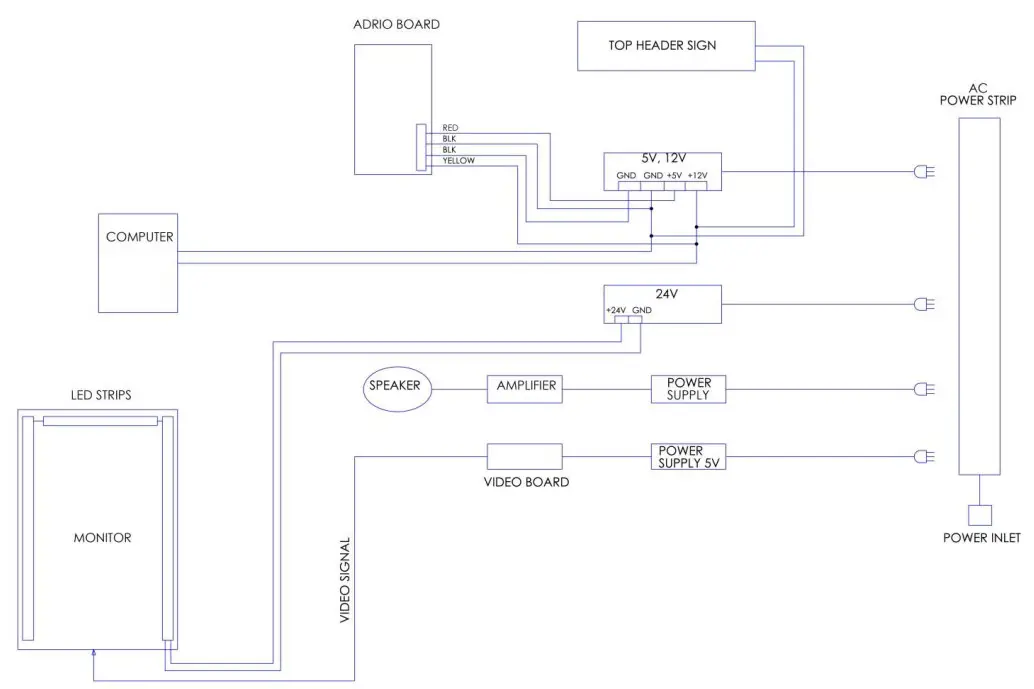
Detailed Wiring Diagram