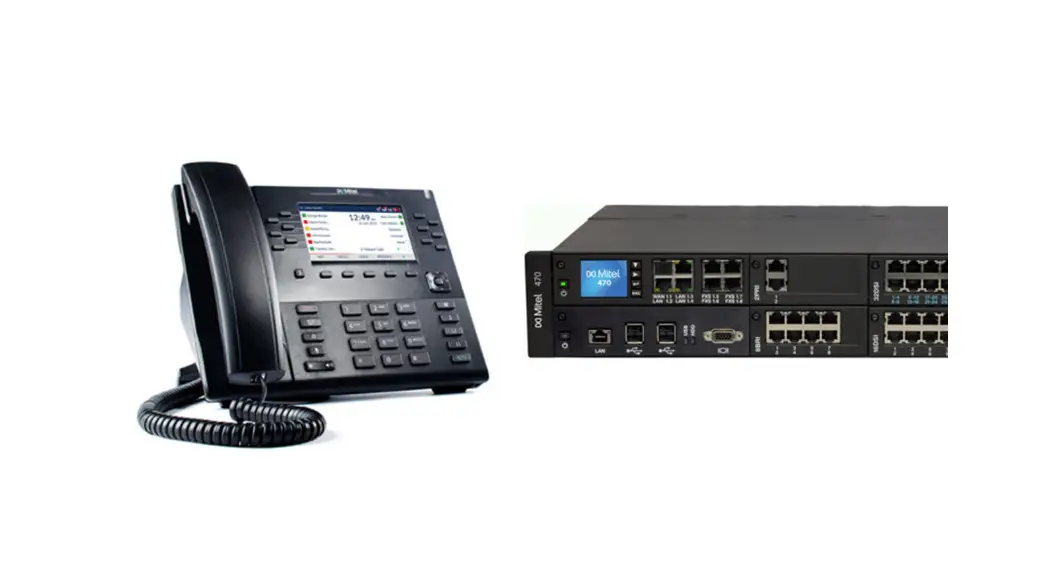

 A MITEL PRODUT GUIDE
Mitel One
Deployment Guide for MiVoice Office 400
Version 1.0
MiVoice Office 400 Pbxs and Telephone Systems
Notices
The information contained in this document is believed to be accurate in all respects but is not warranted by Mitel Networks™ Corporation (MITEL®).The information is subject to change without notice and should not be construed in any way as a commitment by Mitel or any of its affiliates or subsidiaries. Mitel and its affiliates and subsidiaries assume no responsibility for any errors or omissions in this document. Revisions of this document or new editions of it may be issued to incorporate such changes. No part of this document can be reproduced or transmitted in any form or by any means – electronic or mechanical – for any purpose without written permission from Mitel Networks Corporation.
Trademarks
The trademarks, service marks, logos and graphics (collectively “Trademarks”) appearing on Mitel’s Internet sites or in its publications are registered and unregistered trademarks of Mitel Networks Corporation (MNC) or its subsidiaries (collectively “Mitel”) or others. Use of the Trademarks is prohibited without the express consent from Mitel. Please contact our legal department at [email protected] for additional information. For a list of the worldwide Mitel Networks Corporation registered trademarks, please refer to the website: http://www.mitel.com/trademarks.
®, ™ Trademark of Mitel Networks Corporation
© Copyright 2022, Mitel Networks Corporation
All rights reserved
About this Document
This chapter contains the following sections:
- Intended Audience
- Related Documentation
1.1 Intended Audience
This document will serve as an introductory guide to readers seeking a high-level perspective of how to deploy Mitel One with the supported PBXs. The document is intended for Mitel Partners, Resellers, and Account Administrators. Basic knowledge of phones (especially SIP and IP technology) and cloud technology is required to understand the content presented in this document.
1.2 Related Documentation
Click here for Mitel One web application documentation.
Click here for MiVoice Office 400 documentation.
Click here for CloudLink Accounts portal documentation.
Click here for CloudLink Integration with MiVoice Office 400 documentation.
Click here for CloudLink Gateway documentation.
Introduction
With the introduction of Mitel One, Mitel is providing a single application for Mitel customers to talk, chat, meet, and share information. The Mitel One application consolidates telephony, chat, and meetings within a single application and user experience. It provides seamless transitions between chat, voice, and video capabilities for a complete collaboration experience. From your PC or Mac, you can find and connect with individuals and groups through calls and messages, answer and handle multiple calls in real time, and attend multi-party video conferencing with colleagues as well as with your contacts outside your organization.
Prerequisites
Following are the prerequisites that must be ensured before deploying Mitel One to the users.
- A MiVoice Office 400 PBX running version 6.3 or later on a supported platform (470, SMBC, or Virtual Appliance).
- CloudLink Gateway must be running version 1269 or later and must be connected to the Master Node in an AIN (Advanced Intelligent Network) environment.
- System must have active Software Assurance.
- MiVoice Office 400 licenses may be required depending on deployment.
System Requirements
This chapter contains the following sections:
- Consolidated Directories
The following are the minimum system requirements for deploying Mitel One application.
DSP Requirements
For information about the DSP requirements for a Mitel One application call, see the DSP Requirements section in System Requirements.
Bandwidth Requirements
For information about the recommended bandwidth required to use the Mitel One application, see Bandwidth Requirements.
Also, the best practices recommended for CloudLink site deployments must be observed.
Click here to view the list of recommended best practices.
Firewall Settings
For information about the ports that need to be open and the URLs that the web app uses, see Firewall Settings.
Network Handling and Requirements
For information about the app behavior when you switch between access points or networks during an ongoing call, see Network Handling and Requirements.
Scalability
For information about the maximum number of Mitel One users, and the maximum number of simultaneous calls supported on the MiVoice 400 PBX, see Scalability.
4.1 Consolidated Directories
Call history, incoming caller ID, and outgoing caller ID in the Mitel One application are synchronized with the contacts from MiVoice Office 400 PBX consolidated directories.
MiVoice Office 400 PBX support for consolidated directories is summarized in the following table.
Table 1: Support for Consolidated Directories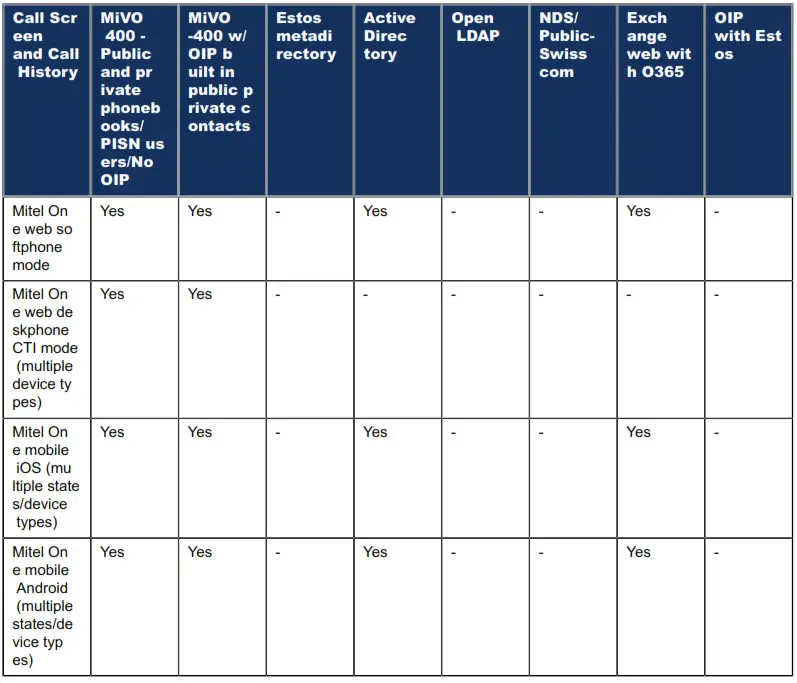
 Note:
Note:
For a phone number that exists in different directories, the details displayed by the Mitel One application are those from the directory of the highest priority. The priority of directories is in the following order:
- Office 365
- OIP
- MiVoice 400 Public and Private Phonebooks
Licensing
Mitel One is offered via subscription-based licenses. The licensing entitlement is delivered on the MiVoice 400 PBX (SLS) and the CloudLink Accounts console.
Mitel One is included with the MiVoice Office 400 Entry, Premier, and Elite profiles only. When you assign a MiVoice 400 profile to a user, one part of the license is delivered to the MiVoice 400 (MiVoice Office 400 User, SIP Terminal, and a Mitel One user license) and another part containing the Mitel One license (Mitel One Softphone, and Chat licenses) is delivered to the CloudLink Platform. The license on the MiVoice 400 automatically creates a CloudLink softphone on the user’s account in the MiVoice 400. However, you must manually enable the Mitel One license for the user in the CloudLink Accounts console for the entire solution to work.
The following table summarizes licensing and entitlements provided based on one-time fee or annual subscriptions.
| Terms/Platform | Feature | MiVoice Office 400 Upgrade to Entry* | MiVoice Office 400 Premier | MiVoice Office 400 Elite |
| Duration | One time purchase | Annual Subscription | Annual Subscription | |
| MiVoice Office 400 | User | Yes | Yes | |
| SIP Terminal | +2 | +2 | ||
| Mitel One | Yes | Yes | Yes | |
| Dialer | Yes | |||
| OIP ACD Agent | Yes | |||
| OIP 1560 Console | Yes | |||
| SWA | +1 user | +1 user | ||
| Mitel One | Softphone | Yes | Yes | Yes |
| Chat | Yes | Yes | Yes | |
| Meetings with 100 participants | Yes | |||
| Meetings with 250 participants** | Yes |
* Upgrade to Entry license assumes user already has full SWA but the license itself does not include SWA.
** This is planned as a future delivery.
The following table summarizes licensing and entitlements provided based on monthly subscriptions.
| Terms/ Platform | Feature | MiVoice Office 400 Telephony | MiVoice Office 400 Entry | MiVoice Office 400 Premier | MiVoice Office 400 Elite |
| Duration | Monthly Subscription | Monthly Subscription | Monthly Subscription | Monthly Subscription | |
| MiVoice Office 400 | User | Yes | Yes | Yes | Yes |
| SIP Terminal | Yes | Yes | Yes | ||
| Mitel One | Yes | Yes | Yes | ||
| Dialer | Yes | ||||
| OIP ACD Agent | Yes | ||||
| OIP 1560 Console | Yes | ||||
| SWA | +1 user | +1 user | +1 user | +1 user | |
| Mitel One | Softphone | Yes | Yes | Yes | |
| Chat | Yes | Yes | Yes | ||
| Meetings with 100 participants | Yes | ||||
| Meetings with 250 participants* | Yes |
* This is planned as a future delivery.
The following table outlines the features offered by Mitel One on MiVoice Office 400 for the Entry, Premier, and Elite bundles.
| Mitel One Features | MiVoice Office 400 Upgrade to Entry | MiVoice Office 400 Premier | MiVoice Office 400 Elite |
| Meetings & Calling | |||
| Softphone | Yes | Yes | Yes |
| Number of WebRTC Audio & Video Meetings | No | Unlimited Meetings | Unlimited Meetings |
| Screen Sharing | NA | Yes | Yes |
| Scheduled Meetings | NA | Yes | Yes |
| Calendar Integrations | NA | Yes | Yes |
| Meetings Recording | NA | Yes, recording size limit as per storage limitations indicated herein | Yes, recording size limit as per storage limitations indicated herein |
| PSTN Call-In for Meetings | NA | Yes | Yes |
| Meeting Size | NA | Limited (100) | Max (250) |
| Chat & Collaboration | |||
| Streams/Workspace | Yes | Yes | Yes |
| File attachments in chat * | Yes | Yes | Yes |
| Storage | Limited to 1GB | Limited to 10 GB | Unlimited |
| Retention (Files and Recordings) | 12 months | 12 months | 12 months |
| Retention (Chats) | 24 months | 24 months | 24 months |
| Threaded Replies | Yes | Yes | Yes |
| Streams/Workspaces user size | Unlimited | Unlimited | Unlimited |
| DM Group Size | Unlimited | Unlimited | Unlimited |
| Integrations | |||
| MS Teams” | Yes | Yes | Yes |
| Administration | |||
| SSO | Yes | Yes | Yes |
| Onboarding tools | Yes | Yes | Yes |
| Support | |||
| Online Self Serve Support | Yes | Yes | Yes |
* Current 10MB file size limitation on CloudLink
** Integration with MS Teams via Mitel Assistant
Configuration
This chapter contains the following sections:
- SIP user configuration for Mitel One
- Direct/Indirect media switching VoIP calls
The following topics describe the configurations required for deploying the Mitel One application. Note:
The Mitel One application user name is provided and synchronized with MiVO400.
6.1 SIP user configuration for Mitel One
The MiVoice Office 400 PBX needs to be programmed to add all users who need to access the Mitel One application. For more information, see Add CloudLink App Users section in Configure MiVO400 on Standalone Platform.
6.2 Direct/Indirect media switching VoIP calls
- Direct Switching
When direct switching is enabled, the use of DSP resources is not required for connections between IP devices.
- Indirect Switching
When indirect switching is enabled, connections between IP and non-IP endpoints are made via an IP media gateway. This is carried out by the integrated standard media switch that switches VoIP channels for call connections in the IP network. The Standard Media Switch uses DSP resources for the real-time processing of the call data. VoIP channels are always required between IP and non-IP endpoints; for example, for internal connections between a SIP/IP phone and a digital system phone or an external user routed to the internal Voice Mail System via an SIP network interface. If indirect switching is enabled for SIP Devices/SIP Trunk, media will always be routed over PBX, using 2 DSP Channels, even when direct switching is possible.
For more information, see MiVoice Office 400 documentation.
Procedure
To onboard MiVoice Office 400 users to the CloudLink Accounts console and to deploy the Mitel One application from the CloudLink Accounts console:
- Log in to the CloudLink Accounts console.
- Create a customer account.
- Enable CloudLink Gateway integration for the customer account. After successful integration, the MiVoice Office 400 users are synchronized with the customer account.
- Enable Mitel One integration for the customer account.
- Assign Mitel One subscription licenses to the customer account. For more information, see the Assign Orders section in Orders. The assigned licenses will be displayed in the Subscriptions page of the customer account.
- Assign the Mitel One licenses to the users in the account.
Registering the User and Downloading the Application
A welcome email is sent to the user when the Mitel One application is deployed to the user from the CloudLink Accounts console. Users must use the Set up Mitel One button in this email to register their information with Mitel and build an account to log in to the Mitel One application. For more information, see Register your Mitel One web application.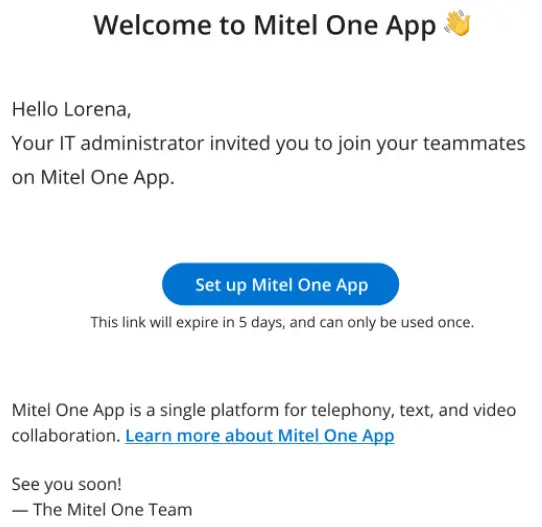 To access the Mitel One web application, users must enter the URL https://one.mitel.io in their browser and log in to the application.
Mitel One Clients
Note:
For the best audio quality, better reliability and stability, reduced latency, and for prompt real-time delivery of the notifications in the Mitel One application, Mitel recommends that you use a wired network over a wireless network.
Mitel One Web Application
The Mitel One web application supports the following browsers.
| Browser | Version |
| Apple Safari | 14.1 and later |
| Google Chrome | 94 and later |
| Microsoft Edge | 90 and later |
| Mozilla Firefox | 90 and later |
Mitel One Mobile Application
The Mitel One mobile application is designed to support 64-bit hardware only. It supports:
- Android phones with OS version 9.0 and later
- iPhones with iOS version 14 and later
mitel.com
Copyright 2022, Mitel Networks Corporation. All Rights Reserved. The Mitel word and logo are trademarks of Mitel Networks Corporation, including itself and subsidiaries and authorized entities. Any reference to third party trademarks are for reference only and Mitel makes no representation of ownership of these marks.
 one.mitel.io