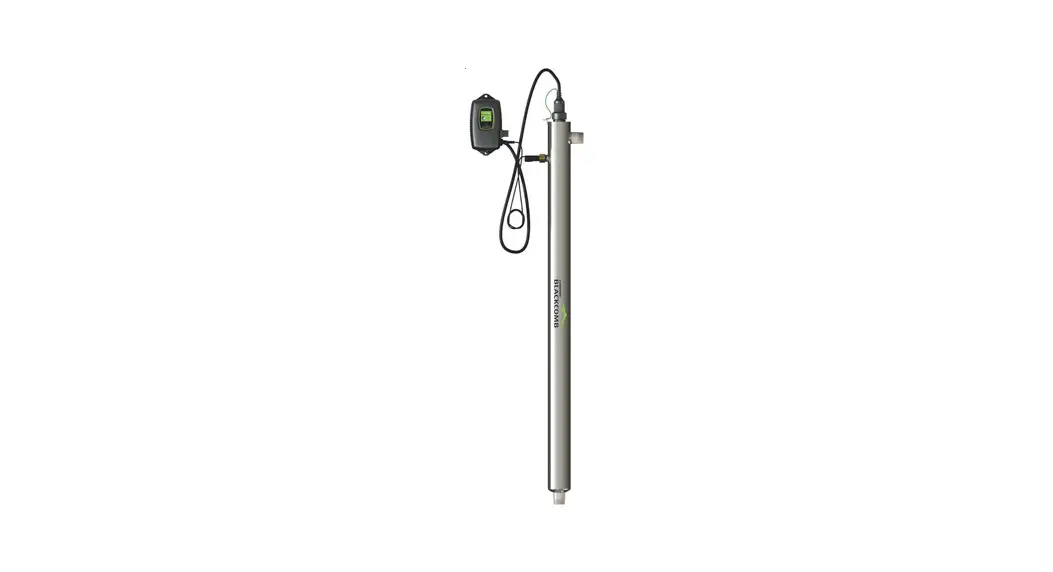

 BLACKCOMB 5.1 UV Water Purification
System Instructions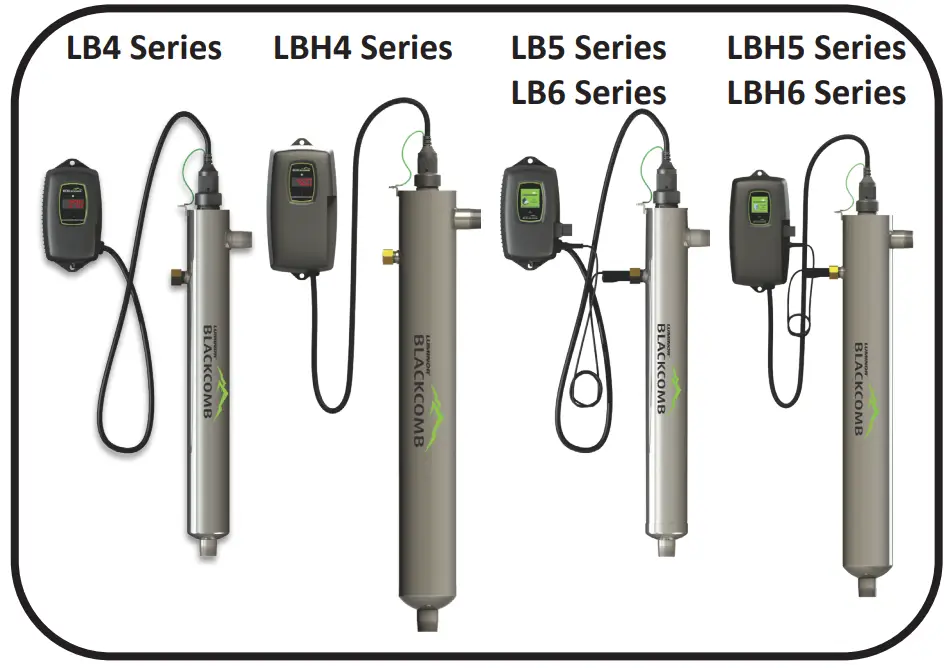
Operation & Installation Instructions
| NSF/ANSI Standard 55 Class A | |||
 System Tested and Certified by NSF International against CSA B483.1 and NSF/ANSI 55 for Disinfection** Performance, Class A System Tested and Certified by NSF International against CSA B483.1 and NSF/ANSI 55 for Disinfection** Performance, Class A | |||
| System | Rated Flow | System | Rated Flow |
| LB6-02XA | 1.6 gym | LBH6-05XA | 2.2 gym |
| LB6-03XA | 2.2 gym | LBH6-10XA | 4.1 gym |
| LB6-06XA | 3.4 gym | LBH6-15XA | 5.4 gym |
| LB6-10XA | 6.3 gym | LBH6-25XA | 7.9 gym |
| LB6-15XA | 7.9 gym | LBH6-40XA | 18 gym |
| NSF/ANSI Standard 55 Class B | |||
| System Tested and Certified by NSF International against CSA B483.1 and NSF/ANSI 55 for Disinfection** Performance, Class B | |||
| System | Rated Flow | System | Rated Flow |
| LB5-02XB LB6-02XB | 2.9 gym | LBH5-05XB LBH6-05XB | 5.4 gym |
| LB5-03XB LB6-03XB | 5.2 gym | LBH5-10XB LBH6-10XB | 7.6 gym |
| LB5-06XB LB6-06XB | 7.6 gym | LBH5-15XB LBH6-15XB | 13 gym |
| LB5-10XB LB6-10XB | 13 gym | LBH5-25XB LBH6-25XB | 22 gym |
| LB5-15XB LB6-15XB | 22 gym | LBH5-40XB LBH6-40XB | 28 gym |
| LUMINOR – Standard Systems | |||
| System | Rated Flow | System | Rated Flow |
| LB4-02X LB5-02X LB6-02X | 2 gym | LBH4-05X LBH5-05X LBH6-05X | 5 gym |
| LB4-03X LB5-03X LB6-03X | 3 gym | LBH4-10X LBH5-10X LBH6-10X | 10 gym |
| LB4-06X LB5-06X LB6-06X | 6 gym | LBH4-15X LBH5-15X LBH6-15X | 15 gym |
| LB4-10X LB5-10X LB6-10X | 11 gym | LBH4-25X LBH5-25X LBH6-25X | 25 gym |
| LB4-15X LB5-15X LB6-15X | 15 gym | LBH4-40X LBH5-40X LBH6-40X | 40 gym |
| LB4-20X LB5-20X LB6-20X | 21 mpg | ||
illuminating technologies for life
Note: These instructions are also available in soft copy via email from Luminor Customer Service.
Safety Considerations
It is important that care is taken when operating and/or maintaining your system.
Please read the instructions
- The appliance is not to be used by persons (including children) with reduced physical, sensory or mental capabilities, or lack of experience and knowledge, unless they have been given supervision or instruction.
- Children should be supervised so that they do not to play with the appliance.
- WARNING: Do not operate the UV-C emitter when it is removed from the appliance enclosure.
- The appliance is to be supplied through a residual current device (RCD) having a rated residual operating current not exceeding 30 mA.
- This appliance contains a UV-C emitter.
- Unintended use of the appliance or damage to the housing may result in the escape of dangerous UV-C radiation. UV-C radiation may, even in little doses, cause harm to the eyes and skin.
- The appliance must be disconnected from the supply before replacing the UV-C emitter.
- The appliance is intended to be permanently connected to the water mains and not connected by a hose-set.
- Maximum working voltage of built-in UV driver U-OUT=240V
- If the supply cord is damaged, it must be replaced by the manufacturer, its service agent or similarly qualified persons in order to avoid a hazard.
- Before servicing this equipment, disconnect the power cord from the electrical outlet.
- Energy given off by the UV lamp is harmful to your eyes and skin. NEVER look directly at an illuminated UV lamp without adequate eye protection and always protect your skin from direct exposure to the UV light.
- For complete disinfection , use ONLY genuine replacement parts.
- Do not operate the unit if it has any damaged or missing components.
- To avoid possible electrical shock, use only with a properly grounded electrical outlet.
- Never perform any maintenance to the system unless you are comfortable in doing so. Contact the manufacturer for service instructions if required.
- Do not use this system for any purpose other than what it was intended for. Misuse of this system could potentially cause harm to the user or others.
- Your system is intended to be installed indoors and away from leaking plumbing. DO NOT plug the unit in if the system or any of the components are wet.
- The system should be directly installed into a ground fault circuit interrupter (GFCI). If the use of an extension cord is required, the cord must be manufactured with a minimum of 16 gauge wire and care should be taken to avoid potential tripping hazards.
- We recommend that a licensed plumber or certified technician install the system.
This product is not to be used for general lighting / illumination.
Before You Begin
The following will be needed for installing the UV system:
Tools
- Pipe cutter, hacksaw or other specialized tools required to cut into your existing plumbing (e.g. if you have PEX piping)
- Soldering tools (torch, flux, emery cloth and solder)
- Wrench (for tightening fittings)
Other Materials
- Inlet/outlet connections
- Teflon™ tape
Water Quality Parameters
Treated water should be tested for at the least the parameters listed below. If the water exceeds the listed parameters LUMINOR strongly recommends that appropriate pretreatment equipment be installed (equipment required will depend on parameters being treated):
| Hardness: | <7 gig (120 mg/L) – if hardness level is 7 gig or slightly below the quartz sleeve must be cleaned periodically in order to ensure efficient UV penetration; if above the water must be softened. |
| Iron (Fe): | <0.3 ppm (0.3 mg/L) |
| Manganese (Mn): | <0.05 ppm (0.05 mg/L) |
| Turbidity: | < 1 NTU |
| Tannins (organics): | <0.1 ppm (0.1 mg/L) |
| UVT (transmittance): | <0.3 ppm (0.3 mg/L)<0.05 ppm (0.05 mg/L) < 1 NTU <0.1 ppm (0.1 mg/L) |
You can have your water tested at a private analytical laboratory or by your local dealer. It is always recommended to install pre-filtration of at least 5 microns prior to a LUMINOR UV disinfection **system.
**LUMINOR’s systems are tested for reduction of the MS-2 coliphage challenge microorganism to demonstrate a log reduction greater than or equal to the reduction caused by a dose of 40mJ/cm 2 .
Assembly
Unpack the system and ensure all the components are included with the system. Your system is shipped with the following components: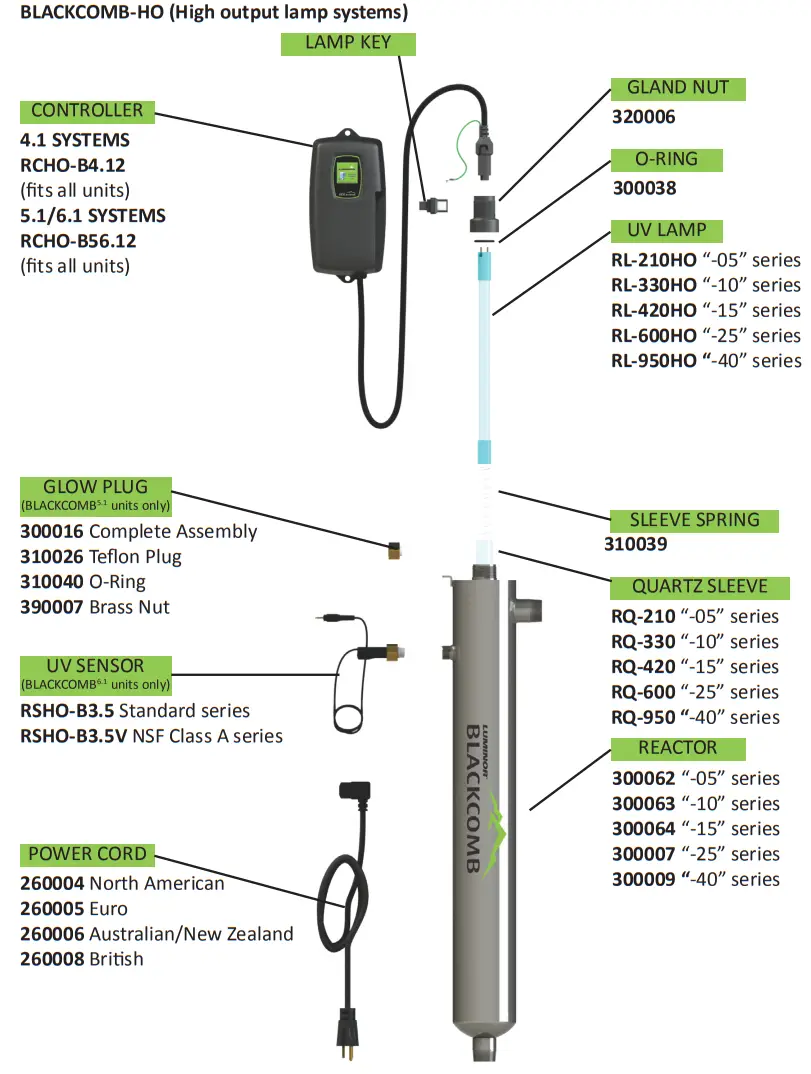
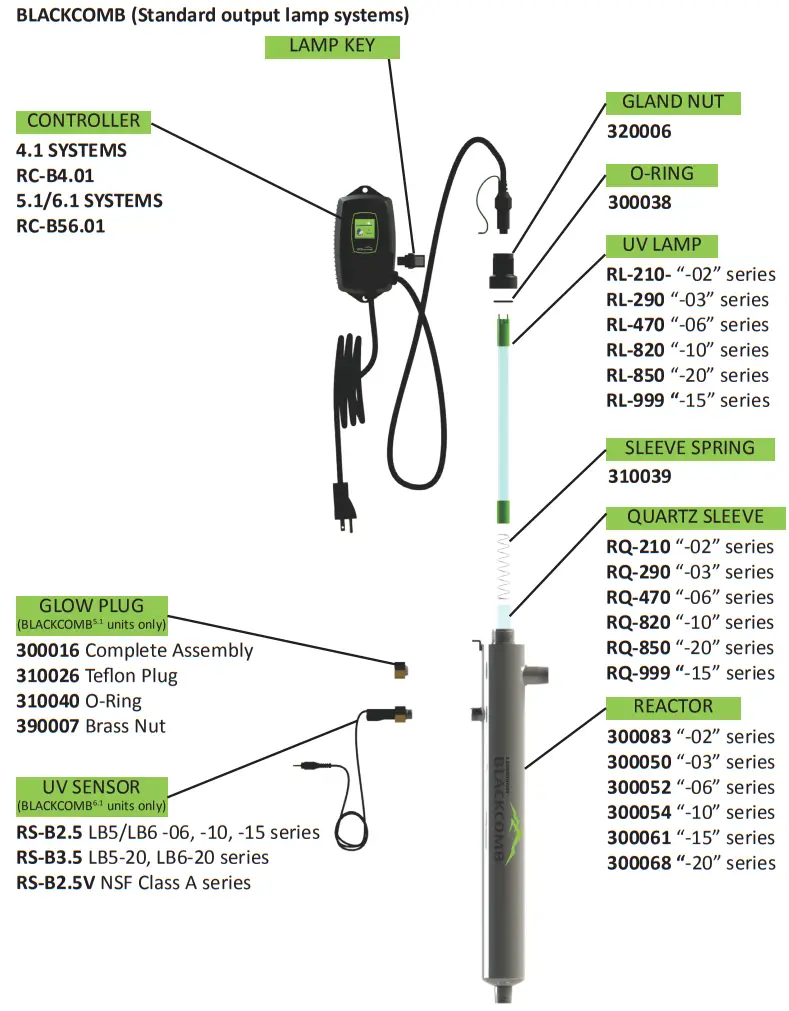
System Sizing
All LUMINOR UV systems are rated for a specific flow rate in water that meets the quality parameters on page 5. PLEASE NOTE that increasing the flow above this rating or disinfecting water that does not meet the quality parameters will decrease the dose and therefore compromise the efficacy of the system.
** If you need to determine your maximum flow rate, you can fill a 1 gallon bucket with water and time how long it takes to fill up. It is always better to oversize your system then to undersize. For example, if your pump delivers 8 gym it is recommended to install any of the BLACKCOMB 10 gym systems.
Location
For Point of Entry (POE) systems, choose a location where the main cold water line is accessible. The system must be installed after other water treatment equipment (softener or filters), but before any branches (See Figure 1). For Point of Use (POU) systems, install the unit just before the faucet. LUMINOR recommends that a 5 micron filter be installed before the UV system for a final polishing step before the water is disinfected.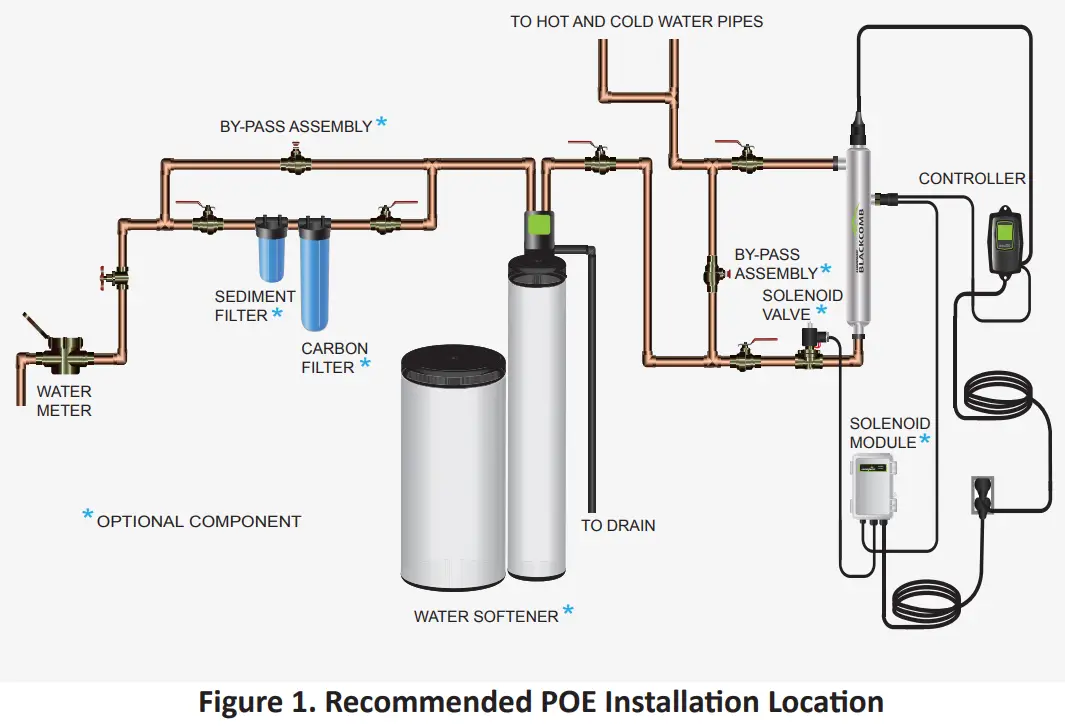 To facilitate lamp removal, ensure there is enough space at the lamp connector end to safely remove the UV lamp and/or quartz sleeve (See Figure 2). The controller will require a ground fault circuit interrupter (GFCI or GFI) outlet and should be mounted beside or above the reactor.
PLEASE NOTE: All LUMINOR UV** disinfection systems are intended for indoor use only as they should not be exposed to the elements.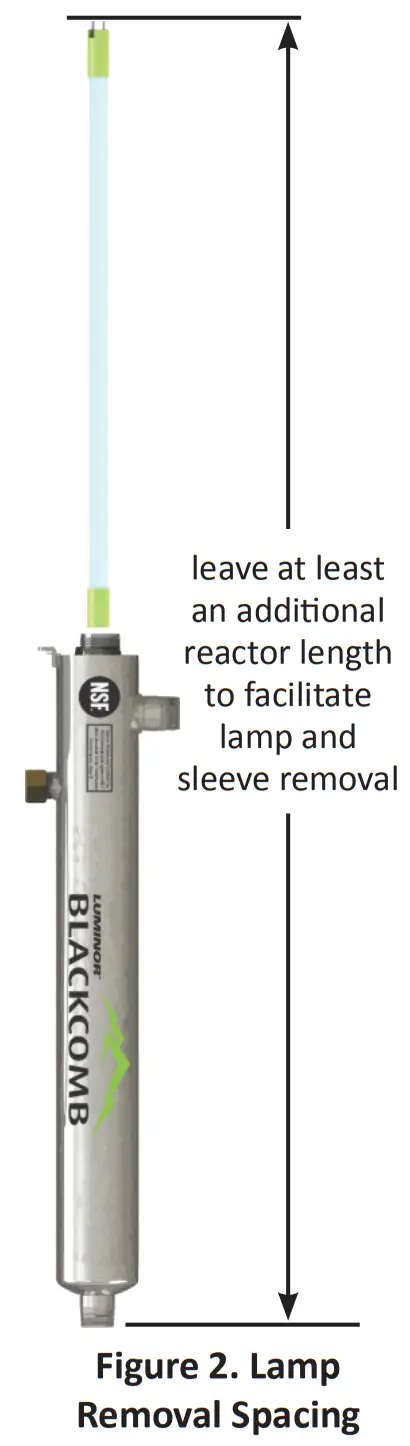
Installation
Step 1: The reactor can be installed either horizontally or vertically using the clamps provided. Vertical installation is the preferred method with the inlet at the bottom (lamp connection at the top) as it allows any air that may be in the lines to be easily purged from the system.
Step 2: The use of a by-pass assembly is recommended as it will allow you to isolate the UV reactor. This will allow for easier access in case maintenance is required (See Figure 4).
Step 3: Fasten chamber clamps to wall with screws provided. The screws must anchor securely into solid wood, concrete, or steel structure for adequate strength. Do not attempt to secure screws into drywall (Figure 3a). Install Chamber into clamps (Figure 3b).
Step 4: For water supplies where the maximum flow rate is unknown, a flow restrictor is recommended so that the rated flow of your particular BLACKCOMB system is not exceeded. The flow restrictor should be installed on the inlet port of the reactor.
Step 5: It is recommended to have a licensed plumber connect the UV reactor to the water supply and may be a requirement depending on where you are located. 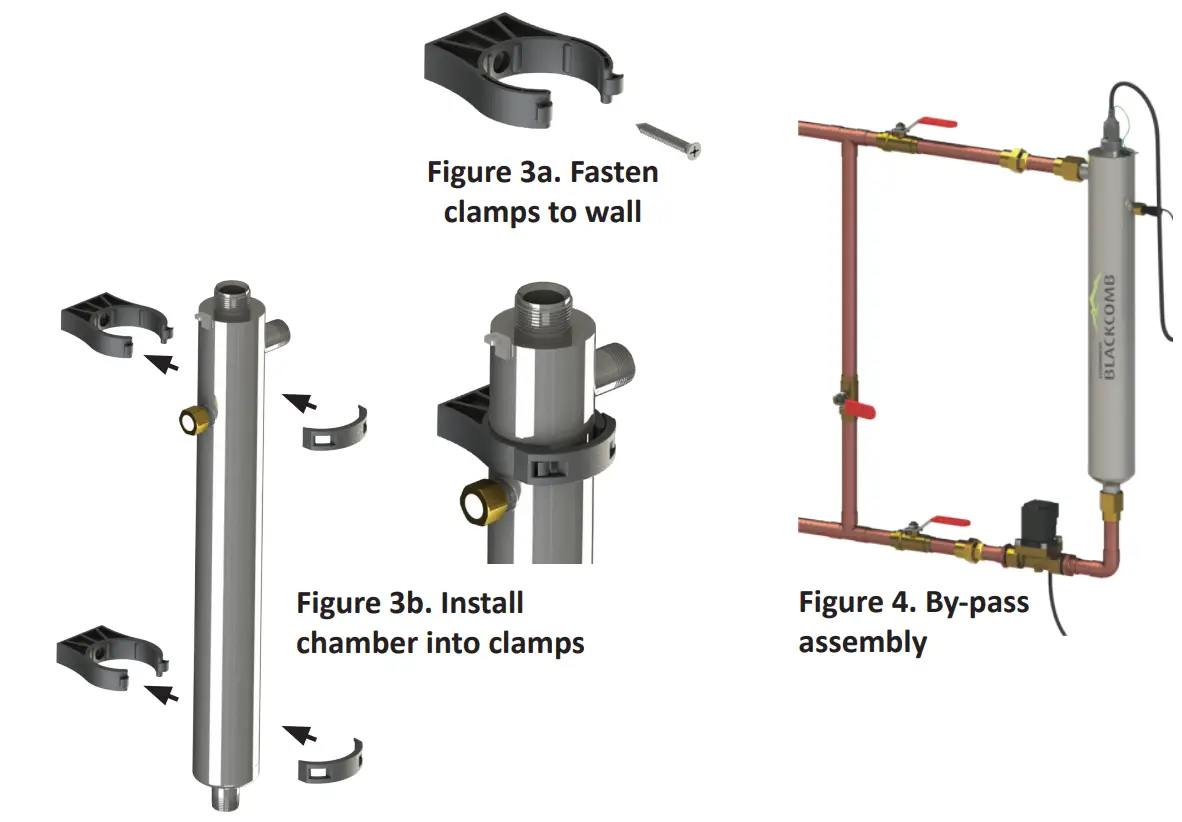
Note: Installation of your BLACKCOMB disinfection** systems shall comply with applicable provincial/ state & local regulations.
Step 6: Once the system has been plumbed in, gently remove the quartz sleeve from its packaging being careful not to touch the length with your hands. The use of cotton gloves is recommended for this procedure as oils from the hands can leave residue on the sleeve and lamp which can ultimately block the UV light from getting to the water. Carefully slide the sleeve into the reactor until you can feel it hit the opposite end of the reactor. Align the sleeve so it centered along the length of the reactor, then gently push it in to lock it into the internal centering springs in the far side of the reactor. CAUTION: Pushing too hard when the sleeve is not aligned can damage the centering springs. Slide the o-ring onto the sleeve until it is butted up against the reactor.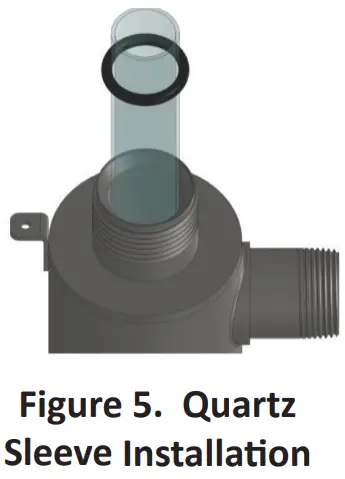
Step 7: Hand tighten the provided gland nut over the quartz sleeve onto the threaded end of the reactor. It has a positive stop to prevent over-tightening. A firm force may be required to fully tighten the gland nut, but DO NOT USE TOOLS for this step. Insert the provided stainless steel compression spring into the quartz sleeve. The spring works with the lamp and LUMI-Loc™ connector to create the proper lamp alignment. PLEASE NOTE: DO NOT install a UV lamp inside the quartz sleeve without the sleeve spring in place.
Step 8: Install the UV sensor (BLACKCOMB6.1systems only). Align the flat portion so it faces the gland nut end and matches up with the half metal lip on the sensor port (see Figure 6). Insert the sensor so it is fully seated and hand tighten the sensor nut.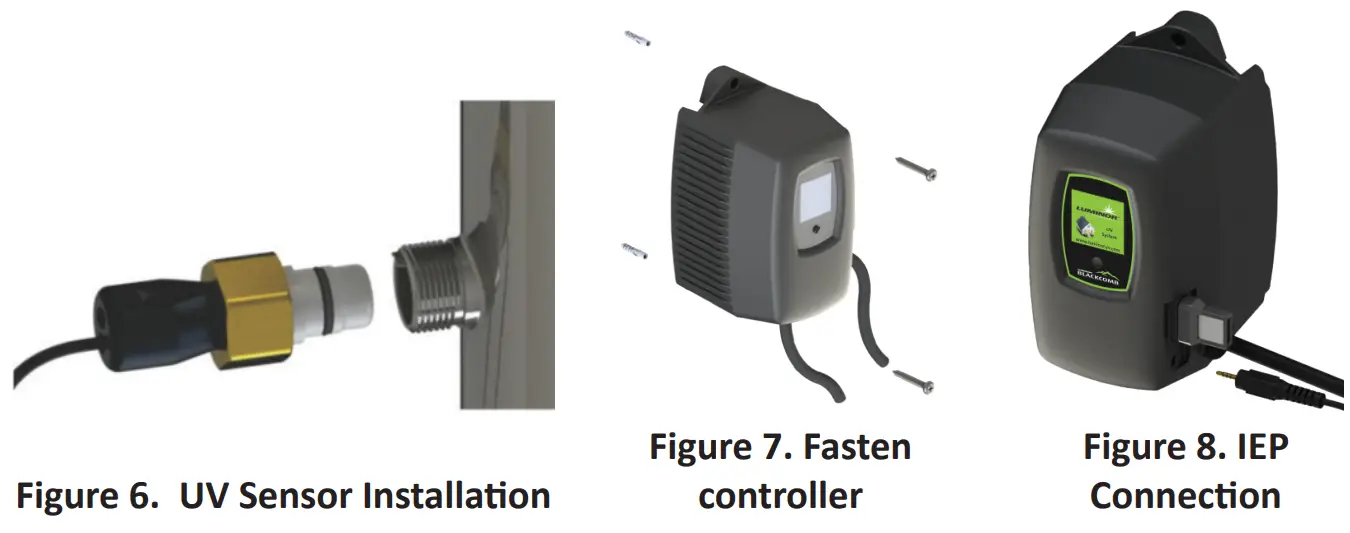
Step 9: The reactor is now ready for water flow. When all plumbing connections have been completed, slowly turn on the water supply and check for leaks. Make sure the by-pass valves are functioning properly and that the water is flowing through the reactor. The most common leak is from the o-ring not making a proper seal on the reactor. For new installations, review steps 5 and 6. For older systems drain the reactor, remove the o-ring, dry it and reapply silicon grease. Reinstall the o-ring ensuring that it is properly sealed against the reactor and check again for leaks.
Step 10: Fasten controller securely to wall with screws provided. Drywall anchors may be used. Note that the controller must be mounted vertically for adequate airflow across the aluminum heat sink on back (see Figure 7). For monitored systems, insert the sensor connector into the IEP located on the right side of the controller (Figure 8). For the sensor to be recognized by the controller, the controller power must be plugged in last. Do not plug the controller power cord in before the last step.
Step 11: Always hold UV lamps by their ceramic ends, not by the lamp quartz. Remove the lamp from its packaging. Again, the use of cotton gloves is recommended. Remove the lamp key from the lamp’s connector and set it aside for the next step. Be careful to not touch the key’s exposed contacts. Insert the UV lamp into the reactor, being careful not to drop it.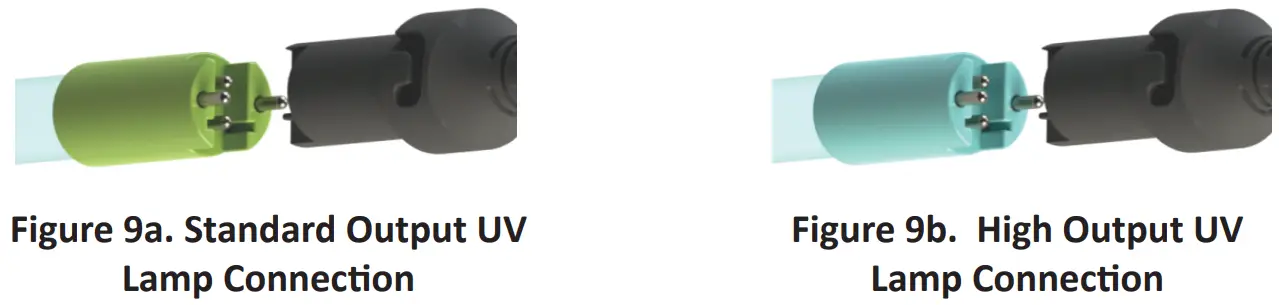
Step 12: Install the lamp key into the controller (BLACKCOMB5.1 , BLACKCOMB 6.1 systems only).
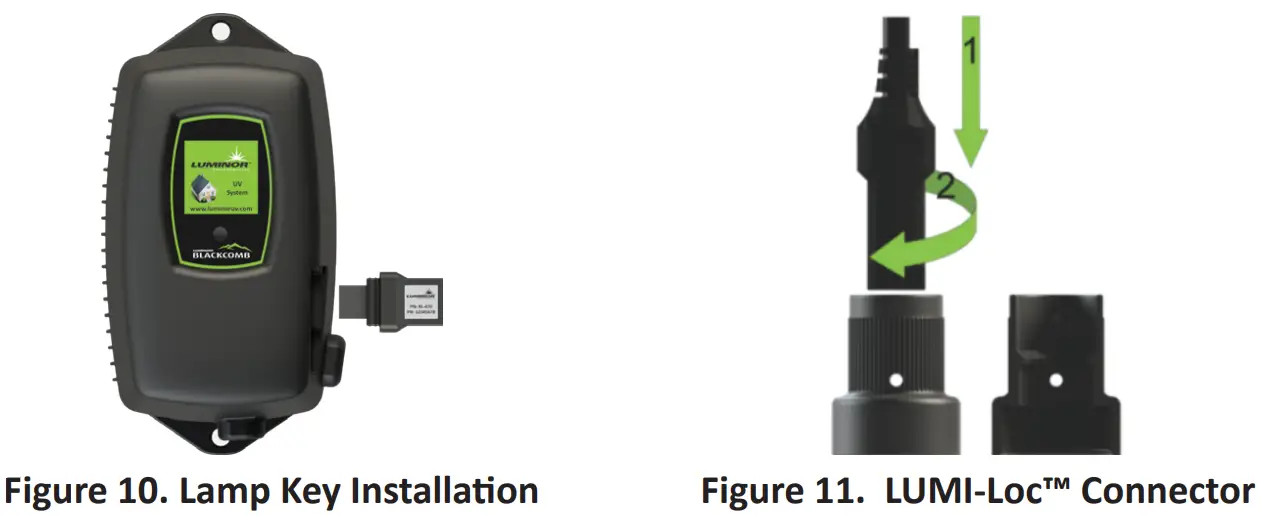
The key always comes packaged with the lamp and sits on the connector. With the key removed from the lamp, orient it so the label is upright and facing you. The key will plug into the lamp key port on the right side of the controller (Figure 10).
Step 13: Plug the LUMI-Loc™ lamp connector into the lamp. Note the keying for proper alignment (see Figure 9a, 9b). Insert the lamp connector into the gland nut and turn the connector approximately ¼ turn to lock the connector to the gland nut as in Figure 11.
Step 14: Tighten the captive ground screw to the ground lug on the UV reactor to ensure proper grounding. 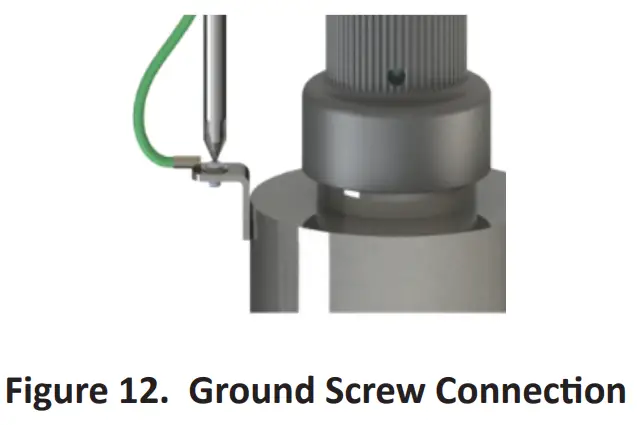
Step 15: Your system is now ready to be plugged into the appropriate GFCI protected outlet. Refer to the following section before any water is allowed to flow through the system.
System Preparation
With a new installation, or any time the UV system is shut down for service, without power, or is inoperative for any other reason, the lines in the home or facility could be contaminated. Use the following steps to prepare the lines throughout the entire home or facility.
Step 1: Check for and remove any “dead ends” in the lines throughout the home as these can harbor dirt and debris. Plug in the UV system and wait until it is ready for operation.
Step 2: Remove the filter cartridge from the last sump and fill it with 1-2 cups of household bleach (most are 5.25% chlorine). Replace the sump and slowly turn on the water supply.
Step 3: At a water outlet, run the water until bleach can be smelled. Repeat this for all faucets, toilets, shower heads, refrigerators, outdoor taps, the washing machine, dishwasher, etc. at the home or facility. Once finished, wait a minimum of 30 minutes before continuing.
Step 4: Reinstall the filter cartridge into the sump and flush the chlorine solution by opening all faucets until chlorine can no longer be detected. Your BLACKCOMB UV system is ready to use.
Cleaning the Quartz Sleeve
Depending on the water quality, the quartz sleeve may require periodic cleaning. At a minimum, the quartz sleeve should be cleaned on an annual basis. The following steps outline a basic cleaning procedure.
Step 1: If a by-pass assembly is installed, shut the inlet valve off to prevent water flow through the system. Otherwise, turn off main water inlet valve (and/or turn off the water pump).
Step 2: Disconnect power cord of UV system from electrical outlet.
Step 3: Release water pressure by opening a downstream faucet and then close the outlet shut-off valve (if any). If there is no outlet shut-off valve, expect water to drain from the system as the head pressure in the system will cause the water to flow back down.
Step 4: Remove the captive ground screw from the ground lug on the UV reactor.
Step 5: Remove the lamp connector from the reactor (gland nut) by pushing the LUMI-lock connector in and turning it ¼ turn counter-clockwise. Disconnect the lamp connector from the lamp. CAUTION: the lamp may be hot!
Step 6: Being careful to touch only the ceramic ends, remove the lamp out of the reactor.
Step 7: Unscrew the gland nut from the reactor exposing the end of the quartz sleeve.
Step 8: Remove the quartz sleeve and o-ring by gently twisting and pulling the quartz sleeve.
Step 9: Using a soft, lint-free cloth or towel wipe the sleeve down using a commercial scale cleaner (i.e. CLR® or LIME-A-WAY®). This removes scaling or iron deposits that may be on the outside of the quartz sleeve. Be careful not to get any moisture or liquids inside of the sleeve.
Step 10: Dry the sleeve with separate cloth.
Step 11: Replace the o-ring and slide the sleeve back into the reactor following steps 7 and 8 from the installation section of the manual.
Cleaning the UV Sensor
Depending on the water quality, the UV sensor may require periodic cleaning. At a minimum, the UV sensor should be cleaned on an annual basis. The following steps outline a basic cleaning procedure.
Step 1: If a by-pass assembly is installed, shut the inlet valve off to prevent water flow through the system. Otherwise, turn off main water inlet valve (and/or turn off the water pump).
Step 2: Disconnect power cord of UV system from electrical outlet.
Step 3: Release water pressure by opening a downstream faucet and then close the outlet shut-off valve (if any). If there is no outlet shut-off valve, expect water to drain from the system as the head pressure in the system will cause the water to flow back down.
Step 4: Place something under the reactor to catch any water that may come out of the reactor during the removal of the UV sensor.
Step 5: Unscrew (counterclockwise) sensor nut from the reactor and pull the sensor slowly out of the sensor port.
Step 6: Holding the sensor in your hand wipe the flat portion (sensor face) of the sensor with isopropyl alcohol using a clean lint-free cloth.
Step 7: Replace sensor following step 9 from the installation section of the manual.
Operation
BLACKCOMB systems come with a feature laden controller that incorporates both the lamp driver (ballast) and control features in one water-tight case. Four main controllers are available for the BLACKCOMB systems (depending on your model). All four models feature a power factor corrected, constant current lamp driver with a universal power input.
Please Note: While the LED or display screen is red and the buzzer is sounding the water from the system should NOT be consumed. If any water does pass through the system during this period, please follow the disinfection** procedure as outlined in this manual before the water is consumed. For BLACKCOMB**systems, even though they have a visual and audible warning built into the controller, a green LED or status screen does not necessarily indicate that the water coming from this system is in fact potable (safe to drink). These systems do not measure the level of disinfection4.1 and BLACKCOMB 5.1 ; they simply measure the “on-off” status of the lamp.
Please have your water checked for microbiological contaminants on a regular basis.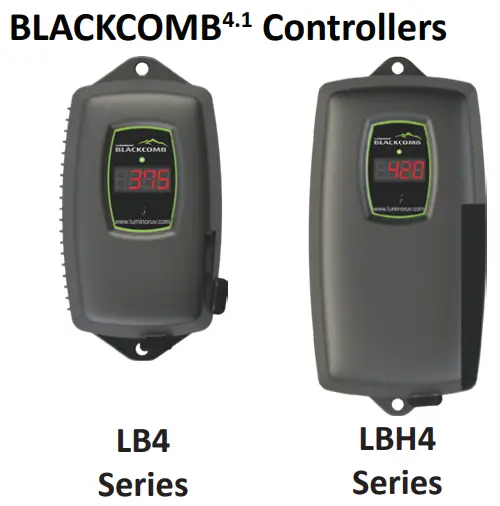 Simplistic in operation, these systems feature a tri-colour LED that indicating system status and a 4-digit display to indicate lamp life remaining. Pressing the button will change the display to indicate total running time. When the UV lamp is on and within its operating age, the LED will be green. When the UV lamp is not on or the lamp life has expired, the LED will be illuminated red and an audible buzzer will be sounding. To remedy this condition, the UV lamp must be replaced with a new genuine LUMINOR UV lamp.
BLACKCOMB5.1 & BLACKCOMB 6.1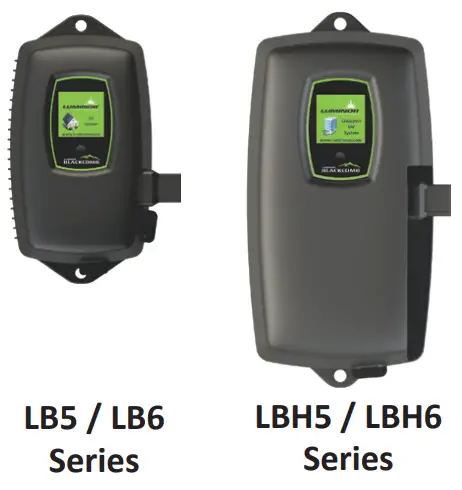
Controllers
A full colour LCD screen provides the user with a detailed description of the system’s performance in addition to providing any applicable fault messages and system diagnostics. The controllers used in both the BLACKCOMB5.1 and BLACKCOMB 5.1 are identical. The difference is that the BLACKCOMB 6.1 series of products includes a UV intensity monitor. All BLACKCOMB 6.1 controllers include an “infinite expandability port” located on the right side of the controller. Simply plug in an optional UV sensor module into the expandability port of a BLACKCOMB 5.1 and BLACKCOMB 6.1 controller and the system will now monitor the UV intensity of the system!
BLACKCOMB5.1 & BLACKCOMB6.1Power-up Sequence
On start up, the controller will run through a diagnostic start-up and the sequence will be displayed as follows on the colour LCD:
Next, the controller checks for and initializes any optional modules that may be attached to the system.
Optional Modules Check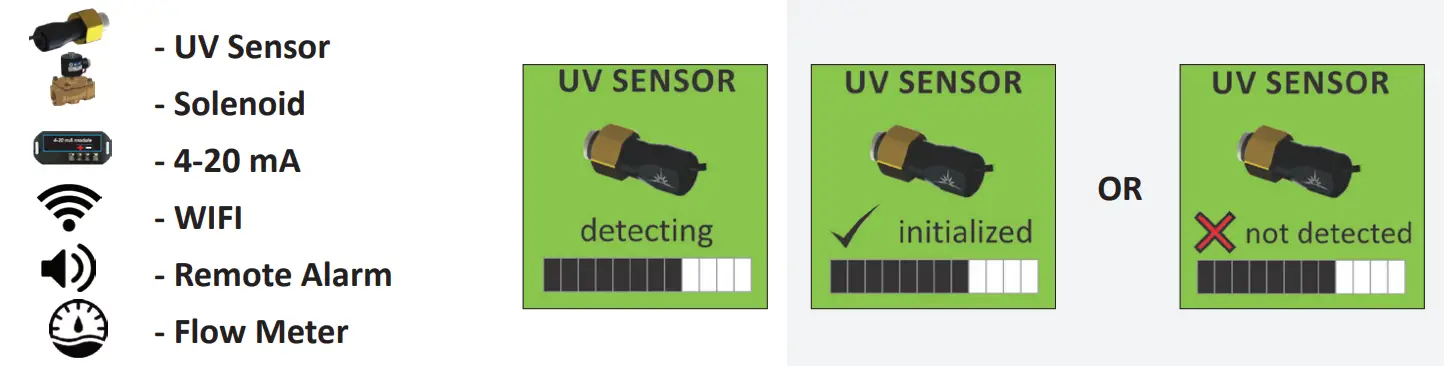
A final module screen is displayed showing which specific modules were initialized.
The controller then displays the lamp optimization screen for 60 seconds to allow the lamp to reach its optimum output. Finally, a final “start-up complete” screen is is played. The system will now be ready to disinfect ** water flow.
BLACKCOMB5.1 Operational Screens
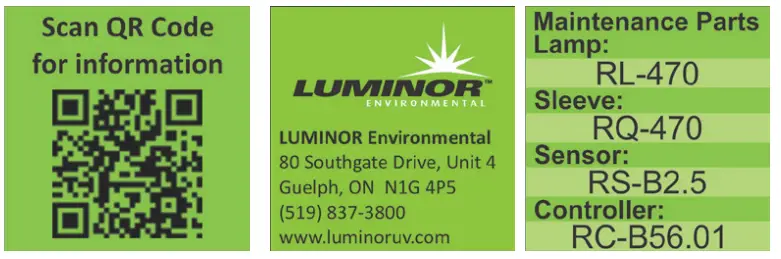
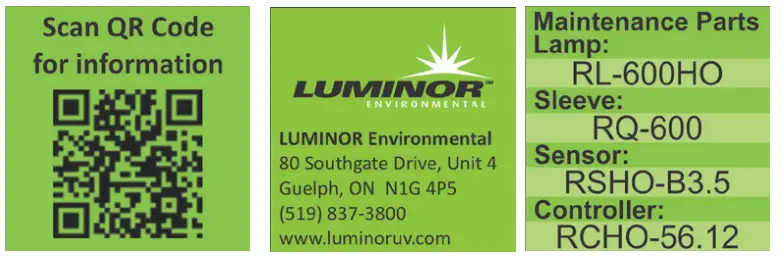
On systems without the UV monitor, the default screen shows the LUMINOR Home Screen. At any point during operation the user is able to scroll through the LUMINOR Home Screen, Lamp life remaining, QR Code, Contact Info and Maintenance Parts screens by pressing the button located on the front of the controller.
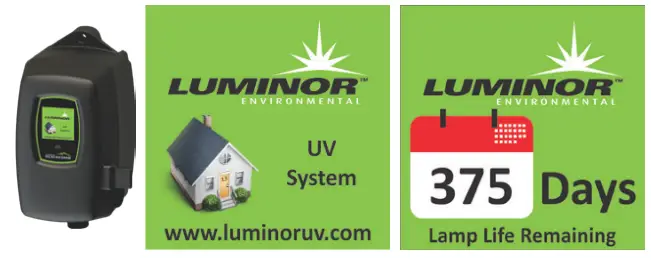 |  |
| www.luminoruv.com | http://www.luminoruv.com/LBHO-QR www.luminoruv.com |
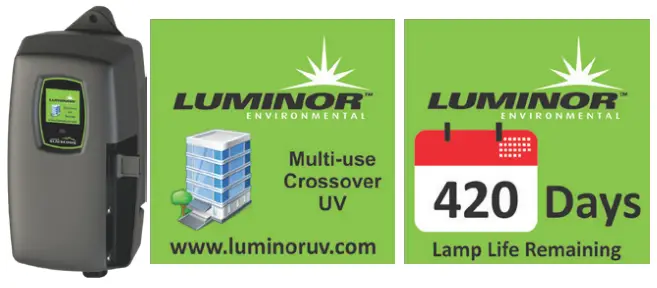 |  |
| www.luminoruv.com | http://www.luminoruv.com/LBHO-QR www.luminoruv.com |
BLACKCOMB6.1 Operational Screens
On systems with the UV monitor, the system will display the same screens as on the BLACKCOMB5.1 except the UV Intensity replaces the home screen. The UV Intensity screen displays the level of UV light detected by the sensor. UV intensity can be affected by poor water quality, scaling on the quartz sleeve and/or sensor, lamp failure or lamp expiring. The following screens show the UV Intensity dropping.
Below 56%, the numbers and warning sign turn red and an audible chirp is given by the ballast every 15 seconds. Below 51%, the screen is solid red and a constant audible alarm is given. This alternates with a screen indicating “water may be unsafe for consumption”. With the solenoid module, the controller de-activates the solenoid valve, shutting off all water flow.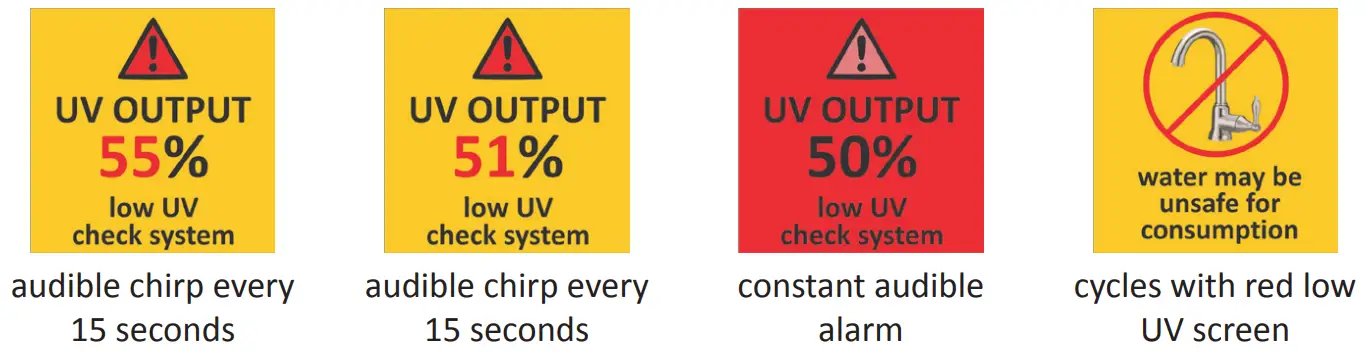
Lamp Countdown Sequence
The system counts down the number of days until a lamp change is required. 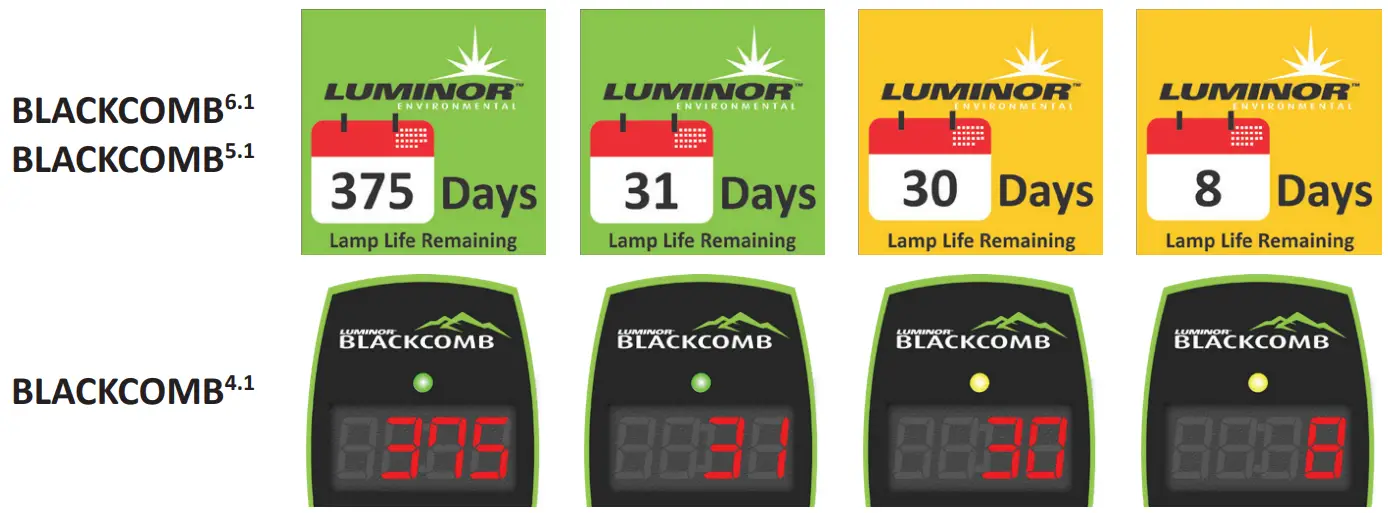
At thirty days remaining, the LED or display screen will change to a yellow caution indicator. At seven days remaining, the system will additionally repeat an audible chirp. Past the zero day threshold, the LED or display screen changes to solid red with a continuous buzzer. 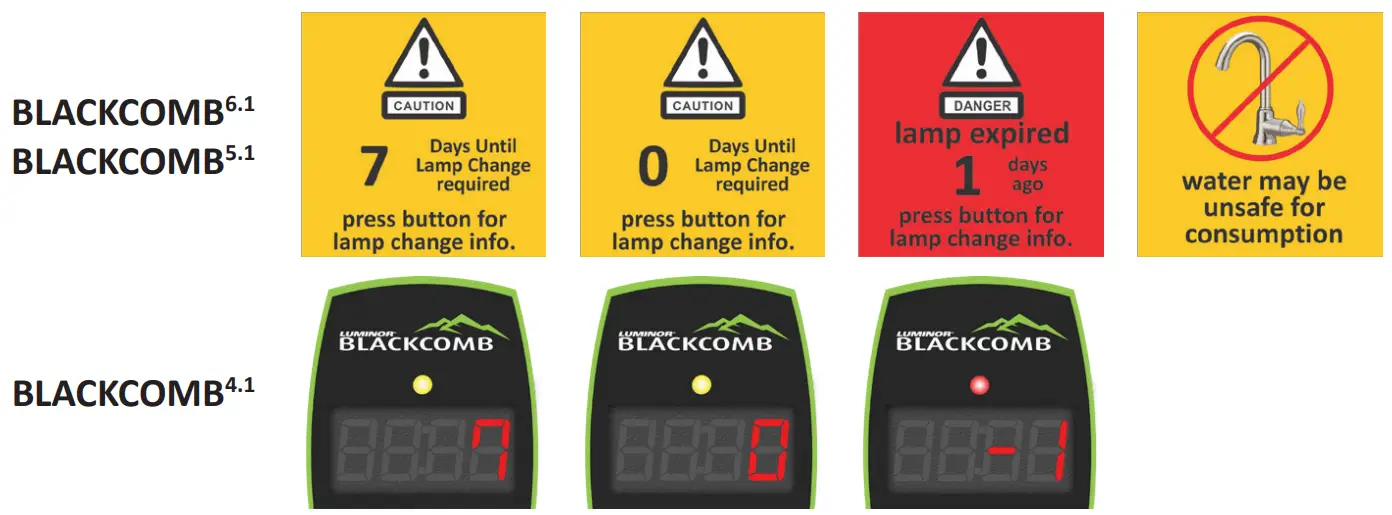
At any point during this sequence, the audible chirp or alarm can be deferred for seven days by holding the controller button down for a period of five seconds. The number of deferrals used will be displayed as below. Once the deferral expires, the alarm will sound once again. The deferral can be repeated up to three times. PLEASE NOTE: At any point after lamp expiration, the water may be unsafe for consumption and should not be consumed without another form of disinfection**.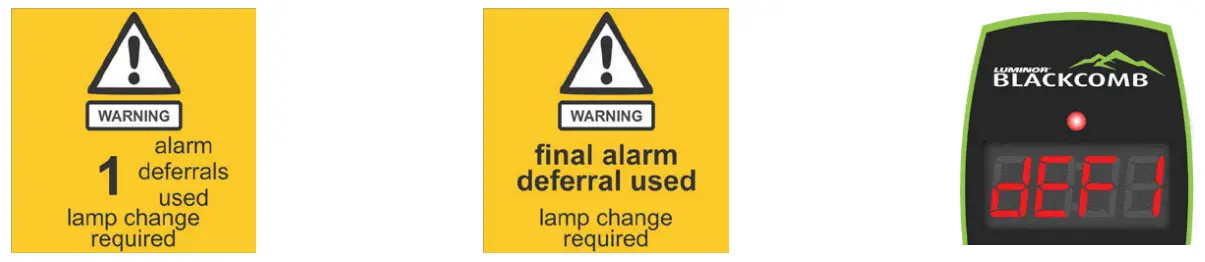
System Service Suggested
BLACKCOMB 5.1 & 6.1 controllers will display the System Service Suggested Screen every 6 months to remind consumers to maintain both their UV and other prefiltration. This will serve as a prompt only and will not put the system into alarm. To clear this condition simply press the button located below the screen.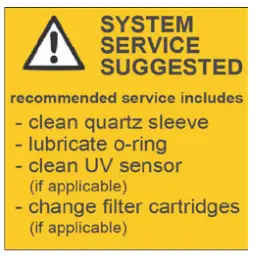
Lamp Replacement (BLACKCOMB4.1 systems)
After the lamp is expired, it must be replaced with the same part number as indicated by the label on the reactor. Begin replacing the lamp by unplugging the power for the controller, then refer to Installation, starting with step 11 (page 11) for instructions on installing the new lamp. To reset the timer in the controller, firmly hold down the button on the controller for 10 seconds. The controller will read “rSt3”, “rSt2”, “rSt1” and then beep. The button can now be released, the lamp countdown timer has been reset.
Lamp Replacement (BLACKCOMB5.1 & BLACKCOMB 6.1 systems)
After the lamp is expired, it must be replaced with the same part number as indicated on the Maintenance Parts screen or on the label on the reactor. With the system powered down, remove and discard the lamp key from the controller. The replacement lamp is packaged with a lamp key on the connector at the end of the lamp. Remove the key from the lamp and place it in the controller. Refer to Installation, starting with step 11 (page 11) for instructions on installing the new lamp.
QR Codes
 http://www.luminoruv.com/LBHO-QR
A QR code (Quick Response code) is a matrix barcode first designed for the automotive industry. LUMINOR uses the QR code to store a link to a specific page on our website. Users with a camera phone equipped with the correct reader application can scan the image of the QR code and over a wireless network connect to a LUMINOR web page in the phone’s browser. LUMINOR’s QR webpage has information on how to purchase replacement components as well as a helpful video directory on system servicing (i.e. How to change a UV lamp or quartz sleeve). To access the QR code on the BLACKCOMB controller, press the control button until the QR code screen appears.
System Troubleshooting
Hard Alarms: The following give a constant audible alarm. If present, the solenoid valve is closed, and the 4-20, remote alarm and wife modules transmit the alarm.
| System Display | Problem | Resolution |
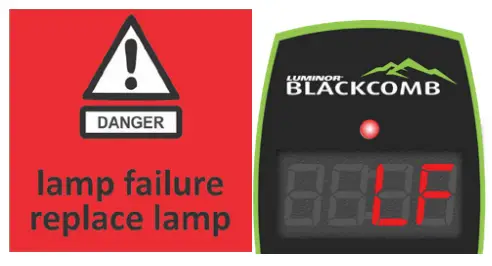 | The system has detected a problem with the lamp. | Reset lamp protection circuit unplug unit for 10 seconds. Replace the lamp with the part as indicated on the silver label on the reactor or on the Maintenance parts screen. |
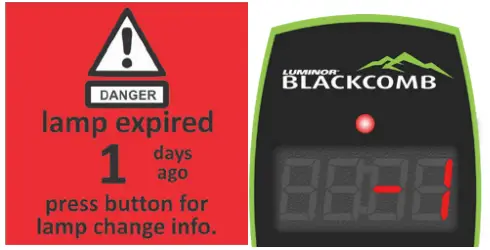 | Although the lamp is powered and visibly illuminated, due to the lamp’s age its UV output is no longer sufficient for proper disinfection**. | Replace the lamp with the part as indicated on the silver label on the reactor or on the Maintenance parts screen. |
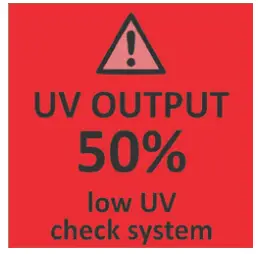 | Low UV Intensity. | Remove and clean the quartz sleeve and sensor. Check water quality meets requirements on page 5 and add filtration as required. Replace lamp. |
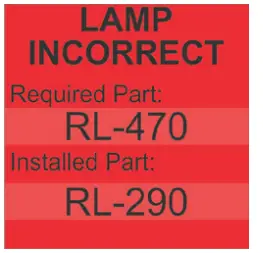 | Wrong lamp or sensor installed. | Replace component with proper model as indicated. |
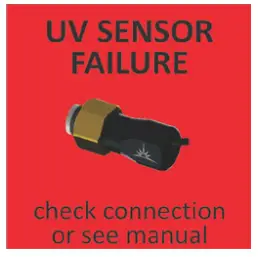 | The UV sensor is no longer communicating with the system. | Ensure all modules are connected properly to the system and to each other. Modules can be tested individually by plugging in one at a time and cycling power to the system. Replace any module that is not detected when plugged directly into the controller. |
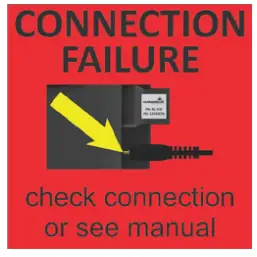 | A bad connection has been detected in the IEP port. | |
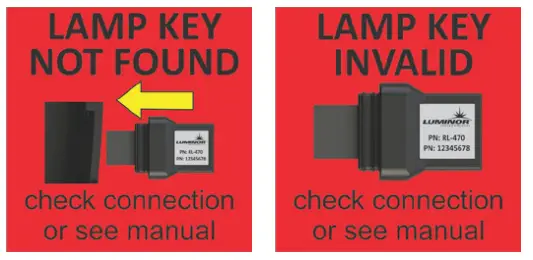
| Missing or incorrect lamp key. | Ensure the lamp key (packed with the lamp, on the connector) is installed. Unplug and reinstall the key. Ensure the key part number matches Lamp on Maintenance Parts screen. |
Soft Alarms: The following remaining errors give a 15 second audible chirp only
| System Display | Problem | Resolution |
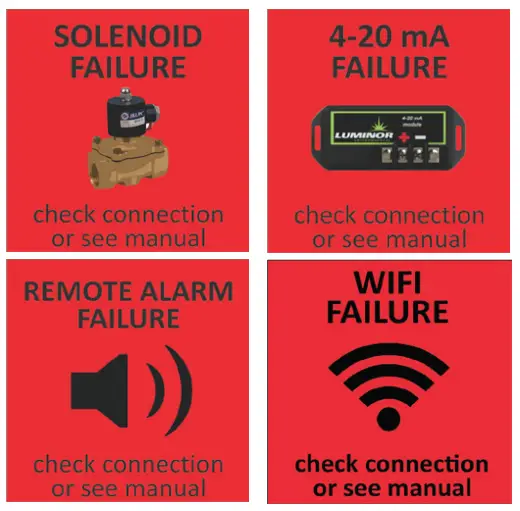 | The module indicated is no longer communicating to with the system | Ensure all modules are connected properly to the system and to each other. |
| Modules can be tested individually by plugging in one at a time and cycling power to the system. | ||
| Replace any module that is not detected when plugged directly into the controller. | ||
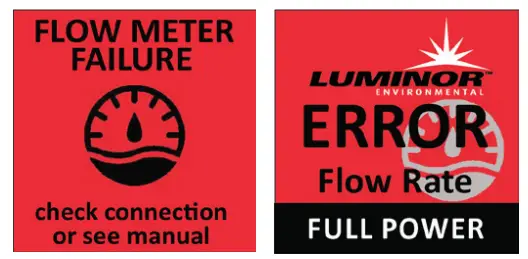 | Refer to flow meter manual for detailed troubleshooting | |
Warning: After any hard alarm, the home or facility should be disinfected**. Follow the steps under the “System Preparation” heading.
Boil Water Advisory: If any failure occurs on a BLACKCOMB UV system, the water must not be used for human consumption until the system is returned to normal operational mode. If the water is used for human consumption during this period, the water must be boiled (minimum 20 minutes at a full boil) prior to consumption.
Temperature Management Devices
Your LUMINOR BLACKCOMB system is designed to run continuously to ensure optimal disinfection . However, during periods when no water is drawn through the system, the energy from the disinfection ** process can cause the temperature of the water inside the chamber to rise. In extreme situations elevated water temperature or the fluctuation in temperature can lower the output of the UV lamp. In these cases, or if the elevated water temperature is a nuisance, LUMINOR recommends one of the following forms of temperature management devices.
Cooling Fan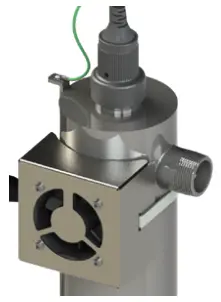 Designed for use on the BLACKCOMB-HO systems, the “LUMI-cool ”™ fan runs continuously to cool the water by forced convection. The long-life fan is powered independently using a compact modular power adapter that operates from 100-240V/50-60Hz. ±10%. The cooling fan must only be supplied at SELV. Order PN 130014.
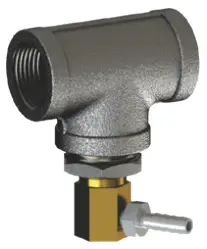 Temperature Relief Valve (TRV)
On reaching a higher temperature, the TRV is designed to drain a small amount of water to allow fresh, cooler water to enter the system. The TRV works without power and comes complete with 10’ of drain line. Order PN 130031 for 1/2” ports, PN 130032 for 3/4” ports, PN 130033 for 1” ports and PN 130034 for 1 1/2” ports.
Expansion Modules
BLACKCOMB5.1and BLACKCOMB6.1 controllers incorporate an “Infinite Expandability Port” (IEP) which allows for expansion to the UV sensor and all other modules. Each module (including the sensor) comes with both a male and female connection. Connect any device to the controller and all subsequent devices are then connected into the female end of last device added in a “daisy chain” configuration. The UV sensor must only be supplied at SELV.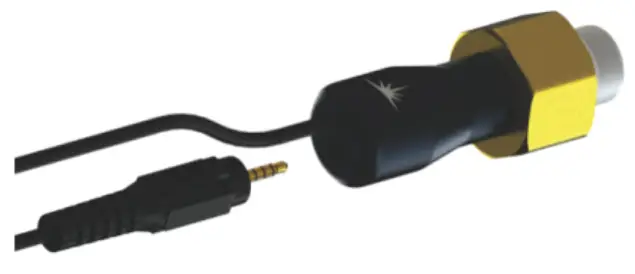 The following optional expansion modules are available for use on BLACKCOMB5.1and BLACKCOMB6.1UV controllers. Contact your authorized distributor for purchasing information.
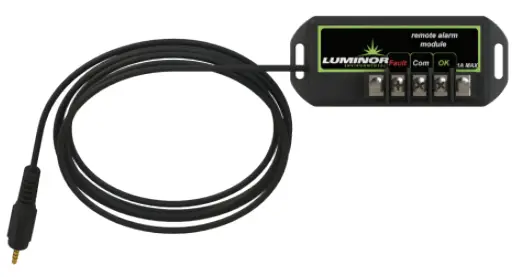 REMOTE ALARM CONNECTION MODULE: Allows for a connection to a remote device such as a buzzer, light, alarm system, PLC, etc., via a pair of contacts. In normal operation the OK and COM contacts will be connected, and in a fault condition (Low UV, Lamp fail, Power Fail), the Fault and COM contacts will be connected. Maximum contact rating is 30V / 1A (use 16-22 AWG). The remote alarm module must only be supplied at SELV. Order PN MOD-RAM.
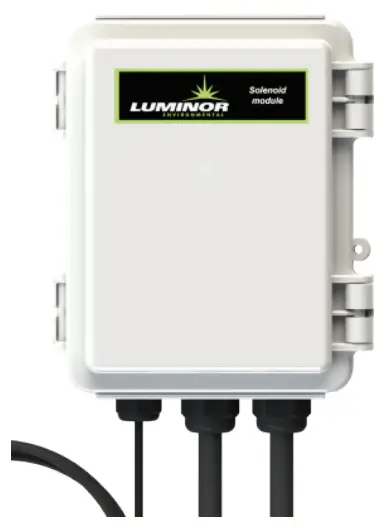 SOLENOID CONNECTION MODULE: Connects a NORMALLY CLOSED line voltage solenoid valve to the controller. Maximum contact rating is 240VAC (50-60Hz) / 30VDC / 2A. On a non-monitored system, the solenoid will only close on a lamp failure error. On a monitored system, the solenoid is closed when the UV level drops below 50%. Also note that in cases where emergency use of un- treated water is required, the controller can be placed into a manual override mode allowing for the flow of water in an alarm condition. Order PN MOD-SOL.
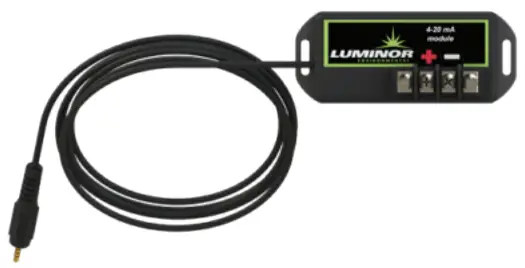
4-20 mA MODULE: Outputs a 4-20mA signal of the UV output to a remote device such as a data logger or computer. The 4-20mA module must only be supplied at SELV.
Order PN MOD-420.
The WiFi module and accompanying IoT application allows you to connect your UV system to a smart phone, tablet, computer or other connected platform. View system status, receive SMS or email messages of alarm conditions and monitor the health of your UV from anywhere via this connected platform. Connect the device via the APP found on Google Play or the APP Store. Connect your UV device to your router, download the software for your connected device and have peace of mind that your UV system is fully operational. *Not available in all markets.
 The Ultrasonic Flow Meter enables your UV system to dim power in times of low to no flow, saving you money on energy, reducing water temperature, and decreasing the risk of fouling. The flow meter module must only be supplied at SELV.
BLACKCOMB Standard Output System Specifications
 | LUMINOR EQUIPMENT SPECIFICATIONS | |||||
| Multi-Use / Residential systems (standard output lamps) | ||||||
| MODEL | LB4-02X LB5-02X LB6-02X | LB4-03X LB5-03X LB6-03X | LB4-06X LB5-06X LB6-06X | LB4-10X LB5-10X LB6-10X | LB4-15X LB5-15X LB6-15X | LB4-20X LB5-20X LB6-20X |
| NSF Class A Flow Rate 40mJ/cm2 @ 70% UVT (add “A” suffix on LB6 models) | 1.6 gym | 2.2 gym | 3.4 gym | 6.3 gym | 7.9 gym | N/A |
| 6.1 lap | 8.3 lap | 13 lap | 24 lap | 30 lap | N/A | |
| 0.36 m3/hr | 0.50 m3/hr | 0.77 m3/hr | 1.4 m3/hr | 1.8 m3/hr | N/A | |
| NSF Class B Flow Rate 16mJ/cm2 @ 70% UVT (“B” suffix on LB5,LB6 models) | 2.9 gym | 5.2 gym | 7.6 gym | 13 gym | 22 gym | N/A |
| 11 lap | 20 lap | 29 lap | 49 lap | 83 lap | N/A | |
| 0.66 m3/hr | 1.2 m3/hr | 1.7 m3/hr | 3.0 m3/hr | 5.0 m3/hr | N/A | |
| Flow Rate 16mJ/cm2 @ 95% UVT | 3.8 gym | 6.1 gym | 11 gym | 20 gym | 30 gym | 39 gym |
| 15 lap | 23 lap | 41 lap | 77 lap | 110 lap | 150 lap | |
| 0.87 m3/hr | 1.4 m3/hr | 2.5 m3/hr | 4.6 m3/hr | 6.8 m3/hr | 8.9 m3/hr | |
| Flow Rate 30mJ/cm2 @ 95% UVT | 2.0 gym | 3 gym | 6 gym | 11 gym | 15 gym | 21 gym |
| 7.6 lap | 11.4 lap | 22.7 lap | 41 lap | 57 lap | 79 lap | |
| 0.45 m3/hr | 0.70 m3/hr | 1.4 m3/hr | 2.5 m3/hr | 3.4 m3/hr | 4.8 m3/hr | |
| Flow Rate 40mJ/cm2 @ 95% UVT | 1.6 gym | 2.4 gym | 4.4 gym | 8.3 gym | 12 gym | 16 gym |
| 6.1 lap | 9.1 lap | 17 lap | 31 lap | 45 lap | 59 lap | |
| 0.36 m3/hr | 0.50 m3/hr | 1.0 m3/hr | 1.9 m3/hr | 2.7 m3/hr | 3.6 m3/hr | |
| Port Size | ½”FNPT | ½”MNPT | ¾”MNPT | ¾”MNPT | 1”MNPT | 1”MNPT |
| Electrical | 100-240V/50-60Hz. ±10%. 1A Max. | |||||
| Plug Type | American: NEMA 5-15P *See Note (below) | |||||
| Lamp Power (Watts) | 8 | 15 | 22 | 39 | 50 | 42 |
| Power (Watts) | 14 | 20 | 30 | 49 | 62 | 51 |
| Replacement Lamp | RL-210 | RL-290 | RL-470 | RL-820 | RL-999 | RL-850 |
| Replacement Sleeve | RQ-210 | RQ-290 | RQ-470 | RQ-820 | RQ-999 | RQ-850 |
| Reactor Dimensions | 6.4 x 26.2 cm (2.5 x 10.3”) | 6.4 x 36.4 cm (2.5 x 14.3”) | 6.4 x 54.2 cm (2.5 x 21.3”) | 6.4 x 89.5 cm (2.5 x 35.2”) | 6.4 x 101.6 cm (2.5 x 40.0”) | 8.9 x 91.7 cm (3.5 x 36.1”) |
| Chamber Material | 304 Stainless Steel, A249 Pressure Rated Tubing | |||||
| Controller Dimensions | 17.2 x 9.2 x 10.2 cm (6.8 x 3.6 x 4”) | |||||
| Operating Pressure | 0.7-10.3 bar (10-150 psi) | |||||
| Operating Water Temperature | 2-40° C (36-104° F) | |||||
| UV Monitor | YES on all “LB6” models. Upgrade available for “LB5” models (NOT available on LB4 models) | |||||
| Solenoid Output | YES (optional solenoid module (MOD-SOL1) sold separately) | |||||
| Dry Contacts | YES (remote alarm module (MOD-RAM) sold separately) | |||||
| 4-20mA Output | YES (4-20mA module (MOD-420) sold separately) | |||||
| Temperature Mgmt. Valve | NA | PN# 130031 | PN# 130032 | PN# 130033 | ||
| Cooling Fan | NO | OPTIONAL (130014) | ||||
| Lamp Change Reminder | YES | |||||
| Lamp Out Indicator | YES | |||||
| Shipping Weight | 2.9 kg (6.3 lbs) | 3.6 kg (7.9 lbs) | 4.4 kg (9.6 lbs) | 6.0 kg (13.2 lbs) | 6.5 kg (14.4 lbs) | 8.2 kg (18.0 lbs) |
*Note: replace “X” with “1” for all 110V systems with North American NEMA 5-15 replace “X” with “2” for all 230V systems with European CEE 7/7 replace “X” with “3” for all 230V systems with British Standard, BS 1363 replace “X” with “4” for all 230V systems with Australian/New Zealand AS/NZ 3112
BLACKCOMB-HO High Output System Specifications
| LUMINOR EQUIPMENT SPECIFICATIONS | ||||
| Residential Crossover systems (high output lamps) | |||||
| MODEL | LBH4-05X LBH5-05X LBH6-05X | LBH4-10X LBH5-10X LBH6-10X | LBH4-15X LBH5-15X LBH6-15X | LBH4-25X LBH5-25X LBH6-25X | LBH4-40X LBH5-40X LBH6-40X |
| NSF Class A Flow Rate 40mJ/cm2 @ 70% UVT (add “A” suffix on LBH6 models) | 2.2 gym | 4.0 gym | 5.4 gym | 7.9 gym | 18 gym |
| 8.3 lap | 15 lap | 20 lap | 30 lap | 68.1 lap | |
| 0.50 m3/hr | 0.91 m3/hr | 1.2 m3/hr | 1.8 m3/hr | 4.08 m3/hr | |
| NSF Class B Flow Rate 16mJ/cm2 @ 70% UVT (“B” suffix on LBH5,LBH6 models) | 5.4 gym | 7.6 gym | 13 gym | 22 gym | 28 gym |
| 20 lap | 29 lap | 49 lap | 83 lap | 110 lap | |
| 1.2 m3/hr | 1.7 m3/hr | 3.0 m3/hr | 5.0 m3/hr | 6.4 m3/hr | |
| Flow Rate 30mJ/cm2 @ 95% UVT | 5.0 gym | 10 gym | 15 gym | 25 gym | 40 gym |
| 18.91 lap | 37.9 lap | 57 lap | 95 lap | 151 lap | |
| 1.1 m3/hr | 2.3 m3/hr | 3.4 m3/hr | 5.7m3/hr | 9.3m3/hr | |
| Flow Rate 40mJ/cm2 @ 95% UVT | 3.0 gym | 7.0 gym | 11 gym | 19 gym | 31 gym |
| 11 lap | 26 lap | 42 lap | 72 lap | 120 lap | |
| 0.68 m3/hr | 1.6 m3/hr | 2.5 m3/hr | 4.3 m3/hr | 7.0 m3/hr | |
| Flow Rate Hot Water (-HW suffix) model 30mJ/cm2 @ 75% UVT | 2.8 gym | 7.0 gym | 9.8 gym | 16 gym | 28 gym |
| 11 lap | 26 pm | 37 lap | 61 lap | 110 lap | |
| 0.6 m3/hr | 1.6 m3/hr | 2.2 m3/hr | 3.6 m3/hr | 6.4 m3/hr | |
| Flow Rate Low UVT (-50 suffix) model 30mJ/cm2 @ 50% UVT | 1.7 gym | 4.2 gym | 6.1 gym | 10 gym | 17 gym |
| 6.4 lap | 16 lap | 23 lap | 38 lap | 64 lap | |
| 0.4 m3/hr | 1.0 m3/hr | 1.4 m3/hr | 2.3 m3/hr | 3.9 m3/hr | |
| Flow Rate TOC (-TOC suffix) model 150mJ/cm2 @ 98% UVT | 0.8 gym | 2.0 gym | 2.8 gym | 5.1 gym | 8.0 gym |
| 3.0 lap | 7.6 lap | 11 lap | 19 lap | 30 lap | |
| 0.2 m3/hr | 0.5 m3/hr | 0.6 m3/hr | 1.1 m3/hr | 1.8 m3/hr | |
| Port Size | ¾”MNPT | ¾”MNPT | 1”MNPT | 1”MNPT | 1 ½”MNPT |
| Electrical | 100-240V/50-60Hz. ±10%. 1.5A Max. | ||||
| Plug Type | American: NEMA 5-15P *See Note (page 22) | ||||
| Lamp Power (Watts) | 18 | 34 | 45 | 67 | 101 |
| Power (Watts) | 20 | 36 | 48 | 72 | 108 |
| Replacement Lamp | RL-210HO | RL-330HO | RL-420HO | RL-600HO | RL-950HO |
| Replacement Sleeve | RQ-210 | RQ-330 | RQ-420 | RQ-600 | RQ-950 |
| Reactor Dimensions | 8.9 x 29.8 cm (3.5 x 11.7”) | 8.9 x 41.8 cm (3.5 x 16.5”) | 8.9 x 50.8 cm (3.5 x 20.0”) | 8.9 x 68.3 cm (3.5 x 26.9”) | 8.9 x 103.4 cm (3.5 x 40.7”) |
| Chamber Material | 316L Stainless Steel, A249 Pressure Rated Tubing | ||||
| Controller Dimensions | 21.7 x 10.8 x 10.2 cm (8.6 x 4.2 x 4”) | ||||
| Operating Pressure | 0.7-10.3 bar (10-150 psi) | ||||
| Operating Water Temperature | 2-40° C (36-104° F) | ||||
| UV Monitor | YES on all LBH6 models. Upgrade available for LBH5 models (NOT available on LBH4 models) | ||||
| Solenoid Output | YES (optional solenoid module (MOD-SOL1) sold separately) | ||||
| Dry Contacts | YES (remote alarm module (MOD-RAM) sold separately) | ||||
| 4-20mA Output | YES (4-20mA module (MOD-420) sold separately) | ||||
| Temperature Mgmt. Valve | PN# 130032 | PN# 130033 | PN# 130034 | ||
| Cooling Fan | OPTIONAL (130014 sold separately) | ||||
| Lamp Change Reminder | YES | ||||
| Lamp Out Indicator | YES | ||||
| Shipping Weight | 4.4 kg (9.7 lbs) | 5.2 kg (11.5 lbs) | 5.6 kg (12.9 lbs) | 7.0 kg (15.5 lbs) | 9.6 kg (21.1 lbs) |
Performance Data Sheet (on all NSF/ANSI Standard 55, Class A Systems)
| System Tested and Certified by NSF International against CSA B483.1 and NSF/ANSI 55 for Disinfection** Performance, Class A | ||||||||||
| Model | LB6-02XA LB6-02A-12V | LB6-03XA LB6-03A-12V | LB6-06XA | LB6-10XA | LB6-15XA | LBH6-05XA | LBH6-10XA | LBH6-15XA | LBH6-25XA | LBH6-40XA |
| LB6-02A- 4V | LB6-03A-24V | |||||||||
| NSF Class A Flow Rate (40mJ/cm2 @ 70% UVT) | 1.6 gym 6.1 lap 0.4 m3/hr | 2.2 gym 8.3 lap 0.5 m3/hr | 3.4 gym 13 lap 0.8 m3/hr | 6.3 gym 24 lap 1.4 m3/hr | 7.9 gym 30 lap 1.8 m3/hr | 2.2 gym 8.3 lap 0.5 m3/hr | 4.1 gym 15 lap 0.9 m3/hr | 5.4 gym 20 lap 1.2 m3/hr | 7.9 gym 30 lap 1.8 m3/hr | 18 gym \68.1 lap 4.08 m3/hr |
| Port Size | ½”FNPT | ½”MNPT | ¾”MNPT | ¾”MNPT | 1” MNPT | ½”MNPT | ¾”MNPT | 1” MNPT | 1” MNPT | 1½”MNPT |
| Electrical | 100-240V/50-60Hz. ±10%. 1A Max | 100-240V/50-60Hz. ±10%. 1.5A Max | ||||||||
| Operating Pressure | 0.7-10.3 bar (10-150 psi) | |||||||||
| Operating Water Temperature | 2-40° C (36-104° F) | |||||||||
| Note: replace “X” with “1” for all 110V systems with North American NEMA 5-15 replace “X” with “2” for all 230V systems with European CEE 7/7replace “X” with “3” for all 230V systems with British Standard, BS 1363 replace “X” with “4” for all 230V systems with Australian/New Zealand AS/NZ 3112 | ||||||||||
Lamp Life: LB6 series UV lamps are rated for 9,000 hours of continuous use (one-year of operation). LBH6 series UV lamps are rated for 10,000 hours of continuous use (approximately 14 months of operation)
General Operation and Maintenance: UV lamps are to be replaced on an annual basis. Quartz sleeves and UV sensors are to be cleaned every 6-12 months and replaced every 5 years. This Class A system conforms to NSF/ANSI 55 for the disinfection ** of microbiologically contaminated water that meets all other public health standards. The system is not intended to convert wastewater or raw sewage to drinking water. The system is intended to be installed on visually clear water.
NSF/ANSI 55 defines wastewater to include human and/or animal body waste, toilet paper, and any other material intended to be deposited in a receptacle designed to receive urine and/or feces (blackwater), and other waste materials deposited in plumbing fixtures (greywater).
If this system is used for the treatment of untreated surface waters or ground water under the direct influence of surface water, a device found to be in conformance for cyst reduction under the appropriate NSF/ANSI standard shall be installed upstream of the system.
While testing was performed under standard laboratory conditions, actual performance may vary.
The systems and installation shall comply with applicable provincial/state and local regulations.
Performance Data Sheet (on all NSF/ANSI Standard 55, Class B Systems)
| System Tested and Certified by NSF International against CSA B483.1 and NSF/ANSI 55 for Disinfection** Performance, Class B | |||||||||
| Model | LB5-03XB | LB5-06XB LB6-06XB | LB5-10XB LB6-10XB | LB5-15XB LB6-15XB | LBH5-05XB LBH6-06XB | LBH5-10XB LBH6-10XB | LBH5-15XB LBH6-15XB | LBH5-25XB LBH6-25XB | LBH5-40XB LBH6-40XB |
| NSF Class B Flow Rate (16mJ/cm2 @ 70% UVT) | 5.2 gym 11 lap 1.2 m3/hr | 7.6 gym 29 lap 1.7 m3/hr | 13 gym 49 lap 3.0 m3/hr | 22 gym 83 lap 5.1 m3/hr | 5.4 gym 20 lap 1.2 m3/hr | 7.6 gym 29 lap 1.7 m3/hr | 13 mpg 49 lap 3.0 m3/hr | 22 gym 83 lap 5.1 m3/hr | 28 gym 110 lap 6.4 m3/hr |
| Port Size | ½”MNPT | ¾”MNPT | ¾”MNPT | 1” MNPT | ½”MNPT | ¾”MNPT | 1” MNPT | 1” MNPT | 1” MNPT |
| Electrical | 100-240V/50-60Hz. ±10%. 1A Max | 100-240V/50-60Hz. ±10%. 1.5A Max | |||||||
| Operating Pressure | 0.7-10.3 bar (10-150 psi) | ||||||||
| Operating Water Temperature | 2-40° C (36-104° F) | ||||||||
| Note: replace “X” with “1” for all 110V systems with North American NEMA 5-15 replace “X” with “2” for all 230V systems with European CEE 7/7 replace “X” with “3” for all 230V systems with British Standard, BS 1363 replace “X” with “4” for all 230V systems with Australian/New Zealand AS/NZ 3112 | |||||||||
Lamp Life: LB5, LB6 series UV lamps are rated for 9,000 hours of continuous use (on year of operation). LBH5, LBH6 series UV lamps are rated for 10,000 hours of continuous use (approximately 14 months of operation)
General Operation and Maintenance: UV lamps are to be replaced on an annual basis. Quartz sleeves and UV sensors are to be cleaned every 6-12 months and replaced every 5 years.
This Class B system or component conforms to NSF/ANSI 55 for the supplemental bactericidal treatment disinfected** public drinking water or other drinking water that has been tested and deemed acceptable for human consumption by the state or local health agency having jurisdiction. The system is only designed to reduce normally occurring non-pathogenic nuisance microorganisms. Class B systems are not intended for treatment of contaminated water.
While testing was performed under standard laboratory conditions, actual performance may vary.
The system and installation shall comply with applicable provincial/state and local regulations.
Limited Warranty Statement:
Products manufactured by LUMINOR Environmental Inc., (LUMINOR) are warranted to the original user only to be free of defects in material and workmanship for a period as specified below. This warranty only applies to the original purchaser and is not transferable.
UV SYSTEMS
Ten (10) year Limited Warranty on the stainless steel reactors, from the date of original purchase, or installation (proper documentation required for verification).
ELECTRONICS
Three (3) year Limited Warranty on the ballasts and controllers, from the date of original purchase, or installation (proper documentation required for verification).
UV LAMPS, UV SENSORS & QUARTZ SLEEVES
One (1) year Limited Warranty on all LUMINOR ultraviolet lamps, UV sensors and quartz sleeves from the date of original purchase, or installation (proper documentation required for verification).
LUMINOR warrants that it will repair, replace or refund, at LUMINOR’s sole option, any ultraviolet system or component that is defective in materials or workmanship for the period as outlined above, subject to the “Limitations of Warranty” as outlined below. LUMINOR’s liability under this warranty shall be limited to repairing or replacing at LUMINOR’s option, without charge, F.O.B. LUMINOR’s factory or authorized service depot, any product that LUMINOR manufactures. LUMINOR will not be liable for any costs of removal, installation, transportation, or any other charges which may arise in connection with a warranty claim. Products which are sold but not manufactured by LUMINOR are subject to the warranty provided by the manufacturer of said products and not by LUMINOR’s warranty. LUMINOR will not be liable for damage or wear to products caused by abnormal operating conditions, accident, abuse, misuse, unauthorized alteration or repair, or if the product was not installed in accordance with LUMINOR’s printed installation and operating instructions.
LIMITATIONS OF WARRANTY
This warranty does not apply to any of the following:
- Water Quality Parameters lie outside of the following ranges
- Hardness > 120 mg/L (7 gig)
- Iron > 0.3 mg/L (ppm)
- Manganese > 0.05 mg/L (ppm)
- Tannins > 0.1 mg/L (ppm)
- Turbidity > 1 NTU
- Transmittance (UVT) < 75%
- A product that has been incorrectly installed according to the owners manual.
- A product that has been modified in any manner, unless approved by the manufacturer.
- A product where the serial number has been altered defaced or removed.
- Damage caused by the use of parts that are not compatible, suitable and/or authorized by LUMINOR for use with the product (e.g. non-original lamps or sleeves).
- Damage caused during shipment of the product.
- Water damage is found inside ballast housing or controllers.
- Product is installed outdoors in direct contact with the environment (rain).
- Product is installed in freezing temperatures.
- Product is used in conditions that exceed LUMINOR’s specifications.
TO GET WARRANTY SERVICE
To obtain service under this warranty, you must first contact where the product was originally purchased to obtain a Warranty Return Authorization. You will require proof of purchase and installation date, failure date, and any other requested data. Unless otherwise provided, the Dealer or Distributor will contact LUMINOR for instructions on returning the product. Any defective product to be returned to LUMINOR must be sent freight prepaid; documentation supporting the warranty claim and/or a Return Goods Authorization must be included if so instructed.
LUMINOR WILL NOT BE LIABLE FOR ANY INCIDENTAL OR CONSEQUENTIAL DAMAGES CAUSED BY FIRE, FLOOD, OR ACTS OF GOD, LOSSES, OR EXPENSES ARISING FROM INSTALLATION, USE, OR ANY OTHER CAUSES. THERE ARE NO EXPRESS OR IMPLIED WARRANTIES, INCLUDING MERCHANTABILITY OR FITNESS FOR A PARTICULAR PURPOSE, WHICH EXTEND BEYOND THOSE WARRANTIES DESCRIBED OR REFERRED TO ABOVE.
THIS LIMITED WARRANTY IS THE SOLE AND EXCLUSIVE WARRANTY MADE BY LUMINOR WITH RESPECT TO THE PRODUCT, AND IS GIVEN IN LIEU OF ANY OTHER WARRANTY. TO THE EXTENT ALLOWED BY APPLICABLE LAW, ANY AND ALL EXPRESS OR IMPLIED WARRANTIES NOT SET FORTH HEREIN ARE WAIVED AND DISCLAIMED, INCLUDING ANY IMPLIED WARRANTY OF MERCHANTABILITY OR FITNESS FOR A PARTICULAR USE. LUMINOR LIABILITY UNDER THIS LIMITED WARRANTY IS LIMITED SOLELY TO THOSE LIABILITIES SET FORTH ABOVE. IN THE EVENT THAT ANY PROVISION OF THIS LIMITED WARRANTY SHOULD BE OR BECOME INVALID OR UNENFORCEABLE UNDER APPLICABLE LAW, THE REMAINING TERMS AND CONDITIONS HEREOF SHALL REMAIN IN FULL FORCE AND EFFECT AND SUCH INVALID OR UNENFORCEABLE PROVISION SHALL BE CONSTRUED IN SUCH A MANNER AS TO BE VALID AND ENFORCEABLE.
Warranty Registration
It is imperative that you complete the warranty registration process. This not only registers your UV disinfection** system for the provided manufacturer’s warranty, but also allows the factory to provide you with any important product updates or technical bulletins concerning your product. The registration process is simple and can ONLY be done online. When registering please ensure that ALL information is filled in, including a valid e-mail address. PLEASE NOTE: This information is for the sole purpose of technical support for your disinfection** system and will not be used, or sold, to any other organization for any other purpose. Please refer to LUMINOR’s Privacy Policy statement at luminoruv.com/privacy-policy for further information.
For Parts and Service Call
LUMINOR Environmental Inc.
80 Southgate Dr., Unit 4
Guelph, ON, N1G 4P5 Canada
Toll-free: 1.855.837.3801
Email: [email protected] 80 Southgate Drive, Unit 4
Guelph, Ontario, CANADA N1G 4P5
P: 519-837-3800
TF: 855-837-3801
F: 519-837-3808
[email protected]
www.luminoruv.com
PN: 910001
Version Date: 03-2023
 Privacy Policy | Luminor
 Canada's Leading Manufacturer of Ultraviolet Water Disinfection Solutions | Luminor