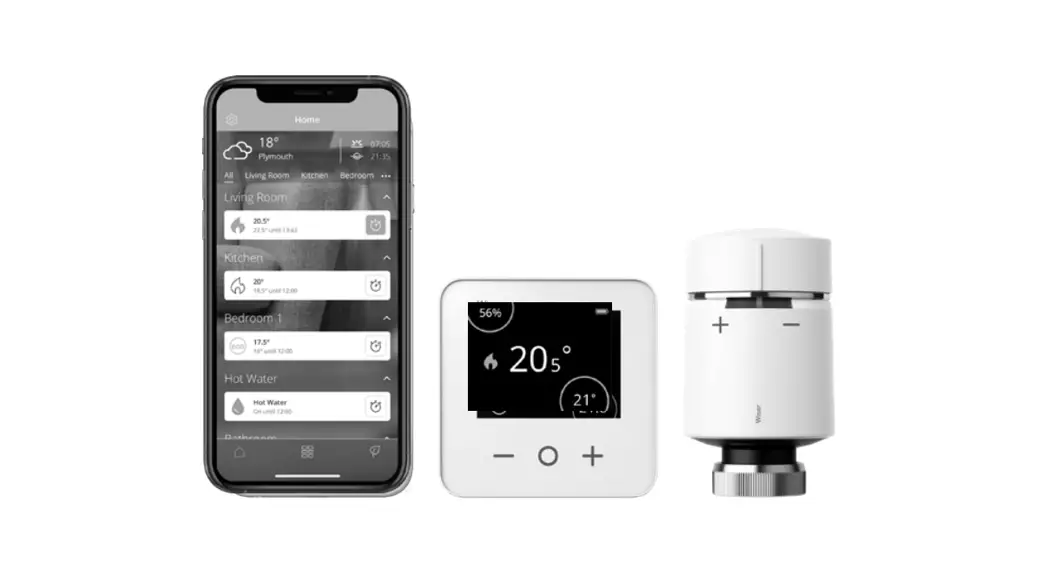

 INSTALLATION Guide
 INSTALLATION Guide
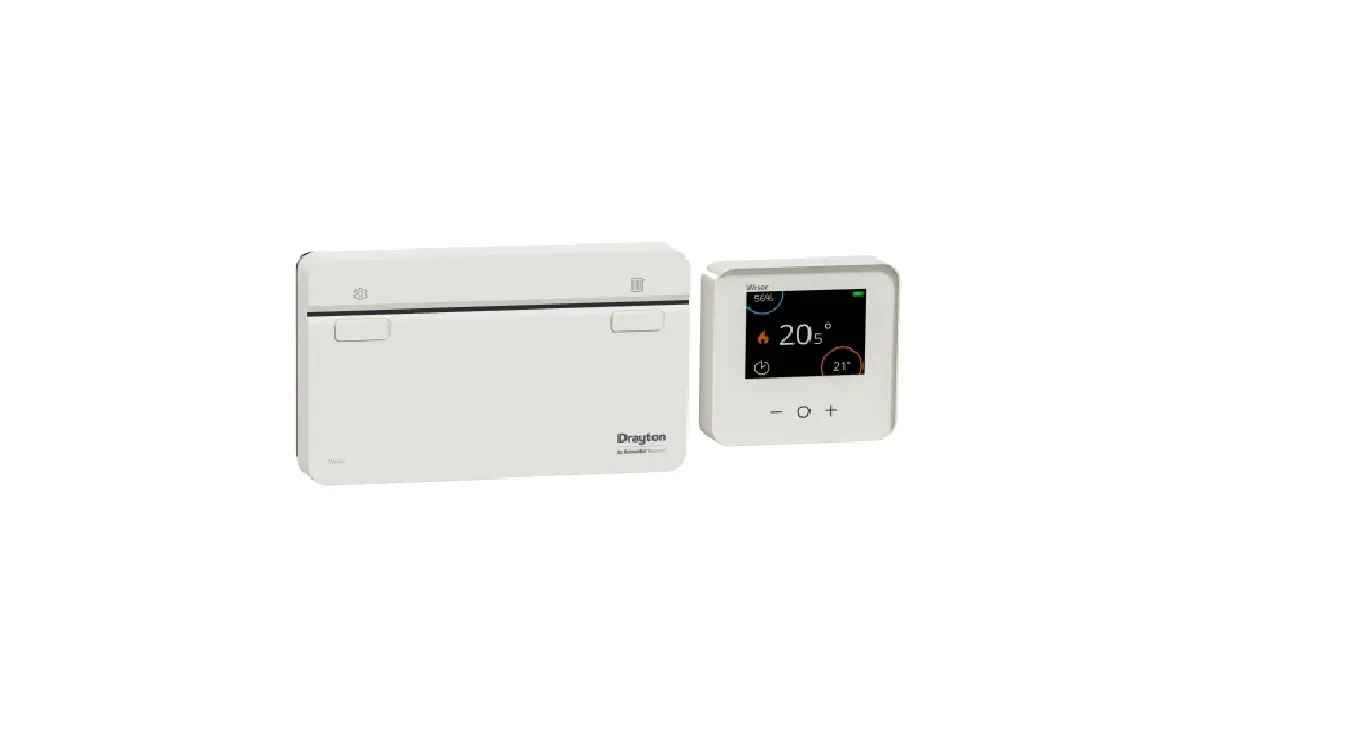
Wiser Thermostat Kit 1
Wiser Thermostat Kit 2
Wiser Thermostat Kit 3
Wiser Multi-zone Kit 1
Wiser Multi-zone Kit 2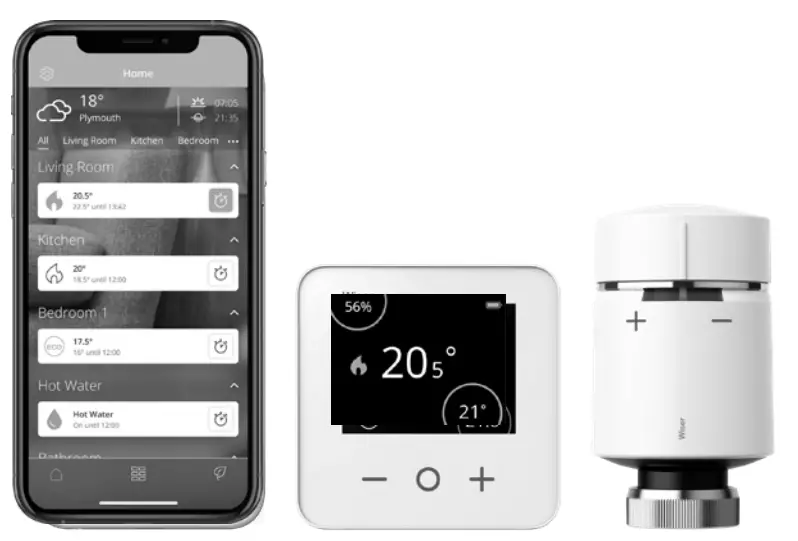 Phone: 0333 6000 622*
Website: wiser.draytoncontrols.co.uk
E-mail: [email protected] @DraytonHome
 /DraytonHome
*Please note that international call charges may apply to those calling from outside of the UK.
Installer Guide 06490238001 Iss M
Introduction
Welcome!
Save this guide for future reference. If you are replacing an existing controller/programmer and don’t need to make any wiring changes that’s great news. All you need to do is remove the old product and fit your new Wiser HubR to the existing wallplate. If you are fitting a new system or require re-wiring please contact an installer.
 IMPORTANT:
Do not attempt to install this product if you are not familiar with how to install mains-powered electrical appliances.
Always switch off the mains before removing a controller and never fit it to a live wallplate.
Step 1:
Mounting the wallplate
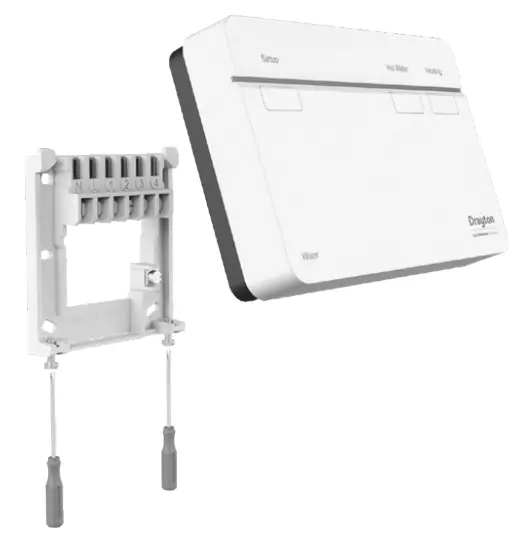 Option 1: Fitting a new wallplate
The ideal location should have reasonable lighting, good access, no condensation, no extremes of temperature, and a supporting surface that fully covers the back of the unit. Position with 70mm clearance to the right, 25mm above, and sufficient room to access the securing screws underneath. Fix, with terminals at the top, either direct to a flat wall using wall plugs and No. 6 x 1″ (25mm) woodscrews, or on a flush mounting single conduit box type UA1 (BS4662) using M3.5 x 14 bolts. Now fit the Wiser HubR onto the wallplate and tighten the securing screws. Check the 3A fuse, and switch on the mains.
Option 2: Using an existing industry-standard wallplate
Loosen the securing screws on the old controller/ programmer and unplug it. Check that there is 70mm clearance to the right of the wallplate and 25mm above it. Check the wiring diagram for your product model to compare terminals and, if necessary, change the wiring of the wallplate to suit. Now fit the Wiser HubR onto the wallplate and tighten the securing screws.
Check the 3A fuse and switch on the mains.
DO NOT use a surface mounting box as the wallplate is not designed for this purpose.
Note: Ensure the HubR is installed in a position with WiFi coverage.
Step 2a: Wiring – wallplate
Make sure the mains input has a 3 amp fuse. CAUTION! Before installation, make sure the mains supply is switched off!
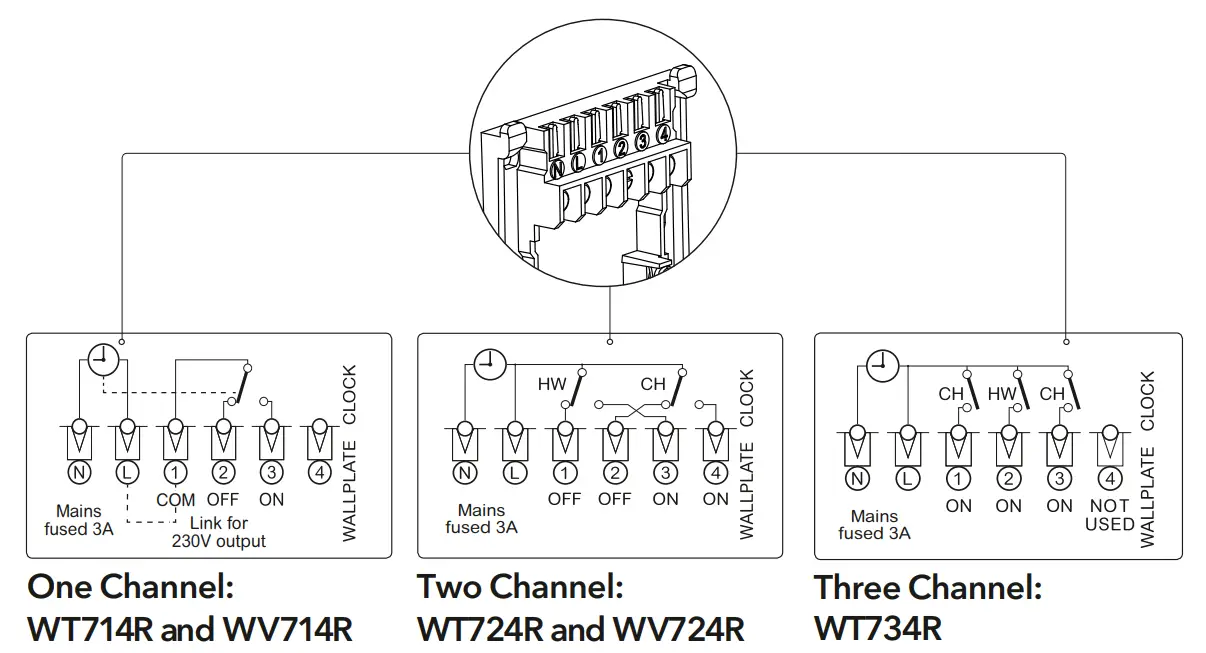
One channel only: Note that the output contacts are voltage-free*, so power needs to be put on to Terminal 1 either by linking from Terminal L or from a separate supply with a 3A fuse.
* Not SELV – Fixed wiring only, to comply with current IET regulations.
Three-channel only: Make a note of which circuit is connected to CH1 and CH3 respectively as this information is needed later, during commissioning, when room thermostats are added to the system.
Note: If there is an existing wired thermostat connected via the wall plate, you can:
– Disconnect it i.e. remove the thermostat wires from the wallplate, or
– Leave the thermostat connected providing it is ON and there are no schedules that can interfere with Wiser, or
– Turn the existing room stat up to max. This is the same as creating a permanent supply through the LIVE-IN and SWITCH-LIVE.
Note: After wiring, fit the Wiser HubR onto the wallplate and tighten the securing screws. Check the 3A fuse and switch on the mains.
Step 2b: Wiring – boiler with OpenTherm interface
If your boiler supports OpenTherm, please follow the instructions under this step.
Existing OpenTherm installation
- Remove the OpenTherm cables from the existing controller of the thermostat.
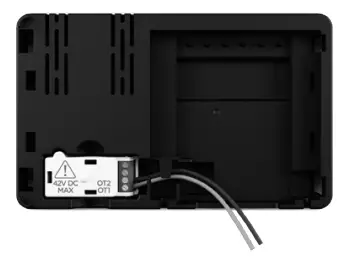
- Remove the OpenTherm module from the rear of the Wiser HubR.
- Wire in the OpenTherm cables into the OpenTherm module. It does not matter which way the cables are wired.
- Replace the OpenTherm module into the HubR.
- Wire L & N on the wallplate from a separate supply with a 3A fuse.
- Mount the HubR on the wallplate.
The Wiser HubR is an OpenTherm certified product and will therefore operate with OpenTherm certified boilers. Currently, The Hube is not compatible with boilers that require a temperature for domestic hot water to be provided by the external heating controls. For more information about wiring
options please consult the digital user guide found on wiser.draytoncontrols.co.uk/support
Step 3: Testing the system Heating and Hot Water buttons
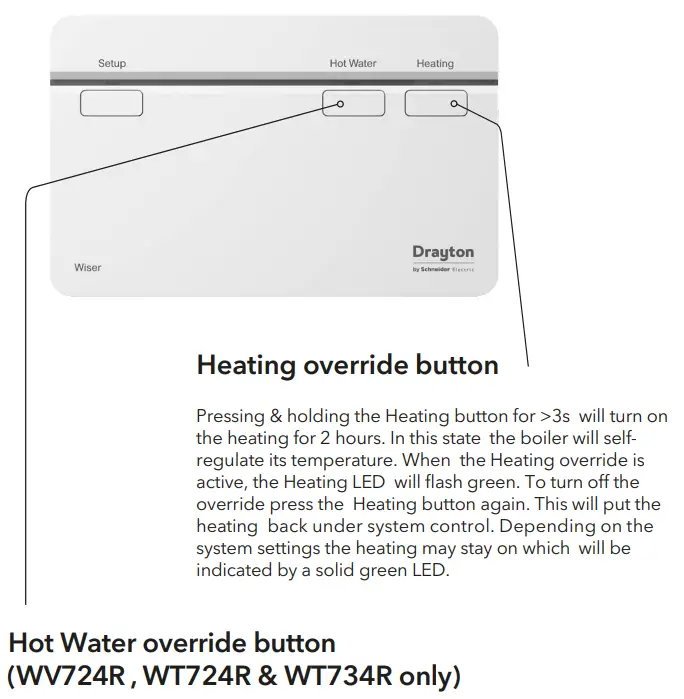
Pressing & holding the Hot Water button for >3s will turn on the Hot Water for 1 hour. In this state, the hot water will be regulated by a cylinder thermostat or the boiler. When the Hot Water override is active, the Hot Water LED will flash green. To turn off the override press the Hot Water button again. This will put the hot water back under system control. Depending on the system settings the hot water may stay on which will be indicated by a solid green LED.
Tip: This feature can be used to ‘test’ an installation prior to adding any devices.
Note: The heating and hot water button override states are not shown in the app. These act as a fallback state in the event that other controls are unavailable.
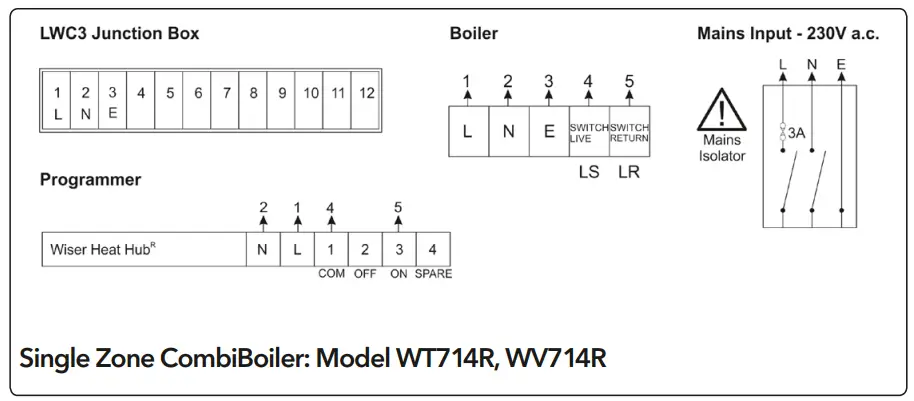
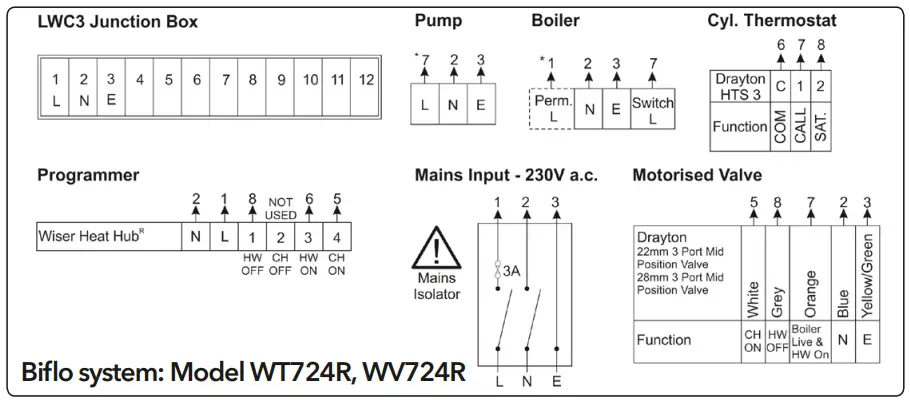
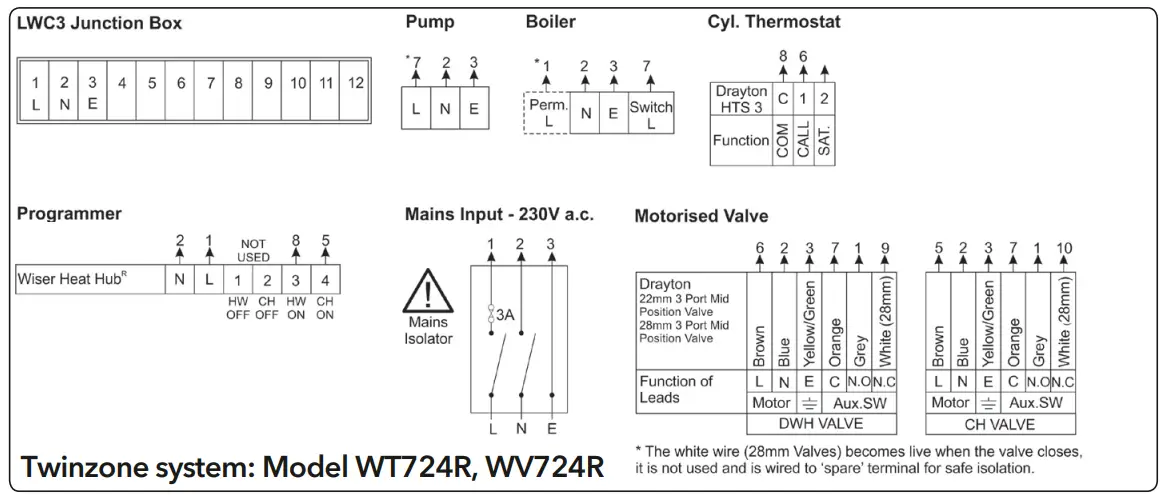
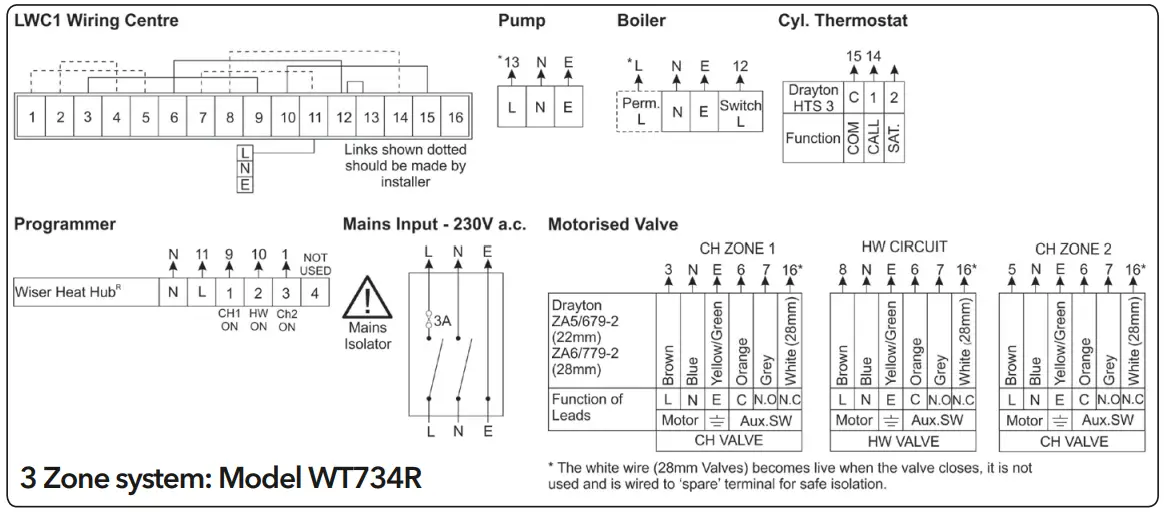
Connection Charts
Always switch off the mains before removing the Wiser HubR – and never fit it to a live wallplate!
Make the wiring connections, as shown in the connection charts, for the appropriate system. For surface wiring, snap out the cable entry strip on the bottom edge of the wallplate.
The Wiser HubR is double-insulated and needs no earth connection, but an earthing continuity (loop) terminal is provided for convenience.
Note: If there is an existing wired thermostat, it must be completely disconnected, i.e. remove the thermostat wires from the wiring center – a link must be inserted between the terminals where the thermostat is common and call for heat wires are located in the wiring center.
Arrowed numbers relate to the junction box.
* Consult boiler handbook for details of pump overrun wiring.
After wiring, clip on the unit and tighten the securing screws.
Check the mains input has a 3A fuse, and switch on the mains.
LS = Live Supply
LR = Live Return
 |  |
 |  |
Step 4: Download the app
In order to continue the installation, you will need to download the Wiser Heat app for your smartphone.

App Store: https://apps.apple.com/us/app/wiser-heat/id1222853887

Google Play:https://play.google.com/store/apps/details?id=com.schneider_electric.WiserHeat
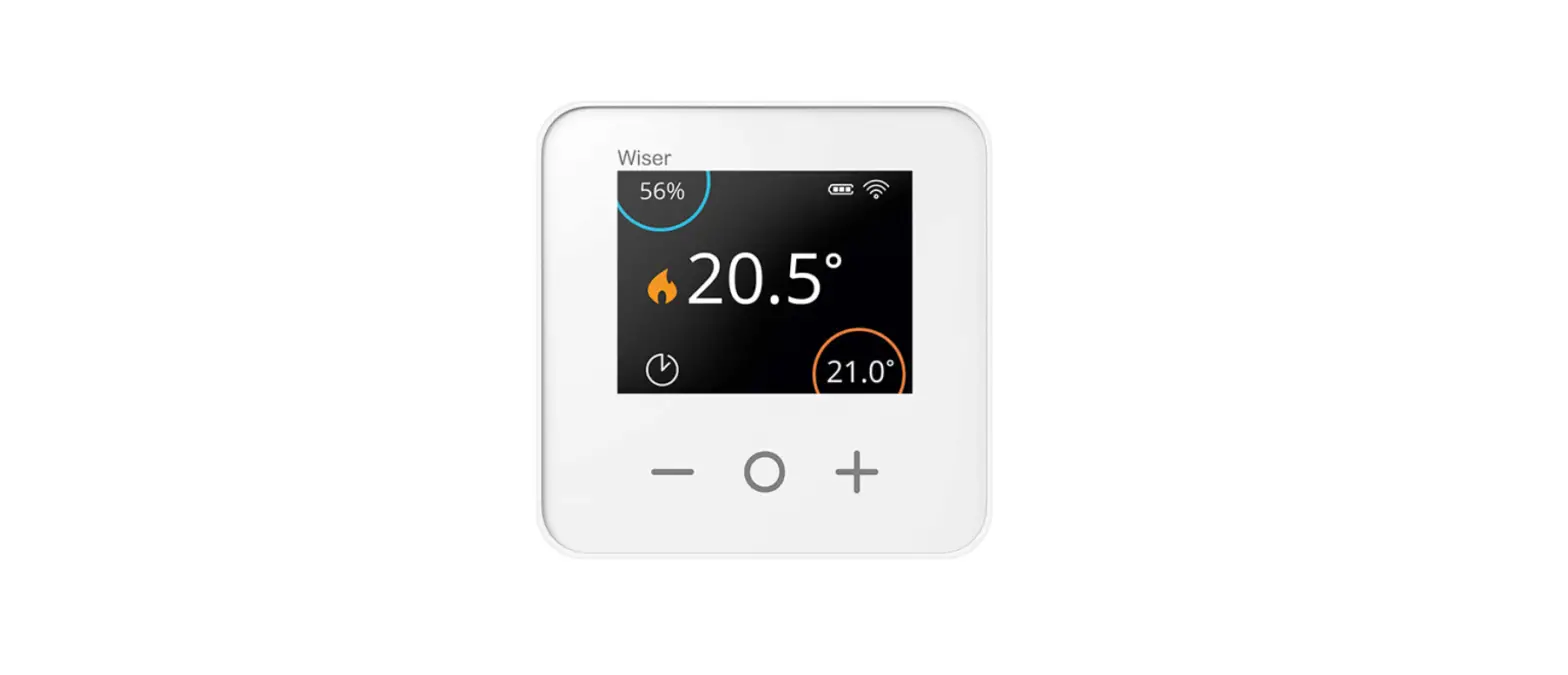
Wiser Room Thermostat
Thermostat Kits 1, 2 & 3:
For room thermostat-only systems the positioning is important as this will control the boiler to your entire home. In these systems, mechanical TRVs should be used as a minimum to provide a level of room heating control.
For optimum comfort and savings, each radiator in your home should be fitted with a Wiser Radiator Thermostat. These can be purchased and installed individually.
Boost
Feeling a bit cool?
- Go to the Room Thermostat and touch any button to wake it up.
- Touch the center button again to activate boost 1st touch = 30 minutes,
2nd touch = 1 hour
3rd touch = 2 hours,
4th touch = 3 hours
5th touch = Cancel - Shortly after the room will start to warm.
Note: A boost will increase the setpoint to 2°C above the ambient temperature for the time period selected. You can still adjust the setpoint when boosted.
Wiser Radiator Thermostat
Multi-zone System:
Economy use:
- Place the Room Thermostat in a room that is heated most of the time, typically the lounge/hallway.
- Place the Radiator Thermostat(s) in rooms that are not used all day such as bedrooms.
- The room with Radiator Thermostats can now be scheduled separately to avoid heating them with the rest of the rooms.
For optimum comfort and savings, each radiator in your home should be fitted with a Wiser Radiator Thermostat. These can be purchased and installed individually.
Mounting Options
A radiator valve bodies are not all the same, Wiser Radiator Thermostats come with two valve adapters; M30x1.5mm and Danfoss RA (If however, neither work with your radiator valves, consult the Valve Adapter Guide on the Drayton website).
First, remove the old thermostatic head from the valve body. Water should not leak from the valve whilst doing this. (Refer to the manufacturer’s instructions if needed.) You are your new Wiser Radiator Thermostat. now ready to install
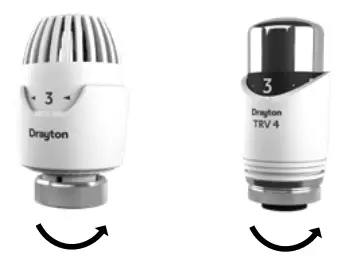
Note: Turning the head to the highest position/number will simplify de-installation Once you have set up your Radiator Thermostat(s) through the app,
you will be asked to select and fit the required adapter. When fitting and tightening the adapter to the Radiator Thermostat, please make sure that the O-ring is firmly seated above the thread as to avoid damaging the O-ring. Tighten by hand only.
Fitting M30x1.5mm
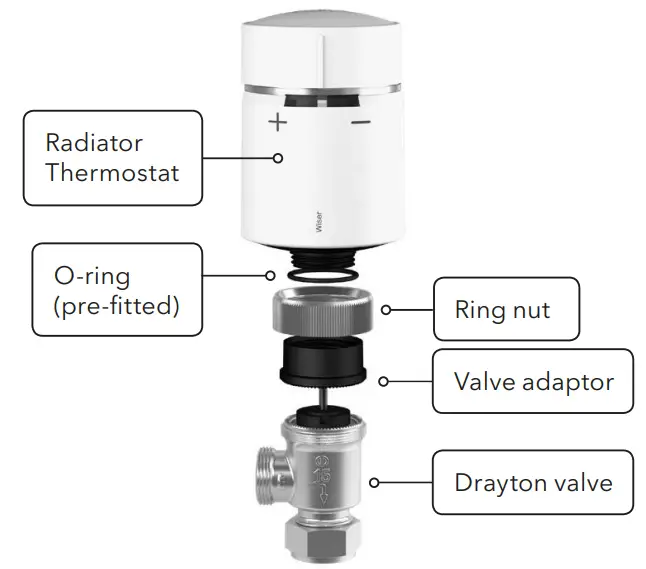
Place the small black plastic adapter serrated face down onto the valve. Position the metal ring nut over the black plastic adapter and screw it onto the valve. Now screw the Radiator Thermostat onto the black plastic adapter until tight. If the Radiator Thermostat is not facing the right direction, slacken the metal ring nut and rotate the Radiator Thermostat as required, and re-tighten the metal ring nut.
Thermostatic head calibration
Upon fitting of the relevant valve adapter, twist the cap of the Radiator Thermostat in the – direction for 2 seconds until the right LED shows a solid blue.
Wiser Radiator Thermostat
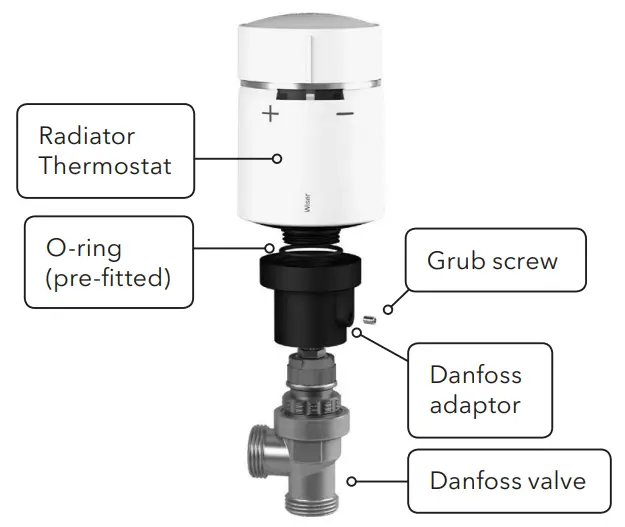
Slide the larger black plastic adapter small end first over the valve.
Make sure that the hole containing the grub screw is facing away from you. This way, once it’s mounted, the markings of the Radiator Thermostat will be in the required position. Use an appropriate size Allen key to tighten the grub screw. Now screw the Radiator Thermostat onto the larger black plastic adapter until tight.
Thermostatic head calibration
Upon fitting of the relevant valve adapter, twist the cap of the Radiator Thermostat in the – direction for 2 seconds until the right LED shows a solid blue.
IMPORTANT:
To limit temperature in other rooms use existing thermostatic radiator heads. We suggest regulating these according to the manufacturer’s
documentation to provide either economic or comfortable use
Boost
Feeling a bit cool?
- Go to the Radiator Thermostat and twist the cap in the + direction.
- The left LED will show a solid red for 5 seconds and then disappear.
- Shortly after the room will start to warm.
Note: A boost + will increase the setpoint by 2˚C above the ambient temperature for 1 hour.
Feeling a bit warm?
- Go to the Radiator Thermostat and twist the cap in the – direction.
- The right LED will show a solid blue for 5 seconds and then disappear.
- Shortly after the Radiator Thermostat will close the valve and stop the hot water flow to the radiator.
Note: A boost – will decrease the setpoint by 2˚C below the ambient temperature for 1 hour.
ERP Rating
| ERP Class with Modulating boiler | IP rating | ERP Class with on/off the boiler | IP rating | |
| Wiser Thermostat Kit 1 | VI | 4% | VII | 3.5% |
| Wiser Thermostat Kit 2 | VI | 4% | VII | 3.5% |
| Wiser Thermostat Kit 3 | VI | 4% | VII | 3.5% |
| Wiser Multi-zoning Kit 1 | VIII | 5% | VII | 3.5% |
| Wiser Multi-zoning Kit 2 | VIII | 5% | VII | 3.5% |
Technical Data
| Wiser Heat HubR | Wiser Room Thermostat | Wiser Radiator Thermostat | ||
| Dimensions | 93mm(w), 148mm(h), 31mm(d) | 76mm(w), 76mm(h), 25mm(d) | 93mm(h), 51mm(dia) | |
| Power Supply | 230V a.c. ±10% 50Hz | 2×1.5V IEC LR6 (AA) alkaline batteries | ||
| Switch Rating | 2(1)A 230V a.c. each switch Total load must not exceed 2.5A | N/A | ||
| Wiring | Fixed wiring only, to comply with current IET Regulations (BS7671) | No wiring required | ||
| Interfaces | User: Push Button/LED; VO: Mains Relays (1-3), Digital Boiler Interface | User: TFT display, touch buttons; I/O: None | User: Twist Cap, LED; I/O: None | |
| 0°C to 45°C | ||||
| Storage Temperature | -10°C to 55°C | |||
| Maximum Mounting Surface Temperature | N/A | 93°C | ||
| Maximum Water Temperature | N/A | 73°C continuous and 110°C max | ||
| Ingress Protection | IP 30 | IP 20 | IP 30 | |
| Ambient Humidity (non-condensing) | Operating 25% to 90%, Storage 15% to 95% | |||
| Set-point Range | 5°C to 30°C | |||
| Control Accuracy | <0.6°C at 4°C/hour (with Room Thermostat) | N/A | ||
| <0.8°C at 4°C/hour (with Radiator Thermostat) | N/A | |||
| Timing Resolution | 1 minute | |||
| Temperature Resolution | 0.5°C | |||
| Ball Pressure Test Temperature | 78°C | 75°C | ||
| Pollution Degree | 2 | |||
| Software Class | A | |||
| Without Mains Power | Display: LEDs off; Time: always kept; Program times: always preserved | N/A | ||
| Rated Impulse Voltage | 2.5kV | N/A | ||
| Radio Technology/Frequency | 2.4GHz (Bi-directional, Mesh) | |||
| Radio Signal Range | 30m Free Space | |||
| Maximum Radio-Frequency Power Transmitted | +17dBm (50mW) | +13dBm (20mW) | +13dBm (20mW) | |
| Mounting | Industry-standard wall plate | Wall bracket or desk stand | Radiator Valve | |
| Relevant Directives | Radio Equipment Directive (RED) 2014/53/EU, Batteries Directive 2006/66/EC, RoHS Directive 2011/65/EU | |||
| Applied Standards | EN60730-1; EN60730-2-7; EN60730-2-9, EN 300 328 | |||
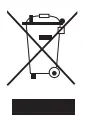 Dispose of the device separately from household waste at an official collection point. Professional recycling protects people and the environment against potential negative effects.
WEEE Directive 2012/19/EU Hereby, Schneider Electric Controls UK Ltd, declares that these products are in compliance with the essential requirements and other relevant provisions of RED 2014/53/EU. Declaration of Conformity can be downloaded from: www.draytoncontrols.co.uk
 Schneider Electric 401 Southway Drive Plymouth PL6 6QT United Kingdom
Schneider Electric 35 Rue Joseph Monier France-92500 Rueil Malmaision se.com/contact