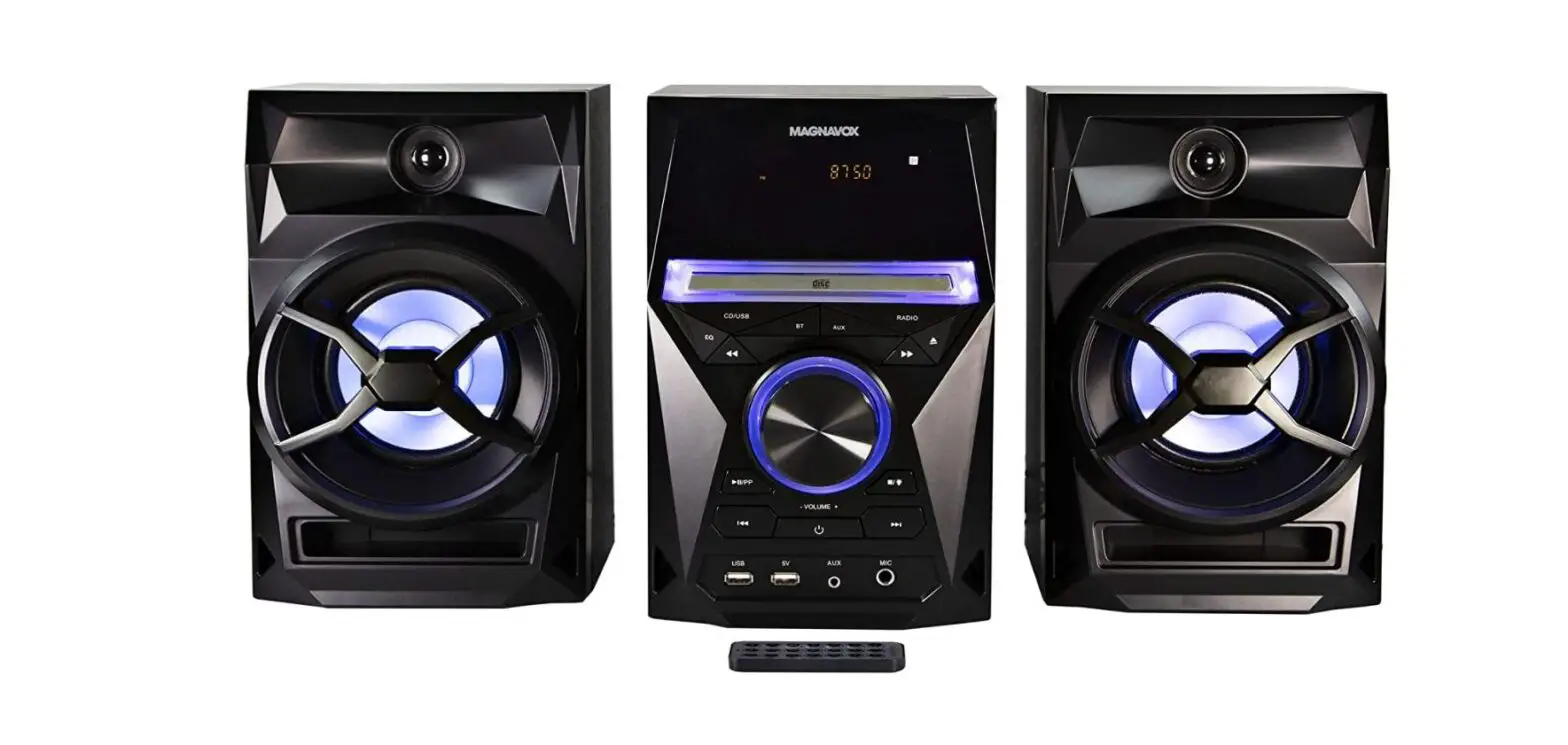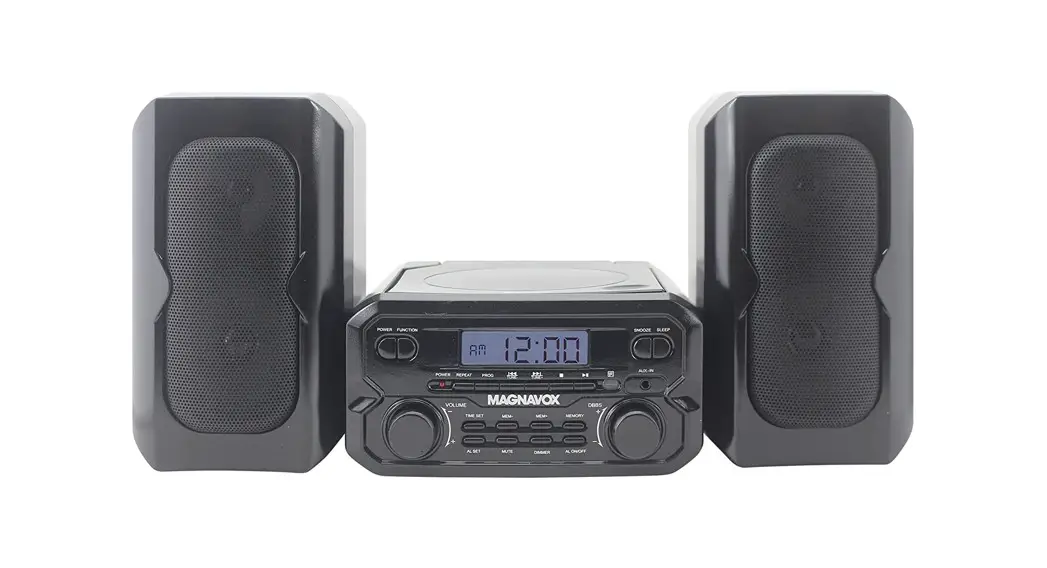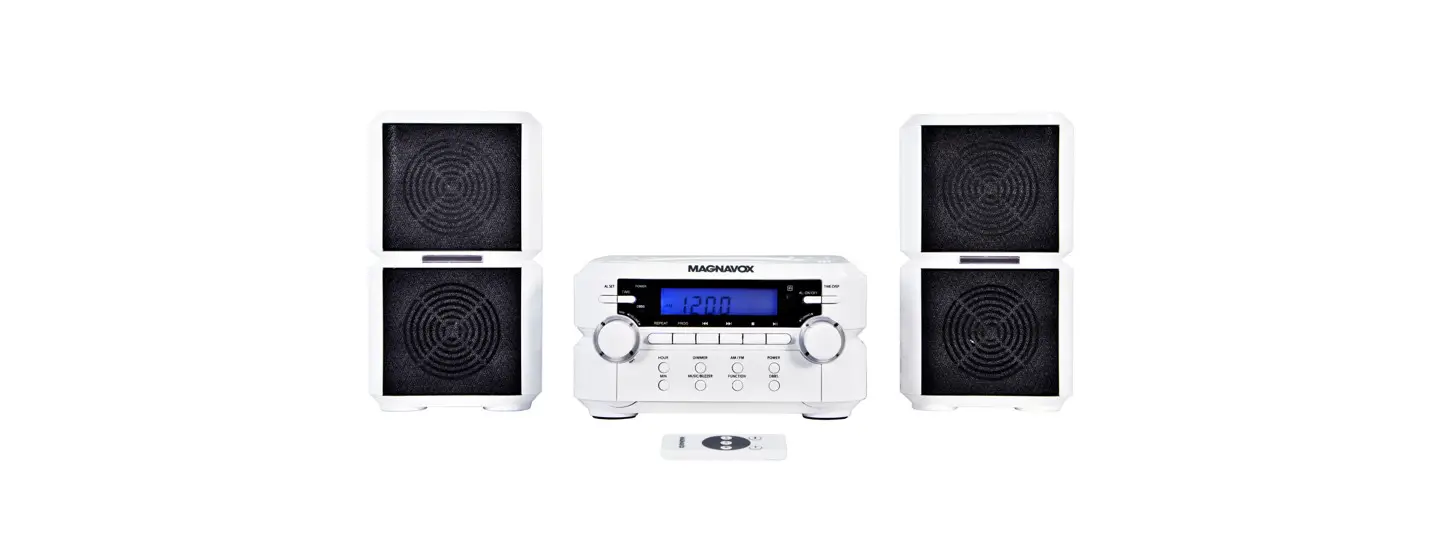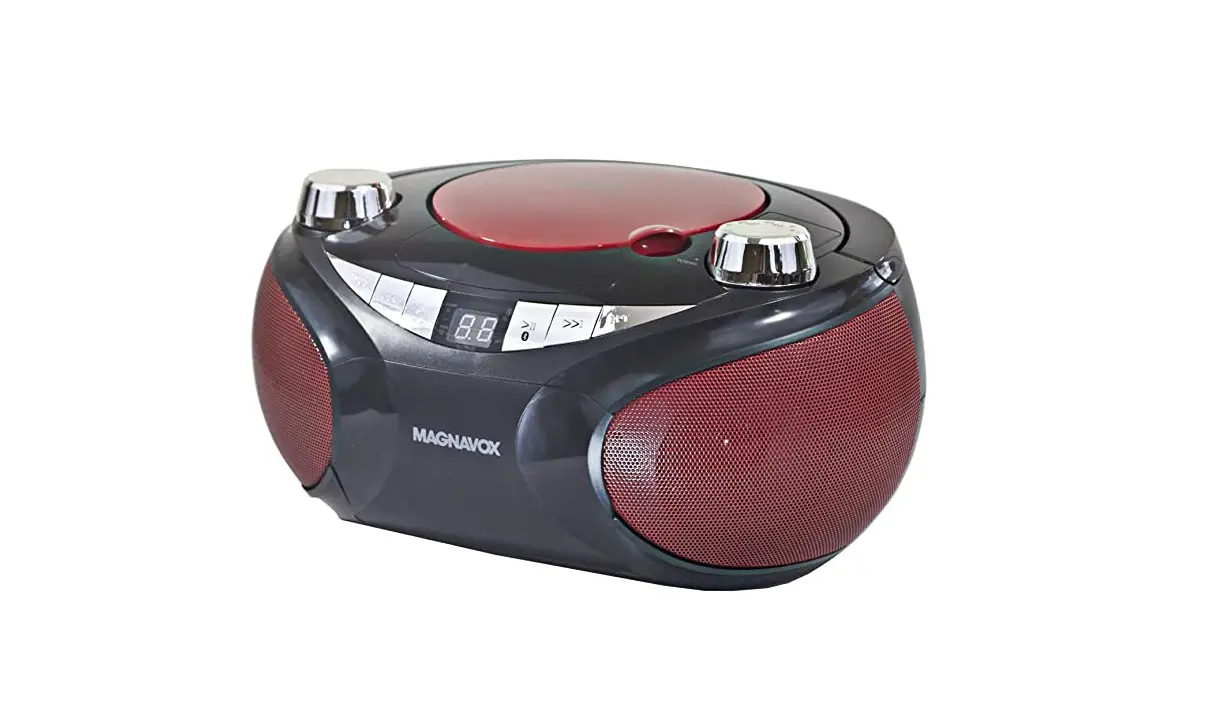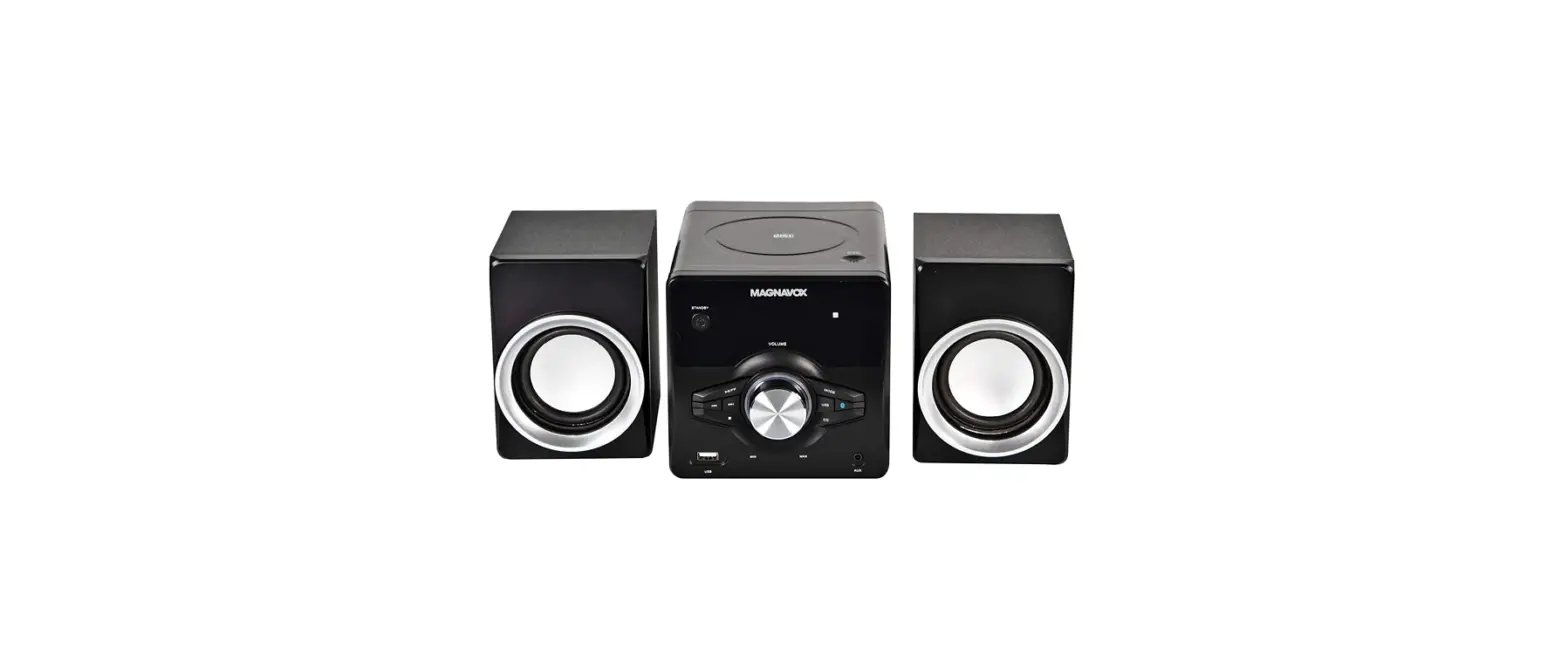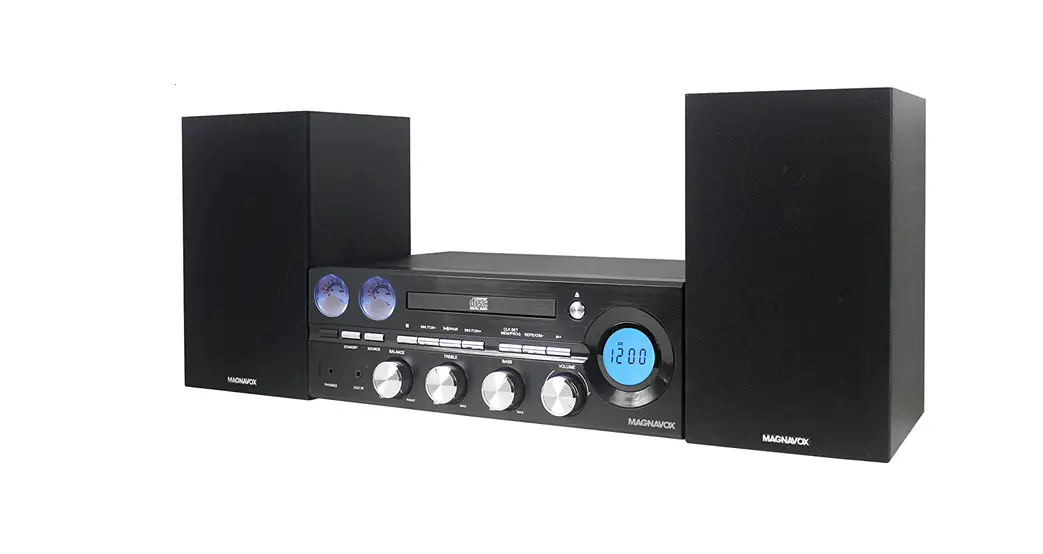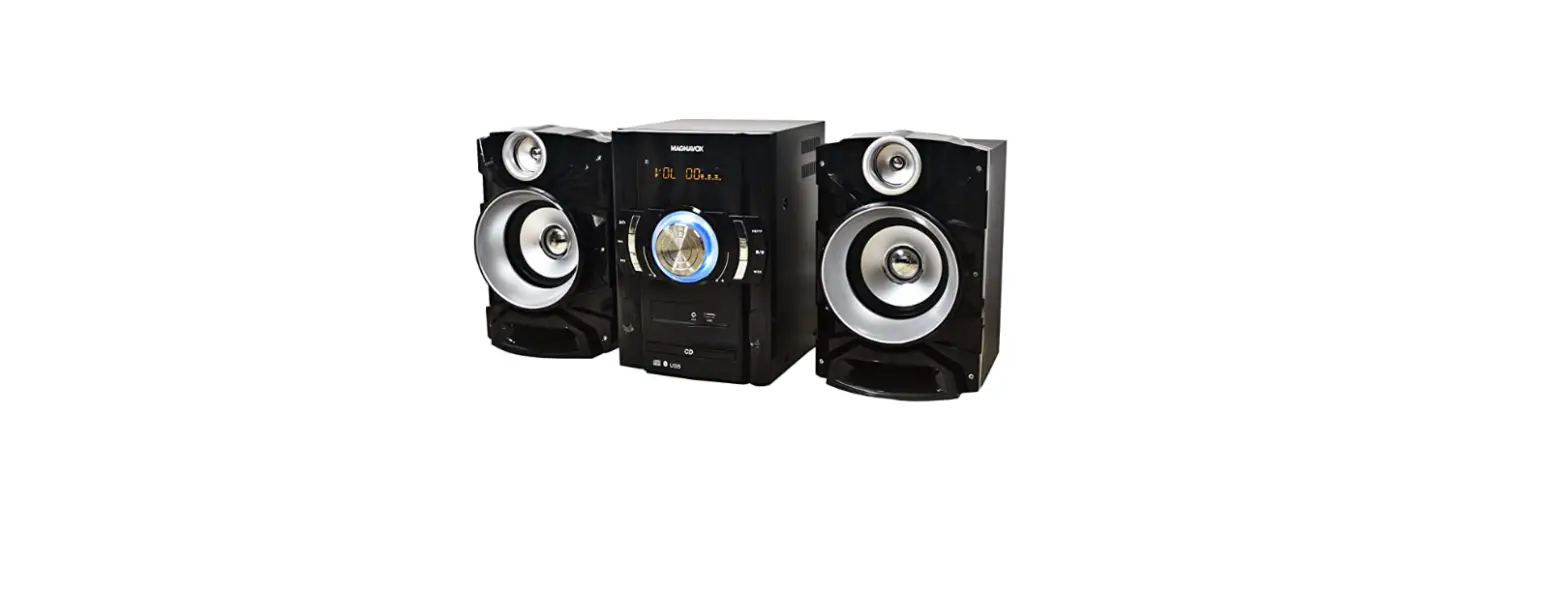
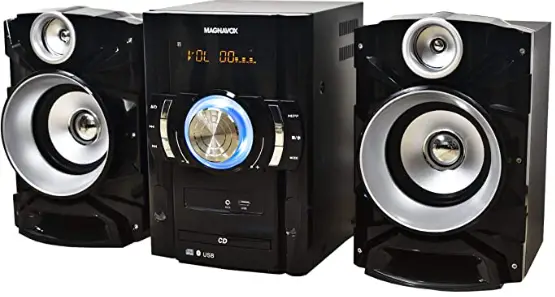
 Magnavox MM440 3-Piece CD Stereo Radio

IMPORTANT SAFETY INSTRUCTION
Before using the unit, be sure to read all operating instructions carefully. Please note that these are general precautions and may not pertain to your unit. For example, this unit may not have the capability to be connected to an outdoor antenna.
- Read these instructions.
All the safety and operating instructions should be read before the product is operated. - Keep these instructions.
The safety and operating instructions should be retained for future reference. - Heed all warnings.
All warnings on the product and in the operating instructions should be adhered to. - Follow all instructions.
All operating and use instructions should be followed. - Do not use this apparatus near water.
Do not use this product near water and moisture, for example: near a bathtub, washbowl, kitchen sink or laundry tub; in a wet basement; or near a swimming pool. - Clean only with dry cloth.
Unplug this product from the wall outlet before cleaning. Do not use liquid cleaners or aerosol cleaners. Use a dry cloth for cleaning. - Do not block any ventilation openings. Install in accordance with the manufacturer’s instructions.
Slots and openings in the cabinet and in the back or bottom are provided for ventilation, to ensure reliable operation of the product and to protect it from overheating. These openings must not be blocked or covered. The openings should never be blocked by placing the product on a bed, sofa, rug or other similar surface. This product should never be placed near or over a radiator or heat source. This product should not be placed in a built-in installation such as a bookcase or rack unless proper ventilation is provided or the manufacturer’s instructions have been adhered to. - Do not install near any heat sources such as radiators, heat registers, stoves, or other apparatus (including amplifiers) that produce heat.
- Do not defeat the safety purpose of the polarized or grounding-type plug.
A polarized plug has two blades with one wider than the other. A grounding type plug has two blades and a third grounding prong. The wide blade or the third prong is provided for your safety. If the provided plug does not fit into your outlet, consult an electrician for replacement of the obsolete outlet. - Protect the power cord from being walked on or pinched particularly at plugs, convenience receptacles, and the point where they exit from the apparatus.
- Only use attachments/accessories specified by the manufacturer.
- Use only with the cart, stand, tripod, bracket, or table specified by the manufacturer, or sold with the apparatus. When a cart is used, use aution when moving the cart/apparatus combination to avoid injury from tip-over.
An appliance and cart combination should be moved with care.
Quick stops, excessive force and uneven surfaces may cause the appliance and cart combination to overturn. - Unplug this apparatus during lightning storms or when unused for long periods of time.
To protect your product from a lightning storm, or when it is left unattended and unused for long periods of time, unplug it from the wall outlet and disconnect the antenna or cable system. This will prevent damage to the product due to lightning and power-line surges. - Refer all servicing to qualified service personnel. Servicing is required when the apparatus has been damaged in any way, such as power-supply cord or plug is damaged, liquid has been spilled or objects have fallen into the apparatus, the apparatus has been exposed to rain or moisture does not operate normally, or has been dropped.
- Power source
This product should be operated only from the type of power source indicated on the marking label. If you are not sure of the type of power supply to your home, consult your appliance dealer or local power company. For products intended to operate from battery power, or other source, refer to the operation instructions. - Power lines
An outside antenna system should not be located in the vicinity of overhead power lines or other electric light or power circuits, or where it can fall into such power lines or circuits. When installing an outside antenna system, extreme care should be taken to keep from touching such power lines or circuits as contact with them might be fatal. - Overloading
Do not overload wall outlets and extension cords as this can result in a risk of fire or electric shock. - Object and liquid entry
Never push objects of any kind into this product through openings as they may touch dangerous voltage points or short out parts that could result in fire or electric shock. Never spill or spray any type of liquid on the product. - Outdoor antenna grounding
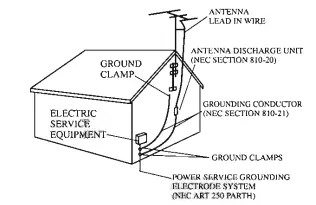
If an outside antenna is connected to the product, be sure the antenna system is grounded so as to provide some protection against voltage surges and built-up static charges. Section 810 of the National Electric Code ANSI/NFPA 70 provides information with respect to proper to the grounding of the mast and supporting structure, grounding of the lead-in wire to an antenna discharge product, size of grounding conductors, location of the antenna-discharge product, connection to grounding electrodes and requirements for the grounding electrodes.
- Service
Do not attempt to service this product yourself as opening or removing covers may expose you to dangerous voltage or other hazards. Refer all servicing to qualified service personnel. - Replacement parts
When replacement parts are required, be sure the service technician uses replacement parts specified by the manufacturer or those that have the same characteristics as the original parts. Unauthorized substitutions may result in fire or electric shock or other hazards. - Safety check
Upon completion of any service or repairs to this product, ask the service technician to perform safety checks to determine that the product is in proper operation condition. - Wall or ceiling mounting
The product should be mounted to a wall or ceiling only as recommended by the manufacturer. - Damage requiring service
Unplug this product from the wall outlet and refer service to qualified service personnel under the following conditions.- When the power-supply cord or plug is damaged.
- If liquid has been spilled or objects have fallen into the product.
- If the product has been exposed to rain or water.
- If the product does not operate normally by following the operating instructions. Adjust only those controls that are covered by the operating instructions, as an adjustment of other controls may result in damage and will and require extensive work by a qualified technician to restore in the product to its normal operation.
- If the product has been dropped or the cabinet has been damaged.
- When the product exhibits a distinct change in performance-this indicates a need for service.
- Note to the CATV system installer
This reminder is provided to call the CATV system installer’s attention to Article 820-40 of the NEC that provides guidelines for proper grounding and, in particular, specifies that the cable ground shall be connected to the grounding system of the building, as close to the point of cable entry as practical.
NOTE: Refer all servicing to qualified service personnel. Servicing is required when the unit has been damaged in any way such as the following: the power-supply cord or plug has been damaged, liquid has been spilled into the unit, the unit has been exposed to rain or moisture, the unit has been dropped or the unit does not operate normally.
CARE AND MAINTENANCE
Caring for Compact Discs
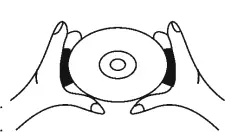
- Treat the disc carefully. Handle the disc only by its edges. Never allow your fingers to come in contact with the shiny, unprinted side of the compact disc.
- Do not attach adhesive tape, stickers, etc. to the compact disc label. Clean the compact disc periodically with a soft, lint-free, dry cloth.

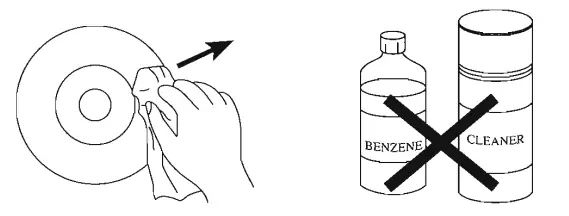
- Never use detergents or abrasive cleaners to clean the compact disc. If necessary, use a CD cleaning kit.
- If a compact disc skips or gets stuck on a section of the compact disc, it is probably dirty or damaged (scratched).
- When cleaning the compact disc, wipe in straight lines from the centre of the compact disc to the outer edge of the compact disc. Never wipe in circular motions.

- If a compact disc skips or gets stuck on a section of the compact disc, it is probably dirty or damaged (scratched).
- When cleaning the compact disc, wipe in straight lines from the centre of the compact disc to the outer edge of the compact disc. Never wipe in circular motions.
- This unit is designed to play only compact discs bearing the identification logo as shown here. Other discs may not conform to the CD standard and may not play properly.

- Compact Discs should be stored in their cases after each use to avoid damage.
- Do not expose compact discs to direct sunlight, high humidity, high temperatures or dust, etc. Prolonged exposure or extreme temperatures can warp the disc.
- Do not stick or write anything on either side of the disc. Sharp writing instruments, or the ink, may damage the surface.

Cleaning the Unit
- To prevent fire or shock hazard, disconnect your unit from the AC power source when cleaning.
- The finish on your unit may be cleaned with a dust cloth and cared for as other furniture. Use caution when cleaning and wiping the plastic parts.
- Mild soap and a damp cloth may be used on the front panel.
LOCATION OF CONTR0LS
MAN UNIT
FRONT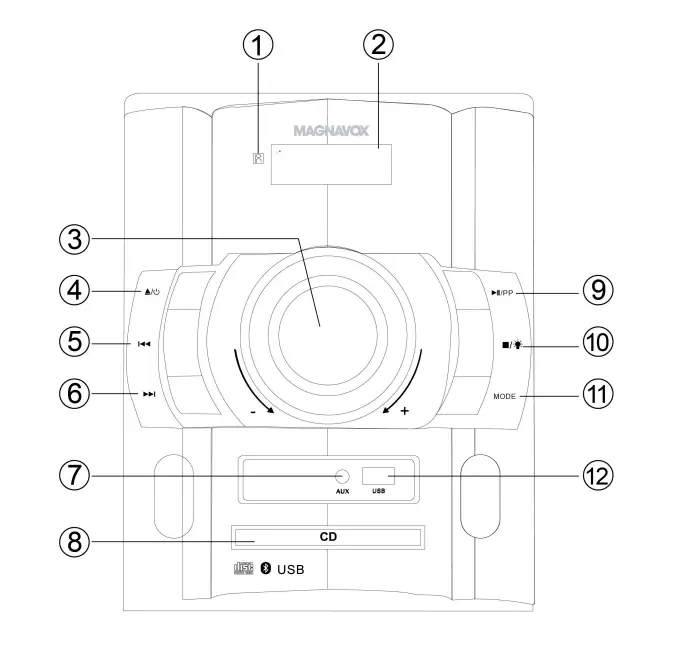
- Remote Receiver
- LED Display
- VOLUME Control Knob
- Disc Tray Open-Close)/(Standby) Button
- (Skip backward/Radio program down) Button
- (Skip forward/Radio program up) Button
- AUX (In) Jack
- CD Disc Tray
- (Play-Pause/Radio Program Preset) Button
- (Stop/Decorative Lights On-Off) Button
- MODE Button
- USB Port (For music playback)
Rear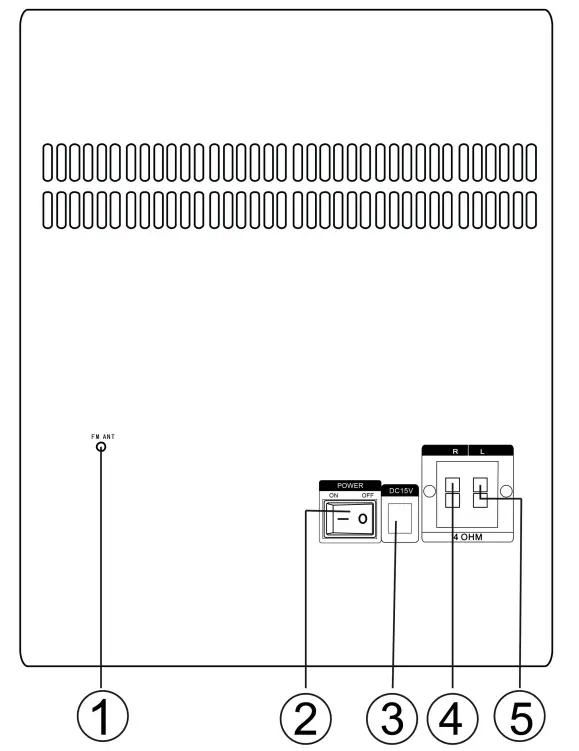
- FM ANT (Antenna)
- POWER Switch
- DC 15V (In) Jack
- Speaker R (right) Clips
- peaker L (left) Clips
REMOTE CONTROL
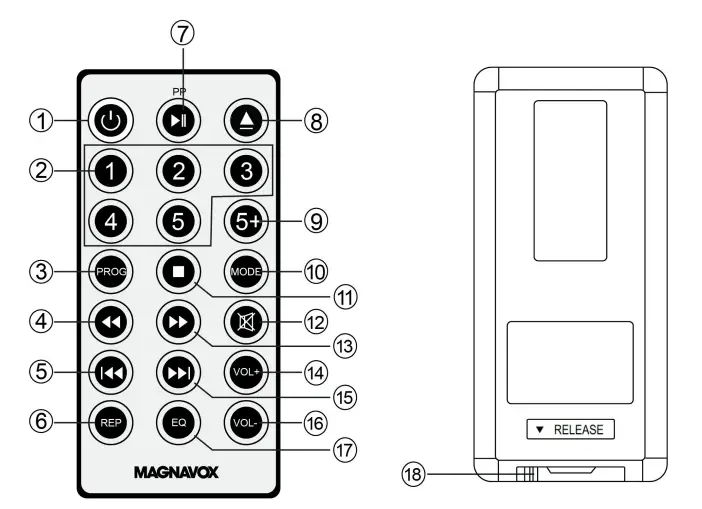
- (Standby) Button
- Numeric Buttons
- PROG (Program) Button
- ◄◄ (Fast rewind/Radio tuning down) Button
- ◄◄ (Skip backward/Radio program down) Button
- REP (Repeat) Button
- ►II/PP (Play-Pause/Radio Program Preset) Button
- (Disc Tray Open/Close) Button
- 5+ Button
- MODE Button
- ■ (Stop) Button
- (Mute) Button
- ►► (Fast forward/Radio tuning up) Button
- VOL + (Volume Up ) Button
- ►►I (Skip forward/Radio program up) Button
- VOL – (Volume Down ) Button
- EQ (Equalizer) Button
- Button Cell Holder
CONNECTION
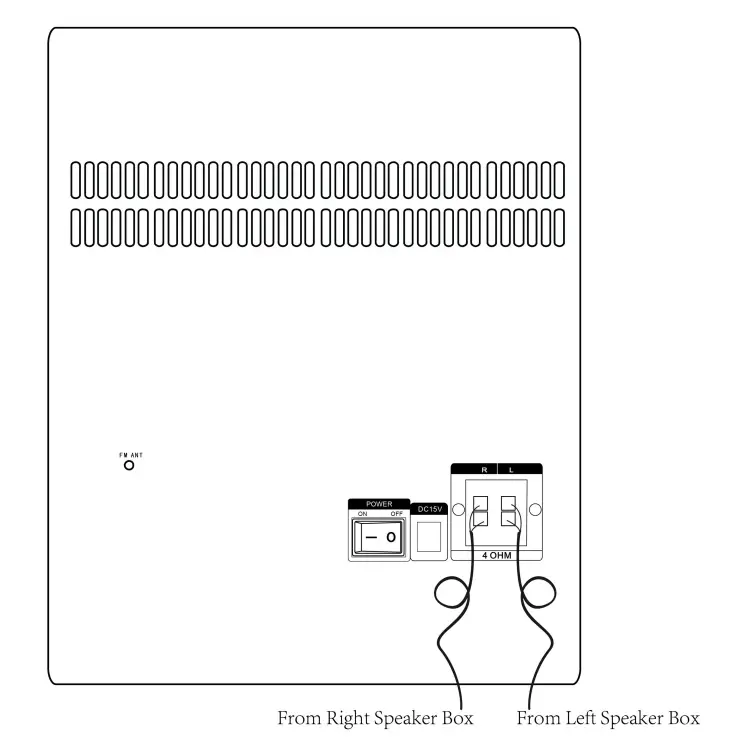
Connect the Speaker Connection Wires from Speaker Boxes to Speaker Out Clips on the rear of unit as illustrated below:
POWER SOURCE
Main unit
Connect the small plug from the supplied AC/DC Adaptor to the DC 15V (In) Jack on the rear of the unit then plug the AC/DC Adaptor to an AC wall outlet having AC 100-240V~; 50/60Hz as illustrated below: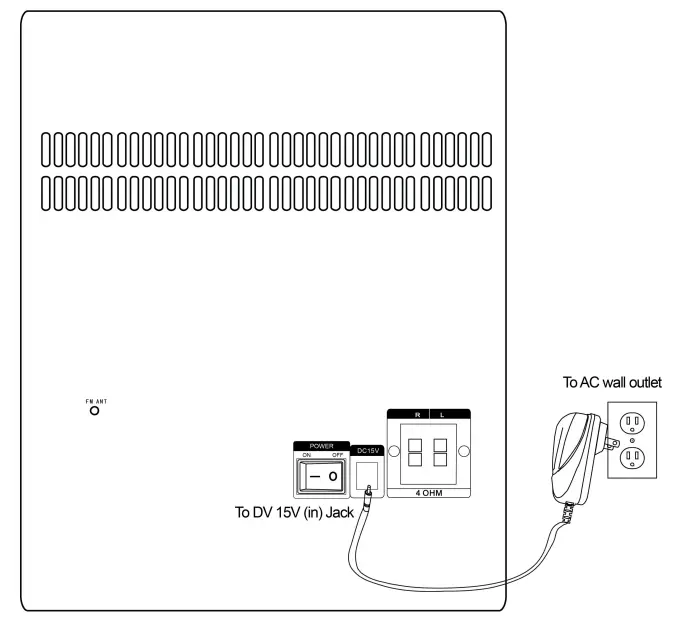
NOTES
- If you will not use the unit for an extended period of time, unplug the AC/DC Adaptor from the wall outlet.
- The AC/DC Adaptor is intended to be correctly orientated in a vertical or floor-mount position.
Remote Control
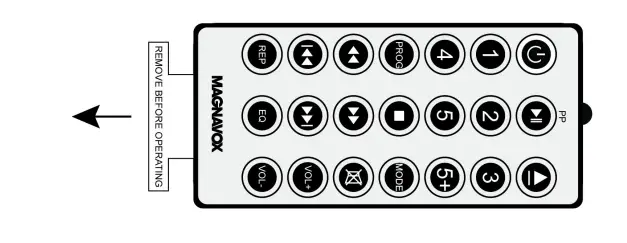
- First time use
Remove and discard the insulation film as illustrated below:
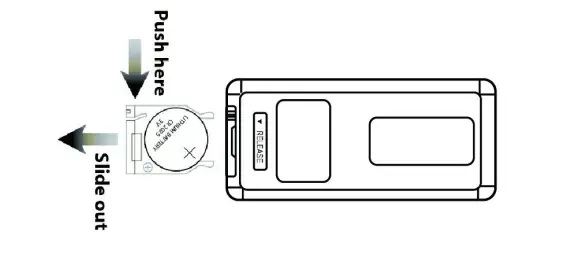
- Replacing the button cell when it is drained as follows:
- Push and slide out the button cell holder as illustrated below.
- Replace the button cell with new CR2025 button cell with the polarity markings on the rear of the Remote Control.
- Close the button cell holder.

Battery precautions
Follow this Battery Precaution when using a battery in this device:
- Use only the size and type of battery specified.
- Be sure to follow the correct polarity when installing the battery as indicated in the battery compartment. A reversed battery may cause damage to the device.
- Do not mix different types of batteries together (e.g. Alkaline and Carbon-zinc) or old batteries with fresh ones.
- If the batteries in the device are consumed or the device is not to be used for a long period of time, remove the batteries to prevent damage or injury from possible battery leakage.
- Do not try to recharge the battery not intended to be recharged; it can overheat and rupture. (Follow battery manufacturer’s instructions.)
- Do not dispose of battery in fire. Battery may explode or leak.
- Clean the battery contacts and also those of the device prior to battery installation.
- This product contains a coin/button cell battery. If the coin/button cell battery is swallowed, it can cause severe internal burn in just 2 hours and can lead to death.
Keep new and used batteries away from children. If the battery compartment does not close securely, stop using the product and keep it away from children.
If you think batteries might have been swallowed or placed inside any part of the body, seek immediate medical attention.
EFFECTIVE DISTANCE OF REMOTE CONTROL
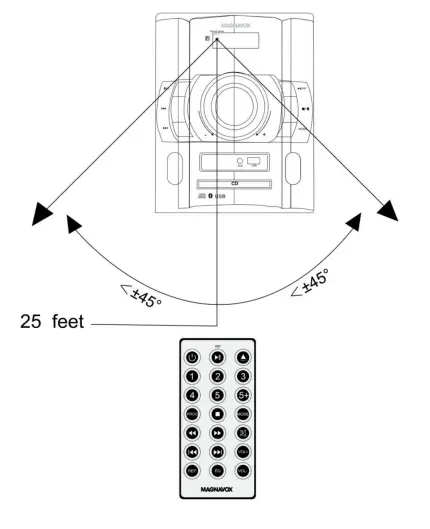
- When there is an obstacle between the unit and the transmitter, the transmitter may not operate.
- When direct sunlight, an incandescent lamp, a fluorescent lamp or any other strong shines on the remote control of the unit, the remote operation may be unstable.
OPERATION
GENERAL OPERATION
- Connect the Speaker Boxes to the unit as previously instructed.
- Connect the unit to AC power as previously instructed.
- Slide the POWER Switch to ON position to power on the unit to standby mode. “O” will appear on the display.
- Press and hold the (Standby) Button on the unit or press the button on the Remote Control to power on the unit from standby mode.
- Press the MODE Button on the Unit or Remote Control repeatedly to switch to desired playback mode. The correspondent indicator will appear (or illuminate) on the display with your selection (see list below):
Playback Mode: Indicators: CD “Cd” will appear on the display USB “USb” will appear on display & the indicator“USb”will illuminate
AUX (Aux/Line in) “AUH” will appear on the display & the indicator “AUH”will illuminate
BT (Bluetooth) “bt” will appear on the display & the indicator“bt”will illuminate
Radio FM Band “rAdI0”will appear on the display a few seconds, then radio frequency “XX.XX” or “XXX.XX” will appear on the
display
- During playback:
- Turn the VOLUME Control Knob on the unit or press the VOL (Volume) +/-buttons on the Remote Control to adjust volume level as desired.
- Press the (Mute) Button on the Remote Control to mute the sound, press again to turn the sound back on.
- Press the EQ (Equalizer) Button on the Remote Control to activate and set the equalizer effect as desired (see list below):
Showing on display: Equalizer effects: OFF Turn off the equalizer effect ROC Rock JA22 Jazz POP Pop CLASS Classic
- When finished listening, press and hold the (Standby) Button on the unit or press the button on the Remote Control to turn the unit to Standby Mode.
NB: If you will not use the unit for an extended period of time, slide the POWER Switch to OFF position to power off the unit then unplug the AC/DC Adaptor from AC wall outlet.
CD
CD Playback
- Power on the unit as previously instructed.
- Press the MODE Button on the Unit or Remote Control repeatedly until “Cd” appear on the display.
- Press the (Disc Tray Open/Close) Button on the unit or Remote Control to open CD tray.
- Place a CD disc on the center of tray, with the printed side face up.
- Press the (Disc Tray Open/Close) Button on the unit or Remote Control to close it, play will automatically start after a few seconds.
- During playback:
- Press the ►II/PP Button on the unit or Remote Control to pause, press again to resume normal playback.
- Press the I◄◄ or ►►I buttons on the unit or Remote Control repeatedly to skip tracks.
- Press the ◄◄ or ►► buttons on the Remote Control to fast searching the specific section then press the ►II/PP Button to resume normal playback.
- To stop, press the ■ (Stop) Button on the unit or Remote Control.
Repeat Playback:
- During playback, press the REP Button on the Remote Control once. The indicator ” ” will appear on the display. The current track will playback repeatedly.
- During playback, press the REP Button twice. The indicator “ALL ” will appear on the display. All the tracks on the current disc will be played back repeatedly.
- To cancel the repeat function, press the REP Button repeatedly until the repeat indicator ” ” disappears on the display.
Programmed Playback:
Up to 20 tracks can be programmed playback as follows:
- In CD stop playing mode, press the PROG Button on the Remote Control. “P 01” will appear on the display. Indicator “PROG” will appear on the display and blink.
- Select the first specific track to be programmed by pressing the I◄◄ or ►►buttons on the unit or Remote Control repeatedly.
- Press the PROG Button again to store the selected track into the memory.
- Repeat steps 2 and 3 until all the specific tracks stored into the memory.
- Press the ►II/PP Button on the unit or Remote Control to start program playback.
- To stop playback, press the ■ Button on the unit or Remote Control. Press the ►II/PP Button to start program playback again.
- To stop and cancel the program, press the ■ Button on the unit or Remote Control repeatedly until indicator “PROG” disappears on the display.
BT
BT (Bluetooth) pairing:
For first-time use or re-pairing the unit to a new BT Device, pair as follows:
- Power on the unit as previously instructed.
- Press the MODE Button on the Unit or Remote Control repeatedly until indicator“bt” appears on the display and blinks to enter to BT mode.
- Power on the external BT Device and enter to BT searching mode. Start pairing following the on screen instructions from the external BT Device. When paired, the indicator “bt” on the display will stop blinking.
- If pairing is complete you may now play music with your external BT Device.
- During playback:
- Press the ►II/PP Button on the unit or Remote Control to pause, press again to resume normal playback.
- Press the I◄◄ or ►►I buttons on the unit or Remote Control repeatedly to skip tracks.
Notes:
- When the external BT Device has searched the unit, our model number “MM440” will appear on the display of external BT Device.
- If while pairing you are asked for a code please try “0000” or “1234”.
Normal operation after pairing:
- 1. Power on the external BT Device and enter to BT playback mode.
2. Power on the unit and enter to BT mode as previously instructed. Indicator “bt” will appear on the display and blink.
3. Wait a few seconds until the unit is automatically paired to the external BT Device.
The indicator “bt” on the display will stop blinking.
4. After pairing is complete you may now play music with your external BT Device.
FM RADIO
- Power on the unit as previously instructed.
- Press the MODE Button on the Unit or Remote Control repeatedly indicator “rAdI0” appear on the display to enter to Radio FM playback mode. Wait a few seconds, radio frequency “XX.XX MHz” will appear on the display.
- To store the available FM stations into the unit (up to 30 stations) at first time use (or relocate the unit to a new location):
- Press the ►II/PP Button on the unit or Remote Control. FM frequency on thedisplay will start running.
- Wait a few minutes, the unit will automatically store all the available FM stations into the memory then playback the first station.
- Press the I◄◄ or ►►I buttons on the unit or Remote Control repeatedly to select and play the stored FM station as desired.
- If reception is weak, press and release the ◄◄ or ►► buttons on the Remote Control repeatedly to fine tune.
- Or, press and hold the ◄◄ or ►► buttons on the Remote Control until the FM radio frequency on the display start running to automatically search and play the next/previous available FM station.
Antennas:
This unit has a FM wire antenna on the rear of unit, which provides adequate reception in most areas. If reception is weak, unwind and extended to its full length and/or reassemble the other direction/location to improve the reception.
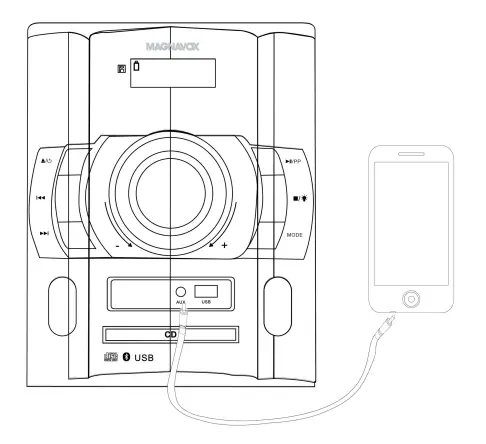
AUX (AUX/LINE IN):
Listen from an external Audio Player such as a Cell phone, MP3 Player, Discman …etc.
- Connect one end of the Audio Connection Cable (not included) to the AUX Out/Line Out/Phone Jack on the external Audio Player.
- Connect the other end of the cable to the AUX (Aux/Line In) Jack on the front of unit as illustrated below:

- Power on the unit as previously instructed.
- Press the MODE Button on the Unit or Remote Control repeatedly until “AUH” appear on the display.
- Play the music on the connected Player as usual. (Make sure the volume level of the connected Audio Player is turned to high level.)
USB
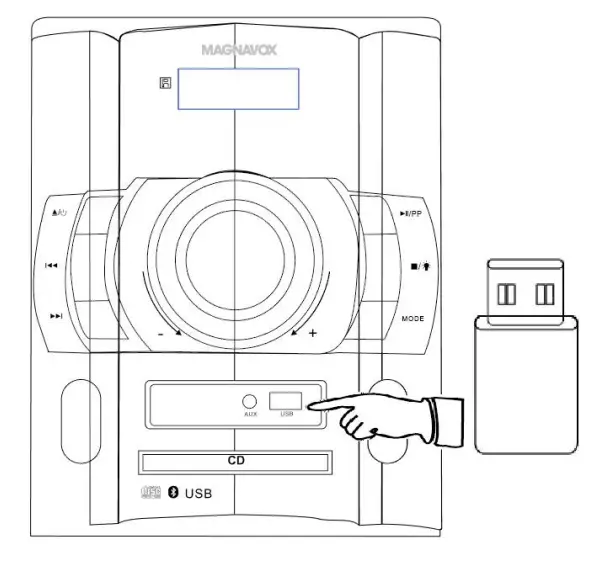
To play the music in external USB Device:
- In standby mode, insert the USB Device into the USB Port on the front of unit as illustrated below:

- Power on the unit as previously instructed.
- Press the Mode Button on the Unit or Remote Control repeatedly until “USb” appear on the display to enter to USB playback mode.
- Wait a few seconds, the unit will automatically play the first track on the USB Device.
Note: If no USB Device was inserted into the USB Port. A few seconds later, the unit will turn to CD playback mode automatically. - During playback:
- Press the ►II/PP Button on the unit or Remote Control to pause, press again to resume normal playback.
- Press the I◄◄ or ►►I buttons repeatedly to skip tracks.
- Press the ◄◄ or ►► buttons on the Remote Control to search the specific section then press the ►II/PP Button to resume normal playback.
Use the Numeric & 5+ buttons on the Remote Control to select and plays the desired tracks. For examples:- To play the 4th track on the USB device, press the “4” Button. “0004” will appear on the display then the unit will start to play it.
- To play the 14th track on the USB device, press the “5+” + “5+” + “4” buttons. “0014” will appear on the display then the unit will start to play it.
Notes:
- Up to 64 GB USB Device the unit supports to play.
- Before replacing USB Device, make sure the unit had been turned to standby mode.
- When inserting the USB Device, make sure the direction you selected is correct.
Never insert violently to avoid damaging the USB Device or the unit. - You also need to download the desired music in MP3 format into the USB Device before insert into the unit.
TROUBLESHOOTING
Check the following before requesting service:
| SYMPTOM | POSSIBLE CAUSE | POSSIBLE SOLUTION |
|
No power | AC/DC Adaptor had not connected | Connected the AC/DC Adaptor to the unit and
AC power as page 10 |
| No sound or sound weak | The volume of the unit was set to minimum position | Increase the volume level by turning the VOLUME Control Knob on the unit clockwise or press the VOL + Button on the Remote Control |
| Volume level of paired/connected device is in
low level | Rise the volume level of the paired/connected device |
| Sound distortion | Volume level too high | Reduce the volume level by turning the VOLUME Control Knob on the unit counterclockwise or press the VOL – Button on the Remote Control |
| The volume level of the connected/paired device too
high | Reduce the volume level of the connected/paired device | |
| BT not functioning | Unit not in BT mode | Press the MODE Button on the Unit or Remote Control repeatedly until indicator “bt” appear on the display and blink to enter to BT playback mode |
| The external BT Device had NOT paired to the unit | Pair the external BT Device to the unit as page 15-16 | |
| The external BT device too far
from the unit | Place the external BT device close to the unit | |
| CD not play | Unit not in CD mode | Press the MODE Button on the Unit or Remote Control repeatedly until “Cd” appear on the display |
| CD disc incorrect install | Place the CD disc on the center of tray with label side face up | |
| Disc is dirty or scratched | Try other discs | |
| Radio not function | Unit not in radio mode | Press the MODE Button on the Unit or Remote Control repeatedly until the indicator “rAdI0” appear on the display |
| Radio reception not good | The direction or location no good for radio reception | Unwind and extended the FM wire antenna on the rear of unit to its full length and/or reassemble the other direction/location to
improve the reception |
| USB Device not function | Unit is not in USB mode | Press the MODE Button on |
| the Unit or Remote | ||
| Control repeatedly until | ||
| “USb” appear on the | ||
| display to enter to USB | ||
| playback mode | ||
| No audio files on the USB | Download the desired | |
| Device | music in MP3 format into | |
| the USB Device before | ||
| insert into the unit |
GENERAL SPECIFICATTIONS
- Power Source: DC 15V, 3A,
- Audio Power: 25W per Channel (Total 50W, RMS)
- The impedance of Speakers: 30W, 4Ω per channel
- FM Band Converge: 87.5 – 108MHz
- BT Version: 5.0
- BT Operation Distance: Up to 32 Feet in opera area
- Disc Compatible: CD; CD-R; CD-RW
PACKAGE INCLUDES:
- 1 x User’s Manual
- 1 x Remote Control (Uses 1 x CR2025 Button Cell, included)
SPECIFICATIONS AND ACCESSORIES ARE SUBJECT TO CHANGE WITHOUT NOTICE
LIMITED WARRANTY
Craig Electronics Inc. warrants this product to be free from manufacturing defects in material and workmanship under normal use for a period of 180 days from date of purchase. If service is required, please return the product to the store where it waspurchased for exchange; or, pack the unit in the original packing material with all accessories if applicable, a copy of your sales receipt and a Cashier’s check or Money Order for $20 (to cover shipping and handling costs) payable to Craig Electronics Inc. For consumers in Canada, please make sure that the cashier check or money order is redeemable through a U.S. bank. Ship your product freight pre-paid. Your unit will be repaired, replaced or if the unit can not be repaired or replaced, a refund wilI be forwarded to you within four weeks of receipt of your unit. Please ship your unit to:
Craig Electronics Inc. 1160 NW 163 Drive Miami, Fl 33169
This warranty is void if the product has been:
- Used in a commercial application or rental.
- Damaged through misuse, negligence, or abuse. c) Modified or repaired by anyone other than an authorized Craig Electronics Inc. service center. d) Damaged because it is improperly connected to any other equipment.
Note: This warranty does not cover: a) Ordinary adjustments as outlined in the Owner’s Manual which can be performed by the customer. b) Damage to equipment not properly connected to the product. - Any cost incurred in shipping the product for repair. d) Damage to the product not used in the USA.
This warranty is not transferable and only applies to the original purchase. Any implied warranties, including the warranty of merchantability, are limited in duration to the period of this expressed warranty and no warranty whether expressed or implied shall apply to the product thereafter. Under no circumstance shall Craig Electronics Inc. be liable for any loss or consequential damage arising out of the use of this product. This warranty gives specific legal rights. However, y ou may have other rights which may vary from state to state. Some states do not allow limitations on implied warranties or exclusion of consequential damage. Therefore, these restrictions may not apply to you.
This product has been manufactured by and is sold under the responsibility of Craig Electronics Inc., and Craig Electronics Inc. is the warrantor in relation to this product. MAGNAVOX and SMART. VERY SMART are registered trademarks of Koninklijke Philips N.V. and are used under license from Koninklijke Philips N.V.
To Obtain Service on your Product emaiI: [email protected]
FAQS
No, they separate from the unit by speaker wire about 24″ in length.
Yes. It comes with the power cord that fits any US outlet.
The speakers are appx the same height as the component -14”
NO
Yes it has a timer….. after 10 minutes of frustration my timer went off and I smashed it
It holds a single CD at a time.
No, it does not.
no jack
Yes it is
No!! The quality is horrible there is a preset equalizer it is worthless the one that they sent me was already two years old take your money and buy something else like a Sony or a good brand name that’s what I should have done
Main Unit Dimension (in) 8.94(W) x 12.99(H) x 10.24(D)
Speaker Cabinet Dimension (pc) (in) 8.50(W) x 12.99(H) x 8.50(D)
3 feet or so
The speakers are appx the same height as the component -14”
Yes. It comes with the power cord that fits any US outlet.