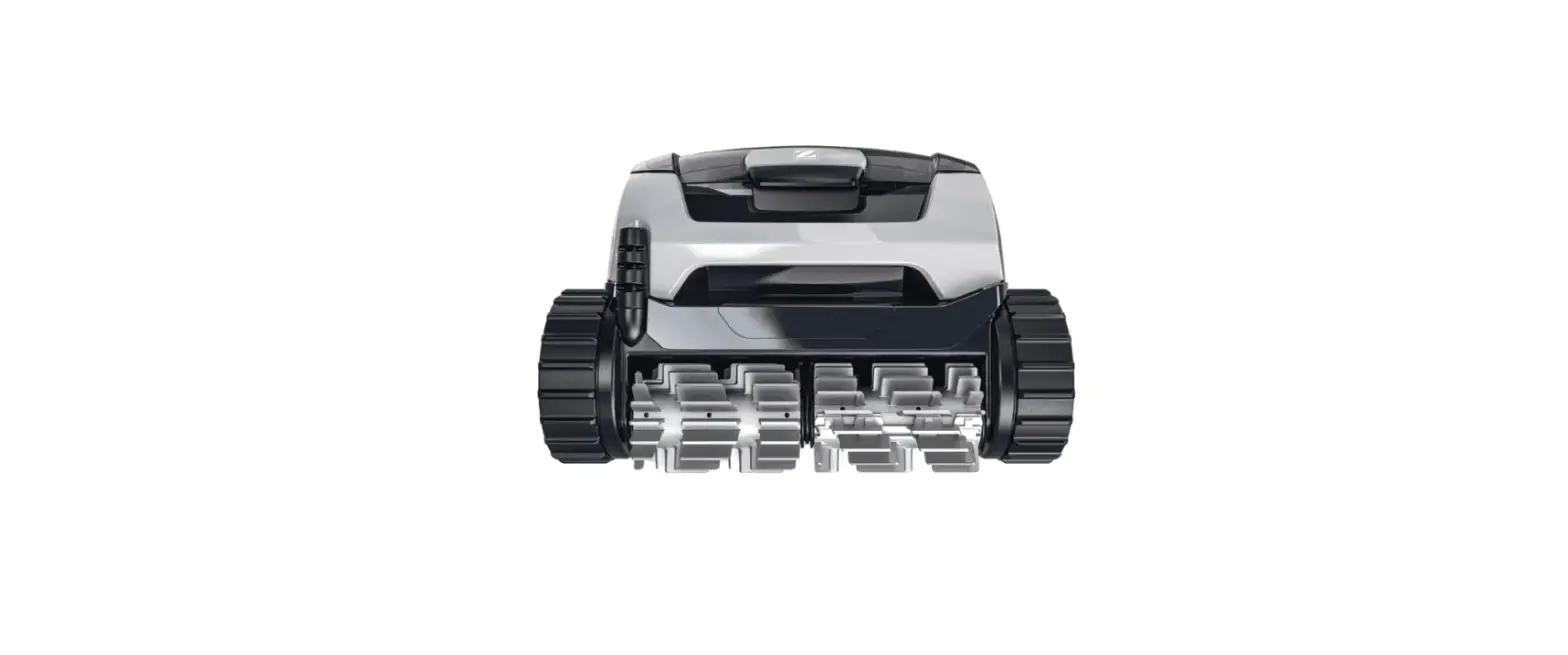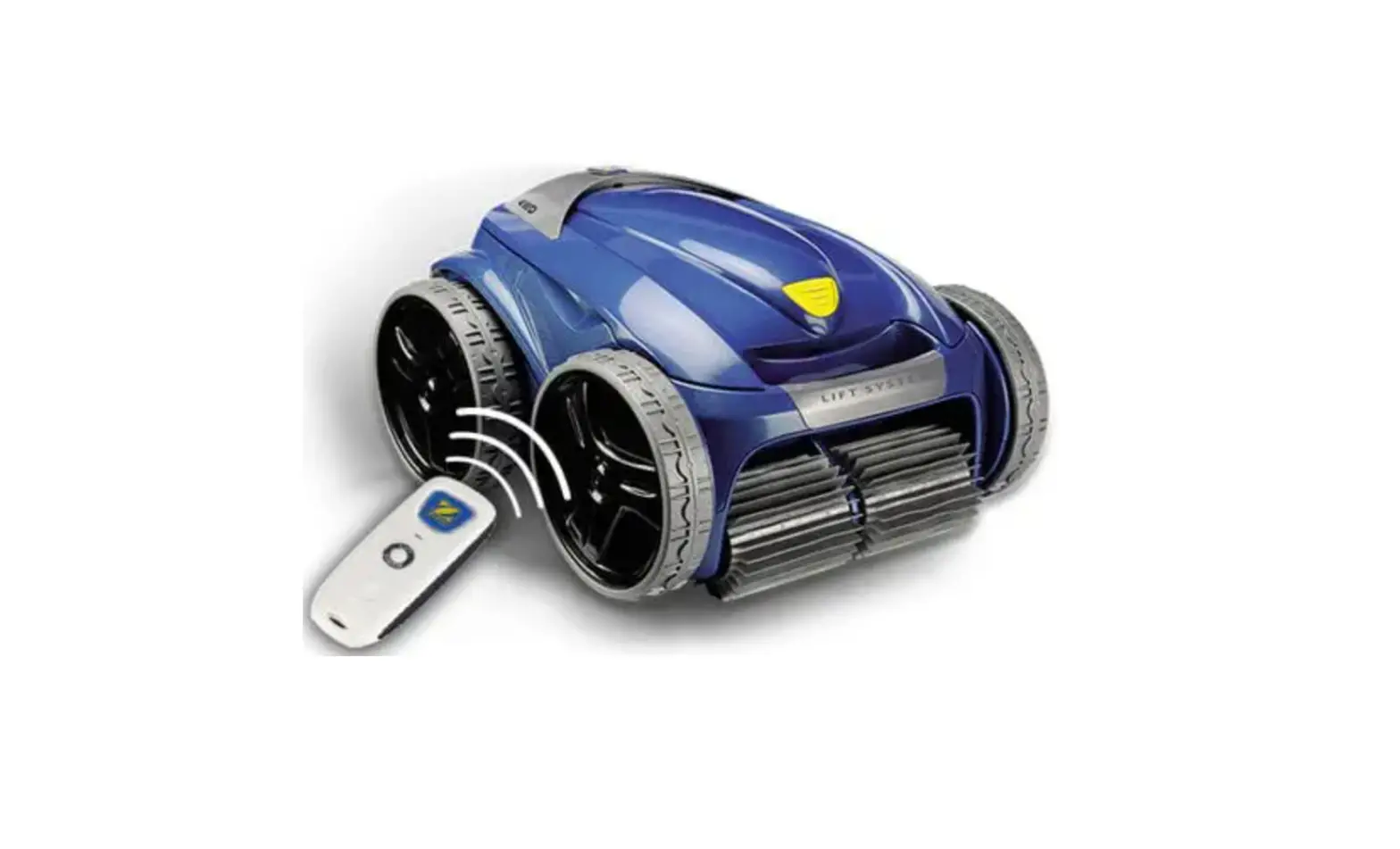
 VORTRAX
Installation and user manual – English
Professional electric cleaner
Translation of the original instructions in French
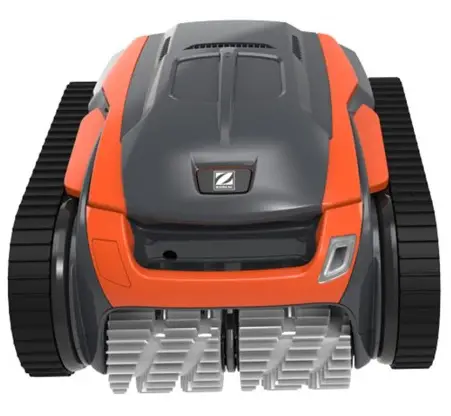
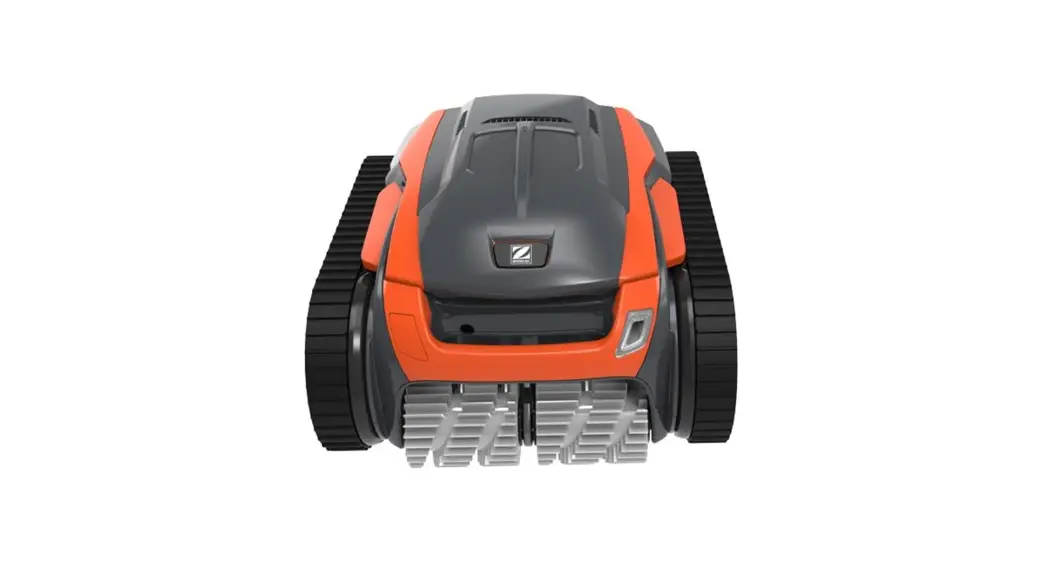
7500 Professional Electric Cleaner
 WARNINGS
- Before handling the appliance, it is vital that you read this installation and user manual, as well as the “Warranties” booklet delivered with the appliance. Failure to do so may result in material damage or serious or fatal injury and will void the warranty.
- Keep and pass on these documents for reference during the appliance’s service life.
- The distribution or modification of this document in any way is prohibited, without prior authorisation from the manufacturer.
- The manufacturer is constantly developing its products to improve their quality. The information contained herein may therefore be modified without notice.
GENERAL WARNINGS
- Failure to respect the warnings may cause serious damage to the pool equipment or cause serious injury, even death.
 This cleaner is a professionnal cleaner. Only a person qualified in the technical fields concerned (electricity, hydraulics or refrigeration) is authorised to use it and carry out maintenance or repair work on the appliance. The qualified technician working on the appliance must use/wear personal protective equipment (such as safety goggles and protective gloves, etc.) in order to reduce the risk of injury occurring when working on the appliance.
- Before handling the appliance, check that it is switched off and isolated.
- The appliance is intended to be used for pools and spas for a specific purpose; it must not be used for any purpose other than that for which it was designed.
- This appliance is not intended for use by individuals (including children) with impaired physical, sensorial or mental abilities, or persons lacking in knowledge and experience, unless they receive supervision or prior instructions on using the appliance from a person responsible for their safety. Children must be supervised to ensure that they do not play with the appliance.
- This appliance can be used by children under 8 and adults with impaired physical, sensory or mental capabilities, or who lack experience and knowledge, if they are correctly supervised or have been instructed in how to use the appliance safely and understand the hazards involved. User cleaning and maintenance operations must not be carried out by children without supervision.
- The appliance must be installed according to the manufacturer’s instructions and in compliance with local and national standards. The installer is responsible for installing the appliance and for compliance with national installation regulations. Under no circumstances may the manufacturer be held liable in the event of failure to comply with applicable local installation standards.
- For any work other than the simple user maintenance described in this manual, the product should be referred to a qualified professional.
- If the appliance suffers a malfunction, do not try to repair it yourself; instead contact a qualified technician.
- Refer to the warranty conditions for details of the permitted water balance values for operating the appliance.
- Deactivating, eliminating or by-passing any of the safety mechanisms integrated into the appliance shall automatically void the warranty, in addition to the use of spare parts manufactured by unauthorised third-party manufacturers.
- Do not spray insecticide or any other chemical (inflammable or non-inflammable) in the direction of the appliance, as this may damage the body and cause a fire.
- Do not touch the fan or moving parts and do not place objects or your fingers in the vicinity of the moving parts when the appliance is in operation. Moving parts can cause serious injury or even death.
 This cleaner is a professionnal cleaner. Only a person qualified in the technical fields concerned (electricity, hydraulics or refrigeration) is authorised to use it and carry out maintenance or repair work on the appliance. The qualified technician working on the appliance must use/wear personal protective equipment (such as safety goggles and protective gloves, etc.) in order to reduce the risk of injury occurring when working on the appliance.
WARNINGS ASSOCIATED WITH ELECTRICAL APPLIANCES
- The power supply to the appliance must be protected by a dedicated 30 mA Residual Current Device (RCD), complying with the standards and regulations in force in the
country in which it is installed. - Do not use any extension lead when connecting the appliance; connect the appliance directly to a suitable power supply.
- Before carrying out any operations, check that:
– The required input voltage indicated on the appliance information plate corresponds to the mains voltage;
– The mains supply is compatible with the appliance’s electricity needs and is correctly grounded. - In the event of abnormal operation or the release of odours from the appliance, turn it off immediately, unplug it from its power supply and contact a professional.
- Before servicing or performing maintenance on the appliance, check that it is powered off and completely disconnected from the power supply and that all other
equipment or accessories connected to the appliance are also disconnected from the power circuit. - Do not disconnect and reconnect the appliance to the power supply when in operation.
- Do not pull on the power cord to disconnect it from the power supply.
- If the power cord is damaged, it must be replaced by the manufacturer, an authorised representative or a repair facility only.
- Do not perform maintenance or servicing operations on the appliance with wet hands or if the appliance is wet.
- Before connecting the appliance to the power supply, check that the connection unit or socket to which the appliance will be connected is in good condition and shows no signs of damage or rust.
- In stormy weather, disconnect the appliance from the power supply to prevent it from suffering lightning damage.
SPECIFIC FEATURES APPLICABLE TO “Pool cleaners”
- The cleaner is designed to operate properly in pool water at a temperature of between 15°C and 35°C.
- To avoid possible injury or damage to the cleaner, do not operate the cleaner out of the water.
- In order to prevent possible injury, bathing is prohibited when your cleaner is in the pool.
- Do not use the cleaner during shock chlorination.
- Do not leave the cleaner unattended for an extended period.
WARNING ON THE USE OF A CLEANER IN A POOL WITH A LINER:
- Before installing the cleaner, carefully inspect the pool lining. If the liner is damaged in places, do not install the cleaner before a qualified professional repairs or replaces
the liner. The manufacturer may not be held liable in any way for damage caused to the liner. - The surface of certain patterned liners can wear away quickly: the patterns and/ or colours can become deteriorated, faded or disappear on contact with certain objects. The cleaner manufacturer may not be held liable for wear to the liners or faded patterns, which are not covered by the limited warranty.
WARNING ON THE USE OF A CLEANER IN A STAINLESS STEEL POOL:
- Some stainless steel pools may have very fragile surfaces. The surface of these pools might get damaged by the basic friction of debris against the surface, for example caused by the wheels, tracks or brushes of cleaners, including electrical pool cleaner. The wear or scratching of stainless steel pools are not the liability of the manufacturer of the pool cleaner and are not covered by the limited warranty.
 Information before use
 Information before use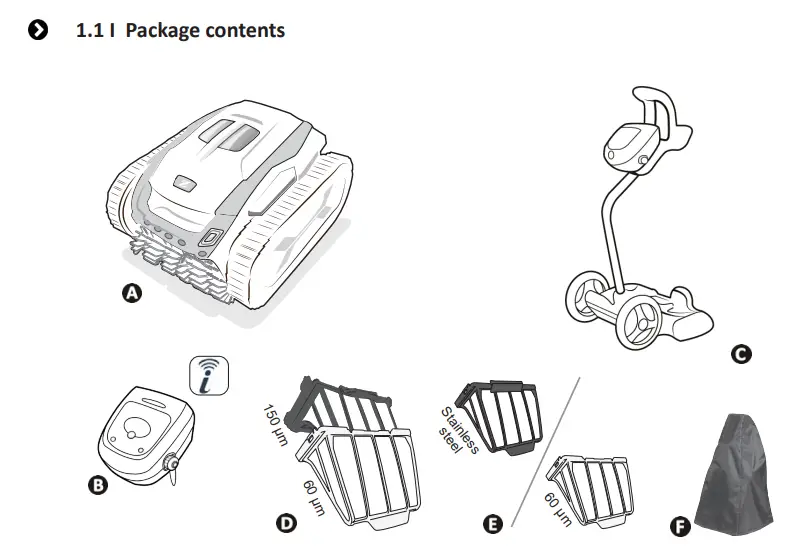
| 7 500 iQ | 7 700 iQ | ||
| A | Cleaner + floating cable |  | |
| B | Control box | | |
| C | Caddy kit | | |
| D | Dual filtration : Very fine debris single filter (60µ) + Fine debris single filter (150µ) | | |
| E | Simple filtration : Very fine debris single filter (stainless steel) or Fine debris single filter (60µ) | | |
| F | Protective cover |  | |
:Supplied : Available as an option
 1.2 1 Technical specifications and marking
1.2.1 Technical specifications
| 7 500 iQ | 7 700 iQ | |
Control box power supply  | 220 – 240 VAC, 50/60Hz, Class II* | |
| Cleaner power supply voltage | 30 V DC | |
| Maximum power input | 150 W | |
| Cable length | 25 m | 30 m |
| Cleaner weight** | 12 kg | |
| Suction width | 270 mm | |
| Maximum operating depth | 4 m | |
| Power supply protection rating | IPX5 | |
| Cleaner protection rating | IPX8 | |
| Frequency bands | 2,412GHz – 2,484GHz | |
| Radiofrequency emission power | +20dBm | |
* Class II: appliance with double insulation or reinforced insulation that does not require grounding.
** Weight with cable and Dual filtration for 7 500 iQ models, with cable and and stainless steel filter for 7 700 iQ models
1.2.2 Marking
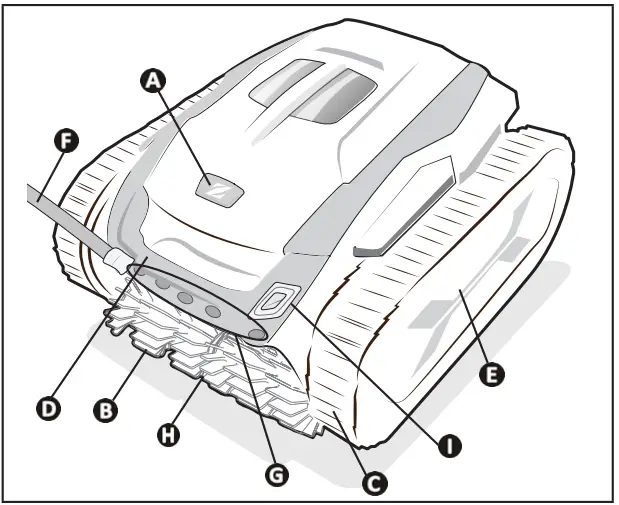
A : Filter access hatch lock
B : Brushes
C : Tracks
D : Transport and remove-from-pool handle
E : Flange and wheels
F : Floating cable
G : Sensors (for 7 700 iQ models only)
H : Centre bridge (between the two brushes)
I : Sensor LED
1.3 1 Operating principle
The cleaner is separate from the filtration system and can function independently. It just simply needs to be connected to the mains power supply.
It finds the best route to move around and clean the areas of the pool for which it has been designed (bottom, walls, water line). Debris is sucked in and stored in the cleaner’s filter.
The cleaner can be used:
– via the control box supplied with the cleaner,
– or via a smartphone or a tablet compatible with the iAquaLink™ application (see § “❸ Using the iAquaLink™ app”).
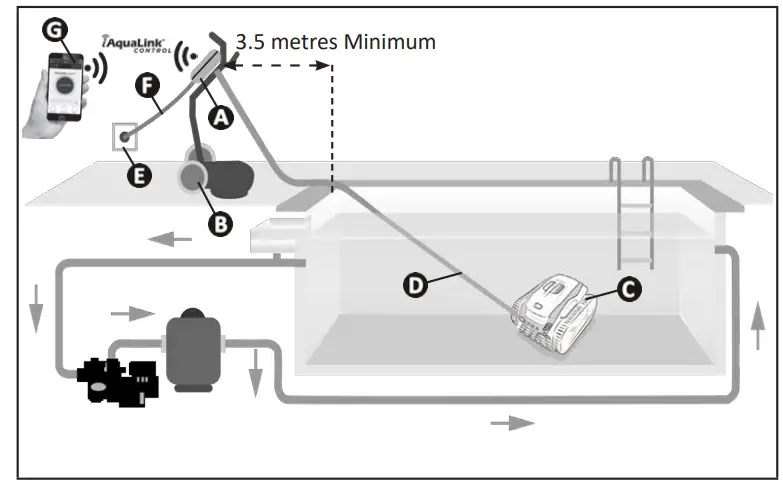
A : Control box
B : Caddy
C : Cleaner
D : Floating cable
E : Plug
F : Power cord
G : Remote control “iAquaLink™” Wi-Fi
1.4 1 Pool preparation
 This product is intended to be used in pools which are permanently installed. Do not use it in pools which may be dismantled. A permanent pool is built into the ground or on the ground and cannot be easily dismantled and stored.
- The appliance must operate in pool water with the following properties:
| Water temperature | Between 15°C and 35°C |
| pH | Between 6.8 and 7.6 |
| Free chlorine | < 3 mg/ l |
- When the pool is dirty, especially when commissioning, remove the largest debris using a net in order to optimise the appliance’s performances.
- Remove any thermometers, toys and other objects that might damage the appliance.
 Use
Use
 Use
Use 2.1 I Immersing the cleaner in the pool
- Before the first use, remove the wedge between the robot cover and the filter holder.
 When using the cleaner for the first time or when it comes out of winter storage, use the fine debris filter (150 µm) only on 7 500 iQ models and the stainless steel filter on 7 700 iQ models.
- After the first use, you can use the dual filtration (150 µm filter + 60 µm filter) on 7 500 iQ models and the stainless steel filter or the 60 µm filter (according to your choice) on 7 700 iQ models.
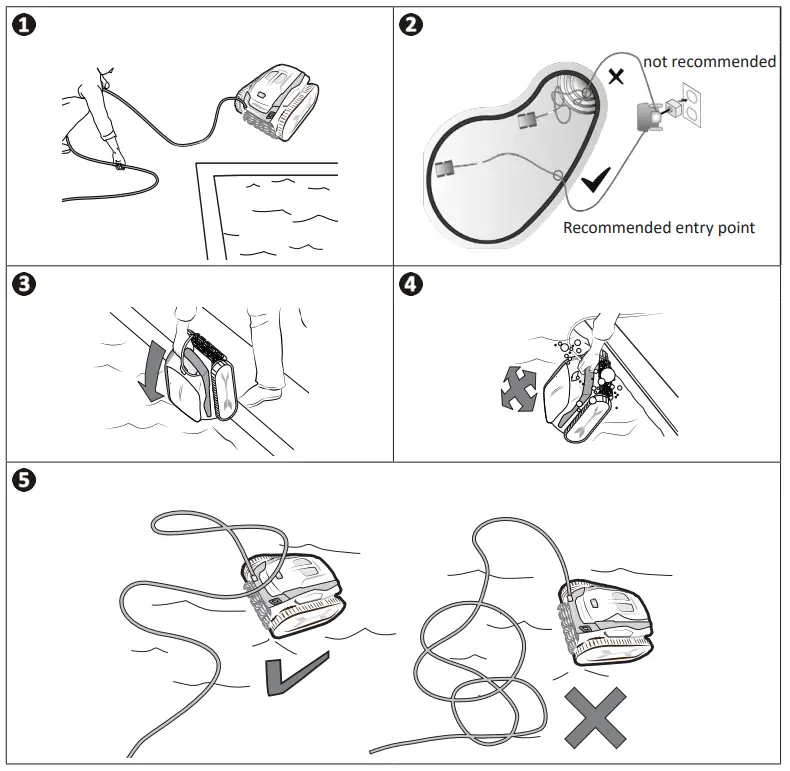
- Roll out the full length of the cable alongside the pool to avoid the cable becoming entangled during immersion (see image ).
- Position yourself halfway along the length of the pool before immersing the cleaner (see image 2 ). This will optimise the cleaner’s movements and reduce tangling in the cable.
- Place the cleaner vertically into the water (see image 3 ).
- Move it slightly in all directions so that the air contained in the cleaner escapes (see figure 4 ).
- It is essential that the appliance sinks on its own and settles on the pool bottom. While it is immersed, the cleaner draws the length of cable it needs into the pool (see figure 5 ).
2.2 I Electricity supply connection
In order to avoid any risk of electrocution, fire or serious injury, please follow the instructions below:
- Use of an electrical extension is prohibited when connecting the control box.
- Make sure that the socket can be easily accessed at all times and is protected from rain or splashes.
- The control box is splash-proof, but must not be immersed in the water or any other liquid.
It must not be installed in a floodable area; keep it at least 3.5 metres away from the edge of the pool and avoid exposing it to direct sunlight. - Place the control box near the socket.
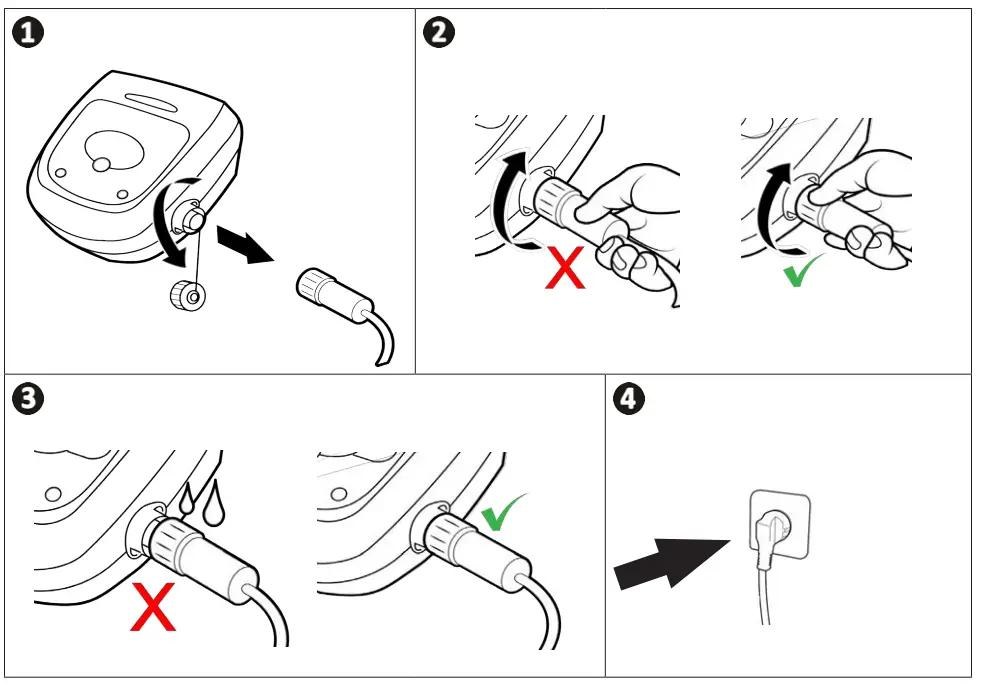
- Unscrew the protective cap (see figure 1 ).
- Connect the floating cable to the control box and lock it into place by turning it clockwise (to avoid damaging the
floating cable) (see image 2). - Make sure that the connector is fully pushed in so that no water can get in (see image 3).
- Connect the power cord (see figure 4 ). Only connect the control box to a power outlet protected by a 30 mA maximum residual current device (if in doubt contact a qualified technician).
2.3 I Control box functions
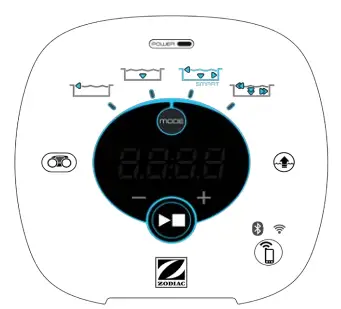
| Symbol | Description | 7 500 iQ 7 700 iQ |
 | Starting/Stopping the appliance |
|
 | Start delayed |
|
| Set up the iAquaLink™ connection |
|
| Bluetooth™ connection status |
|
| Wi-Fi connection status |
|
| “Lift System” remove from pool mode |
|
 | Choose a cleaning mode |
|
| Bottom only mode |
|
 | Smart Mode (optimised cleaning of the bottom, walls, and water line) |
|
| Intensive Bottom, Walls and Water line Mode |
|
 | Water line only mode |
|
 | Reduce or increase the cleaning time (+/- 15 minutes) |
|
| “Filter full” indicator |
|
| Information LED |
|
 | Error codes or messages display |
|


: Available
2.4 I Starting a cleaning cycle
In order to avoid any risk of injury or material damage, please follow the instructions below:
- Bathing is prohibited when the appliance is in the pool.
- Do not use the appliance during a shock chlorination. Wait until the chlorine level has reached the recommended value before immersing the cleaner.
- Use preferably the Bottom only mode if a roller shutter is closed.
- When the control box is powered up, the following symbols light up to indicate:
– The action in progress
– The cleaning mode selected
– Maintenance required - The control box switches to standby after 5 minutes, the screen and the LEDs are switched off. Press any key to exit standby mode. Standby mode does not stop the appliance if it is in a cleaning cycle.
2.4.1 Choice of cleaning mode
- By default, Smart mode is the preselected cleaning mode (cleaning the bottom, sides, water line over an optimised time based on the pools’ dimensions).
- The first Smart mode cycle that is launched is for the cleaner to survey the pool at the same time that it cleans during a 2h30 cycle. During this first cycle “AUTO/2h30” is displayed on the control box. At the end of this cycle, the optimal cleaning time is calculated. Do not interrupt the first SMART cycle.
- This optimal time is then saved and becomes the default cleaning time for the subsequent cycles run in Smart mode.
The control box then displays the calculated optimal time. - To reset Smart mode, press and hold the button cleaner recalculates the optimal cleaning time.
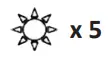
 for 5 seconds. Start a new cycle in Smart mode so that the
 - The cleaning cycle can be modified before the appliance starts or while it is operating. The new mode will be started immediately and the remaining time from the previous cycle will be cancelled.
- Press
 :
:
– Bottom only mode (1h15) :
– Smart Mode (optimised cleaning of the bottom, walls, and water line) (optimal time) :
– Intensive Bottom, Walls and Water line Mode (2h45) :
– Water line only mode (45 min) :
- Press to start the cleaning cycle. Tip to improve cleaning performance
At the start of the bathing season, launch several cleaning cycles in bottom only mode (after removing the large debris with a net). Regular use of the cleaner (without exceeding 3 cycles per week) means that your pool will always be clean and the filter less clogged.
2.4.2 Adjusting the cleaning time
- You may reduce or increase the time for the cleaning cycle selected or in progress:
– : Reduce by 15 minutes.
– : Increase by 15 minutes.
 : Reduce by 15 minutes.
2.4.3 Using the Start delayed
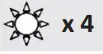
- When the cleaning mode has been selected, press and at the same time.
- The control box displays the duration. This duration can be adjested pressing and .
- Press 10 to start a cycle. The cleaning cycle will start at the end of the scheduled duration.
2.5 I Meaning of the sensor LED
| LED status | Blue | Green | Orange | Off |
| Steady | Cleaning cycle activated | “Lift System” or “Spot Clean” function activated | Filter full | No current cycle or error |
| Flashing | Cycle in progress, pool analysis, or finishing phases | Remote control function activated | N/A |
2.6 I Removing the cleaner from the water
- To prevent damaging the equipment, use only the handle to remove the appliance from the pool.
2.6.1 “LIFT SYSTEM” automated function
The “Lift System” function was designed to facilitate removing the cleaner from the water. It may be activated at any time, during or at the end of a cleaning cycle.
- If necessary, press and hold the button
 to direct the cleaner towards the required wall, the cleaner pivots. When facing the right wall, release the button. The cleaner moves towards the wall.
 - Or just briefly press the button to move it towards the opposite wall.
- The cleaner climbs the wall and stays at the waterline (see image 1 ).
- Use the handle to take it out of the water. The cleaner expels water through a rear jet to make it lighter (see image 2)
 to direct the cleaner towards the required wall, the cleaner pivots. When facing the right wall, release the button. The cleaner moves towards the wall.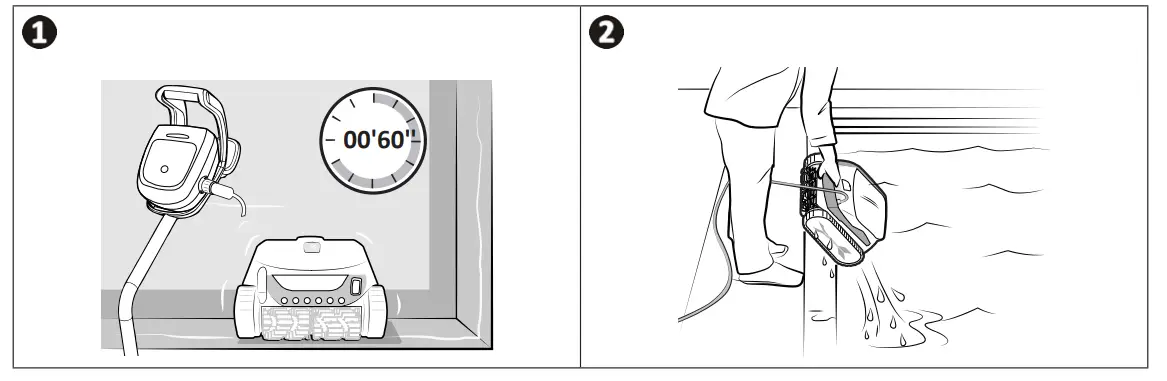
2.6.2 Manually
- Switch off the appliance by pressing .
- Bring the cleaner to the edge of the pool by gently pulling on the floating cable.
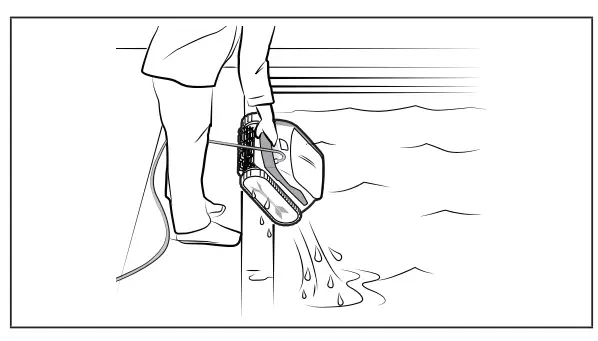
- When possible, pick up the cleaner by the handle and lift it gently out of the pool so that the water it contains drains into the pool.
2.7 I Good practices after each cleaning operation
2.7.1 Clean the filter as soon as the appliance is out of the pool
- The cleaner’s performance may be reduced if the filter is full or dirty.
- Clean the filter in clean water as soon as the appliance is removed form the pool after each cleaning cycle. Do not wait for the debris to dry.
- After each cleaning cycle, follow the steps for cleaning the filter, see § “4.2 I Clean the filter as soon as the appliance is out of the pool”.
2.7.2 Lay out the cable to reduce tangling
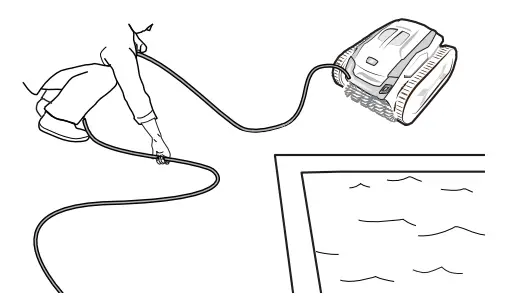
The appliance’s behaviour is strongly impacted by the tangling of the cable. A cable that is correctly untangled will guarantee better coverage of the pool.
- Untangle the cable and lay it out in the sun so that it returns to its original shape.
2.7.3 Storing the cleaner and cable
- Screw the protective cap back on if you unplug the control box power cord.
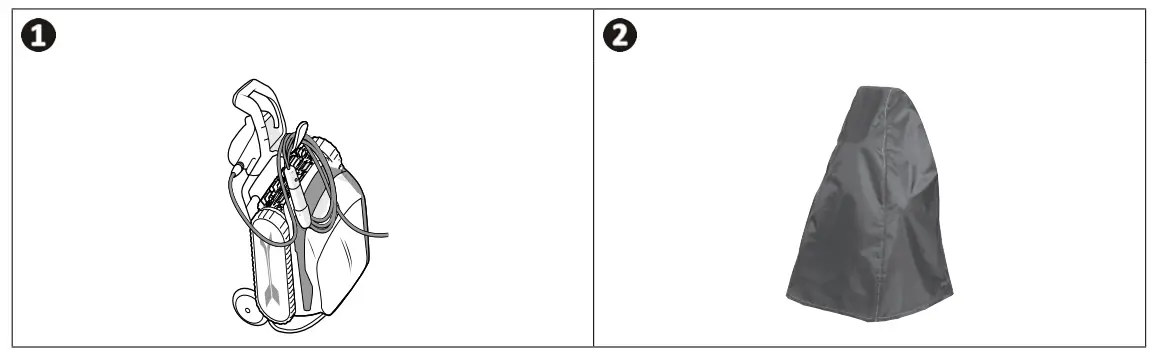
- Place the cleaner vertically at the location provided on the caddy for it to dry out quickly. Roll up the cable carefully and place in on the caddy handle (see image 1).
- Store all elements away from direct sunlight, humidity, and the elements, as well as any splashes. A protective cover is available as an option (see image 2).
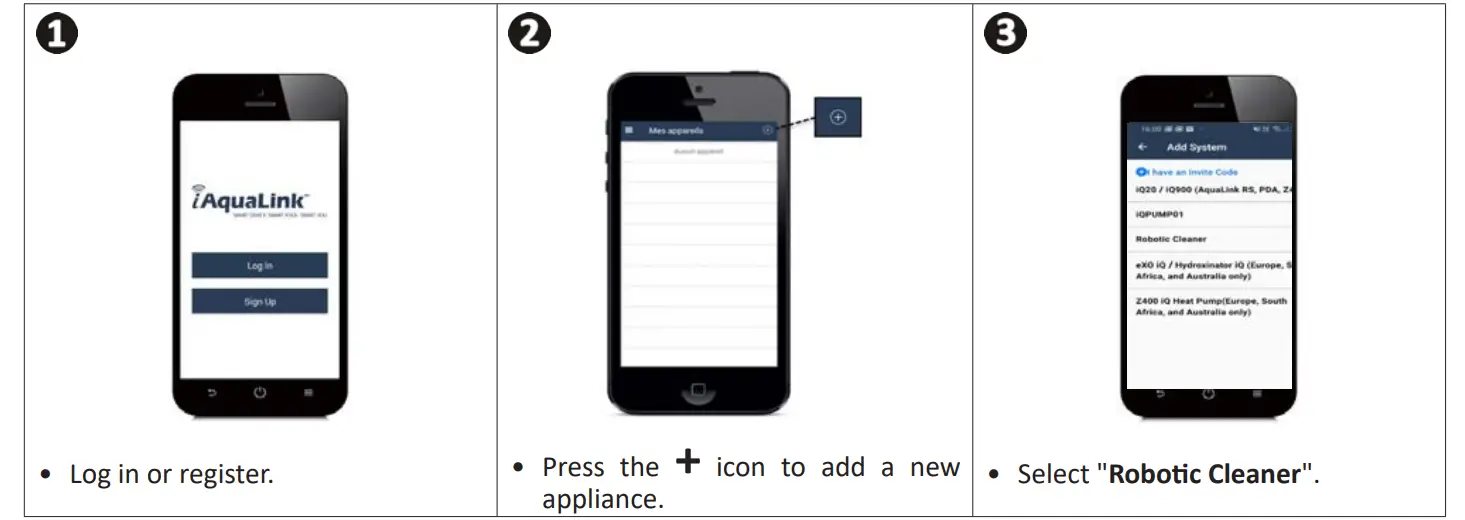
 Using the iAquaLink™ app
 Using the iAquaLink™ app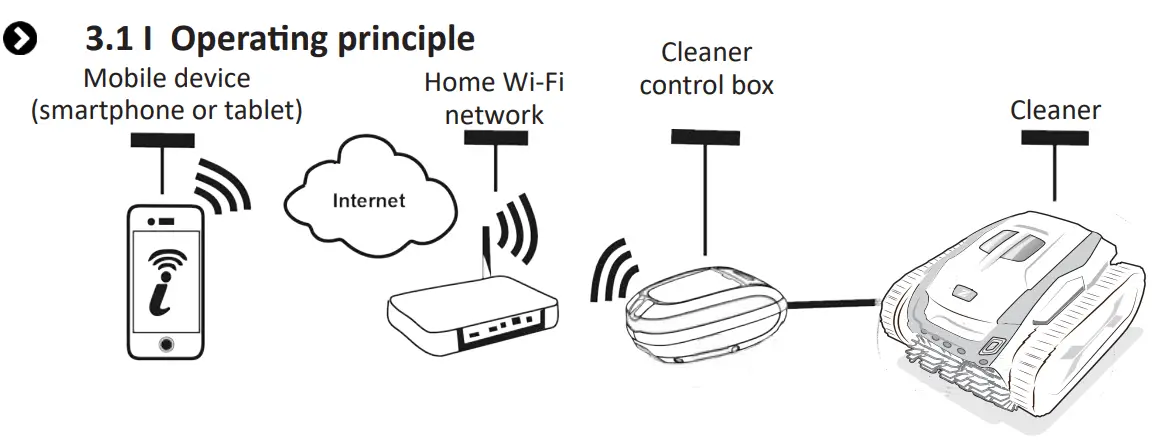
The iAquaLink™ app is available for iOS and Android systems.
With the iAquaLink™ app, you can control the cleaner from any location at any time and have the benefit of advanced functions such as additional programming and troubleshooting assistance. 3.2 I First-time cleaner configuration
Before you install the app, you must:
- Connect the control box to a power outlet,
- Immerse the cleaner in the pool,
- Use a Wi-Fi-enabled smartphone or tablet,
- Use a Wi-Fi network with a reasonably strong signal when connecting to the cleaner’s control box: The Wi-Fi signal must be detectable at the place where the cleaner is used. If this is not the case, a technical solution must be provided to amplify the existing signal.
- Have your home Wi-Fi network password at the ready.
- Download the iAquaLink™ app from the App Store (iOS) or Google Play Store (Android).
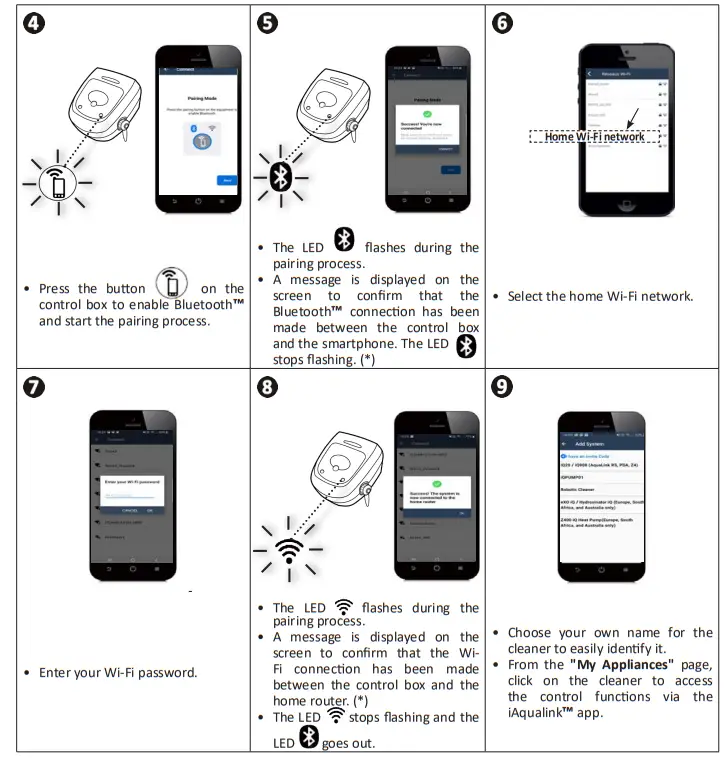
 (*): If an error message appears or if the connection still isn’t made, refer to the table§ “5.3 I Troubleshooting the connection to the iAquaLink™ app”.
3.3 I Functions available in the app
| Symbol | Description | RA 63 – – iQ Alpha 63 iQ Bio | RA 65 – – iQ | RA 67 – – iQ RA 68 – – iQ RA 69 – – iQ |
 | Starting/Stopping the appliance |
|
|
|
| “Lift System” remove from pool mode |
|
|
|
| Choose a cleaning mode |
|
|
|
| Bottom only mode |
|
|
|
| Smart Mode (optimised cleaning of the bottom, walls, and water line) |
|
|
|
| Intensive Bottom, Walls and Water line Mode |
|
| |
| Water line only mode |
| ||
| Reduce or increase the cleaning time (+/- 15 minutes) |
| | |
| “Filter full” indicator |
|
|
|
| Remote control mode |
|
| |
| Spot Clean (targeted cleaning of 1m²) |
| ||
| Cleaning cycle programming over 7 days |
|
| |
| Water temperature display |
|


: Available*
*functions may change depending on updates to the app.
3.4 I Control using the app
Before controlling the cleaner with the app, you must:
- Connect the control box to a power outlet,
- Immerse the cleaner in the pool.
3.4.1 Programming and controlling cleaning cycles
From the application:
- Start/stop cleaning;
- View the current cycle’s remaining cleaning time (displayed in hours and minutes);
- Increase/Reduce the cleaning time by 15-minute sequences;
- Choose the pre-saved cleaning modes
- The new cleaning mode will take effect for the cleaning cycle in progress and all future cycles.
- The cleaning cycle time may vary depending on the selected settings.
- Schedule cleaning cycles (days and hours); Cleaning cycles may be programmed to repeat, only one program can be set per day;
- Check the pool’s temperature during the cleaning cycle;
The cleaner measures the water temperature while operating. - When the cleaner is at the bottom of the pool, it is normal for there to be a temperature difference between that measured by the cleaner and that measured by a thermometer placed at the pool’s surface or measured by another appliance.
3.4.2 “Lift System” function for helping to remove the cleaner from the water
- Only activate the Lift System function if the cleaner is in view.
- From the app, press to use the Lift System function (see § “2.6.1 “LIFT SYSTEM” automated function”).
- Press the arrows to rotate the cleaner left or right.
- When the cleaner is facing the right wall, press the
 button to bring the cleaner to the wall.
 button to bring the cleaner to the wall.
3.4.3 Remote control
The cleaner can be controlled using your smartphone or tablet as a remote control.
- Use the remote control mode only if you have the cleaner within view.
- 2 modes are available for piloting the cleaner:
“Joystick mode”: Press the icons to move the cleaner forwards and backwards and to turn left or right.
“Kinetic mode”: Control the cleaner by tilting the mobile device upwards (backwards movement), downwards (forward movement), to the left (turn left), to the right (turn right). - For cleaning a specific area, use the “Spot Cleaning” function: after this function is activated, the cleaner cleans a 1m² area directly in front of it.
- If the cleaner is relatively slow to respond to an action requested in the app, check the Wi-Fi network signal, see§ “3.2 I First-time cleaner configuration”.
3.4.4 Error messages
- If an error is detected, a warning symbol will be displayed .
Press the warning symbol to display the troubleshooting solutions, see § “5.2 I User alerts”.
Select Clear Error if you think you have solved the problem, or select OK if you want to leave the cleaner in error mode and troubleshoot the problem later.
3.4.5 Settings Menu
Some of the cleaner’s settings can be modified at any time by pressing the Settings icon.
 Maintenance
 Maintenance
- Tip : To ensure the longest possible lifetime for the cleaner, inspect all of the parts for which servicing is detailed in the § “❹ Maintenance” section, once a month. To avoid serious injury:
- Disconnect the cleaner from the power supply.
4.1 I Cleaning the cleaner
- The appliance must be cleaned regularly using clean or slightly soapy water. Do not use solvents.
- Rinse the appliance thoroughly with clean water.
- Do not let your appliance dry in the sun by the pool. Tip: replace the filter and brushes every 2 years
You are encouraged to change the filter and the brushes every 2 years to preserve the integrity of the appliance and guarantee optimum performance.
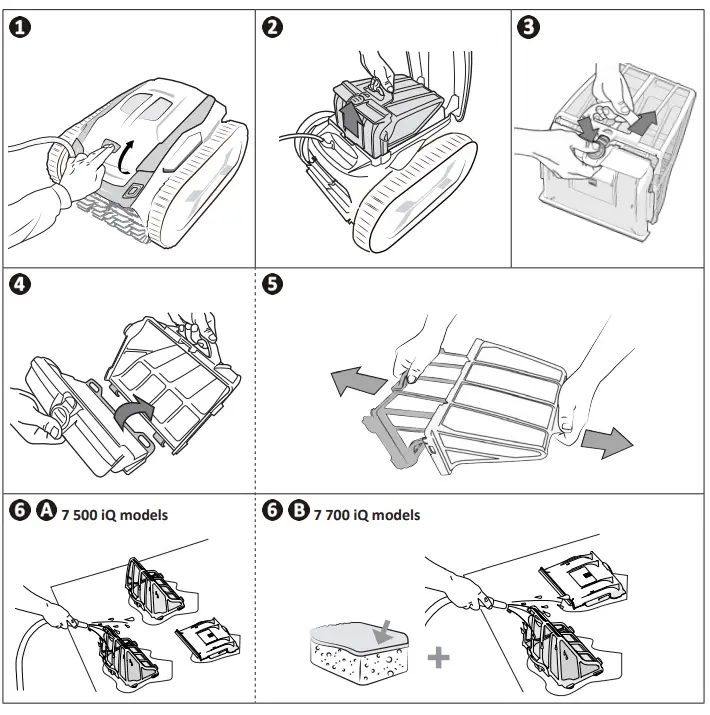
4.2 I Clean the filter as soon as the appliance is out of the pool
- The cleaner’s performance may be reduced if the filter is full or dirty.
- Clean the filter(s) with clean water after each cleaning cycle. For 7 700 iQ models, also use the scouring side of a sponge to clean the stainless steel filter after each cleaning cycle.
- If the filter is blocked, clean it with an acid solution (spirit vinegar, for example). It is recommended that you do this at least once a year, since the filter will clog if not used for several months (winterising period).
Tip: Check the status of the “filter cleaning” indicator 
When the LED is lit, it is strongly recommended that you clean the filter.
4.3 I Cleaning the brushes and the centre bridge
- The performance of the appliance may diminish if the brushes are too dirty or if debris or objects become trapped in the centre bridge (between the two brushes).
- Clean the brushes and the centre bridge in clean water as soon as the appliance is removed from the pool after each cleaning cycle. Do not wait for the debris to dry.
- Remove any object or debris trapped between the two brushes.
4.4 I Cleaning the cover seal
- Appliance performance may diminish if debris (mainly sand) becomes trapped under the cover seal, making it impossible to maintain the necessary waterproofing.
- Clean the cover seal in clean water as soon as the appliance is removed from the pool after each cleaning cycle. Do not wait for the debris to dry.
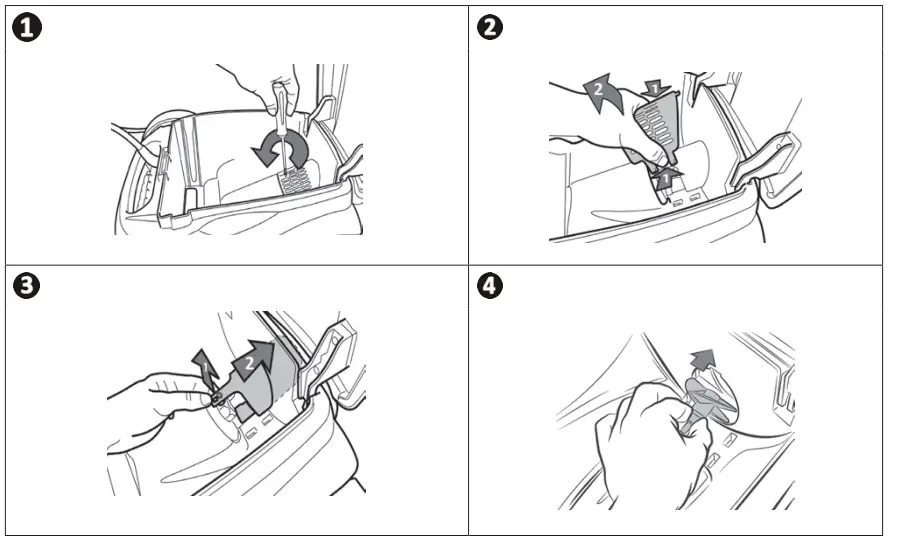
4.5 I Cleaning the propeller
To avoid serious injury:
- Disconnect the cleaner from the power supply.
- Wear gloves when maintaining the propeller
 .
. - Loosen the screw on the grid (see figure 1).
- Remove the grid (see figure 2).
- Remove the flow guide carefully (see figure 3).
- To remove the propeller, wear gloves and hold the end of the propeller carefully when pushing it (see figure ).
- Remove all debris (hair, leaves, stones, etc.) which may be blocking the propeller.
 .
.
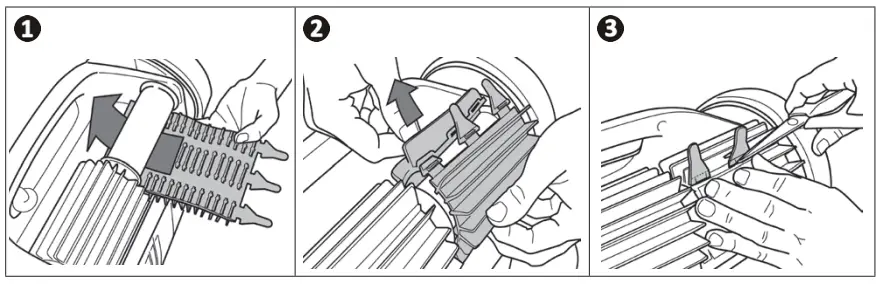
4.6 I Replacing the brushes
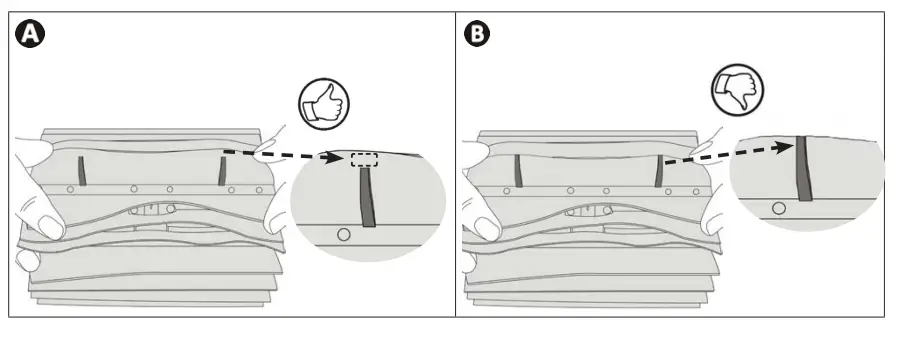
Are the brushes worn?
- Replace the brushes if the wear indicators are similar to example B :
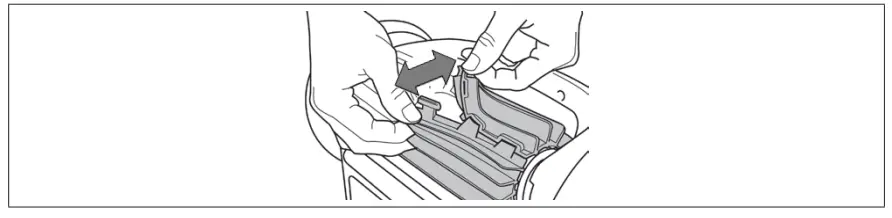
Remove the worn brushes
- Remove the tabs from the holes inside which they are fastened, then remove the brushes.
Position the new brushes.
- Fit the side without tabs under the brush holder (see image 1 ).
- Roll the brush around its support, slide the tabs into the attachment holes and pull on the end of each tab until its edge passes through the slit (see figure 2 ).
- Cut the tabs using a pair of scissors for them to be level with the other blades (see figure 3 ).
4.7 I Replacing the tracks
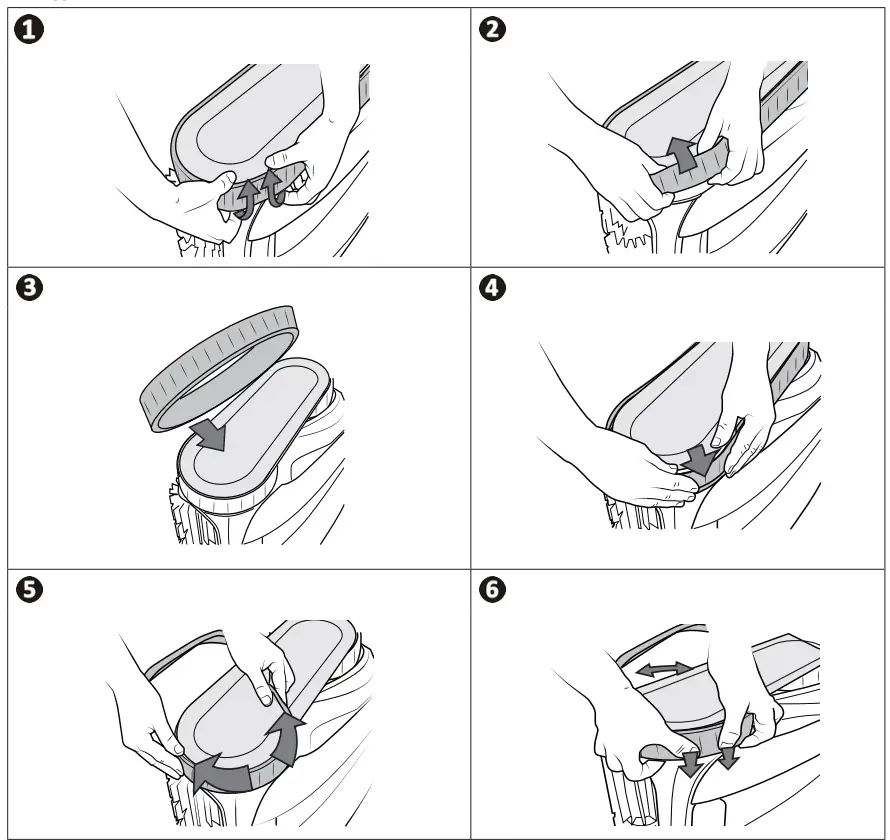
- Pull on the inside of the old track to remove the track lip from the front wheel (see image 1).
- Remove the old track from the front wheel, then remove track from the rear wheel (see image 2).
- To replace the track, position the track on the wheels (see image 3).
- Push one side of the track onto the wheel and fit the rib of the track in the groove of the wheel (see image 4).
- Work the track onto the front wheel and verify the rib of the track is positioned properly within the groove of the wheel (see image 5).
- Push and position the rib of the inner side of the track in the groove of the rear wheel (see image 6). If needed, turn the wheel gently to help with installation.
- Work the track onto the rear wheel and verify the rib of the track is positioned properly within the groove of the
 Troubleshooting
 Troubleshooting
- If a problem occurs, before you contact your retailer, please carry out these few simple checks using the following tables.
- If the problem is not resolved, contact your retailer.
 : Actions to be performed by a qualified technician only.
5.1 I Appliance behaviour
| Part of the pool is not correctly cleaned | • Repeat the immersion steps (see § “2.1 I Immersing the cleaner in the pool”) varying the immersion location until you find the right place in the pool. • The filter is full or clogged: clean it (see § “4.2 I Clean the filter as soon as the appliance is out of the pool”). |
| The appliance does not stay firmly on the pool bottom | • There is still air in the appliance’s casing. Repeat the immersion operations (see § “2.1 I Immersing the cleaner in the pool”). • The filter is full or clogged: clean it (see § “4.2 I Clean the filter as soon as the appliance is out of the pool”). • The propeller is damaged:  |
| The appliance does not or no longer climbs the pool sides as it originally did. | In Bottom/Walls/Waterline mode, the cleaner does not systematically climb the walls. The frequency varies during the cycle. It is normal that the cleaner does not necessarily climb at the beginning of the cycle. You will have to observe the cleaner for about 20 minutes to determine if it has stopped climbing the walls. • Check that the Floor/Walls/Waterline mode is chosen (see § “2.4.1 Choice of cleaning mode”). • The tracks are slack: Contact your retailer to replace them : • Even though the water seems clear, microscopic algae are present in your pool. They are not visible to the naked eye, and they make the walls slippery and prevent the appliance from climbing. Carry out shock chlorination and slightly reduce the pH. Do not leave the appliance in the water during shock treatment. |
| The appliance does not move on start-up. | • Check that the control box’s power socket is receiving a power supply. • Check that a cleaning cycle has been launched and that the lights are on. • Check that the cleaning cycle hasn’t been launched with a delay. If so, a duration is dispalyed on the control box and the cleaning cycle will start at the end of the scheduled duration. |
| The cleaner does not go straight in the pool or does not tilt | • Tracks may be worn out : Check cups or wear indicator to verify if tracks need to be replaced. • Use tracks with cups on pools with smooth surfaces. Use tracks without cups on pools with non slip surfaces : |
| The appliance does not collect debris | • The filter is full or clogged: clean it (see § “4.2 I Clean the filter as soon as the appliance is out of the pool”).| • If the filter remains clogged despite cleaning and cleaning with an acid solution: replace it. • Debris / objects are getting trapped in the centre bridge (between the two brushes) and are not being collected: Clean the brushes and the centre bridge. Clean them regularly. • Debris (mainly sand) is getting trapped in the cover seal: Clean the cover seal. Clean it after every cycle. |
| The cable gets tangled | • Do not unroll the entire length of the cable into the pool. • Place the required length of cable in the pool and spread the rest along the side of the pool. |
| The control box does not respond to any button presses. | • Unplug the power cord from the mains socket, wait 10 seconds and plug it back in again. |
| There is a difference between the temperature displayed in the iAquaLink™ app and the temperature measured by another thermometer or device. | • When the cleaner is at the bottom of the pool, it is normal for there to be a temperature difference between that measured by the cleaner and that measured by a thermometer placed at the pool’s surface or measured by another appliance. |
| The sensor LED is off even though the cleaner is operating. | • Contact the dealer to check the condition of the sensor unit. |
If the problem continues contact your retailer: 5.2 I User alerts
- The alerts are displayed both on the control box and in the iAquaLink™ app.
- Follow the troubleshooting solutions suggested below; they can also be accessed in the iAquaLink™ app: press when an error code appears.
| Display on control box | Display in the iAquaLink™ app |
Solutions | |
| Error code | Flashing LED | ||
| Er: 01 |
| Pump motor | • Check that debris or the cable is not preventing the brushes from rotating freely. • Check that nothing is interfering with the cable connection area. • Remove the flange and rotate each wheel by a quarter of a turn in the same direction until it rotates smoothly • If this fails to solve the problem, contact your retailer for a full diagnosis. |
| Er: 02 Er: 03 |
| Right traction motor Left traction motor | |
| Er: 04 |
| Pump motor consumption | • Check that no debris or hair is blocking the propeller. • Clean the filter thoroughly. • If this fails to solve the problem, contact your retailer for a full diagnosis. |
| Er: 05 Er: 06 |
| Right traction motor consumption Left traction motor consumption | • Check that debris in the tracks or the brush system or the cable is not preventing the brushes from rotating freely. • Check that nothing is interfering with the cable connection area. • Remove the flange and rotate each wheel by a quarter of a turn in the same direction until it rotates smoothly • If this fails to solve the problem, contact your retailer for a full diagnosis. |
| Er: 07 |
| Cleaner out of the water | • Turn the cleaner off. • Clean the filter thoroughly. • Put it back in the water, shaking to release the air bubbles. • Restart the cycle. • If this fails to solve the problem, contact your retailer for a full diagnosis. |
| Er: 10 |
| Communication | • Disconnect and reconnect the cleaner. • Check that the cable is properly connected to the control box. • Check that nothing is interfering with the cable connection area. • If this fails to solve the problem, contact your retailer for a full diagnosis. |
| Er: 11 |
| Sensor unit | • Contact the dealer to check the condition of the sensor unit. |

| Display on control box | Display in the iAquaLink™ app | Solutions | |
| Error code (depending on the model) | Flashing LED (depending on the model) | ||
| Er: 12 |
| Update failed or incomplete | • Disconnect the control box for at least 15 seconds. • Close the iAquaLink™ app. • Connect the control box to the cleaner. • Connect the control box. • Check that the control box is connected to the Wi-Fi network (The LED is  on). on).• If the “PrOG” message is not displayed or if the LED does not flash quickly, open the iAquaLink™ app, select the cleaner and click “Update”. |
| PrOG |  | Update in progress | • Wait for the update to complete. • Do not disconnect the control box. |
| N/A | N/A | Connection error | • Check the status of the Bluetooth/Wi-Fi LEDs on the control box and follow the steps described in the table § “5.3 I Troubleshooting the connection to the iAquaLink™ app”. |
| N/A | N/A | A red dot appears in the “My appliances” list | • Appliance not plugged in or not connected to the home Wi-Fi network. If the dot is red when the control box is plugged in and if the Bluetooth/Wi-Fi icons are lit up, refresh the screen (by swiping downwards). • If the dot turns green: the appliance is ready for use. |
If the problem continues contact your retailer:
Deleting an error code
Using the control box:
- After following the troubleshooting solutions, press any key to delete the error code (except the )
 button.
From the iAquaLink™ app: - After following the troubleshooting solutions, press Clear Error or OK to perform the steps involved in this solution at a later time.
 button.
 5.3 I Troubleshooting the connection to the iAquaLink™ app
| Control box status | Possible causes | Solutions |
|
• The LED | • The control box is connected to the router but not to the cloud server (LAN connected, WEB not connected). | Contact your Internet service provider. |
| • Incompatible 5 GHz router. | • Replace the router. | |
| • App version obsolete | • Update the app |
| • All LEDs are off. | • Very high luminosity. | • Cover the appliance to protect it from the sun’s rays and check that the light indicators turn on. |
| • Control box disconnected. | • Connect the control box (see § “2.2 I Electricity supply connection”). | |
| • Power cut. | • Check that there is power to the circuit breaker. • Check that there is power to the socket by connecting another appliance to it. | |
| • Internet connection lost. | • Check the internet connection – the network may be down. | |
|
• The LED |
• Internet connection lost. | • Check the internet connection – the network may be down. |
| • The LED is lit and the “PROG” ” message is displayed (depending on the model). A message is displayed in the app. • The buttons can’t be activated. • The  LED is not lit during this operation. LED is not lit during this operation. | • A software update is in progress. | • Wait for the update to complete. • Do not disconnect the power cable from the cleaner during an update. |
*There may be several reasons for a weak Wi-Fi signal – The distance between the router (box) and the cleaner’s control box,
– The type of router (box),
– The number of walls separating the router (box) from the cleaner’s control box,
– The Internet service provider,
– etc…
5.4 I Updating connected cleaners
Connected cleaners can be updated with new developed functions or product improvements. Users cannot always see these improvements. The cleaner cannot be controlled by the app until the update has been installed.
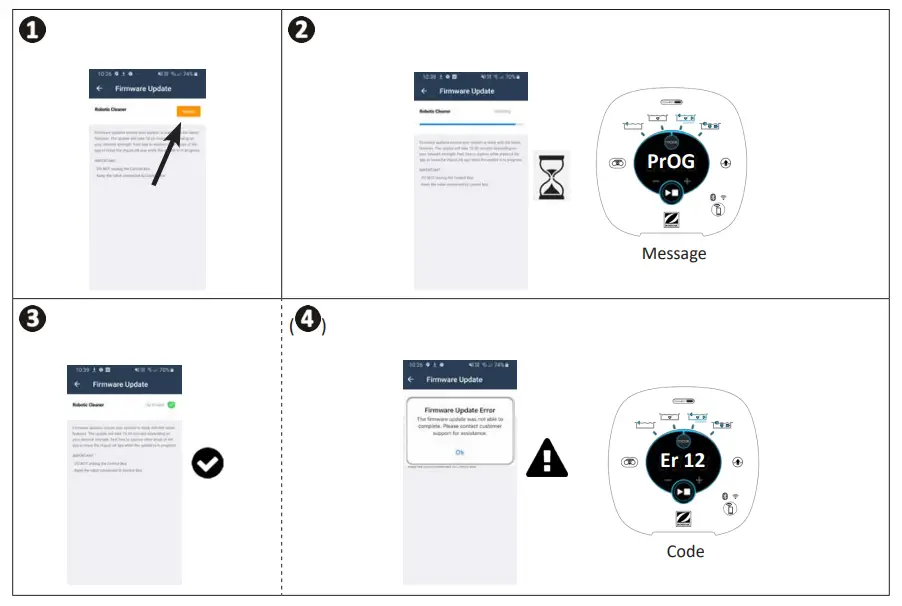
When an update is available (visible in the iAquaLink™ app, see image 1) here are some recommendations before you press the start installation button:
- Place the cleaner and the control box as close as possible to the home Wi-Fi router;
- Check the strength of the home WiFi signal.
- Leave the control box connected to the mains and the cleaner connected to the control box until the installation has finished;
- The control box must be connected to the home Wi-Fi network and the iAquaLink™ app must be open.
Start the update:
- Press the button (see image 1) to start the installation using the iAquaLink™ app;
- A message is displayed during the update (see picture 2); a cleaning cycle cannot be started until the update is finished. The update time is usually 10 to 20 minutes;
- A message is displayed when the update is finished (see image 3).
- If there is a problem with the installation an error message is displayed after 60 minutes (see image 4), see § “5.2 I User alerts”).
* iAquaLink™ app messages may be subject to change.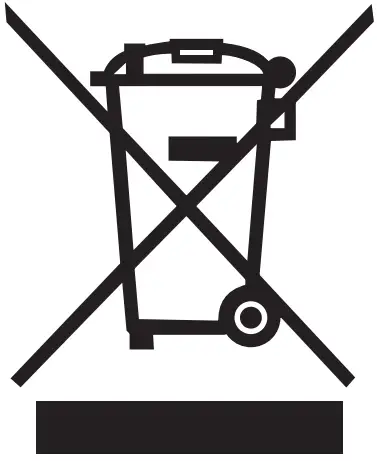 Recycling
This symbol is required by the European directive DEEE 2012/19/EU (directive on waste electrical and electronic equipment) and means that your appliance must not be thrown into a normal bin. It will be selectively collected for the purpose of reuse, recycling or creating value. If it contains any substances that may be harmful to the environment, these will be eliminated or neutralised. Contact your retailer for recycling information.
Votre revendeur
Your retailer
Appliance model
Serial number
For more information, product registration and customer support:
www.zodiac.com ©2022 Zodiac Pool Systems LLC. All rights reserved. ZODIAC® is a registered trademark of Zodiac
International, S.A.S.U., used under license. All other trademarks are the property of their respec-
tive owners. ZPCE – ZA La Balme – 31450 Belberaud – S.A.S.U. au capital de 1 267 140 € / SIRET 395 068 679 00046 / RCS TOULOUS
 More documents on:
www.zodiac.com H0743700.A – 2021/12- EC1102B