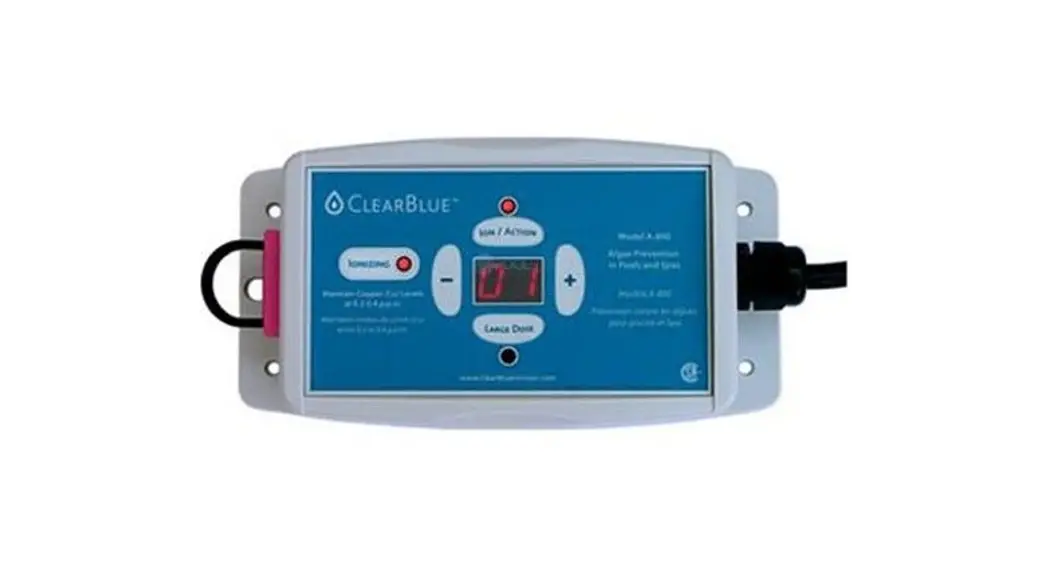
 60953 Above-Ground Pool
User Manual
60953 Above Ground Pool
Active Ingredients
Copper (as elemental): 85.04%
Silver: 5.00%
Other Ingredients: 9.96%
Total Ingredients: 100%
KEEP OUT OF REACH OF CHILDREN
CAUTION
NOTICE TO USER: This control product will be used only as directed on this label. Read the entire label along with the installation and operation manual before use.
ENVIRONMENTAL HAZARDS
This product is toxic to aquatic organisms.
STORAGE AND DISPOSAL
Store in a closed, original container in a cool dry place. Do not store in direct sunlight. Dispose of packaging in household garbage or recycling stream.
DIRECTIONS FOR USE
It violates federal law to use this product in a manner inconsistent with its labeling. This product will assist in controlling bacteria and algae in pools and spas by augmenting the bactericidal and algicidal activity of primary disinfectants such as chlorine or bromine. See the owner’s manual inside the box for complete installation procedures, maintenance instructions, and detailed directions for use. Ensure hardness, pH, alkalinity, and TDS are within acceptable levels. Excessive amounts of algae or bacteria must be controlled prior to installation. Run the pump a minimum of 8 hours per day. A residual of 0.5ppm chlorine or bromine (equivalent to one 3” tablet every week or two) should be maintained to break down organics. Once the copper concentration has reached the required level of 0.2 – 0.4 ppm, maintain 0.5 – 3 ppm of free available chlorine in pools and 0.5 – 5 ppm of free available chlorine in spas. Shock may be required in cases of extreme weather conditions or increased bather loads resulting in high contaminants. Regulated pools must follow provincial, state, or municipal guidelines. Before draining a treated pool, spa, hot tub, or fountain, contact your local sanitary sewer and storm drain authorities and follow their discharge instructions. Do not discharge treated pool or spa water to any location that flows to a gutter, storm drain, or natural water body unless the discharge is allowed by state and local authorities.
REGISTRATION NUMBER 29954, 34129 PEST CONTROL PRODUCTS ACT
A maximum of 151,400L (40,000 Gal) of water can be treated with the ClearBlue Ionizer A-850
NOTICE TO USER: This control product is to be used only in accordance with the directions on this label. It is an offense under the Pest Control Products Act to use this product in a way that is inconsistent with the directions on the label. The user assumes the risk to persons or property that arises from any such use of this product.
 Read the label and the installation and operation manual before using
EPA MASTER LABEL
EPA REG. No. 90859-2
EPA EST. No. 90859-CAN-1
Manufactured by ClearBlue Ionizer Inc.
3045 Southcreek Rd. Unit 45
Mississauga ON L4X 2E9
Tel. (866) 704-8404
[email protected]
www.clearblueionizer.com
MADE IN NORTH AMERICA
Thank you for purchasing a ClearBlue Ionizer. This device will assist in controlling bacteria and algae in pools and spas by augmenting the bactericidal and algicidal activity of primary disinfectants such as chlorine or bromine. Once the copper concentration has reached the required level of 0.2 – 0.4ppm, maintain 0.5 – 3ppm of free available chlorine in pools and 0.5 – 5ppm of free available chlorine in spas.
Regulated pools must follow provincial, state, or municipal guidelines.
READ AND FOLLOW ALL INSTRUCTIONS
- WARNING: To reduce the risk of injury, do not permit children to use this product unless they are closely supervised at all times.
- This unit is only water resistant when the mineral cell cable is plugged into the cell receptacle.
Failure to do this may result in internal water damage. - Use this equipment only for its intended use as described in this manual.
- This system should be serviced only by the manufacturer. Contact the manufacturer for examination, repair, or adjustment.
- Do not immerse the cord or plug in water.
- Keep the cord away from heated surfaces.
- Heavy bather loads may trigger the need for additional chlorine/bromine.
- Check the expiry date of the test kit as test results may be inaccurate if used after that date.
- Use a registered or scheduled pool or spa sanitizer to maintain an appropriate chlorine/bromine residual in the water.
- The average life expectancy of the mineral cell is six months (2160 “on” hours)
- When replacing the mineral cell, use replacement cells having a label that clearly states that it is a replacement mineral cell for a mineral ion-releasing device manufactured by ClearBlue Ionizer Inc.
Electrical Requirements
The retailer and manufacturer cannot accept any liability for damage to the equipment or personal injury resulting from failure to observe the correct electrical connection procedures.
WARNING: Risk of Electric Shock. Connect only to a grounding-type receptacle protected by a ground-fault circuit-interrupter
WARNING: A ground-fault circuit interrupter (GFCI) should be provided by the installer and should be tested on a routine basis. To test the GFCI, push the test button. The GFCI should interrupt power. Push the reset button. Power should be restored. If the GFCI fails to operate in this manner, the GFCI is defective. If the GFCI interrupts power to the unit without the test button being pushed, a ground current is flowing, indicating the possibility of an electric shock. Do not use this unit.
Disconnect the unit and have the problem corrected by a qualified service representative before using.
WARNING: To reduce the risk of electric shock, replace systems with a damaged cord immediately.
SAVE THESE INSTRUCTIONS
Installation Instructions for Pools
The ClearBlue Ionizer system installation requires three components that are included in the kit. You will also need a hacksaw or reciprocating saw, PVC primer, and PVC glue that are not included.
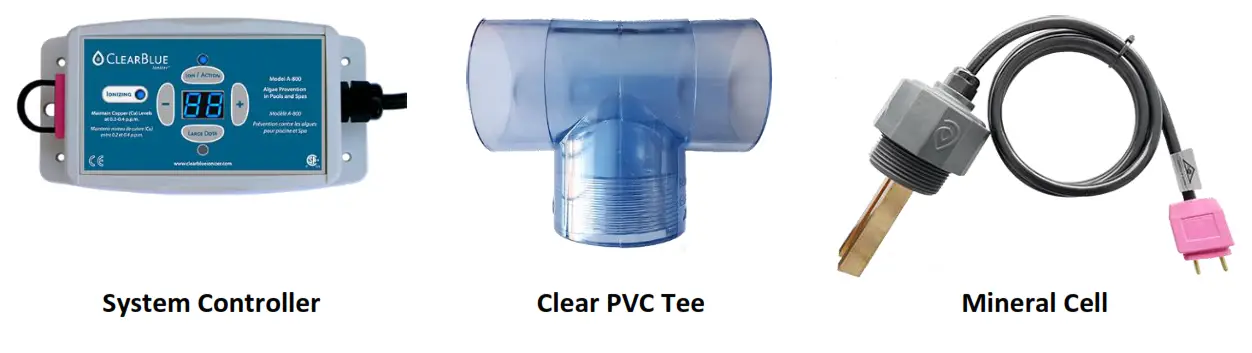
Install the Tee
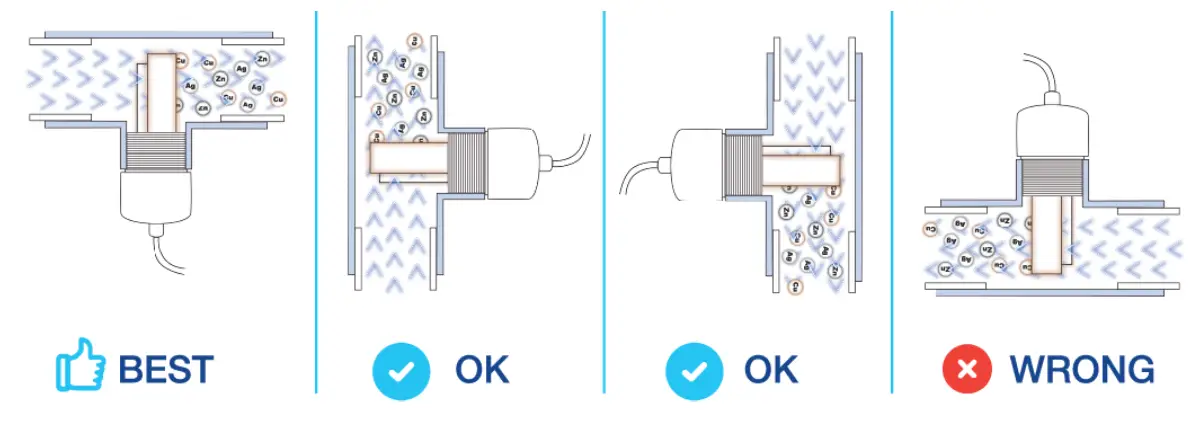
The tee is installed by gluing it into your pool PVC plumbing. The ideal spot for it is on the return line,
after the pump, filter, and heater (if applicable). If you have a salt or inline chlorinator installed, the tee should go before the chlorinator. If you do not have space on the return line for the tee, it can go anywhere in the plumbing that it fits.The tee should be oriented such that it looks like a capital T if possible. If it is not possible to install in this manner, it can be installed in any orientation other than an ‘upside down’ capital T.
Cut plumbing and glue in the tee
- Turn off the pool pump and let the water drain out of the pipe
- Cut a 2.5” (63mm) section out of the PVC plumbing using a hacksaw or reciprocating saw
- Remove any dust and burrs from the pipe
- Apply PVC primer and glue both to the outside of the pipe and the inside of the tee
- Slide the tee over the pipe on one side as far as it will go and then another side
- For each glue joint, hold the tee in place for 30 seconds
- Let the glue dry for 2 hours before turning on the pump
Install the Mineral Cell
Once the PVC glue has dried, you can install the Mineral Cell by threading it into the tee. Teflon tape is not needed. Tighten the cell until it is hand-tight. Orient the bars such that the water will flow between the two bars (or as close as possible with no leaking). Once the controller is mounted, you will plug the cell into the controller.
Unplug or turn off the power to the controller before plugging in or unplugging the cell. Otherwise, you could damage the control board.
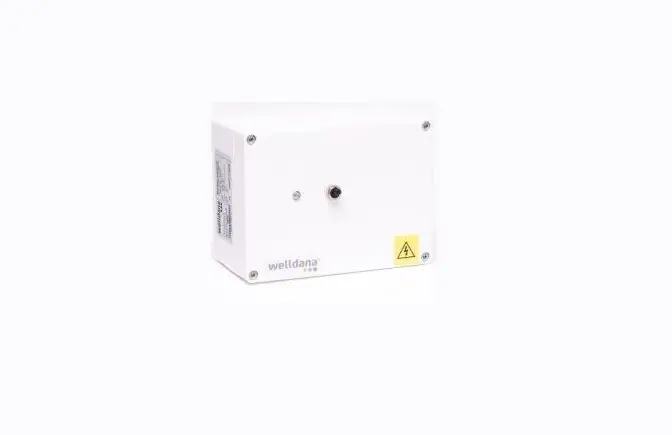
Install the System Controller
The system controller can be mounted on a wall, wood post, the side of the above-ground pool, or anywhere else that it can be fastened with screws or Velcro tape. Make sure that the power cable for the controller reaches the power source and the cable from the cell reaches the controller. The controller is rated for outdoor use, but it should be protected from rain and out of direct sunlight for the longest life. Placing the controller in a hut or weatherproof enclosure is recommended.
If you are hard wiring the controller into a 240V panel, you can have an electrician clip off the plug and wire it per local electrical code. Once you have mounted the controller, you can plug the mineral cell into the receptacle on the side of the controller.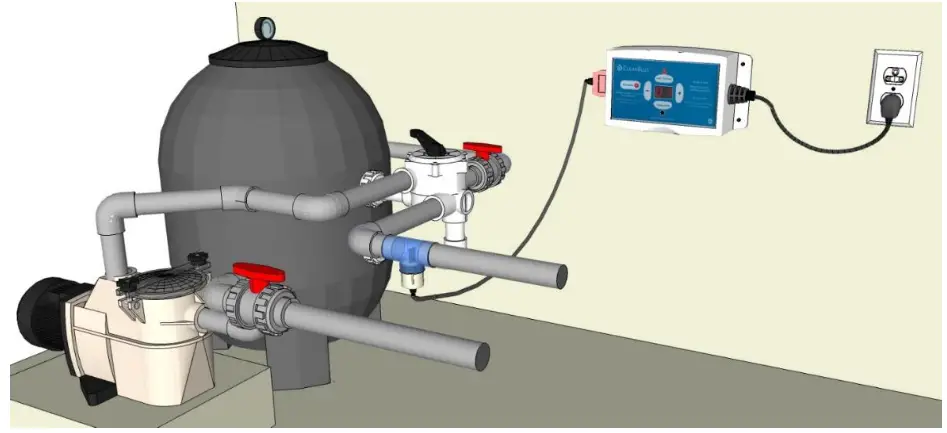
Check out this installation video for pools: https://youtu.be/SGAK0yD6630The same controller can be plugged into a 120V wall outlet or wired to a 240V panel.Make sure that the power cable for the controller reaches the power source and the cable from the cell reaches the controller.
When the cell cable is plugged into the controller and the housing is completely threaded into the tee with the two electrode bars underwater, the ‘Ionizing’ light will illuminate or flash blue. If the ‘Ionizing’ light is flashing red, make sure that the cell is plugged in all the way and the two electrode bars are completely under water.If your controller has a standard wall plug, it must be plugged into a GFCI-protected outlet.
System Controller Configuration
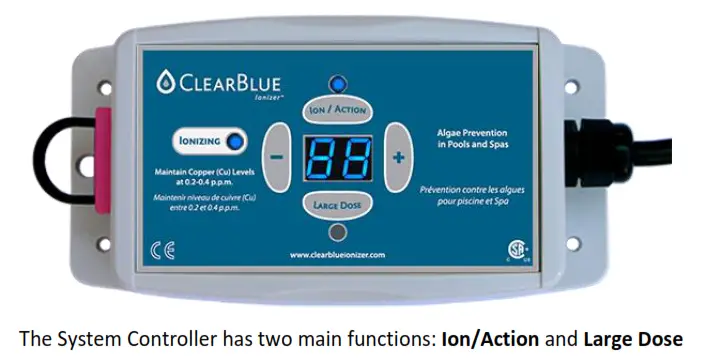
Ion/Action
The Ion/Action setting is the maintenance setting. It represents a percentage of the maximum output level and is set according to your pool or hot tub size. For example, an Ion/Action setting of 88 means the controller is outputting minerals at 88% of maximum output. Use the + and – keys to increase or decrease the number and reach the desired setting. When the controller is set to Ion/Action, the blue light above the Ion/Action button will illuminate and the ‘Ionizing’ light will be solid blue.
Large Dose
The Large Dose setting is the ramp-up set. It represents the number of hours that the controller is set to maximum output. For example, a Large Dose setting of 88 means the controller will run on ‘full blast for 88 hours. As the hours count down, the number will decrease by one each hour until it gets to 01. After the final hour, the controller will switch automatically to the Ion/Action mode.
Use the + and – keys to increase or decrease the number and reach the desired setting. When the controller is set to Large Dose, the blue light below the Large Dose button will illuminate and the ‘Ionizing’ light will be flashing blue.
The Large Dose setting should be used when:
- First filling the pool
- Refilling in the Spring or throughout the season
- The copper level has not reached 0.2ppm or dipped below 0.2ppm
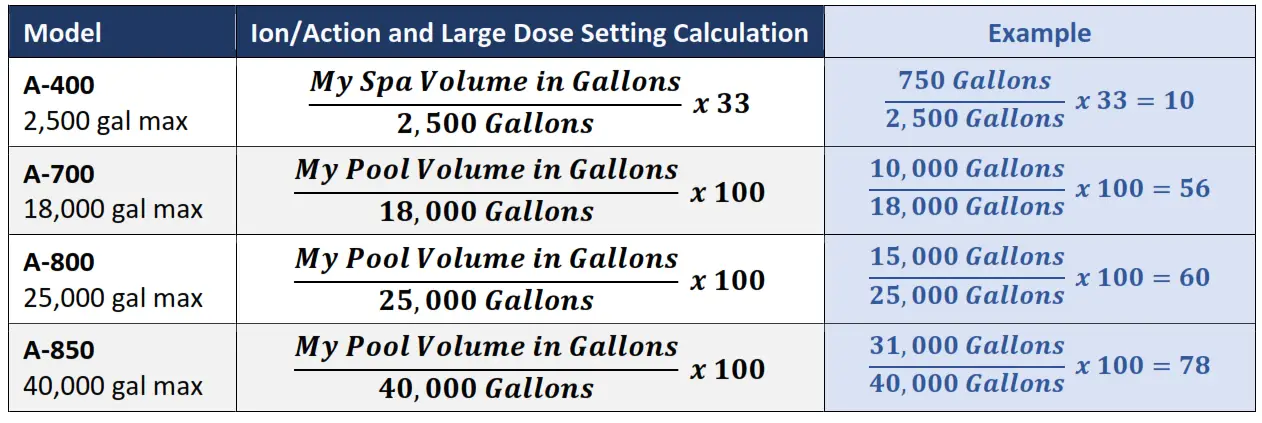
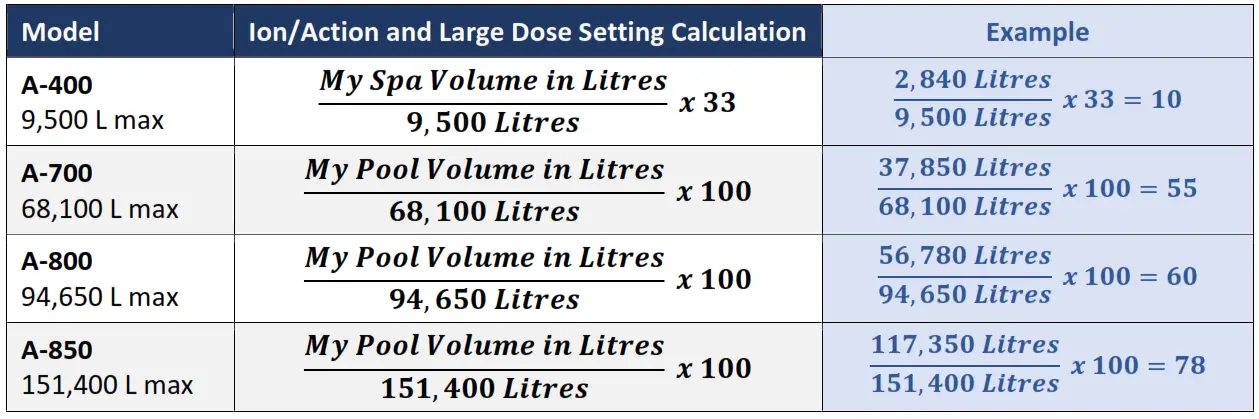
Use the calculations below to calculate the setting for Ion/Action and Large Dose based on your ClearBlue model and pool or spa volume. The Ion/Action and Large Dose can be set to the same value.Use the Large Dose Function as many times as needed until the copper level reaches 0.2ppm.Set the Ion/Action setting first, then set the Large Dose. The Large Dose timer will count down and then switch automatically back to the Ion/Action setting.It is important to balance the water according to the table on page 11 before ramping up the minerals.The setting calculations are guidelines only. You must use a copper test and increase or decrease the Ion/Action setting as required to ensure the copper level is maintained at 0.2ppm to 0.4ppm.DO NOT REDUCE CHLORINE/BROMINE CONCENTRATION UNTIL COPPER LEVEL REACHES 0.2PPM
Calculating Pool Volume
The ClearBlue controller settings are based on the volume of water in your pool or hot tub. Please use the calculations below to determine your water volume.
| Pool Type | Calculation (Using Feet & Gallons) | Example |
| Rectangle | Length x Width x Avg. Depth x 7.5 = Volume (gal) | 16 ft x 32 ft x 4 ft deep, 8 ft deep end 16 x 32 x 6 x 7.5 = 23,040 gal |
| Circle | Diameter x Diameter x Avg Depth x 5.9 = Volume (gal) | 24ft round pool x 4ft deep 24 x 24 x 4 x 5.9 = 13,594 gal |
| Oval | Long Dia. x Short Dia. x Avg Depth x 5.5 = Volume (gal) | 18ft x 33ft oval pool x 4ft deep 33 x 18 x 4 x 5.5 = 13,068 gal |
| Irregular Shape | length x (Width 1 + Width 2) x 0.45 x Avg Depth x 7.5 = Volume (gal) | 16 ft long 5 ft deep kidney pool 16 x (8 + 10) x 0.45 x 5 x 7.5 = 4860 gal |
| Average Depth | + | 4ft deep pool with 8ft deep end |
| Meters to Feet | . = | 10-meter-long pool in feet 10 x 3.281 = 32.81 ft |
For the water volume of a hot tub, please consult your hot tub dealer or manual
Ion/Action and Large Dose Setting from Gallons
The model number is on the back of the controller.
Ion/Action and Large Dose Setting from Litres
The model number is on the back of the controller.
Program Lock (PL)
The Program Lock feature allows you to lock the controls so that they are not inadvertently changed.
To activate the Program Lock, press and hold the + and – keys simultaneously for 20 seconds or until ‘PL’ is shown on the two-digit number screen. Do the same to remove the Program Lock.
Low TDS Mode (Two Decimals on Number Screen)
If the total dissolved solids (TDS) level of the water is low, the controller will go into Low TDS Mode which is indicated by the two decimals on the screen coming on. There is no impact on the performance of the system if it switches into Low TDS Mode and these two decimals can be ignored. However, it is recommended to test the TDS and increase it if needed according to the levels given on page 9.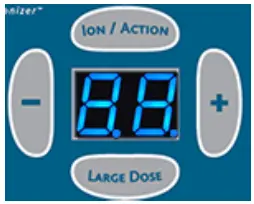
Low TDS Mode may be activated when the mineral cell is low. If the decimals appear but the TDS is in range, check the cell. If the bars are worn down to 0.5” (10mm) or below it is time to change it.
Topside Control Option (Hot Tubs Only)
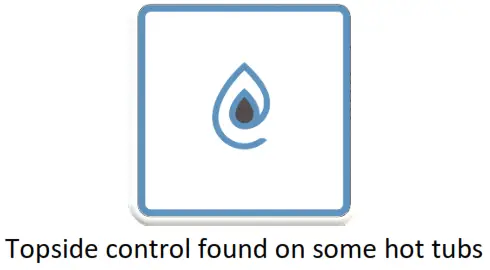
Topside Ionizing Indicator
When the mode of the controller is set to “Ion/Action” and the “Ionizing” light is illuminated on the controller, the area in the center of the topside control will illuminate in blue.
Topside Large Dose Function
Press the center of the logo to engage the “Large Dose” mode for the number of hours programmed on the controller. When “Large Dose” is active, the area in the center of the topside control will flash in blue. Once the cycle expires, the controller will go back to “Ion/Action”, the center area will illuminate in blue and the flashing will stop. To stop the Large Dose mode before the cycle finishes, hold down the button in the center of the logo for 10 seconds.
Turn Off Ionizing
If the mineral level is too high, or you would like to shut off the ionizing for any other reason, hold down the button in the center of the logo for 10 seconds or until the blue light goes off.
Turn On Ionizing
If the ionizing function has been turned off, press the button in the center of the logo to turn it back on.
The center of the logo will illuminate in blue to indicate that the system is ionizing.
Topside Cell Connection Indicator
When the mineral cell is unplugged, the electrode bars are not underwater, the TDS of the water is too low, or the cell is worn past its useful life, the light in the center of the topside control will flash red.
Replacing the Mineral Cell
The mineral cell will last 3 – 12 months in a pool and 2 – 3 years in a hot tub depending on the volume of water, the temperature of the water, the amount and intensity of sun reaching the water, and usage. In a pool, the first cell will always wear down faster because it is used up quickly to ramp up the minerals. Unplug or turn off the power to the controller before plugging in or unplugging the cell. Otherwise, you could damage the control board.
It is important to check the cell regularly and make sure there is still some material left on the bars. If the bars are worn down to 0.5” (10mm) in length or below, it is time to change the cell. When the cell is completely used up, the ‘Ionizing’ light will flash red.
For a pool, it is recommended to change the cell before the start of the pool season or at least every 6 months. For a hot tub, it is recommended to check the cell every 6 months and remove any scale that has formed on the electrode bars.
To maximize the life of the mineral cell:
- Keep the copper level at 0.2ppm
- Cover the pool when it is not in use
- Keep the chlorine/bromine level between 0.5ppm to 1ppm
- Use chlorine or non-chlorine shock once per week
- Keep phosphates low
If the mineral cell life is less than 3 months or you are having trouble reaching 0.2ppm copper, even with multiple Large Dose settings, make sure that the phosphate level of the water is below 200ppb. Phosphates act like fertilizer for algae, so the minerals are used up quicker fighting off rampant algae growth. Your pool water can be tested for phosphates at your local pool store. There are several products available that will reduce the phosphate level in your pool.
It is important to change the cell before it is completely used up. This is to ensure that the mineral levels do not drop off which can lead to green water. Green water is unsafe and requires expensive treatments to clear. Change the cell when the bars are worn to 0.5” (10mm) in length or below.
Pool and Water Maintenance
For the best results from your mineral pool, it is important to start with clean water, keep water parameters in range, maintain a low chlorine/bromine residual, and oxidize excess organic material on a regular basis.
Opening your Pool
When you open your ClearBlue mineral pool, you can follow the instructions of your pool builder or pool store. They may recommend an opening kit with products designed to condition the water and get you swimming as quickly as possible.
Opening kits sometimes use a ‘stain and scale remover’ or another type of sequestering agent. We do not recommend using this type of product because it will remove the ClearBlue minerals and neutralize new mineral production for up to 6 weeks.
If your mineral cell is more than six months old, it should be replaced when you open your pool.
Filling your Pool
We recommend using a pre-filter that attaches to your garden hose when filling your pool. The pre-filter removes unwanted metals and sediment from the water, so the water is as pure as possible for your use. If you live in a rural area and are filling from a well, this is even more important.
Metal removers, sequestering agents, and some stain removers conflict with ClearBlue. If one of these products is used, it will remove the ClearBlue minerals and neutralize minerals for up to 6 weeks. Unplug or power off the ClearBlue controller for at least 4 weeks after using these products to prevent unnecessary wear to the cell.
Water Parameters
For the best results, maintain the water parameters in the following ranges.
Apart from the copper and low level of chlorine, the water parameters below are standard for any pool or hot tub. It is important to balance the water according to the table below before ramping up the minerals.
| Parameter | Range | Notes |
| Copper | 0.2 – 0.4ppm | Once 0.2ppm is reached, test for copper every two weeks |
| pH | 7.2 – 7.6 | pH out of range will cause the water to feel harsh |
| Alkalinity | 80 – 120ppm | |
| Calcium | 200 – 400ppm | Calcium below 200ppm will cause etching to pool surfaces and equipment; Calcium above 400ppm can lead to scaling |
| TDS | 500 – 2,000ppm | |
| Phosphates | <100ppb | It is critical to keep phosphates low to ensure maximize the life of the mineral cells and minimize chlorine/bromine usage |
| Chlorine | 0.5 – 1ppm | Chlorine should be 1— 3ppm until copper reaches 0.2ppm |
| Cyanuric Acid (Stabilizer) | 30 – 50ppm | If your stabilizer is above 50ppm, use unstabilized chlorine |
Regular Water Maintenance
For your pool water to look, feel and smell the best, it is important to maintain a low level of chlorine or bromine and oxidize regularly.
We recommend using one 3” chlorine or bromine per week and oxidizing with a chlorine or nonchlorine shock once per week.
Adding an inline chlorine reservoir to your filtration system is a low-cost way to minimize chlorine maintenance. Simply fill the reservoir with chlorine or bromine tablets and set the setting to 25% of the maximum. Check weekly to make sure there are still tablets inside.Using a non-chlorine shock once per week is a fast and easy way to keep lotions, sunscreens, and organic material from building up in the water.
Closing the Pool
When closing your pool, you can follow the closing instructions from your pool store or pool service. If they recommend a closing kit, take note if there is a stain and scale or other sequestering product used as part of the closing. This product is optional and if skipped, the minerals will keep fighting algae and microorganisms in the water throughout the winter. You will find that the water is cleaner and clearer in the Spring when you open the pool.
We recommend bringing the system controller indoors for the winter. If there is still life left on the cell, you can leave it in the tee, but you must wrap up the plug end so that the winter weather does not corrode it.
Cleaning and Care
System Controller
Clean the controller with a soft cloth dampened with water as needed. Do not use any type of cleaner on the front control panel or plastic housing.
Mineral Cell
If your water is high in calcium, the electrode bars on the mineral cell may become coated with a white or blue scale. Check the cell every 6 months and remove the scale with a standard metal file. The surface of the bars does not have to be polished.
If the bars are too scaled up for the system to release minerals, the ‘Ionizing’ light on the controller will flash red.On a hot tub or swim spa: If the Total Dissolved Solids are too low, the ‘Ionizing’ light on the controller and in the center of the topside (if applicable) will flash red. You can fix this by adding salt to the water. Make sure that the pump is running. Add ½ cup of salt every 10 minutes until the light comes on blue.
Troubleshooting
| Problem | Possible Cause | Solution |
| The ‘Ionizing light is flashing red | The cell is not plugged in all the way | Make sure the cell cable is completely plugged into the controller |
| The electrodes are not underwater | Make sure the electrode bars are completely under water. M air pocket can form when the pump is not running, and the tee is installed upside down. | |
| The cell is worn down past its useful life | Change the mineral cell | |
| There is the scale on the electrodes | File the scale of the electrodes with a metal file | |
| On a hot tub or swim spa: The Total Dissolved Solids (TDS) are too low | Make sure the pump is running and water is circulating. Add Y, a cup of salt every 10 minutes until the ionizing light turns blue | |
| I cannot get my copper level to reach 0.2ppm | You have not used the Large Dose function | Set the controller to Large Dose and set the number to 99. After 99 hours (about 4 |
| days), test again. If your copper level is below 0.2ppm, do another 99-hour Large Dose. Repeat until 0.2ppm copper is reached | ||
| The Ion/Action setting is too low | If you find that the copper level reaches 0.2ppm but then drops off, set your Ion/Action setting higher to compensate | |
| There is not enough chlorine in the water | The chlorine or bromine should be maintained at 1-3ppm until the copper level reaches 0.2ppm. Once the copper level reaches 0.2ppm, you can reduce the chlorine/bromine concentration to 0.6- 1PPm | |
| The mineral cell needs to be changed | Check the electrode bars on the mineral cell. If they are 0.5″ (10mm) or shorter, it is time to change the cell | |
| Has your water tested for phosphates at a pool store? If the phosphate level is above 200ppb, use products recommended at the store to bring it down. If you live in a rural area, you may need to reduce the phosphate level on a regular basis | ||
| The phosphate level in the water is too high | ||
| The test kit is expired | Check the expiry date on the test kit and purchase a new one if it is expired | |
| The test kit instructions are not being followed | Be sure to read the test kit instructions and follow them exactly | |
| There is no power to the controller | The power outlet is dead | Check the power to the outlet by plugging in another appliance |
| The controller is dead | Test the controller in another outlet that you know works. If there is still no power, see the Warranty section below | |
| The controller display shows ‘PC and I can’t change the settings | The controller is set to Program Lock | Press and hold the + and – buttons simultaneously for 20 seconds or until the PL changes back to a number |
| There are two decimal places showing on the display between the numbers | The Total Dissolved Solids (TDS) of the water are low | Increase the TDS to the range recommended above |
| The cell is almost worn out | Change the mineral cell |
Specifications
| Spec | Value |
| Input Voltage | 100 — 240 Volts AC |
| Input Frequency | 50 to 60 Hertz |
| Output Voltage | 38 VDC Max |
| Output Current | 0.20 AMP Max |
| Controller Outside Dimensions | 5″ x 3″ x 2.5″ / 127mm x 76.2mm x 63.5mm |
| Shipping Weight for Complete Kit | 3.6 lbs / 1.6 kg |
| Shipping Size for Complete Kit | 7″ x 7″ x 7″ / 178mm x 178mm x 178mm |
| Mineral Cell Life | Average 6 months (2,160 “on” hours) |
Warranty
The ClearBlue Ionizer controller is covered by a 5-year limited warranty. The mineral cells are designed to wear down and they do not have a warranty, however, they will be replaced free of charge if there is an obvious defect.
The make a warranty claim, send an email to [email protected] with the following information:
- Photo of the serial number on the side panel or back of the controller
- Model information on the back of the controller
- Mailing address
- Phone number
If a terminal problem is diagnosed, a replacement controller will be shipped within 14 days.
Contact
ClearBlue Ionizer Inc.
45 – 3045 Southcreek Rd.
Mississauga ON Canada L4X 2E9
1-866-704-8404
www.clearblueionizer.com
[email protected]
 Pool ionizer system reduces maintenance and chemicals - ClearBlue Ionizer Inc.