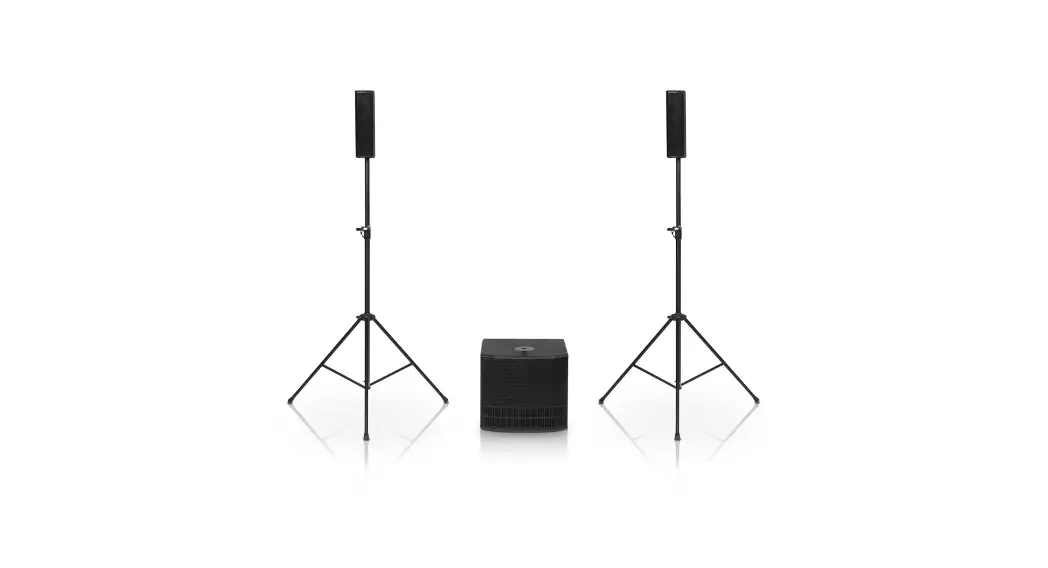

ES503 USER INTERFACE (for firmware rev. 2.0 or higher)
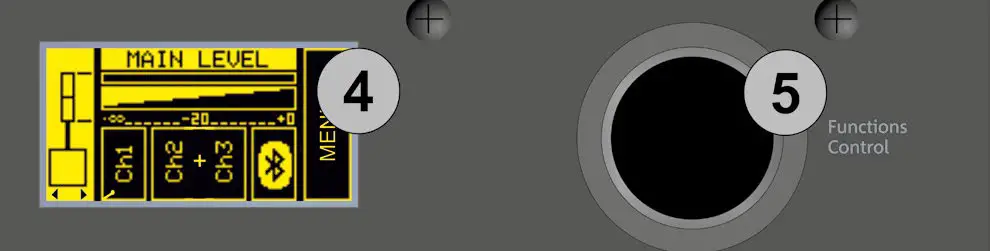
You can view and configure the various ES503 system parameters using the OLED screen [4] and the rotary button [5] in the Functions Control section. Pressing [5] selects and confirms a page or parameter. Pressing it for a few seconds jumps to other pages (shortcut). Turning it lets you browse the various pages or, if you are in the parameters on a page, increase or decrease the selected value.
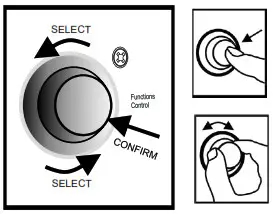
HOME PAGE AND QUICK CONTROLS
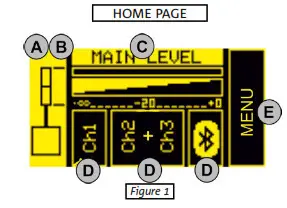
You can perform the following basic operations from the HOME page (figure 1):
A. set the configuration type
B. select the digital steering (coverage angle)
C. set the MAIN LEVEL system volume
D. access the input configuration pages
E. access the extended MENU (see the EXTENDED SETTINGS MENU chapter)
From this page, you can use a shortcut to access the system mixers (see the INPUT, OUTPUT, AND AUX MIXERS paragraph).
 In the DOUBLE COLUMN STEREO configuration, each individual ES503 is identified as the right or left Master or Slave. There must be one Master and one Slave. Master means the ES503 system to which the inputs are connected and on which you set up all the adjustments, which will consequently control the Slave system. Therefore, adjustments will be disabled on the Slave system.
Let us see the steps listed above in detail:
A. use [5] to select the left box (figure 1) and highlight it. Confirm and turn to select the appropriate configuration. You can set the ES503 system as:
- MONO
- STEREO
- DOUBLE COLUMN STEREO MASTER LEFT (ML)
- DOUBLE COLUMN STEREO SLAVE LEFT (SL)
- DOUBLE COLUMN STEREO MASTER RIGHT (MR)
- DOUBLE COLUMN STEREO SLAVE RIGHT (SR)
B. You can change the digital steering of the tops by selecting and pressing [5] after you have confirmed a MONO or DOUBLE COLUMN STEREO configuration, choosing from:
- UP (upwards)
- FAR (no angle)
- DOWN (downwards)
Press [5] again to confirm your chosen option (e.g. figure 2)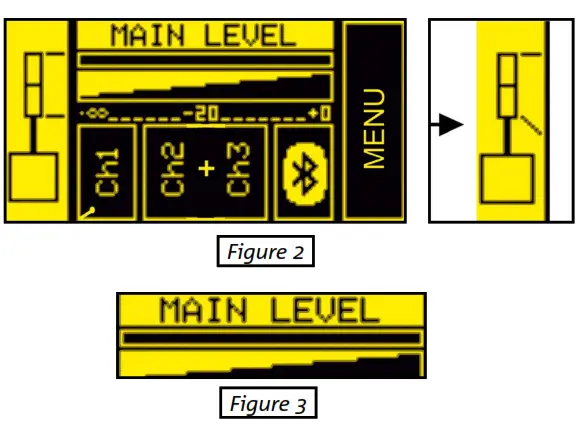 While choosing the configuration, left and right arrows appear under the system diagram.

While choosing the steering, up and down arrows appear under the system diagram.
C. Select and confirm MAIN LEVEL (figure 3) to increase or decrease the overall ES503 system volume.
D. Select and confirm the desired input to access the corresponding sub-page. The available inputs are:
- CH1
- CH2
- CH3
- BLUETOOTH®
The CH2 and CH3 inputs are initially set as a single stereo channel (L+R). Once you have accessed the subpage, you can use them as two separate mono channels by selecting the input type.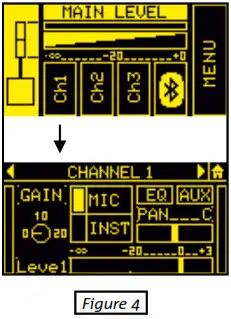 The table below shows the adjustable parameters for inputs CH1, CH2, and CH3:
| NAME | PARAMETER | RANGE |
| GAIN | INPUT GAIN | [o, 10, 20] dB |
| LEVEL | OUTPUT LEVEL (SENT TO DIE INTERNAL MIXER) |  ÷ 3 dB ÷ 3 dB |
| TYPE | INPUT TYPE | CHI: MICANST – CH2, CH3:MIC/UNE |
| EQ | FILTERS THAT CAN BE APPLIED TO MICROPHONE, INSTRUMENT OR LINE INPUTS | SEE THE TABLE ON PAG. 48 |
| AUX | AUXILARY SEND MIXER (NOT AVAILABLE IN THE DOUBLE COLUMN CONFIGURATION) | ÷ 3 dB SEE: INPUT, OUTPUT, AND AUX MIXERS PARAGRAPH |
| PAN | PANNING EFFECT (NOT AVAILABLE IN THE MONO CONFIGURATION) | L÷ R |
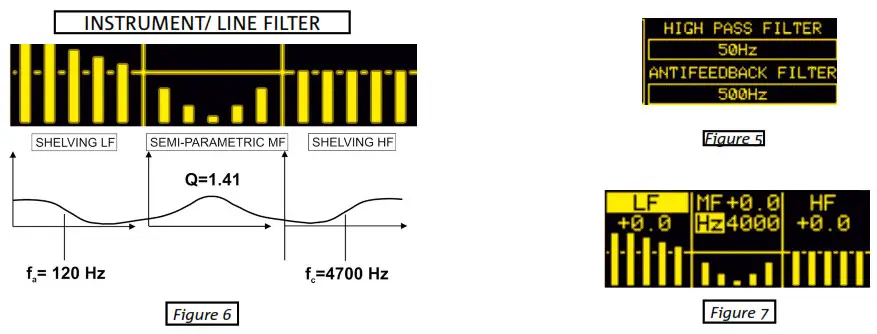
| MIC | HIGH PASS (HP)/ ANTI FEEDBACK | HIGH PASS (HP): 50 ÷ 200 Hz ANTI FEEDBACK: 500÷12000 Hz |
| INSTRUMENT/LINE | LF: SHELVING / MF: SEMIPARAMETRIC / HF: SHELVING | LF/HF: -6 ÷ 4 dB MF: -6 ÷ 4 dB 150 ÷ 4000 Hz (CENTER-FREQUENCY) |
Specifically, you can select the following filters from the EQ submenu (figures 5, 6, 7):
The stereo BLUETOOTH® channel subpage (figure 8) lets you set:
| NAME | PARAMETER | RANGE |
| ON/OFF | RECEIVER ON/OFF | ON/OFF |
| LEVEL | OUTPUT LEVEL (SENT TO THE INTERNAL MIXER) | ÷ 3 dB |
| OPTION | GAIN (INPUT GAIN) | 0 ÷ 15 dB |
| NAME (Bluetooth SYSTEM NAME) | 16 ALPHANUMERIC CHARACTERS | |
| PASSWORD (Bluetooth SYSTEM PASSWORD) | 4 NUMERIC DIGITS | |
| AUX | AUXILIARY SEND MIXER (NOT AVAILABLE IN DOUBLE COLUMN CONFIGURATION) | ÷ 3 dB SEE THE INPUT AND AUX MIXERS PARAGRAPH |
E. Select and confirm the MENU box to access the extended MENU (see the EXTENDED SETTINGS MENU chapter)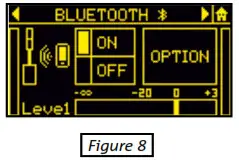
RETURNING TO THE HOME PAGE WHILE BROWSING
To return to the HOME page from a subpage, select and confirm the symbol shown in figure 10. Alternatively, hold button [5] is pressed for a few seconds (shortcut).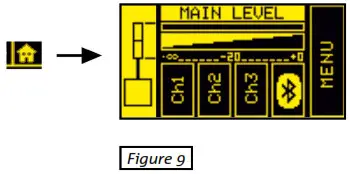 INPUT, OUTPUT, AND AUX MIXERS
From the HOME page, hold button [5] pressed for a few seconds to access the input, output and AUX (auxiliary buses) mixer. The main pages are shown in figure 10.In the DOUBLE COLUMN STEREO configuration, you cannot make any adjustments from the SLAVE system. You must set all the parameters on the MASTER system.
The mixer pages are:
- INPUTS mixer
- OUTPUTS mixer
- AUX mixer
To enter one of these 3 pages, select the corresponding word INPUTS, OUTPUTS or AUX, confirm and turn the button [5]. The INPUTS page displays the CH1, CH2, CH3, and Bluetooth® levels. The OUTPUTS page only displays the levels of the separate subwoofer sections and the system MAIN (total) section.
The AUX section has the levels of the channels that function as auxiliary buses in the mixer. The latter section is especially useful when you want personalized monitoring assigned to the AUX output [6].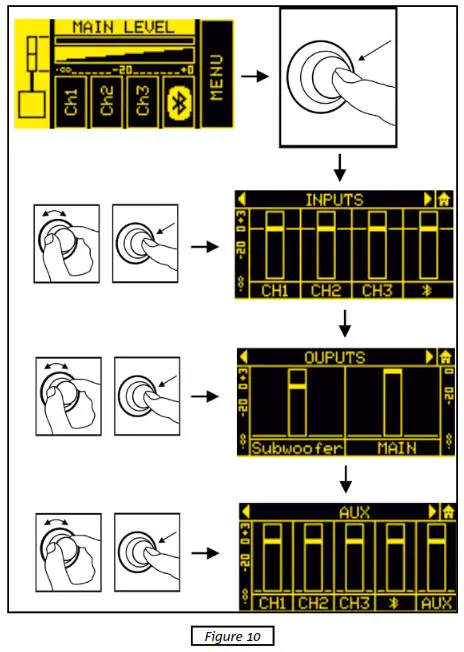
For example in a configuration in which output [6] of the ES503 system is connected to a monitor. You can, for example, use the INPUTS mixer to mix four sources connected to the system inputs, and make only two of them play through the connected monitor by adjusting the AUX levels independently.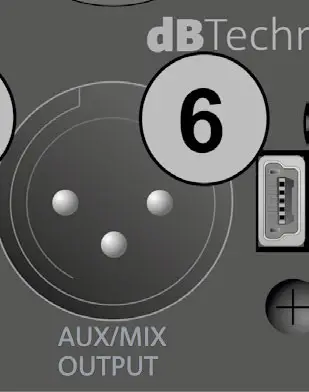
EXTENDED SETTINGS MENU
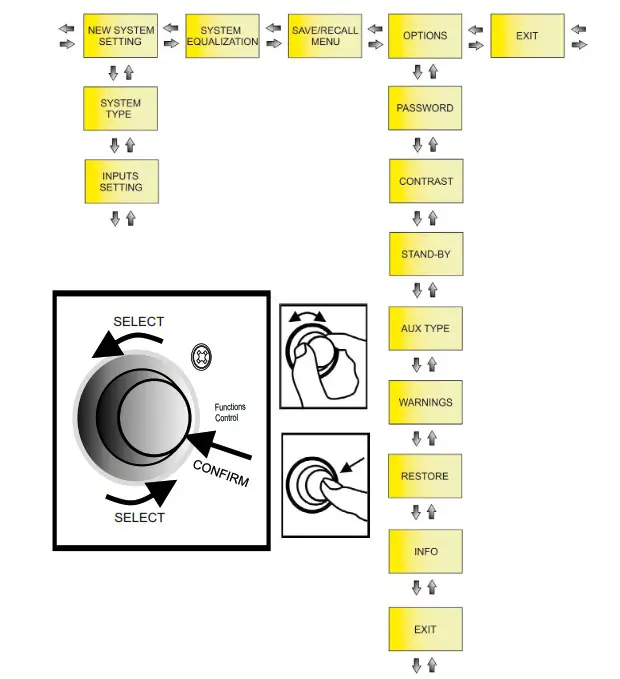
You can configure the ES503 system in detail by accessing this MENU from the HOME page. The main pages are:
- NEW SYSTEM SETTING
- SYSTEM EQUALIZATION
- SAVE/RECALL MENU
- OPTIONS
As shown in the figure above, once you have accessed NEW SYSTEM SETTING and OPTIONS, you can access other settings subpages (which differ according to the chosen main configuration). Use the Functions Control rotary button to confirm and select the pages as shown.
NEW SYSTEM SETTING
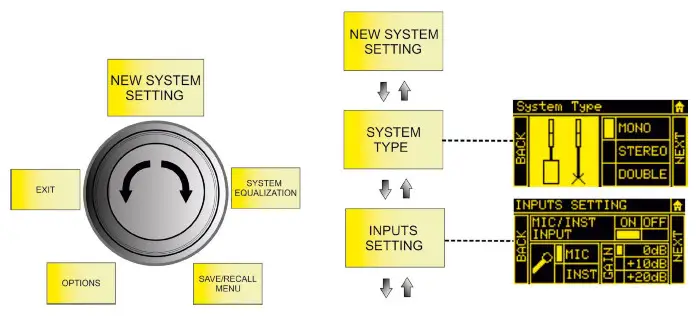
This subpage lets you quickly configure the system using the parameters listed in the table below:
| SYSTEM TYPE —1. | STEERING —0 | INPUTS SETTING | ||||
| ONION | MONO | UP | LWOFF | |||
| TYPE | MIST (CHI) | |||||
| FAR | CH2, CH2, CH3 | |||||
| MIC/LINE/L+R (CHZ CH3) | ||||||
| GAIN (0, +10, +20) dB | ||||||
| DOWN | ||||||
| BLUETOOTH | ON/OFF | |||||
| STEREO | STEREO | – | CHI, CH2, CH3 | ON/OFF | ||
| TYPE | MIST (CHI) | |||||
| MIC/UNE/L+R (C112, CH3) | ||||||
| GAIN (0, +20, +20) dB | ||||||
| BLUETOOTH | ON/OFF | |||||
| DOUBLE (MASTER) | DOUBLE | ML | UP | CHI, 012, CH3 | ON/OFF | |
| TYPE | MIST (CHI) | |||||
| MIC/UNE/L+R (C(CH2, CH3) | ||||||
| MR | FAR | |||||
| GAIN (0, +10, +20) dB | ||||||
| DOWN | ||||||
| BLUETOOTH | LWOFF | |||||
| I DOUBLE (SLAVE) | SL | UP | – | |||
| SR | FAR | |||||
| DOWN | ||||||
SYSTEM EQUALIZATION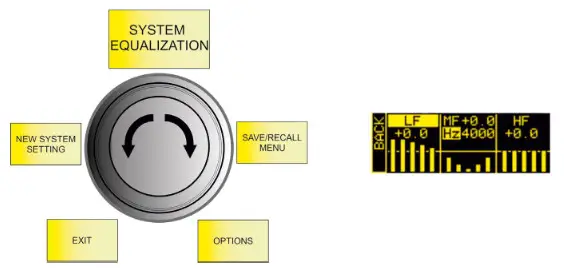
Sets the filtering that you want to apply to the system output sound:
| FILTER TYPE | RANGE |
| LF: SHELVING / MF: SEMIPARAMETRIC / HF: SHELVING | LF/HF: -6 – 4 dB MF: -6 – 4 dB 150 – 4000 Hz (band center) |
SAVE/RECALL MENU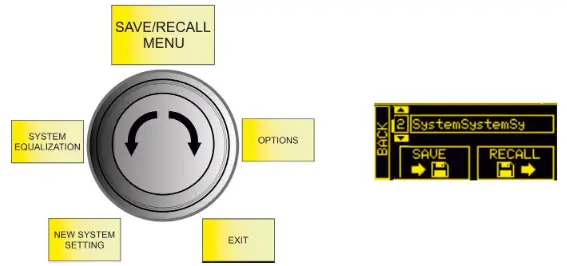
- Highlight the SAVE image to save your settings
- Give a name to the configuration
- Highlight the RECALL image to recall a named configuration saved previously
OPTIONS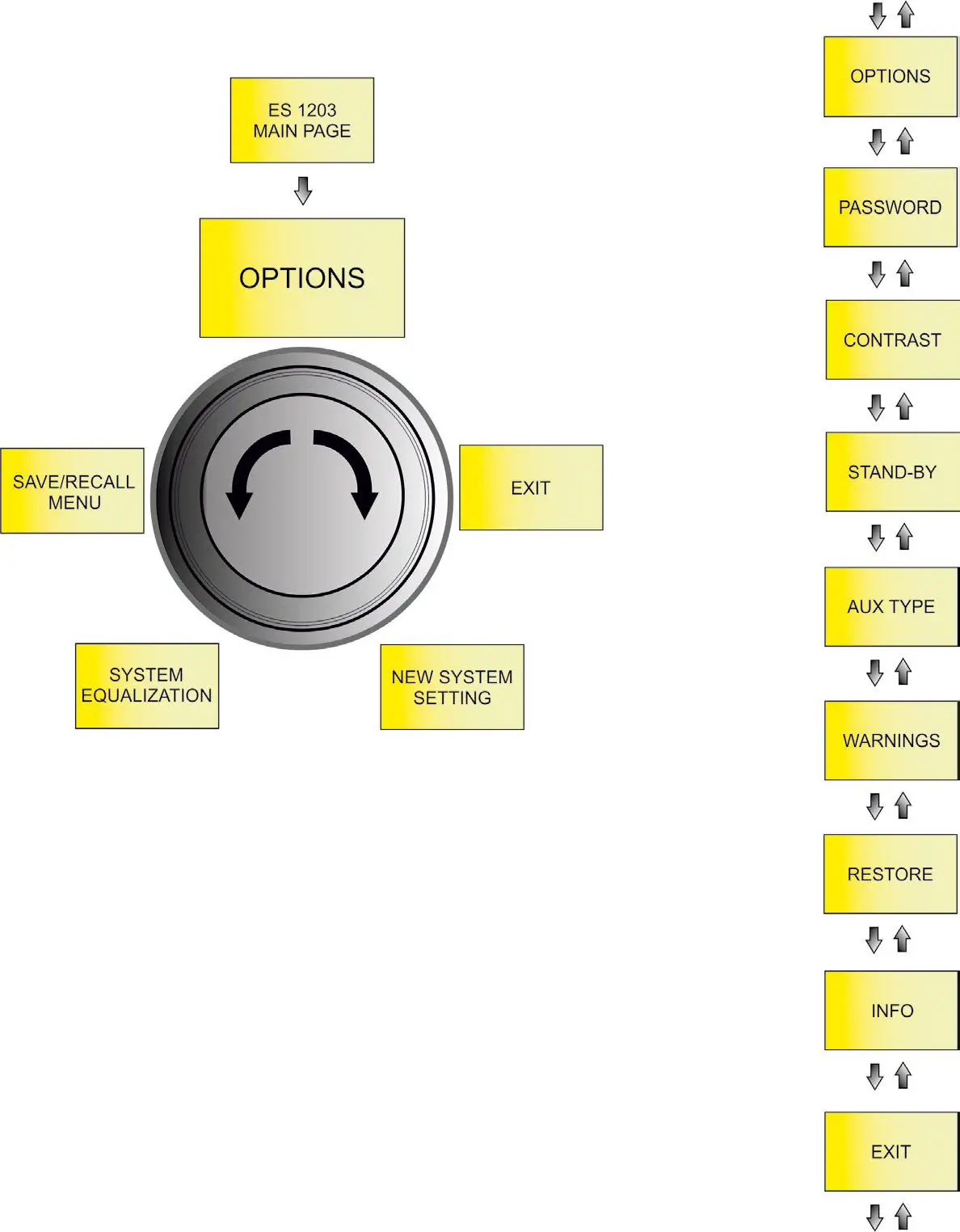
PASSWORD
Enables/disables the use of a password to protect the system’s settings. There are three protection levels:
• LEVEL 1 – Lets you operate at the general MAIN LEVEL and load presets but not save them
• LEVEL 2 – Lets you operate only at the general MAIN LEVEL
• LEVEL 3 – Does not let you change any system settings
Enter a password.
You can only use a 6-digit numeric password.
If you lose it, use the SUPERUSER code: Q2R5D9.
CONTRAST
Adjust the OLED screen contrast (from 0% to 100% in steps of 5%).
STAND-BY
- Enables/disables OLED screen auto power-off (the system remains on)
- Choose the time after which the screen turns off (from 10 seconds to 10 minutes in steps of 10 seconds)
AUX TYPE
As in a mixer, the AUX sends may be affected by fader adjustments or not:
- PRE – the AUX send is taken before the system mixer settings, which is particularly suited to using the ES503 system output for sending a signal to a separate monitor. In this case, the output signal is independent of the internal mixer settings.
- POST – the AUX send is taken after all the system adjustments, so the ES503 system outputs a signal that is affected by all the internal mixer settings.
WARNINGS
This page displays any active system warnings.
RESTORE
Let’s return the system to its factory settings.
INFO
Displays the system firmware revision.
EXIT
Exits from the OPTIONS page.
ES-503
ES503 ADDENDUM