3
DATA SHEET
LG Programmable Monitoring Unit
PMU 330 SERIES

LG Industrial Systems
– When using LGIS equipment, thoroughly read this datasheet and associated manuals introduced in this datasheet. Also pay careful attention to safety and handle the module properly.
– Store this datasheet in a safe place so that you can take it out and read it whenever necessary.
Safety Precautions
- Safety Precautions is for using the product safe and correct in order to prevent the accidents and danger, so please go by them.
- The precautions explained here only apply to the Programmable Monitoring Unit (PMU). For safety precautions on the HMI (Human Machine Interface) system, refer to the Programmable Monitoring Unit User’s manual.
- The precautions are divided into 2 sections, ‘Warning’ and ‘Caution’. Each of the meanings is represented as follows.
 If violated instructions, it can cause death, fatal injury or considerable loss of property.
Caution
 If violated instructions, it can cause a slight injury or slight loss of products
Warning
- The symbols which are indicated in the PMU and User’s Manual mean as follows
 This symbol means paying attention because of danger of injury, fire, or malfunction.
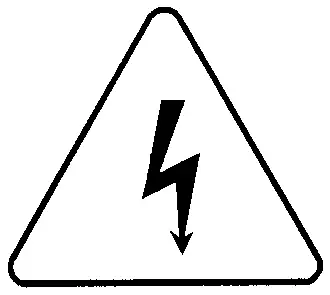 This symbol means paying attention because of danger of electric shock.
- Store this datasheet in a safe place so that you can take it out and read it whenever necessary. Always forward it to the end user.
- Do not contact the terminals while the power is applied.
Risk of electric shock and malfunction.
- Protect the product from being gone into by foreign metallic matter.
Risk of fire, electric shock and malfunction.
- Do not charge, heat, short, solder and break up the battery.
Risk of injury and fire by explosion and ignition.
Warning

- Be sure to check the rated voltage and terminal arrangement for the module before wiring work.
Risk of electric shock, fire and malfunction.
- Tighten the screw of terminal block with the specified torque range.
If the terminal screw looses, it can cause fire and electric shock.
- Use the PMU in an environment that meets the general specifications contained in this datasheet.
Risk of electrical shock, fire, erroneous operation and deterioration of the PMU.
- Be sure that external load does not exceed the rating of output module.
Risk of fire and erroneous operation.
- Do not use the PMU in the environment of direct vibration
Risk of electrical shock, fire and erroneous operation.
- Do not disassemble, repair or modify the PMU.
Risk of electrical shock, fire and erroneous operation.
- When disposing of PMU and battery, treat it as industrial waste.
Risk of poisonous pollution or explosion.
Caution

Precautions for use
- Do not Install other places except PMU controlled place.
- Make sure that the FG terminal is grounded with class 3 grounding which is dedicated to the PMU. Otherwise, it can cause disorder or malfunction of PMU
- Connect expansion connector correctly when expansion module are needed,
- Do not detach PCB from the case of the module and do not modify the module.
- Turn off power when attaching or detaching module.
- Cellular phone or walkie-talkie should be farther than 30cm from the PMU
- Input signal and communication line should be farther than minimum 100mm from a high-tension line and a power line in order not to be affected by noise and magnetic field.
PMU
Others
< Best >
< Good >
< Bad >
PMU
Others
PMU
Others
Head Office
LG Twin Towers East Bldg. 9th Floor, 20, Yoido-Dong Youngdungpo-Gu, Seoul 150-721, KOREA
Domestic Sales Team
PMU sales team TEL:+82-2-3777-4620~34
FAX:+82-2-3777-4622
Busan sales team TEL:+82-51-310-6855~9
FAX:+82-51-515-0406
Deagu sales team TEL:+82-53-603-7740~5
FAX:+82-53-603-7788
Gaungju sales team TEL:+82-62-510-1885~91
FAX:+82-62-526-3262
Deajeon sales team TEL:+82-42-480-8919-20
FAX:+82-42-489-8672
Overseas Sales Team
PMU sales team TEL:+82-2-3777-4640~7
FAX:+82-2-3777-4648
Web site
http://www.lgis.co.kr (Korean)
http://www.lgis.com (English)
Overseas Branches
USA New Jersey Branch +1-201-816-2985
China Bejing Branch +86-10-6462-3256
Shanghai Branch +86-21-5308-3582
JAPAN Tokyo Branch +81-3-3582-9128
Indonesia Jakarta Branch +62-21-897-4311
Vietnam Hanoi Branch +84-4-882-0222
 Main Module Menu Summary
1. Main Menu
– Functions : Controller Type, Communication Protocol, Version Info., Language Setting and Time Setting
* Time Data is retained minimum 1week by super capacitor without input power voltage.
2. Communication Setting
– Functions : Baud Rate, Data Bit, Parity Bit, Spmu Bit, Communication Level, Station Num, Serial Timeout and Send Wait.
3. Initial Setting
– Functions : Power On Mode, Screen off Time, Buzzer Sound, Latch Start Buf., Latch End Buf., Alarm, Printer, Security Password, Default Setting
4. Diagnosis
– Functions : Print Test, Memory Test, Touch Key and Display Test
5. System Information
– Excluding Time data, you can have data of internal system buffer memory at the time of quitting running. (* Data type is 16bit HEX)
 Package Contents
 Main Module 1set
  Download Cable 1pcs(option)
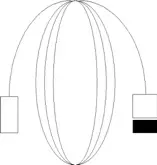
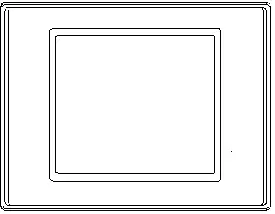
 Bracket 4pcs
 Main Module H/W Manual
 15 pin connector & housing
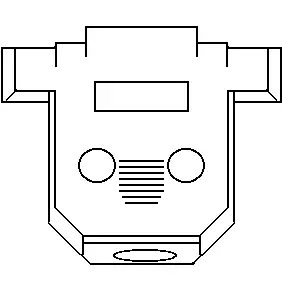
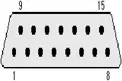
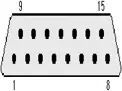
 Outer Dimension (Front, Rear, Side, Upper, Bottom)
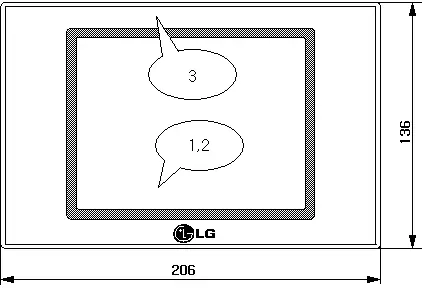
[Fig. Front Outer Dimension]
[Front View]
| No . | Title | Feature | |||
| 1 | LCD | 330BTE | 330BT | 330ST | 330TT |
STNMono | STN 256 Color | TFT 256 Color | |||
| Display Resolution | 320 X 240 | ||||
| Screen Size | 5.7 inch | 5.5 inch | |||
| Brightness | 220cd/㎡ | 150cd/㎡ | 250cd/㎡ | ||
| 2 | Touch Panel | Analog | Matrix | ||
| 3 | Front Sheet | Front Vinyl Cover Sheet for Dampproof and Dustproof | |||
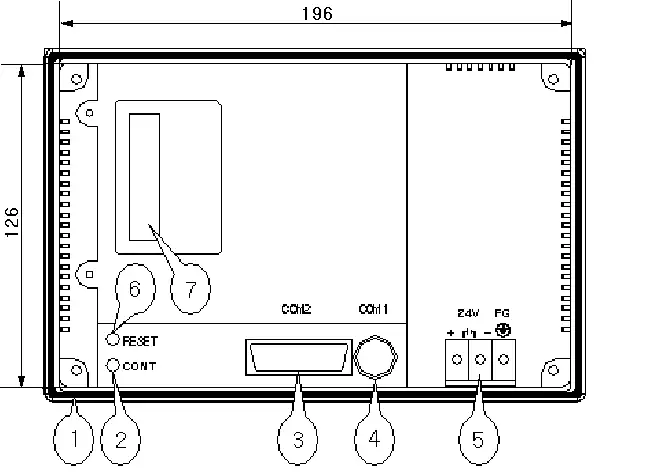
[Fig. Rear Outer Dimension]
[Rear View]
| No. | Title | Num. of Pin | Feature |
| 1 | Rubber Packing | Shock Absorber for Panel Mounting | |
| 2 | Contrast Volume | Contrast Adjust | |
| 3 | RS-232C, 422 Connector | 15 | 1~9: RS232C, 10~15:RS422 |
| 4 | PS/2 Connector | 6 | Down Load and Serial Comm. |
| 5 | Power Input Terminal | 3 | Input Voltage Typical 24VDC |
| 6 | Reset Button | H/W Reset | |
| 7 | Option Module Connector | Reserved Connector for Option |
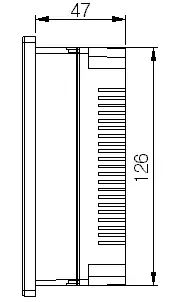
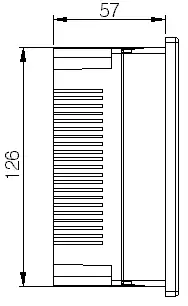
[Fig. Left/Right Outer Dimension]
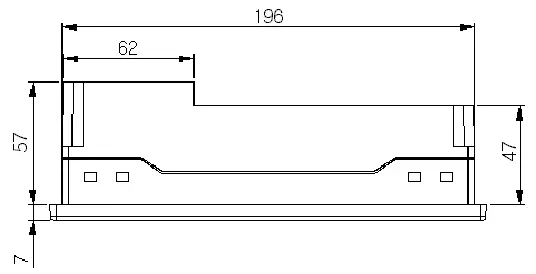
[Fig. Upper/Bottom Outer Dimension]
* Panel Cutting size : 198W * 128H(mm)
 Download Interface (RS232C)
Download Connection RS232C
In case of connecting Main Module 6P Connector and PC 9P Connector
Main Module(6P male) PC(9P Male)
1 CD
2 RD
3 SD
4 DTR
5 SG
6 DSR
7 RTS
8 CTS
9
1
2 RD
3 SG
4
5
6 SD
2
1
4
6
3
5
1
9
1
6
In case of connecting Main Module 6P Connector and PC 25P Connector
Main Module(6P male) PC(25P Male)
1
2 RD
3 SG
4
5
6 SD
1
2 SD
3 RD
4
5
6
7 SG
8
20
2
1
4
6
3
5
 General Specification
| Item | Specification |
| PMU 330 | |
Input Voltage | DC 24V(DC20V ~ DC28V) |
| Power Consumption | 12W |
| Noise Immunity | Impulse Noise 900Vp-p, Pulse width 1㎲ |
| Insulation Resistance | Above 10㏁ at DC 500V Between Power Terminal and Grounding Terminal |
| Operating Temperature | 0 ~ 50℃ |
| Storage Temperature | -10 ~ 60℃ |
| Humidity | 40℃, 85%RH |
| Grounding | Class 3 Grounding Resistance Under 100Ω |
| Atmosphere | No Corrosive Gas |
 PMU Feature
| Item | Specification | Ref. | |||
| PMU | PMU 330BTE | PMU 330BT | PMU 330ST | PMU 330TT | |
| Display Device | STN 5.7” Blue Mono | STN 5.7” 256 COLOR | TFT5.5” 256 COLOR | ||
| Display Resolution | 320 X 240 | Dot | |||
| Panel Cut Size | 198(W) X 128(H) | mm | |||
| Brightness | 220cd/㎡ | 150cd/㎡ | 250cd/㎡ | ||
| Touch Cell | 320X 240 | 16 X 12 | |||
| Communication Interface | Serial RS232c/422/485 | ||||
Ethernet, Devicenet, Profibus, CC Link | Under Development | ||||
| Printer | NO OPTION | Option HP Deskjet | PLC Level 3 | ||
 Serial Interface (RS-232C)
Feature
| Item | Contents | |
| Protocol | Half Duplex | |
| Synch. | Asynchronous | |
| Communication Distance | About 15M | |
| Type of Connection | 1:1 | |
| Control Code | ASCII Code or HEXA Code | |
| Baud Rate | 9600, 19200, 38400, 57600, 76800, 115200bps | |
| Data Type | Data Bit | 7,8bit |
| Parity Bit | None, Odd, Even | |
| Spmu Bit | 1,2bit | |
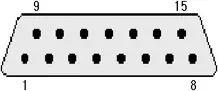
Connector Pins and Signals
| Type | Pin Number | Signal | Direction | Contents |
| 15Pin Female
(COM2) | 1 | NC | Not Used | |
| 2 | RD(RxD) | Input | Data Receive | |
| 3 | SD(TxD) | Output | Data Send | |
| 4 | DTR | Output | Data Terminal Ready | |
| 5 | SG | Signal Ground | ||
| 6 | DSR | Input | Data Set Ready | |
| 7 | RTS | Output | Send Request Signal | |
| 8 | CTS | Input | Send Enable Signal | |
| 9 | NC | Not Used |
 Serial Interface (RS-422/485)
Connect main module to controller by RS-422/485 for communication.
Feature
| Item | Contents | |
| Protocol | Half Duplex, 5wires | |
| Synch. | Asynchronous | |
| Communication Distance | About 500M | |
| Type of Connection | 1:N(N≤31) | |
| Control Code | ASCII Code or HEXA Code | |
| Baud Rate | 9600, 19200, 38400, 57600, 76800, 115200bps | |
| Data Type | Data Bit | 7,8bit |
| Parity Bit | None, Odd, Even | |
| Spmu Bit | 1,2bit | |
Connector Pins and Signals
| Type | Pin Number | Signal | Direction | Contents |
| 15Pin terminal
| 11 | RDA(RD+) | Input | Data Receive(+) |
| 12 | RDB(RD-) | Input | Data Receive(-) | |
| 13 | SDA(SD+) | Output | Data Send(+) | |
| 14 | SDB(SD-) | Output | Data Send(-) | |
| 15 | SG | Signal Ground |
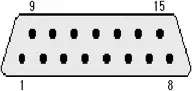 (COM2)
 Project File Up/Download
Meaning of ‘Download’ is transferring projection file data from computer to PMU main module.
And ‘Upload’ is transferring data from PMU Main module to computer.
Main module data will be saved up forever on flash memory of PMU main module unless overwriting.
It is possible to transfer data on the main menu, communication setup menu, initial setup menu, diagnosis menu, and system information menu after connecting download cable between computer and PMU main module.
it is possible to transfer data on running state
 Font and O/S Download
– Connect download cable between 9-pin serial port and download port of PMU main module.
– Short circuit between 2nd pin and 3rd pin of 9pin D-Sub connector.
– Turn off power of main module and restart.
– After PMU main module is in the download ready mode, remove the short circuit connect 9pin D-sub connector to serial port of computer.
– In O/S and Font download mode of PMU Designer on PC, download them to PMU main module.
– After finishing downloading, PMU main module will be reset automatically.
– Downloadable fonts are bellows.
8X8, 8X16, 16 X 16 dot, 16 X 32dot, 32 X 32 dot font
LG PMU 330 SERIES Programmable Monitoring Unit Data Sheet – Download [optimized]
LG PMU 330 SERIES Programmable Monitoring Unit Data Sheet – Download