
User manual
Portable Power Bank
Nov.2022| Revision A.2
About this manual
This manual describes how to install and use the VOLANS. Read this manual before you attempt to use the product, and follow the instructions throughout the installation process. If you are uncertain about any of the requirements, recommendations, or safety procedures described in this manual, contact Soluna immediately for advice and clarification. The information included in this manual is accurate at the time of publication. however, with regards to the product design and technical specification updates, our company reserves the right to make changes at any time without prior notice. In addition, the illustrations in this manual are meant to help explain system configuration concepts and installation instructions. The illustrated items may differ from the actual items at the installation location.
Safety precautions
Warning
The following basic precautions must always be observed when using this product.
- To read the instruction manual before using this product please.
- To reduce the risk of injury, close supervision is required when using this product near children.
- Do not put your fingers, palms or any part of your body into the product.
- Do not use damaged or modified battery packs or devices.
- Do not use the product with damaged wires, plugs or output wires.
- When the product needs maintenance or repair, do not disassemble the product by yourself. Please hand over the it to a qualified service provider. The wrong disassemble method can lead to fire or electric shock risk.
- In the event of a product failure, to reduce the risk of electric shock, remove the portable from the socket before performing any guided repair operation
- Charge the internal battery in a well-ventilated area. Do not obstruct air circulation
- Under extreme conditions, liquid may be ejected from the battery. Avoid contact with batteries and liquids. In case of accidental contact, rinse with clean water. If fluid comes into contact with your eyes, seek other medical help.
- Do not expose the product to fire or somewhere overheating.
- Only qualified maintenance personnel shall carry out maintenance.
Product Introduction
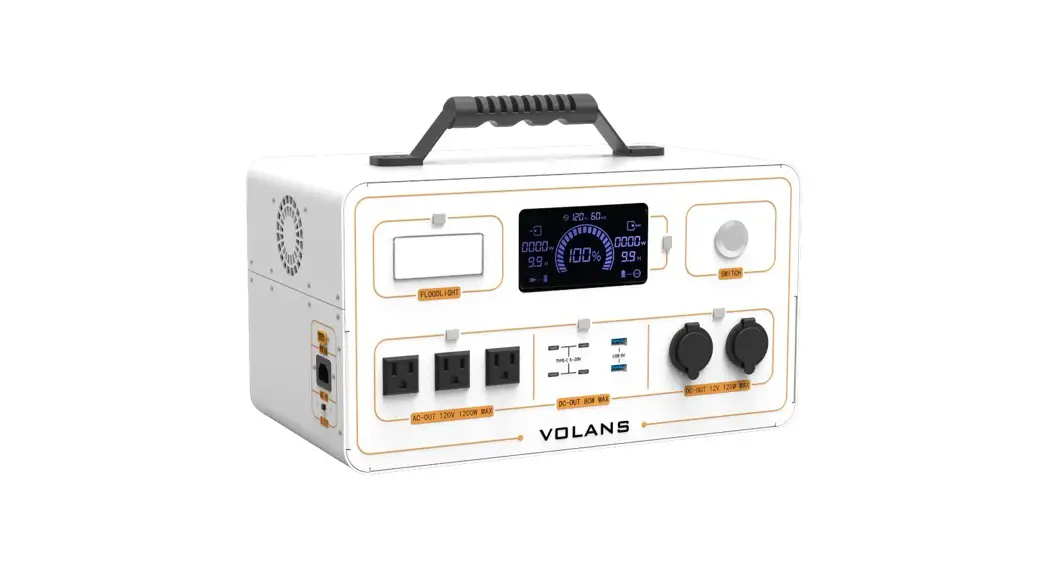
VOLANS is a portable power supply, battery capacity 1.28kwh (50Ah), built-in 120VAC output, continuous AC output power 1200W, peak up to 2400W, support PV charging and grid quick charging, support UPS function, Built-in car charging port 12V, USB output, Type-c output and night light. It perfectly work with ventilator, mobile temperature door, disinfection machine, electric drill, small household appliances, uav photography equipment; It is suitable for long-distance self-drive, emergency rescue, geological survey, car power supply, indoor and outdoor scenes.
2.1 Features
- Support AC fast charge, full charge in 1 hours.
- Support wireless parallel function, save customers cumbersome wiring, double output power, to meet customers’ high power load requirements.
- Support UPS function, switching time 10ms.
- With wireless Bluetooth function, you can check the operation states online.
- AC instantaneous output power up to 2400W, without fear of various impact loads.
2.2. Application scenarios
- lighting
- Small appliances
- Mobile charging devices
- On-board recharging
- Car battery recharge 6) Power tools
2.3 Outline Dimensions
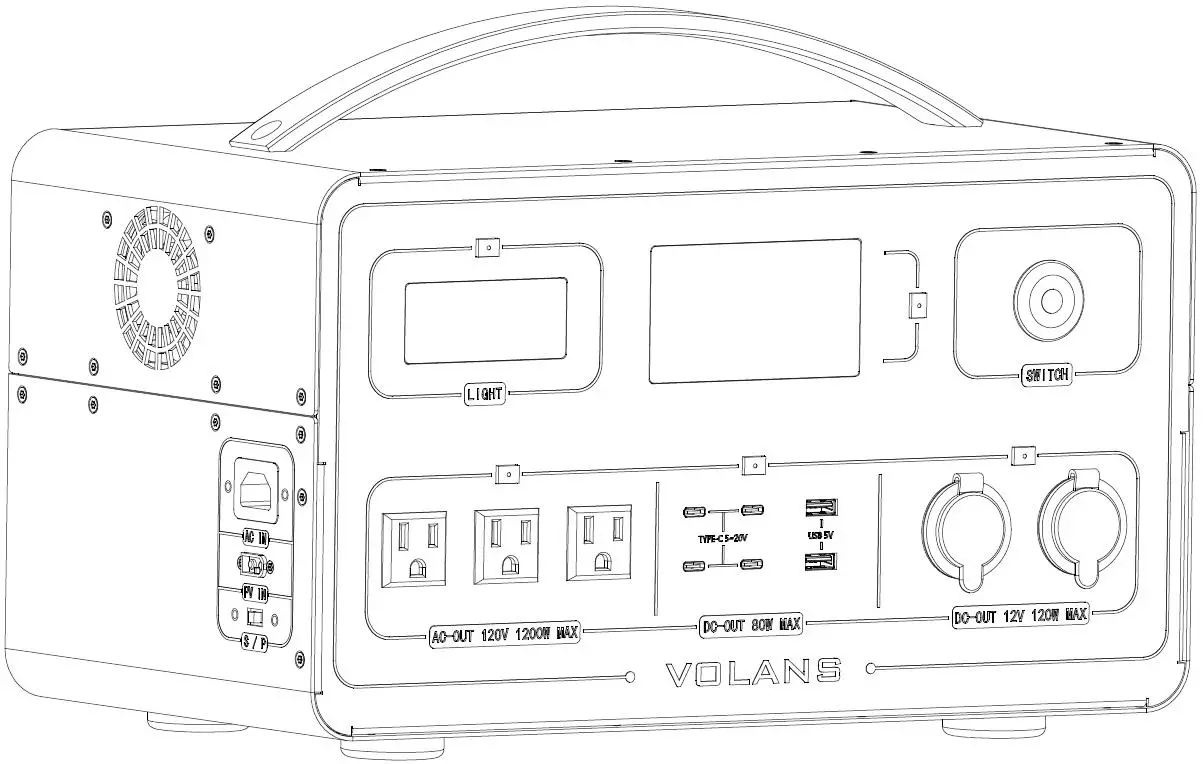
| Width | 380 | mm |
| Depth | 215 | mm |
| Height | 210 | mm |
| Weight | 14 | kg |
2.4 Appearance
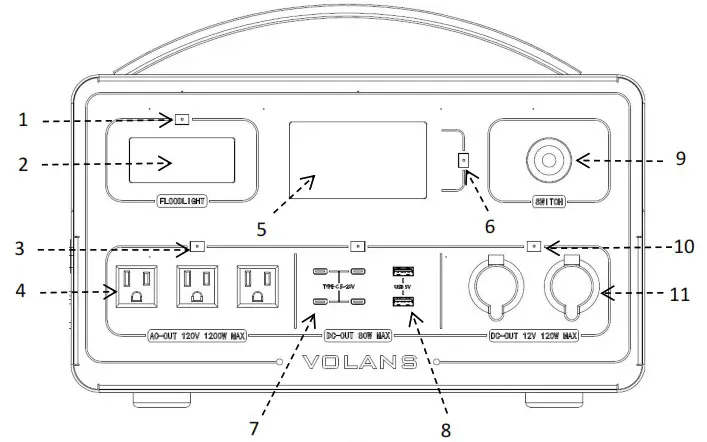 | 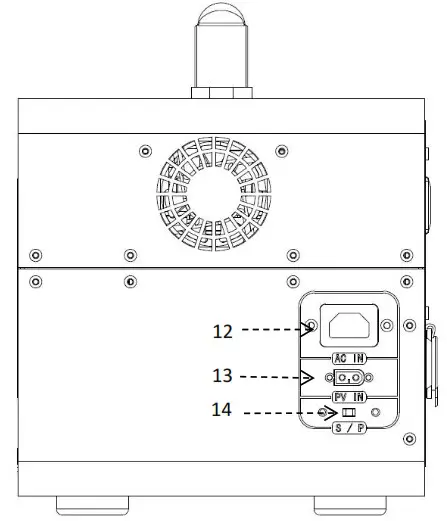 |
| Number | Name | Remark |
| 1 | LED lighting button | |
| 2 | LED light | |
| 3 | AC output button | |
| 4 | AC output port | |
| 5 | Screen | |
| 6 | Type-C & USB output button | |
| 7 | Type-C port | |
| 8 | USB port | |
| 9 | VOLANS Power on/off button | |
| 10 | Car charger output button | |
| 11 | Car charger port | |
| 12 | AC input | |
| 13 | PV input | |
| 14 | Parallel Switch |
2.5 Technical data
| PV input | |
| Max. recommended DC power (W ) | 400 |
| Vdc input range {Vdc) | 10-65 |
| Max.input current (A ) | 10 |
| Number of MPPT trackers | 1 |
| Strings per MPPT tracker | 1 |
| AC Input | |
| Normal Voltage (VAC) | 120,Single phase(L/N/PE) |
| Frequency (Hz) | 60 |
| Max. AC input current (A) | 12 |
| PF | 0.99@100%Load |
| THDi | ≤8%@100%Load |
| AC Output | |
| AC output waveform | Pure sine wave |
| Normal Voltage (VAC) | 120,Single phase(L/N/PE) |
| Frequency (Hz) | 60 |
| Rated current (A) | 10.9 |
| Rated power (W) | 1200 |
| Overload | 106110% Rated power @3min 111-130% Rated power @1min 131-149% Rated power @1S 150-200% Rated power @100mS |
| Power factor range | -0.8-+0.8 |
| Battery | |
| Battery type | Lithium(LFP) |
| NominalStorage capacity (kWh) | 1.28 |
| Usable Storage Capacity (kWh) | 1.02 |
| Battery capacity (Ah) | 50 |
| Normal voltage (V) | 25.6 |
| Voltage range (V) | 20-28.4 |
| DOD | 80% |
| Cycle life | 6000 |
| DC output | |
| Car charger output*2 | 12V/10A |
| uss*2 | 5V/2.1A |
| Type-c*4 | 5-12VDC Max output current 3A Max output power 45W |
| LED lighting | |
| Max power | 3W |
| Gear | 2Gears (2W, 3W) |
| Parallel | |
| Parallel qty | 2 units |
| Max output power | 2400W |
| Regular parameters | |
| Operating temperature range (°C) | -10-+40 |
| Relative humidity (%RH) | 5%-95% |
| Altitude (m) | <2000 |
| Cooling methods | Forced airflow |
| Ingress protection | IP20 |
| Warranty | |
| Please refer to SOLUNA WARRANTY CONDITIONS | |
2.6 Screen display
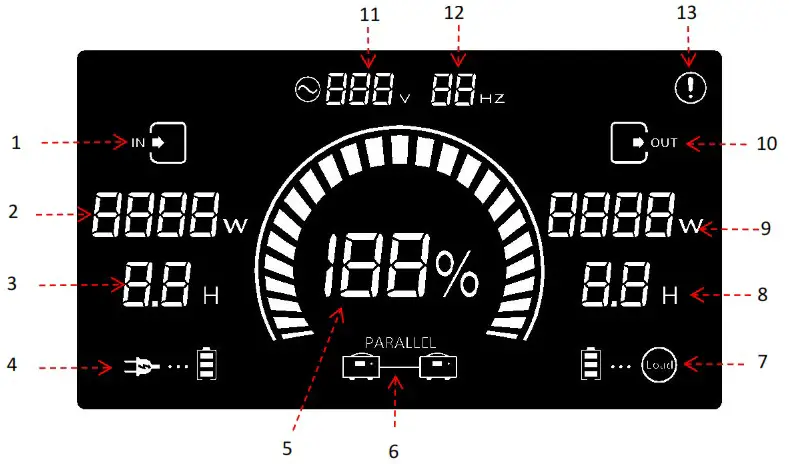
| Number | Name | Remark |
| 1 | Input status | |
| 2 | Charging power | |
| 3 | Charging time | |
| 4 | Charging status | |
| 5 | SOC | |
| 6 | Parallel status | |
| 7 | Discharging status | |
| 8 | Discharging time | |
| 9 | Discharging power | |
| 10 | Output status | |
| 11 | AC voltage | |
| 12 | AC frequency | |
| 13 | Fault icon |
2.7 Accessory list
Users can find the following accessories in the accessory box,please find the follow table for details.
| Item | Name | Qty (pcs) | Remark |
| 1 | AC input cable | 1 | |
| 2 | Parallel cable | 1 | |
| 3 | PV connection cable | 1 |
How to use VOLANS
The Soluna will be in Standby when the user press the button of Power ON/OFF, Then, the user can press the corresponding button as neededPlease find the following picture for the position of button.
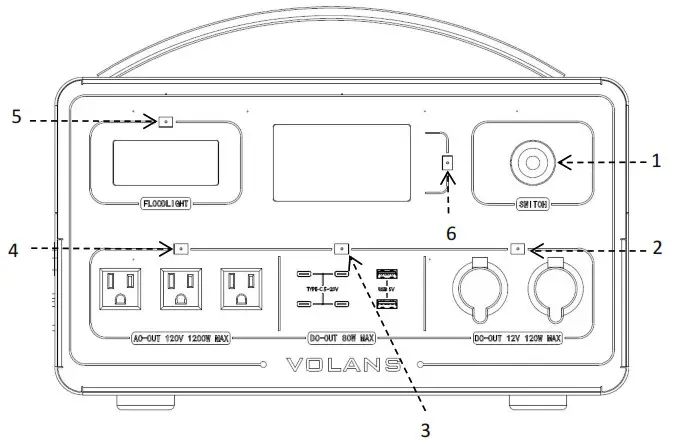
| Number | Name | Remark |
| 1 | Power on/off button | |
| 2 | Car charger output button | |
| 3 | Type-C & USB output button | |
| 4 | AC output button | |
| 5 | LED lighting button | |
| 6 | Screen button |
VOLANS parallel connection
4.1 Connection
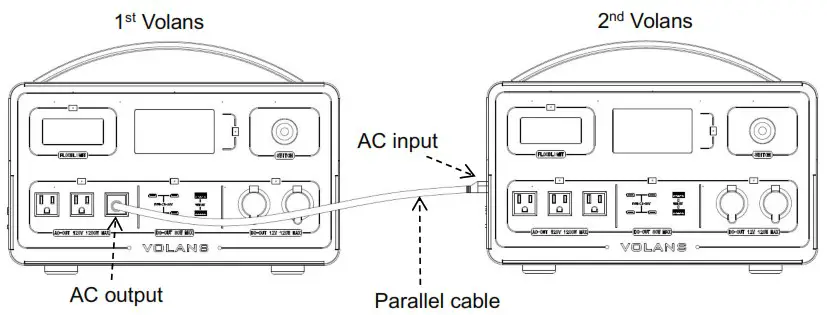
When put 2 units VOLANS in parallel, the cable should be connected form 1st VOLANS’s AC output port to the 2nd VOLANS’s AC input port. The cable comes together in the accessory box, details please see below picture.
4.2 setting
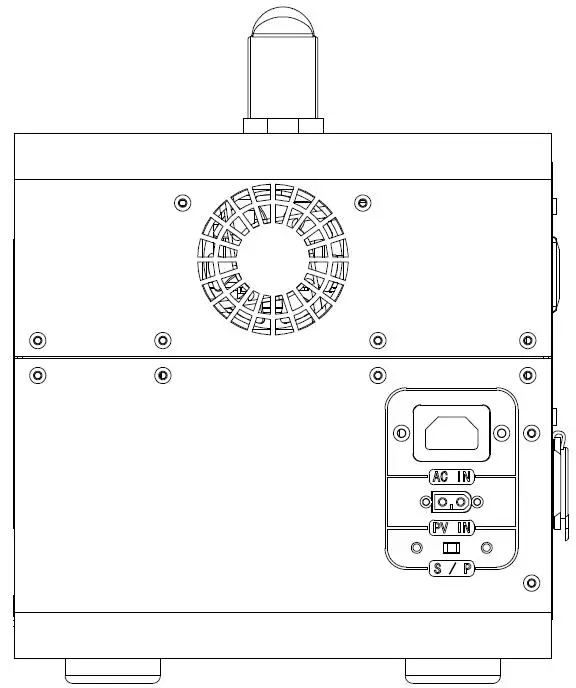
The 2nd VOLANS’s output power will be 2 times rated output power of VOLANS after connected in parallel.(MAX output power can up to 2400W)
Wireless Bluetooth
The user will can check the Volans data via APP after download “Volans” APP.
5.1 Download APP
iPhone:Search “Volans” in Apple Store.
Android: Search “Volans” in Google play Store.
Remark: Please see below picture for Volans Icon.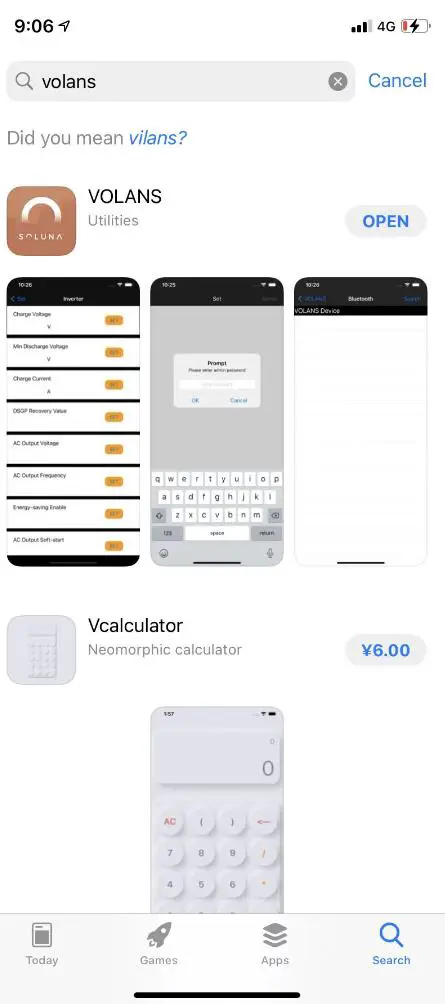 5.2 Bluetooth S/N
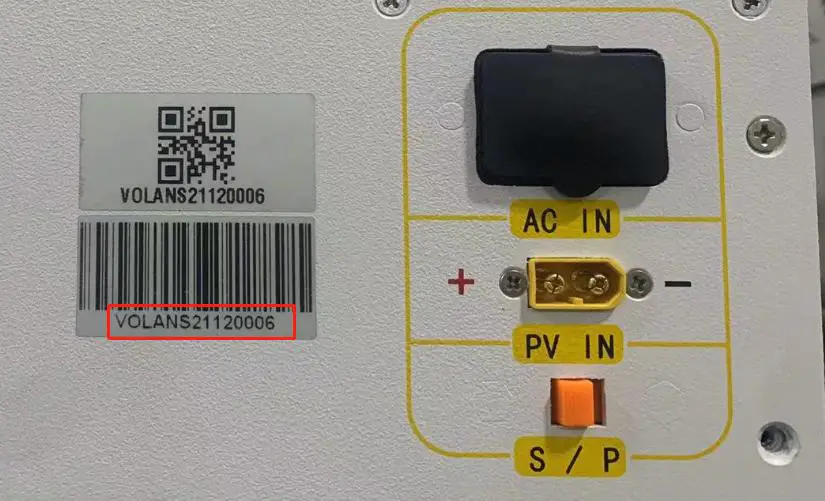
User can find the Bluetooth S/N on the Volans, Please find the following picture for Bluetooth S/N for details.
Contact us
We hope that this manual has clearly demonstrated the product. If you still have any doubts or something not clear about it in the specifications, feel free contact to us please. we will do our best to support you!
SOLUNA
Add: No.3492 Jinqian Road, Shanghai, China 201406
Tel: +86-21-57475835
Email: [email protected]
Web: www.solunabattery.com
 solunabattery.com