
TOSHIBA TE-B Configured Soft Start Packages 
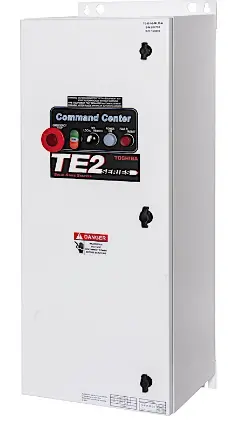
Manual Addendum for TE-B Configured Soft Start Packages
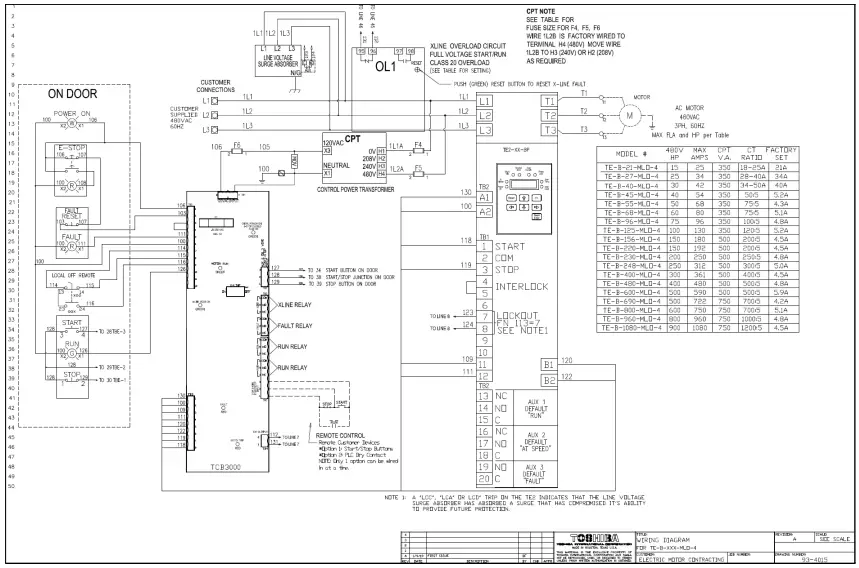
For use with wiring diagram # 93-4014 Rev A (CB/FS), or 93-4015 Rev A (MLO), and TE2 instruction manual.
Introduction: The TE-B is a configured enclosed soft start, available as a Combination (with C/B or Fused disconnect) package, or as an MLO (Main Lug Only) package, intended for use in Industrial, Commercial, Agricultural, or Infrastructure applications.
Line Voltage:
By default, units are set-up for 460VAC line power, but can be adjusted to operate on 230VAC or 208VAC at the reduced HP rating. To adjust the operating voltage simply move wire #1L2B from the 480V (H4) terminal to the 230V (H3) or 208V (H2) terminal.
Power Connections:
Line Power input is connected directly to the bottom terminals of the Circuit Breaker, or line terminals on MLO (Main Lug Only) units, and the motor is connected to the lugs at the bottom of the TE2 soft start.
Remote Start / Stop Control connections:
The TE-B is set up for 2 or 3 wire remote control using dry contacts rated at 120VAC (0.1Amp).
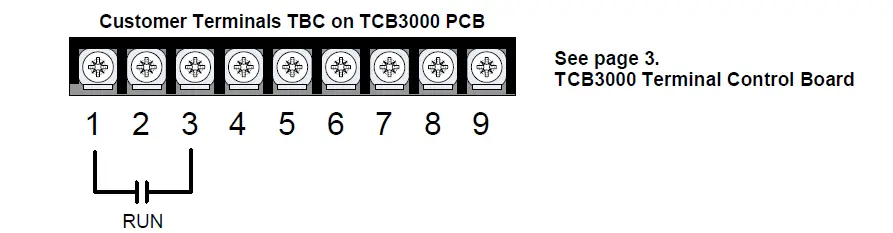
Remote Two Wire Control:
Connect a dry (voltage free) maintained contact closure between terminals 1 and 3 of the customer terminal strip as shown here.
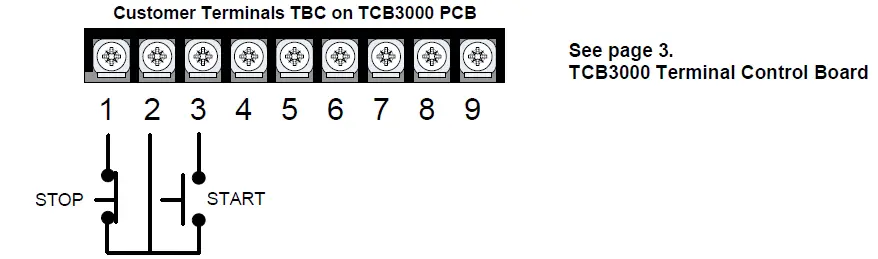
Remote Three Wire Control:
For standard 3-wire control, connect dry (voltage free) contacts for the Stop / Start buttons as shown below of the customer terminal strip. Connect the normally closed “STOP” pushbutton across terminals 1 & 2, and the normally open “START” pushbutton across terminals 2 & 3 of the customer terminal strip. Note: the unit can be operated in the “Local” position without any external control.
Run Status Output Contacts
The TE-B unit offers 2 Form-C (N.O and N.C.) “RUN” contacts located on the customer terminal strip, terminals 4 (NC), 5 (NO), 6 (Common), and terminals 7 (NC), 8 (NO) 9 (Common). These contacts reflect a successful RUN command in “SOFT” or “X-LINE” mode, and should be used for any required “Run / Running” status outputs.
TE2 Auxiliary Contacts (TB2 of Soft Starter)
There are 3 programmable Aux contacts available on TB2 of the TE2 soft start (2 form-C and 1 form-A). The function of these contacts are labeled on the wiring diagrams, but can be changed in the TE2
programming. Note however, that the contacts may not function properly when operating in the X-LINE mode. (see description below).
X-LINE Operation:
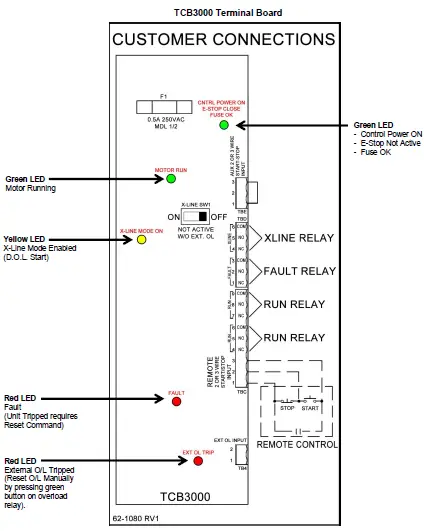
TE-B packages are supplied with a SOFT/X-LINE selector switch, located on the TCB3000 PCB that allows the operator to select Full Voltage operation of the motor via the bypass contactor for emergency operation when the soft start may be inoperable.
When operated in the X-LINE mode full
start/stop control is maintained, and the “Run Status Output Contacts” will function correctly.
During X-LINE operation, the motor will be protected by the external Bi-Metal overload relay which must be set according to the motor FLA and the Current transformer ratio of the unit.
Important:
Motor FLA and Service Factor must be entered prior to a start attempt see next section on how to set Motor FLA and Service Factor parameters.
OVERLOAD RELAY OPERATION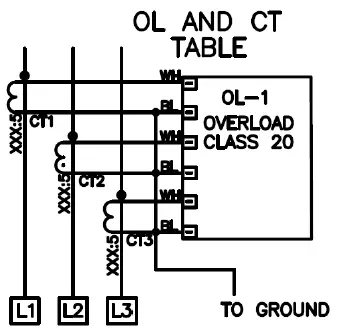 WHEN IN HAND (H) POSITION: USER MUST RESET OL (BY PUSHING GREEN BUTTON) WHEN IN AUTO (A) POSITION: RELAY WILL AUTOMATICALLY RESET AFTER TRIPPING | ||||
| NOTE: YELLOW OVERLOAD DIAL MUST BE SET IN ACCORDANCE WITH THE MOTOR “FULL LOAD AMPS” PER MOTOR NAME PLATE DATA YELLOW OVERLOAD ADJUSTMENT DIAL | ||||
| TE-B MODEL NUMBER | CT RATING XXX:5 | 4 | 5 | 6 |
| TE-B-21-YY-4 | 18-25A | 18 | 22 | 25 |
| TE-B-27-YY-4 | 28-40A | 28 | 34 | 40 |
| TE-B-40-YY-4 | 34-50A | 34 | 42 | 50 |
| TE-B-45-YY-4 | 50:5 | 40 | 50 | 60 |
| TE-B-55-YY-4 | 75:5 | 60 | 75 | 90 |
| TE-B-68-YY-4 | 75:5 | 60 | 75 | 90 |
| TE-B-96-YY-4 | 100:5 | 80 | 100 | 120 |
| TE-B-125-YY-4 | 120:5 | 96 | 120 | 144 |
| TE-B-156-YY-4 | 200:5 | 160 | 200 | 240 |
| TE-B-220-YY-4 | 200:5 | 160 | 200 | 240 |
| TE-B-230-YY-4 | 250:5 | 200 | 250 | 300 |
| TE-B-248-YY-4 | 300:5 | 240 | 300 | 360 |
| TE-B-400-YY-4 | 400:5 | 320 | 400 | 480 |
| TE-B-480-YY-4 | 500:5 | 400 | 500 | 600 |
| TE-B-600-YY-4 | 500:5 | 400 | 500 | 600 |
| TE-B-690-YY-4 | 700:5 | 560 | 700 | 840 |
| TE-B-800-YY-4 | 700:5 | 560 | 700 | 840 |
| TE-B-960-YY-4 | 1000:5 | 800 | 1000 | 1200 |
| TE-B-1080-YY-4 | 1200:5 | 960 | 1200 | N/A |
Programming Instructions
This document is intended for use with Models: TE-B Soft Start Packages Motor FLA and Service Factor must be entered prior to start attempt Entering Motor FLA & SF.
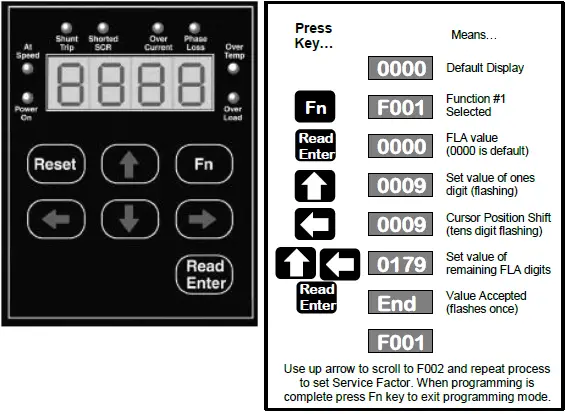
| Fn # | Function Description | Range | Default |
| F001 | Motor Nameplate FLA | 50-100% of Max Amp Rating. | None |
| F002 | Motor Nameplate Service Factor | 1.00 – 1.30 SF | 1.0 SF |
For complete parameter list see pages 6-7 of this document
For Complete Installation instructions see TE2 Instruction Manual
Operation and Troubleshooting
Keypad Operation Display Mode (Default) : Fault Mode
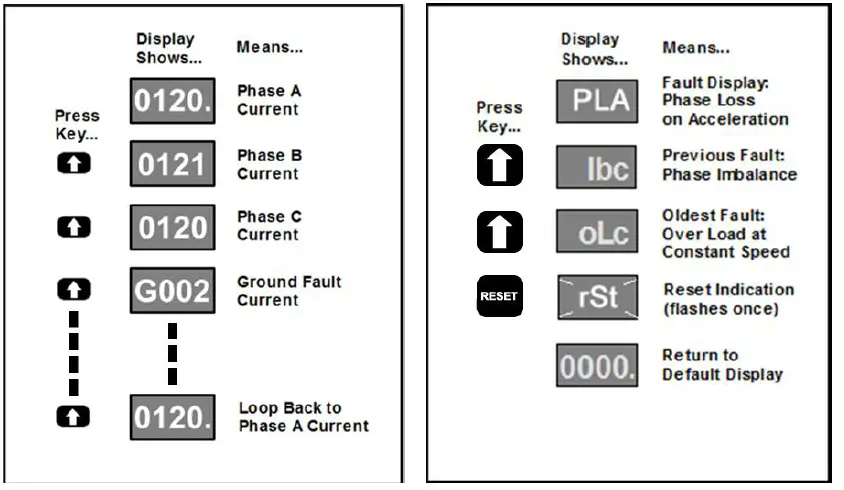
| Fault Code | Description |
| nFLA | No Full Load Amps set in F001 |
| Inh | Parameter change attempted when in Run Mode or without password |
| N3Ph | Line Voltage Loss (no 3 phase prior to start) |
| Loc | Lockout Starter is in overload or duty cycle lockout |
| Err | Incorrect Password Entered |
| ocA; occ: ocd | Over Current during Acceleration; Constant speed; Deceleration |
| PLA; PLc; PLd* | Phase Loss during Acceleration; Constant speed; Deceleration |
| otA; otc; otd | Over Temperature during Acceleration; Constant speed; Deceleration |
| oLA; oLc; oLd | Over Load during Acceleration; Constant speed; Deceleration |
| SSA; SSc; SSd* | Shorted SCR during Acceleration; Constant speed; Deceleration |
| st | Shunt Trip during Acceleration; Constant speed; Deceleration |
| IbA; Ibc; Ibd | Current Imbalance during Acceleration; Constant speed; Deceleration |
| UcA; Ucc; Ucd | Under Current during Acceleration; Constant speed; Deceleration |
| ScA; Scc; Scd | Short Circuit during Acceleration; Constant speed; Deceleration |
| GFA; GFc; GFd | Ground Fault during Acceleration; Constant speed; Deceleration |
| bPA; bPc; bPd | Bypass Discrepancy during Acceleration; Constant speed; Deceleration |
| LcA; Lcc; Lcd* | Normally closed external lockout is open |
| rtA; rtc; rtd | Rotation Trip during Acceleration; Constant speed; Deceleration |
| EIA; EIc; EId | Voltage Imbalance during Acceleration; Constant speed; Deceleration |
| oEA; oEc; oEd | Overvoltage during Acceleration; Constant speed; Deceleration |
| UEA; UEc; UEd | Under voltage during Acceleration; Constant speed; Deceleration |
| PFA; PFc; PFd | Power Factor trip during Acceleration; Constant speed; Deceleration |
| PrA; Prc; Prd | Power (kW) trip during Acceleration; Constant speed; Deceleration |
| ncPA; ncPc; ncPd | Control Power Loss during Acceleration; Constant speed; Deceleration |
*NOTES:
“PLd” can be caused by a Grounded delta power system. If one input leg measures ZERO volts to ground, reduce
the setting of F051 to “0054” for operation on a “Grounded Delta”.
“SSd” can be caused by operating without a motor connected, ensure the motor is firmly connected.
“LcA, Lcc, or LCD” indicates that the Surge absorber is damaged; see NOTE 1 on wiring diagram.
| Full Parameter List | |||
| Parameter | Description | Adjustment Range | Factory Setting |
| F001 | Motor FLA | 50-100% of Max Amp Rating (less Service Factor) | 0 |
| F002 | Motor Service Factor | 1.00-1.30 | 1.00 |
| F003 | Overload Class During Start | NEMA/UL Class 5-30 | 10 |
| F004 | Overload Class During Run | NEMA/UL Class 5-30 | 10 |
| F005 | Overload Reset | 0=Manual, 1=Auto, 2=Disabled | 0:Manual |
|
F10 | Ramp Type (If Ramp 2 is not being used, unit will ignore all settings referenced to Ramp 2) | Ramp #1 Ramp #2 |
1 |
| Setting = 1 Setting = 2 Setting = 3 Setting = 4 | Voltage Voltage Current Current Voltage Current Current Voltage | ||
| F011 | Initial Voltage of Ramp 1 | 0-100% Line Voltage | 60% |
| F012 | Initial Current of Ramp 1 | 0-600% Motor Current | 200% |
| F013 | Accel Ramp Time of Ramp 1 | 1-120 seconds | 10 sec |
| F014 | Max Current Limit of Ramp 1 | 200 – 600% Motor Current | 350% |
| F015 | Initial Voltage of Ramp 2 (if Ramp 2 is used) | 0-100% Line Voltage | 60% |
| F016 | Initial Current of Ramp 2 (if Ramp 2 is used) | 0-600% Motor Current | 200% |
| F017 | Accel Ramp Time of Ramp 2 (if Ramp 2 is used) | 1-120 seconds | 10Sec. |
| F018 | Max Current Limit of Ramp 2 (if Ramp 2 is used) | 200 – 600% Motor Current | 350% |
| F019 | Voltage Jog | 5-100% Line Voltage | 50% |
| F020 | Time of Voltage Jog | 1-20 seconds | 10 sec |
| F021 | Current Jog | 100-500% Motor Current | 150% |
| F022 | Kick Start Voltage | 0=Disabled or 10-100% Line Voltage | 0 |
| F023 | Kick Time | 0.1-2 seconds | 0.8 sec |
| F024 | Deceleration Ramp (Pump Control) | 0=Disabled (Coast to Stop) 1=Enabled (except after OL trip) 2=Enabled (Deceleration even during O/L trip) | 0 |
| F025 | Begin Decel Level (BDL) | 0 – 100 % of Output Voltage | 60% |
| F026 | Decel Shut Off Voltage | 0 to (BDL minus 1)% Voltage | 30% |
| F027 | Decel Ramp Time | 1-60 seconds | 10Sec. |
| F028 | Auto Restart Delay Time | 0=Disabled or 1-999sec after Power Loss | 0 |
| F029 | Voltage Input | 200 – 690 Volt | 480 |
| F030 | Voltage Imbalance Trip % | 0, 1 – 30% [0=Disabled] | 0 |
| F031 | Voltage Imbalance Trip Delay | 1 – 20 seconds | 10 |
| F032 | Over Voltage Trip % | 0, 1 – 10% [0=Disabled] | 0 |
| F033 | Over Voltage Trip Delay | 1 – 20 seconds | 10 |
| F034 | Under Voltage Trip on Start % | 0, 1 – 20% [0=Disabled] | 0 |
| F035 | UV Trip on Start Delay | 1 – 180 seconds | 10 |
| F036 | Under Voltage Trip on Run % | 0, 1 – 20% [0=Disabled] | 0 |
| F037 | UV Trip Delay during Run | 1 – 20 seconds | 2 |
| F038 | Shorted SCR and Trip Delay | 0, 1-10 seconds [0=Disabled] | 1Sec |
| F039 | Shunt Trip Delay | 0, 1-10 seconds [0=Disabled] | 1Sec |
| F040 | Current Imbalance Trip % | 0=Disabled or 5-30% imbalance | 0 |
| F041 | Current Imbalance Trip Delay | 1-20 seconds | 2 sec |
| F042 | Over Current Trip % | 0=Disabled or 100-300% of Motor FLA | 0 |
| F043 | Over Current Trip Delay | 1-20 seconds | 1 sec |
| F044 | Under Current % | 0=Disabled or 10-90% of Motor FLA | 0 |
| F045 | Under Current Trip Delay | 1-60 seconds | 2 sec |
| F046 | Ground Fault Current Trip Value | 0=Disabled or 5-90% of CT ratio from Fn74 | 0 |
| F047 | Ground Fault Current Trip Delay | 1-60 seconds | 2 sec |
| F048 | Coast Down Lockout Time | 0=Disabled or 1-60 minutes | 0 |
| F049 | Maximum Starts per Hour | 0=Disabled or 1-10 Starts | 0 |
| F050 | Minimum Time Between Starts | 0=Disabled or 1-60 minutes | 0 |
| F051 | nCP Trip (No Control Power) | 0, 1 [0=Disabled, 1=Enabled] | 1 |
| Parameter | Description | Adjustment Range | Factory Setting |
|
F052 |
Auto Reset Selected Trips | Auto Reset Disabled | 0 |
| Reset after Over Temperature Trip only Reset after Over Current (Shear Pin) Trip only Reset after Under Current Trip only Reset after Phase Loss Trip only Reset after Current Unbalance Trip only Reset after Ground Fault Trip only Reset after Short Circuit Trip only Reset after OT Trip or Over/Under Current Trip Reset after Phase Loss, Current Unbal, or GF Trip Reset after all Except Short Circuit Trip Reset after all Except GF or Short Circuit Trip Reset after any Trip | 1 2 3 4 (Default) 5 6 7 8 9 10 11 12 | ||
| F053 | Auto Restart Attempts | 0=Disabled, 1-10 = # of Attempts | 0 |
| F054 | Auto Restart Delay Readout | Readout only | |
| F055 | Coast Down Lockout Time Readout | Readout only | |
| F056 | Starts Per Hour Timer Readout | Readout only | |
| F057 | Starts Per Hour Readout | Readout only | |
| F058 | Time Value Between Starts Readout | Readout only | |
| F059 | Thermal Capacity to Start Readout | Readout only | |
| F060 | Aux Relay 1 setting | Run/Stop | 1 |
| F061 | Aux Relay 2 setting | At Speed/Stop | 2 |
| F062 | Aux Relay 3 setting | Any Trip | 22 |
| F063 | Aux. Relay Delay Timer | 0=Disabled or 1-999 seconds | 0 |
| F065 | Communications | 0=Disabled 1=Enabled(11bit) 2=Enabled(10 bit) | 0:Disabled |
| F066 | Baud Rate | 4.8, 9.6, 19.2 KB | 9.6 |
| F067 | Modbus Address | 1-247 | 1 |
| F068 | Remote Starter Control from Communications | 0=Disabled 1=Enabled w/Start PB 2=Enabled w/o Start PB 3=Enabled via Remote Jog Input | 0 |
| F070 | Parameter Lock/ Level 1 Password | 0=Disabled or 001-999 | 0 |
| F071 | System Clear / Factory Reset | 0=Disabled, 1=Clear Lockouts 2=Reset to Factory Default | 0 |
| F073 | Frame Rating | 10-2000A | by model |
| F074 | CT Value | 10-2000 | by model |
| F075 | Year | 2000-2047 | 2000 |
| F076 | Month | 1-12 | 1 |
| F077 | Day | 1-31 | 1 |
| F078 | Hour | 0-23 | 0 |
| F079 | Minute | 0-59 | 0 |
| F080 | Seconds | 0-59 | 0 |
| F081 | Software rev # (info purposes only) | rev # | Rev # |
| F085 | Fault History #1 (most recent fault code) | 0=No Fault History, or Fault # 1-27 (full manual for fault code descriptions) | 0 |
| F086 | Time Stamp Fault #1 | 00.00-23.59 (hh.mm) | 00.00 |
| F087 | Date Stamp Fault #1 | 01.01-12.31 (MM-DD) | 01.01 |
| F088 | Fault History #2 (previous fault code) | 0=No Fault History, or Fault # 1-27 (full manual for fault code descriptions) | 0 |
| F089 | Time Stamp Fault #2 | 00.00-23.59 (hh.mm) | 00.00 |
| F090 | Date Stamp Fault #2 | 01.01-12.31 (MM-DD) | 01.01 |
| F091 | Fault History #3 (oldest fault code) | 0=No Fault History, or Fault # 1-27 (full manual for fault code descriptions) | 0 |
| F092 | Time Stamp Fault #3 | 00.00-23.59 (hh.mm) | 00.00 |
| F093 | Date Stamp Fault #3 | 01.01-12.31 (MM-DD) | 01.01 |
| F094 | Run Time Hours | 000.9-999.9 hours | 0000 |
TE-B Door Mounted Operators
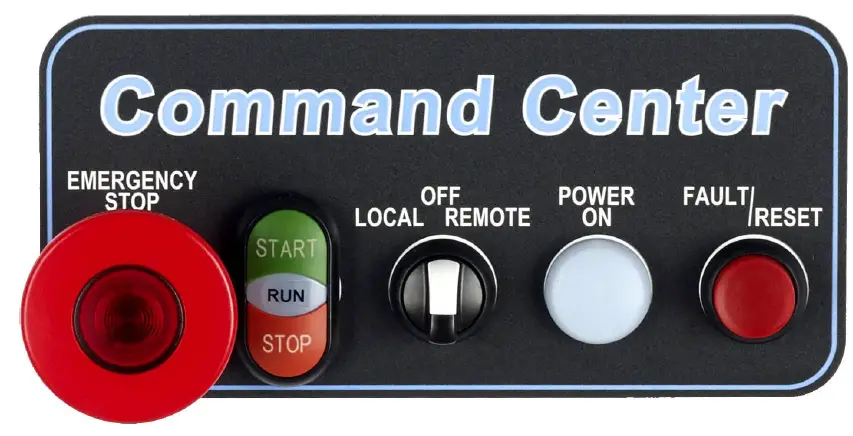
Illuminated E-Stop Pushbutton
- Removes control power from all circuits and TE2 soft start.
- Push to activate, twist and pull to release.
- Button Lights when E-stop is pressed.
Start/Stop Pushbutton and Run Light Assembly
- Provides Start/Stop control in “Local” mode.
- Provides “Motor Running” indication in all operating modes.
Local/Off/Remote Selector
- Local” selects door mounted Start/Stop control.
- Remote” selects Start/Stop control from customer supplied signals at terminals 1-3 on TBC.
- Off’ Turns motor off.
Power ON Light
- Indicates presence of 120VAC control power, derived from main (L1 & L2) line voltages.
Fault Light/Reset Pushbutton
- When lit, indicates that the unit has tripped, and requires “Reset”.
- In “Soft” (normal) mode, the “trip” will be displayed on the TE2 keypad (inside), and will reset upon activation of the reset pushbutton.
- In “X-Iine” mode, the light indicates that the X-line overload inside the panel is tripped, and must be reset manually by pressing the (green) reset key on the overload itself. Then the unit can be reset, using the pushbutton on the door.
Note: If the green reset key on the X-line overload is turned to the “A” (auto) position, the O/L relay will reset itself after the required cooldown, after that the unit can be reset by pushing the reset pushbutton without opening the enclosure door.
Wiring Diagram # 93-4014
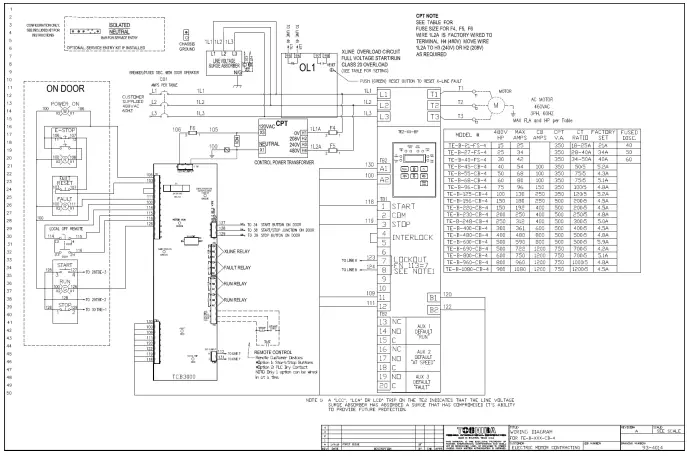
Wiring Diagram # 93-4015