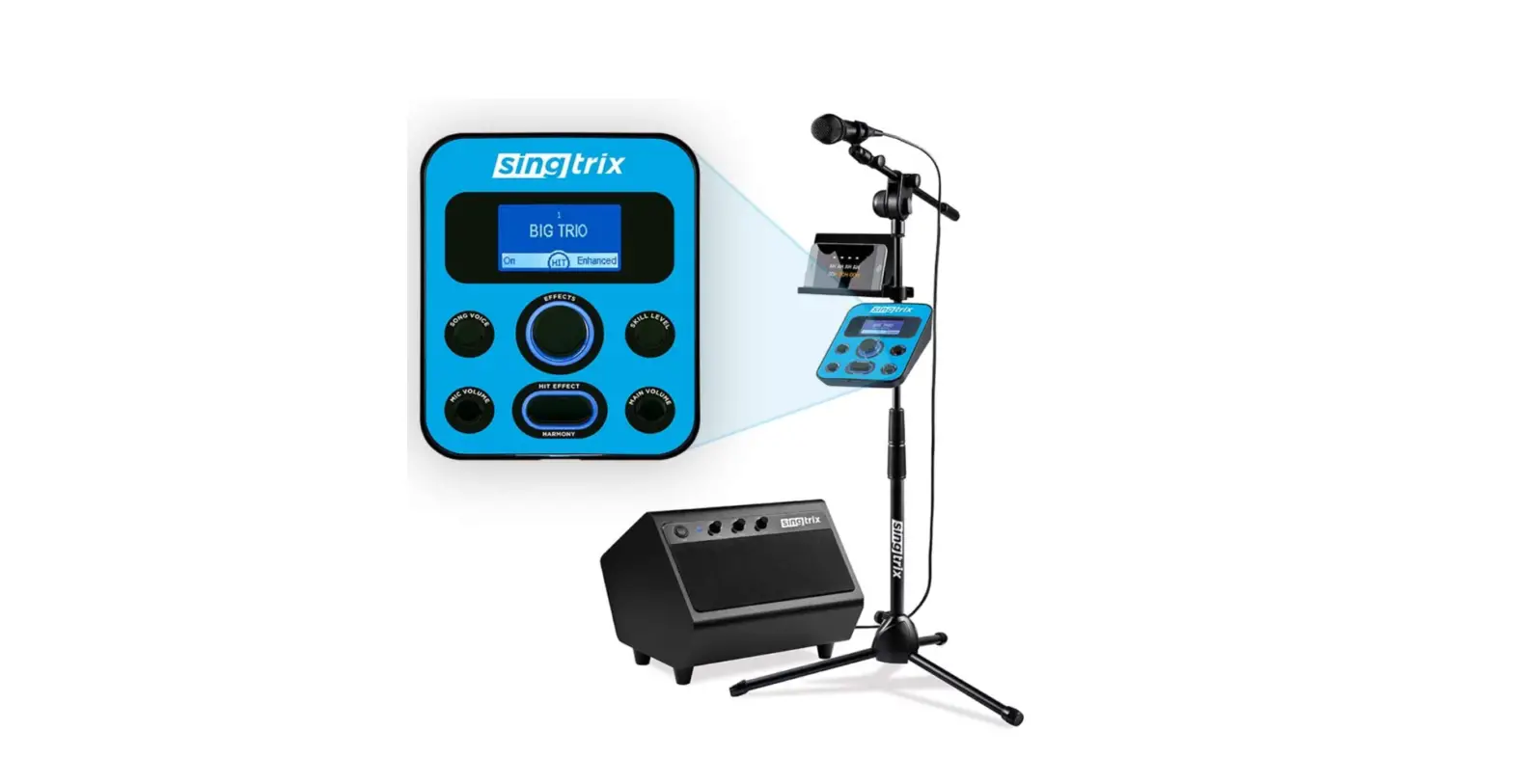

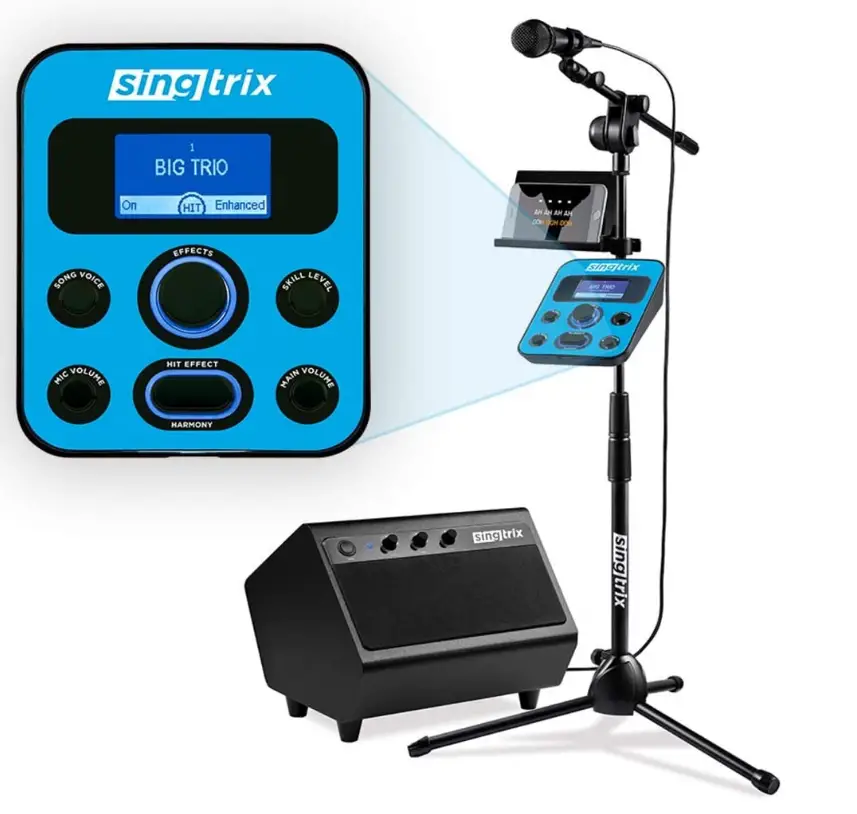
Singtrix SGTX2 Portable Karaoke Machine
Specifications
- CONSOLE DIMENSIONS: L-7.25” x W-5.75” x H-2.25”
- CONSOLE WEIGHT: 440g
- MICROPHONE WEIGHT: 470g
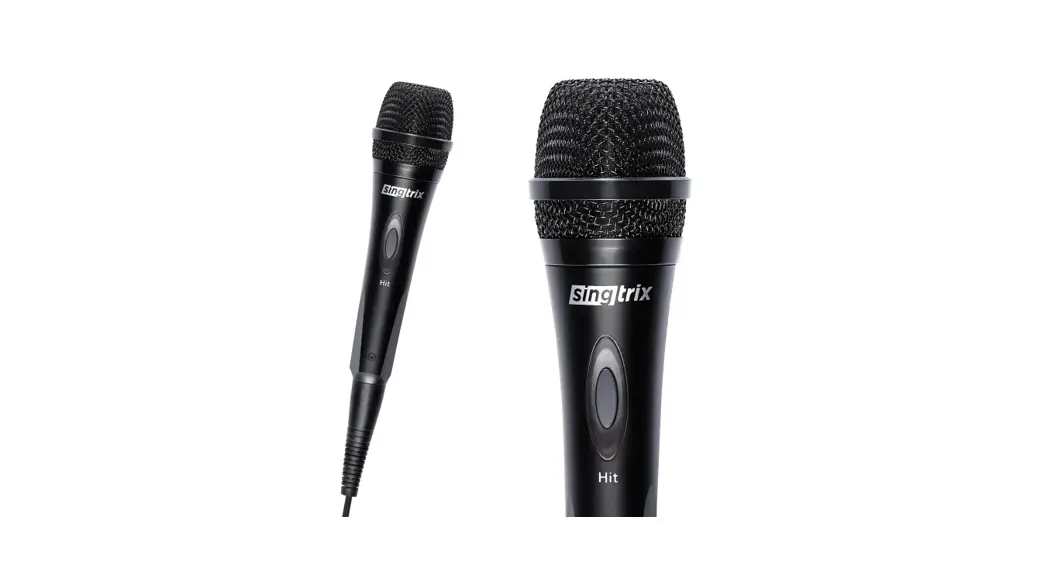
- MICROPHONE DIMENSIONS: L-10” x W-2” x H-2”
- MUSIC INPUT: balanced 1/8” mini stereo jack (3.5mm)
- SPEAKER OUTPUT 1 & 2: balanced 1/8” mini stereo jack (3.5mm)
- POWER INPUT: 5V 250mA
- POWER OUTPUT: 5V, 1000mA
- IMPEDANCE: 600 ohm (+/-15%)
- SENSITIVITY: -53+/-3dB (at 1kHz) , (0dB=1mV/Pa)
- SPEAKER POWER: 40 Watts
- 3” LEFT & RIGHT MID/HIGH RANGE STEREO SPEAKERS: 200Hz to 20KHz,
- BUILT-IN SUBWOOFER: 20Hz to 100Hz,
- SUBWOOFER SIZE25”
- SPEAKER WEIGHT: 5Kg
- SPEAKER DIMENSIONS: L-12” x W-13” x H-11”
- DC INPUT: 18V, 2.8 Amps
- SPEAKER AC POWER SUPPLY INPUT: 100-240V, 50/60Hz 1.2A
- SPEAKER AC POWER SUPPLY OUTPUT: 18V, 2800Ma
Introduction
Singtrix Portable Karaoke Machine is one of the most popular karaoke machines from Singtrix. It is an all-in-one karaoke system with 350+ voice effects and auto tuning, PA speakers, a karaoke microphone and free YouTube karaoke songs. This karaoke machine can be used by your family, on every occasion. It is simple to operate and can be used by anyone from a beginner to a Pro.
Setup & quick-start guide SGTX2
Setup: Assemble
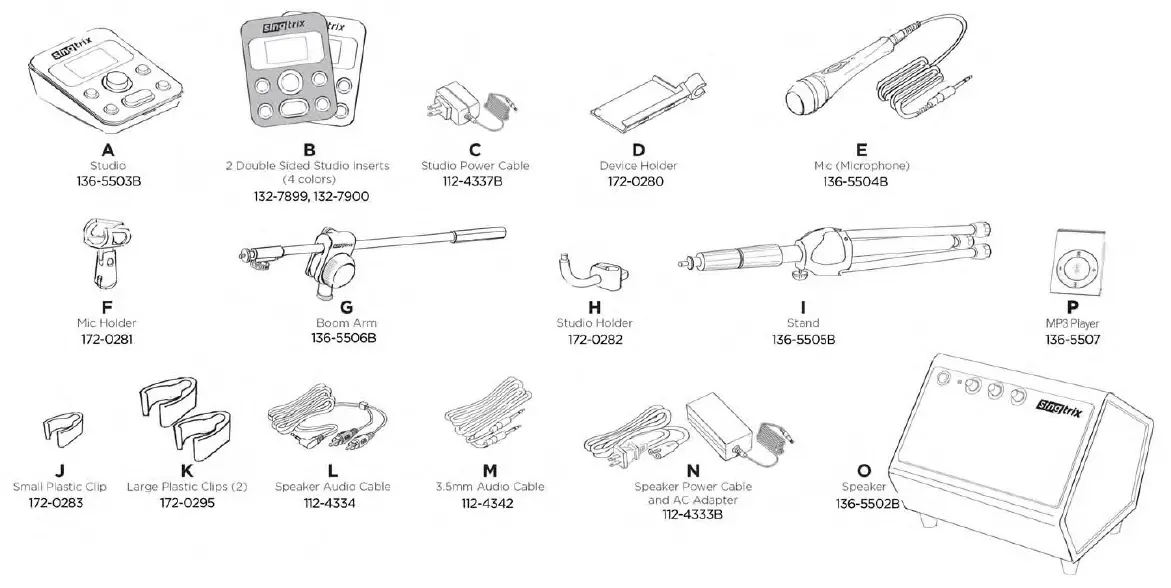
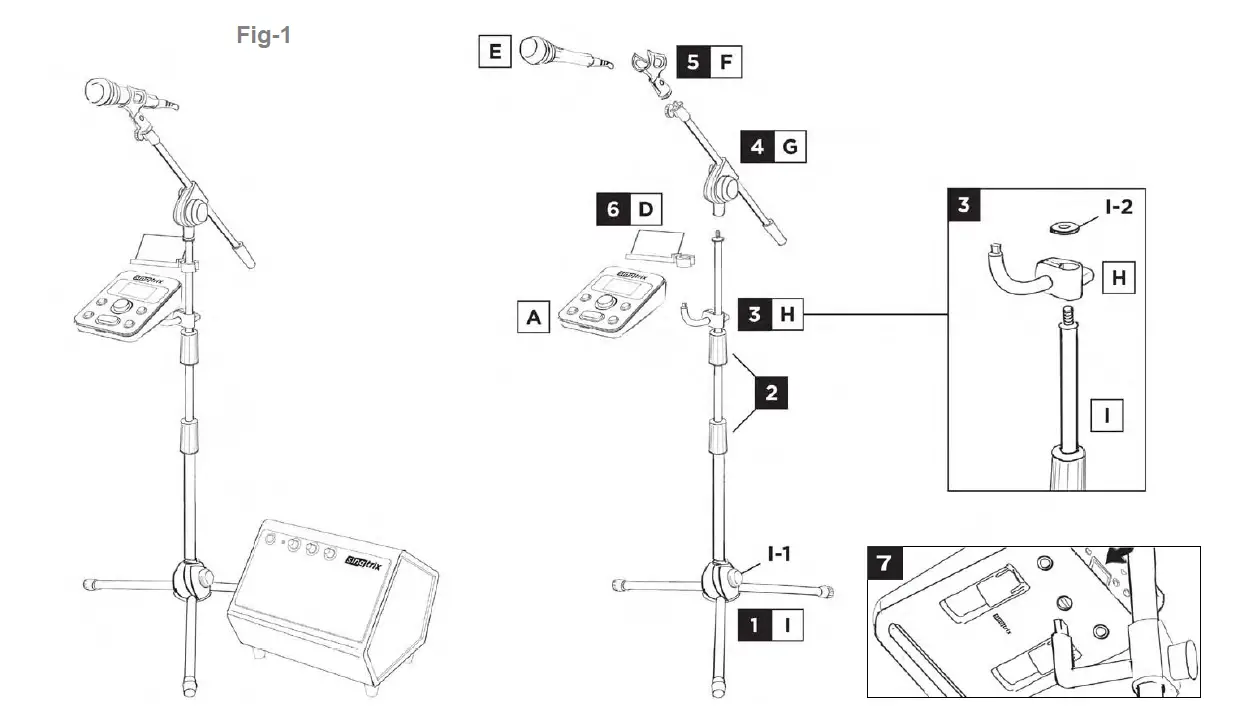
- Extend the bottom legs on stand (I) and twist knob (I-1) to lock in place.
- Twist handles on stand. Fully extend both sections, adjusting for preferred height, and tighten handles. NOTE: Leave a minimum of 8 inches extended at the top for device holder (D).
- Unscrew washer (I-2) from top of stand. Slide studio holder (H) onto stand with hook pointed upward and twist knob to lock in place. Screw washer back onto top of stand.
- Screw boom arm (G) onto top of stand.
- Screw mic holder (F) onto end of boom arm (G).
- Snap device holder (D) onto stand (I).
- Holding the unlock button on back of studio, snap studio (A) to studio holder (H) until a click is heard which means the studio is locked. Lift up on the studio to make sure it is securely in place.
Setup: Making Connections
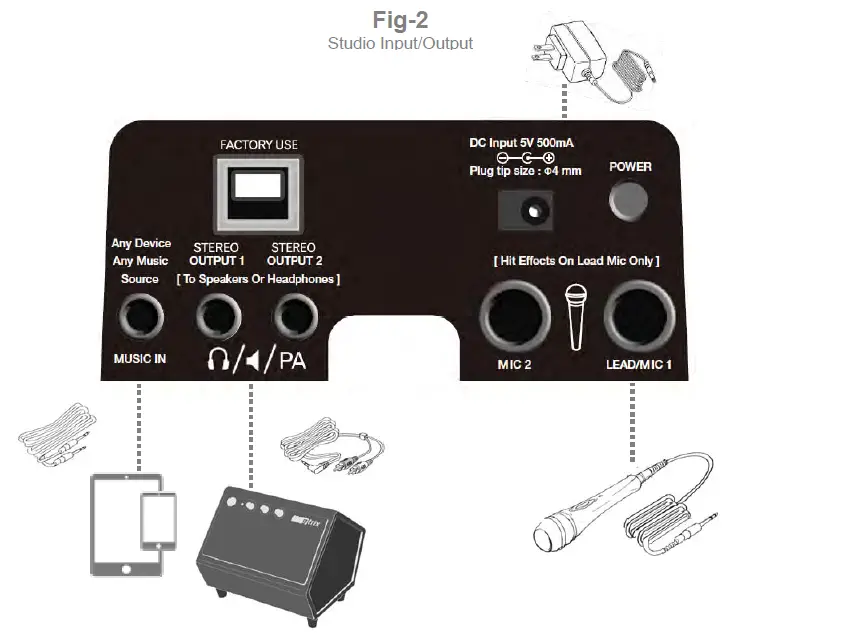
- As per Fig-1 below, plug Mic (E) into “LEAD/MIC 1” input. MIC 2 input can be used for a 2nd mic and has basic effects including reverb & delay with no hit feature or pitch-correction.
- Plug the 3.5mm Audio Cable (M) into “MUSIC IN”. Plug the other end into your tablet, smartphone or other music device (see list of device options in following section). Singtrix tunes your voice & harmonies to the music played. In place of karaoke music from your device, you can plug in an instrument such as a guitar or keyboard (see “Live Mode” section for more details).
- Plug the 3.5mm end of the Speaker Audio Cable (L) into “OUTPUT 1” or “OUTPUT 2”. Note: make sure the plugs are fully inserted to prevent hum. Plug opposite end with RCA connectors into “L/R MUSIC INPUT on the Speaker (O).
- Plug Studio Power Adapter (C) into “DC IN” on Studio.
- Plug Speaker Power Adapter (N) into “DC IN” on speaker.
Quick Start: Power Up, Level Adjustment & Sound Check
- Turn on Studio power switch located on the back.
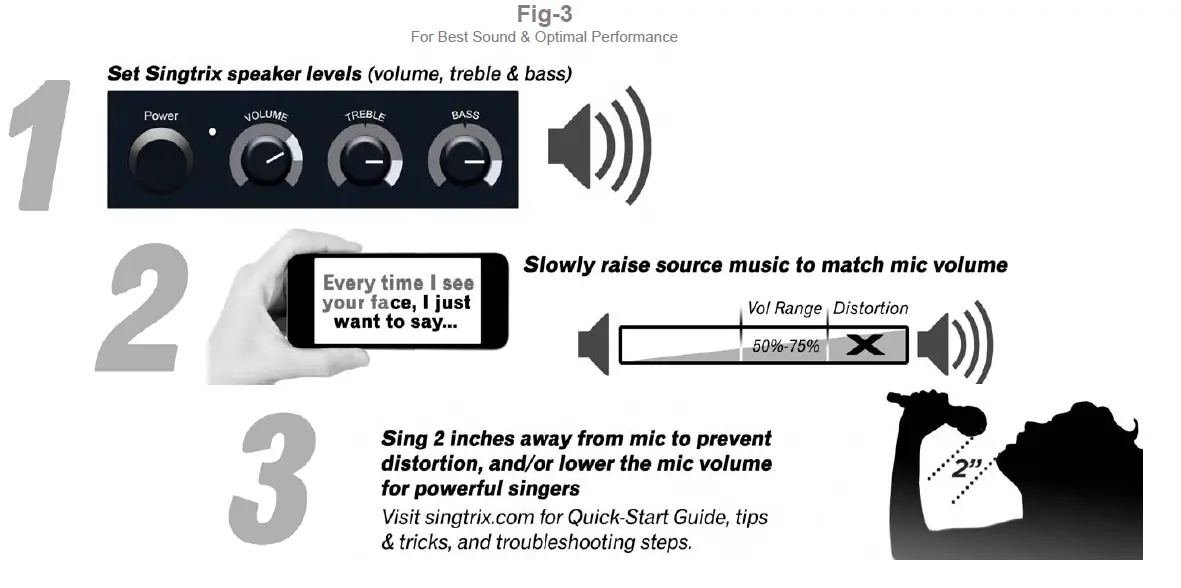
- Turn on Speaker & set volume to 2 o’clock, treble & bass to 3 o’clock. TIP: Want to hear our amazing effects shine in true stereo, try Singtrix with headphones into our stereo output. Great for quiet practice sessions.
- Sing into mic and check that volume level is adequate and optimal. The system and mic are sensitive for effortless singing. Screaming can distort the sound. For the best performance, sing 2” away from the mic and never cup your hand around the mic screen. Singing with your mouth on the mic screen or holding the mic screen will cause distortion. The system and mic are sensitive for effortless singing. For loud singers, sing further away or turn down the mic gain.
- Turn your tablet or other music device volume down to 20% and start playing a karaoke song. TIP: Check out FREE YouTube® karaoke videos. Search “karaoke” and the name of a song, artist, lyric or genre for access to thousands of karaoke tracks. Create playlists on YouTube®. Singtrix YouTube® channel has playlists covering every genre of music including Pop, Rock, Country, Hip Hop, Kids Pop Hits etc. Always select highest quality playback for YouTube® videos.
- For sound check, try Preset 1 BIG TRIO.
- Sing into the mic while music is playing, and slowly raise your music device volume until your vocals are evenly mixed with the music.
- Press the “HIT” button on the mic during the chorus of the song to kick in live vocal harmonies and other cool effects.
Quick Start: Any Music, Any Device
Singtrix open platform allows you to use a variety of sources for music content & music devices. The music device you use must have a headphone or line level analog output. Singtrix will tune your voice & live harmonies to the music played. TIP: when using karaoke apps, the 3.5 mm jack may activate on your device’s onboard microphone. All mics must be disabled on your music device to prevent feedback. Only the Singtrix Mic should be used.

Quick Start: Navigating the Studio Console & Effects Presets Fig-4
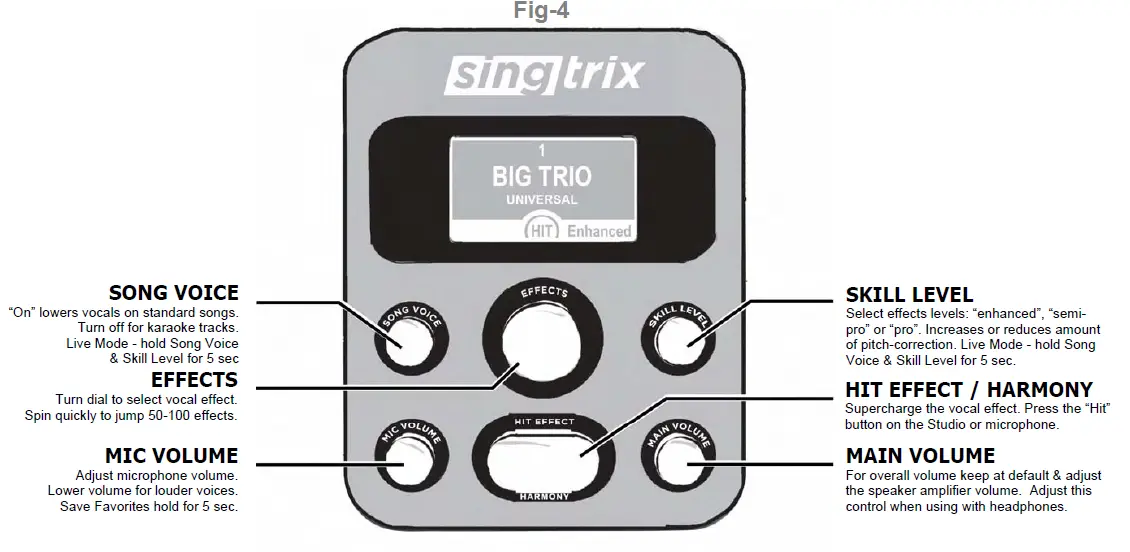
- Effects Preset Guide go to Singtrix.com for our comprehensive guides and preset/song reference list
- Navigating Push the Effects dial and select an effects category, or spin the dial quickly to jump 50-100 effects at a time. Use the preset list as reference.
- Favorites Presets Singtrix comes with hundreds of preset effects. Save your top 10 favorites by pressing and holding the Mic Volume button for 10 seconds.
- Party Favorites Presets These are 20 of the best effects to use with first time users and party guests. There is something for every type of singer and will prevent guest from waiting while users try to scroll through the 400+ effect library.
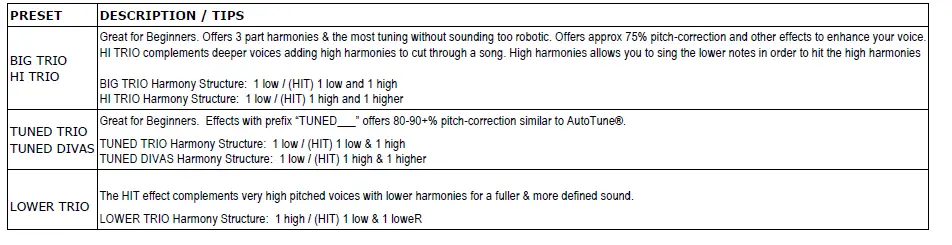
- Universal Presets are versatile, best for beginners, and sounds great with any type of music. Some universal effects presets are styled to match certain genres of music e.g. country, rock, hip hop, or big pop sounds. Effects named “TUNED” offers the most pitch-correction.
- Semi Pro Presets are our recommended presets for singers with already great voices that want subtle tuning and other enhancements, but want the option to add harmonies.
- Genre Presets Effects designed to match a specific music genre.
- Extreme Presets offer dozens of transformative effects. Want to sing like a Robot? Pixies or famous baritones? Singtrix has you
Quick Start: Using the Effects Presets
- Where to Start begin with preset 1 “Big Trio”. TIP: presets 1-8 are the easiest for beginners and sound good with most songs. Effects named “TUNED” offers the most pitch-correction.
- Skill Levels enhanced, semi-pro, and pro levels determine the amount of overall effects levels & pitch-correction. As your singing naturally improves, switch to the semi-pro or pro.
- HIT Effect each preset has its own “HIT” effect.” Press the HIT button on the mic or studio to supercharge the vocal effect. Use it to accent certain words or sections in a song, like a chorus or bridge.
- Distance From Mic Singtrix works best when you sing about 2 inches away from the mic. The microphone is sensitive so there’s no need to strain your voice. Singing too close or to loud will cause distortion. However, a good strong voice distanced properly from the mic ensures the best overall sound. TIP: do not cup the mic screen.
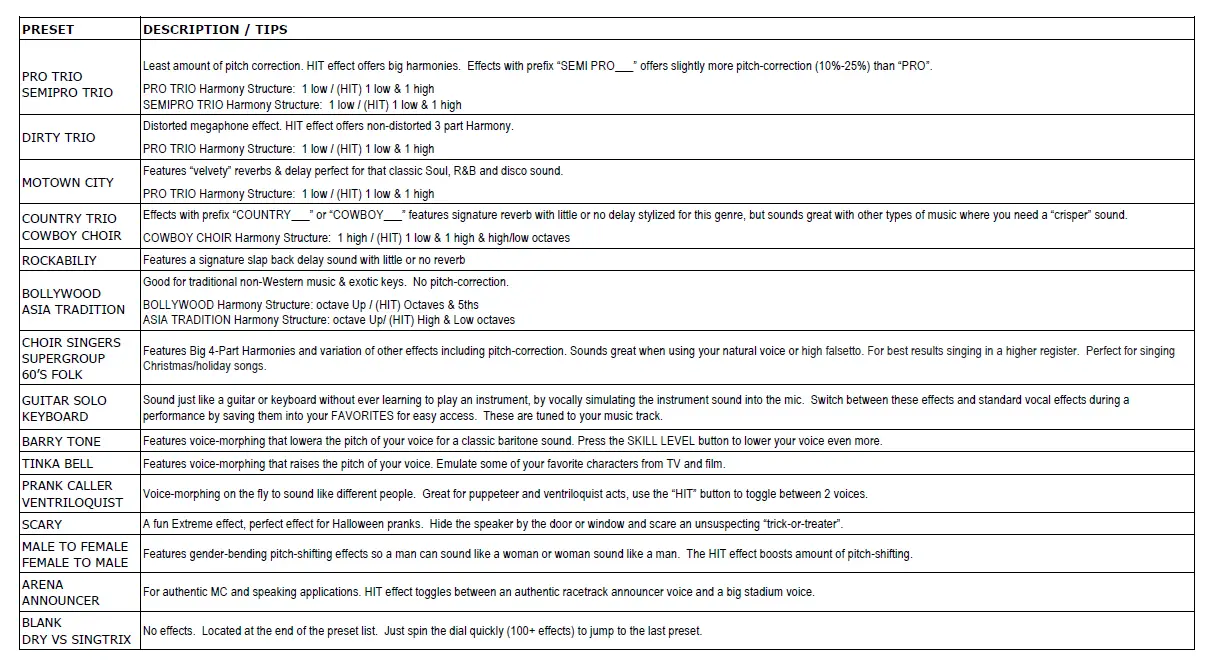
- Commit To The Performance! Don’t just “talk” into the mic, you have to attempt to sing & try to hit those notes. Depending on preset settings, Singtrix will do 30%-70% of the “work” and you have to do the rest. When using presets with more “natural pitch correction”, covered. Tip: Get the family singing favorite holiday songs with “Choir Singers” and create a new tradition together. Try “announcements”, and sound like a sportscaster. Try “ventriloquist” and sound like a puppeteer using the “HIT” button to toggle between 2 voices. “Scary” is a perfect effect for Halloween pranks. Hide the speaker by the door or window and scare an unsuspecting “trick-or-treater”.
- Song Presets are a series of custom designed presets to best match the vocal style of some classic karaoke favorites. Some song presets can be difficult for beginners
- Chromatic Presets offers no vocal tuning when the HIT button is off. Activating the HIT button turns on pitch-correction, harmonies and other effects.
- Fixed Key Presets allow users to set the vocal tuning and harmonies to their desired Key. For example A+MAJ means A# Major, and AMIN means A Minor.
- Be Creative! There is no right and wrong way to use Singtrix effects. People have different abilities, range, musical tastes and styles. Experiment, have fun and use what works for you and your voice. Many users will only use a handful of presets for an entire session of singing.
- Singtrix acts like training wheels for your voice helping you improve naturally.
- The Speaker Faces the Singer for proper monitoring. This allows you to monitor the fidelity of your voice and helps prevent you from straining or screaming into the mic, which will distort the sound. TIP: for best performance place behind the singer when performing to an audience so that everyone is in line with the speaker.
- Practice Makes Perfect The more you sing, the more comfortable and confident you will be. Singtrix is a tool and practicing will help you learn how to use it to make you sound your best. TIP: always warm up and hydrate before and during singing sessions.
- Record a Video to gauge any improvements you’ve made. Post your recordings for family and friends on YouTube®. Send us a link of your best performances and we’ll add your video to our YouTube® Friends & Fans play.
Quick Start: Live Mode / Instrument Mode
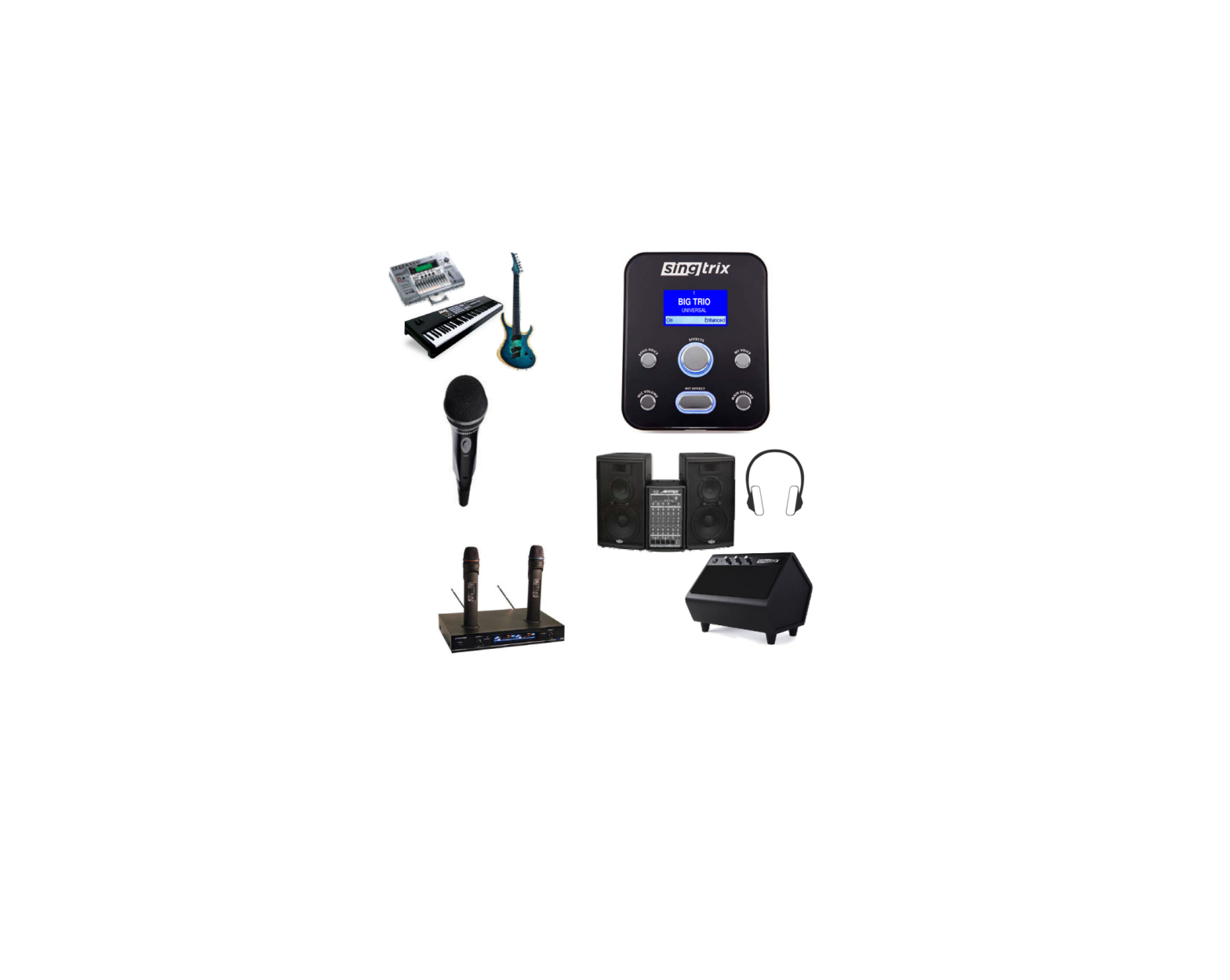
In place of standard music or karaoke tracks, you can use an instrument such as a guitar or music keyboard. Singtrix will tune your voice to the chords played on your instrument.
- Set to Live Mode Press Main Volume Button and use the effects dial to activate. A guitar icon will indicate the mode is on. Live mode eliminates latency used by the system to analyze full spectrum music (music with multiple instruments, percussion and other sounds). Latency will cause the chord played on your instrument to be delayed before it is heard out of the speaker connected to the Studio speaker output. This will prevent playing out of sync.
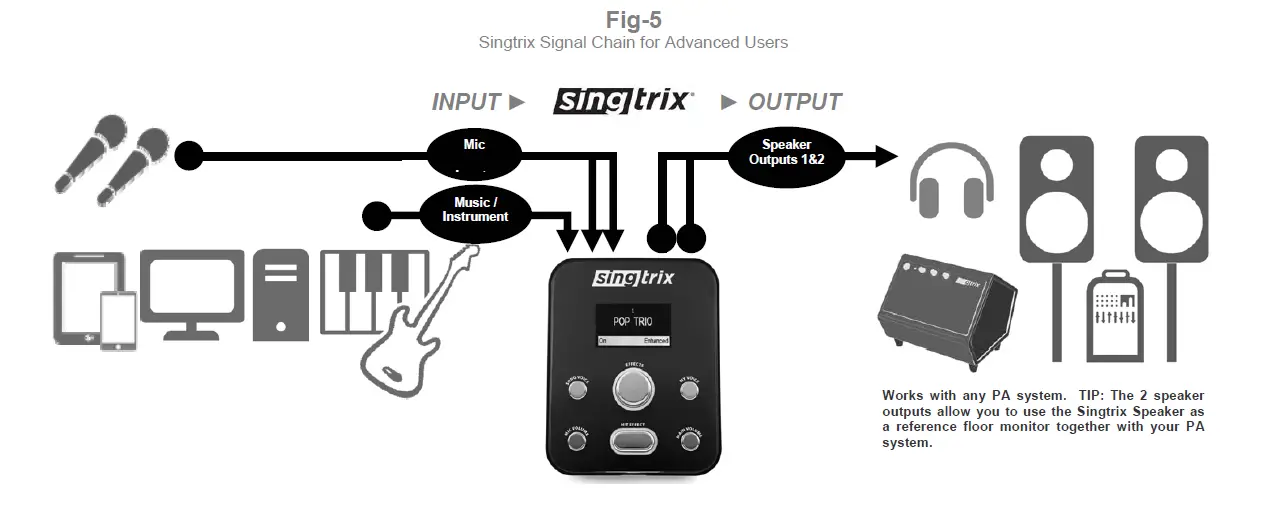
- Signal Chain All inputs and outputs must follow the signal flow diagram in the Fig-5, especially when integrating other equipment including music instruments, other music audio sources, microphones and speaker PA systems. Audio plug adapters may be required for your specific equipment.
- Other Microphones Singtrix mics are specifically tuned to be sensitive and louder than other mics. When using other mic systems (i.e. wireless), it is important that it has a separate microphone gain/volume adjustment to raise the mic volume independently from the volume on the Studio Effects Console.
Frequently Asked Questions
Singtrix is the world’s only plug-and-play karaoke system that uses studio quality vocal effects designed to make “bad singers sound good and good singers sound amazing!” Sing in-tune to your favorite hits with confidence. Just plug into the headphone output of your mobile device or computer and start singing. Singtrix will tune your voice to the music track and add studio quality effects such as 4-part harmony or choir, reverb, delay and so much more.
Singtrix Highlights
• The simple plug and play system is powered by patented state-of-the-art professional live vocal effects technology
• No need to pay for music content since it was designed to work with the thousands of FREE YouTube® Karaoke videos readily available online & posted by 3rd party publishers.
• Works with your existing mp3 music, apps and more.
• Voice-cancellation option lowers existing vocal track from standard songs creating “karaoke tracks on-the-fly”.
• For all skill levels from beginner to pro
• For all musical tastes. Singtrix effects cover every genre & generation of music.
The Standard Singtrix Party Bundle SGTX2 includes the award-winning Gen-2 Studio Effects Console, high-fidelity Singtrix Mic with custom “HIT” button, powerful 40-watt 2.1 stereo speaker system with built-in subwoofer (which doubles as a multimedia speaker system for movies & gaming), device holder for tablet or another mobile device, mic stand with boom arm, cables and other accessories. Other versions of the Party Bundle may have add-on accessories. Additional Mic, Mic Stand, Party Lights & other accessories are also available for individual purchase.
Get FREE Karaoke Videos and original lyric videos on YouTube® from 3rd party publishers. Check out the Singtrix YouTube channel for instant access to a variety of playlists covering all the popular genres of music. Thousands of popular hits in each playlist for FREE. Use any one of our Singtrix playlists to create your own custom playlists. Note: Singtrix does not publish its own karaoke content, nor does it guarantee availability & quality of YouTube® content or services.
Singtrix karaoke machine requires a separate device to provide: Music, analog audio signal needed to establish a KEY for tuning and harmony effects, Screen for lyrics. You can use almost any device with an analog headphone output. Singtrix requires a 3.5mm stereo connection. Many devices such as smart phones, laptops and tablets have both an audio output as well as screen for playing karaoke videos which have lyrics. From your device you can access music & karaoke apps and other services. Most customers use YouTube® for free karaoke video tracks. In the YouTube® search, just enter “karaoke” plus name of any song or artist right. Singtrix® has its own YouTube® Channel with Karaoke YouTube® Playlists for your convenience. You can also use standard songs from your current music library. In fact, a basic CD player will work as your music audio source.
With standard songs you are able to lower the song vocals using our SONG VOICE feature. With Singtrix, you are not stuck with any specific app, operating system or music format.
A preset is a customized formulation of our individual vocal effects working together to produce a cool vocal sound. Some presets will have more or less of a specific type of effect. This holds true for pitch-correction. Some presets will emulate current artists who utilize hard-tune effects that intentionally sound “robotic”. Other presets will be geared towards more natural or subtle tuning. Experiment and refer to the preset booklet for the presets that suit you and your song choices.
In addition, each preset has an “enhanced”, “semi-pro” and “pro” setting that can be adjusted using the SKILL LEVEL button. “Enhanced” will have the highest level of effects and pitch-correction. Use the Effects Dial to select your effect category and desired preset.
Go to singtrix.com for our Preset List & Guide & Song FX Reference List
The following is a list of individual effects that may be combined & formulated to make a single Singtrix Effect Preset:
• Thicken
• Tube
• Rotor
• Panner
• Flanger
“Favorites”, “Party Favorites” and “Universal” presets are conveniently located at the front of the list. You can save your own top 10 favorites for quick access. “Universal” presets are a MUST for beginners with the first few effects being the most versatile. They are designed to sound great with most songs. “Party Favorites” are 20 presets that we have selected that will offer something for every type of singer and music at a party. No need to have people scrolling through the massive library and holding up a party or event. One or two presets can be used for an entire night of karaoke without having to change. Additionally, the SKILL LEVEL setting also offers a range of options for party guests with varying abilities and tastes.
“Semi Pro” presets are our recommended presets for singers with already great voices that want subtle tuning and other enhancements, but want the option to add harmonies
“Genre” presets are generic effects designed to match a specific music genre.
“Extreme” presets offer fun voice-morphing options like gender-bending, character voices and instrument simulation. Some are more novel, while others can be musical and used with karaoke tracks. We encourage you to experiment and have fun!
“Song” presets are effect combinations in the style of your favorite songs & artists. Some song presets can be more difficult for beginners so a universal preset may be a better choice in some cases. Song presets will sound great with certain songs so experiment.
Use the Effects Dial to select your preset effects. Quickly spin the dial left or right to jump 50-100 presets at a time. Remember there is no right or wrong preset to use. We understand that everyone has their own unique preference and taste. We made sure there were enough options for everyone! Experimenting and trying different combinations is half the fun and an important part of your Singtrix journey.
• Use any of the presets in the Semi Pro category or with “Pro” in the name (e.g. Pro Trio etc.), less overall effects levels & pitch-correction.
• Lower amount of overall effects by switching the SKILL LEVEL setting from “Enhanced” to “Pro”.
• Try Preset – Dry vs Singtrix
• Try a blank preset or Party Favorite 1 “NO FX”
What effects are best for my voice?
Children and females typically have higher voices and can sound best using a lower harmony. Standard harmony presets like a “TRIO”. “HI TRIO” effects can sound best with a singer with a lower voice or a song that is sung in a low key. Tuned effects are “hard tuned” so they sound similar to an AutoTune® sound. Effects named “TUNED” offer the most pitch-correction and overall vocal enhancements making it easier for beginners to sing.
You can select the Party Favorite 1 NO FX preset or select one of the Chromatic Category of presets. You can also bypass all key related effects such as pitch-correction and harmony by plugging in (2) mics and using the mic plugged into “Mic Input 2”. When (2) mics are plugged in at the same time, only “Mic Input 1” will have harmonies and pitch-correction. “Mic Input 2″ will have all the other lush effects. If there is no additional mic, you can use a ¼” phono cable or adapter into “Mic Input 1” to trick the system into behaving like there are (2) mics plugged in. If you want to minimize the pitch-correction but still keep the harmonies, use Mic Input 1 and set the SKILL LEVEL to “semi-pro” or “pro” settings. This reduces the amount of pitch-correction but still implements powerful harmonies when the HIT button is on. You can also select any effects presets named “PRO” or “SEMI-PRO”.
Yes. Mic input 1 is the lead, and offers pitch-correction and harmony effects. Mic 1 should be used by one singer at a time for best results. Pitch-correction and harmony is more accurate when applied to one voice at a time. Mic input 2 offers amazing core effects such as lush reverbs, delay and dynamic tone equalization.
Since there is no pitch-correction or harmonies applied to Mic 2. Multiple backup singers can share the mic.
Other microphone systems including wireless can be used with Singtrix; however, you lose the ability to control the HIT feature from the mic. Instead, you will have to use the HIT button directly on the Studio Console for harmonies and other “HIT” effects. The Singtrix Mic was designed to be very dynamic with high sensitivity so that singing is effortless. Other mics may not be as sensitive. To compensate for this, we recommend using a microphone pre-amp with your mic for separate volume/gain control to independently raise your mic’s volume level. A ¼” phono plug adapter may be required to plug into the Singtrix Studio console.
Yes, depending on your existing equipment. You may need to discuss this with your local electronics store representative.
Common configurations:
• Computer Video Output/HDMI ► TV HDMI Input ► TV Audio/Headphone Output to Singtrix Music Input
• Singtrix Music Input ◄ Computer Headphone Output / Computer Video Output ► TV video Input
• Mobile Device ► Chromecast ► TV ► TV Audio/Headphone Output to Singtrix Music Input
• Mobile Device ► Apple TV ► TV ► TV Audio/Headphone Output Singtrix Music Input
Note: If your Television doesn’t have an analog headphone output, you can use a digital to analog adapter. Optical or coaxial to RCA adapters are inexpensive option if the TV has these audio outputs. You will need an additional cable that goes from the RCA connections on the adapter to the 3.5mm stereo music input of the Singtrix effects console. When using a computer for audio and TV for Video, you must first become familiar with the computer’s specific soundcard and audio settings options. Many computers allow you to play audio from the computer headphone output while playing video on a TV.
It depends. Singtrix requires an analog audio signal to detect song key in order for pitch-correction and harmony effects to work properly. If your Karaoke system has a headphone output or other audio output, that can be connected to the Singtrix music input. Audio adapters may be required to make this connection. Any separate speaker or amplification system must be directly connected to the Singtrix speaker output. The speaker or amplification system cannot bypass the Singtrix speaker output. For example, if your karaoke system has a built in speaker system, the music signal played on the karaoke system must not play directly through the internal speaker. The music heard coming out of the Singtrix speaker output will be out of sync with the music coming out of the karaoke player’s internal speaker system.
This signal chain is required: Karaoke Player/Music ► Studio Console Music Input / Studio Console Speaker Output ► Speaker System.
If using a karaoke app on our mobile device, you must turn off the device’s internal microphone since it will cause feedback. Please refer to your music device’s specific instructions. If you’re using a second microphone, make sure it is not near and pointed directly at the Singtrix Speaker. If you experience any hum, buzzing or distortion out of the speaker, it is commonly caused by incorrect volume settings, cables in the wrong plug, or a plug not fully inserted (speaker plug) into the back of the Studio Console speaker output. To isolate problems or noise attributed to the speaker itself, you can try plugging in your music device such as a tablet or phone directly to the speaker bypassing the Singtrix console.