INSTRUCTION MANUAL
pH Simulator
Introduction
Thank you for selecting our palm top pH and mV simulator. This simulator is designed to be handy, capable of allowing one hand operation.
Your simulator has a user friendly feature of push button operation for selection of pH and mV values which are accessible through the splash-proof membrane keypad. It also has a large LED display for easy reading.
Your simulator includes a 1 meter BNC to BNC cable and 4 AAA batteries.
This manual provides a step-by-step guide to operate the simulator.
Display and Keypad Function
2.1 Display
The display consists of 16 sets of labeled LED for the selection of pH and mV values.
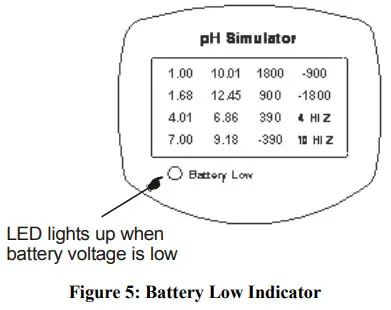
The display also includes the low battery indicator LED at the bottom left hand corner.

| 1.00 – 1.00 pH Value | 10.01 – 10.01 pH Value | 1800 – 1800 mV Value | -900 – -900 mV Value |
| 1.68 – 1.68 pH Value | 12.45 – 12.45 pH Value | 900 – 960 mV Value | -1800 – -1800 mV Value |
| 4.01 – 4.01 pH Value | 6.86 – 6.86 pH Value | 390 – 390 mV Value | 4 HI Z – 4.01 High Impedance pH value |
| 7.00 – 7.00 pH Value | 9.18 – 9.18 pH Value | 390 – -390 mV Value | 10 HI Z -10.01 High Impedance pH value |
2.2 Keypad
A large membrane keypad with tactile feedback makes the instruments easy to use.
 | Powers on and shuts off the simulator. |
 | Scroll and select the pH and mV output simulation value. |
 | Scroll and select the pH and mV output simulation value. |

Preparation
3.1 Inserting & Removing Rubber Boot
- To remove simulator from rubber boot, push out from the bottom edges of simulator until it is completely out of boot. Ensure that the BNC cables are not connected.
- To insert simulator into rubber boot, slide in from the top of meter before pushing the bottom edges of simulator down to set it into position. Lift up the stand at the back of simulator for bench top applications if necessary.


3.2 Inserting the Batteries
The battery compartment is found at the back of instrument as shown in Figure 4. To open the battery compartment:
- Push in the direction of arrow and lift up the cover.
- Note the polarity of battery before inserting into position.
- After replacement, place cover back and press down until it locks tight.


3.3 Battery Replacement
A low battery LED alerts you when battery power is running low. See Figure 5. Replace with the same type as recommended by the manufacturer.
Caution: Power off the simulator when changing battery.
3.4 Connecting the BNC cable to simulator
- Insert the BNC connector of the cable over the BNC connector socket on the simulator.
- Make sure the slots of the connector are in line with the posts of the socket.
- Slide the BNC connector of the cable over the socket and rotate the connector clockwise until it locks.
- To remove cable, push and rotate the connector counterclockwise.
- While holding onto the metal part of the connector, pull it away from the simulator.
- Be careful not to use excessive force.
CAUTION: Do not pull on the cable cord or the cable wires might disconnect.

Operating Procedure
The simulator is designed to test the accuracy of your pH/ORP meters. It includes the simulation values for the USA and NIST buffer set standards and the simulation performance of an electrode in pH 4.01 and pH 10.01 buffers (4 Hi Z & 10 Hi Z). This High mpedance pH simulation is useful for testing suspected leakage problems of your pH/ORP meters.
- Connect the BNC end connector of your simulator to the pH/ORP meter.
- Switch the simulator on by pressing the ON/OFF button. The ‘7.00’ LED will light up indicating that the pH 7.00 simulation value has been selected.
Note: The simulator will always be in the pH 7.00 selection every time it is turned on. - Press the ▲ and ▼ key to scroll through the value selection on the LED display. The LED will light up according to your preferred selection.
- Select the desired simulation value indicated by the LED light up display.

Specification
| pH Simulation Value | 1.00 pH, 1.68 pH, 4.01 pH, 6.86 pH, 7.00 pH, 9.18 pH, 10.01 pH, 12.45 pH |
| pH Simulation Accuracy (with supplied cable) | +1- 0.02 pH |
| mV Simulation value | 1800 mV, 900 mV, 390 mV, -390 mV, -900 mV, -1800 mV |
| mV Simulation Accuracy (with supplied cable) | +/- 1 mV |
| High Impedance Test (Hi Z) | 1 G ohm at 4.01 pH & 10.01 pH |
| Buffer Set Standard Simulation Value | USA, NIST |
| Display | LED, Orange lighting |
| Output | BNC Connector |
| Power Requirements | 4 *AAA’ 1.5V Batteries |
| Operating Temperature | 0 to 40°C |
| Relative Humidity | 80% up to 31°C decreasing linearly to 50% at 40°C |
| Dimensions | 14 X 17 X 3.5 cm |
| Weight | 200g (Boxed) |
Accessories
| Item | Eutech Instrume Order Code | Instruments Order Code Oakton Instruments |
| pH Simulator with 1m BNC to BNC Cable | EC-PHSIMULATOR | 35652-00 |
| 1m BNC to BNC Cable | 01X373401 |
Warranty
This simulator is supplied with a one-year warranty against significant deviations in material and workmanship.
If repair or adjustment is necessary and has not been the result of abuse or misuse within the designated period, please return – freight pre-paid – and correction will be made without charge. Eutech Instruments/ Oakton Instruments will determine if the roduct problem is due to deviations or customer misuse.
Out of warranty products will be repaired on a charged basis.
Exclusions
The warranty on your instrument shall not apply to defects resulting from:
- Improper or inadequate maintenance by customer
- Unauthorized modification or misuse
- Operation outside of the environment specifications of the products
Return of Items
Authorization must be obtained from our Customer Service Department or authorized distributor before returning items for any reason. A “Return Goods Authorization” (RGA) form is available through our Authorized Distributor. Please include data regarding the reason the items are to be returned. For your protection, items must be carefully packed to prevent damage in shipment and insured against possible damage or loss. Eutech Instruments/ Oakton Instruments will not be responsible for damage resulting from careless or insufficient packing. A restocking charge will be made on all unauthorized returns.
NOTE:Eutech Instruments Pte Ltd/ Oakton Instruments reserve the right to make improvements in design, construction, and appearance of products without notice.
Contact:
Industrial Process Measurement, Inc.
3910 Park Ave, Unit #7
Edison, NJ 08820 USA
(732) 632-6400
[email protected]
https://www.instrumentation2000.com/
 Environmental Express
 World Leader in Water Quality Instruments - Eutech
 oaktoninstruments.com/
 Instrumentation2000.com - Test Instruments and Accredited Calibration