lexicon 300L User Guide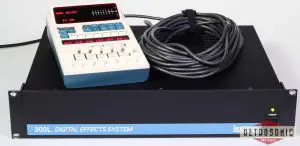
Selecting Analog and/or Digital Input
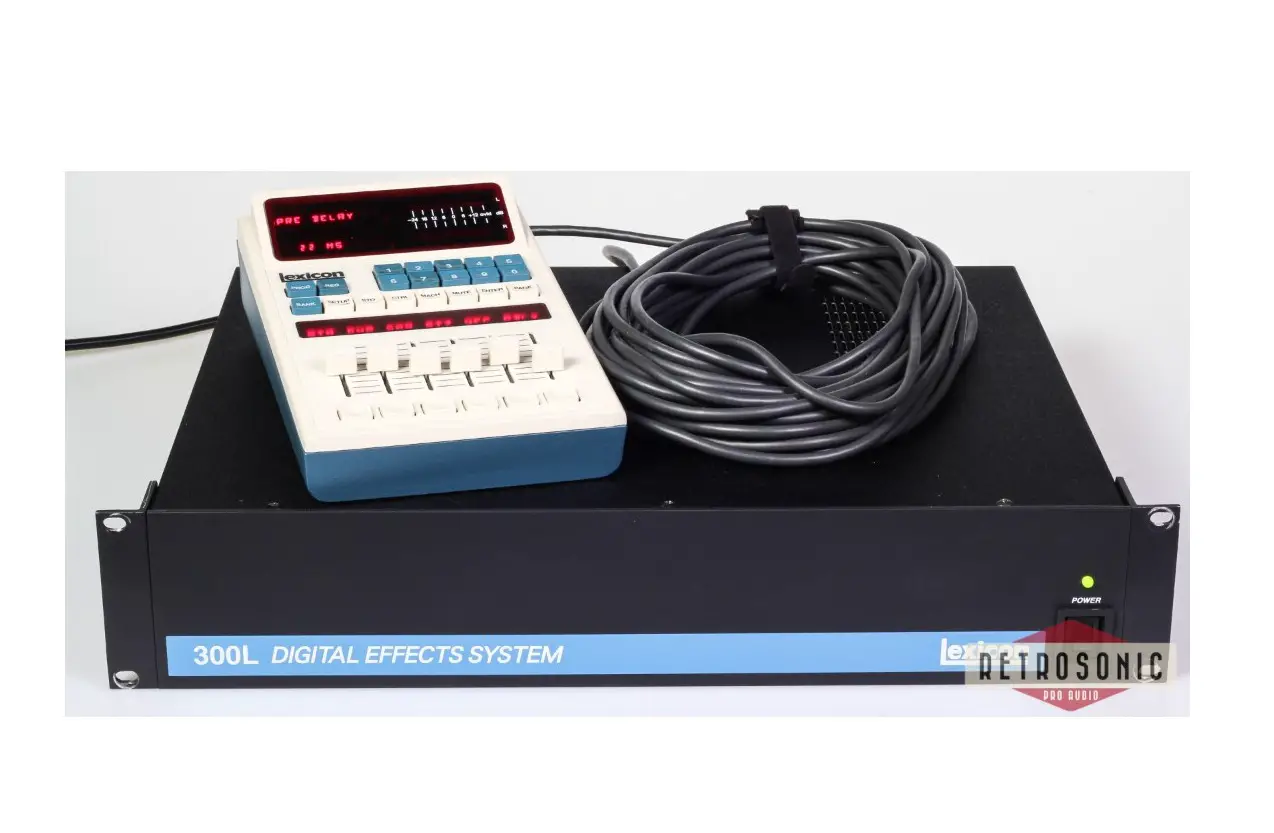
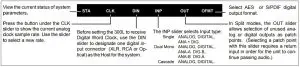
The 300L is factory set to run Analog In at 48kHz. To change the Analog Sampling rate, to Client-lock the 300L to an external digital device, or to external system word clock, press CTRL to enter Control mode. Press PAGE until the following set of controls appear on the LARC slider display.
This page allows you to view the current status of the box, (STA), define sample clock speed (CLK), specify a digital
Input connector (DIN), and select Input type (INP), output type (OUT) and digital output format (OFMT). Use the sliders beneath each label to make selections.
Setups
The 300L is organized into Setup Presets and User Registers.
Setups contain input routing, analog and digital levels and balances, LFO rates and shapes, DSP effect configuration, and pointers to one or more effects. The SETUP key accesses this top level of the user interface.
To simplify the choice among the many possible effect and system routings, the 300L is shipped with 150 Setup Presets.
The Setup Presets are organized as follows:
- P1-100 = Single Setups
- P101-125 = Dual Mono Setups
- P126-150 = Cascade Setups
All of the Setups are listed on the reverse side of this card.
Single Setups

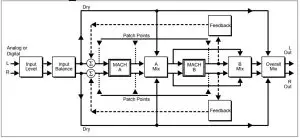
Split Setups
Dual Mono Setups (P101- 125) load one effect into Machine A (left out) and one into Machine B (right out).
Cascade Setups also load two effects: one is loaded into Machine A, then the audio from Machine A is passed to Machine B.
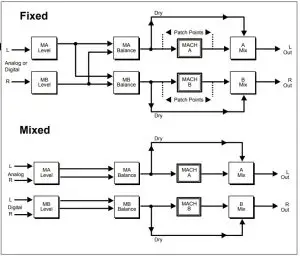
When only one input is selected (analog or digital), the format is referred to as “fixed”. When both analog and digital are specified to operate as main inputs, the format is referred to as “mixed”.
Setup Selection and SoftSlider
Press SETUP to display the currently running Setup. Use the PRE slider or numeric keypad entry to select a new Setup.
Press ENTER to load the selected Setup. Use the SoftSlider to quickly modify the sound of the Effect.
Editing a Program or Register
Press BANK, PROG or REG to access a page of Effect parameters.
Press PAGE to view additional parameter pages. Use the LARC sliders to control the parameters shown on each page.
Storing your changes into Setups
If you modify the SoftSlider setting, or any parameter, press SETUP to return to the top level of the user interface.
Press STORE . Use the REG slider to select an “available” register (or one you don’t mind overwriting).
Press STORE again.
Note: If the 300L Copy function is disabled, no STORE functions can be performed.This function is enabled in CTRL mode (page 3, Slider 1). Selection of CTRL does not interrupt audio operation of the 300L.
| Single Setup Presets | |||||
| # | Name | SoftSlider | # | Name | SoftSlider |
| P1 | LARGE HALL | DECAY | P51 P52 P53 P54 P55 P56 P57 P58 P59 P60 P61 P62 P63 P64 P65 P66 P67 P68 P69 P70 P71 P72 P73 P74 P75 P76 P77 P78 P79 P80 P81 P82 P83 P84 P85 P86 P87 P88 P89 P90 P91 P92 P93 P94 P95 P96 P97 P98 P99 P100 | LIVEDRUMROOM ON STAGE GUITAR CAVE DRUM CAVE BALLROOM SCORE STAGE DRUM GATE LE GATE! THIN LIZZY BAND IN ROOM SPACE & EKOZ VOCAL STAGE WAVE O WALLS BRAND “X” HANGAR EARLY REFLEX STAGE SLAP HUGE SPACE VOCAL SHEEN ALMOST VERB RICH PLATE GLOSSY PLATE WARM PLATE PERC PLATE CONTEM-PLATE EKO PLATE 5K HALL ROUND PLATE SALAD PLATE VOX PLATE STEREOADJUST STEREO DELAY 3 FRAME DLY 4 FRAME DLY PHASE INVERT MS DECODE TELEPHONE MULTI CANYON LFO PANNER THIN EKOZ STEREO SHIFT OCTAVE DOWN VOX CHORUS POLE FLANGE BULKIE ROLL MR. BIG ZORCH! GOING, GOING GTR CHORUS FADE DOWN | IMPACT LIVENESS DECAY DECAY SIZE / SHAPE LIVENESS DURATION HIGH CUT SIZZLE LIVENESS BLEND DECAY DECAY DECAY HIGH CUT SPACING PREDELAY DECAY LEVEL SPACE PREDELAY DECAY DECAY DECAY SIZE DECAY EKO DELAY DECAY DECAY DECAY DECAY LEVEL DELAY FINE DELAY FINE DELAY PHASE MATRIX M/S LEVEL DEPTH LFO SPEED FEEDBACK SHIFT DN/UP FINE PITCH SPLIT SHIFT FEEDBACK DELAY FINE PITCH FEEDBACK FEEDBACK FINE PITCH FINE PITCH |
| P2 | MEDIUM HALL | DECAY | |||
| P3 | SMALL HALL | DECAY | |||
| P4 | SYNTH HALL | LIVENESSL | |||
| P5 | DANCE HALL | LIVENESS | |||
| P6 | SOLO HALL | DECAY | |||
| P7 | CHURCH | DEPTH | |||
| P8 | GOTHIC HALL | DEPTH | |||
| P9 | GATED HALL | SIZE | |||
| P10 | DEEP END | HOW DEEP? | |||
| P11 | ROOMS | SIZES | |||
| P12 | REHURSAL ROOM | PADDING | |||
| P13 | STUDIO A | LIVENESS | |||
| P14 | STUDIO B | LIVENESS | |||
| P15 | STUDIO C | LIVENESS | |||
| P16 | LARGE ROOM | LIVENESS | |||
| P17 | SMALL ROOM | LIVENESS | |||
| P18 | BEDROOM | REFLEXIONS | |||
| P19 | W.C. | DECAY | |||
| P20 | INVERSE ROOM | DURATION | |||
| P21 | CHAMBER | DECAY | |||
| P22 | BRICK WALL | DIFFUSION | |||
| P23 | OIL DRUM | TUNING | |||
| P24 | WIDE CHAMBER | DECAY | |||
| P25 | FAT CHAMBER | DECAY | |||
| P26 | CHUNKY | CHUNK | |||
| P27 | HOMEROOM | DECAY | |||
| P28 | OPEN WIDE | DECAY | |||
| P29 | WET SUIT | DECAY | |||
| P30 | BASEMENT | LIVENESS | |||
| P31 | AMBIENCE | SIZES | |||
| P32 | MARBLE FOYER | SLAP LEVEL | |||
| P33 | LARGE AMB. | HIGH CUT | |||
| P34 | MEDIUM AMB. | HIGH CUT | |||
| P35 | SMALL AMB. | HIGH CUT | |||
| P36 | V SMALL AMB. | HIGH CUT | |||
| P37 | HEAVY AMB. | REVERB LVL | |||
| P38 | BRIGHT AMB. | REVERB LVL | |||
| P39 | SMOOTH AMB. | HOW SMOOTH? | |||
| P40 | WAVE AMB. | HOW LONG? | |||
| P41 | IN A ROOM | HOW BIG? | |||
| P42 | STAIRWELL | # OF FLOORS | |||
| P43 | CAR INTERIOR | WINDOW DN/UP | |||
| P44 | MEETING ROOM | LIVENESS | |||
| P45 | LIVING ROOM | LIVENESS | |||
| P46 | POWDER ROOM | DECAY | |||
| P47 | FULL CLOSET | HOW FULL? | |||
| P48 | PODIUM | DISTANCE | |||
| P49 | STUDIO D | HIGH CUT | |||
| P50 | OFFICE | LIVENESS | |||
| Dual Mono Setup Presets | ||
| # | Name | SoftSlider |
| P101 | DM: REV/REV | INPUT PAN |
| P102 | DM: REV/DLY | INPUT PAN |
| P103 | DM: REV/PCH | INPUT PAN |
| P104 | DM: REV/COMP | INPUT PAN |
| P105 | DM: DLY/DLY | LFO RATE |
| P106 | DM: DLY/PCH | DELAY MACH A |
| P107 | DM: DLY/COMP | SPACE MACH A |
| P108 | DM: PCH/PCH | INPUT PAN |
| P109 | DM: PCH/COMP | INPUT PAN |
| P110 | DM: COMP/COMP | INPUT PAN |
| P111 | DM: SLOW SPIN | LFO RATE |
| P112 | DM: WIDEFLANG | LFO RATE |
| P113 | DM: X-TRAFFIC | DELAY MACH B |
| P114 | DM: GEAR UP | INPUT PAN |
| P115 | DM: TWO ROOMS | INPUT PAN |
| P116 | DM: TWO HALLS | INPUT PAN |
| P117 | DM: DELAYS | DELAY SPACE |
| P118 | DM: REVPAN | DECAY TIME |
| P119 | DM: UP&DOWN | DELAY |
| P120 | DM: MYGUITAR | INPUT PAN |
| P121 | DM: ENVSPOOGE | INPUT PAN |
| P122 | DM: FLNG&DLYS | DELAY MACH B |
| P123 | DM: DLY DAZE | DELAY |
| P124 | DM: CLUSTERS | DELAY MACH B |
| P125 | DM: 2 FLANGES | INPUT PAN |
| Cascade Setup Presets | ||
| # | Name | SoftSlider |
| P126 | CC: REV->DLY | DELAY SPACE |
| P127 | CC: DLY->REV | SLAP & SIZE |
| P128 | CC: REV->PCH | DECAY MACH A |
| P129 | CC: PCH->REV | BMIX |
| P130 | CC: REV->COMP | THRESHOLD |
| P131 | CC: COMP->REV | NONE |
| P132 | CC: DLY->PCH | LFO RATE |
| P133 | CC: PCH->DLY | DELAY SPACE |
| P134 | CC: DLY->COMP | DELAY SPACE |
| P135 | CC: SLAPS | SPACE |
| P136 | CC: PCH->COMP | LFO RATE |
| P137 | CC: SURRVERB | SPATIAL EQ |
| P138 | CC: V3COMP | NONE |
| P139 | CC: EQ/DITHER | NONE |
| P140 | CC: FILT DLYS | DLY/BANDPASS |
| P141 | CC: JETVERB | LFO RATE |
| P142 | CC: BIGBRICKS | DIFFUSION |
| P143 | CC: REV->EKOZ | RVB LEVEL |
| P144 | CC: REV->KORUS | RVB LEVEL |
| P145 | CC: OVER!TOP | LFO RATE |
| P146 | CC: GUITAR XP | LFO RATE |
| P147 | CC: EKO->FAZE | AMIX |
| P148 | CC: VERB->DOWN | B MIX |
| P149 | CC: THE SKY | DELAYS |
| P150 | CC: SPINOLA | LFO RATE |
The 300L has many features which are not described here for complete information, see the 300L Owner’s Manual.
3 Oak Park • Bedford MA 01730-1441
Tel: (617) 280-0300
Fax: (617) 280-0490