 Operation instruction of pulverizer
Instruction Manual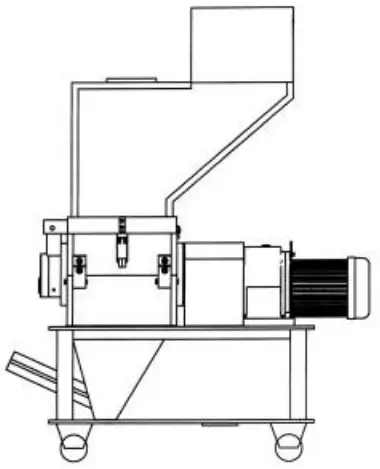
Chapter I installation and initial operation
1. installation
The machine must be installed on the level ground. To ensure that the machine is stable, two wheels with brakes must be installed on the machine. Make sure the brakes are locked.
2. preparation before boot:
- Check the crushing chamber before starting the machine to ensure that there is no residual material in the crushing chamber.
- Check that all parts of the unit are fastened and the power line is good before starting.
- After boot, let the equipment idling 2-3 minutes, check whether the rotor steering is correct and sound is normal. It can only work after rotating smoothly at rated speed.
- Always pay attention to the operation of the grinder, feed evenly, to prevent blocking the car. If there is vibration, noise, bearing and body temperature is too high, spray out of the material, should immediately stop to check, after troubleshooting before continuing to work.
- Comminuted materials should be carefully checked, not mixed with stones, metals and other foreign objects, lest damage the machine.
- When the machine is in operation, the operator shall not leave the unit, nor shall he remove the machine in operation to observe the working condition of the crushing chamber, and the maintenance tools shall not be placed on the machine orfiller.
- Operators should not wear gloves, when clogging, strictly prohibit the hand into the stuffing hopper, feed should stand on the side of the grinder, in case of rebound debris injury face.
- Do not shut down immediately after the work is finished. It should be idle for 2 to 3 minutes, so that the material in the machine can be completely discharged. After shutdown, it should be cleaned and maintained.
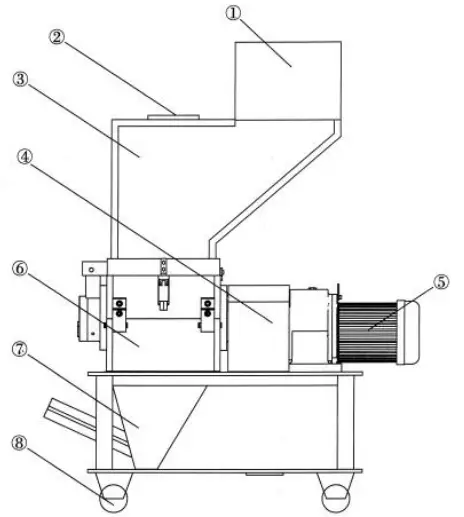
| 1. Heightening bucket 2. Hopper window board 3. Upper bucket 4. switch | 5. motor 6. filler bin 7. Hopper 8. trundle |
 Note: motor steering should be checked.
This chapter is for you to use this product correctly and safely, notes on the operation, maintenance, inspection, repair process and how to identify the notice stickers, and labels affixed to the product.
Operation and maintenance,inspection of .this product,must strictly abide by the safety notes recorded in this book. We do not assume any liability or warranty for any injury or accident caused by failure to pay attention to these matters.
For the safe use of this product, the general note must be observed
| Must abide by the content | Give an example |
| No crushing of any material or article other than a “plastic bar” . | For example: not allowed to form bad products, mold cleaning materials, etc. Comminuted. |
| Prohibit a large amount of material rod crushing. | For example: no manual input or material rods piled up inside the hopper for the use of tools to the material rod into the box and so on and so on. |
| Disable load startup. | No matter what causes the shutdown, when restarting, all the contents of the box and hopper must be cleaned, otherwise the motor and motor starter will be destroyed. |
| No breakage of adhesive paper and change of current value on thermal protector in motor starter. | 1:the arbitrary change of the current value will seriously affect the guarantee function of the motor. 2:the sticker paper is damaged artificially, does not with warranty, and holds the corresponding responsibility. |
| No metal tools can be used to move-jammed cutters. | Can cause tool damage. |
| Must ensure good discharge of comminuted materials. | The comminuted materials will gradually pile up, causing losses to the internal parts of the box and to the motor. |
| Prohibition of reverse operation of pulverizer | 1:the electric current increases, burns out the motor. 2:cut into pieces, affecting use. |
| Please let our after-sales service department or your company Very experienced electrical technicians operate spot check And replacement operations. | Because electrically unfamiliar operators are prone to trouble and danger. |
| Please do not proceed without our approval Alteration of plant. | Our company is not responsible for accidents caused by unauthorized transformation and alteration. |
| Before the operation of maintenance, inspection and replacement of parts, Must stop running and cut off the power. | Avoid personal injury. |
3. Maintain
Grinding machine operator during maintenance inspection and replacement of parts with fault, dangerous, therefore, in addition to the product knowledge of professionals, please do not operate. When replacing gear reducer using cranes and other occasions, the licensed personnel should abide by the necessary safety rules, such as labor safety and health rules, electrical equipment technical standards and other necessary safety rules.
- Waste of products and parts
After products and parts become industrial wastes, subject to the “waste disposal and cleaning related laws”, please entrust the industry waste collection and handling industry license or “industrial waste disposal industry license” practitioners to deal with. - Power supply
Please use the standard power supply voltage and frequency.
The earth wire must be grounded. - regular inspections
Replacement parts
Components and use of components are basically useful life. In particular, the parts of the grinder blade (fixed moving knife, fixed knife, relying on knife) and the internal parts of the box body of the body which are in contact with the comminuted material are required to be checked and replaced in advance to the after-sales service department of the company before they need to be replaced. Periodic dismantling and overhaul cleaning
In order for you to use this machine for a long time , it is recommended that you perform a regular overhaul and overhaul every year.
(Transmission , bearing – related disassembly and overhaul cleaning and replacement of parts as required .)
In terms of contact , please consult with the after 一 sales service department of our company .
Outside warranty of pulverizer:
The blade (fixed moving knife, fixed knife) and the body box in contact with comminuted material are used as the consumption parts of daily wear, and belong to the warranty external parts.
In addition, the purchase of the machine rust is also warranty.
Please pay attention to the rust prevention measures after purchase.
In addition, the foreign body into the wrong, resulting in the grinder blade damaged, also outside the warranty.
Chapter 3 various label considerations
Label the product according to the risk level, which needs special attention. Please label the label.And after the full understanding of the attention, then carry out the operation.
Please pay attention to maintaining labels so that labels can be identified before the products are discarded.
| warn | |
 | Watch your hands. Your fingers are pinned. Because of the use of a rather sharp rotary knife, do not touch even after the power is turned off, or there is a risk of trauma. |
| Danger | |
 | Hand, finger cut off danger In operation, do not put your hand into the feeding port, otherwise, the sharp turning knife will cause the hand and fingers to be cut off. |
| Danger | |
 | Watch your hands. Your fingers are pinned. When closing the connection between the hopper and the crusher, remember to lock the brake on the casters and slowly lift the hopper. Do not put your hand between the joints. |
| Danger | |
 | Hand, finger cut oft danger In operation, do not put your hand Into the feeding port otherwise, the sharp turning knife will cause the hand and fingers to be cut off. |
| Danger | |
 | False action attention Before checking, maintenance and replacement, the power must be turned off to prevent the risk of misoperation. |
| Danger | |
 | Pay attention to pop-up. Do not stretch your head to look at the feeding mouth, otherwise. because of the material smashing in the face and injured. |
Considerations in the use of Chapter 4
1. Matters needing attention of operators
1.1 Use material correlatior
The device is a special pulverizer for synthetic resin runner residue and gate residue. Even if the comminuted material is synthetic resin 1 channel residue, gate residue, PP materiaLsoft materialjeinforced nylon glass fiber;materials with strong static electricity,etc. In the lower part of the mill suction box may also cause bridge erection, use should be noted.
For the above materials,please confirm whether it can be used before use. Other materials ( product crushing , wood chips , iron and non – ferrous metals ) are not suitable for use because they are susceptible to accidents , failures and breakage.
The failure caused by the use of other materials is outside the warranty.
The device is a special pulverizer for synthetic resin runner residue and gate residue.
1.2 Users and clothing
Please wear safety shoes during maintenance.
Please do not disassemble, clean, or operate anyone other than the operator. Avoid easily involved clothes and wear gloves to prevent cuts. Use air gun cleaning, dust flying in the air, please wear dustproof glasses mask and so on.
Please wear safety shoes during maintenance.
2.Move, set, notice
2.1 Moving
The grinder is heavy. Be careful not to turn over. If the pressure on the person, there is a risk of fracture and other serious injuries. When moving, it is important to take effective safety measures to prevent overturning when passing through sloping and falling areas.
2.2 landing。
Please be sure to check and confirm the grounding.
* in poor ground condition, there is a danger of electric shock.
3 .Precautions in operation
3.1 bunker
When the machine is running, the hopper must be closed and the following hopper fastening parts must be tightened thoroughly. If the hopper fastening parts are not tightened and the fastening parts are loosened and unloaded while the hopper is running, the hopper will become fully open as soon as it collaps
3.2 Material bar input
The bar should be injected in batches during each injection period. Excessive investment will cause blade breakage and failure
3.3 Hopper
If the hopper continues to run in a full state, the rotary knife will crush the pellets in the hopper by meters, and the guide plate will cut off the pellets, resulting in curl and breakage of the guide plate. Therefore, do not allow the hopper to run at full capacity.
The fifth chapter technical parameter
| Model | unit | AH-1 HP | AH-2HP | AH-3HP |
| Power | kW | 1.1 | 1.5 | 2.2 |
| Fixed Knife | PC | 6 | 6 | 8 |
| Rotary Knife | PC | 2 | 2 | 3 |
| Rotary Knives | PC | 3 | 3 | 4 |
| Rotation Speed | (Tum/Minute) | 23 | 23 | 23 |
| Crushing Granules | mm | 5-6 | 5-6 | 5-6 |
| Crushing Capacity | ( kg/h ) | 15-20 | 20-25 | 25-30 |
| Engine Room Size | mm | 315 x 248 | 315 x 315 | 410 x 315 |
| The Fuselage Size | mm | 900x450x1200 | 1100x500x1480 | 1200x500x1560 |
| Product Weight | kg | 205 | 275 | 315 |
| item | unit | AH-200 | AH-300 | AH-400 |
| Power | kW | 2.2 | 3.7 | 4 |
| The Rotor Diameter | mm | 185 | 185 | 185 |
| be Widlb Of The Rotor | mm | 234 | 290 | 430 |
| He Rotor Speed | m mm | 150 | 150 | 150 |
| The Knife Number | PC | 24 | 30 | 45 |
| Faed Blade Row Number | Row | 8 | 10 | 15 |
| Mesh Size | mm | >5 | >5 | >5 |
| Product Weight | k kg | 150 | 160 | 180 |
| _ | _ | — | — | — |
| _ | _ | _ | _ | _ |
Chapter 6 Operation Instructions
1. Instructions
Dear Customer:
Thank you for choosing PUNP products!
For your convenience, please read the instructions carefully and follow the steps of the Manual.
2. Specifications
| No. | Specification Parameter | Description |
| 1 | Rated input voltage | 10VAC ± 10% 50/60HZ |
| 2 | Working Environment | -10 °C —60 °C ,585%RH non-condensation |
| 3 | Storage Environment | -20 °C —70 °C ,585%RH non-condensation |
| 4 | Switch Input | 6 passive signal inputs 1 channel AC220V active signal input |
| 5 | Switch Output | 5 relays |
| 6 | Relay load type | D01:annunciator D02-D04:contacto r D05:electric machinery |
| 7 | Current Input | 3 ways of current (0.3-35A) |
3. Panel Diagram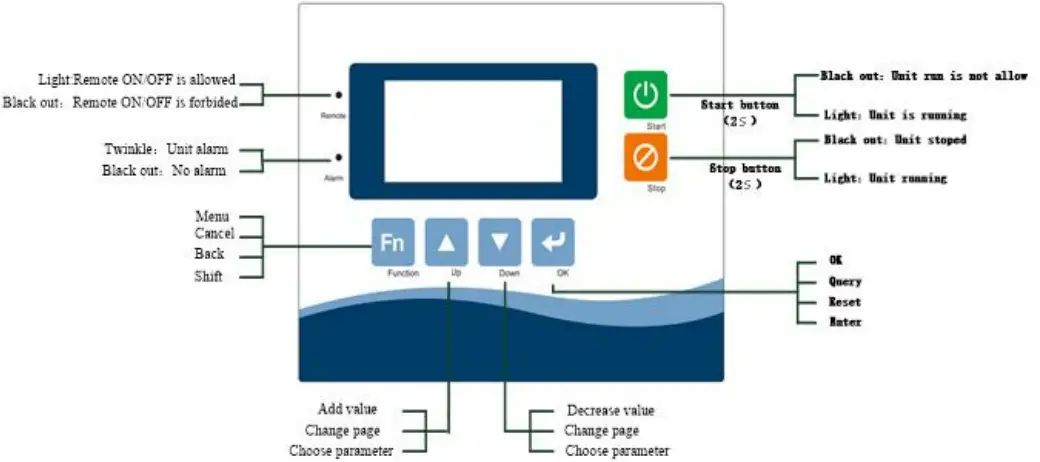
4. First Power-on
The controller needs to be configured when powered on for the first time. Please refer to 10.4 Configuration guide for specific operation.
5. Common Screens
Commonly used screens include the main screen and the alarm screen.
5.1 Main Screen
The system will enter the main screen after countdown, which displays as follows: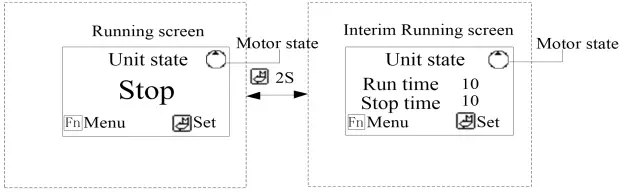 Remark: Long press
  2s quick start stop intermittent operation function. this function can also be set in user parameters.
5.2 Alarm Screen
In case of unit failure, the alarm screen is as follows: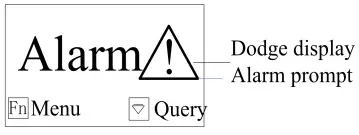
6. Common Operation
6.1Display interface switching
Press the button  at the same time on unit status interface ,switch to proportional valve status interface,Press the button at the same time on proportional valve status interface witch to unit status interface
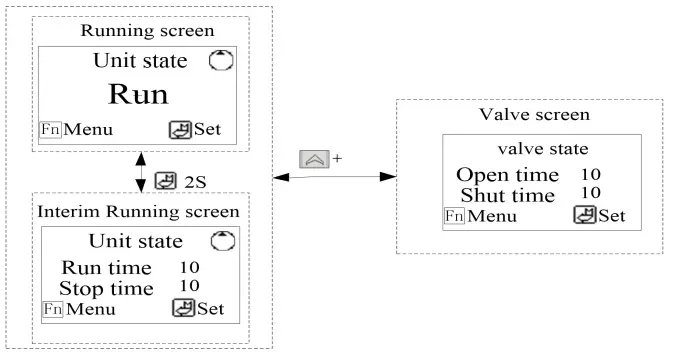 6.2 Quickly modify the running stop time
When the user parameter (lock time)is set to “No” ,the set time can be directly modified when the unit is shut down in the status interface .the specific operation is as follows: Remark: You can also modify the run time and stop time in the user parameters
6.3Quickly modify the opening and closing time of proportional valve
When the user parameter (lock time)is set to “No”,when there is no proportional signal input ,the setting time can be directly modified in the main interface .the specific operation is as follows: Remark: You can also modify the opening and closing time of proportional vavle in the user parameters
6.4 Query/Reset Fault
In case of fault, the alarm screen will automatically pop up. The operation details of query and reset faults are as follows: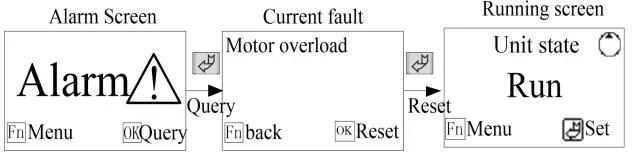
7. Function Menu
Press the button  on the main screen to enter the Function Menu, which includes five items as the table below:
| No. | Menu Item | Funtion | Remark |
| 1 | User Settings | To display user parameters | For number of user parameters and their implications, please refer to: 9 User Parameters Table. |
| 2 | Unit Status | To display the current operating status of the unit | Current value won’t be displayed when current module is not used. |
| 3 | History List | Allowing the query of the last 10 faults | Press for 2s to clear the fault history. |
| 4 | Version | To check the current software version |
8. Parameter Operation
For the modification operation of parameter value, the user’s modification of setting Run time will be described as an example.
9. User Parameters Table
The implication of each parameter in the user parameters is listed in the following table:
| No. | Parameter Name | Factory Default | Setting Range | Remark |
| 1 | Lock T.set | No | Yes—No | Yes: After locking ,the running time and stop time cannot be modified in the main interface. No : when the timer function is turned on in the shutdown state, you can modify the operation time and stop time in the main operation interface. When there is no two material proportional signal input , in the proportional valve status display interface ,you can modify the opening time and closing time of the proportional valve. |
| 2 | Run time | 10 Sec | 1-999 Sec | Intermittent operation function: operation and stop |
| 3 | Stop time | 10 Sec | 1-999 Sec | time setting |
| 4 | Contrast | 32 | 20-44 | Adjust LCD contrast |
| 5 | Backlight on | 0 | 0-255 Minu | 0: Do not turn off the backlight; |
| 6 | Proportioner on | 5 Sec | 0-100 Sec | When there is a proportional signal, the opening time of the proportional valve. |
| 7 | ProportionerOff | 5 Sec | 0-100 Sec | When there is a proportional signal, the closing time of the proportional valve. |
| 8 | Interim Running | Yes | Yes—No | Whether the intermittent operation function is used |
| 9 | Language | Chinese | Chinese—English | Selection display language |
10. 10 Manufacturer Menu
Press  in the main screen to enter the Enter Password screen and enter the correct manufacturer password (default 4561, changing it is strongly recommended). Then enter the Manufacturer Function Menu.
10.1 Procedures of Entering Manufacturer Menu
 10.2 Details of Manufacturer Menu
The details and function of manufacturer menu are as follows:
| No. | Parameter Item | To set the parameters commonly used by the manufacturer | Remark s |
| 1 | Manuf.setting | To debug the abnormal operation of each electrical part of the unit | Refer to 13 Manufacture Parameters for specific parameters. |
| 2 | Manuf.Debug | Commonly used parameters of config the unit | Not accessible during the unit running. |
| 3 | Config guide | For initializing all the parameters of the machine. | Not accessible during the unit running. This screen will pop up when powered on for the first time. |
| 4 | Initialize | To set the password to enter manufacturer menu. | Refer to 13 Manufacture Parameters for the initial values of the parameters. |
| 5 | Password Set | To set the parameters commonly used by the manufacturer | Default one is 4561, and changing it is strongly recommended. |
10.3 Manufacturer Debugging
Manufacturer debugging is mainly used to test whether the operation of each electrical part of the unit is normal, which is not accessible when the unit is running.
Method: to determine whether the unit is normal by testing three-phase power input, 4 alarm inputs and 5 relay outputs. For alarm input, it only displays the test result. If the result is normal the wiring is good and parameter settings are correct; if it alarms, it will display of alarm characters, then make sure whether the external wiring is good and the parameter settings are suitable. 10.4 Configuration Guide
Configure the common parameters of the machine. For the number of parameters of configuration guide and the significance, please refer to 13 Manufacturer Parameters Table. Access is not available during the unit operation.
Refer to the Parameter Operation for specific configuration method. The Configuration guide screen will pop up when powered on for the first time. And if you click “Cancel” operation without configuring at this time, the Configuration guide screen will still pop up when powered on next time. Once you have entered the Configuration guide, the Configuration guide screen will not pop up when powered on and you can only enter the Configuration guide through the Manufacturer Menu.
the number of parameters of configuration guide and the significance, please refer to 13 Manufacturer Parameters Table 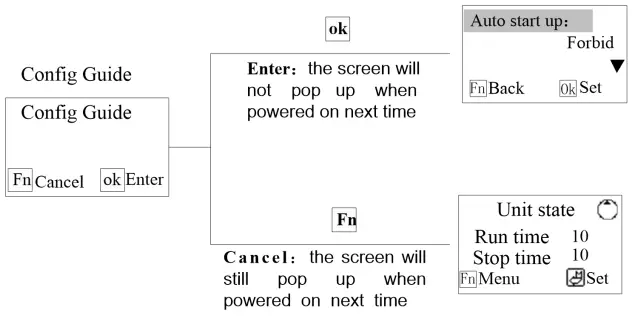 11. Fault List
| Fault | Test Conditions | Troubleshooting | Solution |
| Phase AL | Power on to test | Alarm shutdown | Check whether the three-phase power is in phase or reverse phase. |
| Motor overload | Power on to test | Alarm shutdown | Check whether the motor overload is consistent with the switch value setting |
| SafetyDoor open | operation detection | Alarm shutdown | Check whether the safety door is closed |
| Motor cur high | Motor operation detection | Alarm shutdown | Check whether the rated current setting of the motor is reasonable and whether the motor is blocked. |
| Motor cur low | Motor operation detection | Alarm shutdown | Check whether the current wiring of the motor is current and whether the interface is firm |
| Fan Cur high | Fan operation detection | Alarm shutdown | Check whether the rated current setting of the fan is reasonable and whether the fan is blocked. |
| Fan Cur low | Fan operation detection | Alarm shutdown | Check whether the current wiring of the fan is current and whether the interface is firm |
| Motor stalling | Motor operation detection | Alarm shutdown | Check whether the grinder is blocked |
13 Manufacturer Parameters Table
Parameters set by the manufacturer and parameter meanings are listed as follows: (“*” is for parameters of the configuration guide)
| Setting Item | Name of Parameter | Factory Default | Setting Range | Remark |
| Func. Setting | * Auto start up | Forbid | Forbid: use | Use: the unit starts automatically when powered on; Forbid: the unit doesn’t start automatically when powered on; |
| Alarm output | Keep when mute | Keep when mute; Stop when mute | Keep when mute: press the “alarm output” parameter to take action once a fault occurs; Stop when mute: press the “alarm output” parameter to take action in case of no fault after silencing. | |
| Alarm type | N.o | N.0 : N.0 : pulse | N.O: the alarm relay is ON in case of faults; N.C: the alarm relay is OFF in case of faults. pulse: Relay intermittent output in case of fault. | |
| * Current detect | Forbid | Forbid: Use | Use: there is a current detection module; Forbid: no current detection module | |
| * Motor.l rating | 0.3A | 0-35.0A | OA: Motor current fault is not detected. When [Current detect] is set “Forbid”, those parameter is not displayed. (if the rating current of Comp or Pump is lower 1A, when using please winding two or three laps on the sensor). | |
| * Fan.l rating | 0.3A | 0-35.0A | OA: Fan current fault is not detected. When [Current detect] is set “Forbid”, those parameter is not displayed. (if the rating current of Comp or Pump is lower 1A, when using please winding two or three laps on the sensor) | |
| * Phase monitor | Use | Forbid: Use | use: Use controller with three-phase electric protection Forbid: Three phase electric detection function is not used | |
| * Motor locked | Use | Forbid: Use | Select according to whether the locked rotor sensor is installed | |
| * Fan output | Use | Forbid: Use | Is the relay of the conveying fan closed when starting up | |
| * Reverse retry | 3 | 0-10 | In the locked rotor fault period if the number of motor reversals exceeds the number of reversals and retries ,the machine will be shut down if the motor is locked | |
| Time Setting | I detect delay | 2 Sec | 2-10 Sec | After the motor current is stable ,detect the motor current |
| Locked time | 3 minu | 1-255 minu | Cycle time for detecting the number of locked rotor | |
| Locked detect | 3 Sec | 1-8 Sec | Judge the delay time of motor locked rotor | |
| reverse time | 1 Sec | 1-5 Sec | Reverse rotation time of motor after locked rotor | |
| Input stable | 2 Sec | 0-255 Sec | Motor overload. safety gate signal is anti shake time | |
| Reverse wait | 3 Sec | 1-100 Sec | Waiting time between forward and reverse switching | |
| Input Setting | * Motor overload | N.O | N.O – N.0 | Selection of switch input mode N.O: switch off with no fault; N.C: the switch is closed with no fault. |
| * Ratio signal | N.O | N.O – N.0 | ||
| * Blocking turn | N.O | N.O – N.0 | ||
| * safety gate | N.O | N.0 – N.0 |
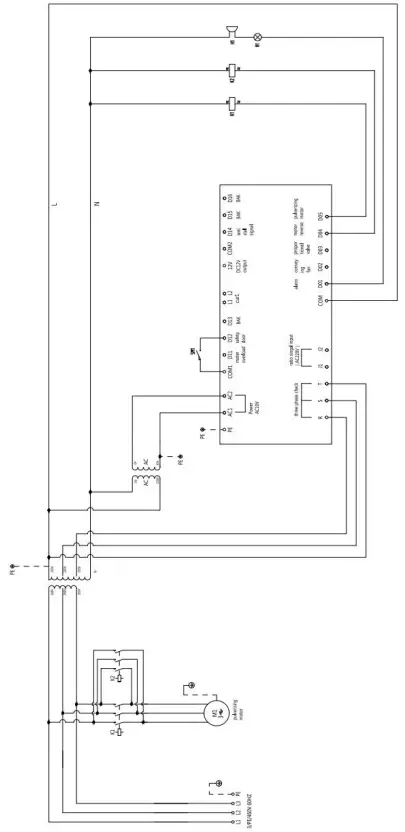
14 Electrical Connection Diagram