BX-4 Bluetooth Audio Receiver
Product Information:
- USB CHARGE: This interface supplies power to
connected devices for charging. - POWER ON/OFF: The push switch turns the BX-4
on and off. - PAD 0dB -10dB: This sensitivity attenuator
allows you to lower the input signal sensitivity to avoid signal
overload and distortion. - CHARGE: The battery indicator shows the
charging status. When charging, the blue light will be lit, and
when the battery is fully charged, the indicator light goes
out. - LED indicator: When you turn on the BX-4, the
product enters pairing mode and alternates between red and blue
lights. Once paired successfully, the blue light will flash slowly.
When paired and playing music via Bluetooth, the blue light will
remain solidly lit. If no music is playing, the blue light will
flash slowly. - STEREO-LINK button: Press and hold this button
on both BX-4 units for 2 seconds to activate stereo linking. The
LED indicators will flash quickly. The BX-4 units will search for
each other and once successfully paired, one BX-4 unit will have a
red and blue light alternation, while the other BX-4 unit will have
a blue light flashing slowly. At this time, the output signal will
be in stereo. - XLR: This is the balanced output
connector.
Product Usage Instructions:
- To charge connected devices, use the USB CHARGE interface.
- To turn on or off the BX-4, use the POWER ON/OFF switch.
- Adjust the sensitivity of the input signal using the PAD 0dB
-10dB attenuator to prevent overload and distortion. - Check the battery indicator to monitor the charging status. The
blue light will be lit during charging, and it will go out when the
battery is fully charged. - When turning on the BX-4, it will enter pairing mode with
alternating red and blue lights. Once paired successfully, the blue
light will flash slowly. If playing music via Bluetooth, the blue
light will remain solidly lit. If no music is playing, the blue
light will flash slowly. - To activate stereo linking between two BX-4 units, press and
hold the STEREO-LINK button on both units for 2 seconds. The LED
indicators will flash quickly. The units will search for each other
and once paired successfully, one unit will have a red and blue
light alternation, while the other unit will have a blue light
flashing slowly. - Use the XLR balanced output connector for your audio
connections.
* Bluetooth version: V5.0
* Power supply: 3.7V lithium battery
* Standby current: [not mentioned]
* Working current: [not mentioned]
* Temperature range: [not mentioned]
* Wireless transmission range: [not mentioned]
* Sensitivity: [not mentioned]
* Frequency range: [not mentioned]
* Signal to noise: [not mentioned]
* Distortion: [not mentioned]
* Charging method: [not mentioned]
* Stand by: [not mentioned]
* Working time: [not mentioned]
* Net weight: [not mentioned]
* Size: [not mentioned]
mm
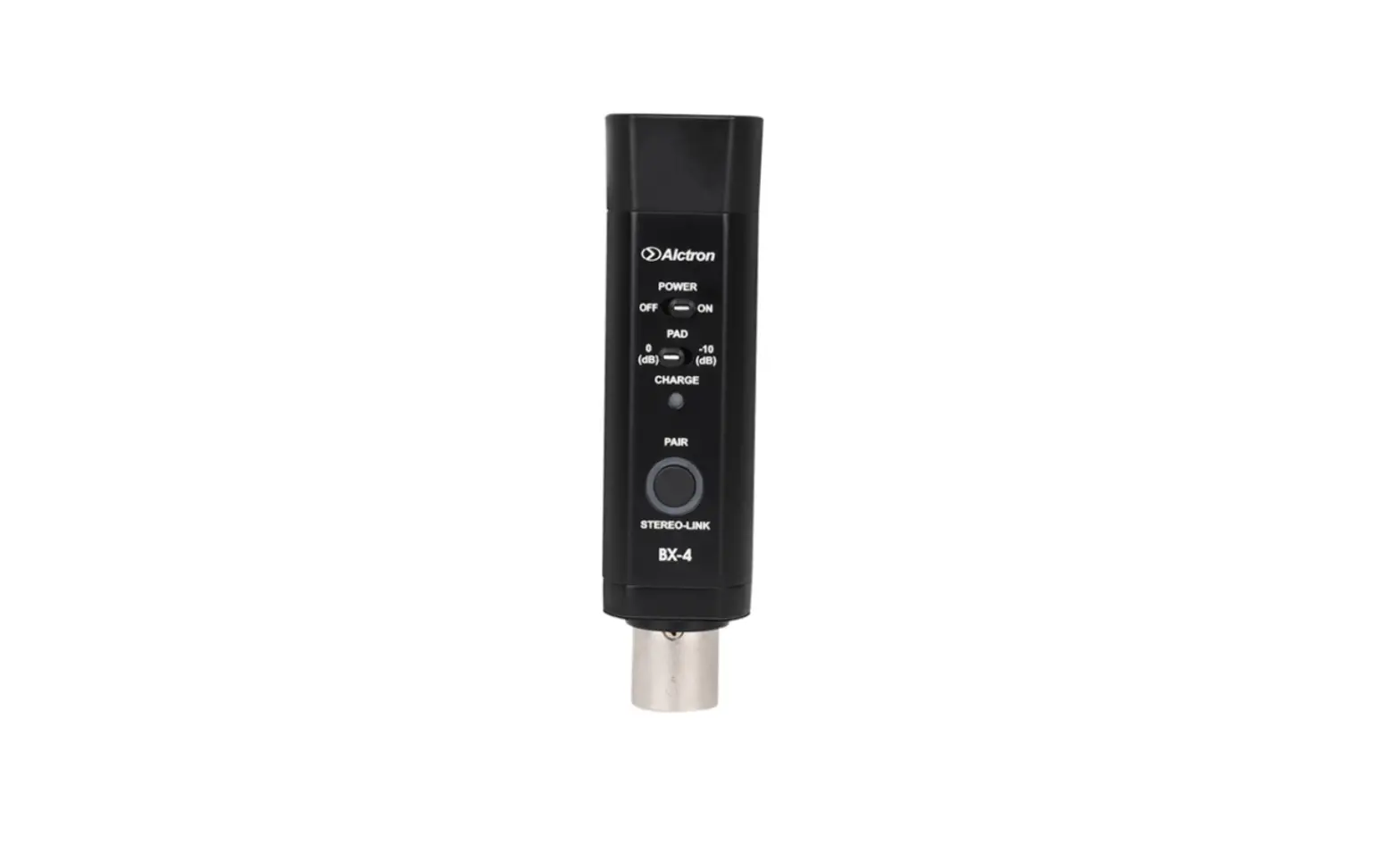
BX-4 is a Bluetooth® receiver with 5.0 chip. This chip offers high quality sound and makes the compatibility and integral performance more optimizing. Just use 3-pin XLR to connect console or active speaker, then using Bluetooth® to connect smart phone, pad such devices to realize wireless transmission. STEREO-LINK button helps BX-4 pairing with another BX-4 to transmit the signal to audio equipments.
1. USB CHARGE: charging interface supply power to devices.
2. POWER ON/OFF: push switch-turns the BX-4 on and off.
3. PAD 0dB -10dB: sensitivity attenuator, lower the input signal sensitivity and avoid signal overload and distortion.
4. CHARGE: battery indicator,during charging the blue light lits, when battery is already full, the indicator goes out.
5. LED indicator: when turn on the BX-4, the product to be paired, red and blue light lit alternation; when paired successfully, blue light flash slowly. When paired and Bluetooth played music, blue light solidly lit; if no music, blue light flash slowly.
6. STEREO-LINK button: press the button(STEREO-LINK) on both BX-4 for 2 seconds, the blue light flash quickly(on both BX-4 LED indicator flash). Each BX-4 searched for each other, when they are successfully paired, one BX-4 red and blue light lit alternation another BX-4 blue light flash slowly(at that time, the output signal is STEREO).
7. XLR: balanced output connector
Bluetooth
Turn on Bluetooth Visibility Only visible to paired devices Device name Received files PAIRED DEVICES
DN-200BR
AVAILABLE DEVICES Alcron BX-4
Bluetooth
Turn on Bluetooth
Visibility Only visible to paired devices
Device name
Received files
PAIRED DEVICES Alcron BX-4 Connected DN-200BR
AVAILABLE DEVICES
flash slowly
5aWhen paired successfully, blue light flash slowly. When paired and Bluetooth played music, blue light solidly lit; if no music, blue light flash slowly.
1aPress the STEREO-LINK button on both BX-4 for 2 seconds.
STEREO-LINK LED flash blue
light quickly
2aBoth STEREO-LINK LED will flash blue light quickly. Then BX-4 will search for each other.
red and blue light lit alternation
another blue light flash slowly
3aWhen they are successfully, one BX-4 red and blue light lit alternation another BX-4 blue light flash slowly.
4aFollowing BLUETOOTH PAIRING A SINGLE BX-4 steps to connect with Bluetooth devices.
* Bluetooth version: * Power supply: * Standby current: * Working current: * Temperature range: * Wireless transmission range: * Sensitivity: * Frequency range: * Signal to noise: * Distortion: * Charging method: * Stand by: * Working time: * Net weight: * Size:
Bluetooth V5.0 3.7V lithium battery power supply <50uA 10mA -40¥ to +80¥ 10m -95dBm<±0.1% BER 2.4Ghz-2.480Ghz 95dB 0.1% USB charging 50days(Theoretically) 24hours (Theoretically) 95g 33.4*27.5*124mm
BX-45.03 PADSTEREO-LINK 2BX-4BX-4
Alcron BX-4 DN-200BR
5.
1BX-4STEREO-LINK2
STEREO-LINK
2BX-4STEREO-LINK
3BX-4
4BX-4
1. USB CHARGE
2. POWER ON/OFF/BX-4
3. PAD 0dB -10dB
4. CHARGE
5. LED BX-4,,
6. STEREO-LINKBX-4STEREO-LINK2BX-4LED BX-4BX-4BX-4 BX-4
7. XLR
* * * * * * * * * * * * * * *
Bluetooth V5.0 3.7V <50uA 10mA -40— +80 10m -95dBm<±0.1% BER 2.4Ghz-2.480Ghz 95dB 0.1% USB 50 24 95g 33.4*27.5*124mm
DN-200BR
Alcron BX-4
FCC St at ement Thi s devi ce compl i es wi t h par t 15 of t he FCC Rul es. Oper at i on i s subj ect t o t he f ol l owi ng t wo condi t i ons: ( 1) Thi s devi ce may not cause har mf ul i nt er f er ence, and ( 2) t hi s devi ce must accept any i nt er f er ence r ecei ved, i ncl udi ng i nt er f er ence t hat may cause undesi r ed oper at i on. Thi s equi pment has been t est ed and f ound t o compl y wi t h t he l i mi t s f or a Cl ass B di gi t al devi ce, pur suant t o par t 15 of t he FCC Rul es. These l i mi t s ar e desi gned t o pr ovi de r easonabl e pr ot ect i on agai nst har mf ul i nt er f er ence i n a r esi dent i al i nst al l at i on. Thi s equi pment gener at es, uses and can r adi at e r adi o f r equency ener gy and, i f not i nst al l ed and used i naccor dance wi t h t he i nst r uct i ons, may cause har mf ul i nt er f er ence t o r adi o communi cat i ons. However , t her e i s no guar ant ee t hat i nt er f er ence wi l l not occur i n a par t i cul ar i nst al l at i on. I f t hi s equi pment does cause har mf ul i nt er f er ence t o r adi o or
t el evi si on r ecept i on, whi ch can be det er mi ned by t ur ni ng t he equi pment of f and on, t he user i s encour aged t o t r y t o cor r ect t he i nt er f er ence byone or mor e of t he f ol l owi ng measur es: . Reor i ent or r el ocat e t he r ecei vi ng ant enna. . I ncr ease t he separ at i on bet ween t he equi pment and r ecei ver . . Connect t he equi pment i nt o an out l et on a ci r cui t di f f er ent f r om t hat t o whi ch t he r ecei ver i s connect ed. . Consul t t he deal er or an exper i enced r adi o/ TV t echni ci an f or hel p. Changes or modi f i cat i ons not expr essl y appr oved by t he par t y r esponsi bl e f or compl i ance coul d voi d t he user ‘ s aut hor i t y t o oper at e t he equi pment . RF Exposur e I nf or mat i on The devi ce was eval uat ed t o meet gener al RF exposur e r equi r ement s. Thi s equi pment shoul d be i nst al l ed and used wi t h a mi ni mum di st ance of 0 mm bet ween t he r adi at or and your body.
145x210mm 105g V1.1 V1.2
DESIGNED_BY
APPROVED_BY
TECHNOLOGIZED_BY
CHECKED_BY
STANDARDIZED_BY
NAME:
SHEJI SHENHE
PIZHUN GUIDANG
DATE:
SJRQ
SHRQ
PZRQ GDRQ
7
Alctron NINGBO ALCTRON ELECTRONICS TECHNOLOGY CO., LTD